Healthcare organizations operate in a highly structured and time-sensitive environment. Hospitals, clinics, laboratories, and healthcare facilities must manage equipment maintenance, compliance audits, medical inspections, staff schedules, and regulatory deadlines with precision. However, many teams still rely on scattered spreadsheets or manual planners. As a result, important dates get missed, coordination becomes difficult, and compliance risks increase.
Therefore, you need a structured and interactive system that keeps everything organized.
The Healthcare Maintenance Calendar in Excel provides a ready-to-use solution that helps healthcare organizations manage annual, monthly, and daily events efficiently. Instead of using multiple tools, you can track all healthcare maintenance activities in one powerful Excel workbook.
Let us explore everything in detail.
Click to Purchases Healthcare Maintenance Calendar in Excel
What Is a Healthcare Maintenance Calendar in Excel?
A Healthcare Maintenance Calendar in Excel is a structured event management and scheduling template designed specifically for healthcare environments.
It allows you to:
-
Manage maintenance schedules
-
Track compliance deadlines
-
Add and update events easily
-
View annual, monthly, and daily calendars
-
Monitor events within selected date ranges
-
Customize calendar appearance
Because this template runs in Excel, most teams can use it immediately without learning new software.
Why Do Healthcare Organizations Need a Maintenance Calendar?
Healthcare facilities operate under strict regulations. Equipment must undergo regular maintenance. Compliance audits follow strict timelines. Staff training and inspections require careful coordination.
Without a centralized calendar:
-
Teams miss deadlines.
-
Compliance risks increase.
-
Equipment maintenance delays occur.
-
Patient safety may get affected.
On the other hand, when you use a structured Healthcare Maintenance Calendar:
-
You improve coordination.
-
You increase compliance control.
-
You reduce operational risks.
-
You ensure proactive planning.
Therefore, this calendar becomes essential for healthcare management.
Click to Purchases Healthcare Maintenance Calendar in Excel
Key Features of Healthcare Maintenance Calendar in Excel
This ready-to-use template includes 5 structured worksheets. Each worksheet supports a different level of planning and monitoring.
Let us understand each one clearly.
1️⃣ Home Sheet – Easy Navigation Center
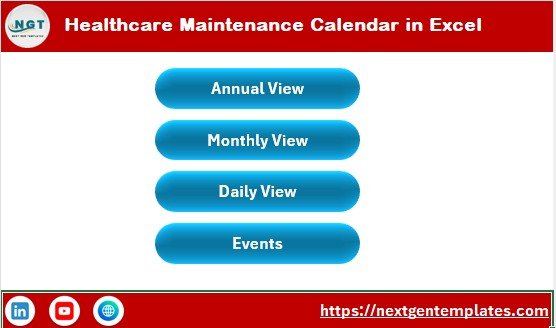
The Home sheet works as an index page. It allows users to navigate quickly across different calendar views.
Navigation Buttons Available:
-
Annual View
-
Monthly View
-
Daily View
-
Events
Because of these buttons, users can move between sheets instantly. Therefore, the workflow remains smooth and efficient.
2️⃣ Annual View Sheet – Complete Year at a Glance
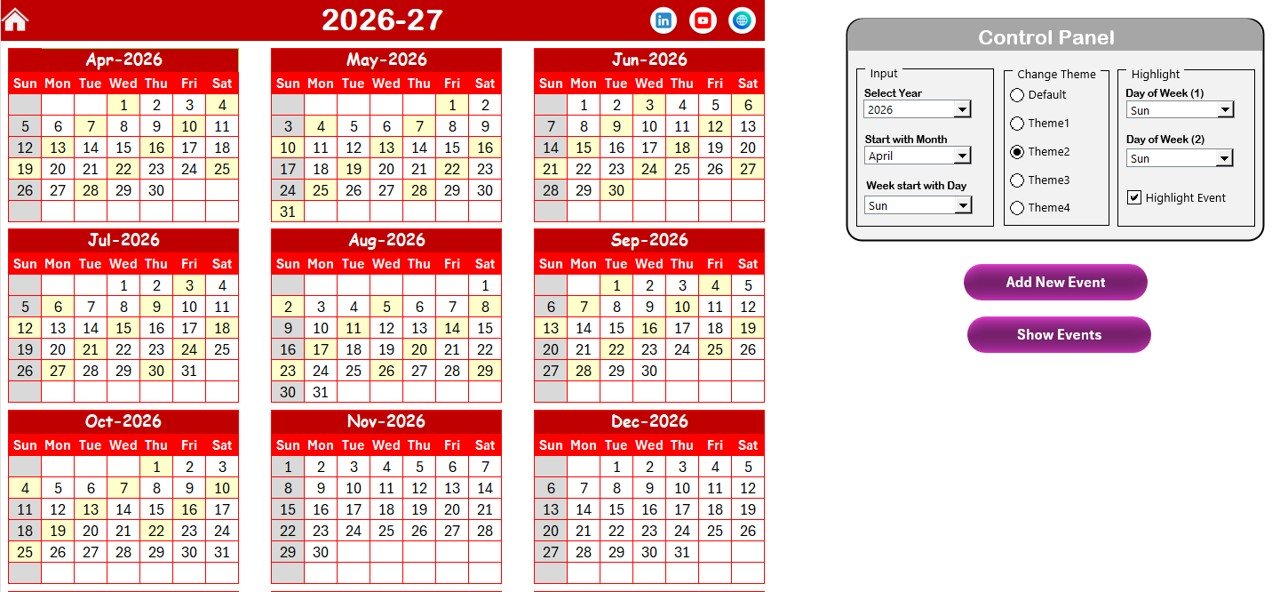
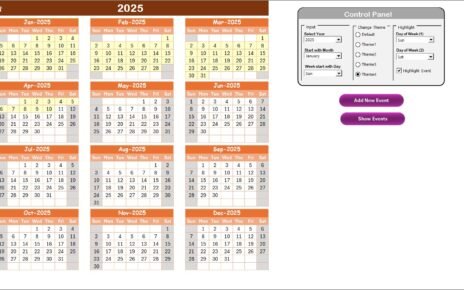
The Annual View Sheet displays all 12 months in one structured layout.
This sheet helps administrators visualize the entire year’s maintenance and compliance schedule.
Control Panel Features
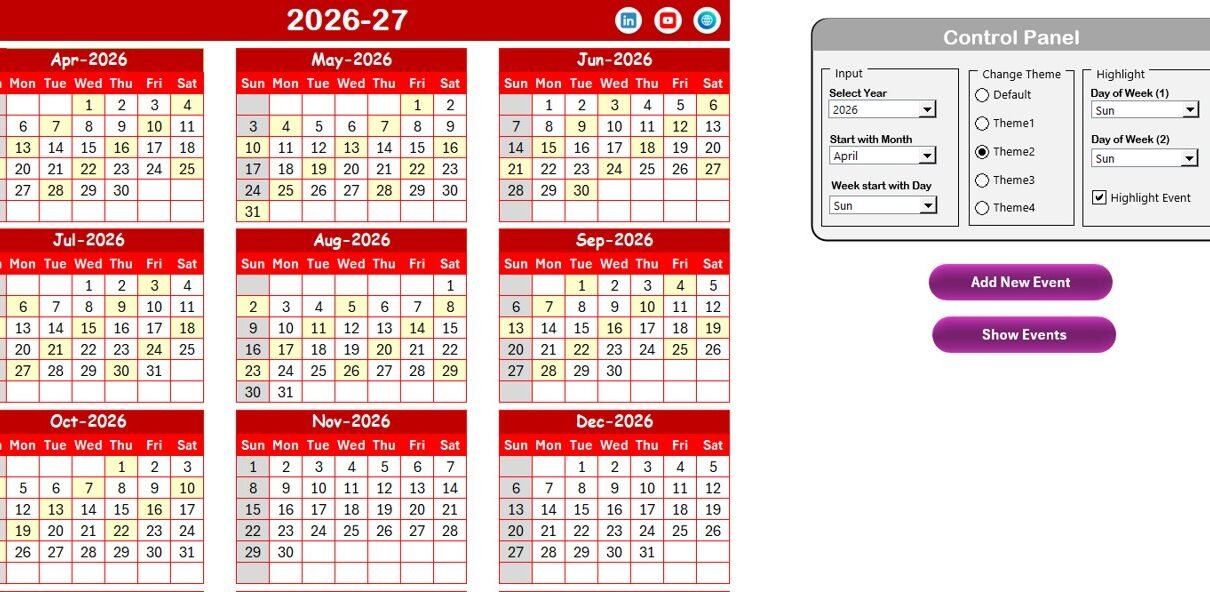
The Annual View sheet includes a powerful Control Panel divided into three groups.
🔹 Input Group
From this section, you can:
-
Select the Year
-
Change the Starting Month
-
Modify the Starting Day of the Week
As soon as you change these inputs, the entire annual calendar updates automatically.
🔹 Change Theme Group
You can choose from 5 different color themes.
Once selected, the chosen theme applies to the entire workbook. Therefore, you can customize the design according to your organization’s preference.
🔹 Highlight Group
This section allows you to:
-
Highlight Day of Week (1)
-
Highlight Day of Week (2)
For example, if you want to highlight Saturday and Sunday in grey, you can select them here.
Additionally, you can use the Highlight Event checkbox. When enabled, the calendar highlights event dates in yellow. As a result, important dates stand out clearly.
Add New Event Button
You can select any date on the calendar and click the Add New Event button.
This action opens the Add Event Form. Simply enter the required details and click Submit. The event will automatically appear on the selected date.
Show Event Button
To see the list of events scheduled for a selected date, click the Show Event button. This feature helps users review daily activities quickly.
Click to Purchases Healthcare Maintenance Calendar in Excel
3️⃣ Monthly View Sheet – Focused Month Planning
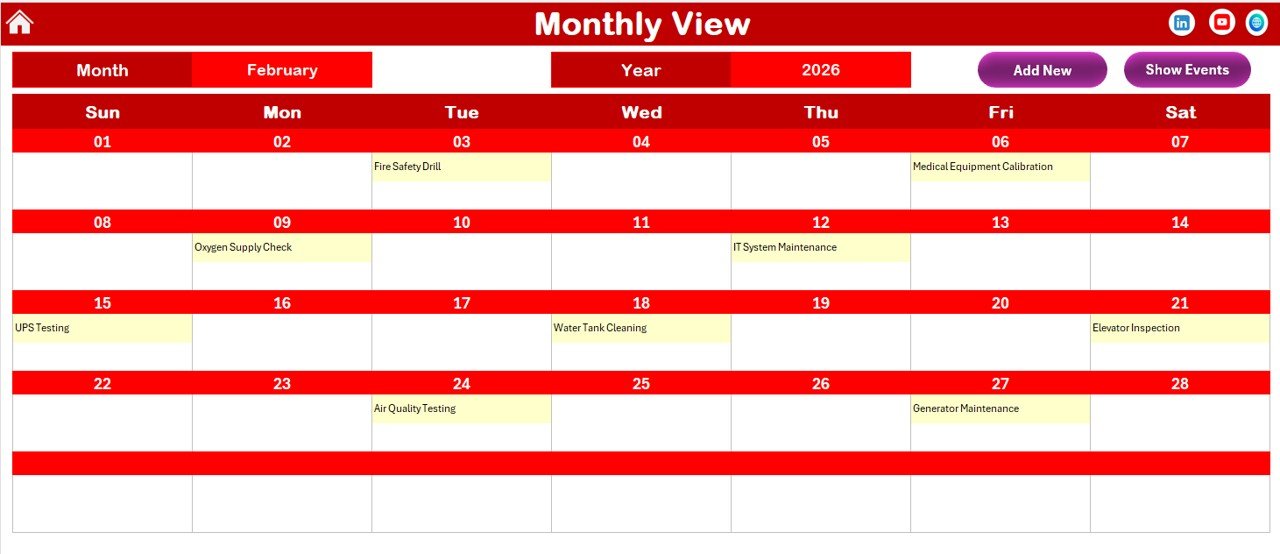
The Monthly View sheet displays a detailed calendar for a selected month.
At the top, you can select:
-
Month
-
Year
The calendar updates automatically based on your selection.
Event Display in Monthly View
-
If a date has one event, it displays directly.
-
If a date has multiple events, it shows “more than 1…”
This feature ensures that the calendar remains clean and readable.
Buttons Available on Monthly View
Add New Event Button
Select a date and click this button to add an event quickly.
Show Event Button
Click to view the complete list of events for that selected date.
Because these buttons simplify event management, administrators can update schedules easily.
Click to Purchases Healthcare Maintenance Calendar in Excel
4️⃣ Daily View Sheet – Detailed Event Tracking
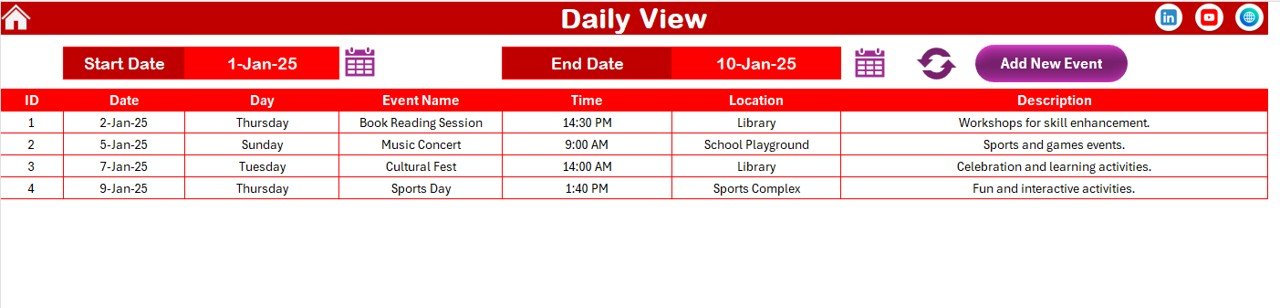
The Daily View sheet shows a detailed list of events within a selected date range.
At the top of the sheet, you can enter:
-
Start Date
-
End Date
You can use the calendar icon to select dates easily.
Once you click the Refresh Button, the sheet displays all events within the selected date range.
Add New Event Option
The Daily View also includes an Add New Event button. You can open the event form directly from here and add new records instantly.
Therefore, this sheet supports operational-level monitoring.
Click to Purchases Healthcare Maintenance Calendar in Excel
5️⃣ Events Sheet – The Central Database
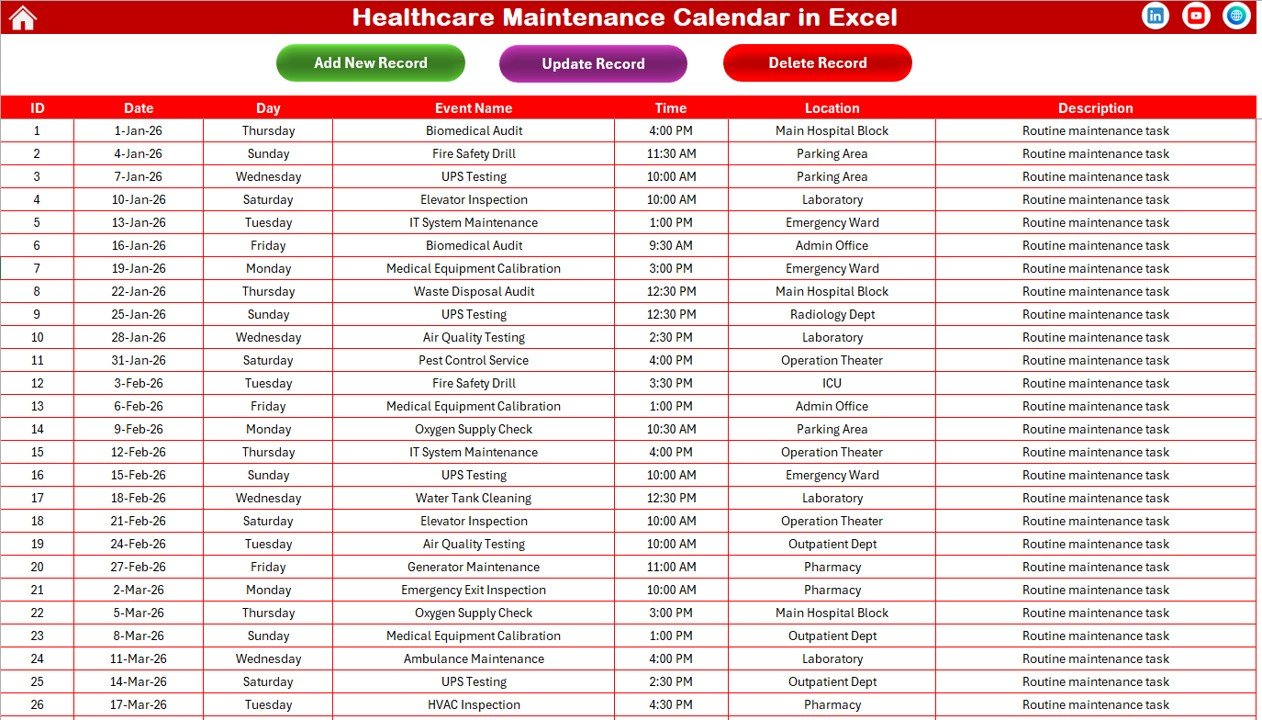
The Events sheet acts as the main database of the calendar.
All event details are stored here in a structured format.
Columns Included:
-
ID (Auto-generated)
-
Date
-
Day
-
Event Name
-
Time
-
Location
-
Description
Because the system auto-generates ID numbers, record management becomes simple.
Event Management Buttons
At the top of the Events sheet, you will find three powerful buttons.
Add New Record
Opens the event form to add a new record.
Update Existing Record
Select an ID and click this button. The system opens the form with pre-filled data. You can modify and submit changes easily.
Delete Record
Select an ID and click delete to remove the record permanently.
Therefore, event management becomes structured and efficient.
How Does Healthcare Maintenance Calendar Improve Operational Efficiency?
This template improves performance in several ways.
1️⃣ Centralized Event Management
All healthcare events stay in one structured workbook.
2️⃣ Automated Calendar Updates
Changes in inputs automatically update the views.
3️⃣ Visual Highlighting
Highlighted weekends and events improve clarity.
4️⃣ Easy Event Form System
Forms simplify data entry and editing.
5️⃣ Date Range Monitoring
Daily View helps review activities within custom ranges.
Click to Purchases Healthcare Maintenance Calendar in Excel
Advantages of Healthcare Maintenance Calendar in Excel
Let us explore the major advantages.
✅ Organized Compliance Management
Track inspections, audits, and regulatory deadlines easily.
✅ Improved Maintenance Scheduling
Plan preventive maintenance without missing deadlines.
✅ Customizable Design
Change themes and highlight preferences instantly.
✅ Multi-Level Calendar Views
View yearly, monthly, and daily schedules.
✅ Easy Event Editing
Update and delete records effortlessly.
✅ Cost-Effective Solution
Excel provides flexibility without additional subscription costs.
What Types of Events Can You Track?
Healthcare organizations can track:
-
Equipment maintenance
-
Calibration schedules
-
Compliance audits
-
Staff training sessions
-
Vaccination drives
-
Facility inspections
-
Regulatory reporting deadlines
-
Medical waste disposal schedules
Because the template supports detailed descriptions, you can capture all essential information.
Click to Purchases Healthcare Maintenance Calendar in Excel
Best Practices for the Healthcare Maintenance Calendar in Excel
To maximize efficiency, follow these best practices.
⭐ Update Events Immediately
Enter new events as soon as they are scheduled.
⭐ Review Annual Calendar Quarterly
Monitor long-term planning regularly.
⭐ Use Highlight Feature Strategically
Highlight critical days such as compliance audits.
⭐ Keep Event Descriptions Clear
Write short and precise descriptions.
⭐ Back Up the File Regularly
Maintain data security by creating backups.
⭐ Assign Responsibility Internally
Why Choose Excel for Healthca
Ensure someone oversees calendar accuracy.re Maintenance Scheduling?
Many organizations invest in expensive scheduling software. However, Excel offers:
-
Easy setup
-
Full customization
-
Offline accessibility
-
Simple navigation
-
Strong control panel features
Therefore, Excel remains a reliable solution for structured scheduling.
Who Should Use the Healthcare Maintenance Calendar?
This template benefits:
-
Hospital Administrators
-
Clinic Managers
-
Compliance Officers
-
Maintenance Teams
-
Biomedical Engineers
-
Healthcare Operations Managers
Because it supports structured planning, it suits both small clinics and large healthcare institutions.
How Does This Calendar Reduce Compliance Risk?
Compliance requires timely action. Missed deadlines can result in penalties.
This calendar:
-
Highlights important dates
-
Tracks inspections
-
Maintains historical records
-
Supports date-range reviews
-
Simplifies updates
As a result, compliance becomes proactive rather than reactive.
Click to Purchases Healthcare Maintenance Calendar in Excel
Conclusion: Should You Use Healthcare Maintenance Calendar in Excel?
If you want structured scheduling, strong compliance tracking, and efficient maintenance management, then yes — you should use this template.
It offers:
-
Annual planning
-
Monthly tracking
-
Daily monitoring
-
Event database control
-
Customizable themes
-
Automated highlighting
Most importantly, it helps healthcare organizations operate smoothly and safely.
Therefore, if you aim to improve operational efficiency and reduce compliance risks, the Healthcare Maintenance Calendar in Excel provides a practical and powerful solution.
Frequently Asked Questions (FAQs)
1️⃣ What is a Healthcare Maintenance Calendar in Excel?
It is a ready-to-use Excel template that helps healthcare organizations manage maintenance schedules and events.
2️⃣ Can I customize the calendar theme?
Yes. You can select from five color themes in the control panel.
3️⃣ Can I add new events easily?
Yes. Use the Add New Event button to open the event form and submit details.
4️⃣ Can I update or delete events?
Yes. Use the Update Existing Record or Delete Record buttons in the Events sheet.
5️⃣ Does the calendar support annual, monthly, and daily views?
Yes. It includes Annual View, Monthly View, and Daily View sheets.
6️⃣ Can I highlight weekends or specific days?
Yes. You can highlight two selected days of the week in the control panel.
7️⃣ Is this template suitable for small clinics?
Yes. It works perfectly for clinics, hospitals, and healthcare facilities of all sizes.
Click to Purchases Healthcare Maintenance Calendar in Excel
Visit our YouTube channel to learn step-by-step video tutorials