Educational institutions manage numerous activities throughout the academic year. Schools, colleges, universities, and training organizations must coordinate lectures, examinations, workshops, meetings, holidays, and academic events efficiently. However, many institutions still rely on manual planners or scattered spreadsheets. As a result, schedules overlap, important events get missed, and administrative coordination becomes difficult.
Therefore, institutions increasingly adopt structured scheduling tools that centralize all academic activities into one organized system.
The Education Scheduling Calendar in Excel provides a ready-to-use and automated solution that simplifies academic planning, event tracking, and schedule management using an interactive Excel-based calendar.
In this article, we will explain the structure, features, advantages, and best practices of the Education Scheduling Calendar in Excel and how it improves educational planning efficiency.
Click to Purchases Education Scheduling Calendar in Excel
What Is an Education Scheduling Calendar in Excel?
An Education Scheduling Calendar in Excel is an automated event and schedule management template designed to organize academic activities through annual, monthly, and daily calendar views supported by a centralized event database.
Instead of managing multiple planners, users control all schedules inside one workbook.
The calendar helps users:
-
Plan academic events efficiently
-
Schedule classes and activities
-
Track events across different time views
-
Manage event details systematically
-
Maintain a centralized academic calendar
Because the template works inside Microsoft Excel, organizations implement it instantly without additional software.
Why Is Academic Scheduling Important?
Proper scheduling ensures smooth academic operations and improves institutional productivity.
Without structured scheduling:
-
Events conflict with each other
-
Deadlines get overlooked
-
Resource planning becomes inefficient
-
Communication gaps increase
However, a centralized scheduling calendar improves coordination and visibility.
Key Benefits of Academic Scheduling
-
Better time management
-
Improved coordination between departments
-
Clear visibility of academic activities
-
Reduced scheduling conflicts
-
Enhanced administrative efficiency
Overview of Education Scheduling Calendar Structure
This ready-to-use calendar contains 5 worksheets, each designed for a specific scheduling function.
Click to Purchases Education Scheduling Calendar in Excel
1️⃣ Home Sheet – Navigation Hub
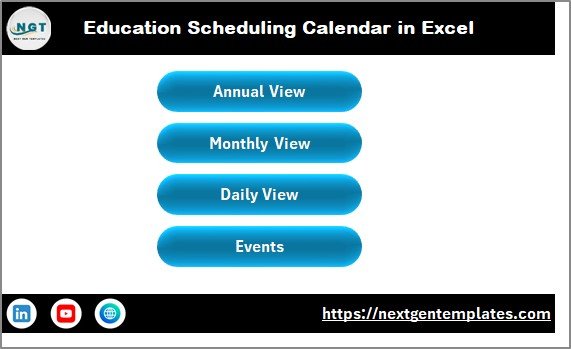
The Home Sheet works as an index page that allows users to navigate quickly.
Navigation Buttons Available
-
Annual View
-
Monthly View
-
Daily View
-
Events Database
Users can move between calendar views instantly, which improves usability.
2️⃣ Annual View Sheet – Yearly Academic Planning
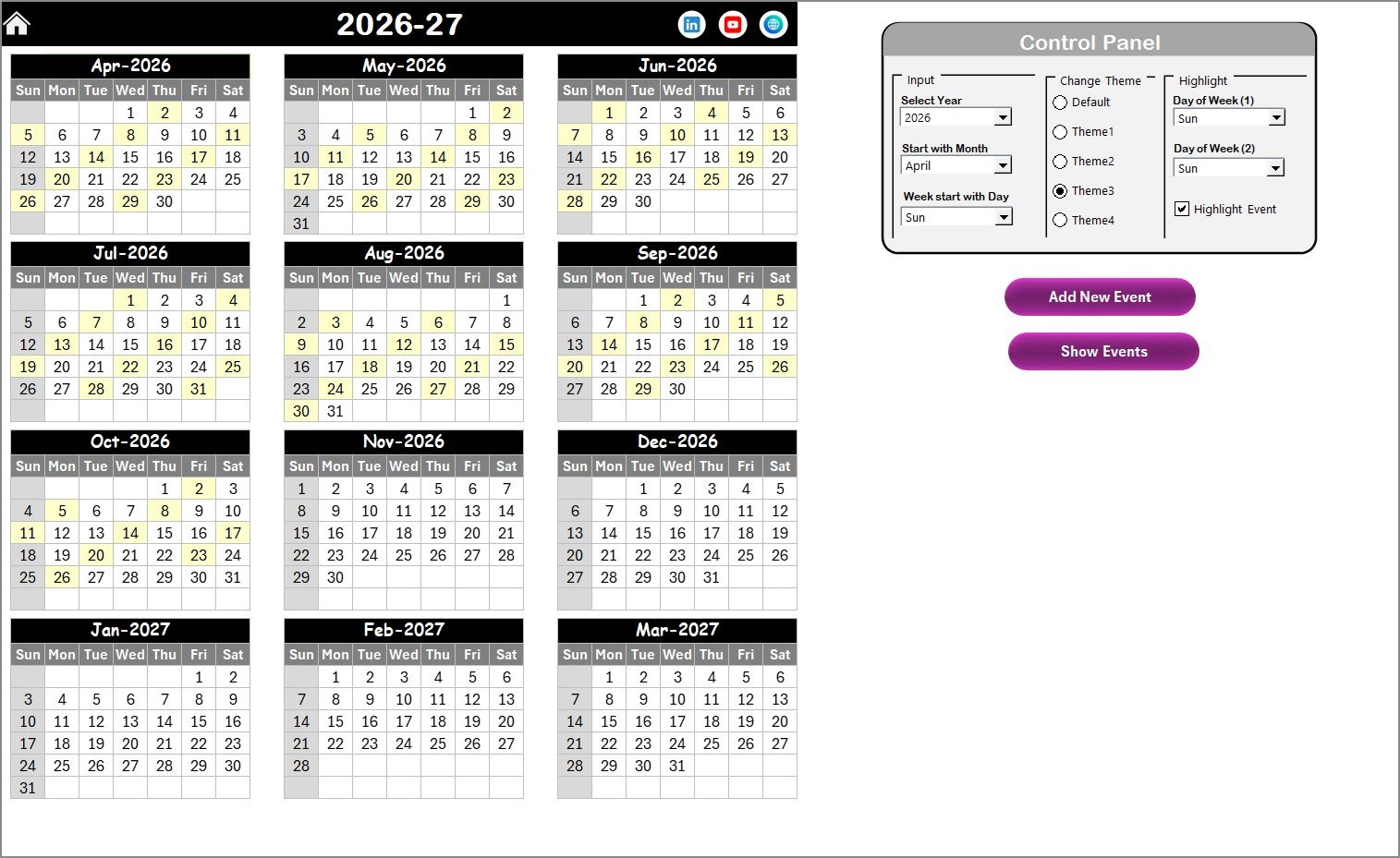
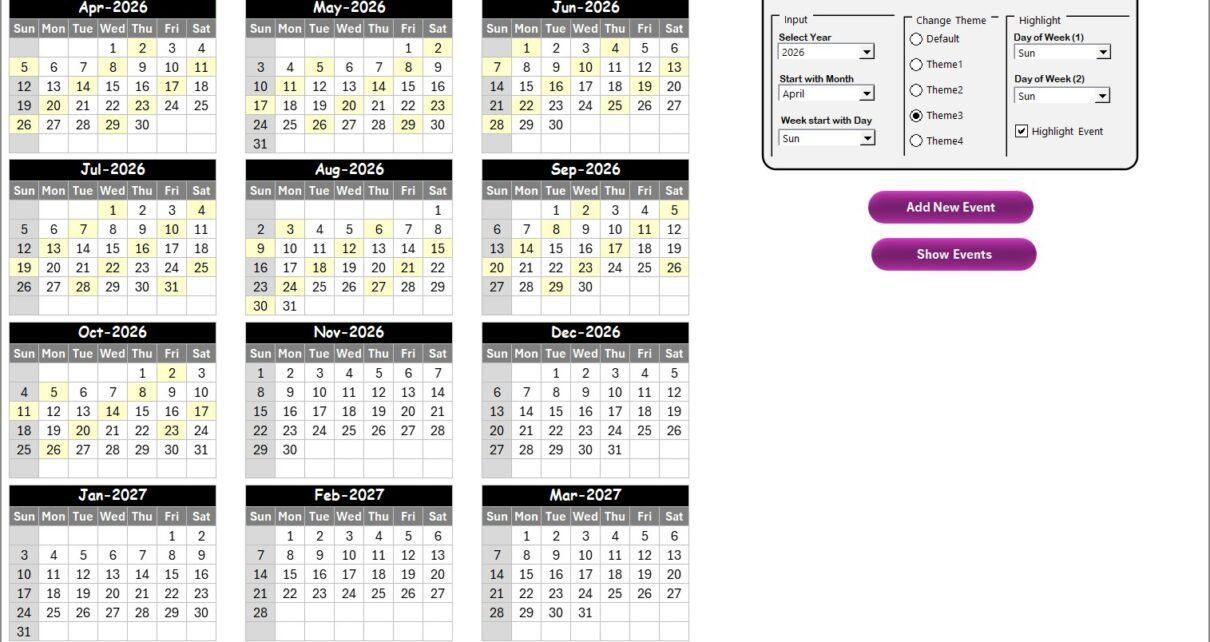
The Annual View Sheet displays a full 12-month calendar overview.
Control Panel Features
The control panel allows complete calendar customization.
Input Group
Users can:
-
Select the Year
-
Change the Starting Month
-
Adjust the Starting Day of Week
The calendar updates automatically after selection.
Change Theme Group
Users choose from 5 color themes to apply across the entire workbook instantly.
Highlight Group
Users highlight important weekdays.
Example:
-
Highlight Saturday and Sunday as weekends.
The Highlight Event checkbox marks event dates in yellow color for better visibility.
Event Management Buttons
Add New Event Button
-
Select a date on the calendar
-
Click Add New Event
-
Fill event details
-
Submit
The event automatically appears on the calendar.
Show Event Button
Displays all events scheduled on the selected date.
Click to Purchases Education Scheduling Calendar in Excel
3️⃣ Monthly View Sheet – Detailed Monthly Scheduling
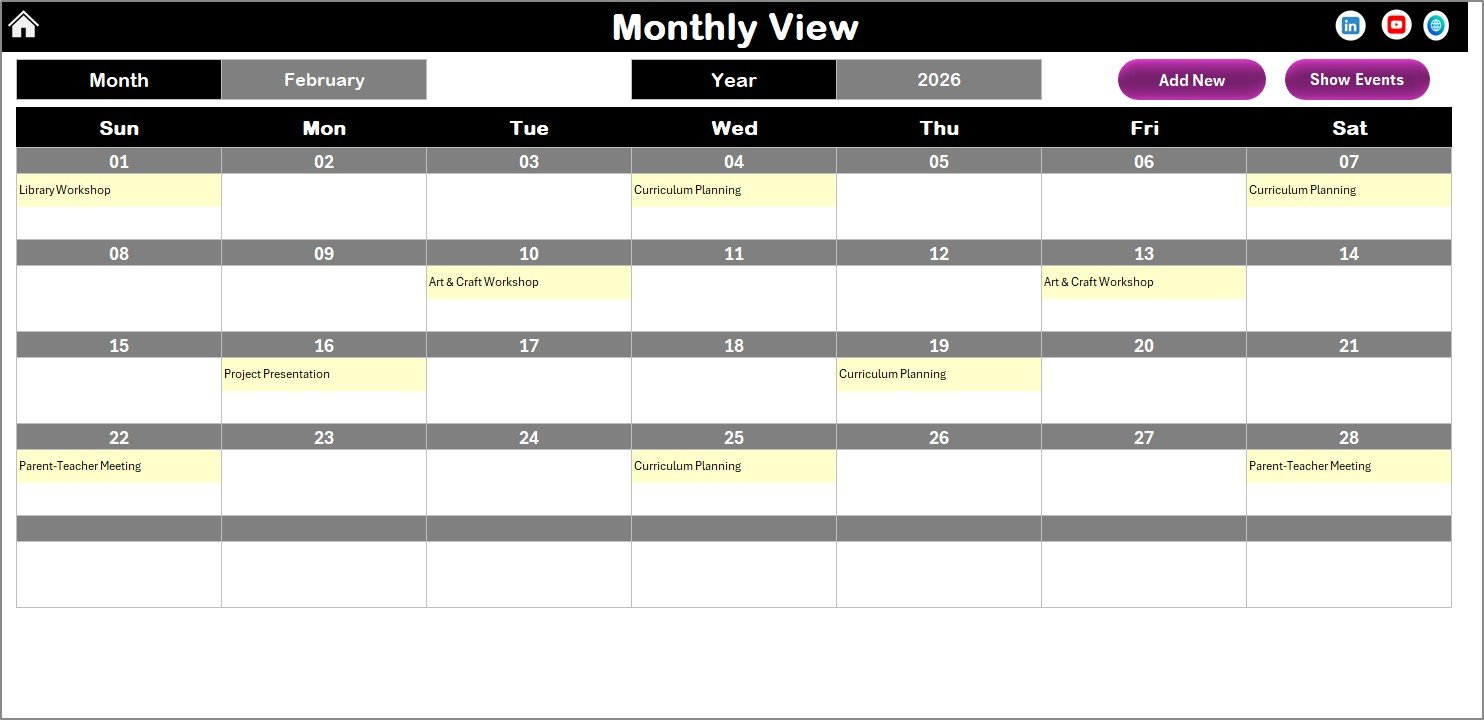
The Monthly View Sheet shows a single month calendar.
Users select:
-
Month
-
Year
The calendar automatically updates.
Event Display Logic
-
Shows one event directly on the calendar
-
Displays “more than 1…” when multiple events exist
This keeps the layout clean and readable.
Buttons Included
-
Add New Event – Add event for selected date
-
Show Event – View event details
Therefore, administrators manage monthly schedules efficiently.
4️⃣ Daily View Sheet – Event Tracking by Date Range
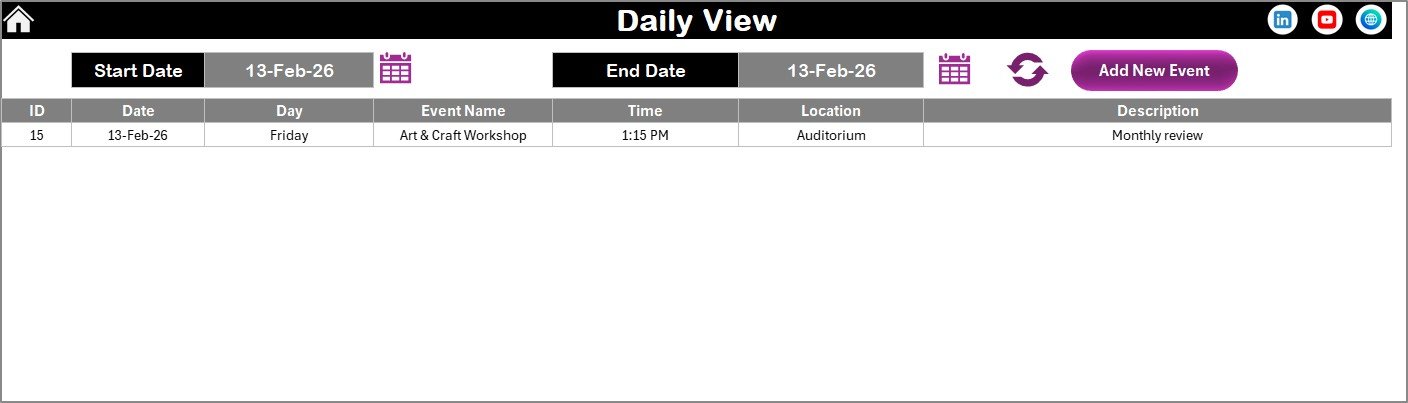
The Daily View Sheet provides detailed event tracking.
Features
-
Select Start Date and End Date
-
Use calendar icons for date selection
-
Click Refresh to load events
The sheet displays complete event details within the chosen date range.
Add Event Feature
Users can add new events directly using the Add New Event button at the top.
This feature helps institutions monitor daily activities clearly.
Click to Purchases Education Scheduling Calendar in Excel
5️⃣ Events Sheet – Central Event Database
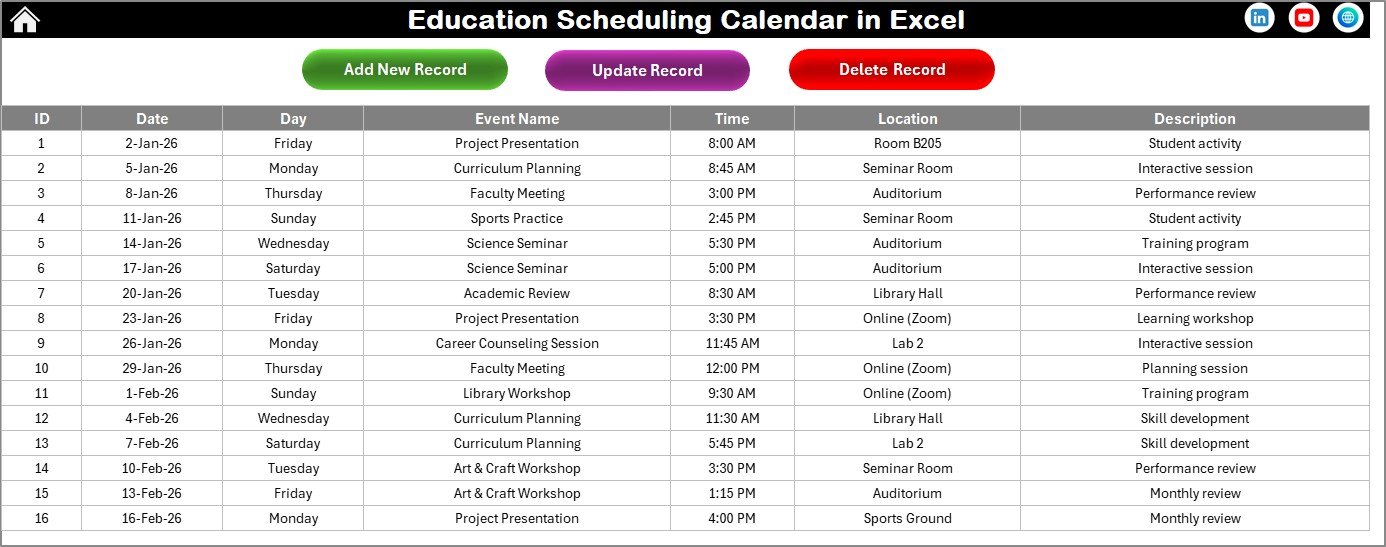
The Events Sheet acts as the backend database storing all events.
Information Stored
-
ID – Auto-generated event number
-
Date – Event date
-
Day – Weekday name
-
Event Name – Event title
-
Time – Event timing
-
Location – Event venue
-
Description – Short event details
Database Management Buttons
Add New Record
Opens event form to create new entries.
Update Existing Record
Select event ID → Edit details → Submit updates.
Delete Record
Removes selected event permanently.
This ensures complete event lifecycle management.
Click to Purchases Education Scheduling Calendar in Excel
Key Features of Education Scheduling Calendar in Excel
-
Annual, Monthly, and Daily calendar views
-
Automated calendar generation
-
Event entry forms
-
Event highlighting options
-
Customizable themes
-
Centralized event database
-
Date range filtering
-
Navigation buttons for easy access
Advantages of Education Scheduling Calendar in Excel
✅ Centralized Scheduling System
All academic events managed in one place.
✅ Automated Updates
Calendar changes dynamically.
✅ Easy Event Management
Add, edit, or delete events quickly.
✅ Visual Planning
Highlighting improves schedule visibility.
✅ User-Friendly Interface
Minimal training required.
✅ Flexible Customization
Themes and settings adjustable.
✅ Cost-Effective Tool
No additional software required.
Click to Purchases Education Scheduling Calendar in Excel
How to Use the Education Scheduling Calendar Effectively?
Step 1: Configure Calendar Settings
Choose year and calendar preferences.
Step 2: Add Academic Events
Use Add New Event buttons.
Step 3: Monitor Annual Schedule
Review yearly overview regularly.
Step 4: Manage Monthly Activities
Plan upcoming events in monthly view.
Step 5: Track Daily Events
Use date range filtering for detailed tracking.
Click to Purchases Education Scheduling Calendar in Excel
Best Practices for Education Scheduling Calendar in Excel
-
Update events immediately after confirmation
-
Use consistent event naming conventions
-
Highlight important academic days
-
Review schedules weekly
-
Maintain regular backups
-
Train administrative staff
-
Avoid duplicate entries
Who Can Use This Calendar?
This template is suitable for:
-
Schools and colleges
-
Universities
-
Training institutes
-
Coaching centers
-
Academic administrators
-
Event coordinators
-
Corporate training departments
Why Choose Excel for Education Scheduling?
Familiar Environment
Most users already understand Excel.
Flexible Customization
Modify layouts easily.
Automation Support
Formulas and forms simplify planning.
Offline Capability
Works without internet access.
Scalability
Supports growing schedules.
Click to Purchases Education Scheduling Calendar in Excel
Future of Academic Scheduling Tools
Educational scheduling continues evolving with:
-
AI timetable optimization
-
Automated reminders
-
Cloud integrations
-
Smart resource allocation
-
Mobile scheduling dashboards
However, Excel calendars remain practical and reliable solutions.
Conclusion
Educational institutions require structured scheduling to manage academic activities effectively. Without centralized planning, coordination becomes complex and inefficient.
The Education Scheduling Calendar in Excel simplifies academic scheduling by combining yearly planning, monthly management, daily tracking, and centralized event storage into one intelligent system.
By using this calendar, institutions can:
-
Improve academic coordination
-
Reduce scheduling conflicts
-
Enhance productivity
-
Maintain organized event records
-
Plan educational activities confidently
Ultimately, this template transforms academic scheduling into a professional and streamlined process.
Click to Purchases Education Scheduling Calendar in Excel
Frequently Asked Questions (FAQs)
1. What is an Education Scheduling Calendar in Excel?
It is an automated Excel template used to manage academic schedules and events.
2. Is it beginner-friendly?
Yes. Basic Excel knowledge is enough.
3. Does the calendar update automatically?
Yes. Changing inputs updates calendars instantly.
4. Can events be modified later?
Yes. Use the Update Record option.
5. Can multiple events exist on one date?
Yes. The system supports multiple events.
6. Is customization possible?
Yes. Users can change themes and settings.
7. Who should use this template?
Educational institutions and training organizations.
Click to Purchases Education Scheduling Calendar in Excel
Visit our YouTube channel to learn step-by-step video tutorials