Mutual fund managers and AMC operations teams in 2026 face a familiar squeeze — Morningstar Direct seats run $1,800 to over $24,000 per user per year, Bloomberg Terminal sits at roughly $31,000 a seat annually, and yet most month-end KPI rollups still happen inside a sprawling Excel file that the previous analyst built. The Mutual Funds KPI Dashboard in Excel is built for exactly that gap: a 7-worksheet, one-time-purchase template that tracks MTD and YTD performance side-by-side with conditional-formatting up/down arrows on every metric. Setup takes under 10 minutes.
The dashboard is plug-and-play — no macros, no VBA, no external data feeds. Drop your KPIs into the KPI Definition sheet, enter actuals, targets, and prior-year values across three input tabs, and the Dashboard and KPI Trend pages refresh automatically. This article walks through every page, who the template is built for, where it fits against Morningstar and Bloomberg, and how AMC teams, advisors, and CFA candidates are using it in practice.
Key Features of the Mutual Funds KPI Dashboard in Excel
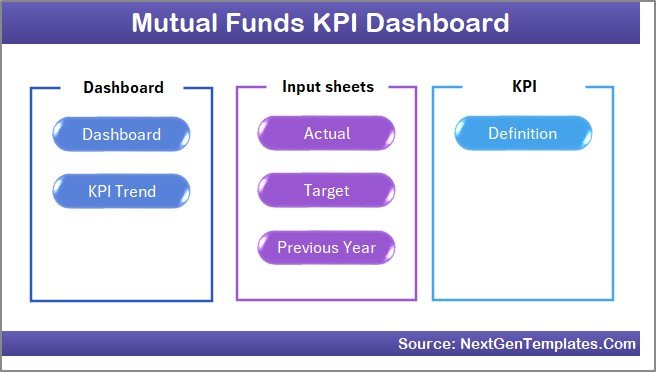
The Mutual Funds KPI Dashboard in Excel ships with 7 interactive worksheets, 2 drop-down controls (Month selector on the Dashboard, KPI selector on the KPI Trend page), 2 trend charts per KPI (MTD and YTD, each with Actual + Target + PY series), and an editable KPI library. Below are the features that matter most for fund houses, advisors, and finance teams.
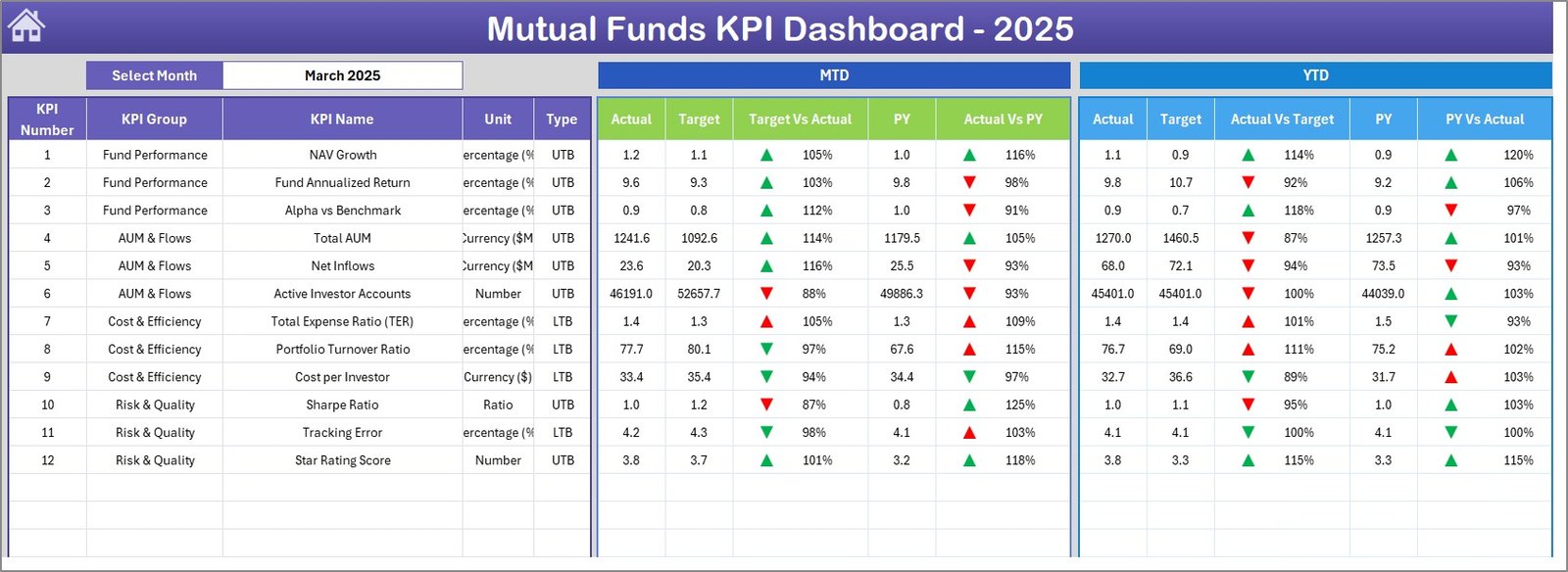
- Dynamic month selector on D3 — pick any month from the Dashboard’s drop-down and every KPI card, variance arrow, MTD figure, and YTD figure recalculates in place.
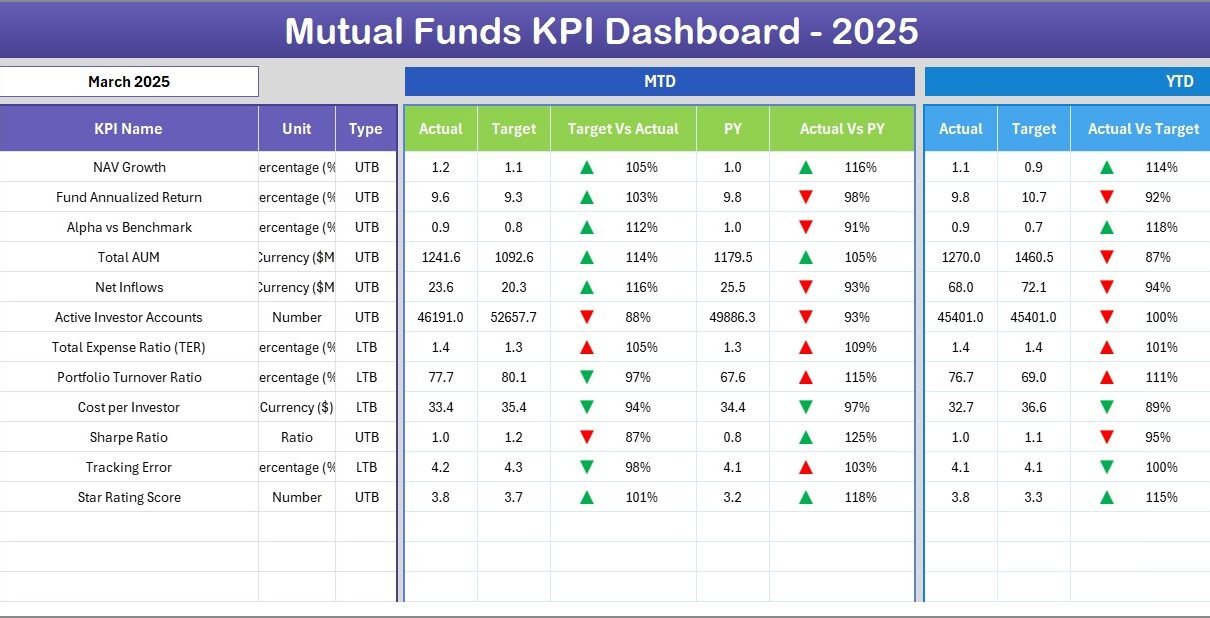
- MTD + YTD shown together — Actual, Target, and Previous Year values sit side-by-side, so monthly performance and full-year tracking are visible without flipping tabs.
- LTB / UTB logic — every KPI is flagged Lower-the-Better or Upper-the-Better in the KPI Definition sheet, and conditional formatting flips arrow direction so improvements always render green.
- Fiscal-year aware — cell E1 on the Actual Numbers Input sheet sets your fiscal start month, so April-March, July-June, and January-December calendars all work without rebuilding the file.
- Editable KPI library — add, edit, or remove KPIs directly on the KPI Definition sheet. The Dashboard and KPI Trend pages pick up changes automatically.
- No macros, no VBA — pure formulas plus conditional formatting, so the file opens cleanly in Excel 2016, 2019, 2021, 365, and Excel for Mac, even in locked-down corporate environments.
Dashboard Pages Explanation
1. Home Sheet
The Home sheet is the navigation index. Six buttons jump directly to the Dashboard, KPI Trend, Actual Numbers, Target Numbers, Previous Year Numbers, and KPI Definition sheets — useful when sharing the file with leadership who do not want to scan a tab bar.
2. Dashboard Sheet
The Dashboard sheet is the main view. Cell D3 holds the month selector — pick any month and every number on the page refreshes. The layout shows MTD Actual, Target, and Previous Year alongside Target vs. Actual and PY vs. Actual with conditional-formatting up/down arrows, then repeats the same block for YTD so monthly and cumulative performance are visible at the same time.
3. KPI Trend Sheet
👉 Click here to purchase the Mutual Funds KPI Dashboard in Excel
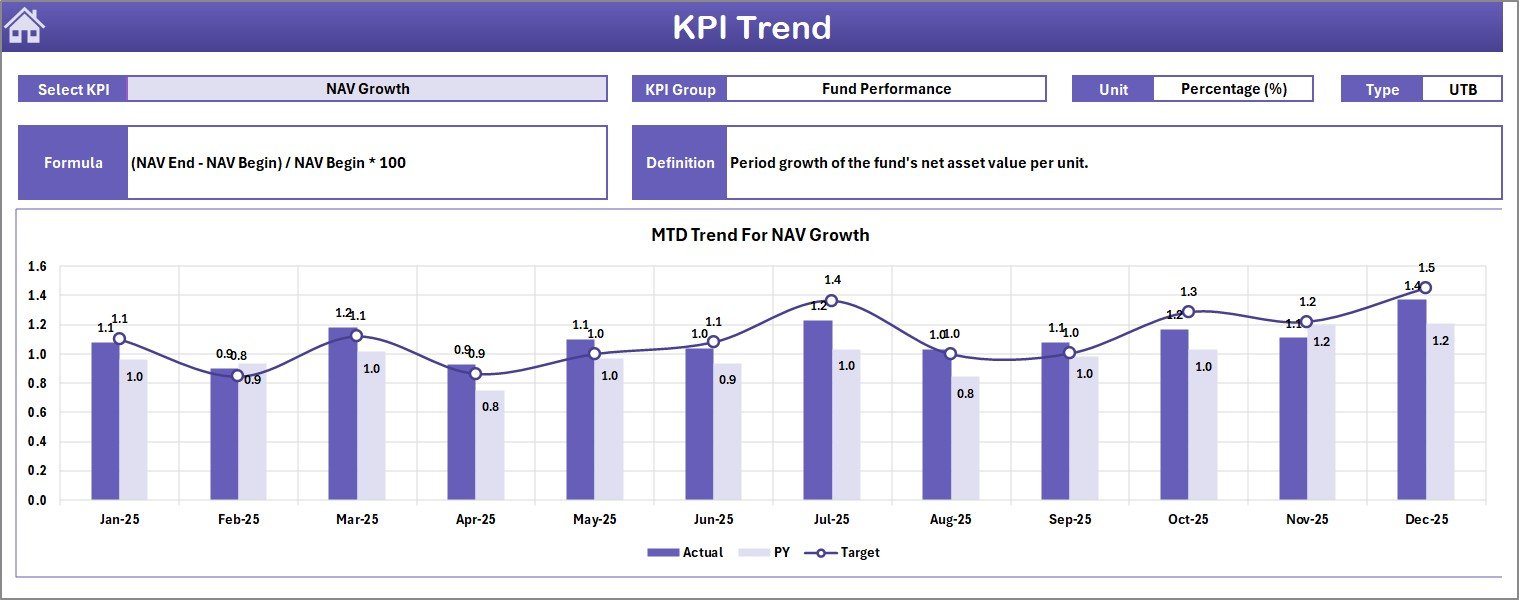
Pick a KPI from the drop-down on cell C3 and the KPI Trend sheet displays its Group, Unit, Type (LTB / UTB), Formula, and Definition, then plots two trend charts — one for MTD and one for YTD — each showing the Actual, Target, and Previous Year series side by side. Useful for monthly fund-manager reviews and trustee meetings.
4. Actual Numbers Input Sheet
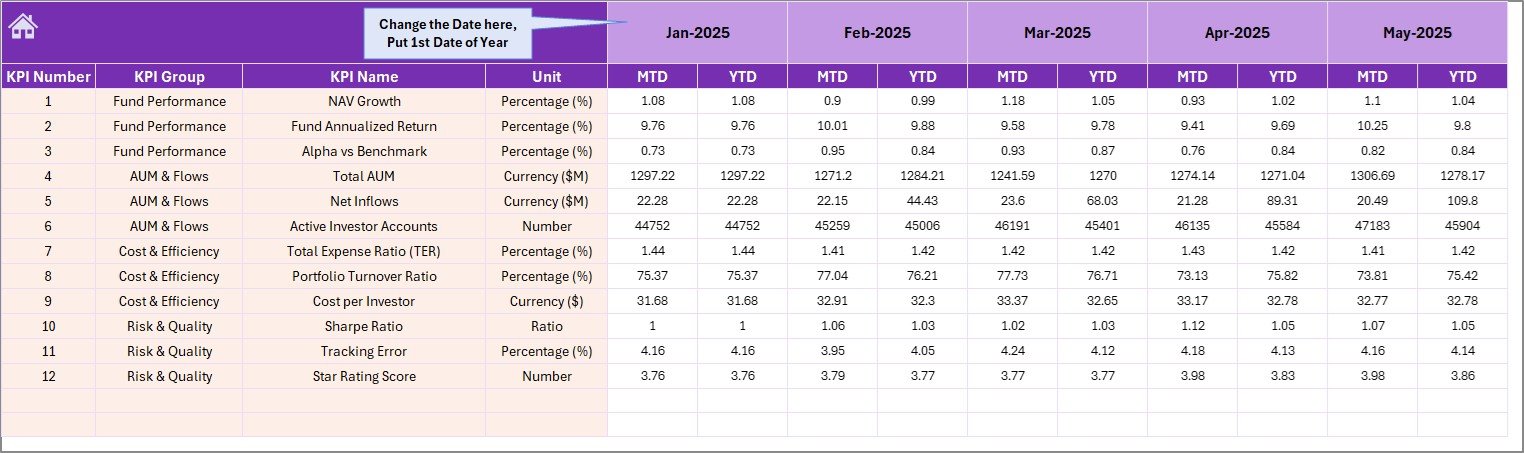
Enter MTD and YTD actual values for every KPI here. The fiscal start month is controlled by cell E1 — type the first month of your fiscal year and the month columns regenerate automatically. This is the only place where live performance numbers go.
5. Target Number Input Sheet
Enter MTD and YTD target values for every KPI for each month. The Target sheet is what the Dashboard’s Target vs. Actual variance arrows compare against — keep this sheet aligned with your fund’s annual operating plan or AMC budget.
6. Previous Year Number Sheet
👉 Click here to purchase the Mutual Funds KPI Dashboard in Excel
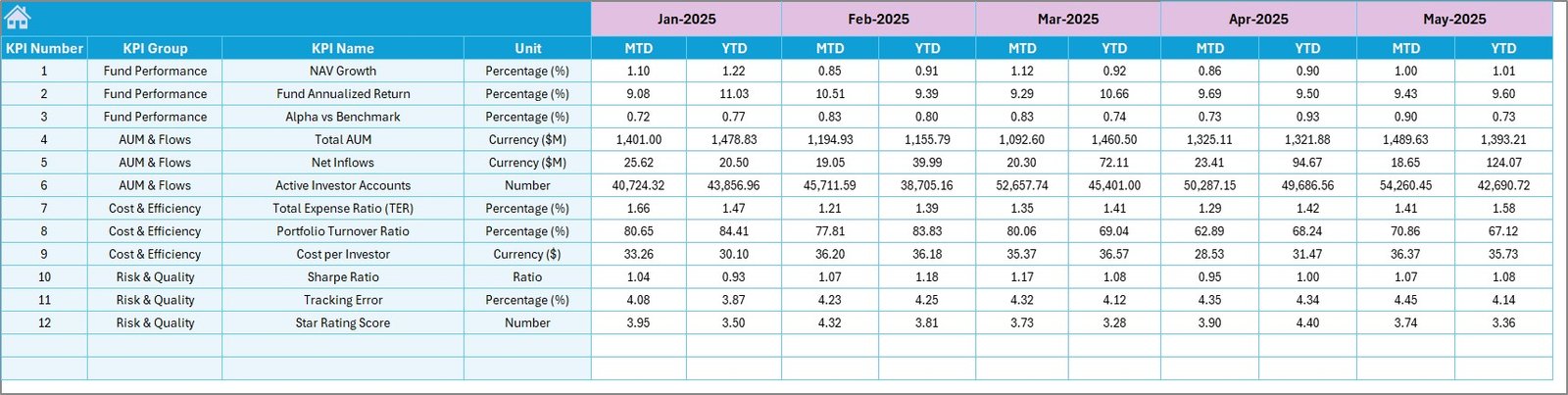
Enter MTD and YTD prior-year values for every KPI. These feed the PY vs. Actual comparison on the Dashboard and the Previous Year series on the trend charts — essential for year-over-year analysis of NAV growth, AUM, expense ratio, and redemptions.
7. KPI Definition Sheet
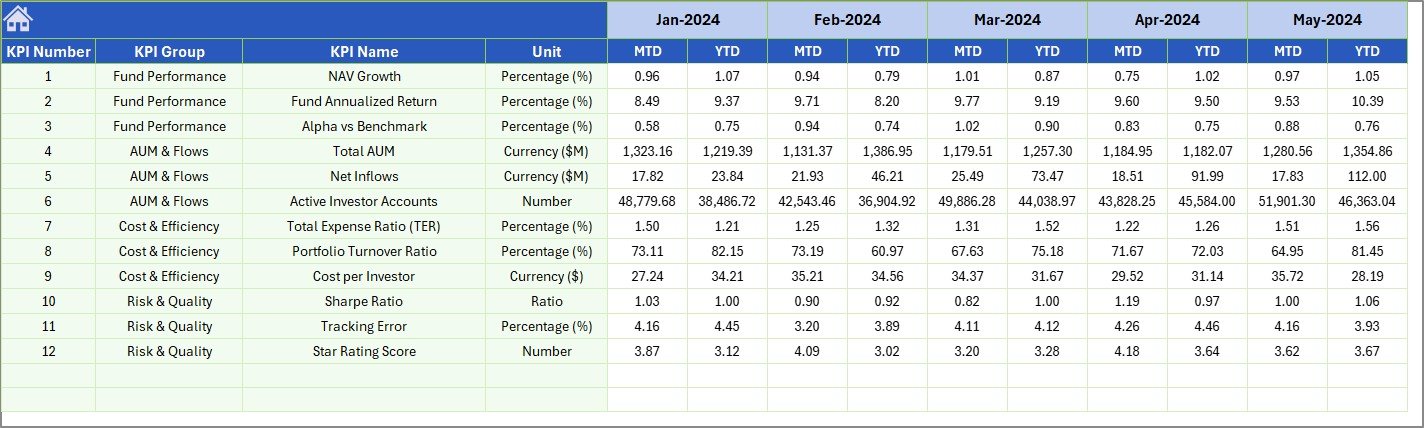
Define every KPI in one place: KPI Name, KPI Group, Unit, Formula, Definition, and Type (LTB or UTB). Edit, add, or remove rows and the Dashboard plus KPI Trend pages refresh automatically — no formula edits needed elsewhere.

Mutual Funds KPI Dashboard in Excel vs. Google Sheets Equivalent vs. Morningstar / Bloomberg — Feature Comparison
| Feature | Mutual Funds KPI Dashboard in Excel | Google Sheets Equivalent | Morningstar Direct / Bloomberg Terminal |
|---|---|---|---|
| Cost | $14.99 one-time | $9.99 one-time (Google Sheets version) | $1,800-$24,000 / user / year |
| Platform | Microsoft Excel (offline) | Google Sheets (browser) | Proprietary desktop / web SaaS |
| Setup Time | Under 10 minutes | Under 10 minutes | 2-6 weeks onboarding |
| MTD + YTD Variance Arrows | ✅ Built-in conditional formatting | ✅ Built-in | ✅ Configurable widgets |
| Real-Time Team Collaboration | Limited (OneDrive required) | ✅ Built-in | ✅ Enterprise plan |
| Mobile Access | Limited (Excel mobile) | ✅ Google Sheets app | ✅ Mobile app |
| Customisable KPIs | ✅ Edit KPI Definition sheet | ✅ Edit KPI Definition sheet | Limited to vendor library |
| Share with Link | ❌ File transfer required | ✅ One-click sharing | Role-based seats only |
| Year-1 Cost at 5 Analysts | $14.99 total | $9.99 total | $9,000-$120,000 |
For AMCs, fund houses, and independent analysts that want clear MTD/YTD mutual fund performance tracking without paying $1,800+ per seat per year, the Mutual Funds KPI Dashboard in Excel sits in the sweet spot.
Who Should Use This Template
👉 Click here to purchase the Mutual Funds KPI Dashboard in Excel
Perfect for:
- Asset Management Company (AMC) operations and fund accounting teams tracking monthly fund-level KPIs.
- Mutual fund product managers preparing trustee, board, or investor performance decks.
- Wealth managers and independent financial advisors monitoring a portfolio of recommended schemes for clients.
- Finance students and CFA candidates building a structured mutual fund performance model.
- Independent research firms running monthly fund category reviews for retail subscribers.
Not a fit if:
- You run a trading desk that needs live NAV feeds or intraday tick-by-tick data.
- You need SEBI/SEC compliance reporting from an audited, system-of-record data pipeline.
- You back-test thousands of funds — Power BI or a database is a better fit for that scale.
Real-World Use Cases
Aarti is a fund operations analyst at a mid-size AMC in Mumbai. Every month-end she rolls up NAV growth, expense ratio, AUM, redemptions, and SIP book size for 14 schemes. She uses the Mutual Funds KPI Dashboard in Excel to drop actuals into a single sheet, pick the month, and email a clean MTD/YTD variance view to the CIO — replacing a 22-tab legacy file that her predecessor maintained for years and that no one wanted to inherit.
Daniel runs an independent advisory firm in London. He tracks 8 recommended global equity funds for his retail clients. Each quarter he updates the Actual, Target (his expected-return assumptions), and Previous Year sheets, then exports the Dashboard sheet as a PDF for client review meetings. The workflow used to require a Morningstar Direct seat at roughly £4,200 a year per analyst.
Priya is a CFA Level 2 candidate in Bangalore. She uses the dashboard to model her practice mutual fund — alpha, beta, Sharpe ratio, tracking error — and uses the KPI Trend chart to visualise how tightening the expense ratio would change MTD and YTD performance against her benchmark. It is also the file she uses to revise the difference between LTB and UTB metrics before the exam.
Advantages of the Mutual Funds KPI Dashboard in Excel
👉 Click here to purchase the Mutual Funds KPI Dashboard in Excel
The main advantage is cost. A single one-time payment of $14.99 replaces what would otherwise be $1,800 to $24,000 a year for Morningstar Direct or roughly $31,000 a year for a Bloomberg Terminal seat. For a 5-analyst team that is a Year-1 saving of $9,000 to $155,000 in the most conservative comparison.
The second advantage is portability. There are no macros to enable, no add-ins to install, and no cloud account to log into. Send the file over email, drop it on a SharePoint or OneDrive folder, and it works. Asset managers that operate under strict internal IT controls — where macros are blocked at the file-policy level — can use this template without raising an exception ticket.
The third advantage is editability. The KPI Definition sheet is the single source of truth. Add a row, type the KPI name, group, unit, formula, definition, and LTB/UTB flag, and the Dashboard plus KPI Trend pages pick it up automatically. Compare that with a SaaS reporting platform where every new metric is a workflow request to a vendor team.
Opportunities for Improvement
The template is intentionally lightweight, which means it does not pull live NAV data from depository APIs or RTA feeds — users have to enter actuals manually each month-end. For AMC operations teams who already export monthly NAV and AUM data into Excel anyway, this is a minor copy-paste step, but it is not a real-time tool.
The trend charts plot Actual, Target, and PY — not a multi-fund or category-average overlay. If you need a single chart that compares your fund’s NAV growth against a category median across 200 funds, that is a Power BI build, not an Excel build. A future Power BI version of this dashboard is on the NextGenTemplates roadmap.
Finally, the file is single-user by design. Real-time collaboration is best handled by the Personal Investment KPI Dashboard in Google Sheets, which uses the same KPI framework but ships in Google Sheets format with native sharing.
Best Practices
👉 Click here to purchase the Mutual Funds KPI Dashboard in Excel
- Define your KPI list first. Before entering any actuals, freeze the KPI Definition sheet with the metrics you actually report on — NAV growth, Total Expense Ratio, AUM, redemptions, SIP inflows, alpha, beta, Sharpe ratio. Edit and trim before the file goes live.
- Lock down LTB vs. UTB flags. Mis-flagging Expense Ratio as UTB (instead of LTB) means a falling ratio shows a red down-arrow — exactly the opposite of what you want. Audit the Type column on the KPI Definition sheet before sharing the file with leadership.
- Keep the fiscal-start month consistent across the Actual, Target, and Previous Year sheets. If cell E1 says “April” on the Actual sheet, the Target and PY sheets must use the same April-March layout, or the Dashboard’s variance arrows will compare mismatched months.
- Export the Dashboard sheet as a PDF for board reviews, trustee meetings, and quarterly investor updates. Use File → Export → Create PDF and select only the Dashboard tab — cleaner than emailing the live Excel file.
- Refer to the official Microsoft Excel documentation if you hit a conditional-formatting glitch — the up/down arrow icon set is a standard Excel feature and the Microsoft Learn troubleshooting library covers the most common edge cases.
Explore Relevant Templates
🔹 Sovereign Wealth Funds KPI Dashboard in Excel — same MTD/YTD KPI framework tuned for sovereign and pension fund managers.
🔹 Investment Banking KPI Dashboard in Excel — deal flow, pitchbook conversion, and league-table KPIs for IB teams.
🔹 Investment Management KPI Dashboard in Excel — AUM, alpha, beta, and client-level KPIs for asset managers.
🔹 Personal Investment KPI Dashboard in Excel — same dashboard structure built for retail investors and family offices.
🔹 Wealth Tech Dashboard in Excel — wealth-management technology KPIs across AUM, advisors, and digital onboarding.
🔹 Also available as: Personal Investment KPI Dashboard in Google Sheets for teams that prefer browser-based collaboration.
Frequently Asked Questions
👉 Click here to purchase the Mutual Funds KPI Dashboard in Excel
What KPIs can I track with the Mutual Funds KPI Dashboard in Excel?
The Mutual Funds KPI Dashboard in Excel works with any KPI you define on the KPI Definition sheet — typical mutual fund metrics include NAV growth, AUM, Total Expense Ratio, redemptions, SIP inflows, alpha, beta, Sharpe ratio, and tracking error. Each KPI shows MTD and YTD Actual, Target, and Previous Year side-by-side on the Dashboard sheet.
Does the dashboard work for non-calendar fiscal years like April-March or July-June?
Yes. The Actual Numbers Input sheet has a fiscal-start cell at E1 — type your fiscal start month (April, July, or any other) and the column headers and downstream formulas adjust automatically. The Target and Previous Year sheets follow the same fiscal layout, so April-March, July-June, and January-December calendars all work without rebuilding the file.
How are the up/down arrows on the Dashboard calculated?
Each KPI is tagged Lower-the-Better (LTB) or Upper-the-Better (UTB) on the KPI Definition sheet. Conditional formatting on the Dashboard reads that flag and flips the arrow direction so improvements always render green — Expense Ratio falling shows a green up-arrow, AUM rising shows the same. No formula tweaks needed.
How does the Mutual Funds KPI Dashboard in Excel compare to Morningstar Direct or Bloomberg Terminal?
Morningstar Direct and Bloomberg Terminal cost $1,800 to $24,000 per user per year and provide live market feeds, broad fund universes, and audit-grade data. The Mutual Funds KPI Dashboard in Excel costs $14.99 one-time and is designed for internal KPI tracking and reporting where you already have the underlying numbers. It is a reporting tool, not a market-data terminal.
Does the template require Excel macros or VBA?
No. The Mutual Funds KPI Dashboard in Excel runs entirely on standard Excel formulas, drop-down lists, and conditional formatting. There are no macros, no VBA, and no security warnings on open — so it works in locked-down corporate environments where macros are disabled at the IT policy level.
How long does setup take?
Setup takes under 10 minutes if you already have your KPI list, monthly actuals, targets, and prior-year numbers. Replace the sample data on the four input sheets (KPI Definition, Actual, Target, Previous Year) and the Dashboard plus KPI Trend pages refresh automatically — no formula edits required.
Can I add or remove KPIs after I have started using the file?
Yes. Open the KPI Definition sheet and edit, add, or delete KPI rows. The KPI selector drop-down on the KPI Trend sheet rebuilds automatically, and the Dashboard layout flexes to match — no need to rewire formulas or named ranges.
About the Author
Built by PK — Microsoft Certified Professional with 15+ years of Excel, Google Sheets, and Power BI experience. Founder of NextGenTemplates, reaching 300K+ subscribers across YouTube channels (@PK-AnExcelExpert, @NextGenTemplates, @NeoTechNavigators). Every template is hand-built and tested before release.
Conclusion
The Mutual Funds KPI Dashboard in Excel gives AMC operations teams, financial advisors, and CFA candidates a structured, one-time-purchase way to track mutual fund KPIs — MTD and YTD, Actual vs. Target vs. Previous Year, with conditional-formatting arrows that make over- and under-performance readable at a glance. No macros, no subscription, no per-user fees.
👉 Click here to purchase the Mutual Funds KPI Dashboard in Excel
✅ Instant download · One-time payment · No subscription · Lifetime access
🎥 Visit our YouTube channel for step-by-step video tutorials: YouTube.com/@PK-AnExcelExpert
📅 Last updated: May 2026