Laboratory Instruments Dashboard in Power BI is a ready-to-use PBIX reporting template for labs that need clearer visibility into instrument usage, test runs, maintenance cost, calibration cost, operational assets, downtime, failure rate, vendors, locations, and labs. A laboratory may manage hundreds of instruments across multiple sites, and even a small increase in downtime or failed calibration can delay testing, reduce throughput, and increase operating cost. This dashboard brings the main signals into 5 Power BI pages, 4 headline KPI cards, multiple slicers, and 17 analysis visuals.
You can open the PBIX file in Power BI Desktop, replace or connect the sample source with your own structured laboratory instrument data, refresh the report, and use the pages for monthly performance reviews, calibration meetings, maintenance follow-ups, and inventory planning. You can learn more about Power BI Desktop from Microsoft Learn.
Click here to purchase Laboratory Instruments Dashboard in Power BI
Laboratory Instruments Dashboard in Power BI
Key Features of Laboratory Instruments Dashboard in Power BI
- 5 report pages: Overview, Utilization, Calibration, Maintenance, and Inventory.
- 4 executive cards: Total Usage Hours, Total Test Runs, Total Maintenance Cost, and Operational Assets.
- Interactive slicers: Filter the dashboard quickly by available laboratory, location, vendor, status, criticality, month, and instrument fields.
- Utilization review: Analyze downtime hours, asset distribution, vendor cost, lab usage, and location-level test runs.
- Calibration tracking: Review vendor calibration cost, year-wise assets, pass rate by instrument type, and operational assets by lab.
- Maintenance analysis: Monitor failure rate, technician cost, operational assets, and downtime by instrument type.
- Inventory insight: Track assets by quarter, failure rate by criticality, operational assets by vendor, and calibration cost by month.
- Editable PBIX file: Customize measures, visuals, relationships, slicers, labels, and report pages in Power BI Desktop.
Dashboard Pages Explanation
1. Overview Page
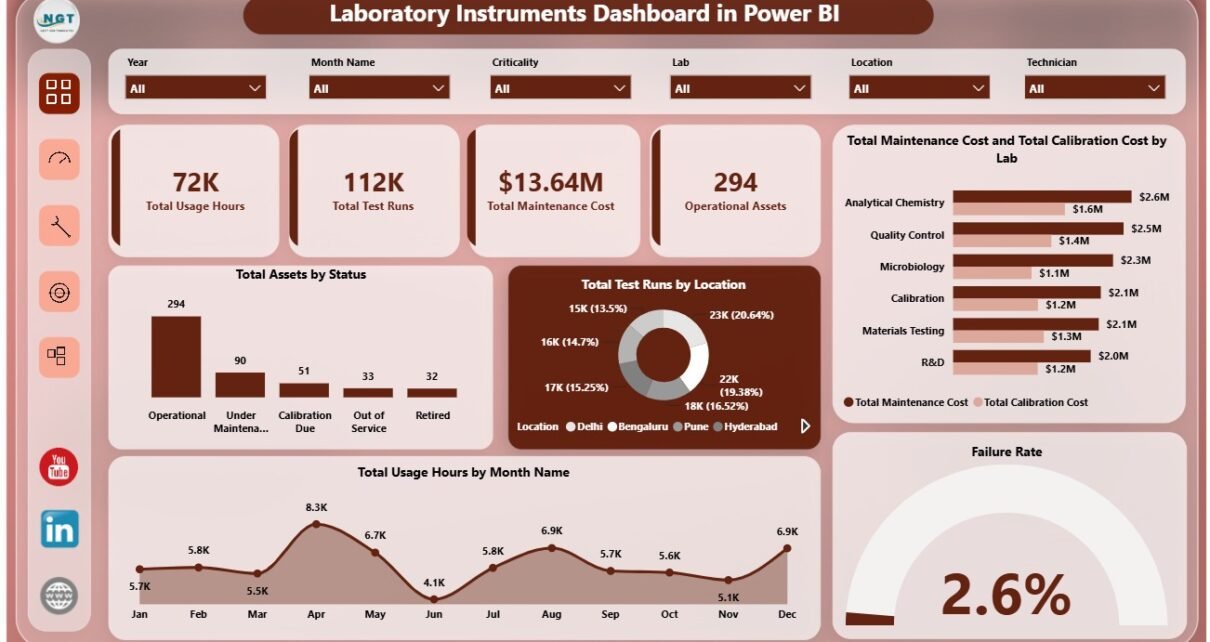
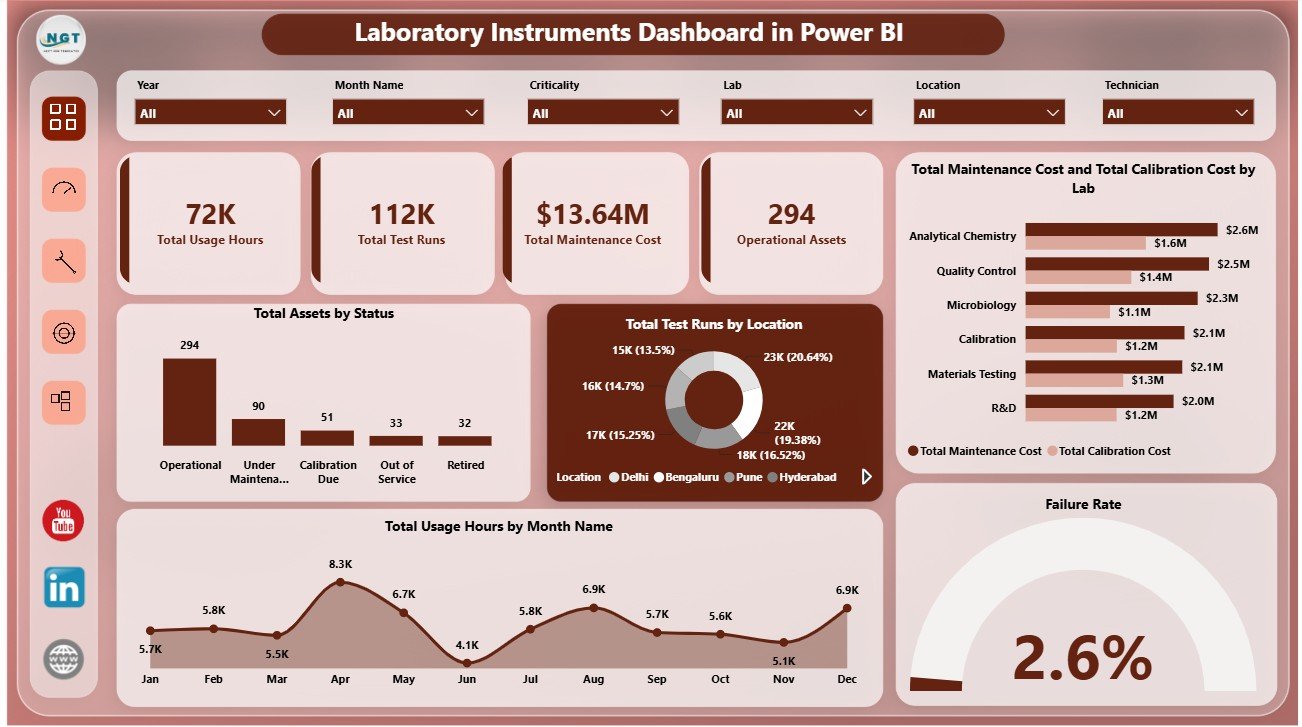
The Overview Page works as the executive summary of the report. The top cards show Total Usage Hours, Total Test Runs, Total Maintenance Cost, and Operational Assets, giving leadership a quick read on equipment demand, testing activity, cost pressure, and available instrument capacity.
Total Assets by Status: This chart shows how laboratory instruments are distributed by operating status. It helps teams see whether assets are active, unavailable, under maintenance, or waiting for action.
Total Test Runs by Location: This visual compares test volume across locations. It helps managers understand where laboratory workload is concentrated and where capacity planning may be needed.
Total Maintenance Cost and Total Calibration Cost by Lab: This comparison highlights two major cost lines by laboratory. It helps finance, quality, and maintenance teams review labs with higher service or calibration spend.
Total Usage Hours by Month Name: This trend shows how instrument usage changes month by month. It helps teams identify peak demand periods and low-utilization months.
Failure Rate: This visual highlights equipment reliability. It helps maintenance teams understand whether failure performance needs investigation.
2. Utilization
The Utilization page focuses on how instruments are being used and where downtime or cost may be affecting operations. Total Downtime Hours by Criticality helps prioritize high-impact instruments first, because downtime on critical equipment can affect many downstream tests.
Total Assets by Location shows where the equipment base is concentrated. Total Maintenance Cost and Total Calibration Cost by Vendor compares vendor-level service spending, while Total Usage Hours by Lab helps identify which labs carry the highest workload.
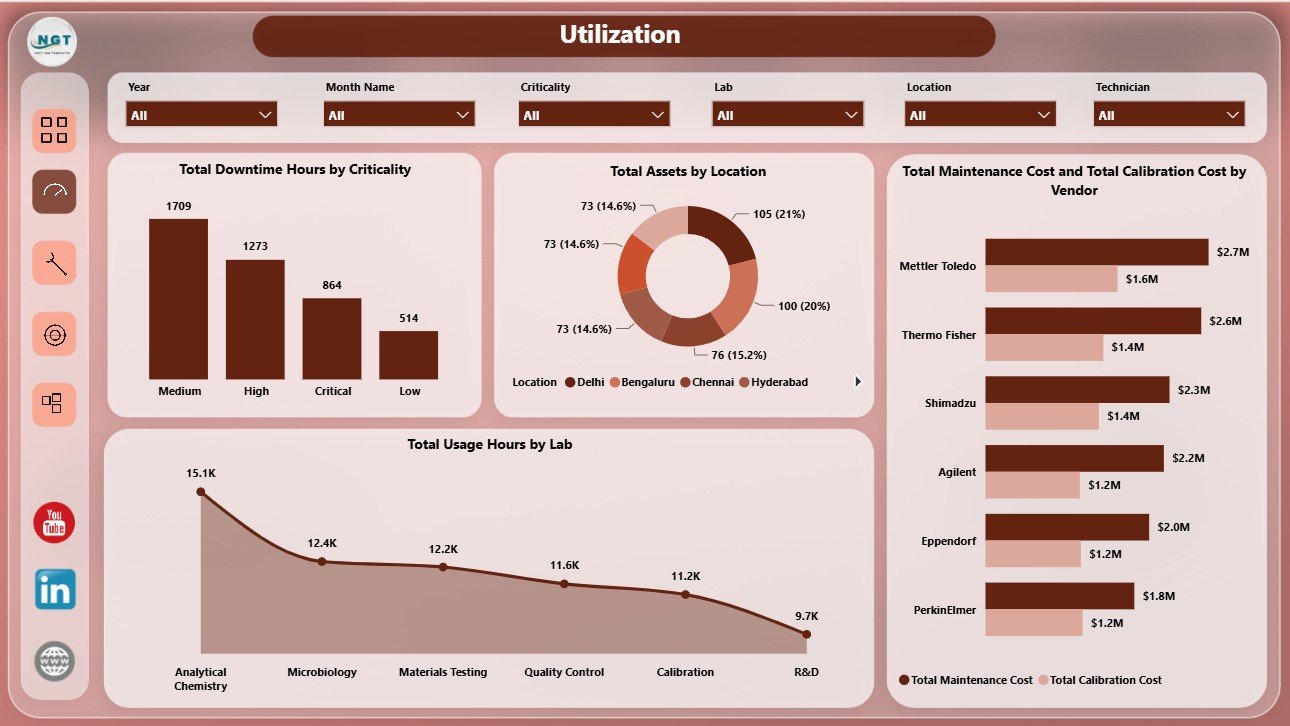
Utilization
3. Calibration
The Calibration page is useful for quality, compliance, and supplier review. Total Calibration Cost by Vendor shows which vendors are linked with the highest calibration spend and supports supplier conversations.
Total Assets by Year helps teams understand asset age or acquisition patterns. Calibration Pass Rate by Instrument Type compares calibration outcomes across equipment groups, and Operational Assets by Lab shows which labs currently have instruments available for active work.
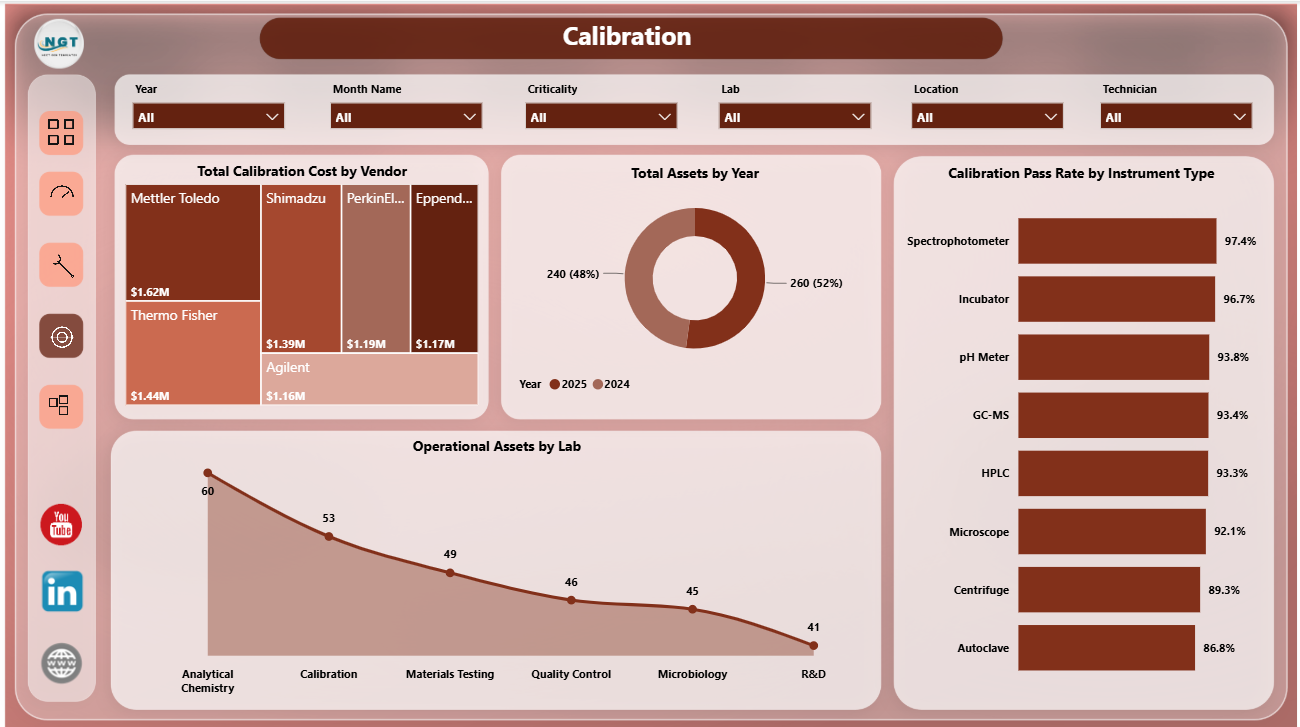
Calibration
4. Maintenance
The Maintenance page helps teams review reliability, downtime, technician cost, and operating status. Failure Rate by Status connects reliability with asset condition, helping users see whether certain status groups need attention.
Operational Assets by Location shows where usable equipment is currently available. Total Maintenance Cost by Technician supports workload and cost review by maintenance owner. Total Downtime Hours by Instrument Type identifies equipment categories causing the most downtime.
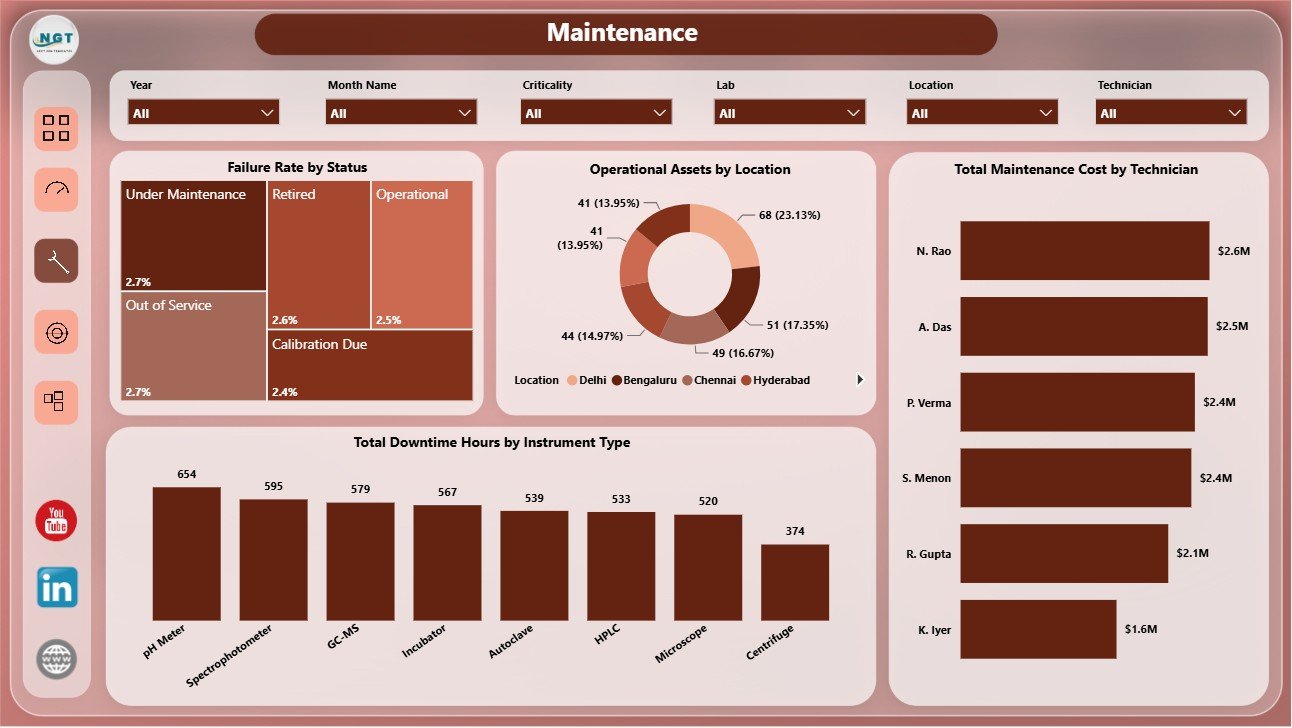
Maintenance
5. Inventory
The Inventory page helps laboratory teams understand asset movement and availability. Total Assets by Quarter tracks asset count over time and helps identify growth, retirement, or inventory changes.
Failure Rate by Criticality shows reliability risk by importance level. Operational Assets by Vendor compares available assets by supplier, and Total Calibration Cost by Month Name helps teams plan budgets and investigate monthly cost spikes.
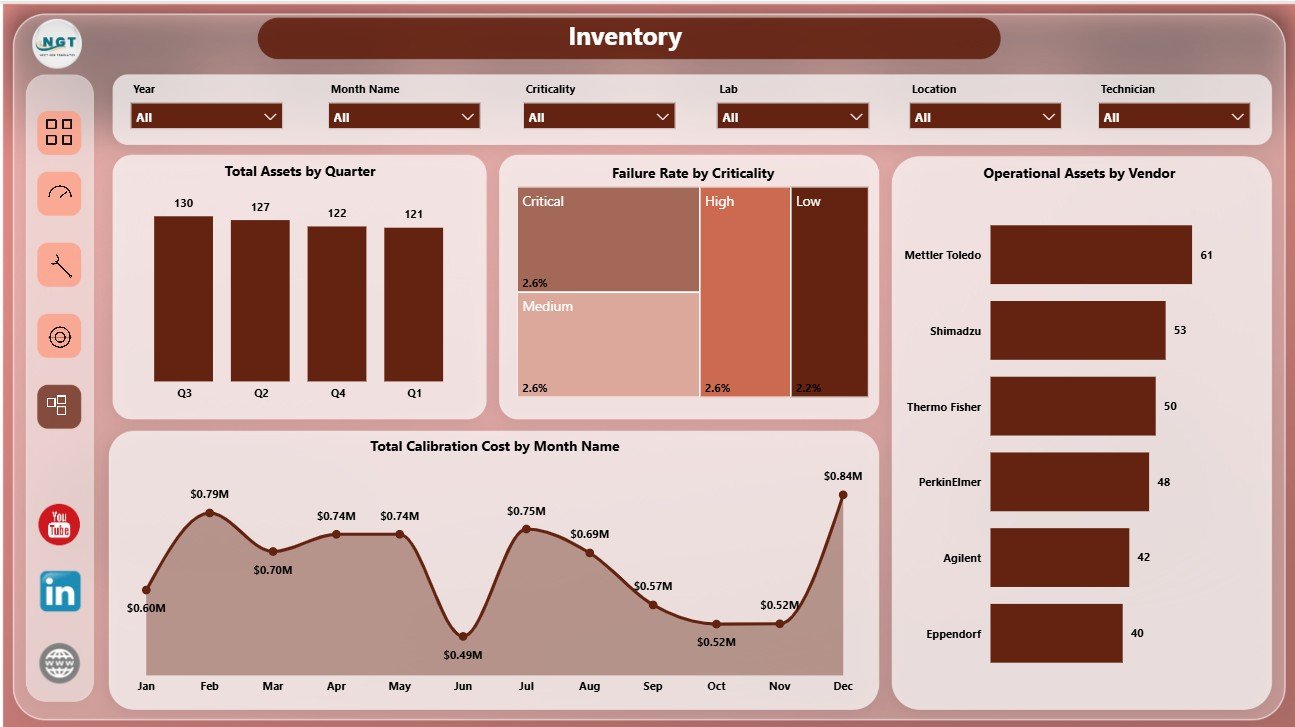
Inventory
Laboratory Instruments Dashboard in Power BI vs. Tableau vs. Paid CRM/SaaS – Feature Comparison
| Feature | This Power BI dashboard | Tableau or Qlik alternative | Paid healthcare SaaS |
|---|---|---|---|
| Cost | $17.99 one-time template | License cost plus dashboard build time | Monthly or annual subscription |
| Platform | Power BI Desktop and Power BI Service | Tableau or Qlik environment | Vendor cloud platform |
| Setup time | Open PBIX, connect data, refresh | Build model and visuals manually | Implementation and onboarding |
| Real-time team collaboration | Available after publishing to Power BI Service | Available by platform plan | Usually included by plan |
| Mobile access | Power BI mobile app after publishing | Vendor mobile app | Usually included |
| Customizable fields | Edit model, visuals, measures, pages, and slicers | Editable with platform skills | Depends on vendor permissions |
| Share with link | Available through Power BI sharing settings | Available through platform permissions | Usually login controlled |
| Year-1 cost at 5 users | $17.99 plus any Microsoft licensing | License cost plus analyst time | Often hundreds or thousands |
| Laboratory instrument metrics | Usage, tests, assets, maintenance, calibration, failure rate, downtime, vendors, and labs | Must be designed manually | Depends on product module |
Who Should Use This Template
This template is useful for laboratory managers, diagnostic centers, pharmaceutical labs, research laboratories, quality control teams, calibration coordinators, maintenance teams, healthcare analysts, and operations leaders who want a Power BI dashboard for instrument performance. It works best when your team already has structured records for usage hours, test runs, maintenance cost, calibration cost, assets, vendors, technicians, status, criticality, locations, labs, and months.
It is not a live equipment monitoring system, LIMS, CMMS, regulatory filing system, inventory procurement workflow, or automated maintenance alerting tool. Use it as a reporting layer after your operational data has been prepared.
Real-World Use Cases
Monthly laboratory review: A laboratory director uses the Overview page to review usage hours, test runs, maintenance cost, and operational assets before a performance meeting.
Maintenance planning: A maintenance lead uses failure rate, downtime by instrument type, and technician cost to prioritize preventive maintenance.
Calibration compliance review: A quality analyst uses the Calibration page to compare pass rate by instrument type and calibration cost by vendor.
Advantages of Laboratory Instruments Dashboard in Power BI
- It centralizes laboratory instrument performance into one interactive Power BI report.
- It reduces manual chart-building time for recurring maintenance and calibration reviews.
- It gives leadership clear KPI cards for usage, test runs, cost, and active assets.
- It connects utilization, calibration, maintenance, and inventory views in one workflow.
- It can be adapted in Power BI Desktop for local terminology, measures, and data sources.
Opportunities for Improvement
Advanced users can extend the report with live database connections, scheduled refresh in Power BI Service, drill-through pages for individual instruments, row-level security by lab or region, extra DAX measures for uptime and mean time to repair, and automated data preparation through Power Query. The template is designed as a starting reporting model, so it can grow as the laboratory data process matures.
Best Practices
- Keep lab, location, vendor, technician, status, and instrument type names consistent in the source data.
- Validate maintenance cost, calibration cost, usage hours, and test run fields before refreshing monthly reports.
- Use the Overview page first, then move to Utilization, Calibration, Maintenance, and Inventory for deeper review.
- Review critical instruments separately when downtime or failure rate increases.
- Publish to Power BI Service only after checking slicers, KPI cards, visual totals, and refresh behavior.
Explore Relevant Templates
- Laboratory Instruments Dashboard in Power BI
- Laboratory Instruments Dashboard in Excel
- Laboratory Instruments KPI Dashboard in Power BI
- Pathology Lab Management System Web App
Frequently Asked Questions
What is the Laboratory Instruments Dashboard in Power BI?
It is an editable PBIX dashboard template for analyzing laboratory instrument usage, test runs, maintenance cost, calibration cost, operational assets, failure rate, downtime, vendors, locations, labs, and inventory trends.
What pages are included?
The report includes Overview, Utilization, Calibration, Maintenance, and Inventory pages.
Do I need Power BI Desktop?
Yes. Power BI Desktop is needed to open, refresh, and customize the PBIX file. Power BI Service is optional for online sharing and scheduled refresh.
Can I connect my own data?
Yes. Replace or connect the sample data source with your own structured laboratory instrument records, then refresh the report.
Can I customize the report?
Yes. You can edit visuals, fields, DAX measures, slicers, relationships, labels, colors, and page layouts in Power BI Desktop.
Is this a full laboratory management system?
No. It is a reporting dashboard, not a LIMS, CMMS, live monitoring system, procurement workflow, or regulatory submission tool.
About the Author
Built by PK – Microsoft Certified Professional with 15+ years of Excel, Google Sheets, and Power BI experience. Founder of NextGenTemplates, reaching 300K+ subscribers across YouTube channels. Every template is hand-built and tested before release.
Conclusion
The Laboratory Instruments Dashboard in Power BI gives laboratories a clear way to review usage hours, test runs, maintenance cost, calibration cost, operational assets, downtime, failure rate, vendors, locations, labs, and inventory movement. Instead of starting from a blank Power BI file, users get a ready report structure they can refresh, customize, and adapt to their own data.
Click here to purchase Laboratory Instruments Dashboard in Power BI
Visit our YouTube channel for step-by-step Excel, Power BI, and dashboard tutorials.