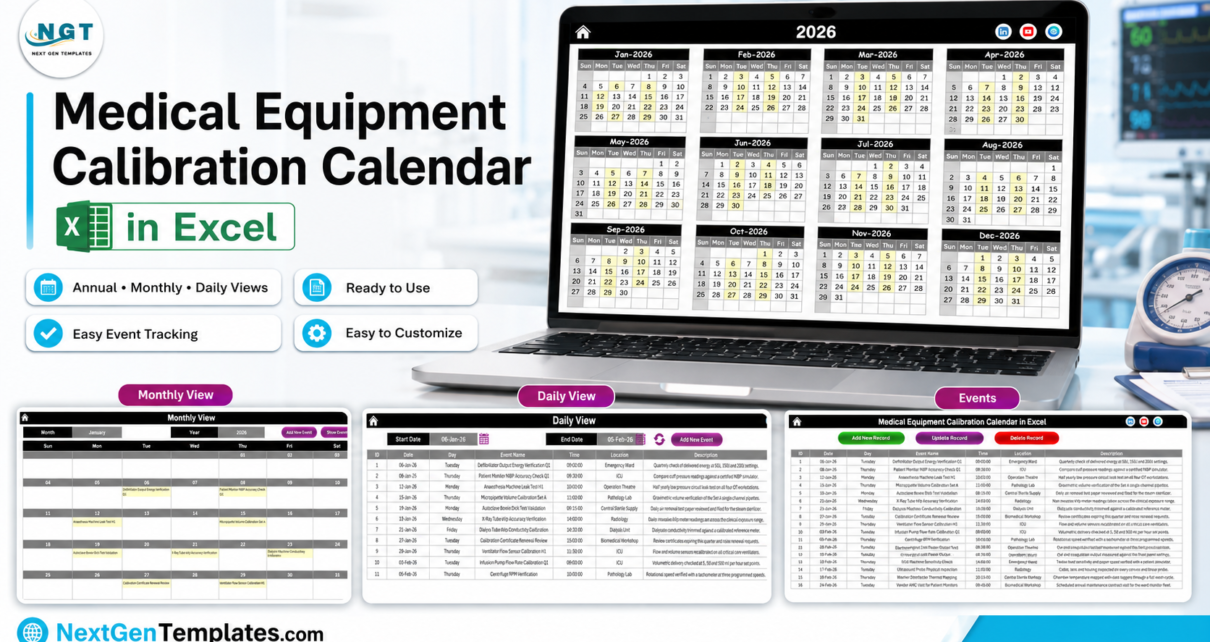
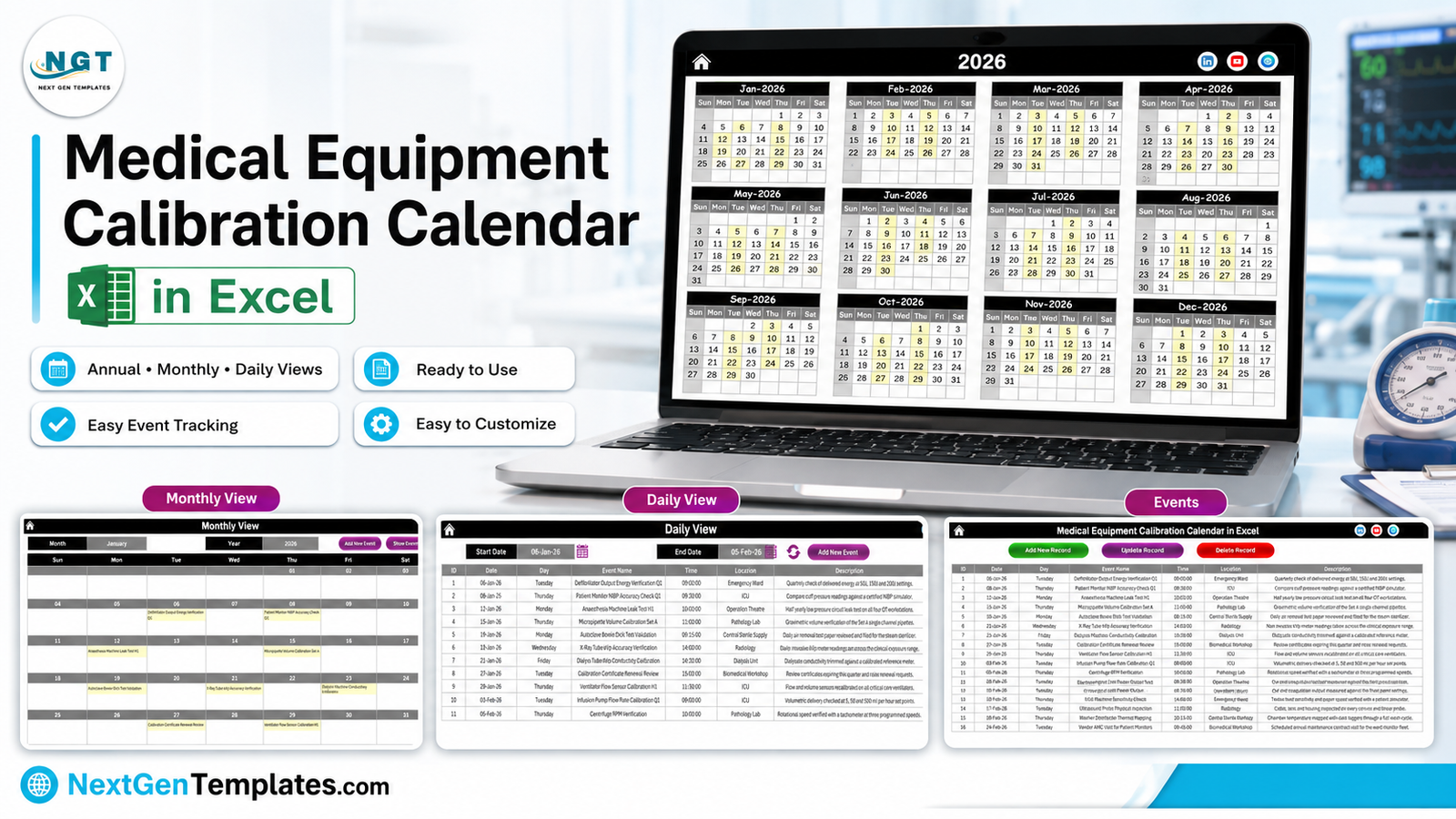
Every hospital biomedical department runs on the same quiet arithmetic. A defibrillator wants its output energy verified each quarter. Ventilator flow sensors want recalibrating. Anaesthesia workstations want a half-yearly leak test. Autoclaves want Bowie-Dick papers and biological indicators, pipettes want gravimetric checks, the X-ray tube wants a kVp verification, the RO plant wants a water round, and somewhere behind all of it sit the vendor AMC visits and the certificates that quietly expire. Most departments plan that year on a whiteboard, a wall planner, or a spreadsheet somebody built in 2019. The Medical Equipment Calibration Calendar in Excel puts it into one macro-enabled workbook: 7 worksheets, 100 ready-made sample checks dated from 6 January to 29 December 2026, 8 hospital departments, 16 start times between 09:00 and 16:00, and a VBA form that adds, updates and deletes an entry without anyone touching a formula. It costs $4.99 once, it works offline, and it schedules the work without pretending to certify it – which, as you will see, is the most important paragraph in this article.
Key Features of the Medical Equipment Calibration Calendar in Excel
- Seven worksheets: Home, Annual View, Monthly View, Daily View, This Month, Events and Setting.
- One Events sheet drives everything. Seven columns – ID, Date, Day, Event Name, Time, Location, Description – in rows 5 to 104. Every view reads from it.
- 100 different sample checks, no repeats, spread evenly across all twelve months: 9 in January, 8 in February, 9 in March, 8 in April, 9 in May, 8 in June, 8 in July, 8 in August, 9 in September, 8 in October, 8 in November and 8 in December.
- Eight departments built in: Biomedical Workshop (15 entries), ICU (14), Emergency Ward (13), Pathology Lab (13), Operation Theatre (12), Radiology (12), Central Sterile Supply (11) and the Dialysis Unit (10).
- Sixteen start times from 09:00 to 16:00, and most sample rounds land on a Tuesday or a Thursday – the way a workshop actually blocks its service days.
- A VBA entry form behind Add New Record, Update Record and Delete Record, with a date picker, a time picker and a Day field that fills itself.
- A Setting sheet with any year from 2021 to 2051, the start month, the week start day, two highlight-weekday rules, an event-highlight switch and five colour themes (Default, Blue, Red, Black, Orange). It ships on Black.
- No patient field anywhere, and no readings, tolerances or pass/fail status either. It is a diary, on purpose.
Workbook Pages Explanation
Home
Five buttons on a black header – Annual View, Monthly View, Daily View, This Month and Events. That is the whole navigation. Nobody in the workshop has to learn the tab bar, and the print area is set so the Home sheet stays one page.
Annual View
All twelve months of the chosen year on a single printable page, in a three-by-four grid. Every date that carries a scheduled check is shaded, so a year of service load is readable from across the room. Change the year on the Setting sheet and the whole page redraws.
Monthly View

Pick a Month and a Year from the two grey pickers and the check name is written straight into each date cell. January 2026 reads as a real month of work: the defibrillator output energy verification on the 6th, the patient monitor NIBP accuracy check on the 8th, the anaesthesia machine leak test on the 12th, micropipette volume calibration on the 15th, the autoclave Bowie-Dick validation on the 19th, X-ray tube kVp verification on the 21st, dialysis machine conductivity calibration on the 23rd, the calibration certificate renewal review on the 27th and the ventilator flow sensor calibration on the 29th. Add New Event and Show Events buttons sit on the same header. This is the page you print and pin up.
Daily View

Set a Start Date and an End Date, hit the refresh arrows, and the workbook lists every check in that window with ID, date, day, event name, time, location and description. Six January to five February returns eleven rows, from the 09:00 defibrillator verification in the Emergency Ward through to the 10:00 centrifuge RPM verification in the Pathology Lab. This is the round sheet an engineer carries.
This Month

Four counters across the top – Events This Month, Active Days, Locations Used and Next 7 Days – then an Events by Day of Week table and a Top 5 Locations ranking, and under them the full list of that month’s checks with times, departments and descriptions. August 2026 in the sample data shows 8 events across 8 active days and 8 locations, with 2 in the next seven days, and the weekday table confirms the Tuesday/Thursday rhythm: four each, nothing on the other five days.
Events and Setting
Events is the database – one flat table, rows 5 to 104, with Add New Record, Update Record and Delete Record buttons on top. Clicking any of them opens the pop-up form: Date with a calendar picker, Day filled in automatically, Event Name, Time with a clock picker, Location and Description, plus Submit and Reset. Setting holds the year, the start month, the week start day, the two highlight weekdays, the event-highlight switch and the theme. There is nothing else to configure.
What This Workbook Deliberately Does Not Do
This is a scheduling and record-keeping calendar. It records that a calibration, a safety test or a service visit is due, and it prints that plan. It does not perform, witness, validate or certify a single measurement, and it stores none of them: there is no as-found or as-left value, no tolerance, no result, no pass or fail status, no instrument serial number and no certificate number, and there is no status column at all. It talks to no analyser, tester, simulator or asset-management system.
It is not a medical device, not a quality-management system, not a CMMS and not an equipment register. It carries no certification, accreditation or conformity claim of any kind, and it does not make a calibration programme compliant with any standard, regulator or accreditation body. Some of the 100 sample rows are named after rounds a biomedical department books – safety-testing blocks, audit-preparation days, quarterly compliance reviews – and those names are calendar reminders and nothing more. The buyer remains fully responsible for their own calibration and maintenance programme, for the competence of whoever performs the work, for the evidence they keep, and for whatever regulations, standards and accreditation requirements apply to them.
It also holds no patient data, and none should be added. There is no patient name, patient ID, MRN, date of birth, diagnosis or clinical note – not on the Events sheet, not on the entry form, not in any sample row. You schedule by equipment check, department, date and time. It is an ordinary Excel file with no access control, no encryption and no audit trail, so anyone who can open it can change any row without trace. Keep clinical and patient data in your governed clinical system, and if you are ever tempted to add a patient column here, add an asset tag instead.
Medical Equipment Calibration Calendar in Excel vs. Google Sheets vs. Paid CMMS – Feature Comparison
| This Excel calendar | Google Sheets calendar | Paid healthcare CMMS | |
|---|---|---|---|
| Cost | $4.99 once | Free, or $4.99 for a Sheets calendar | $50-$200 per user per month |
| Platform | Excel for Windows desktop, macros on | Browser, any device | Browser plus vendor app |
| Setup time | About 2 minutes | About 2 minutes | Weeks to months |
| Works offline in the workshop | Yes, completely | No | No |
| Real-time multi-user editing | No | Yes | Yes |
| Printable year on one page | Yes – Annual View | Yes | Usually a report |
| Asset register with serial numbers | No | No | Yes |
| Stores readings, tolerances, pass/fail | No | Only if you build it | Yes |
| Next due date from an interval | No | No | Yes |
| Overdue alerts and escalation | No | No | Yes |
| Year-1 cost at 5 users | $4.99 | $0-$4.99 | $3,000-$12,000 |
The last four rows are the honest ones. If your department needs interval-driven due dates, overdue escalation and a serial-numbered asset register, buy a CMMS. If what you actually need is the year on a wall and a round sheet in a hand, this is $4.99.
Who Should Use This Template
- Hospital biomedical and clinical-engineering departments planning calibration and service rounds on paper today.
- Single-site clinics, diagnostic centres and pathology labs tracking pipette, scale, centrifuge, refrigerator and analyser check dates.
- Sterile-services and dialysis units with their own autoclave, washer-disinfector and RO-water round schedules.
- Biomedical service contractors planning site visits, AMC calls and certificate renewals across a month.
- Anyone who needs the plan to work with no internet, no licence renewal and no monthly bill.
It is the wrong tool for a department that needs results recorded against each instrument, automatic recurrence, work-order routing, or a record that has to stand up on its own in an external audit.
Real-World Use Cases
The 200-bed hospital workshop. Tuesdays and Thursdays are round days. ICU ventilator and infusion-pump checks, Emergency Ward defibrillator verifications and theatre anaesthesia leak tests all live in one Monthly View, printed on the last Friday of the month and pinned above the bench. The measurements themselves go on the department’s own record forms; the calendar only says when a round is due.
The pathology lab. Filter the Pathology Lab rows and you get the lab’s own year: micropipette volume calibration set by set, analytical weighing-scale certification, centrifuge RPM verification, reagent refrigerator and deep-freezer temperature mapping, analyser photometric checks. The Next 7 Days counter on This Month becomes a Monday morning to-do list.
The service contractor. Daily View from today to month end, across all eight departments, prints as a single visit plan – which site round, vendor AMC visit or certificate renewal comes next. Nothing on that sheet is confidential: department, check, date and time only.
Advantages of the Medical Equipment Calibration Calendar in Excel
- One table, four views. Type a check once on Events and it appears in the Annual, Monthly, Daily and This Month pages. No duplicate lists to keep in step.
- Genuinely offline. A workshop in a basement with no signal still gets the full workbook.
- Built to print. Print areas are set on every page, so Monthly View for the wall and Daily View for the clipboard come out clean.
- Editable to the last cell. Rename the eight departments, rewrite all 100 rows, change the year and the theme. Nothing is locked.
- Sample data worth reading. The 100 rows are a decent starting checklist of what a biomedical department schedules in a year, department by department.
Opportunities for Improvement
- No recurrence engine. A quarterly interval does not roll itself forward – you copy rows and change dates.
- No overdue flag. Nothing turns red when a date passes, and there are no reminders by email or SMS.
- Monthly View shows one entry per date. If two checks share a date it writes the first and an “N more…” flag; Daily View and This Month show them all.
- Windows Excel only. The macros do not run in Excel for the web, and the mobile app is read-only.
- Single editor. One file, one person at a time. A shared Google Sheets calendar is the better shape for a team editing together.
Best Practices
- Read the 100 sample rows before deleting them – they are a free checklist of what a biomedical year contains.
- Keep the Location column to real departments or rooms, and put the asset tag in the Event Name so the round sheet identifies the machine.
- Block one or two weekdays for rounds, the way the sample data uses Tuesdays and Thursdays. The Events by Day of Week table then tells you when you are overloading a day.
- Save as .xlsm, never .xlsx – saving as .xlsx strips the macros silently and the buttons stop working.
- Keep the results, certificates and signatures in your own governed records. This file is the plan, not the evidence.
Explore Relevant Templates
- Nurse Duty Roster Calendar in Excel – the same seven-sheet engine applied to ward shifts.
- Operation Theatre Booking Calendar in Excel – theatre lists, so anaesthesia and diathermy checks land in a free slot.
- Radiology Slot Booking Calendar in Excel – imaging rooms and slot types, alongside the X-ray and CT quality checks.
- Dialysis Session Calendar in Excel – shift blocks and water-treatment rounds for the renal unit.
- Pharmacy Stock Expiry Calendar in Excel – expiry and stock-check dates for the same hospital’s pharmacy.
Frequently Asked Questions
Does this make my calibration programme compliant with any standard or accreditation?
No. It is a scheduling calendar. It carries no certification, accreditation or conformity claim, it is not a medical device, not a quality-management system and not a CMMS, and it does not perform, validate, witness or certify any calibration. Your programme, your evidence and the regulations and accreditation requirements that apply to you remain entirely your responsibility.
Does it store readings, tolerances or a pass/fail result?
No. The Events sheet has seven columns – ID, Date, Day, Event Name, Time, Location, Description – and no field for a measured value, a tolerance, a status, a serial number or a certificate number. The descriptions say what a check involves; they hold no result.
Does it hold patient data?
No, by design – there is no patient name, ID, MRN, date of birth, diagnosis or clinical note anywhere in it, and none should be added. It has no access control, no encryption and no audit trail.
Will it work out the next due date, or tell me when something is overdue?
No to both. There is no interval field, no recurrence generator, no overdue flag and no reminder. The “Q1 / Q2 / H1” wording in the sample names is text a human typed. Next 7 Days on This Month counts upcoming entries, not late ones.
Do I need macros enabled?
Yes. The navigation buttons and the Add / Update / Delete form are VBA. Click Enable Content on the yellow bar when the file opens, and keep saving it as .xlsm.
Will it work on a Mac, in Excel for the web or on a phone?
It is built for Excel for Windows desktop. The views open elsewhere, but the entry form and the buttons need Windows Excel with macros on, and Excel for the web will not run them at all.
Can I change the year, the departments and the colours?
Yes. Any year from 2021 to 2051, five colour themes, and every department name and sample row is editable.
What is in the download?
A ZIP containing the .xlsm workbook and the Excel Calendar user manual as a PDF.
About the Author
Built by PK – Microsoft Certified Professional with 15+ years of Excel, Google Sheets, and Power BI experience. Founder of NextGenTemplates, reaching 300K+ subscribers across YouTube channels. Every template is hand-built and tested before release.
Conclusion
The Medical Equipment Calibration Calendar in Excel does one job well: it turns a biomedical department’s year into four views of a single hundred-row table, printable, offline, and free of anything that identifies a patient or pretends to be a certificate. It will not generate your next due date, it will not chase an overdue check, and it will not make anyone compliant with anything – and it says so plainly. If what you need is the plan on the wall and the round sheet in your hand, it is $4.99 and about two minutes of setup.
Get the Medical Equipment Calibration Calendar in Excel →
More Excel walkthroughs on the channel: youtube.com/@PKAnExcelExpert.