ESG Investment Firms Dashboard in Excel gives ESG fund managers, sustainable investment analysts, portfolio operations teams, and finance leaders a structured way to review AUM, capital deployed, management fees, net fee income, ESG score, compliance rate, engagements, and portfolio company activity from one workbook. ESG investing has moved from a side report to a core investment workflow, but many firms still manage ESG quality, capital allocation, and fee reporting in disconnected spreadsheets. This dashboard brings those metrics into one pivot-driven Excel template with KPI cards, charts, slicers, a Data Sheet, and a Support Sheet.
The template is designed for teams that already have structured investment firm data and want a ready reporting layer instead of building every pivot and chart manually. You can replace the sample records, keep the same column format, click Data > Refresh All, and use the pages for portfolio meetings, ESG committee reviews, analyst performance discussions, and management reporting. If you are new to pivot-based dashboards, Microsoft has helpful references for creating PivotTables and using slicers to filter data.
ESG Investment Firms Dashboard in Excel
Key Features of ESG Investment Firms Dashboard in Excel
- 5 dashboard pages: Overview, Capital, ESG Quality, Portfolio, and Firm Segments.
- Executive KPI cards: Total AUM, Total Capital Deployed, Total Management Fee, Net Fee Income Total, and Avg. ESG Score.
- AUM and capital analysis: Review total AUM by region and year, plus capital deployed by asset class.
- ESG quality views: Compare average ESG score by ESG theme and region, with compliance status and compliance rate visuals.
- Fee reporting: Analyze management fees by quarter and investment strategy, plus net fee income by fund type and analyst.
- Portfolio visibility: Track portfolio companies by strategy, month, and asset class.
- Engagement reporting: Review total engagements by analyst and month to understand activity patterns.
- Refreshable Excel design: Update the Data Sheet, then refresh pivots and charts from the Support Sheet.
Dashboard Pages Explanation
1. Overview Page
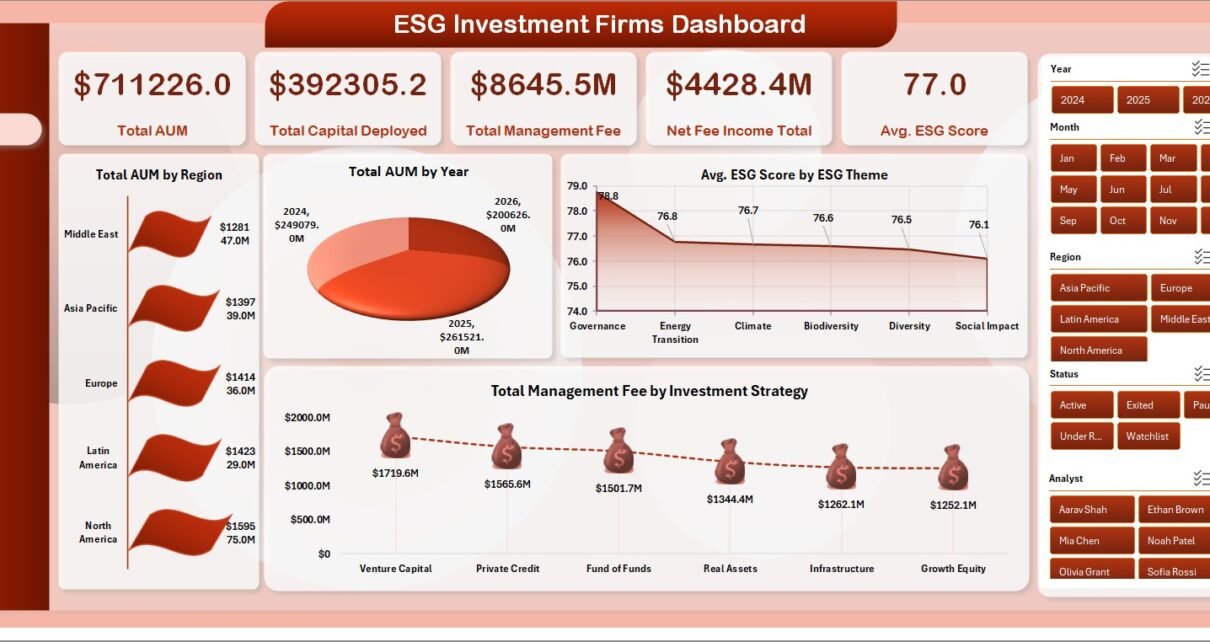
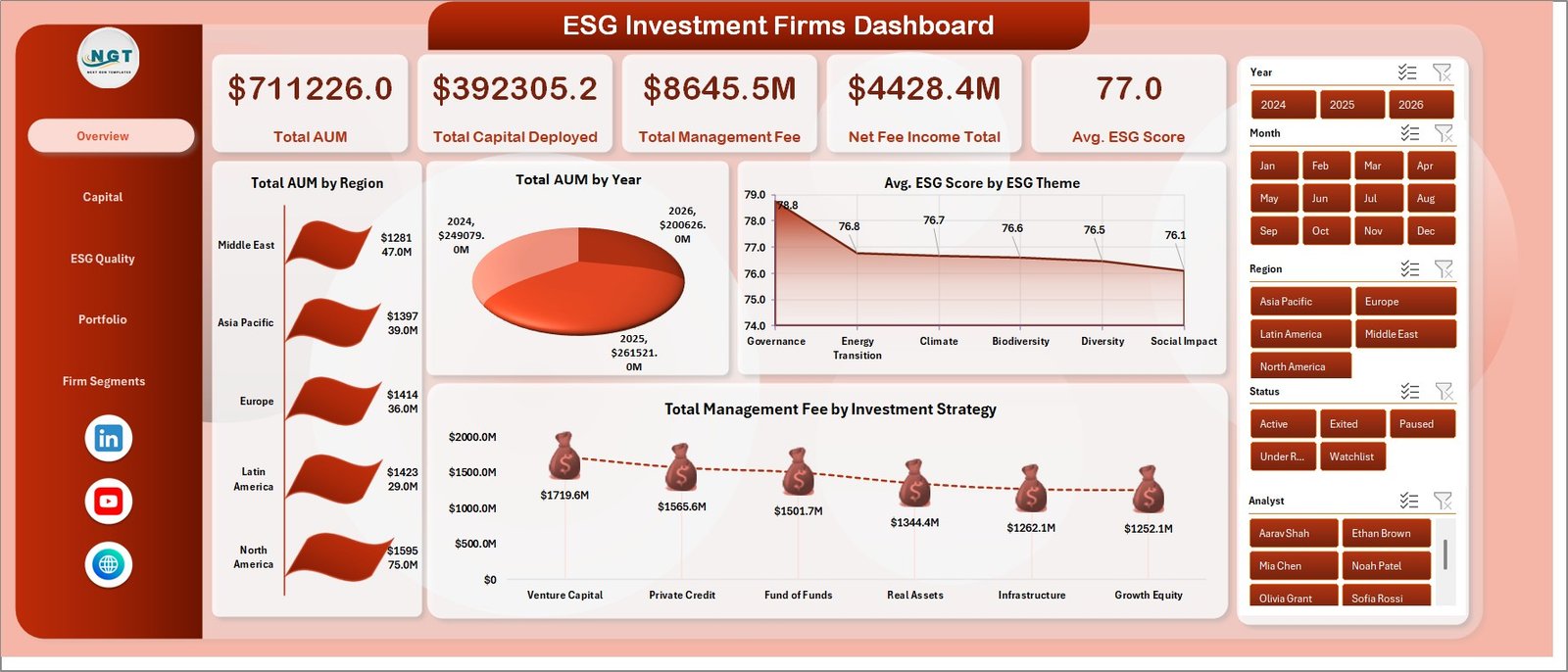
The Overview page is the executive summary of the workbook. At the top, it displays Total AUM, Total Capital Deployed, Total Management Fee, Net Fee Income Total, and Avg. ESG Score so stakeholders can read the financial scale and ESG quality position quickly.
Total AUM by Region compares assets under management across regions and helps identify where portfolio exposure is concentrated. Total AUM by Year shows yearly movement in AUM for long-term growth review. Avg. ESG Score by ESG Theme compares ESG quality across theme categories. Total Management Fee by Investment Strategy shows which strategies contribute more fee income.
Overview Page
2. Capital
The Capital sheet focuses on fees, fund type, asset class, and compliance. It includes Total Management Fee by Quarter, Net Fee Income Total by Fund Type, Total Capital Deployed by Asset Class, and Compliance Rate % by ESG Theme.
This page helps finance and investment operations teams review quarterly fee movement, understand which fund types create stronger net fee income, compare capital deployment across asset classes, and monitor ESG compliance by theme.
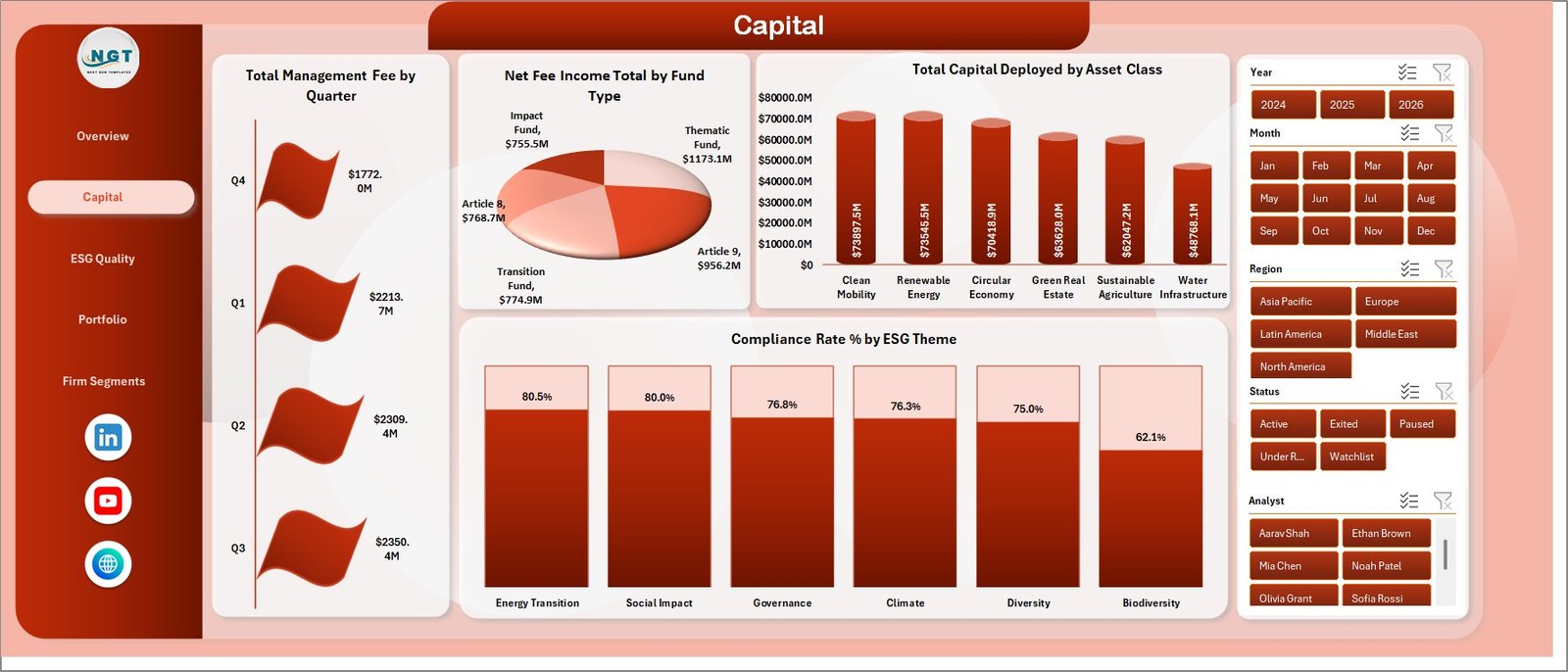
Capital
3. ESG Quality
The ESG Quality sheet is built for governance, analyst review, and ESG oversight. It includes Total Firm Records by Compliance Status, Avg. ESG Score by Region, Total Engagements by Analyst, and Total Portfolio Companies by Asset Class.
Use this page to compare compliance status distribution, identify regional ESG score differences, understand analyst engagement workload, and review portfolio company allocation across asset classes.
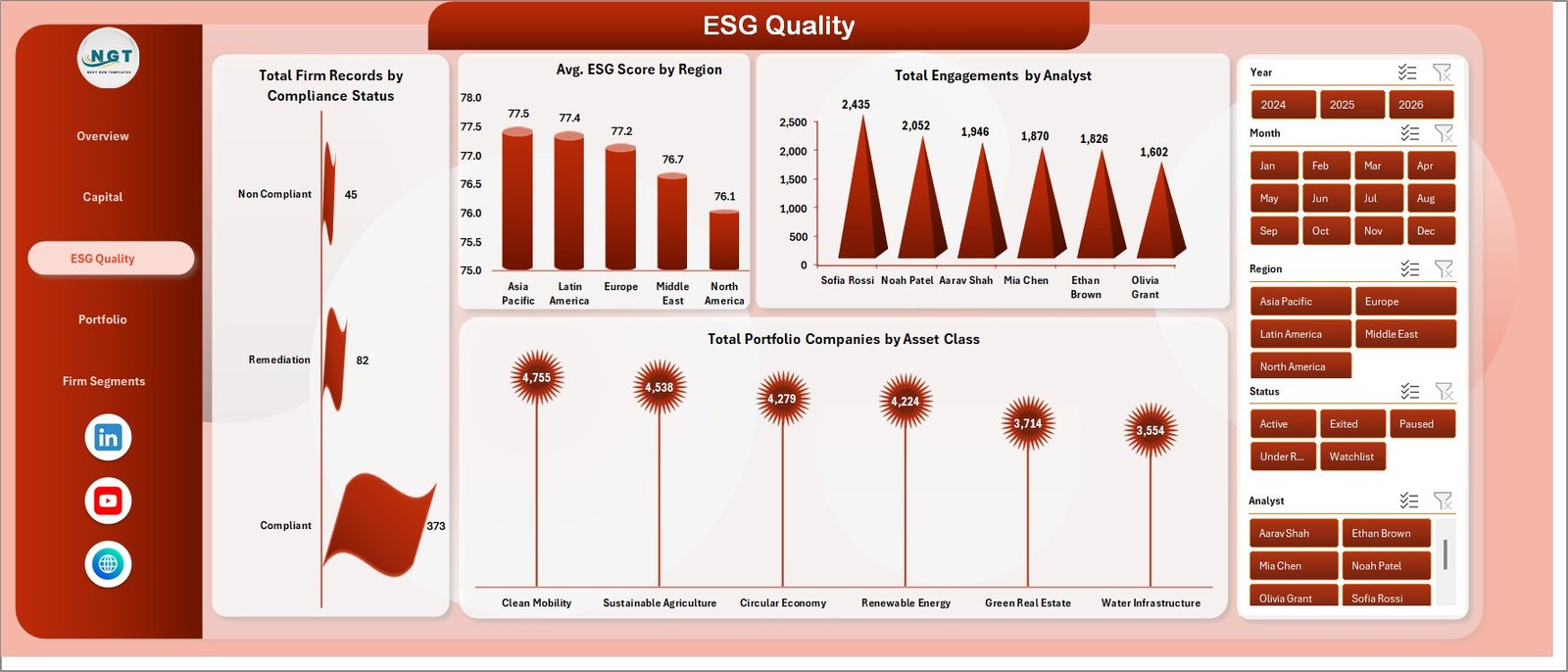
ESG Quality
4. Portfolio
The Portfolio page connects strategy, year, region, and engagement timing. It includes Total Portfolio Companies by Investment Strategy, Active Firm Count by Year, Total Firm Records by Region, and Total Engagements by Month.
This sheet helps teams see which strategies carry more portfolio companies, whether active firm count is rising or falling by year, where firm records are distributed, and how engagement activity moves month by month.
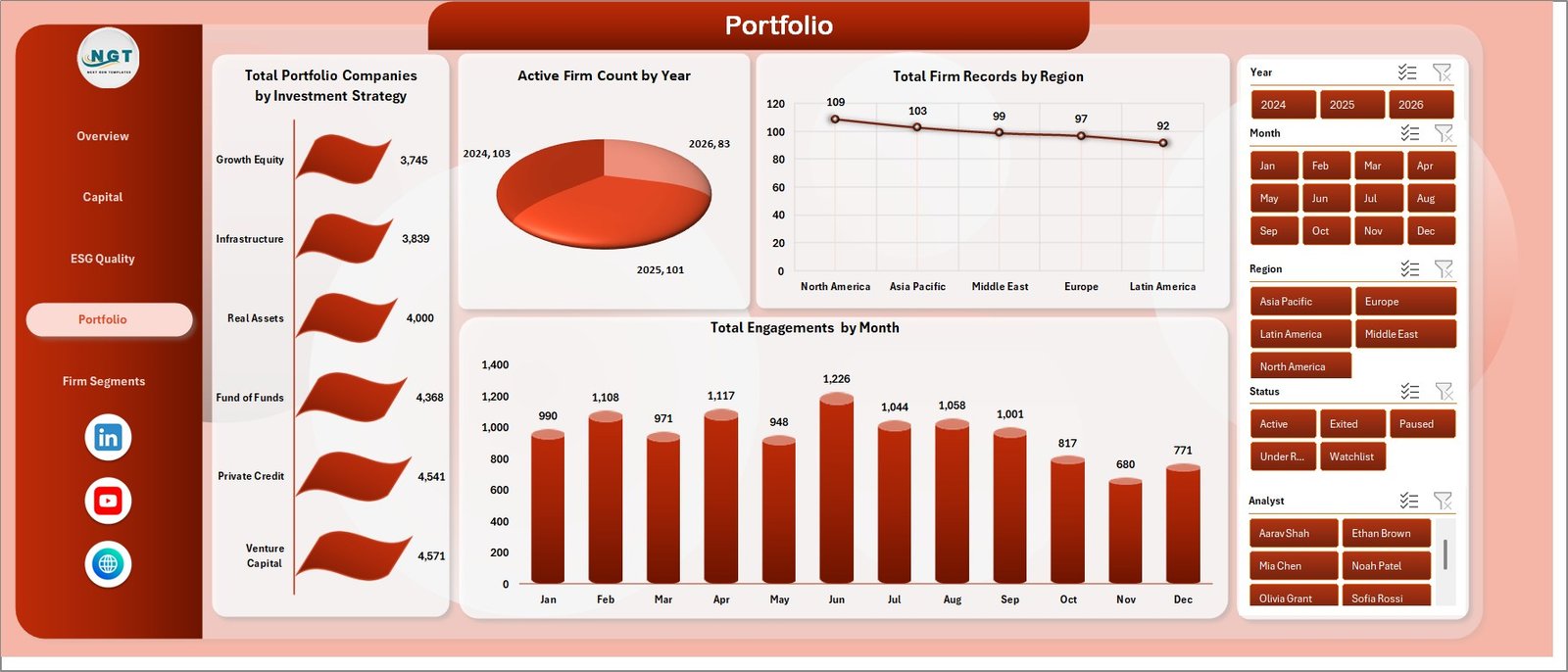
Portfolio
5. Firm Segments
The Firm Segments page compares fund type, analyst, and monthly company activity. It includes Compliance Rate % by Fund Type, Net Fee Income Total by Analyst, and Total Portfolio Companies by Month.
This view is useful when leadership wants to compare fund segment compliance, understand analyst-level fee contribution, and review whether portfolio company counts are changing over time.
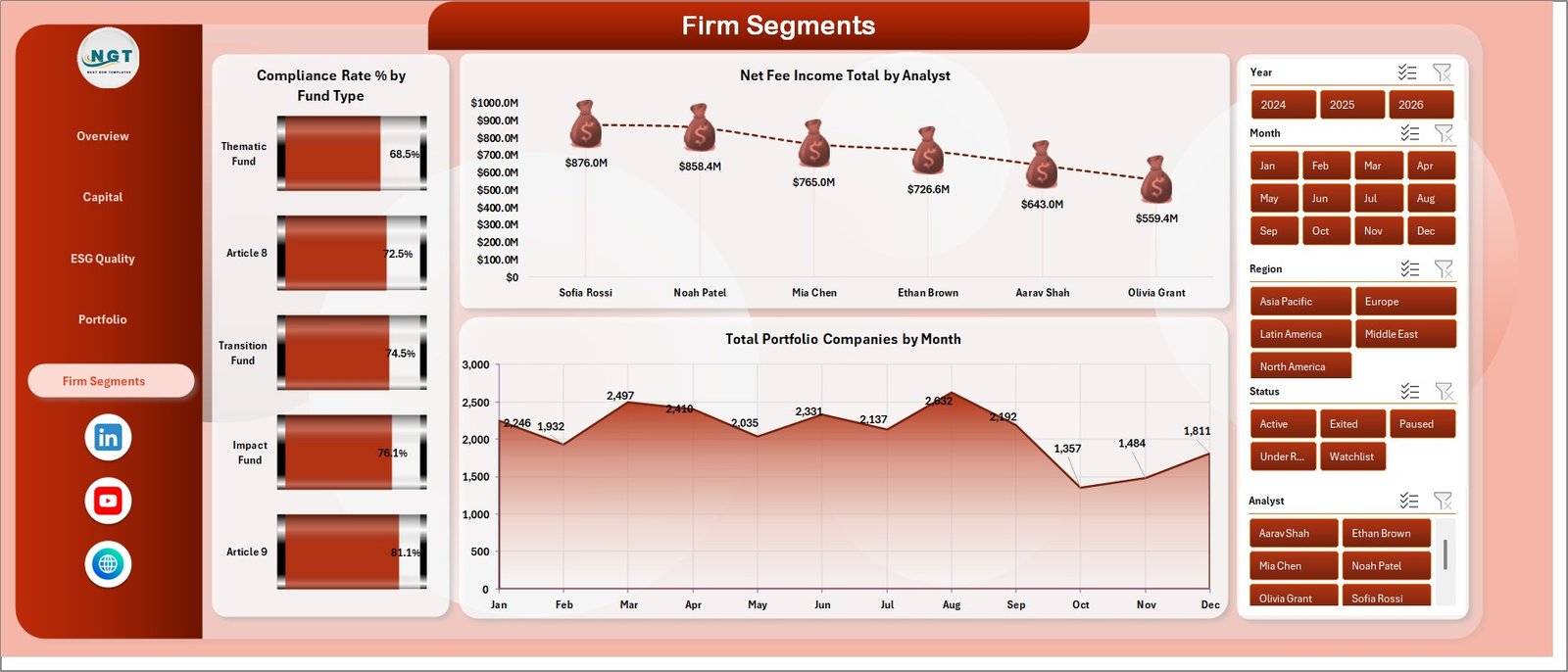
Firm Segments
Data Sheet Tab
The Data Sheet is the input table for the workbook. Add your ESG investment firm records in the same format as the sample data, including fields for AUM, capital deployed, management fee, net fee income, ESG score, compliance, engagement, analyst, fund type, asset class, strategy, region, year, quarter, and month. Keeping the same structure allows the pivots, slicers, and charts to refresh correctly.

Data Sheet tab
Support Sheet Tab
The Support Sheet contains the pivot tables used to create the dashboard dynamically. After updating the Data Sheet, go to the Data tab in the Excel Ribbon and click Refresh All. All pivots and charts refresh together. You can keep this sheet hidden when sharing the workbook with stakeholders.

Support sheet tab
ESG Investment Firms Dashboard in Excel vs. Google Sheets vs. Paid CRM/SaaS – Feature Comparison
| Feature | ESG Investment Firms Dashboard in Excel | Google Sheets Alternative | Paid ESG or Portfolio SaaS |
|---|---|---|---|
| Cost | $17.99 one-time | Template cost or manual build | Monthly or annual subscription |
| Platform | Microsoft Excel | Google Sheets in browser | Vendor cloud system |
| Setup time | Paste data and refresh | Build formulas, pivots, and charts | Onboarding and configuration |
| Real-time team collaboration | Via OneDrive or SharePoint | Native collaboration | Usually per paid user |
| Mobile access | Excel mobile app | Google Sheets app | Vendor app |
| Customizable fields | Fully editable | Editable | Limited by vendor settings |
| Share with link | Possible through cloud storage | Native | Login controlled |
| Year-1 cost at 5 users | $17.99 total | Template cost plus build time | Often hundreds or thousands |
| ESG investment reporting | Built in | Must be built | Depends on implementation |
Who Should Use This Template
This template is useful for ESG investment firms, sustainable finance teams, fund managers, asset managers, portfolio analysts, ESG analysts, investment operations teams, and consultants who need a spreadsheet-based view of AUM, capital deployed, fees, ESG score, compliance rate, engagements, and portfolio companies.
It is not designed to replace audited ESG scoring software, fund accounting systems, investor portals, regulatory filing workflows, CRM systems, or live data warehouses. It works best as a reporting dashboard after your operational data has been exported, cleaned, or pasted into Excel.
Real-World Use Cases
Priya is an ESG portfolio analyst. She uses the Overview and ESG Quality pages before committee meetings to explain AUM, ESG score, compliance status, regional quality, and analyst engagement activity.
Marcus manages investment operations. He uses the Capital and Portfolio pages to review management fee movement, net fee income by fund type, capital deployed by asset class, and engagements by month.
Elena supports impact investing clients. She keeps one workbook per client and uses Firm Segments to compare fund type compliance, analyst contribution, and portfolio company movement across periods.
Advantages of ESG Investment Firms Dashboard in Excel
- Fast setup: Replace the sample data and refresh the workbook without designing charts from scratch.
- Low cost: A one-time Excel template can reduce manual dashboard-building time and recurring reporting tool costs.
- Full control: The workbook is editable, so teams can change charts, slicers, colors, and pivot layouts.
- Offline reporting: Sensitive portfolio data can stay inside an Excel workbook when required.
- Committee-ready pages: Overview, Capital, ESG Quality, Portfolio, and Firm Segments support different review meetings.
Opportunities for Improvement
The dashboard is built for periodic reporting, not live data sync. Teams still need to export or prepare source data before adding it to the Data Sheet. It does not include automated API connectors, third-party ESG scoring feeds, regulatory assurance workflows, or investor portal permissions. Larger firms may later connect similar reporting logic to Power BI, a data warehouse, or a governed ESG data platform.
Best Practices
- Keep the Data Sheet headers and field structure consistent.
- Use standardized names for region, ESG theme, fund type, asset class, investment strategy, analyst, and compliance status.
- Refresh all pivots after every data update using Data > Refresh All.
- Validate KPI cards before sending the workbook to leadership.
- Save a backup before changing pivot fields or adding new columns.
- Hide the Support Sheet before sharing the workbook with stakeholders.
Explore Relevant Templates
You can download the product from ESG Investment Firms Dashboard in Excel. Related templates include ERP SaaS Startups Dashboard in Excel, ERP SaaS Startups Dashboard in Power BI, and Sovereign Wealth Funds KPI Dashboard in Excel. You can also explore more Excel Dashboard Templates.
Frequently Asked Questions
What KPI cards are included?
The Overview page includes Total AUM, Total Capital Deployed, Total Management Fee, Net Fee Income Total, and Avg. ESG Score.
How many dashboard pages are included?
The workbook includes five dashboard pages: Overview, Capital, ESG Quality, Portfolio, and Firm Segments, plus Data Sheet and Support Sheet tabs.
Do I need macros or VBA?
No. The dashboard uses Excel pivot tables, charts, and slicers. No macro setup is required.
How do I update the dashboard?
Replace the sample rows in the Data Sheet, keep the same format, and click Data > Refresh All in the Excel Ribbon.
Can I customize the charts and slicers?
Yes. You can modify charts, slicers, colors, fields, sheet names, and pivot layouts in Excel.
Is this a live ESG compliance platform?
No. It is an Excel dashboard template for prepared data. Use it as a reporting layer, not as a regulated ESG scoring or filing system.
About the Author
Built by PK – Microsoft Certified Professional with 15+ years of Excel, Google Sheets, and Power BI experience. Founder of NextGenTemplates, reaching 300K+ subscribers across YouTube channels. Every template is hand-built and tested before release.
Conclusion
The ESG Investment Firms Dashboard in Excel is a practical way to turn AUM, capital deployed, fee, ESG score, compliance, analyst, and portfolio company data into a clean visual report. It is ideal when you want flexible spreadsheet analytics without the cost or complexity of a full ESG or portfolio SaaS implementation.
Click here to purchase the ESG Investment Firms Dashboard in Excel.
Subscribe to our YouTube channel for step-by-step Excel tutorials: Youtube.com/@PK-AnExcelExpert
Last updated: June 2026