A chemotherapy-related calendar must make operational information easier to review without pretending to make clinical decisions. This Chemotherapy Cycle Calendar in Excel uses 7 worksheets, 100 editable sample records, 25 sample event labels, and 8 sample locations to present annual, monthly, daily, and current-month views. It is designed for administrative planning and visibility only. It does not recommend treatment dates, cycle intervals, regimens, doses, supportive medication, monitoring, or escalation, and it cannot replace an oncology team, EHR, clinical scheduling application, or validated safety process.
The workbook is a macro-enabled Excel file for Windows desktop. Its sample records cover 1 January through 31 December 2026, with IDs 1 to 100 and correctly matching weekday labels. Those figures describe the supplied demonstration file, not a recommended clinical schedule.
Key Features of Chemotherapy Cycle Calendar in Excel
- Home navigation plus Annual, Monthly, Daily, This Month, Events, and Setting worksheets.
- A 12-month annual calendar with configurable year, start month, week start, themes, and highlights.
- A month selector with event dates displayed in a conventional calendar grid.
- A date-range Daily View showing the stored ID, date, day, event name, time, location, and description.
- A current-month summary with event count, active days, locations used, next-seven-day count, weekday distribution, and top locations.
- VBA-assisted Add, Update, and Delete controls plus an Add New Event form.
- 100 demonstration records that can be replaced with organization-approved administrative data.
Workbook Pages Explanation
Home worksheet

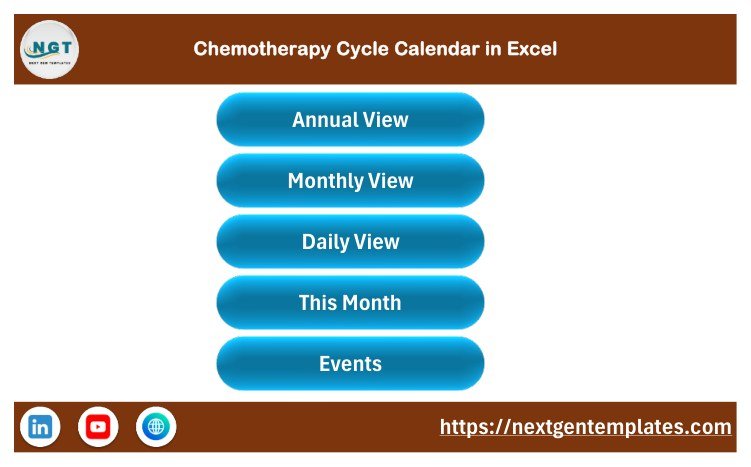
Home page with five navigation buttons
The Home sheet links to Annual View, Monthly View, Daily View, This Month, and Events. The uncluttered menu makes the workbook easier to use during routine administrative reviews.
Annual View

Twelve-month Annual View
All 12 months appear on one sheet. The sample shows 2026, and highlighted cells indicate dates carrying an event. Controls allow changes to year, starting month, week-start day, theme, highlighted weekdays, and event highlighting.
Monthly View

Selected month with event labels
The selected month and year drive the calendar grid. The view gives a quick visual reference, but it should not become the authoritative clinical schedule. Buttons provide access to the event-entry form and the records for a selected date.
Daily View

Detailed records within a chosen date range
Enter a start and end date to display matching records with their full administrative fields. This supports operational huddles or handoffs when used under appropriate access controls.
This Month summary

Current-month operational summary
The worksheet summarizes events this month, active days, locations used, the next seven days, distribution by weekday, and top locations. A detailed list remains visible below the summary.
Events database

Editable Events table
The supplied table has seven columns: ID, Date, Day, Event Name, Time, Location, and Description. It includes no dedicated patient name, medical record number, date of birth, phone, email, address, diagnosis, protocol, or dosage field. That is helpful, but it is not a privacy guarantee: free text can still hold sensitive information. The sample descriptions also include clinical-sounding language and must be replaced or reviewed before operational use.
VBA event form

Macro-assisted event entry
The form captures date, automatically displayed weekday, event name, time, location, and description. Macros must be enabled for the form and workbook buttons to work.
Chemotherapy Cycle Calendar in Excel vs. Google Sheets vs. Paid Oncology Software – Feature Comparison
| Feature | Excel template | Google Sheets edition | Paid oncology/EHR software |
|---|---|---|---|
| Cost | One-time purchase | Spreadsheet template | Subscription or contract |
| Platform | Excel for Windows desktop | Web browser | Vendor application |
| Setup | Replace sample records and validate | Copy sheet and configure sharing | Implementation and training may be required |
| Real-time collaboration | Limited; controlled file ownership preferred | Native multi-user sharing | Depends on vendor |
| Custom fields | Editable | Editable | Depends on configuration |
| Clinical decision support | No | No | May be available in validated modules |
| Patient monitoring | No | No | Depends on product |
| Best use | Administrative calendar visibility | Shared administrative calendar | Enterprise or clinical workflow |
Who Should Use This Template
Potential users include oncology operations managers, administrative coordinators, day-unit support teams, and service-improvement staff who need a local overview of approved non-clinical milestones. A small organization may also use it as a planning aid while its official schedule remains in the authorized system.
It should not be used by a patient to plan treatment, by staff to decide or change a clinical appointment, or as the only record of chemotherapy, blood work, medication, transfusion, tests, monitoring, or follow-up. It provides no conflict checking, resource-capacity calculation, notifications, consent workflow, billing, clinical documentation, or EHR integration.
Real-World Use Cases
Administrative monthly review
An operations coordinator can review upcoming approved events by month and use the location summary to prepare a discussion agenda.
Non-identifying service planning
A service manager can replace the sample with generic departmental milestones, using internal codes rather than personal identifiers.
Operational handoff
A coordinator can filter a short date range for an administrative handoff while checking every item against the organization’s authoritative system.
Advantages of Chemotherapy Cycle Calendar in Excel
The template brings several useful views into one familiar Excel workbook, offers a clean events table, and supplies VBA controls for faster entry. It is editable, portable, and does not require a new monthly software subscription. The sample data also demonstrates each view immediately.
Its strongest design choice is the absence of dedicated patient-identifier columns. Still, users must control file access and free text. Privacy depends on what is entered, where the file is stored, who receives it, retention rules, backups, and organizational policy.
Opportunities for Improvement
The template does not connect to an EHR, send reminders, detect scheduling conflicts, allocate chairs or staff, monitor symptoms, track doses, or validate clinical intervals. Teams needing those capabilities require an approved specialist system. The wide promotional image supplied with this product was not used because one miniature calendar repeats a weekday label and does not faithfully reproduce the workbook.
The demonstration descriptions include phrases about treatment, tests, and supportive care. They are examples, not instructions. Replace them with validated administrative wording and never infer care guidance from the sample.
Best Practices
- Keep the authoritative clinical schedule in your approved system.
- Save an untouched backup before editing the sample workbook.
- Enable macros only in the trusted downloaded file.
- Use non-identifying internal codes wherever practical.
- Restrict file access and storage according to organizational policy.
- Validate every imported or typed date against the authoritative source.
- Review free-text descriptions for sensitive or clinically directive language.
- Test all buttons, views, filters, and backup procedures before routine use.
Explore Relevant Templates
For browser-based collaboration, compare the Chemotherapy Cycle Calendar in Google Sheets. Other administrative calendar options include the Ambulance Duty Calendar in Excel, Lab Sample Collection Calendar in Excel, and Home Nursing Visit Calendar in Excel. Browse the full Excel Calendar collection.
On PK-AnExcelExpert, you can also read the guides to the Ambulance Duty Calendar, Lab Sample Collection Calendar, and Home Nursing Visit Calendar.
Frequently Asked Questions
Is this clinical scheduling software?
No. It is an administrative Excel calendar and does not replace clinical scheduling, oncology software, an EHR, or professional judgment.
Can the workbook determine chemotherapy dates?
No. It must never be used to calculate or recommend treatment timing, cycle intervals, dose changes, or monitoring.
Does it contain patient identifiers?
The supplied structure contains no dedicated patient-identifier fields. However, users can type sensitive information into free text, so privacy controls remain essential.
How many sample entries are included?
The workbook contains 100 demonstration records across 2026, with 25 event labels and 8 locations. These are examples only.
Do macros have to be enabled?
Yes for the VBA forms and buttons. Microsoft explains how macro security works in its official macro guidance.
Can several people edit it simultaneously?
This Excel/VBA build is best managed through controlled file ownership. Consider the Google Sheets edition for real-time collaboration, while applying the same privacy safeguards.
Does purchase include regulatory compliance?
No. The template makes no HIPAA, GDPR, clinical-governance, or security guarantee. Your organization must assess suitability and controls.
About the Author
Built by PK – Microsoft Certified Professional with 15+ years of Excel, Google Sheets, and Power BI experience. Founder of NextGenTemplates, reaching 300K+ subscribers across YouTube channels. Every template is hand-built and tested before release.
Conclusion
The Chemotherapy Cycle Calendar in Excel is a practical administrative workbook for teams that want annual, monthly, daily, and current-month visibility in one editable file. Its seven worksheets and VBA entry tools reduce navigation friction, while its limitations remain clear: it supplies no treatment advice, no clinical decision support, no patient monitoring, and no EHR replacement.
Review the draft product page and use the template only within an approved administrative workflow.
For Excel tutorials, visit PK: An Excel Expert on YouTube.
Last updated: 10 September 2026.