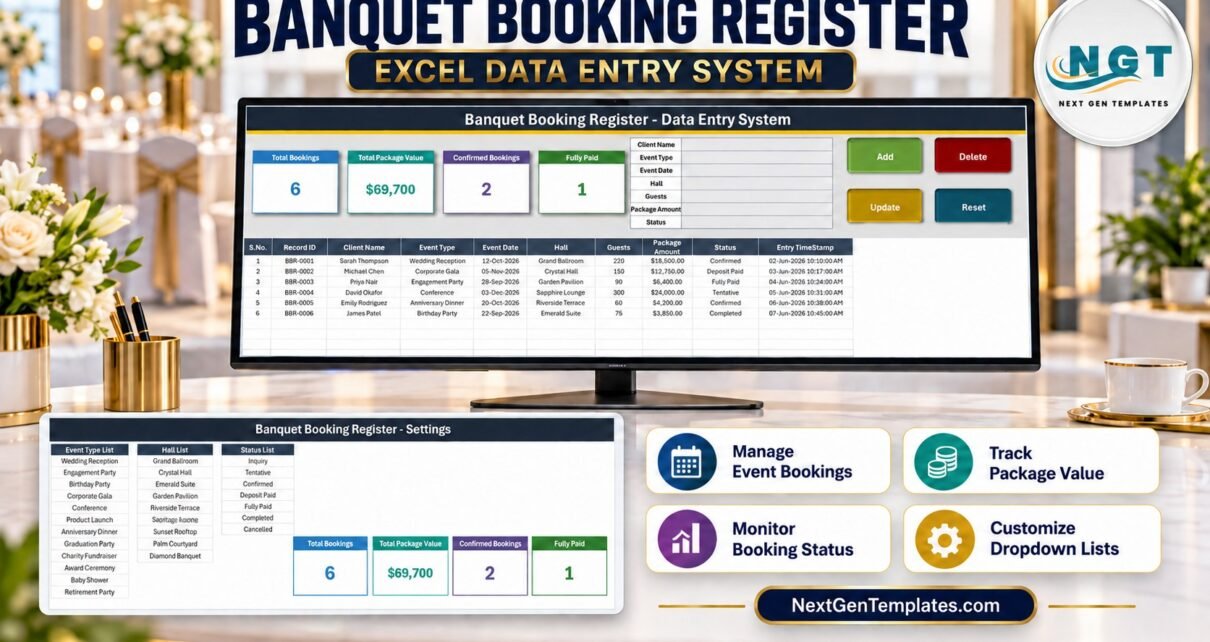
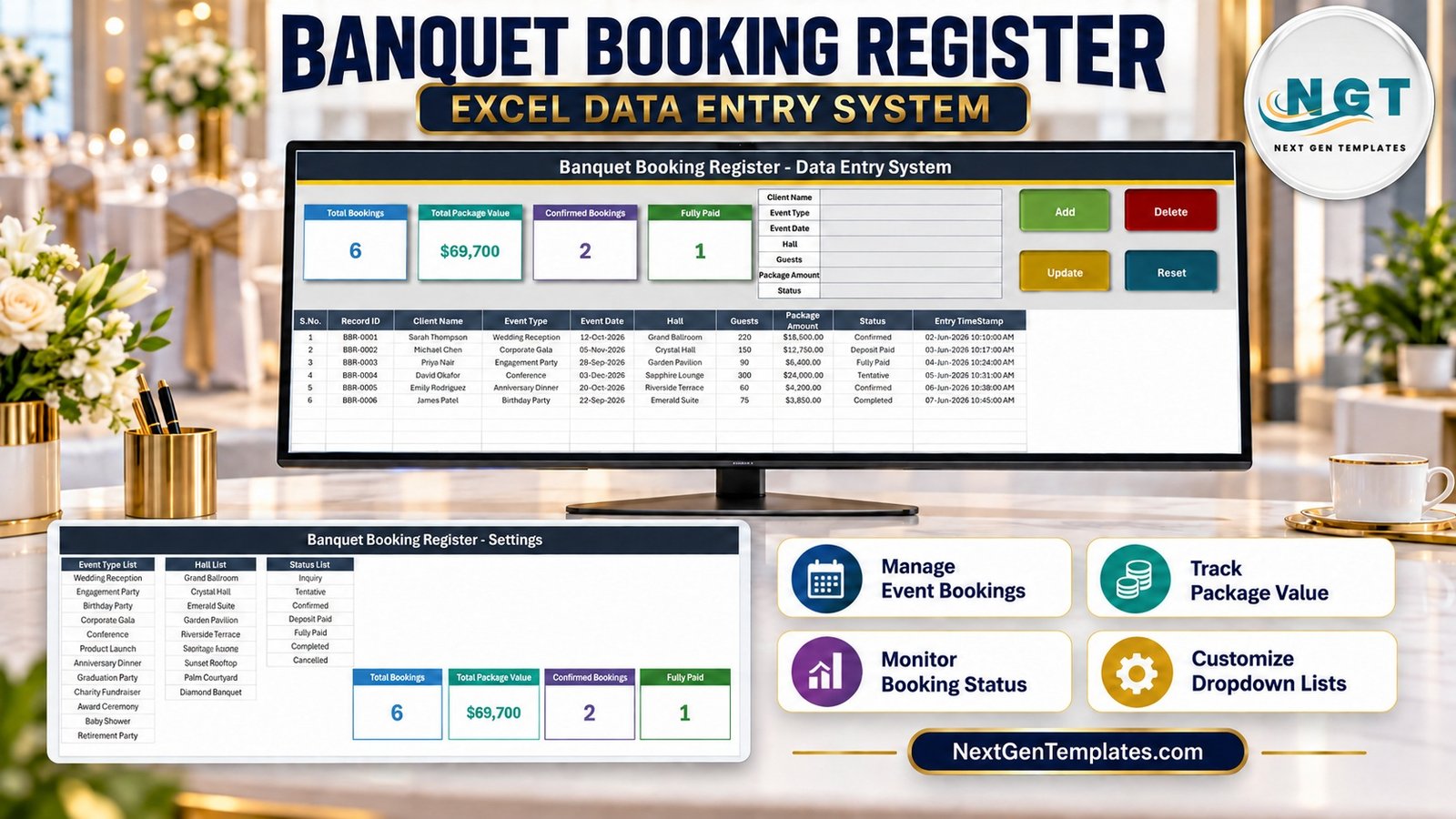
The Banquet Booking Register Data Entry System in Excel is a four-sheet macro-enabled workbook that logs banquet and event bookings through a seven-field form. Each booking lands in a ten-column table with its own BBR-0001 style Record ID and an entry timestamp, and four stat cards – Total Bookings, Total Package Value, Confirmed Bookings and Fully Paid – update as you work. It ships with 12 event types, 10 hall names and 7 booking statuses, and 200 pre-formatted rows. Banquet Booking Register Data Entry System in Excel
Most small venues still take bookings on paper, in a diary or in a loose spreadsheet where every coordinator types dates and hall names differently. This banquet booking register in Excel replaces that with one form, fixed dropdowns and a record ID for every booking, so you can always find, change or remove the right entry. It is a register, not venue software: it takes no payments, has no online booking or calendar view, and does not warn you about double bookings.
Key Features of the Banquet Booking Register Data Entry System in Excel
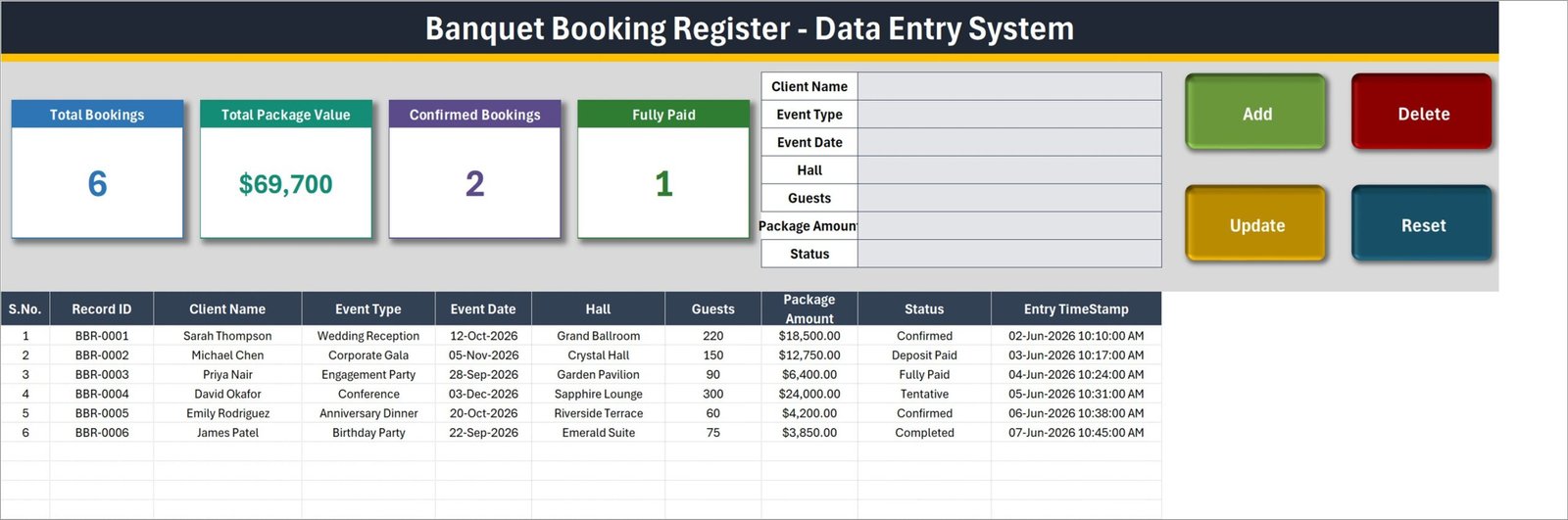
- Seven-field entry form. Client Name, Event Type, Event Date, Hall, Guests, Package Amount and Status sit in one block at the top of the Data Entry sheet.
- Four VBA buttons. Add (green), Delete (red), Update (gold) and Reset (teal) run the macros
Add_Record,Delete_Record,Update_RecordandReset_Form. - Automatic Record ID. The next ID is one more than the highest BBR number already used, so IDs stay unique even after you delete bookings.
- Entry TimeStamp. The date and time each booking was saved is written in the last column.
- Update by Record ID. Double-click a booking to load it; Update finds it again by its ID even if the table has been sorted. Delete shows the ID and asks for confirmation.
- Four stat cards. Total Bookings, Total Package Value, Confirmed Bookings and Fully Paid are linked pictures of the real cards on the Setting sheet.
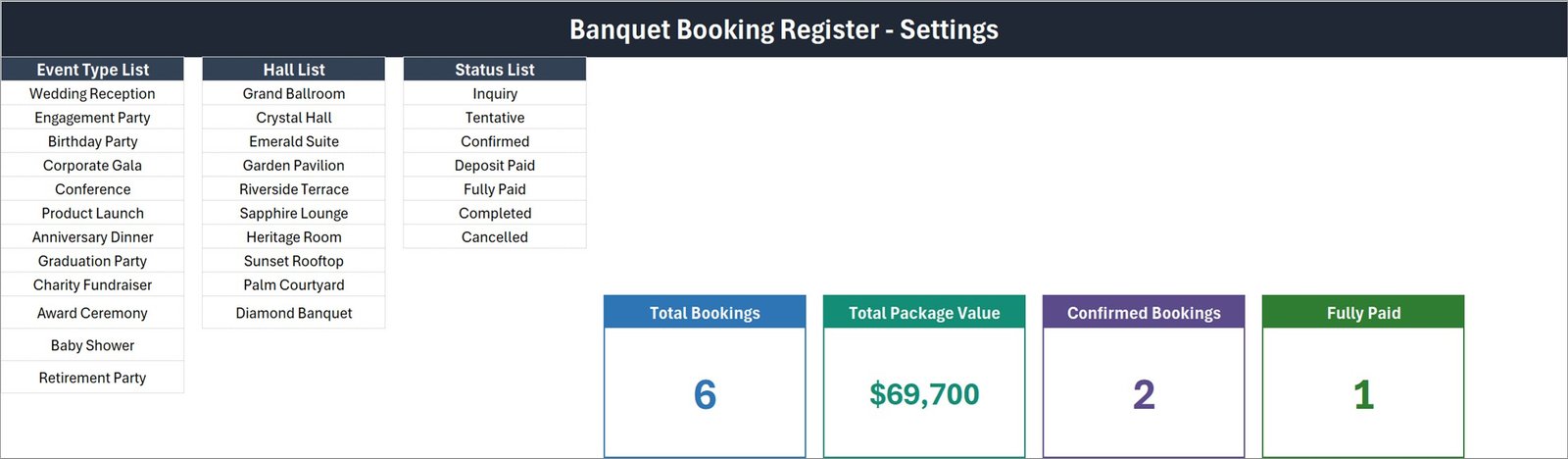
- Three dropdown lists. Event Type (12), Hall (10) and Status (7) are all edited on the Setting sheet.
Sheets Explanation
Sheet 1: Data Entry
The working sheet holds the four cards, the form, the buttons and the records table with S.No., Record ID, Client Name, Event Type, Event Date, Hall, Guests, Package Amount, Status and Entry TimeStamp. Six sample bookings are included – from a 220-guest Wedding Reception in the Grand Ballroom at $18,500.00 to a 75-guest Birthday Party in the Emerald Suite at $3,850.00.
Sheet 2: Setting
The Event Type List runs from Wedding Reception, Engagement Party and Corporate Gala to Baby Shower and Retirement Party. The Hall List holds Grand Ballroom, Crystal Hall, Emerald Suite, Garden Pavilion, Riverside Terrace, Sapphire Lounge, Heritage Room, Sunset Rooftop, Palm Courtyard and Diamond Banquet. The Status List is Inquiry, Tentative, Confirmed, Deposit Paid, Fully Paid, Completed and Cancelled. The four real stat cards live here too, which makes this a banquet hall booking template you can rename to your own venue in minutes.
Sheet 3: Instructions
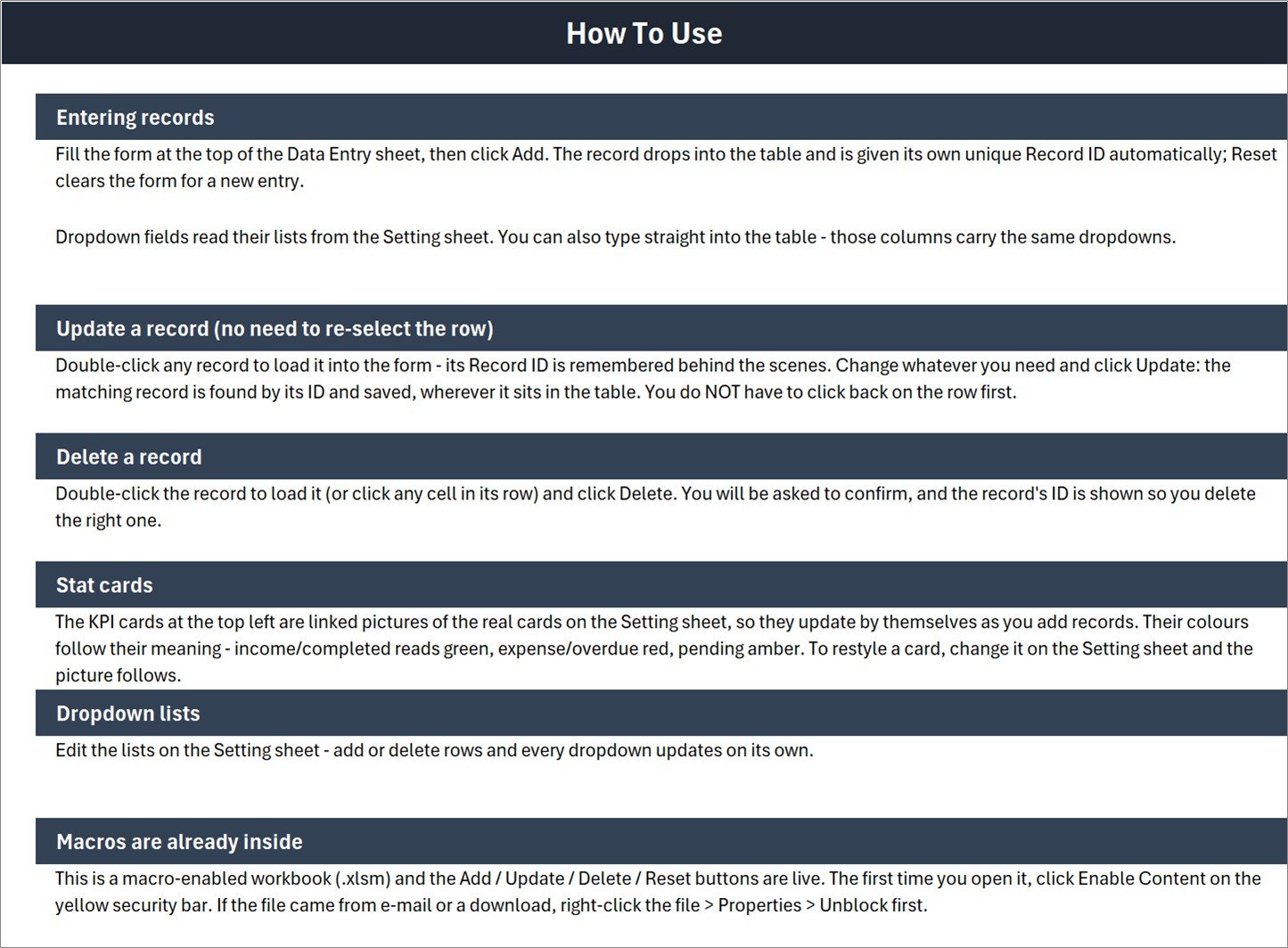
The tab is named Instructions and its banner reads “How To Use”. Six short sections explain entering, updating and deleting records, how the stat cards work, how to edit the dropdown lists and how to enable macros.
Sheet 4: Get More Templates
A short page of links to the NextGenTemplates store sections.
Banquet Booking Register workbook vs. Google Sheets vs. Venue Booking Software – Feature Comparison
| Feature | Banquet Booking Register workbook | Google Sheets equivalent | Venue booking software (Tripleseat / Perfect Venue) |
|---|---|---|---|
| Cost | One-time payment | One-time template price | Monthly subscription |
| Platform | Desktop Excel for Windows (.xlsm) | Browser, any OS | Browser and apps |
| Setup time | Minutes – edit three lists | Minutes | Days of onboarding |
| Works offline | Yes | Limited | No |
| Real-time team collaboration | No | Yes | Yes |
| Mobile access | No | Yes | Yes |
| Customizable fields | Full VBA and formula access | Yes | Within vendor limits |
| Double-booking warning | No | Depends on template | Yes |
| Online payments and deposits | No | No | Yes |
For a small venue that wants a clean booking log without a monthly software bill, the Banquet Booking Register workbook sits in the sweet spot.
Who Should Use This Template
Perfect for:
- Owners of a single banquet hall or a venue with a handful of halls
- Hotel sales and events coordinators who want an event booking data entry form on their own PC
- Event planners who need a simple, searchable record of client bookings and package amounts
Not a fit if:
- You need online booking, deposits or card payments collected for you
- You need automatic double-booking prevention or a calendar view
- Several people must edit the file at the same time, or you work on a Mac, Excel on the web or Google Sheets
Real-World Use Cases
Ravi runs a wedding venue with three halls. Every phone enquiry goes in as Inquiry. When the couple pays a deposit he double-clicks the row, changes Status to Deposit Paid and clicks Update. On Mondays he filters Status to Tentative and calls each client.
Laura is the events coordinator at a 60-room hotel. She records conferences, corporate galas and award ceremonies with hall and guest count, then sorts the Event Date column to plan banquet staff for the month ahead.
Omar plans birthday and anniversary parties. He books several partner venues and uses the Hall list for their names, so a single register shows every event he has sold and its package value.
Advantages of the Banquet Booking Register workbook
- Consistent data. Dropdowns stop “Grand Ballroom” being typed three different ways.
- Safe edits. Update and Delete work by Record ID, so sorting the table never makes you edit the wrong booking.
- No recurring cost. One payment, no per-user fees and no internet connection needed.
- Open design. Formulas and VBA are unlocked, so you can add columns such as Deposit Amount or Contact Number.
Opportunities for Improvement
We checked the workbook’s formulas and code before writing this post. These are the limits you should know:
- Total Package Value is an unfiltered SUM. It adds every booking whatever its Status, including Inquiry, Tentative and Cancelled. In the sample data, $24,000.00 of the $69,700 total is one Tentative booking. A SUMIFS on the Status column would give confirmed revenue.
- Only 2 of 7 statuses have a card. Confirmed and Fully Paid are counted; the cards do not add up to Total Bookings.
- Total Bookings counts Client Name, not Record ID. Rows added with the Add button always have a name, but a row typed directly into the table without one is not counted.
- The lists do not auto-extend. The Instructions sheet says every dropdown updates when you add rows, but the named ranges are fixed and already full. Insert new items inside the list, or widen the range in Name Manager (Microsoft: define and use names in formulas). Table dropdowns cover rows 15 to 214.
- Light input checks. Only Client Name is required. A blank or invalid Event Date is saved as today’s date without a warning.
- No clash check. Two bookings for the same hall on the same date are accepted.
Best Practices
- Enable macros once and save the file in a trusted folder (Microsoft guide to enabling macros).
- Replace the sample halls and event types before your first real booking.
- Before confirming a date, sort by Event Date and Hall to check for a clash.
- Always fill Event Date, so the booking is not saved with today’s date.
- Keep a weekly backup copy of the .xlsm. To learn more about the macros behind the buttons, see the Excel VBA reference on Microsoft Learn.
Explore Relevant Templates
If you like this form-and-table design, the Catering Order Book Data Entry System in Excel and the Hotel Booking Agent Data Entry System in Excel use the same approach. For charts instead of a register, read about the Event Management Dashboard in Excel, and see the Hospitality & Restaurant Bundle for seven Excel + VBA templates.
- Banquet Hall Tracker in Google Sheets – a browser-based banquet tracker with charts, no macros.
- Banquet Hall Management System Web App – a multi-user Apps Script system for larger venues.
- Event Planning Management System Web App – for planners running many events and vendors.
Frequently Asked Questions
What does the Banquet Booking Register workbook record?
For every booking it records Client Name, Event Type, Event Date, Hall, Guests, Package Amount and Status, plus an automatic BBR Record ID and entry timestamp. Four cards show Total Bookings, Total Package Value, Confirmed Bookings and Fully Paid.
How to track banquet bookings in Excel with this template?
Fill the seven-field form and click Add. To change a booking, double-click it, edit the form and click Update. Filter the Status column to see Inquiry or Tentative bookings, and sort Event Date to see what is coming up.
Does it prevent double bookings?
No. The Banquet Booking Register workbook does not compare hall and date, so a clash is saved without a warning. Sort by Event Date and Hall before confirming a new booking.
How long does setup take?
About ten minutes: enable macros, type your halls and event types on the Setting sheet, delete the six sample bookings and start adding your own.
How does it compare to Tripleseat or Perfect Venue?
Those tools add online enquiries, contracts, payments and calendars for a monthly fee. The Banquet Booking Register workbook is a one-time purchase that only keeps an offline booking register.
Can I use it on a Mac or in Google Sheets?
No. It is a macro-enabled .xlsm and the buttons need desktop Excel for Windows. For a browser option, see the Banquet Hall Tracker in Google Sheets.
About the Author
Built by PK – Microsoft Certified Professional with 15+ years of Excel, Google Sheets and Power BI experience. Founder of NextGenTemplates, reaching 300K+ subscribers across YouTube channels. Every template is hand-built and tested before release.
Conclusion
If your venue needs a clean, offline record of who booked which hall, when, for how many guests and at what price, the Banquet Booking Register Data Entry System in Excel does that job with a form, three dropdown lists and four cards. Read the limits above, then make it your own.
Click here to Purchase the Banquet Booking Register Data Entry System in Excel
Instant download · One-time payment · No subscription
Watch more tutorials: Youtube.com/@PK-AnExcelExpert
Last updated: September 2026