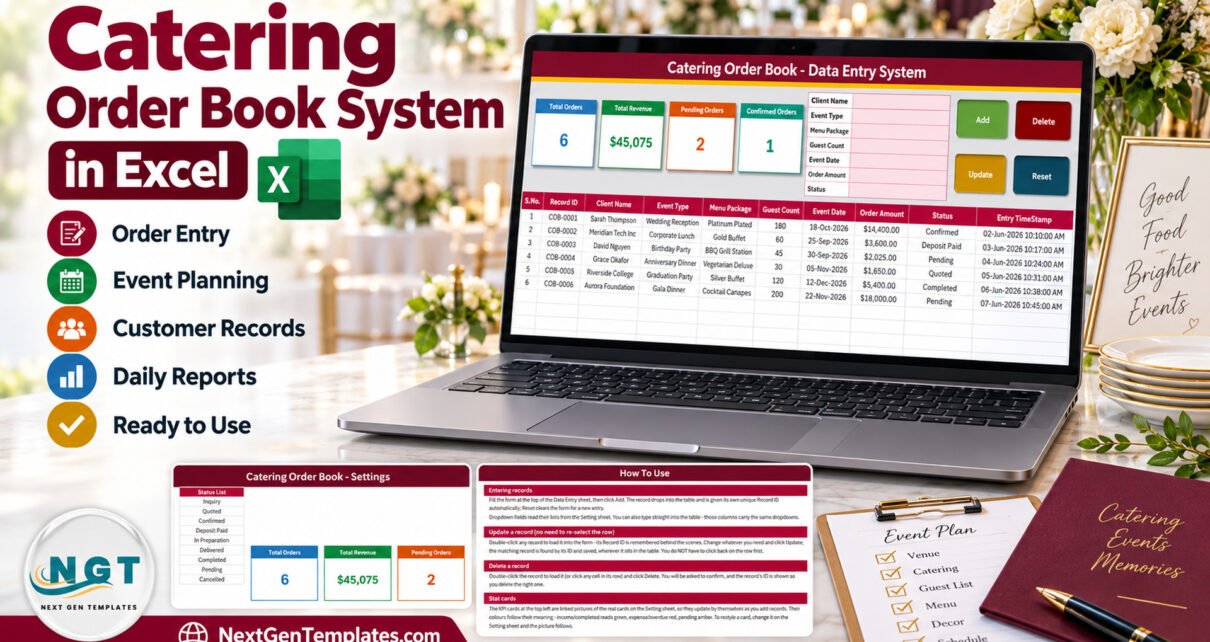
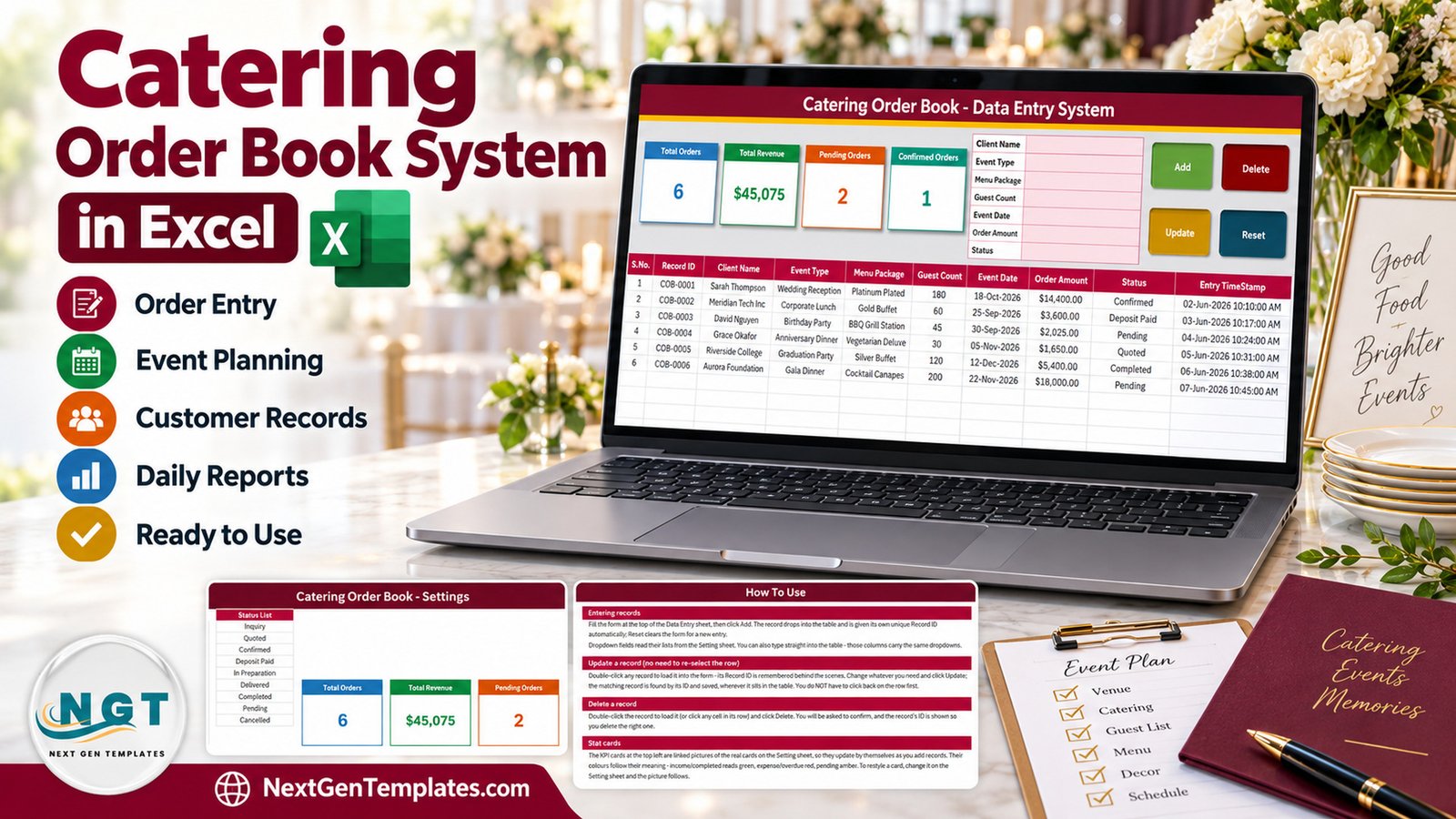
The Catering Order Book Data Entry System in Excel turns a paper order diary into a 4-sheet, macro-enabled workbook: a 7-field entry form, 4 VBA buttons, 4 live stat cards, a 10-column order table and 3 dropdown lists with 31 ready values. Six fictional sample orders worth $45,075 are loaded so every button can be tested on day one.
Small caterers take bookings by phone, message and email, and the details end up scattered. This catering order book keeps every order in one table – who booked, what kind of event, which menu package, how many guests, the date, the amount and the current status – and shows the headline numbers without a single formula to write.
What the Catering Order Book Data Entry System in Excel Does
It is an order register for a catering business. Each order gets its own row, its own Record ID in the COB-0001 series and an Entry TimeStamp. The form sits at the top of the Data Entry sheet next to the stat cards, so you can enter an order and see the totals change on the same screen.
It is deliberately narrow. It does not plan events, cost menus, raise invoices or record payments. If you need a simple, reliable list of booked events, it is enough; if you need a full catering system, see the related templates further down.
Key Features
- Seven-field form: Client Name, Event Type, Menu Package, Guest Count, Event Date, Order Amount and Status.
- Add, Update, Delete and Reset buttons driven by VBA that ships inside the .xlsm file.
- Double-click editing: double-click any order and it loads back into the form; Update finds it again by Record ID even after the table is sorted.
- Delete with confirmation that shows the Record ID, so you remove the right order.
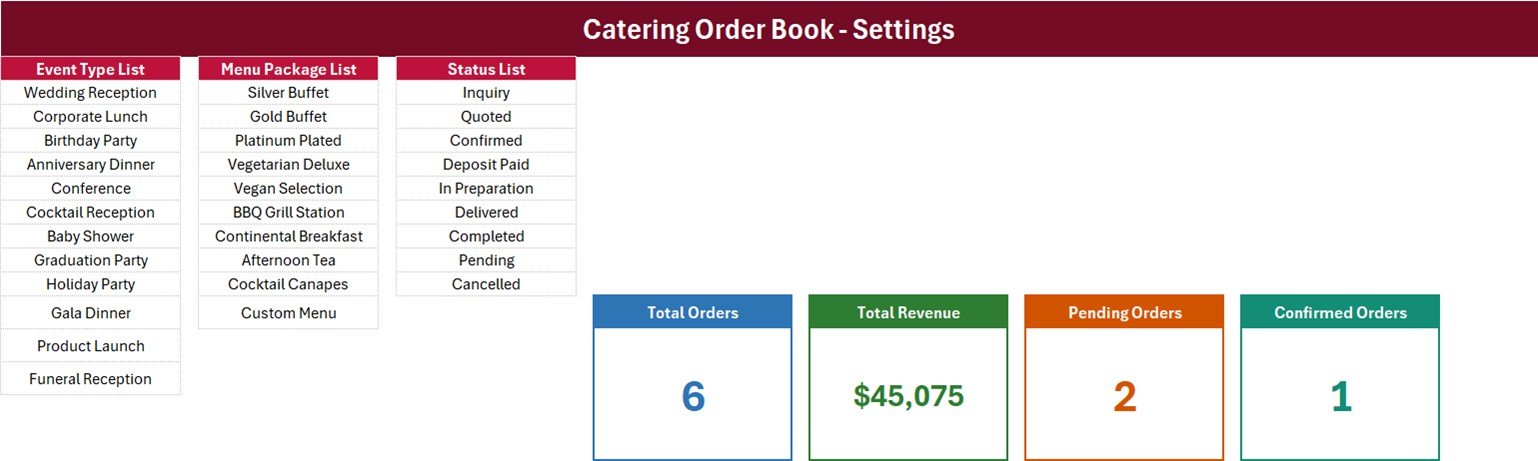
- Three editable dropdown lists: 12 event types, 10 menu packages and 9 statuses, used by the form and by the table columns.
- Four stat cards: Total Orders, Total Revenue, Pending Orders and Confirmed Orders, recalculating as orders change.
- Fully unlocked: no password on any sheet, list, formula or macro.
Sheets Explanation
Data Entry sheet
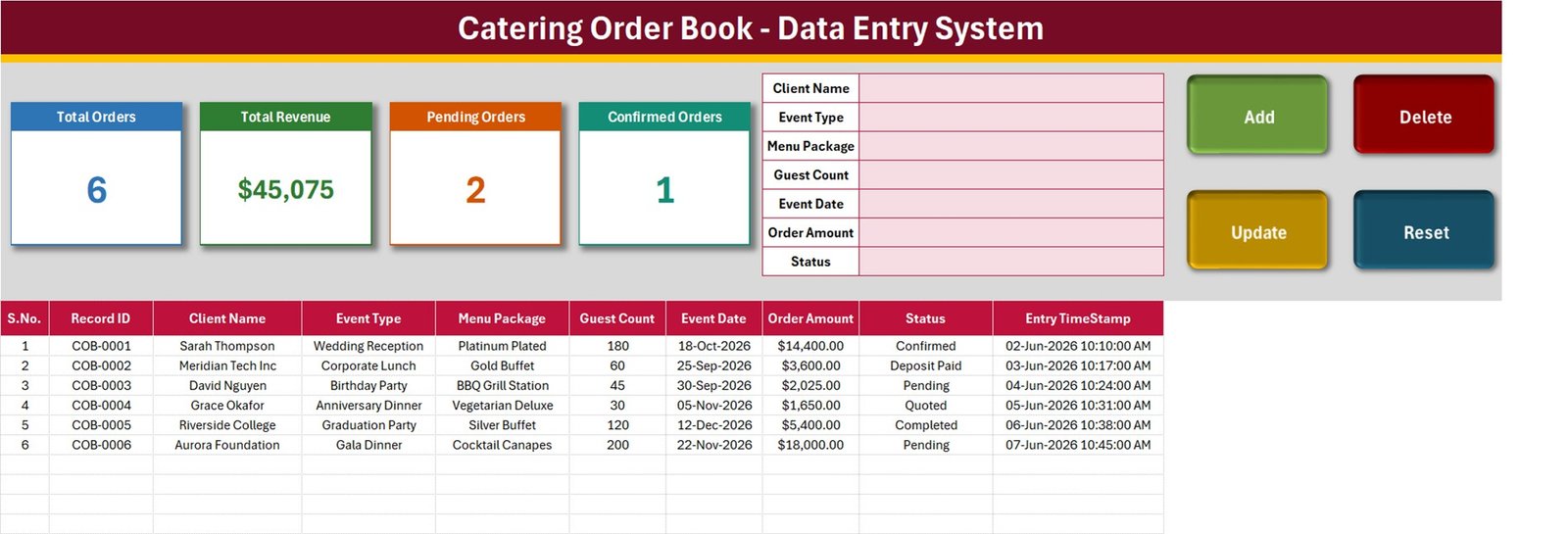
The working screen holds the four stat cards, the seven-field form, the four buttons and the order table with S.No., Record ID, Client Name, Event Type, Menu Package, Guest Count, Event Date, Order Amount, Status and Entry TimeStamp. The six samples run from a 180-guest Wedding Reception on Platinum Plated to a 200-guest Gala Dinner on Cocktail Canapes, and the cards read 6, $45,075, 2 and 1.
Setting sheet
This sheet stores the lists behind every dropdown and the real card formulas. Event types run from Wedding Reception and Corporate Lunch to Product Launch and Funeral Reception; menu packages from Silver Buffet to Custom Menu; statuses from Inquiry and Quoted through Confirmed, Deposit Paid, In Preparation and Delivered to Completed, plus Pending and Cancelled.
How To Use sheet
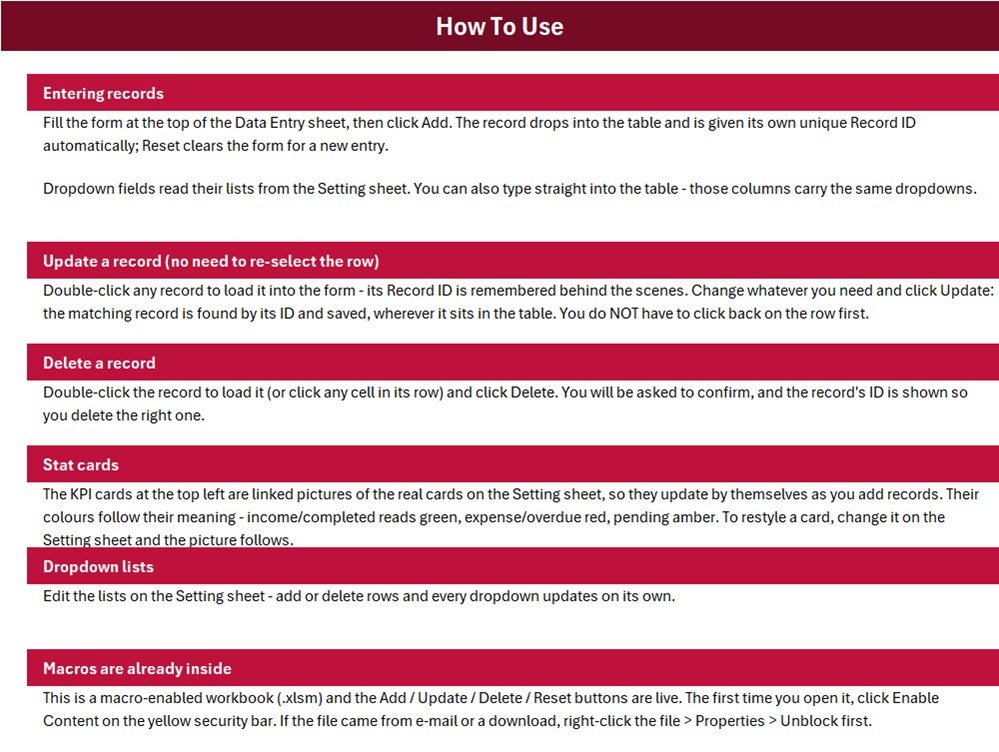
A short guide to entering orders, updating without re-selecting the row, deleting, the stat cards, editing the lists and enabling macros. A fourth sheet, Get More Templates, links to the NextGenTemplates store.
What the Four Stat Cards Count
- Total Orders =
COUNTA('Data Entry'!$C$15:$C$1048576), a count of rows with a Client Name. - Total Revenue =
SUM('Data Entry'!$H$15:$H$1048576), every Order Amount regardless of status. On the samples it includes $20,025 of Pending and $1,650 of Quoted orders; Confirmed, Deposit Paid and Completed orders total $23,400. - Pending Orders =
COUNTIF(...,"Pending"). - Confirmed Orders =
COUNTIF(...,"Confirmed"), so a Deposit Paid order is not counted.
Only two of the nine statuses have a count card. To total firm orders only, put this in a spare Setting cell: =SUM(SUMIFS('Data Entry'!$H$15:$H$1048576,'Data Entry'!$I$15:$I$1048576,{"Confirmed","Deposit Paid","In Preparation","Delivered","Completed"})).
Excel Order Book vs. Google Sheets Log vs. Catering Software – Feature Comparison
| Feature | Catering Order Book (Excel) | Home-made Google Sheets log | Catering management software |
|---|---|---|---|
| Cost | $6.99 one-time | Free, built by you | Monthly subscription |
| Platform | Excel for Windows desktop | Any browser | Vendor app or browser |
| Setup time | About 10 minutes | Hours | Days of onboarding |
| Entry form with Add / Update / Delete | Yes, VBA | No | Yes |
| Real-time team collaboration | No | Yes | Yes |
| Mobile access | No | Yes | Usually |
| Customizable lists | Fully unlocked | Yes | Vendor settings only |
| Quotes, invoices, payments | No | No | Usually |
| Year-1 cost at 5 users | One-time purchase | Free | Subscription x 12 |
For a small caterer who wants an organised order book without a subscription, this workbook sits in the sweet spot.
Who Should Use This Template
Perfect for:
- Home caterers and small catering companies
- Restaurants, cafes and bakeries that take outside catering orders
- Owners who want pending and confirmed orders visible at a glance
Not a fit if:
- You need venues, timelines, vendor lists or guest RSVPs
- You need quotes, invoices, deposit tracking, menu costing or several people editing at once
- You work on a Mac, in Excel for the web or in Google Sheets
Real-World Use Cases
Amara runs a two-person catering kitchen. Every inquiry goes into the form the day it arrives. She moves orders from Quoted to Deposit Paid as clients commit, and filters Event Date each Monday to see which weekends are full.
Daniel’s restaurant caters corporate lunches. At month-end he filters by Menu Package to compare Gold Buffet with Platinum Plated orders and drops packages nobody books.
A neighbourhood bakery uses Guest Count to plan production before it confirms an event order.
Advantages
- One purchase at $6.99, no monthly fee and no per-user charge.
- Every order is in one sortable, filterable Excel table you own.
- Record IDs keep orders identifiable after sorting, filtering or editing.
- Lists and cards are editable, so the workbook adapts to your menu and your process.
Opportunities for Improvement
- Total Revenue has no status filter, so it includes inquiries, quotes and cancelled orders.
- Only Pending and Confirmed are carded out of nine statuses.
- Order Amount and Guest Count are typed; there is no price-per-guest, deposit or balance field.
- The named ranges are fixed and already full (Event Type A3:A14, Menu Package C3:C12, Status E3:E11), although the How To Use page says the dropdowns update on their own. Insert new values inside a list, or widen the range in Name Manager.
- In-table dropdowns stop at row 214.
- A blank or invalid Event Date is saved as today, Update rewrites the Entry TimeStamp, and deleting the newest order lets the next one reuse its Record ID.
Best Practices
- Rewrite the three lists before entering real orders, inserting rows inside each list.
- Always fill Event Date so the order is not dated today by default.
- Add a SUMIFS cell for firm orders if you use the revenue figure for planning.
- Keep a dated backup copy each month, especially before deleting orders.
Client Data and Macros
The sample clients are fictional. The workbook stores client names but no phone, email or address fields, and it has no password or access log, so keep the file on a secured PC and handle client names under the privacy rules that apply to you. Macros must be enabled; Microsoft explains how in Enable or disable macros in Microsoft 365 files, and files downloaded from the internet may need unblocking as described in Macros from the internet are blocked by default.
Explore Relevant Templates
- Restaurant Order Data Entry System in Excel – the same form-and-cards build for dine-in and takeaway orders.
- Tiffin Subscription Data Entry System in Excel – for meal subscription services.
- Hotel Room Booking Data Entry System in Excel – a booking register for hospitality.
- Bar Stock Register Data Entry System in Excel – stock records for bars and pubs.
- Catering Business Management System Web App – a multi-user option for growing caterers.
Frequently Asked Questions
What does the Catering Order Book Data Entry System in Excel record?
Client Name, Event Type, Menu Package, Guest Count, Event Date, Order Amount and Status for each order, plus an automatic Record ID and Entry TimeStamp. Four cards show Total Orders, Total Revenue, Pending Orders and Confirmed Orders.
How long does setup take?
About ten minutes: enable macros, rewrite the three lists on the Setting sheet, delete the six sample orders and start adding orders through the form.
Do I need to know VBA?
No. The macros are already inside the workbook and wired to the buttons. You only need to click Enable Content when you first open the file.
Why is Total Revenue higher than the money I have received?
The card sums every Order Amount whatever the status, including inquiries, quotes and cancelled orders, and the workbook has no payment columns. Use the SUMIFS formula above for firm orders.
Can it plan events or cost menus?
No. There are no venue, vendor, timeline, ingredient or cost fields. It is an order book that records what has been booked and its status.
How does it compare to catering software?
Catering software adds quotes, invoices, payments and multi-user access for a monthly fee. This workbook is a one-time $6.99 order book for a single Windows PC.
About the Author
Built by PK – Microsoft Certified Professional with 15+ years of Excel, Google Sheets and Power BI experience. Founder of NextGenTemplates, reaching 300K+ subscribers across YouTube channels. Every template is hand-built and tested before release.
Conclusion
If your catering orders live in a notebook or a chat thread, this workbook gives them one home: a form, a table with Record IDs, and cards that show booked value and pending work at a glance. Read the stat-card notes above once, and it will serve a small catering business well.
Click here to Purchase the Catering Order Book Data Entry System in Excel
Instant download · One-time payment · No subscription
Last updated: September 2026
Video tutorials: Youtube.com/@PKAnExcelExpert