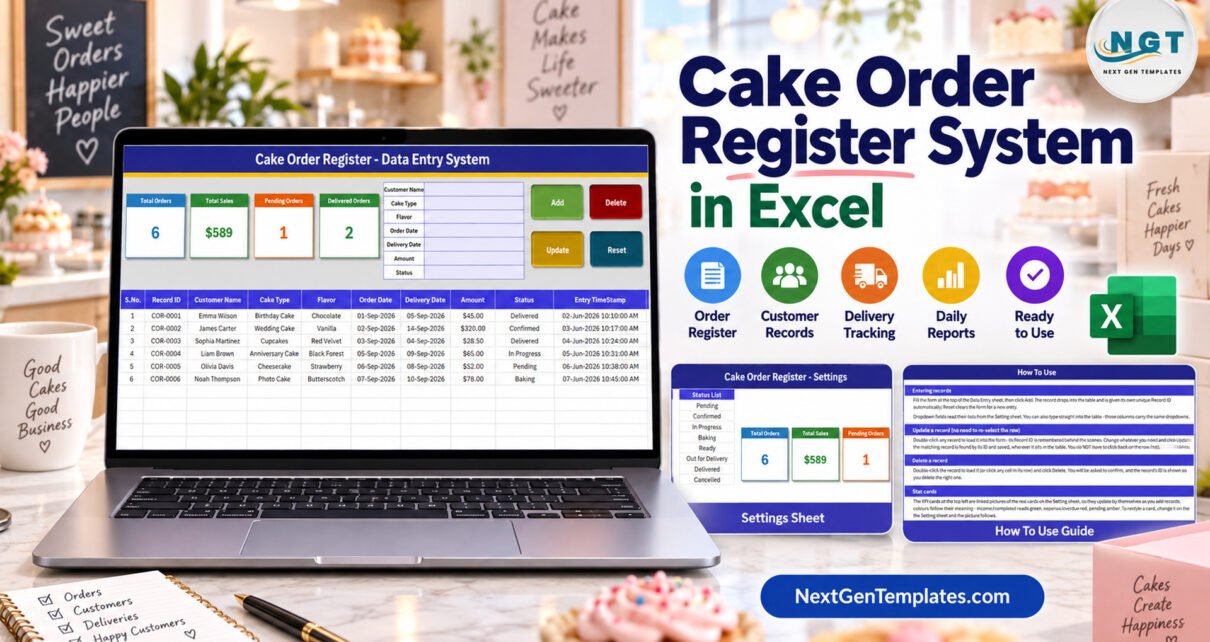
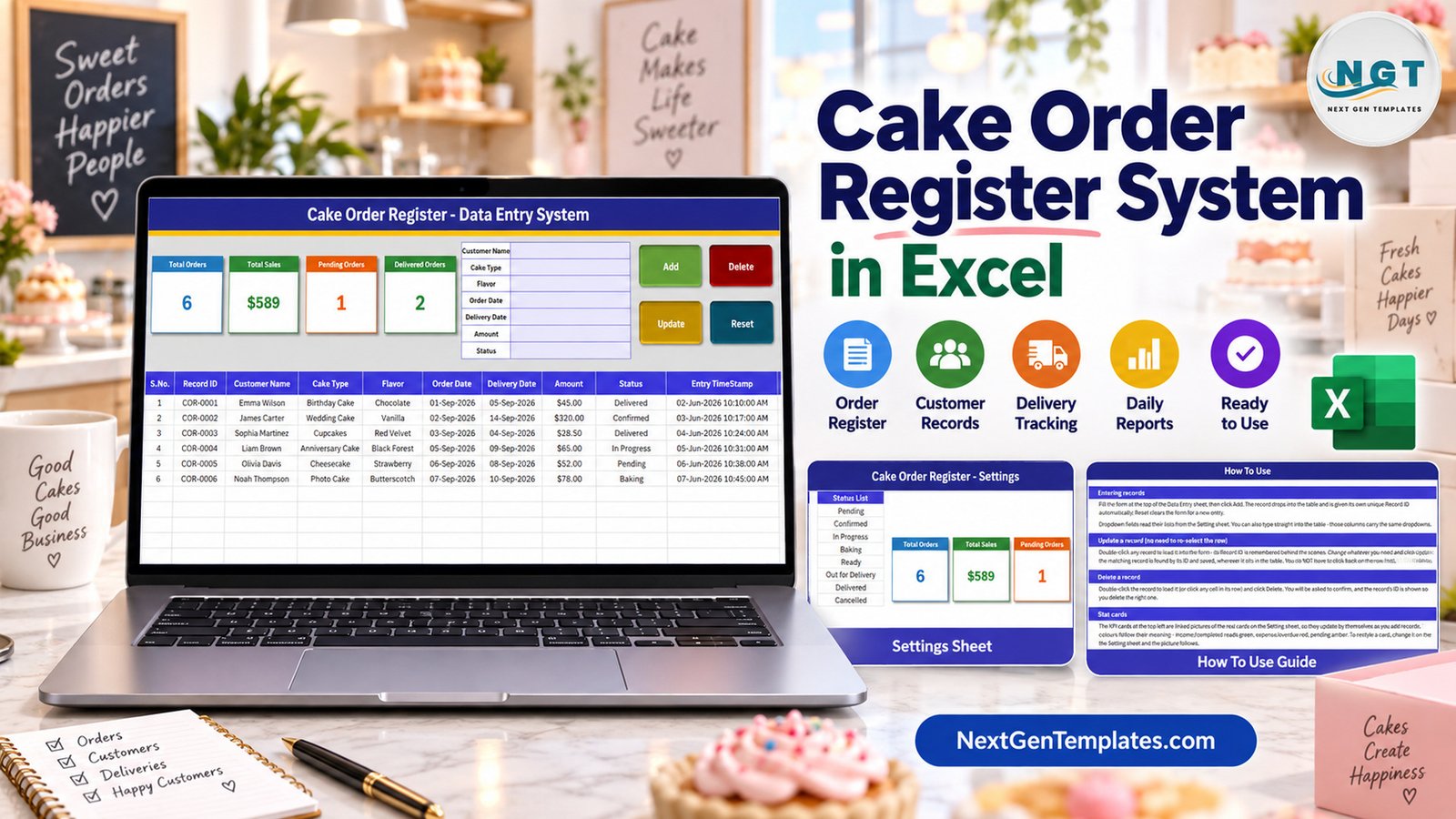
The Cake Order Register Data Entry System in Excel is a macro-enabled workbook with a 7-field order form, 4 VBA buttons, 4 live stat cards and 3 dropdown lists holding 30 values – 10 cake types, 12 flavors and 8 order statuses. Every saved order gets an automatic Record ID in the COR-0001 series and an Entry TimeStamp, and the records table has formatted, dropdown-ready rows for 200 orders.
Plenty of home bakers and small cake shops still keep custom orders in a spiral notebook by the oven. It works until someone asks how many orders are booked for the weekend, or which ones were already delivered, and the answer means flicking through pages. This walkthrough covers every sheet, exactly what each stat card counts, and the limits worth knowing before you set it up for your own bakery.
What the Cake Order Register in Excel Does
It is an .xlsm workbook with four sheets. You type an order into a form, click Add, and the order drops into a records table with its Record ID and timestamp. There is nothing to install, nothing to sign into and no subscription. Four cards beside the form recount themselves as orders are added, updated or deleted.
It is deliberately small, so here is a plain explanation of the scope: this is a record of orders you have taken. It does not take payments or deposits, it does not schedule baking or deliveries, it does not send reminders, and it has no field for allergens or dietary notes. The six sample customers, orders and figures are fictional.
Key Features
- Seven-field form: Customer Name, Cake Type, Flavor, Order Date, Delivery Date, Amount and Status.
- Four VBA buttons: Add, Update, Delete (with a confirmation that shows the Record ID) and Reset.
- Eight order statuses: Pending, Confirmed, In Progress, Baking, Ready, Out for Delivery, Delivered and Cancelled.
- Double-click to edit: the row loads into the form and the macro remembers its ID, so Update finds it wherever it sits.
- Dropdowns in two places: on the form and on table rows 15-214, all reading the Setting sheet.
- Linked-picture stat cards: the cards on Data Entry are pictures of formula cards on Setting, so restyling one restyles both.
- Unlocked: no sheet protection and no VBA password.
Sheets Explanation
Data Entry sheet
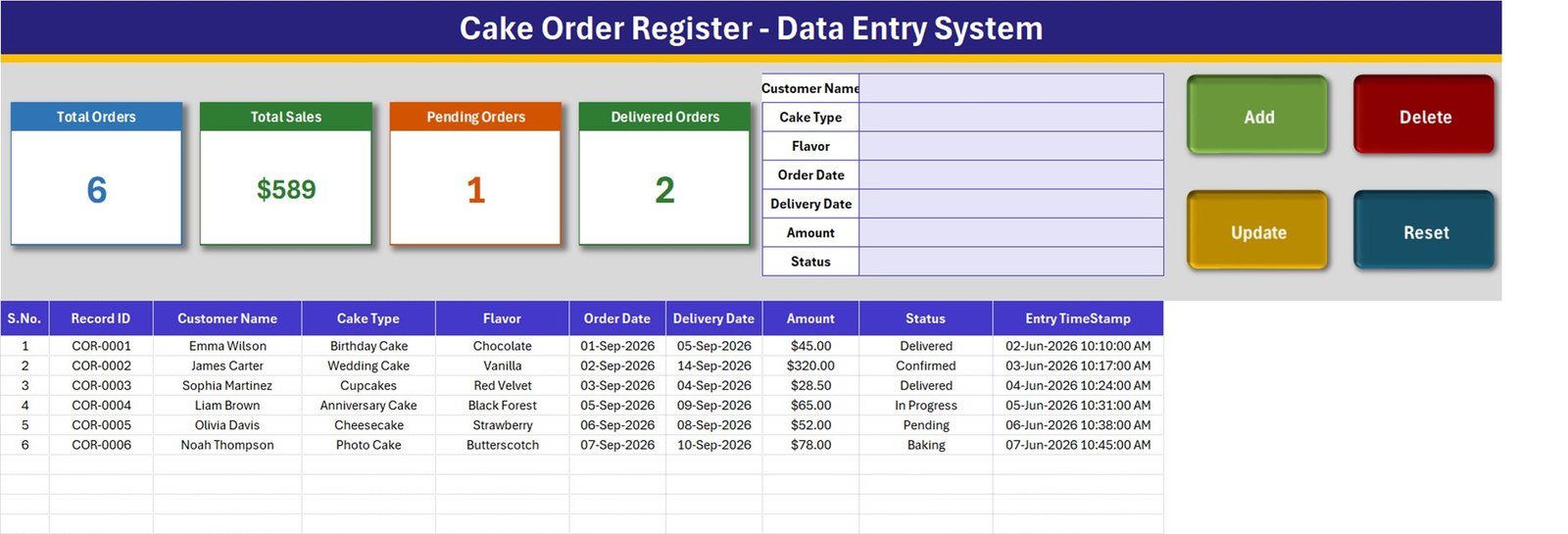
The form, the four buttons and the four stat cards sit across the top. Below them the table holds S.No., Record ID, Customer Name, Cake Type, Flavor, Order Date, Delivery Date, Amount, Status and Entry TimeStamp. With the samples loaded the cards read 6 orders, $589 total sales, 1 pending order and 2 delivered orders.
Setting sheet
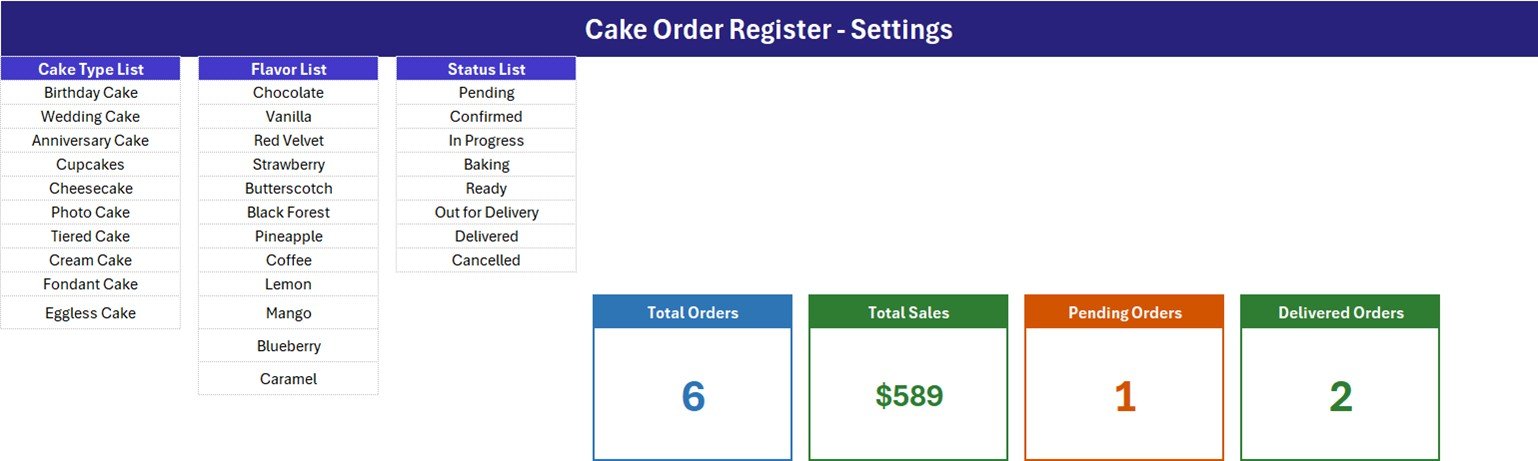
Three lists drive every dropdown: Cake Type List (Birthday Cake, Wedding Cake, Anniversary Cake, Cupcakes, Cheesecake, Photo Cake, Tiered Cake, Cream Cake, Fondant Cake, Eggless Cake), Flavor List (Chocolate, Vanilla, Red Velvet, Strawberry, Butterscotch, Black Forest, Pineapple, Coffee, Lemon, Mango, Blueberry, Caramel) and Status List (Pending, Confirmed, In Progress, Baking, Ready, Out for Delivery, Delivered, Cancelled). The four formula cards live here too.
How To Use sheet
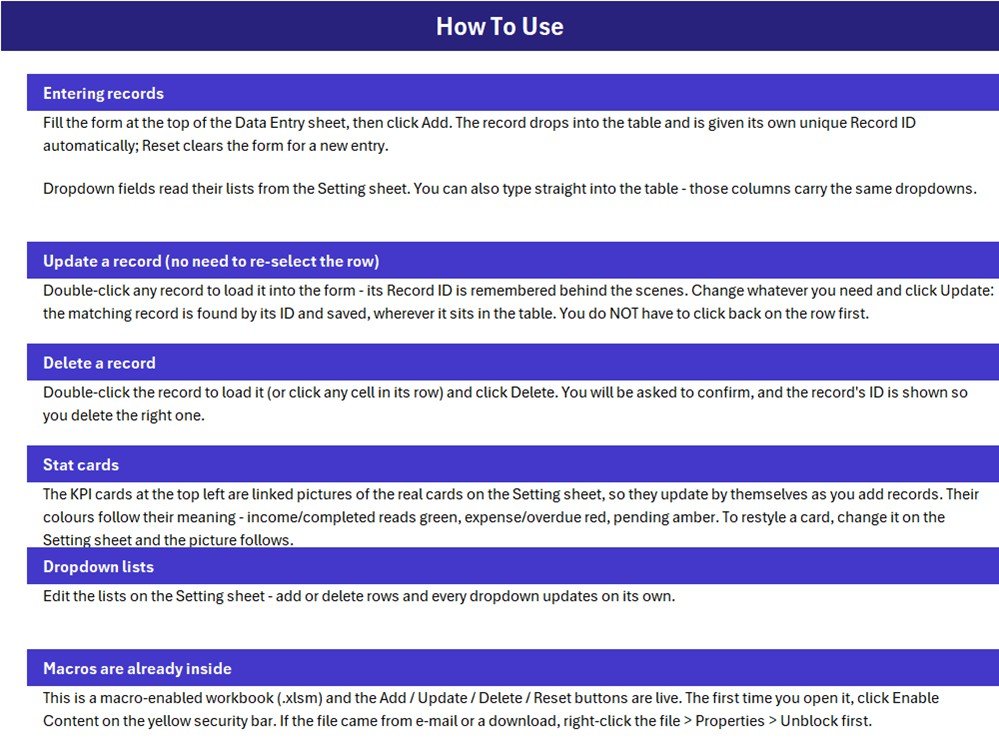
Short instructions for entering, updating and deleting records, how the stat cards update, how to edit the lists and how to enable the macros on first open.
What the Four Stat Cards Count
These are the real formulas on the Setting sheet, read from the workbook itself:
| Card | Formula | What it means |
|---|---|---|
| Total Orders | COUNTA('Data Entry'!$C$15:$C$1048576) | Counts the Customer Name column. Add refuses a blank Customer Name, so this matches the orders added through the form. |
| Total Sales | SUM('Data Entry'!$H$15:$H$1048576) | Every Amount whatever the Status – Pending, Confirmed, Baking and Cancelled included. |
| Pending Orders | COUNTIF('Data Entry'!$I$15:$I$1048576,"Pending") | Orders whose status is exactly Pending. |
| Delivered Orders | COUNTIF('Data Entry'!$I$15:$I$1048576,"Delivered") | Orders whose status is exactly Delivered. |
Total Sales is booked, not delivered or collected. The samples total $588.50 (the card shows $589), but only $73.50 comes from the two Delivered orders; the $320 confirmed wedding cake, the $78 photo cake still baking, the $65 anniversary cake in progress and the $52 pending cheesecake make up the rest. For delivered sales only, replace Setting!I13 with this SUMIFS formula:
=SUMIFS('Data Entry'!$H$15:$H$1048576,'Data Entry'!$I$15:$I$1048576,"Delivered")Pending plus Delivered will not equal the order count. Only two of the eight statuses have a card, so on the samples 1 + 2 falls short of 6. Add =COUNTIF('Data Entry'!$I$15:$I$1048576,"Ready") as a fifth card if you want to see cakes waiting for pickup. A Cancelled order also stays inside Total Sales until you delete it or switch to a status-filtered formula.
Amount is typed. There are no size, weight, tier, quantity, add-on, deposit or tax fields, and the macro copies the Amount box straight into column H. Price the cake first, then log the final figure.
The lists do not grow on their own. How To Use says every dropdown updates when you add rows, but the named ranges are fixed – Cake_TypeList is Setting!$A$3:$A$12, FlavorList $C$3:$C$14, StatusList $E$3:$E$10 – and all three are full. Insert a row inside a list to add a value, or redefine the name as =OFFSET(Setting!$A$3,0,0,COUNTA(Setting!$A$3:$A$100),1).
How the Buttons Behave – Details From the Macro
- Add only insists on Customer Name. A blank or unreadable Order Date or Delivery Date is saved as today’s date, and nothing checks that delivery comes after the order – so always type both dates.
- Record IDs are the highest existing number plus one. Deleting an older order never causes a repeat, but if you delete the newest order, the next order you add reuses its Record ID.
- Update rewrites every field, including the Entry TimeStamp, so the timestamp shows when an order was last saved rather than first taken.
- Delete removes the whole worksheet row, so the formatted, dropdown-ready block (rows 15-214) shortens by one row each time.
Excel Workbook vs. Paper Order Book vs. Bakery Order Software – Feature Comparison
| Feature | Cake Order Register workbook (Excel) | Paper order book | Bakery order management software |
|---|---|---|---|
| Cost | $6.99 one-time (regular $11.99) | Cheap, nothing adds up for you | Recurring monthly subscription |
| Platform | Excel for Windows desktop | Pen and paper | Vendor app or browser |
| Setup time | About 10 minutes | None | Days of onboarding |
| Entry form with Add / Update / Delete | Yes, VBA | No | Yes |
| Filter by delivery date, cake type or status | Yes | No | Yes |
| Online ordering, deposits, reminders, production schedule | No | No | Usually |
| Real-time team collaboration and mobile access | No | No | Yes |
| Customizable lists and fields | Fully unlocked | Yes | Vendor settings only |
| Year-1 cost at 5 users | One purchase per user, no renewal | Notebooks | Subscription x 12 months |
For a home baker or small cake shop that takes orders by phone or over the counter and wants a searchable list of them, this workbook sits in the sweet spot.
Who Should Use This Template
Perfect for:
- Home bakers and small cake shops logging custom birthday, wedding and anniversary orders
- Bakery counters that want pending and delivered orders at a glance
- Owners comfortable in Excel who want a file they fully control
Not a fit if:
- You need online ordering, deposit or payment tracking, customer reminders, a baking schedule, recipe costing or stock levels
- You must record allergens, dietary requirements or food-safety checks – keep those on your order slip
- Your team works on Mac, in a browser or in Google Sheets, or needs several people editing at once
Real-World Use Cases
Anita bakes custom cakes from home. Orders arrive by phone and message, so she logs each one as Pending, switches it to Confirmed once the design is agreed, and filters the Delivery Date column every evening to see what she is baking tomorrow.
A small cake shop keeps Birthday Cake and Photo Cake at the top of the Cake Type list, moves orders through Baking, Ready and Out for Delivery during the day, and checks the Delivered Orders card at closing.
A wedding cake studio adds a Confirmed card and switches Total Sales to the Delivered-only formula, so the top of the sheet separates booked work from completed work.
Advantages
- One purchase, no subscription and no per-user fee.
- Ten minutes from download to the first real order.
- Update and Delete work by Record ID, so sorting or filtering the table does not break them.
- Everything is visible and editable – formulas, lists and macro.
Opportunities for Improvement
- Deposit Paid and Balance columns, so unpaid orders are visible.
- A delivered-only sales card, and cards for Confirmed, Baking, Ready and Cancelled.
- A “due today” or “due this week” card driven by the Delivery Date.
- Self-extending dropdown lists to match what How To Use promises.
- Date validation that refuses a blank date or a delivery date before the order date, and Record IDs that are never reused.
- Keeping the first Entry TimeStamp on Update, perhaps with a separate Last Updated column.
Best Practices
- Always add orders through the form so every row gets a Record ID; rows typed straight into the table cannot be loaded back with a double-click.
- Rewrite the Cake Type and Flavor lists to match your menu before you enter real orders, inserting rows inside each block.
- Amounts are formatted in US dollars – change the number format on column H and the Total Sales card for your own currency.
- Keep a dated backup copy on a secured PC, because the file holds customer names, and avoid adding phone numbers or addresses you do not need.
Macros and Compatibility
Macros must be enabled and Windows desktop Excel is required. On first open click Enable Content; Microsoft’s guide to enabling macros in Microsoft 365 files covers the security bar, and its note on macros from the internet being blocked explains the Unblock checkbox.
Explore Relevant Templates
If you like this format, the Bakery Sales Register Data Entry System in Excel applies the same form-and-cards build to counter sales, and the Online Order Tracker Data Entry System in Excel does the same for online shop orders. For charts on top of your bakery numbers, read the Bakery Business Dashboard in Excel walkthrough, and the Birthday Reminder Data Entry System in Excel pairs well with a birthday cake business.
In the store, the Bakery KPI Dashboard in Excel suits bakeries that have outgrown a simple register, and the Bakery POS Web App is the option if you need billing at the counter.
Frequently Asked Questions
What does the Cake Order Register Data Entry System in Excel record?
One row per order: Customer Name, Cake Type, Flavor, Order Date, Delivery Date, Amount and Status, plus an automatic Record ID and Entry TimeStamp. Four cards show total orders, total sales, pending orders and delivered orders.
Can it track deposits or payments?
No. There is one Amount field and no deposit, paid or balance column, so it cannot show who still owes money. You can add a column yourself because the file is unlocked.
How long does setup take?
About ten minutes. Enable macros, replace the sample cake types and flavors on the Setting sheet, delete the six sample rows and start adding orders. Nothing needs installing.
Do I need to know VBA?
No. The Add, Update, Delete and Reset buttons are already wired. VBA only matters if you want to change what a button writes, such as adding a Deposit field.
Why is Total Sales higher than the cakes I have delivered?
The card adds every Amount whatever the Status. On the samples it shows $589 against $73.50 from Delivered orders. Swap in the SUMIFS formula above to count Delivered orders only.
How does it compare to bakery order software?
Order software handles online ordering, deposits, reminders and production planning for a monthly fee. This is a one-time $6.99 Excel file that records who ordered which cake, for when, for how much and where the order stands.
About the Author
Built by PK – Microsoft Certified Professional with 15+ years of Excel, Google Sheets and Power BI experience. Founder of NextGenTemplates, reaching 300K+ subscribers across YouTube channels. Every template is hand-built and tested before release.
Conclusion
This workbook turns a cake order notebook into a table you can sort and filter, with four numbers on top that keep themselves current. Know what those numbers count – booked rather than delivered sales, a typed Amount and two statuses out of eight – and always type both dates, and it will not surprise you.
Click here to Purchase the Cake Order Register Data Entry System in Excel – $11.99, currently $6.99.
✅ Instant download · One-time payment · No subscription
Last updated: September 2026
Watch more Excel tutorials at Youtube.com/@PKAnExcelExpert