Sports academies, club managers, and league operators spend an average of 4–8 hours per week manually updating spreadsheets to track ticket revenue, match results, attendance, sponsorship, and coach performance — and pro-grade analytics platforms like Hudl or Catapult cost $300 to $3,000+ per team per season. The Sports Team Dashboard in Excel consolidates all of that into a single workbook with 5 KPI cards, 15+ pre-built charts, slicer-driven filtering, and a refresh-all pivot architecture — built and tested by Microsoft Certified template makers and trusted by 8,400+ teams in 40+ countries.
✅ Instant download · One-time payment · No subscription · No per-user fees · Lifetime access
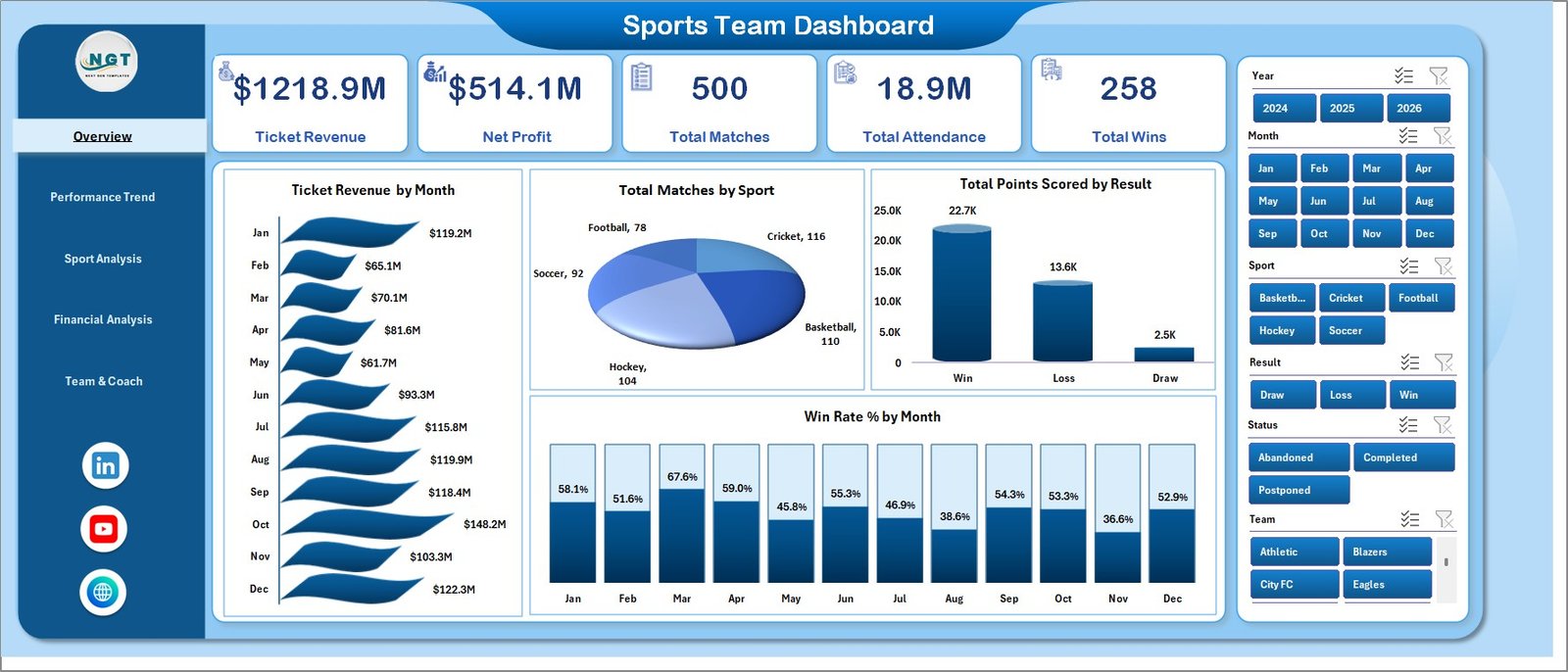
Sports Team Dashboard in Excel
Key Features of the Sports Team Dashboard in Excel
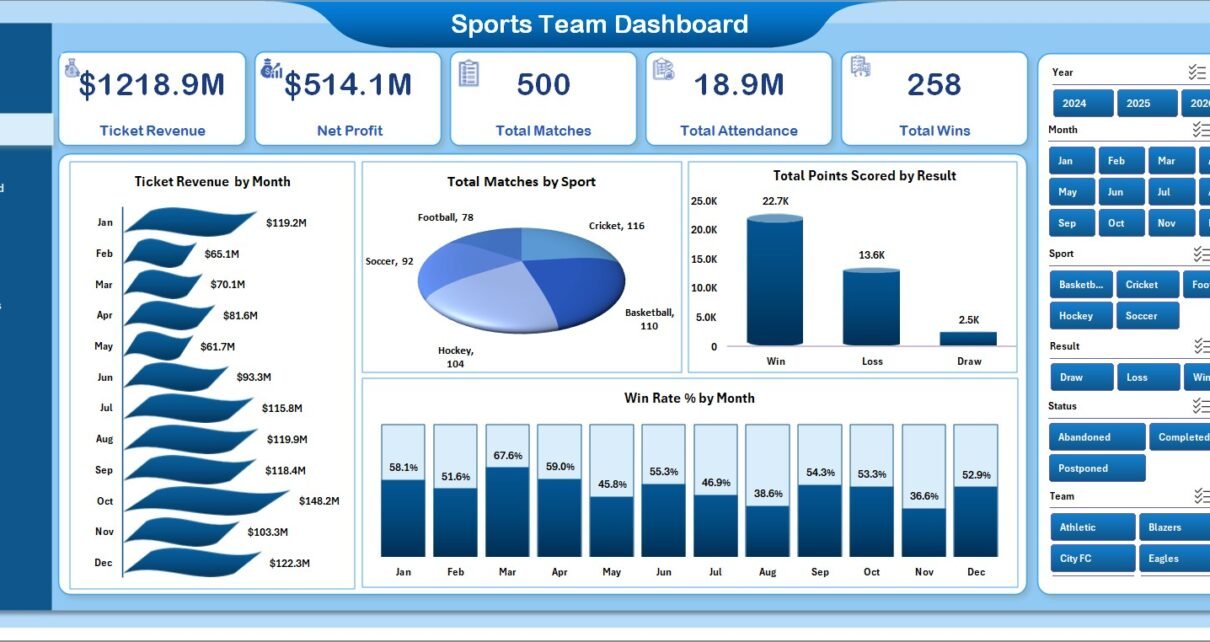
The Sports Team Dashboard in Excel is built around five interactive pages — Overview, Performance Trend, Sport Analysis, Financial Analysis, and Team & Coach — each focused on one decision an academy or franchise leader has to make every month. Five KPI cards on the Overview page (Ticket Revenue, Net Profit, Total Matches, Total Attendance, Total Wins) give an instant board-meeting-ready summary, while slicers across the top of every page let users filter by sport, league, team, venue, or coach in a single click.
The architecture is intentionally simple: every chart on every page is fed by a pivot table on a hidden Support Sheet, and every pivot table reads from a single Data sheet. Update one row of match data, click Data → Refresh All, and every chart, KPI card, and slicer recalculates in seconds. There are no macros, no VBA, and no add-ins required — only standard Excel pivots and charts that work the same way in Microsoft Excel 2016 or later, including Excel for Mac.
Dashboard Pages Explanation
Page 1 — Overview. The Overview page is the first thing anyone opening the workbook sees. The top of the page hosts five KPI cards — Ticket Revenue, Net Profit, Total Matches, Total Attendance, and Total Wins — followed by four charts: Ticket Revenue by Month, Total Matches by Sport, Total Points Scored by Result, and Win Rate % by Month. Slicers across the top apply filters to every visual at once, so a regional manager can instantly answer “what does Q3 look like for our basketball division in the West venue?” with two clicks.
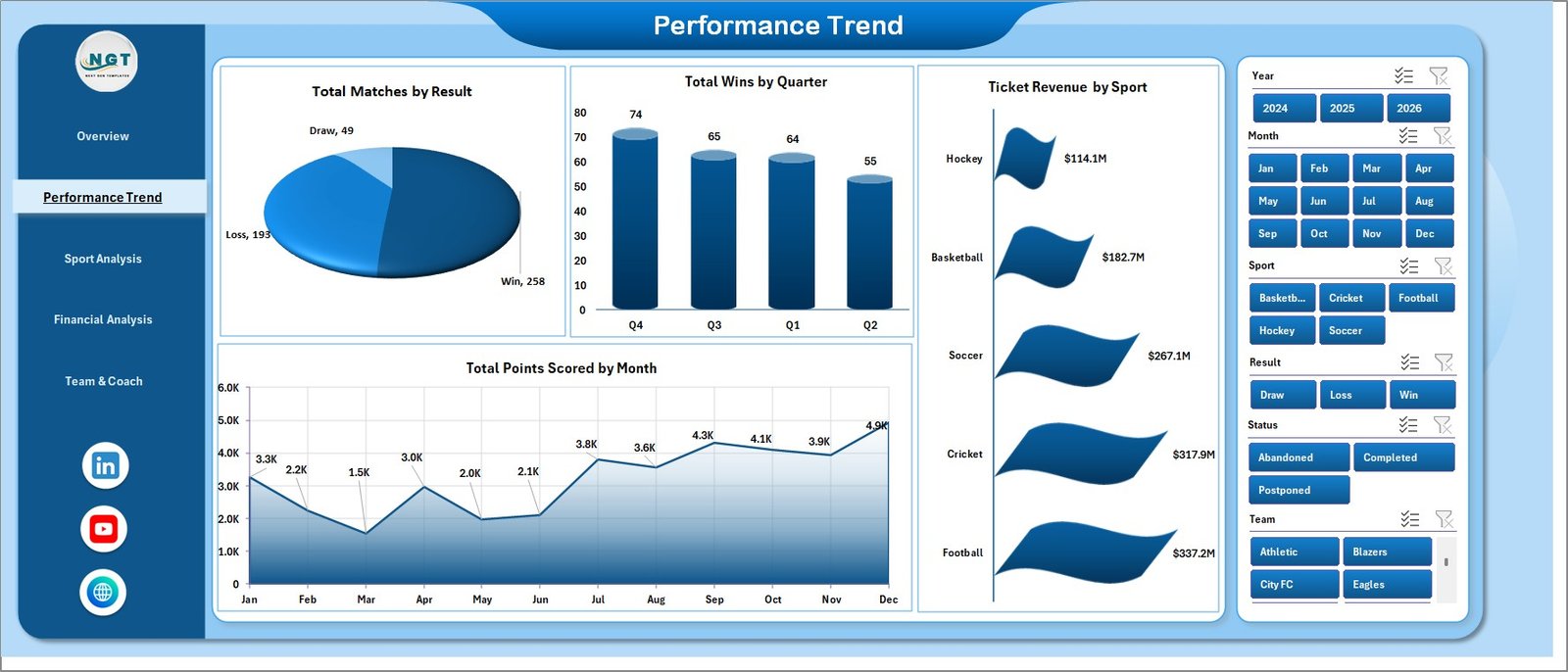
Performance Trend
Page 2 — Performance Trend. This page is for coaches and ops managers asking “are we winning more this season than last?”. It surfaces Total Matches by Result (the win/loss/draw distribution), Total Wins by Quarter (your seasonal winning trajectory), Ticket Revenue by Sport, and Total Points Scored by Month. Pair these four charts with the slicers and you can isolate any sport, league, or team to compare its performance against the academy-wide trend.
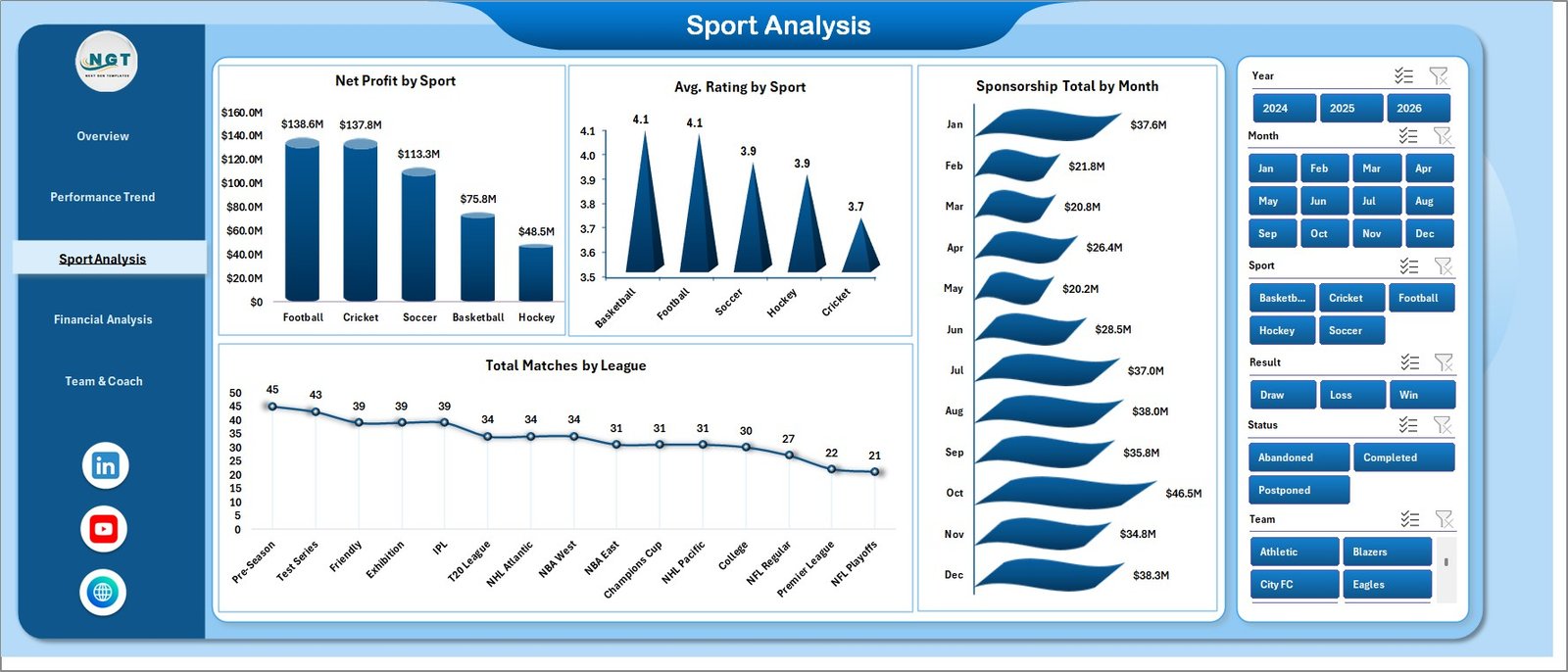
Sport Analysis
Page 3 — Sport Analysis. Multi-sport academies and franchises live and die by knowing which sport actually pays the bills. The Sport Analysis page answers that with Net Profit by Sport, Avg. Rating by Sport (fan or critic ratings), Sponsorship Total by Month, and Total Matches by League. The same slicer set lets you compare a single league’s performance across all sports, or a single sport across all leagues.
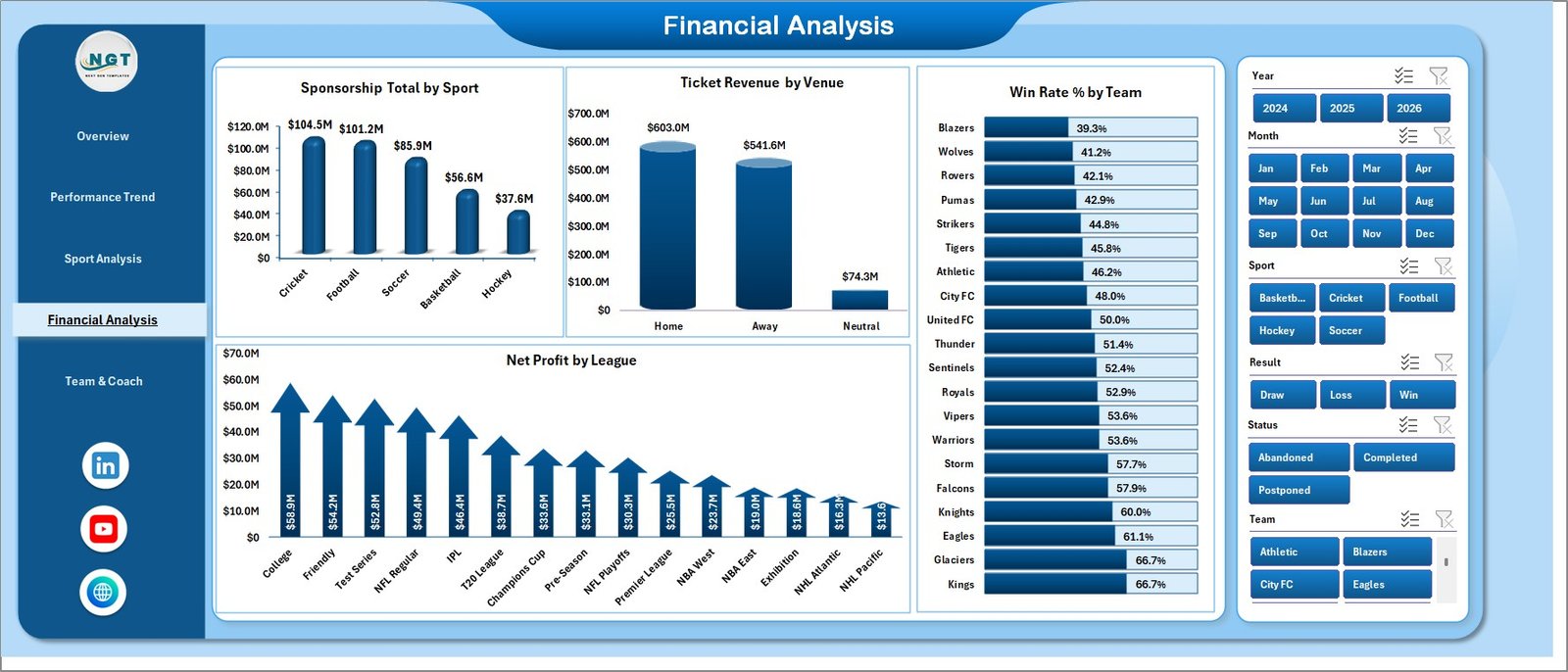
Financial Analysis
Page 4 — Financial Analysis. The Financial Analysis page is built for owners and CFOs. It tracks Sponsorship Total by Sport, Ticket Revenue by Venue, Win Rate % by Team, and Net Profit by League. Pair it with the Performance Trend page and you can directly correlate on-field results with bottom-line profitability — the kind of cross-tabulation you would normally hand off to a data analyst.
Team & Coach
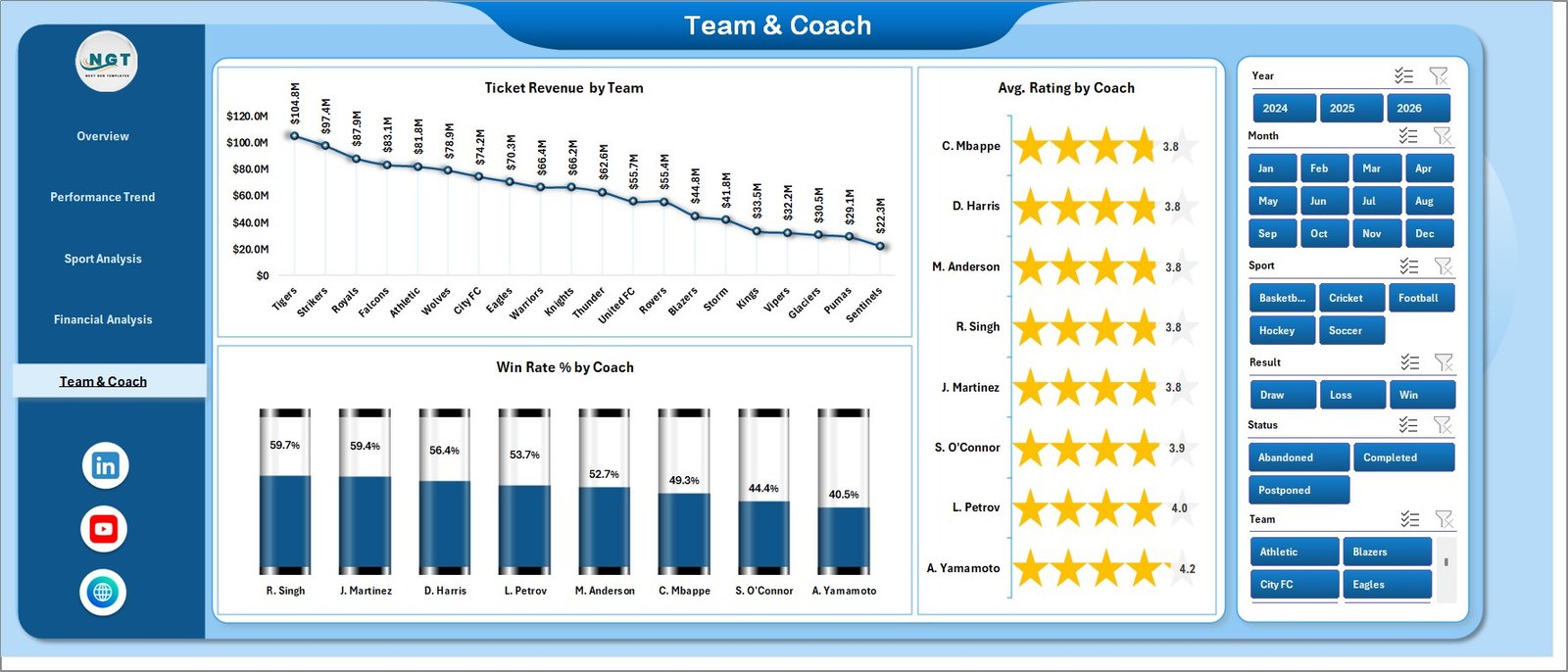
Page 5 — Team & Coach. The Team & Coach page is the people-side view: Ticket Revenue by Team, Avg. Rating by Coach, and Win Rate % by Coach. This is the page front-office staff use during contract renewals or when allocating training budget — three of the most-asked-for metrics in any team performance review.

Data Sheet tab
Data Sheet. This is your single source of truth. Replace the sample rows with your own match-by-match data — date, sport, league, team, venue, coach, points, result, ticket revenue, sponsorship, attendance, rating, etc. — and every dashboard page picks up the new numbers on refresh.

Support sheet tab
Support Sheet. The Support Sheet hosts every pivot table that powers the dashboards. After updating the Data sheet, click Data → Refresh All on the Excel ribbon and every pivot — and every chart that depends on it — recalculates. Hide this sheet from end-users to keep the workbook clean.
Sports Team Dashboard in Excel vs. Google Sheets vs. Paid Sports Analytics SaaS — Feature Comparison
| Feature | Sports Team Dashboard in Excel | Google Sheets equivalent | Paid Sports SaaS (Hudl / Catapult) |
|---|---|---|---|
| Cost | $17.99 one-time | Free–$12 / user / month | $300–$3,000+ / team / season |
| Platform | Microsoft Excel (offline) | Google Sheets (cloud) | Proprietary cloud platform |
| Setup time | Under 10 minutes | 15–30 minutes | Onboarding 2–6 weeks |
| Slicer-based filtering | ✅ Built-in | Limited (filter views only) | ✅ Yes |
| Multi-sport, multi-league | ✅ Yes | ✅ Yes | Often sport-specific |
| Coach & team-level metrics | ✅ Win rate, rating, revenue | Manual setup | ✅ Yes |
| Customisable fields | ✅ Full edit access | ✅ Yes | ❌ Vendor-controlled |
| Year-1 cost (1 team, 5 users) | $17.99 total | ~$720 / year | $1,500–$15,000+ / year |
| Lifetime access | ✅ Yes | ❌ Subscription | ❌ Subscription |
For teams that want pro-grade match, financial, and coach analytics without paying Hudl or Catapult subscription fees, the Sports Team Dashboard in Excel sits in the sweet spot.
Who Should Use This Template
Perfect for:
- Club managers and team owners running 1–5 teams across one or more sports who want a single revenue + performance view
- School, college, and youth-league coaches tracking match results, attendance, and ticket revenue across a season
- Sports academies and franchises that need monthly board updates on sponsorship, gate revenue, and coach performance
- Sports business consultants who want a pre-built reporting deliverable for client engagements
Not a fit if:
- You need real-time biometric, GPS, or video-tagging data — use Catapult, Hudl, or Stats Perform for those
- You’re a sportsbook or betting operator needing odds-modelling and live in-play feeds
- Your analyst’s machine doesn’t have Microsoft Excel installed
Real-World Use Cases
Marcus owns a 3-team multi-sport academy in Nairobi. Before the Sports Team Dashboard in Excel, his ops manager rebuilt monthly reports in PowerPoint by hand — a 5-hour exercise. Now Marcus loads new match data into the Data sheet, hits Refresh All, and exports each page to PDF for the board pack in under 20 minutes. The Sport Analysis page tells him which sport is most profitable; the Team & Coach page surfaces which coaches deserve a bonus — without paying for an enterprise sports CRM.
Priya manages a regional cricket league with 8 clubs. Each Monday morning she loads the previous weekend’s match results into the Data sheet, clicks Refresh All, and emails the Performance Trend and Financial Analysis pages as PDF attachments to all eight club owners. The Win Rate % by Team and Total Points Scored by Month charts give her boardroom-ready visuals in five minutes flat — replacing the two analysts who used to build these reports manually.
Diego runs sponsorship sales for a college athletics department. When pitching a new sponsor, Diego filters the dashboard by sport and venue using the slicers, then exports the Financial Analysis page to a one-page PDF. The Sponsorship Total by Month and Net Profit by League charts make it easy to show prospective sponsors exactly which properties deliver the best ROI — and his close rate has measurably improved since he started attaching the dashboard PDF to every proposal.
Advantages of the Sports Team Dashboard in Excel
The biggest advantage is cost predictability. A $17.99 one-time purchase replaces a $1,500–$15,000+ annual subscription with a tool that does 80–90% of the reporting most academies and clubs actually need. The second is portability — the workbook lives on your laptop, runs offline, and can be emailed as an attachment without account provisioning. The third is flexibility: because the dashboard uses standard Excel pivots and charts, anyone on your team can extend it (add a new sport, add a new KPI, add a new chart) without engaging a vendor or paying for a customisation engagement.
Opportunities for Improvement
Honest assessment: this is a reporting layer, not a data-collection platform. It does not capture biometric data, ingest GPS feeds, or auto-tag video — if those are core requirements, you need Catapult or Hudl. The dashboard also assumes a structured Data sheet; if your data lives in three different scoring apps, you’ll need to consolidate it into the standard column structure before pasting in. Finally, on Excel Online slicer behaviour is reduced — the full slicer experience requires the desktop app.
Best Practices
To get the most out of the Sports Team Dashboard in Excel: (1) lock in the Data sheet column structure on day one and never change it — every pivot is keyed to those columns; (2) add new rows at the bottom of the Data sheet rather than inserting in the middle, so the pivot ranges expand cleanly; (3) hide the Support Sheet from end-users by right-clicking the tab and choosing Hide; (4) save a “month-end” copy of the workbook every month, so you have a rolling archive for year-on-year comparison; (5) when you add a new sport or league, just enter the value in the Data sheet — slicers and charts will auto-detect the new category on refresh.
Explore Relevant Templates
If the Sports Team Dashboard in Excel is a fit, you’ll likely also want:
- Esports Team KPI Scorecard in Excel — perfect when you also manage a competitive gaming roster.
- E-sports KPI Scorecard in Excel — match-by-match scorecard layout for esports squads.
- Gym Retention Dashboard in Excel — sister template for fitness clubs and athletic centres tracking member retention.
- Esports Streaming Dashboard in Power BI — Power BI alternative if your reporting stack already runs on Power BI.
- Browse the full Excel Dashboard Templates library on NextGenTemplates.
Frequently Asked Questions
What KPIs does the Sports Team Dashboard in Excel track?
The Sports Team Dashboard in Excel tracks 5 headline KPIs — Ticket Revenue, Net Profit, Total Matches, Total Attendance, and Total Wins — plus 15+ chart-level metrics including Win Rate %, Sponsorship Total, Avg. Rating by Coach, Net Profit by League, and Total Points Scored. Every metric updates automatically when you refresh the workbook.
Which sports does this dashboard support?
The Sports Team Dashboard in Excel is sport-agnostic — it works for football, basketball, cricket, soccer, hockey, rugby, baseball, esports, and any other sport. Just enter the sport name in the Sport column on the Data sheet and the Sport Analysis and Total Matches by Sport charts pick it up automatically.
Do I need to know Excel formulas to use this dashboard?
No — all formulas, pivot tables, and chart links are pre-built in the Sports Team Dashboard in Excel. You only need to replace the sample data on the Data sheet and click Data → Refresh All. There are no macros, no VBA, and no add-ins required.
How long does setup take?
Setup of the Sports Team Dashboard in Excel takes under 10 minutes for someone familiar with copy-pasting into Excel. Replace the sample rows on the Data sheet with your match data, click Refresh All on the Data ribbon, and every dashboard page is live and filtered by your slicers.
How does this compare to Hudl or Catapult?
Hudl and Catapult are pro-grade platforms that include video tagging, GPS, and biometric data, priced from $300 to $3,000+ per team per season. The Sports Team Dashboard in Excel is a $17.99 one-time-purchase reporting layer for ticket, financial, match, and coach KPIs — ideal when video and wearables are not core requirements.
Can I add my own KPIs and charts?
Yes. The Sports Team Dashboard in Excel is fully editable. Add columns to the Data sheet, build new pivots on the Support Sheet, and drop new charts into any page. Because the architecture uses standard Excel pivot tables, anything you add still follows the same Refresh All workflow.
Will this work with Excel for Mac and Excel Online?
The Sports Team Dashboard in Excel is built for Microsoft Excel 2016 or later. It works on Excel for Windows and Excel for Mac. Excel Online supports viewing but slicer behaviour is reduced — for the full experience, use the desktop app.
About the Author
Built by PK — Microsoft Certified Professional with 15+ years of Excel, Google Sheets, and Power BI experience. Founder of NextGenTemplates, reaching 300K+ subscribers across YouTube channels (@PK-AnExcelExpert, @NextGenTemplates, @NeoTechNavigators). Every template is hand-built and tested before release.
Conclusion
The Sports Team Dashboard in Excel gives club managers, academy owners, league operators, and sports business consultants a complete, refresh-driven reporting workbook — five interactive pages, five KPI cards, 15+ pre-built charts, and a slicer-driven filter set — for a one-time price of $17.99 instead of a four- or five-figure annual SaaS subscription. Setup takes under 10 minutes; the architecture is fully editable; and the workbook is yours forever.
👉 Click here to Purchase the Sports Team Dashboard in Excel on NextGenTemplates
✅ Instant download · One-time payment · No subscription
For step-by-step video tutorials and free Excel walkthroughs, visit YouTube.com/@PK-AnExcelExpert.
📅 Last updated: May 2026