Managing documents sounds simple. However, in reality, it becomes complex very quickly. Teams create files daily. Departments share reports. Compliance rules demand accuracy. Meanwhile, managers expect fast access and zero errors.So, how do you measure document performance clearly?You need a Document Management KPI Scorecard in Excel.In this detailed guide, you will learn:
- What a Document Management KPI Scorecard in Excel is
- Why organizations need structured document KPIs
- Complete explanation of all worksheets
- Advantages of Document Management KPI Scorecard in Excel
- Best Practices for the Document Management KPI Scorecard
- Frequently Asked Questions with Answers
Click to buy Document Management KPI Scorecard In Excel
What Is a Document Management KPI Scorecard in Excel?
A Document Management KPI Scorecard in Excel is a ready-to-use performance tracking template that helps organizations monitor document control activities using structured KPIs.
Instead of managing scattered reports, you can track everything in one structured Excel file. Moreover, you can monitor:
- Document processing time
- Approval cycle time
- Version control accuracy
- Compliance rate
- Retrieval time
- Audit findings
- Error rates
- Digital adoption rate
- Archive efficiency
- User access compliance
As a result, managers gain clarity. Teams gain direction. Organizations gain control.
Why Do Organizations Need a Document Management KPI Scorecard?
Document management plays a key role in compliance, productivity, and quality control. However, many organizations still rely on manual tracking. Consequently, they face delays, duplication, and audit risks.
Therefore, a KPI scorecard helps you:
- Measure performance regularly
- Compare Actual vs Target results
- Track Month-to-Date (MTD) and Year-to-Date (YTD) progress
- Identify weak areas quickly
- Improve compliance and efficiency
In addition, leadership teams can make faster decisions because they see real-time insights.
Overview of Document Management KPI Scorecard in Excel Template
This ready-to-use template includes 4 structured worksheets:
- Scorecard Sheet
- KPI Trend Sheet
- Input Data Sheet
- KPI Definition Sheet
Now, let us understand each sheet in detail.
Scorecard Sheet
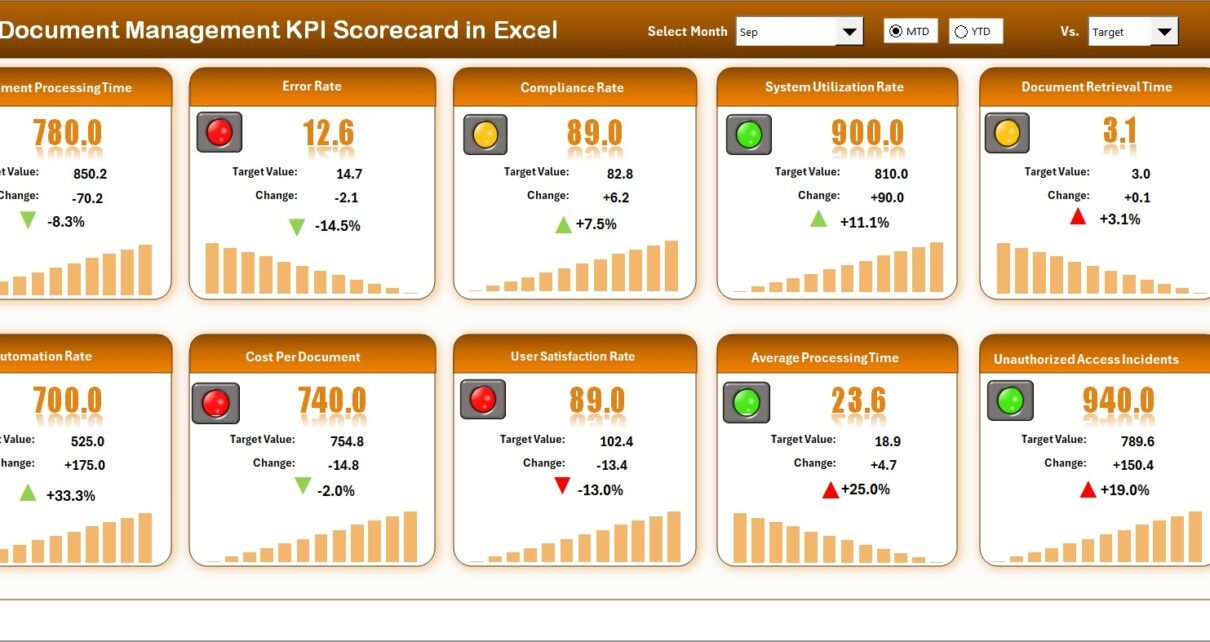
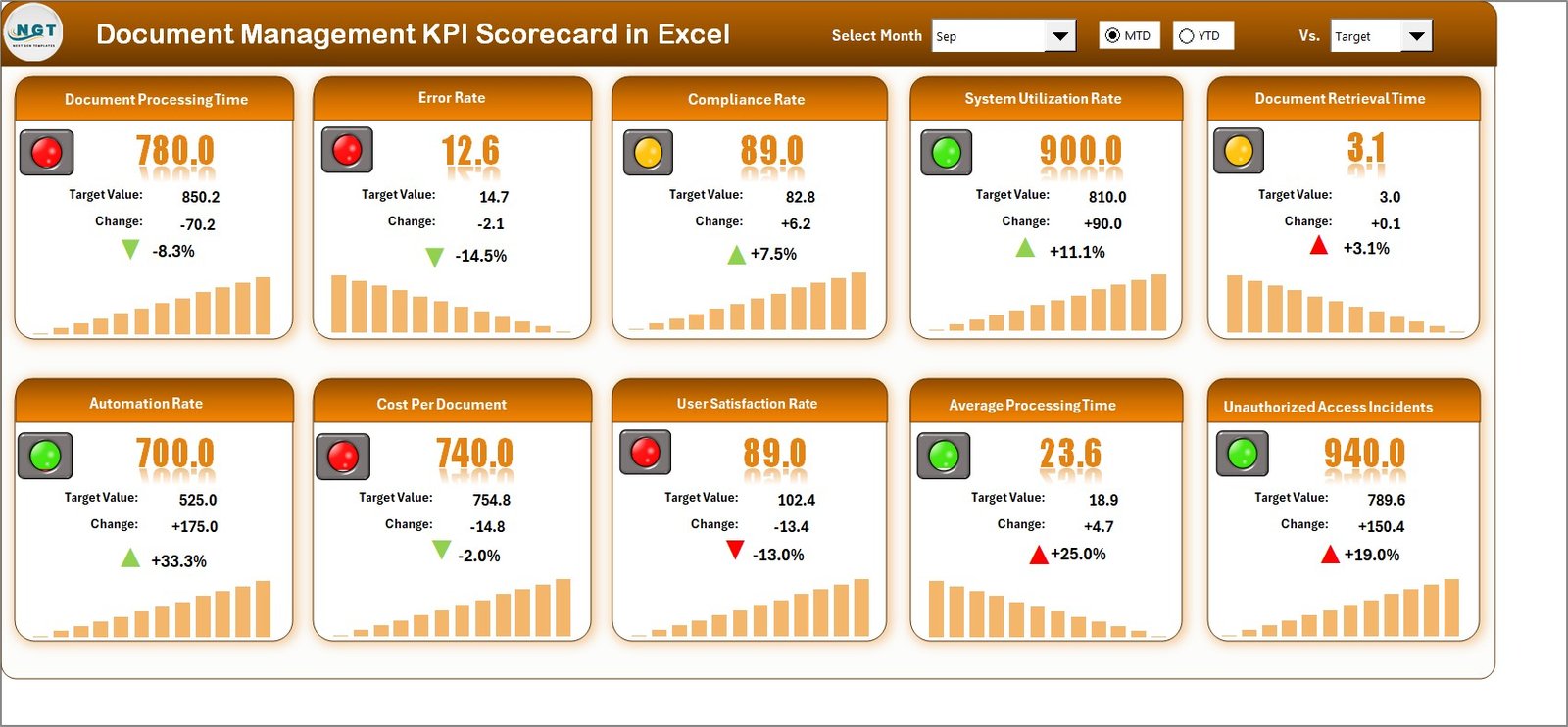
The Scorecard Sheet acts as the main interface of the entire system. It gives you a complete performance overview in one place.
Key Features of the Scorecard Sheet
Dropdown Menus for Smart Filtering
You can select:
- Month
- MTD (Month-to-Date)
- YTD (Year-to-Date)
As soon as you select a month, the entire scorecard updates automatically. Therefore, you can instantly review performance without manual recalculation.
Actual vs Target Comparison
The scorecard shows:
- MTD Actual
- MTD Target
- YTD Actual
- YTD Target
- Previous Year (PY) comparisons
Because of this comparison, you can quickly identify whether performance meets expectations.
Visual Indicators for Quick Decisions
The template uses:
- Color coding
- Conditional formatting
- Performance signals
Consequently, you do not need to analyze numbers deeply. You can immediately see which KPI meets target and which misses it.
Comprehensive KPI Overview
The scorecard displays 10 KPIs in one view. Therefore, managers get a consolidated snapshot of document management performance.
Click to buy Document Management KPI Scorecard In Excel
KPI Trend Sheet
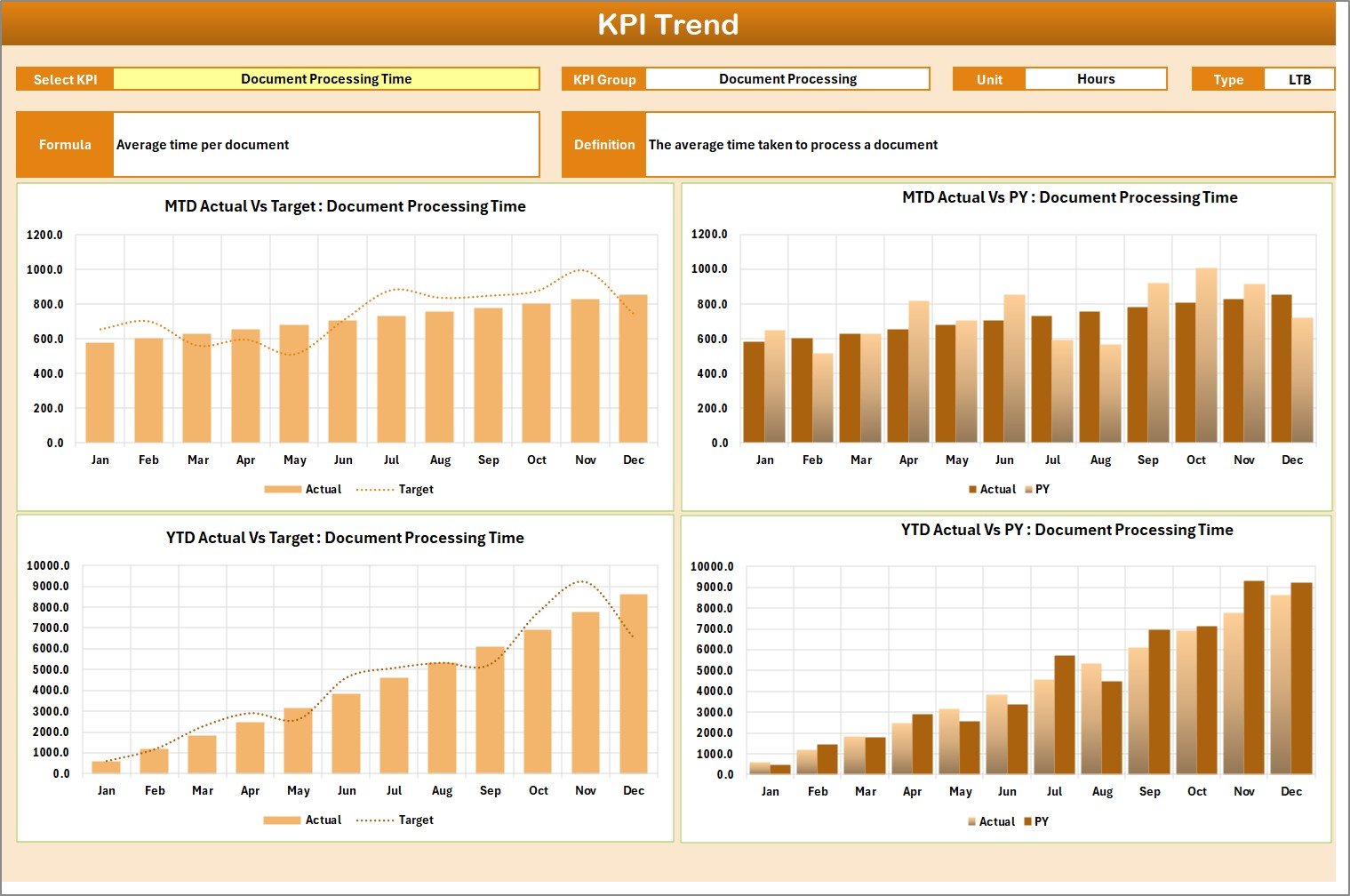
While the scorecard provides a snapshot, the KPI Trend Sheet provides deep analysis.
Features of KPI Trend Sheet
KPI Selection Dropdown (Cell C3)
You can select any KPI from the dropdown. Immediately, the sheet displays:
- KPI Group
- Unit of Measurement
- KPI Type (LTB or UTB)
- Formula
- KPI Definition
MTD & YTD Trend Charts
The sheet shows:
- Actual trend
- Target trend
- Previous Year trend
Therefore, you can analyze performance movement across months. Moreover, you can detect patterns early.
For example:
- If document approval time increases gradually, you can take corrective action.
- If compliance rate improves consistently, you can replicate best practices.
Click to buy Document Management KPI Scorecard In Excel
Input Data Sheet
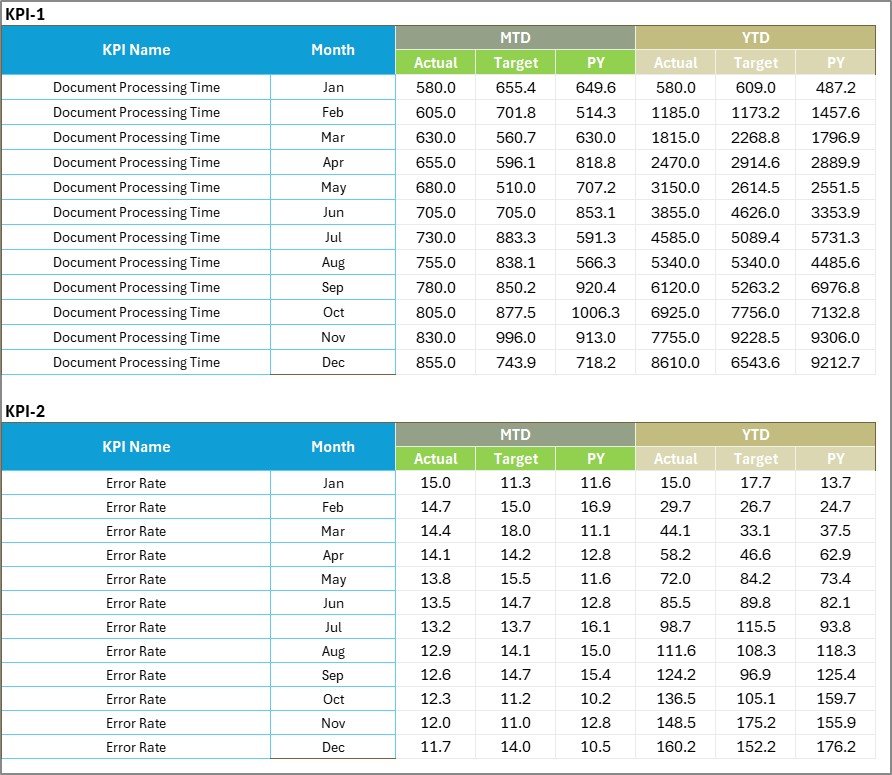
The Input Data Sheet acts as the data engine of the scorecard.
Key Benefits of Input Data Sheet
- Record Actual values
- Enter Target values
- Update monthly results
- Maintain structured data format
Because you enter data in one place, you avoid confusion. Furthermore, the dashboard updates automatically.
Whenever new data becomes available, you simply update the input sheet. Instantly, the entire scorecard refreshes.
Click to buy Document Management KPI Scorecard In Excel
KPI Definition Sheet
Clarity matters in KPI management. Therefore, the KPI Definition Sheet ensures transparency.
In this sheet, you enter:
- KPI Name
- KPI Group
- Unit
- Formula
- KPI Definition
As a result, everyone understands what each KPI measures. Moreover, audit teams appreciate this structured documentation.

Click to buy Document Management KPI Scorecard In Excel
What KPIs Should You Track in Document Management?
Although organizations vary, most document management systems track similar KPIs.
Here are 10 commonly used KPIs:
- Document Approval Cycle Time
- Document Retrieval Time
- Version Control Accuracy Rate
- Compliance Rate
- Audit Findings Count
- Document Error Rate
- Digital Document Adoption Rate
- Archive Processing Time
- User Access Compliance Rate
- Document Revision Frequency
Each KPI plays a different role. However, together they provide complete visibility.
Advantages of Document Management KPI Scorecard in Excel
Now, let us discuss the key advantages.
Improves Visibility
You can see all document performance metrics in one place. Therefore, you avoid guesswork.
Enhances Compliance
Because you monitor compliance KPIs regularly, you reduce regulatory risk.
Supports Faster Decision-Making
Visual indicators help you act quickly. Consequently, you prevent small issues from becoming large problems.
Encourages Accountability
When teams see clear targets, they focus on results.
Saves Time
Instead of preparing reports manually, you generate insights instantly.
Easy to Customize
You can modify KPIs based on industry needs.
Budget-Friendly Solution
Excel remains accessible and affordable. Therefore, you do not need expensive software initially.
How to Implement the Document Management KPI Scorecard Successfully?
Implementation determines success. Therefore, follow structured steps.
Step 1: Define Clear KPIs
First, identify document management objectives. Then, select KPIs aligned with those goals.
Step 2: Set Realistic Targets
You should define achievable targets. Otherwise, teams may lose motivation.
Step 3: Train Users
Train document controllers and managers. Because of training, they will use the scorecard effectively.
Step 4: Review Monthly
Schedule monthly reviews. During meetings, analyze MTD and YTD performance.
Step 5: Take Corrective Action
When KPIs miss targets, investigate root causes. Then, implement improvements.
Best Practices for the Document Management KPI Scorecard
To maximize benefits, follow these best practices:
Keep KPI Definitions Clear
Avoid confusion. Write short and precise definitions.
Update Data Regularly
Do not delay updates. Timely data ensures accurate insights.
Limit KPIs to What Matters
Do not overload the scorecard. Focus on critical metrics.
Use Conditional Formatting Smartly
Highlight key performance changes. However, keep visuals clean.
Compare with Previous Year
Trend analysis provides deeper understanding.
Conduct Quarterly Performance Reviews
Monthly tracking helps operations. Quarterly reviews support strategy.
Align KPIs with Compliance Standards
If your industry requires ISO or regulatory audits, align KPIs accordingly.
How Does the Scorecard Support Audit and Compliance?
Audit teams often request:
- Proof of monitoring
- Performance trends
- Corrective actions
Because the KPI scorecard tracks MTD, YTD, and Previous Year comparisons, you can present structured reports instantly.
Therefore, audits become smoother and faster.
Who Should Use the Document Management KPI Scorecard?
This scorecard benefits:
- Document Control Managers
- Compliance Officers
- Quality Assurance Teams
- Operations Managers
- Project Managers
- IT Document Administrators
If your organization handles large volumes of documents, this tool becomes essential.
How Does the Scorecard Improve Productivity?
When you measure performance, you encourage improvement.
For example:
- If retrieval time decreases, employees work faster.
- If approval cycle time improves, projects move quickly.
- If error rate reduces, rework costs drop.
Therefore, KPI tracking directly improves operational performance.
Future Scope of Document Management KPI Tracking
As digital transformation increases, document management becomes even more critical.
In the future, organizations may integrate:
- Automation tools
- AI document classification
- Cloud document tracking
- Real-time compliance alerts
However, even before advanced systems, Excel KPI scorecards provide strong foundation.
Conclusion
Document management directly impacts compliance, productivity, and operational efficiency. However, without structured tracking, organizations struggle to measure performance.
The Document Management KPI Scorecard in Excel provides a simple yet powerful solution. It centralizes KPIs, compares Actual vs Target, tracks MTD and YTD performance, and visualizes trends clearly.
Moreover, it promotes accountability, improves visibility, and supports better decision-making.
If you want clarity in document control operations, this scorecard will guide your performance journey.
Frequently Asked Questions with Answers
- What is a Document Management KPI Scorecard in Excel?
It is a ready-to-use Excel template that tracks document management performance using structured KPIs.
- How many worksheets does this template include?
The template includes 4 worksheets:
- Scorecard Sheet
- KPI Trend Sheet
- Input Data Sheet
- KPI Definition Sheet
- Can I customize the KPIs?
Yes, you can modify KPI names, formulas, and targets based on your organization’s needs.
- What is the difference between MTD and YTD?
MTD shows performance from the beginning of the month until today.
YTD shows performance from the beginning of the year until today.
- What does LTB and UTB mean?
LTB means Lower the Better.
UTB means Upper the Better.
- Who should use this KPI Scorecard?
Document managers, compliance officers, quality teams, and operations managers can use it effectively.
- How often should I update the data?
You should update the data monthly. However, some organizations update weekly for tighter control.
- Does this scorecard require advanced Excel skills?
No. Basic Excel knowledge allows you to use this template easily.
Click to buy Document Management KPI Scorecard In Excel
Visit our YouTube channel to learn step-by-step video tutorials
Watch the step-by-step video tutorial: