Managing employee transfers, internal movements, and role changes is a critical responsibility for HR and operations teams. However, many organizations still rely on scattered Excel sheets, emails, and manual approvals. As a result, errors increase, records become inconsistent, and tracking history becomes difficult.Employee Transfer and Movement Management System V1.0 in Excel VBA
That is exactly why the Employee Transfer and Movement Management System V1.0 in Excel VBA becomes a powerful and practical solution.
In this detailed article, you will learn what this system is, how it works, why it matters, and how each feature supports smooth employee movement management. Moreover, you will explore its advantages, best practices, and frequently asked questions, so you can confidently decide whether this tool fits your organization.Employee Transfer and Movement Management System V1.0 in Excel VBA
What Is an Employee Transfer and Movement Management System in Excel VBA?
An Employee Transfer and Movement Management System in Excel VBA is a desktop-based HR management tool built using Microsoft Excel and Visual Basic for Applications (VBA). It helps organizations manage employee transfers, internal movements, department changes, position updates, and reporting from one centralized system.
Instead of managing multiple files or manual registers, this system provides:
- Secure login
- Role-based access
- Structured data entry forms
- Centralized employee movement records
- Exportable reports
Because it runs entirely in Excel, teams can use it without installing expensive HR software or paying recurring subscriptions.
Why Do Organizations Need an Employee Transfer and Movement Management System?
Employee movement happens frequently in growing organizations. Employees change departments, move between locations, receive new roles, or shift reporting structures. However, without a proper system, organizations face several challenges.
Common Problems Without a Structured System
- HR teams lose track of movement history
- Manual errors occur during data updates
- Approvals and updates become slow
- Reports take too much time to prepare
- Data security becomes weak
Therefore, organizations need a ready-to-use, controlled, and reliable system. This Excel VBA-based tool solves these problems effectively while remaining simple and familiar.
Overview of Employee Transfer and Movement Management System V1.0 in Excel VBA
The Employee Transfer and Movement Management System V1.0 is designed for small to mid-sized organizations that want a structured, offline solution.
This tool allows HR and admins to:
- Record employee movements accurately
- Update or delete records easily
- Control user access
- Export data for reporting
- Maintain a clean audit trail
Most importantly, it works offline, so your data remains with you at all times.
Key Features of Employee Transfer and Movement Management System V1.0
Let us now explore each feature in detail so you clearly understand how the system works.
Secure Login Form – How Does the Login System Work?
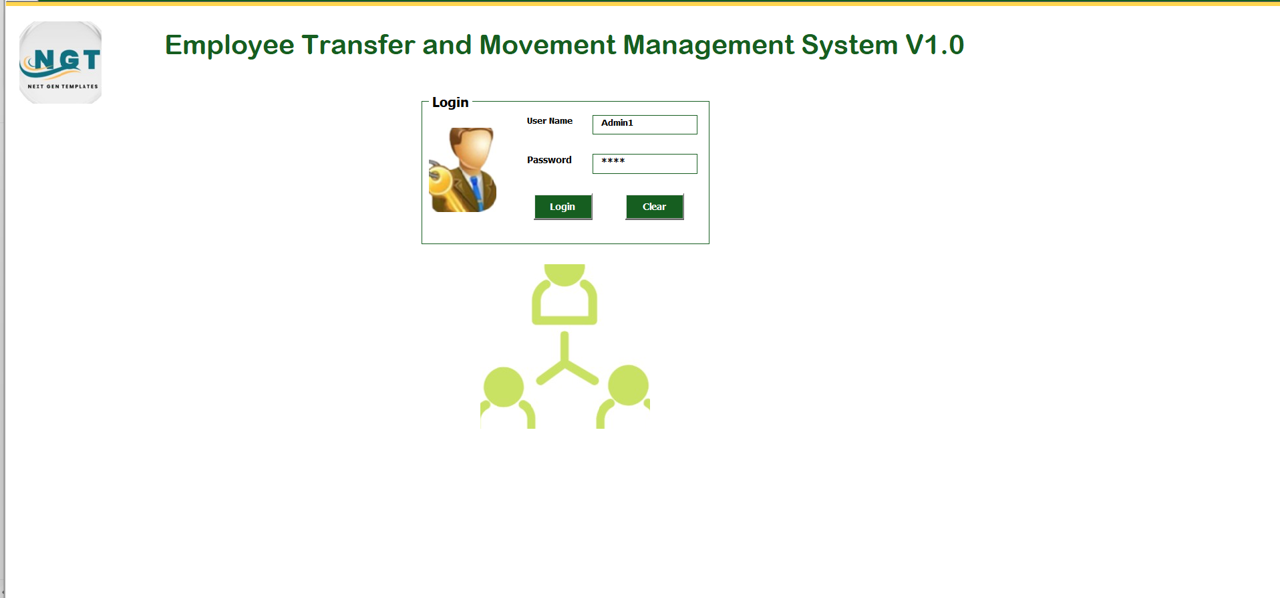
The system starts with a secure login form. This ensures that only authorized users can access sensitive employee data.
Default Login Credentials
Admin Role
- Username: Admin1
- Password: abcd
User Role
- Username: User1
- Password: abcd
After entering valid credentials and clicking the Login button (or pressing Enter), the system opens the Main Form.
Because of role-based access, users only see features allowed for their role. As a result, data security improves significantly.
Main Form – What Can You Manage from the Dashboard?
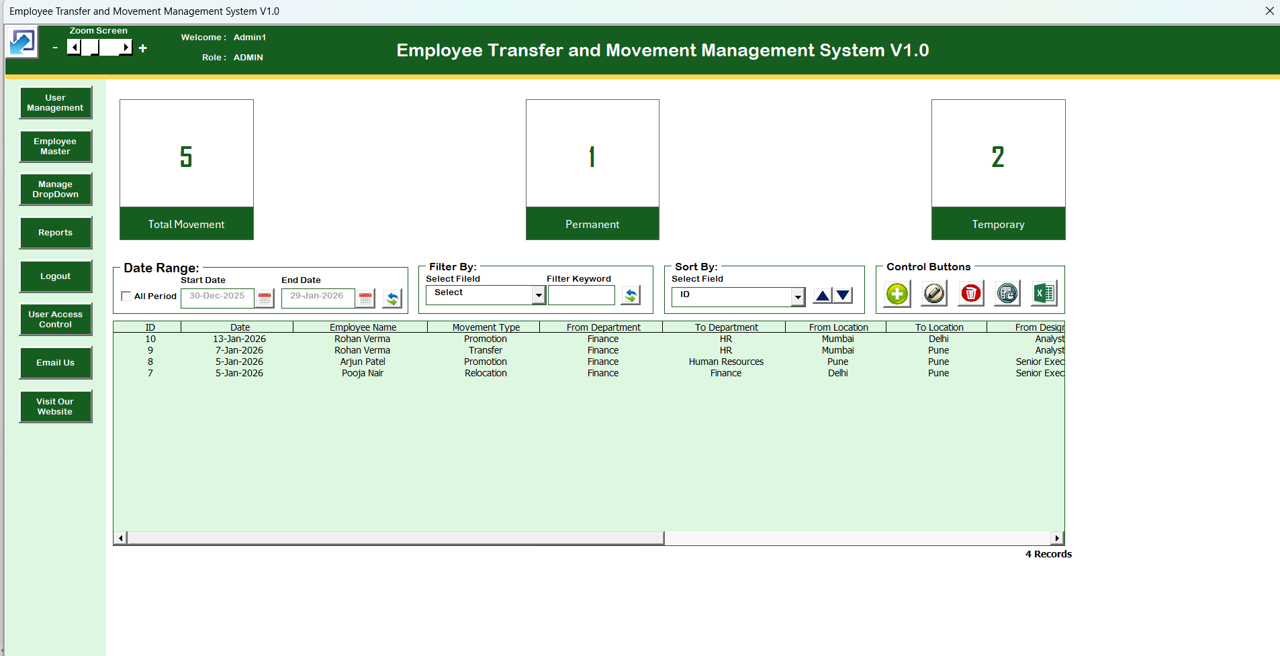
The Main Form acts as the central control panel of the system. From this screen, users can manage employee movement records efficiently.
List Box on the Main Form
At the center of the screen, you will find a List Box that displays all employee movement records. This allows users to:
- View records instantly
- Select records for update or deletion
- Review movement history at a glance
Since the data appears in a structured format, navigation becomes fast and simple.
Filters – How Can You Filter Employee Movement Records?
Above the List Box, the system provides filter options. Using these filters, users can:
- Filter records by date range
- Filter records by selected columns
Because of this, users can quickly locate specific employee movements without scrolling through large datasets.
Sort By – How Does Sorting Improve Data Visibility?
The Sort By feature allows users to sort records based on selected criteria. As a result:
- Records appear in a logical order
- Data analysis becomes easier
- Reviewing recent or specific movements becomes faster
This feature helps HR teams save time during audits and reviews.
Control Buttons – What Actions Can You Perform?
Below the List Box, the system provides several control buttons that allow complete data management.
Add New Record
This button allows users to add a new employee transfer or movement record. Once clicked, the Employee Movement form opens for data entry.
Update Existing Record
Users can update records in two ways:
- Select a record and click Update Existing Record
- Double-click on a record in the List Box
After updating the information, users simply click Submit to save changes.
Delete Record
This option allows users to delete a selected record safely. This helps keep the database clean and accurate.
Export to Excel
Using this button, users can export List Box data to a new Excel file. This feature is extremely useful for:
- Reporting
- Sharing data with management
- Backup purposes
Employee Movements Form – How Do You Add or Update Records?
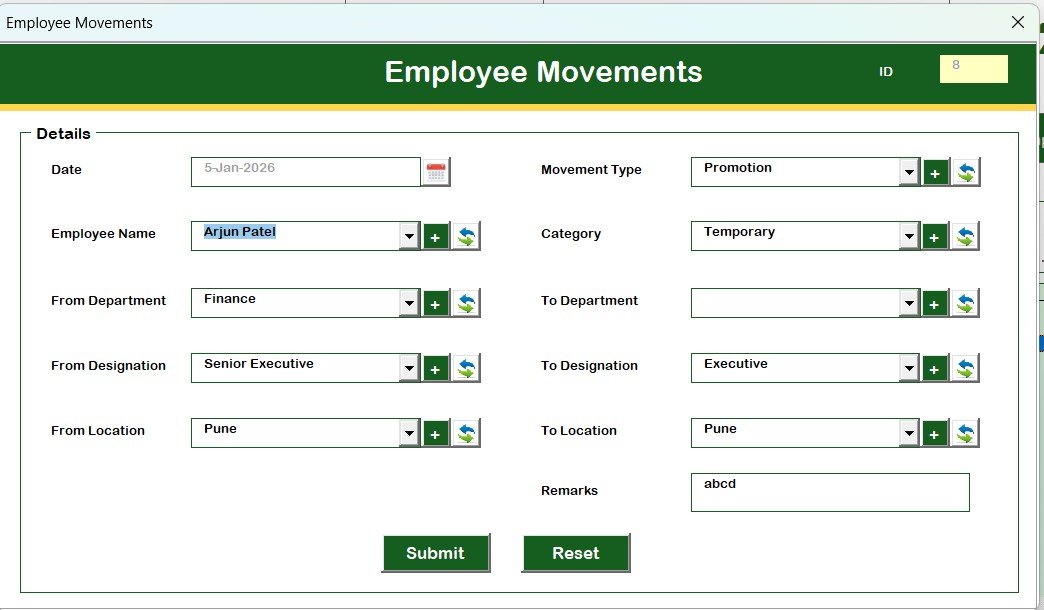
The Employee Movements Form is the main data entry screen. It opens when users click:
- Add New Record
- Update Existing Record
From this form, users can:
- Enter new movement details
- Modify existing records
- Submit data instantly
Because the form is structured, it reduces manual errors and improves consistency.
Navigation Menu – What Options Are Available?
On the left-hand side, the system provides a Navigation Menu that gives access to additional modules.
User Management – How Do You Control Users?
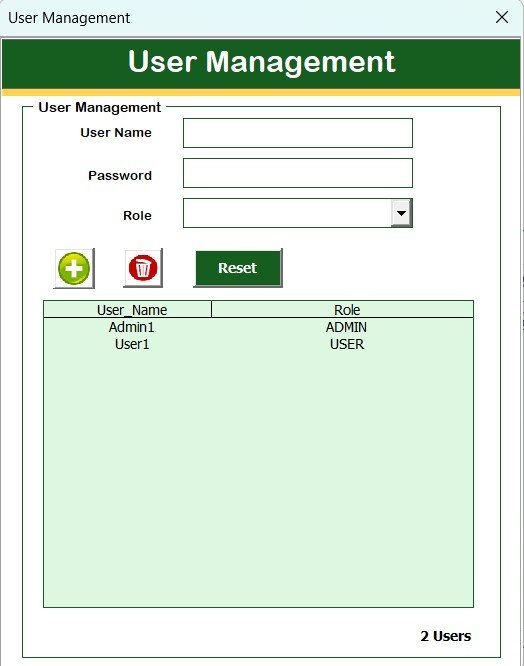
The User Management module allows admins to:
- Add new users
- Update existing users
- Delete users
- Reset passwords
- Change passwords
This ensures that only authorized people access the system.
Manage List – How Do You Maintain Drop-Down Lists?
The Manage List form allows users to:
- Add values to lists
- Delete values from lists
This helps keep dropdowns updated for departments, positions, or movement types.
Employee Master – How Is Position Information Managed?
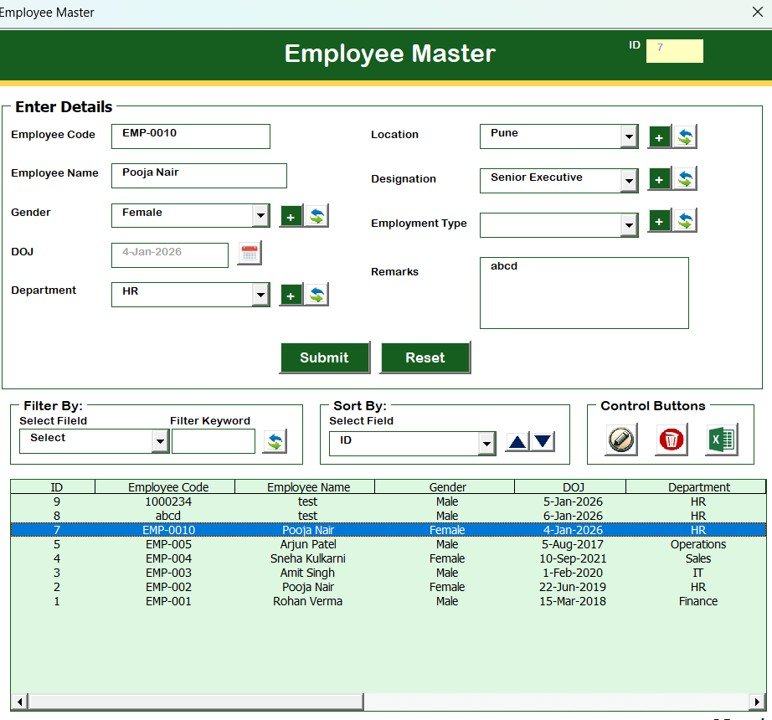
The Employee Master module stores position-related information. This ensures:
- Consistent data entry
- Accurate movement records
- Easy reference during updates
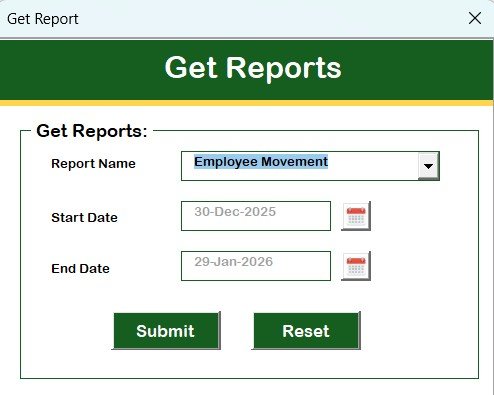
Reports – How Can You Generate Reports?
The Reports module allows users to:
- Select a date range
- Fetch employee movement reports
- Export reports to Excel format
Because of this, HR teams can prepare reports quickly without manual compilation.
Manage User Access Control – How Is Security Maintained?
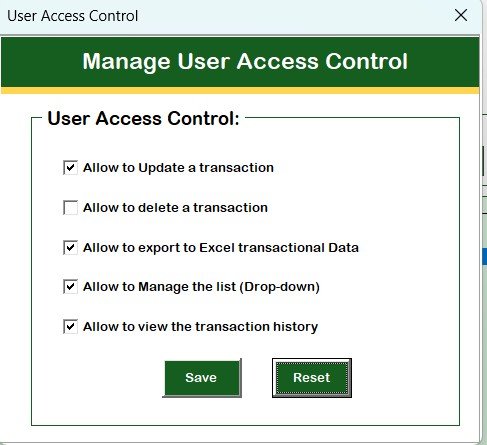
Only Admin users can access the User Access Control module.
From here, admins can:
- Assign feature-level access
- Control what each role can see or edit
This ensures better governance and data security.
Logout – How Is Data Saved Safely?
When users click Logout:
- The system saves all data
- Excel closes safely
This prevents accidental data loss.
Email Us & Visit Website – What Support Options Are Available?
- Email Us button displays the support email for help or customization
- Visit Our Website button opens the official website to explore more tools
System Compatibility – What Are the Technical Requirements?
Advantages of Employee Transfer and Movement Management System V1.0 in Excel VBA
Centralized Employee Movement Records
Secure Login and Role-Based Access
Easy-to-Use Excel Interface
Offline Data Security
Fast Reporting and Export
Reduced Manual Errors
No Subscription Costs
Best Practices for Employee Transfer and Movement Management System
Maintain Updated Employee Master Data
Assign Proper User Access Roles
Export and Backup Data Regularly
Train Users on Data Entry Forms
Use Filters and Sorting for Reviews
Restrict Admin Access Carefully
Who Should Use This System?
- HR Teams
- Admin Departments
- Small and Medium Businesses
- Manufacturing Units
- Service Organizations
- Educational Institutions
Conclusion: Is Employee Transfer and Movement Management System V1.0 Worth It?
The Employee Transfer and Movement Management System V1.0 in Excel VBA offers a simple, secure, and cost-effective solution for managing internal employee movements.
Instead of struggling with manual processes, this tool provides structure, control, and clarity. Moreover, because it runs on Excel, teams can adopt it quickly without technical barriers.
If you want an offline, reliable, and ready-to-use HR movement management system, this solution is definitely worth considering.
Frequently Asked Questions (FAQs)
Is this system suitable for small businesses?
Yes, it works perfectly for small and mid-sized organizations.
Does this system require internet access?
No, it works completely offline.
Can I customize this system?
Yes, customization support is available via email.
Does it support multiple users?
Yes, it supports Admin and User roles.
Can I export reports to Excel?
Yes, reports can be exported easily.
Is this compatible with Mac?
No, it works only on Windows with Excel Desktop.
Visit our YouTube channel to learn step-by-step video tutorials
Watch the step-by-step video tutorial: