Event production teams handle many responsibilities at the same time. They plan events, coordinate venues, manage budgets, track execution challenges, and ensure client satisfaction. However, scattered spreadsheets and manual reports slow down the decision-making process. When you cannot see real-time numbers, you miss trends and insights that help events run smoothly.
Because of this, many organizations use an Event Production Dashboard in Power BI. This dashboard brings all operational, financial, and client-related KPIs into one visual system. You can check performance instantly, compare event types, monitor profitability, track budgets, and analyze trends without digging through multiple files.
In this detailed article, you will explore how the dashboard works, what each page includes, the benefits, the best practices, and the most common questions people ask.
Click to Purchases Event Production Dashboard in Power BI
What Is an Event Production Dashboard in Power BI?
An Event Production Dashboard in Power BI is an analytical reporting tool that helps event managers monitor performance across different stages of event execution. It displays KPIs like scheduled event percentage, revenue, profit margin, budget, spend, weather impact, venue insights, and client contribution.
You can explore the data through slicers, filters, charts, and interactive visuals. Since everything updates automatically, you always work with accurate numbers.
This dashboard includes 5 powerful pages:
-
Overview Page
-
Event Analysis Page
-
Venue Analysis Page
-
Client Analysis Page
-
Monthly Trends Page
Each page serves a specific purpose and helps you understand key event performance patterns.
Why Do Businesses Need an Event Production Dashboard in Power BI?
Event production depends on clarity. You deal with budgets, logistics, multiple vendors, client expectations, and unpredictable factors such as weather or venue constraints. A dashboard solves these challenges because it shows all information in one place.
You gain:
-
A quick view of event performance
-
Real-time profit tracking
-
Accurate budget vs. spend insights
-
Strong visibility of client contribution
-
Clear event-type performance
-
Trend understanding across months
With these insights, teams move faster, avoid delays, and plan better.
Key Features of the Event Production Dashboard in Power BI
Now, let us explore each page in detail.
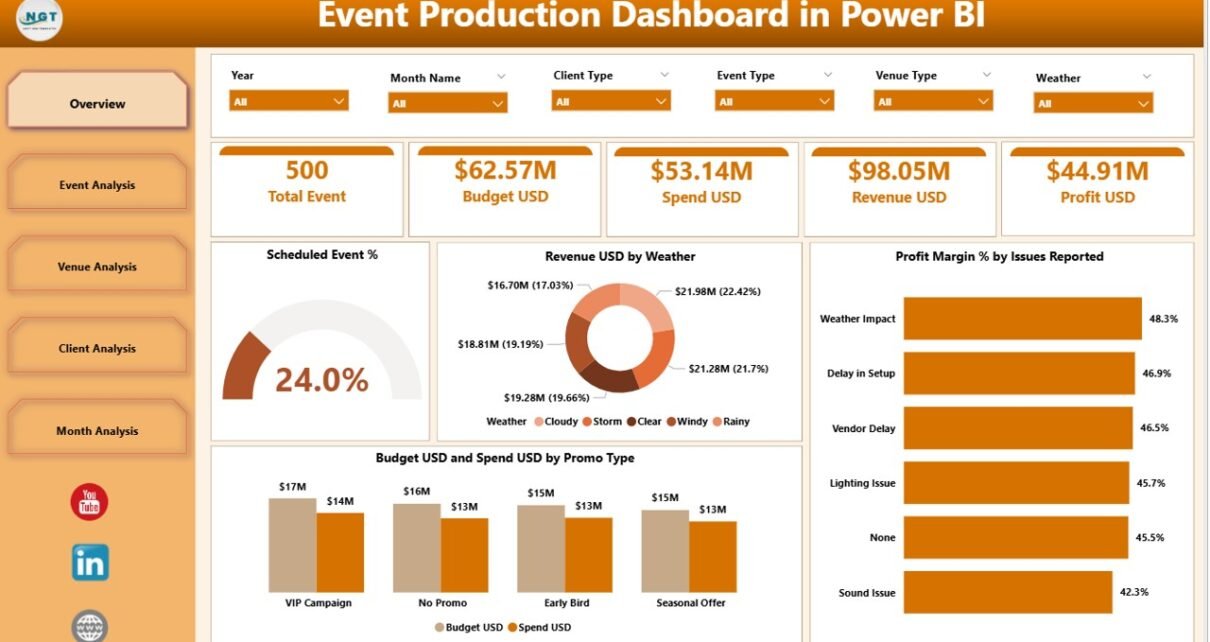
1. Overview Page – What Does It Show?

The Overview Page gives a complete snapshot of event production performance. It acts as the home screen of the dashboard and includes slicers so you can filter the data by different categories such as event type, venue, client type, or month.
Elements on the Overview Page
You will find:
-
4 KPI Cards that show the most important metrics
-
Scheduled Event % Chart
-
Revenue (USD) by Weather Chart
-
Profit Margin % by Issues Reported Chart
-
Budget USD vs. Spend USD by Promotion Type Chart
These visuals help you understand how internal and external factors influence event performance. For example, weather conditions often change attendance and revenue. Issues during an event also impact profit margins.
Because these KPIs appear on one page, decision-makers always know what needs immediate attention.
2. Event Analysis Page – Why Is It Important?
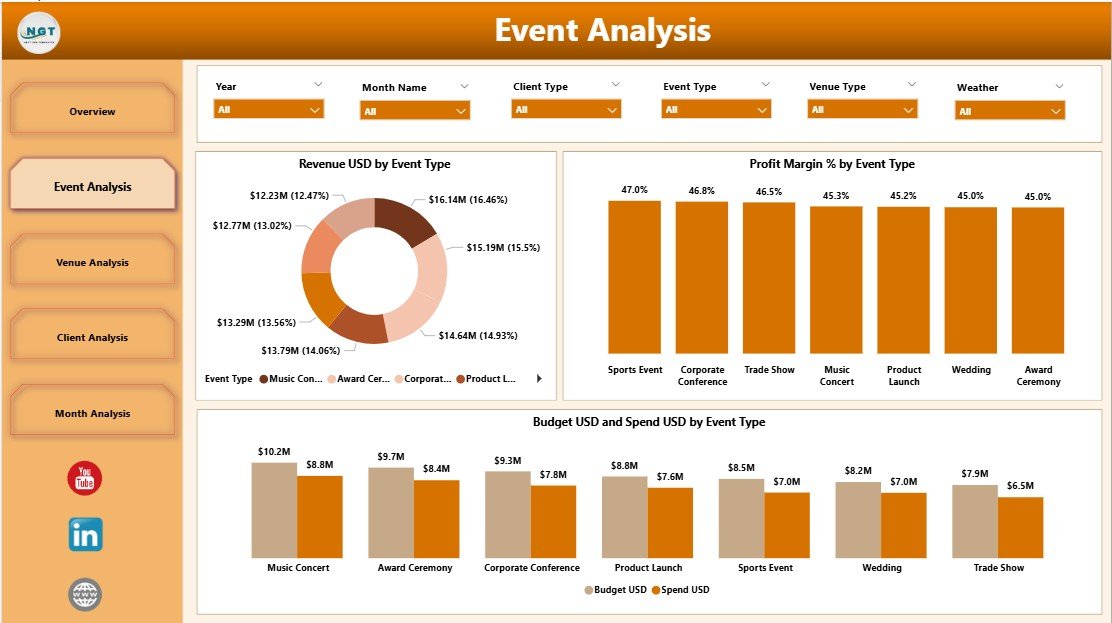
The Event Analysis Page breaks down financial and performance metrics by event type. Not all events bring the same revenue or require the same spending. Some events earn higher profit margins, and some need better budget planning.
This Page Includes:
-
Revenue USD by Event Type
-
Profit Margin % by Event Type
-
Budget USD vs. Spend USD by Event Type
-
Interactive Slicers
This analysis helps you:
-
Identify high-performing event categories
-
Improve budget allocation
-
Understand which events deliver the most profit
-
Manage event cost overruns
-
Predict future event performance
Teams can then decide which events to promote, scale, or refine.
Click to Purchases Event Production Dashboard in Power BI
3. Venue Analysis Page – What Can You Learn from It?

Picking the right venue can make or break an event. The Venue Analysis Page helps you compare venues based on revenue, scheduling, and budget behavior.
This Page Shows:
-
Revenue USD by Venue Type
-
Scheduled Event % by Venue Type
-
Budget USD and Spend USD by Venue Type
With this information, you understand:
-
Which venues generate the best revenue
-
How often you schedule events in each venue type
-
Whether venue categories stay within budget
-
Where overspending occurs
Because venue cost is a major financial component, these insights support smarter planning.
4. Client Analysis Page – How Well Do Your Clients Perform?
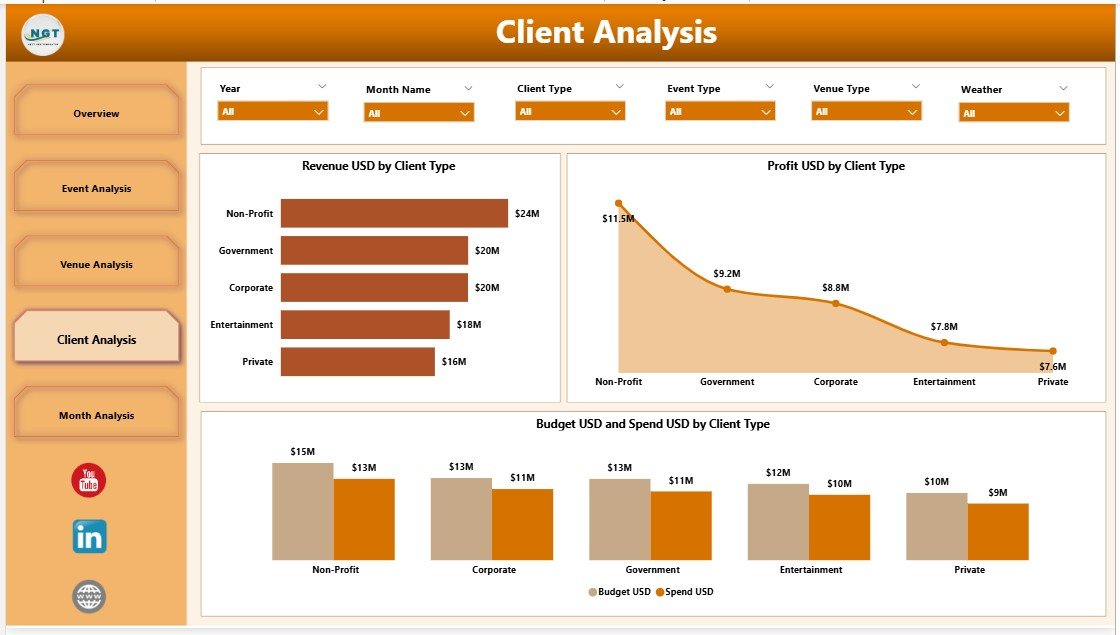
Different clients contribute differently to your revenue and profit. The Client Analysis Page gives you a clear view of client behavior and financial contribution.
This Page Includes:
-
Revenue USD by Client Type
-
Profit USD by Client Type
-
Budget USD and Spend USD by Client Type
You gain clarity on:
-
High-value client segments
-
Profitability of each client group
-
Client types that require more resources
-
Opportunities to increase revenue from certain segments
This page helps managers improve customer relationships and project forecasting.
5. Monthly Trends Page – Why Do Monthly Patterns Matter?
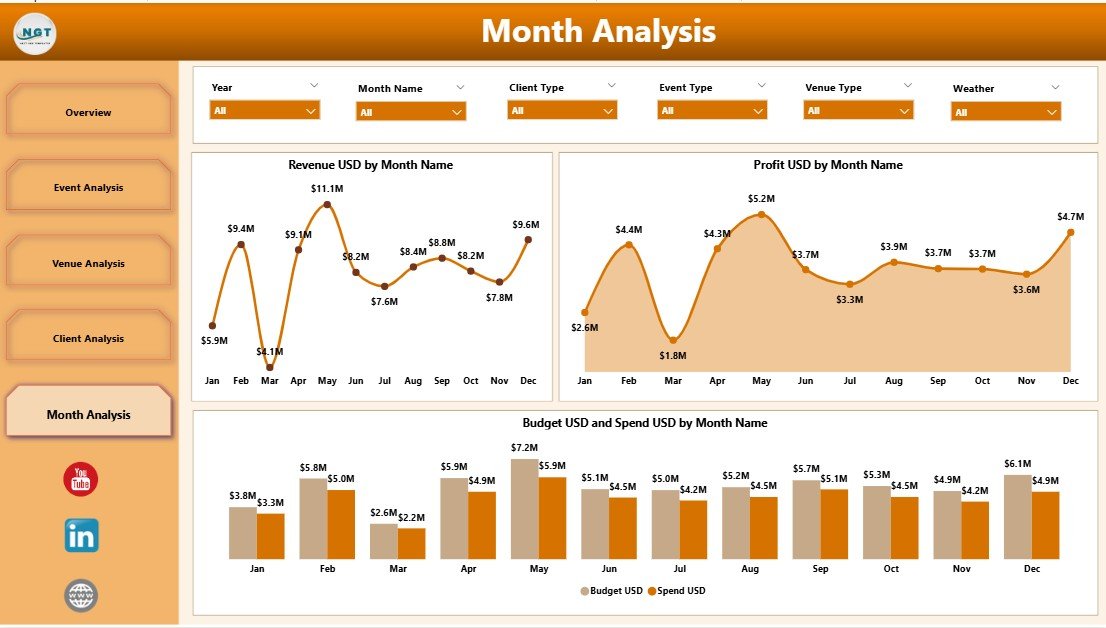
The final page tracks event performance month by month. You can see financial ups and downs, budget trends, and revenue patterns clearly.
This Page Shows:
-
Revenue USD by Month
-
Profit USD by Month
-
Budget USD and Spend USD by Month
Monthly trends help you:
-
Plan future events based on seasonality
-
Forecast revenue growth
-
Track cost movements
-
Identify peak and low-performing months
Since events often follow predictable cycles, this page becomes a valuable planning tool.
Advantages of an Event Production Dashboard in Power BI
Click to Purchases Event Production Dashboard in Power BI
An Event Production Dashboard offers several advantages that strengthen decision-making, financial control, and operational efficiency.
1. Real-Time Visibility
You see all important KPIs instantly, which helps teams avoid delays. You react before problems grow.
2. Better Budget Control
You track budget and spend across event types, venue categories, and client groups. This helps you control overspending and improve financial discipline.
3. Improved Profitability
The dashboard shows profit margins at different levels. You learn which events or clients bring higher profit and where you lose money.
4. Strong Operational Insights
You track weather impact, issues raised, client categories, and venue types. This supports improved operational planning.
5. Faster Decision-Making
Power BI visualizations help teams understand patterns quickly. You spend less time analyzing spreadsheets and more time improving operations.
6. Better Resource Allocation
When you understand event performance, you assign resources more effectively. You avoid effort waste and cost pressure.
7. Seamless Data Integration
Power BI works well with Excel, databases, and other sources. You update your data once and the dashboard refreshes automatically.
Best Practices for Using the Event Production Dashboard in Power BI
To get the full benefit of this dashboard, teams can follow these best practices.
1. Keep Your Data Updated Daily
A dashboard becomes powerful only when it shows fresh data. Update your files daily or weekly to maintain accuracy.
2. Use Slicers to Explore Multiple Views
Slicers help you filter data by event type, venue type, client type, or month. Always check the data from different angles to make better decisions.
3. Compare Budget vs. Spend Often
Track expenses closely. Look for patterns where costs rise more than expected.
4. Monitor Profit Margins Regularly
Profit margin trends reveal whether your events deliver financial value. Check margins by event type and client type frequently.
5. Use Trend Charts to Forecast Future Events
Monthly trend charts show clear patterns. Use them to decide event schedules, pricing, and resource planning.
6. Identify Low-Performing Venues or Clients
Do not overlook segments that affect profitability. Use the dashboard to detect where improvement is needed.
7. Review Weather and Issue Impact
External factors such as weather and reported issues change event outcomes. Include these learnings in future planning.
Conclusion
An Event Production Dashboard in Power BI helps event teams operate with more clarity, speed, and accuracy. It brings all event-related KPIs into one dashboard where you can explore trends, analyze revenue, track profitability, monitor budgets, and understand client or venue performance. When teams use this dashboard, they make smarter decisions, reduce risk, and plan events more effectively.
Power BI transforms event management into a data-driven process. As a result, organizations deliver better events and maintain strong client satisfaction.
Frequently Asked Questions (FAQs)
1. What is the main purpose of an Event Production Dashboard in Power BI?
The dashboard helps event teams monitor performance, track financial metrics, and analyze trends in one visual system.
2. Can this dashboard help improve revenue?
Yes. When you understand event-type performance, client contribution, and venue profitability, you make decisions that increase revenue.
3. Does the dashboard require advanced technical skills?
No. Power BI makes it easy to navigate charts, slicers, and visuals even for non-technical users.
4. How often should event teams update their data?
Teams should update their data daily or weekly to maintain real-time accuracy.
5. Can the dashboard handle large datasets?
Yes. Power BI processes large event datasets efficiently and updates visuals automatically.
6. Is this dashboard suitable for small event companies?
Yes. Small and large companies benefit because the dashboard offers clarity and saves time.
7. Can I add more KPIs to the dashboard?
You can customize visuals, KPIs, and pages easily based on your business needs.
8. Why is monthly trend analysis important?
Monthly trends show seasonality, cost patterns, and revenue growth. This supports better forecasting.
9. Can this dashboard replace Excel reporting?
Yes. It reduces manual work and centralizes all event performance metrics.
10. Does the dashboard improve client satisfaction?
Yes. When you track client contributions clearly, you plan better projects, improve communication, and deliver stronger results.
Visit our YouTube channel to learn step-by-step video tutorials
Click to Purchases Event Production Dashboard in Power BI