Financial management requires discipline, accuracy, and accountability. Every finance department handles numerous daily, weekly, and monthly tasks such as reconciliations, reporting, compliance checks, invoice processing, budgeting, and audit preparation. Because financial operations involve critical business information, organizations must ensure that every financial task happens on time and without errors.
However, many companies still track financial duties using scattered notes, emails, or manual reminders. As a result, finance teams often miss deadlines, forget routine checks, or duplicate work. These issues can lead to compliance risks, reporting errors, and operational inefficiencies.
Therefore, organizations need a structured system that tracks financial staff responsibilities clearly.
One practical solution is the Financial Staff Duty Checklist in Excel. This ready-to-use Excel checklist template helps finance teams organize tasks, assign responsibilities, track progress, and monitor completion status.
Instead of managing tasks manually, finance departments can use a structured checklist to track all financial duties in one place.
In this comprehensive guide, you will learn:
-
What a Financial Staff Duty Checklist in Excel is
-
Why finance teams need a duty checklist
-
Key features of the Excel checklist template
-
How the checklist works
-
Advantages of using the checklist
-
Best practices for managing financial duties
-
Practical use cases for organizations
Let us explore the details.
Click to Purchases Financial Staff Duty Checklist in Excel
What is a Financial Staff Duty Checklist in Excel?
A Financial Staff Duty Checklist in Excel is a structured template designed to track and manage financial responsibilities assigned to finance team members.
Finance departments perform a variety of operational and compliance tasks, including:
-
Bank reconciliation
-
Accounts payable processing
-
Accounts receivable tracking
-
Expense monitoring
-
Financial reporting
-
Budget review
-
Compliance checks
-
Tax preparation
Without a clear checklist, it becomes difficult to track which tasks have been completed and which tasks remain pending.
Therefore, a duty checklist helps finance teams:
-
Track daily and periodic financial tasks
-
Assign responsibilities to staff members
-
Monitor task completion
-
Maintain accountability within the team
Since the checklist operates in Excel, organizations can implement it quickly without additional software.
Click to Purchases Financial Staff Duty Checklist in Excel
Why Do Finance Teams Need a Staff Duty Checklist?
Finance operations require strict monitoring and proper documentation. Even small mistakes in financial processes can lead to serious consequences.
A structured checklist ensures that finance teams follow a consistent workflow.
Key reasons finance teams need a duty checklist
Improves task organization
Finance departments can organize all tasks in one structured list.
Prevents missed financial tasks
The checklist ensures that no financial activity gets overlooked.
Improves accountability
Each task includes a responsible person and deadline.
Supports compliance
Financial regulations require proper documentation of financial processes.
Improves productivity
Teams can complete tasks faster when responsibilities remain clearly defined.
Click to Purchases Financial Staff Duty Checklist in Excel
Key Features of Financial Staff Duty Checklist in Excel
The Financial Staff Duty Checklist in Excel is a simple yet powerful task management template designed for finance teams.
The template contains two worksheets that help manage financial duties effectively.
1. Financial Staff Duty Checklist Sheet (Main Checklist)
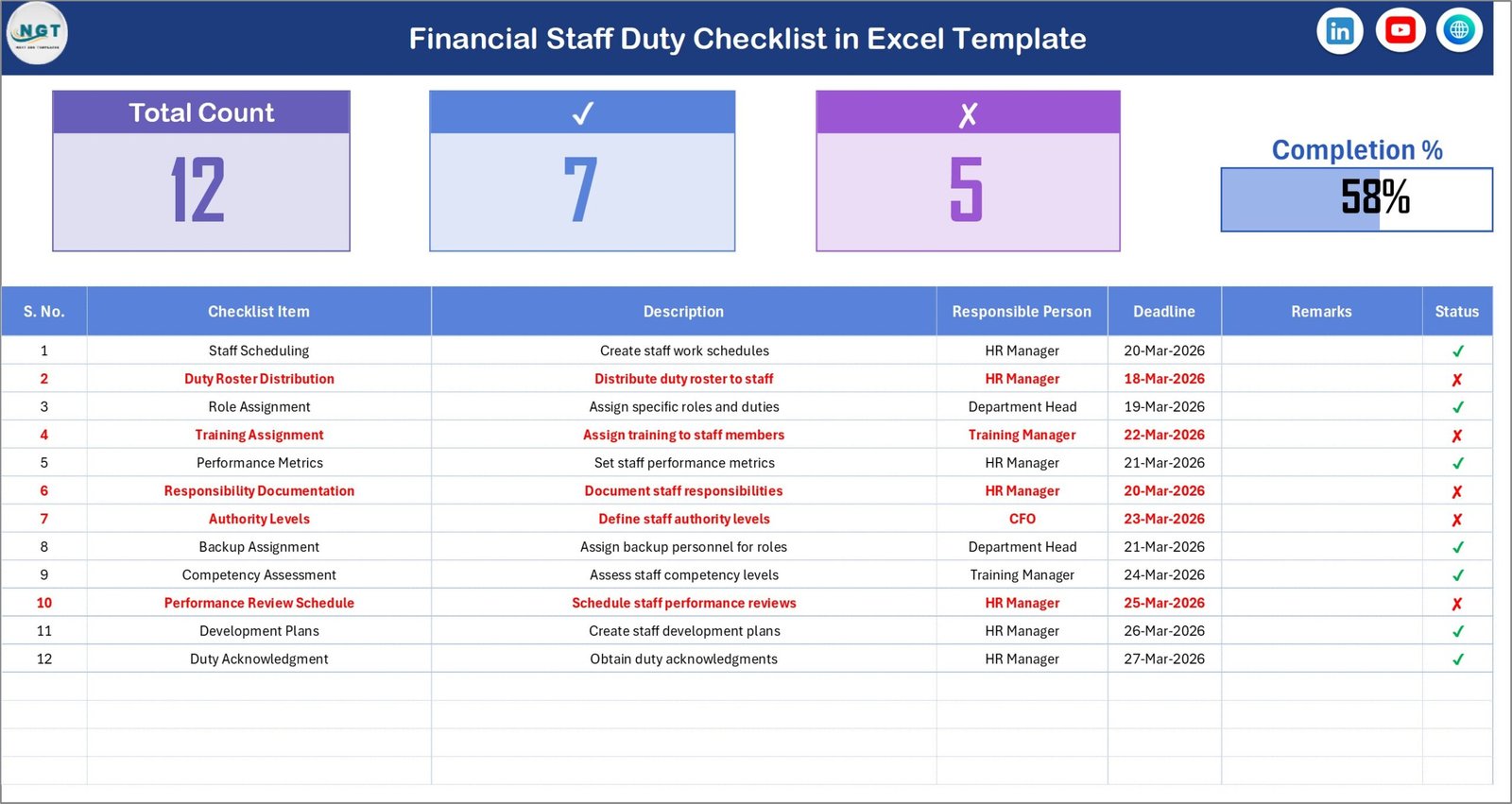
The Financial Staff Duty Checklist sheet acts as the main working area of the template.
Users enter all checklist tasks and track completion status in this sheet.
Top Section (Checklist Summary)
The top section provides a quick overview of checklist progress.
It displays important metrics such as:
-
Total Count – Total number of checklist tasks
-
Checked Count – Number of completed tasks
-
Crossed Count – Number of incomplete or rejected tasks
-
Progress Bar – Visual indicator showing the percentage of completed tasks
This summary helps managers quickly understand task progress.
Checklist Table
Below the summary section, the template includes a structured checklist table.
Users must update the task status to track progress.
The status options include:
-
✔ Completed
-
✘ Not Completed
Checklist Table Columns
The checklist table includes the following columns.
Serial No.
This column represents the sequence number of the task.
Checklist Item
This column contains the name of the financial task.
Description
This section provides additional details about the task.
Responsible Person
This field identifies the staff member responsible for completing the task.
Deadline
This column specifies the due date for the task.
Remarks
Users can add notes or additional comments about the task.
Status
Users update the task status using ✔ or ✘.
Once users update the status, the summary section updates automatically.
Click to Purchases Financial Staff Duty Checklist in Excel
2. List Sheet (Dropdown Data Source)

The List sheet stores the unique list of responsible persons.
This sheet acts as the data source for dropdown lists used in the checklist table.
Purpose of the List Sheet
The List sheet ensures consistent data entry.
Instead of typing names manually, users can select responsible persons from a dropdown list.
This feature provides several benefits:
-
Prevents typing errors
-
Ensures standardized names
-
Improves data consistency
-
Simplifies task assignment
Therefore, finance managers can easily assign responsibilities.
Click to Purchases Financial Staff Duty Checklist in Excel
Advantages of Financial Staff Duty Checklist in Excel
Using a structured financial checklist offers several benefits for organizations.
Centralized task tracking
All financial duties appear in one organized checklist.
Improved accountability
Each task includes a responsible person and deadline.
Better task visibility
Managers can instantly view task completion status.
Improved compliance management
Finance teams can track mandatory financial activities.
Easy implementation
Organizations can use the checklist immediately because it runs in Excel.
Visual progress tracking
The progress bar helps managers track completion percentage quickly.
Best Practices for the Financial Staff Duty Checklist
To maximize the effectiveness of this checklist, organizations should follow best practices.
Define clear financial tasks
Every checklist item should clearly describe the required activity.
Assign responsible staff members
Each task must have a responsible person.
Set realistic deadlines
Deadlines help finance teams complete tasks on time.
Update task status regularly
Staff members should update task status immediately after completing tasks.
Review checklist progress weekly
Managers should monitor task progress regularly.
Maintain proper documentation
Finance teams should maintain documentation related to completed tasks.
Click to Purchases Financial Staff Duty Checklist in Excel
Practical Use Cases of Financial Staff Duty Checklist
Many finance-related activities can benefit from this checklist.
Daily financial operations
Track tasks such as invoice processing and transaction recording.
Month-end closing
Monitor financial closing activities and reconciliations.
Audit preparation
Track tasks required for internal or external audits.
Compliance management
Ensure regulatory reporting tasks happen on time.
Financial reporting
Track preparation of financial statements.
How the Checklist Improves Financial Operations
A structured checklist significantly improves financial workflow.
First, it creates a clear task structure.
Second, it improves transparency in financial operations.
Third, it ensures that every financial activity receives proper attention.
For example, finance managers can quickly identify:
-
Pending financial tasks
-
Delayed reporting activities
-
Staff workload distribution
Therefore, the checklist helps organizations maintain strong financial discipline.
Conclusion
Financial departments must handle critical responsibilities with precision and accountability. However, without proper organization, teams may miss tasks or delay important financial activities.
The Financial Staff Duty Checklist in Excel provides a simple and effective solution to manage financial responsibilities.
This ready-to-use Excel template helps finance teams:
-
Organize financial tasks
-
Assign responsibilities
-
Track task completion
-
Improve accountability
Because the checklist runs on Excel, organizations can implement it easily without complex systems.
Therefore, finance departments can maintain better control over their daily operations and ensure financial tasks are completed on time.
Click to Purchases Financial Staff Duty Checklist in Excel
Frequently Asked Questions (FAQs)
What is a Financial Staff Duty Checklist?
A Financial Staff Duty Checklist is a structured task list used to track financial responsibilities assigned to finance team members.
Why should finance teams use a checklist?
A checklist helps finance teams organize tasks, track deadlines, and ensure financial duties are completed on time.
Can this checklist track multiple financial tasks?
Yes. The checklist can track multiple financial activities across departments.
Does the template support task progress tracking?
Yes. The template includes a progress bar that shows the percentage of completed tasks.
Can users assign tasks to different team members?
Yes. The template includes a dropdown list to assign tasks to responsible staff members.
Click to Purchases Financial Staff Duty Checklist in Excel
Visit our YouTube channel to learn step-by-step video tutorials