Healthcare organizations operate in a highly regulated environment. Deadlines for audits, policy reviews, certifications, and reporting never stop. Moreover, regulatory agencies demand accuracy and timely compliance. Therefore, missing even one important date can lead to penalties and reputational risk.
However, many healthcare teams still manage compliance deadlines through scattered spreadsheets, emails, or manual reminders. As a result, they lose visibility and control.
So, how can healthcare organizations manage compliance schedules efficiently?
The answer is clear.
You need a Healthcare Compliance Calendar in Excel.
This ready-to-use calendar template helps healthcare administrators, compliance officers, and hospital managers track events, manage deadlines, and monitor compliance activities throughout the year. Consequently, organizations stay organized and audit-ready at all times.
Let us explore everything in detail.
Click to Purchases Healthcare Compliance Calendar in Excel
What Is a Healthcare Compliance Calendar in Excel?
A Healthcare Compliance Calendar in Excel is a structured event management and scheduling tool designed specifically for healthcare compliance activities. It centralizes regulatory deadlines, training schedules, inspections, certifications, and internal audits into one interactive calendar.
Instead of juggling multiple files, you can:
-
View annual, monthly, and daily schedules
-
Add, update, or delete compliance events
-
Highlight weekends or special days
-
Apply color themes
-
Track event details in one database
Because Excel offers flexibility and automation, this calendar provides both simplicity and control.
Why Do Healthcare Organizations Need a Compliance Calendar?
Healthcare regulations change frequently. Agencies conduct inspections regularly. Internal audits require preparation. Therefore, structured scheduling becomes essential.
Without a compliance calendar:
-
Teams miss important deadlines
-
Audit preparation becomes stressful
-
Communication gaps increase
-
Documentation suffers
-
Risk exposure grows
On the other hand, a centralized calendar improves planning, transparency, and accountability.
Click to Purchases Healthcare Compliance Calendar in Excel
Key Features of Healthcare Compliance Calendar in Excel
This ready-to-use template includes 5 structured worksheets, each designed for efficiency and usability.
Let us review each sheet clearly.
1️⃣ Home Sheet – How Do You Navigate the Calendar?
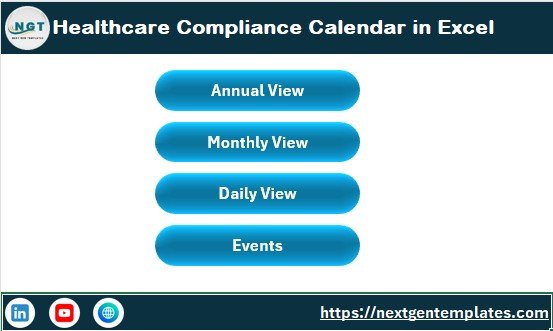
The Home Sheet works as an index page.
It includes 4 navigation buttons:
-
Annual View
-
Monthly View
-
Daily View
-
Events
Because of these quick-access buttons, users can move between sections instantly.
This sheet provides a clean and professional entry point for the entire workbook.
Click to Purchases Healthcare Compliance Calendar in Excel
2️⃣ Annual View Sheet – How Do You Monitor the Entire Year?
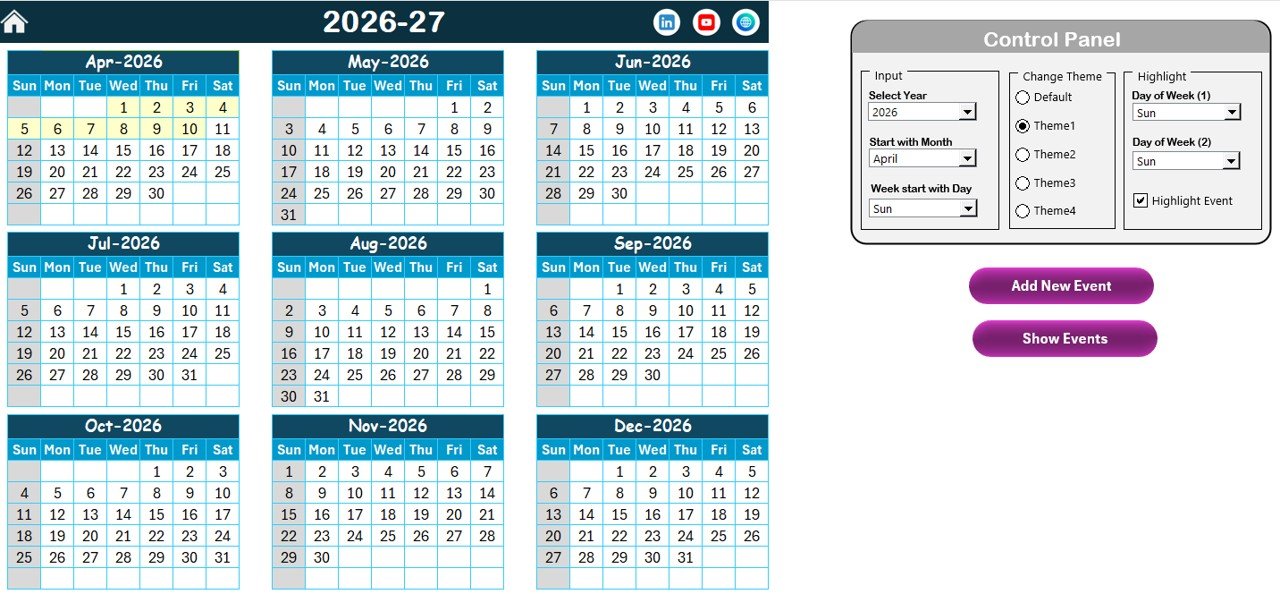
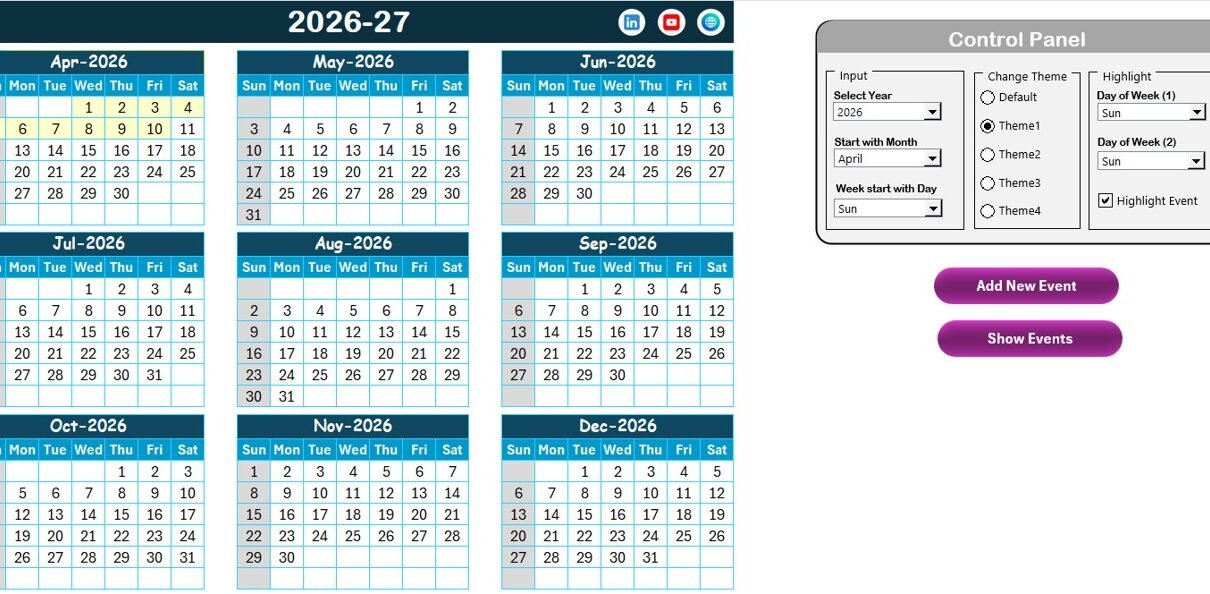
The Annual View Sheet displays all 12 months in one structured layout.
This sheet includes:
-
12-month calendar view
-
Control panel
-
Add New Event button
-
Show Event button
Let us understand the control panel in detail.
🔹 Control Panel Features
The control panel contains three groups:
1. Input Group
Here, you can:
-
Select the Year
-
Change the starting month
-
Change the starting day of the week
Because of these controls, the calendar adjusts automatically based on your selection.
2. Change Theme Group
You can choose from 5 different color themes.
As soon as you select a theme, it applies across the entire workbook. Therefore, you can customize the design according to your organization’s branding.
3. Highlight Group
This feature allows you to:
-
Highlight two specific days of the week
-
Highlight events automatically
For example, if you want to highlight Saturday and Sunday in grey, you can select them in Day of Week (1) and Day of Week (2).
Additionally, you can check the “Highlight Event” option to mark event dates in yellow.
Because visual highlighting improves clarity, teams can identify important dates instantly.
Click to Purchases Healthcare Compliance Calendar in Excel
🔹 Add New Event Button (Annual View)
To add a new event:
-
Select a date
-
Click “Add New Event”
-
Fill the event form
-
Click Submit
The event will appear on the selected date.
🔹 Show Event Button
To view events on a selected date:
-
Select the date
-
Click “Show Event”
This feature displays all events scheduled for that day.
Click to Purchases Healthcare Compliance Calendar in Excel
3️⃣ Monthly View Sheet – How Do You Focus on One Month?
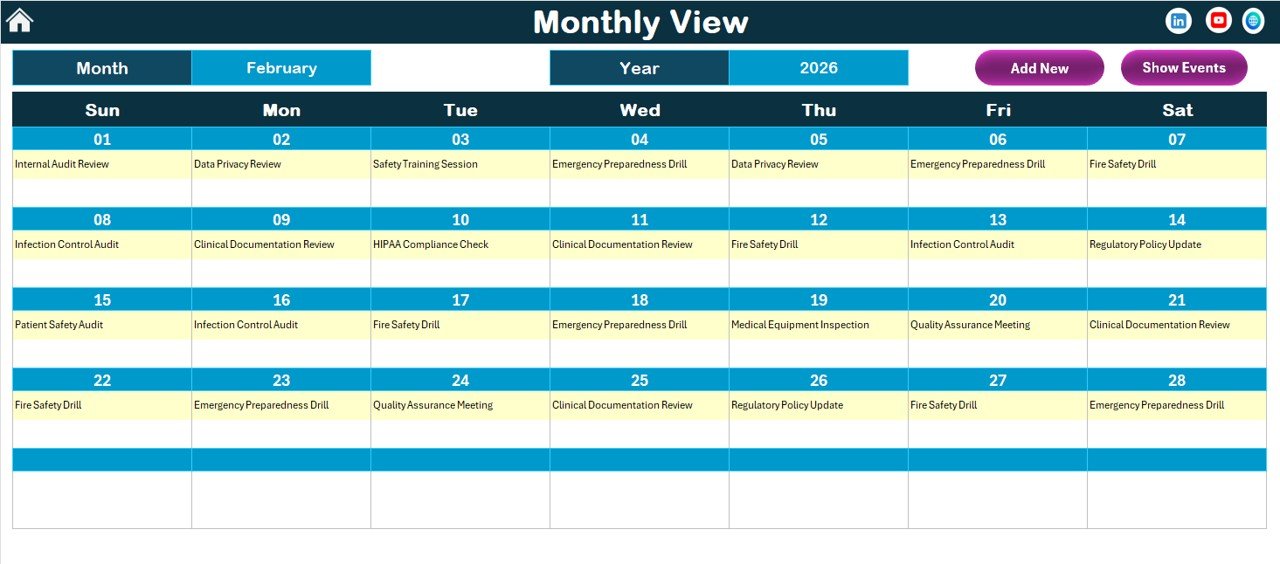
The Monthly View Sheet displays a single-month calendar.
At the top, you can select:
-
Month
-
Year
The calendar updates automatically.
If a date contains one event, it displays the event name. However, if multiple events exist, it shows “more than 1…” to indicate additional entries.
This sheet also includes:
-
Add New Event button
-
Show Event button
Therefore, you can manage events directly from the monthly view.
4️⃣ Daily View Sheet – How Do You Track Event Details?
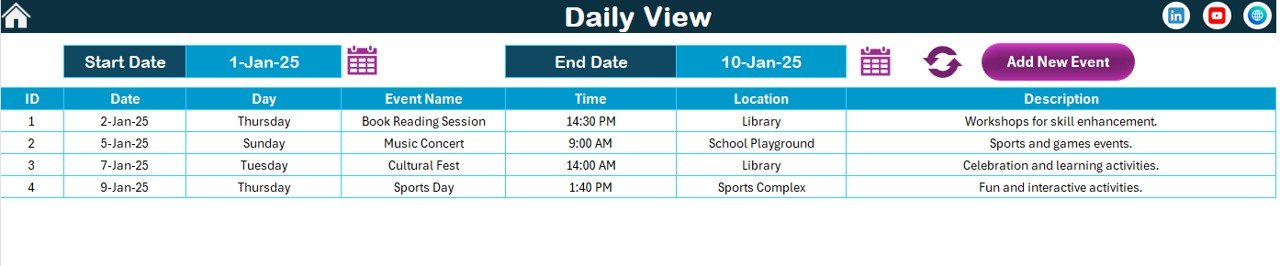
The Daily View Sheet displays event details for a selected date range.
At the top, you can select:
-
Start Date
-
End Date
Simply use the calendar icons to choose the range. Then click the “Refresh” button to display the latest data.
This sheet shows:
-
Event ID
-
Date
-
Event Name
-
Time
-
Location
-
Description
Because you can filter by date range, this view supports detailed compliance planning.
Additionally, you can use the “Add New Event” button to create new entries instantly.
Click to Purchases Healthcare Compliance Calendar in Excel
5️⃣ Events Sheet – Where Is the Database Stored?
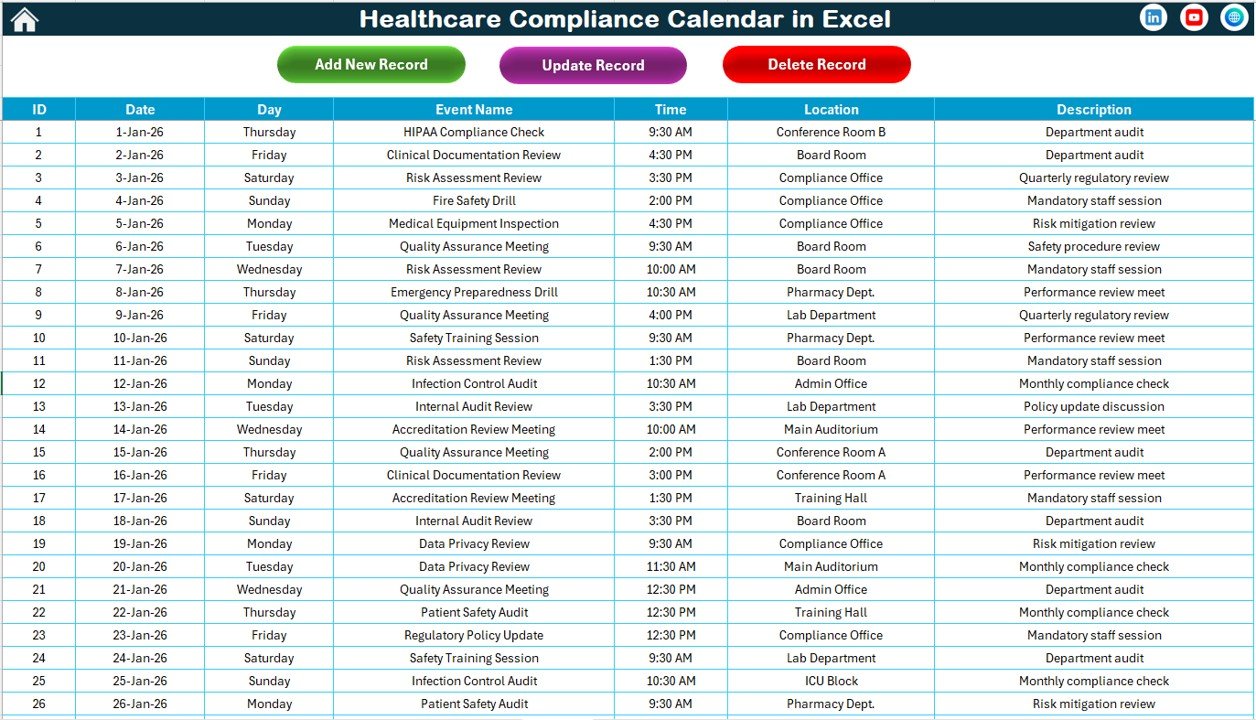
The Events Sheet serves as the database.
It stores all compliance event details, including:
-
ID (Auto-generated)
-
Date
-
Day
-
Event Name
-
Time
-
Location
-
Description
At the top, you will find three buttons:
🔹 Add New Record
Click this button to open the event form and add a new record.
🔹 Update Existing Record
Select the event ID, then click this button to edit details.
🔹 Delete Record
Select the event ID and click delete to remove the event.
Because this structure centralizes data, the entire calendar remains organized and consistent.
What Events Should a Healthcare Compliance Calendar Include?
Healthcare compliance covers multiple activities.
🔹 Regulatory Deadlines
-
Government reporting deadlines
-
Accreditation renewals
-
License renewals
🔹 Internal Audits
-
Compliance audits
-
Risk assessments
-
Policy reviews
🔹 Training Programs
-
HIPAA training
-
Staff certification renewals
-
Safety training sessions
🔹 Inspection Schedules
-
Facility inspections
-
Equipment maintenance checks
-
Environmental compliance reviews
🔹 Reporting & Documentation
-
Quarterly compliance reports
-
Annual regulatory submissions
-
Incident reporting reviews
Because structured scheduling prevents last-minute stress, including all compliance activities ensures better governance.
Click to Purchases Healthcare Compliance Calendar in Excel
Advantages of Healthcare Compliance Calendar in Excel
Now let us examine the benefits.
1️⃣ Centralized Compliance Scheduling
All compliance activities stay in one place. Therefore, teams avoid confusion.
2️⃣ Improved Deadline Management
Visual calendars make it easy to track upcoming tasks.
3️⃣ Easy Event Addition and Editing
Add, update, or delete events quickly using buttons.
4️⃣ Customizable Design
You can change themes and highlight specific days.
5️⃣ Audit Readiness
Since events stay organized, audit preparation becomes smoother.
6️⃣ User-Friendly Interface
Excel provides a familiar environment. Consequently, teams adapt quickly.
Best Practices for the Healthcare Compliance Calendar
To maximize results, follow these best practices:
✅ Update Events Regularly
Enter compliance deadlines as soon as they are announced.
✅ Assign Clear Responsibility
Include responsible departments in event descriptions.
✅ Review the Calendar Weekly
Conduct regular compliance review meetings.
✅ Highlight Critical Deadlines
Use the highlight feature to mark high-priority events.
✅ Maintain Data Accuracy
Ensure event details remain correct and updated.
✅ Backup the Workbook
Protect compliance records by saving secure copies.
Who Should Use This Calendar?
This template benefits:
-
Healthcare Compliance Officers
-
Hospital Administrators
-
Clinic Managers
-
Risk Management Teams
-
Healthcare HR Departments
-
Medical Facility Coordinators
Moreover, both small clinics and large hospitals can use it effectively.
Conclusion
Healthcare compliance requires precision, organization, and timely action. However, without a structured calendar, teams risk missing critical deadlines.
The Healthcare Compliance Calendar in Excel provides a simple yet powerful solution. It centralizes events, supports annual, monthly, and daily views, and allows easy event management.
If your organization wants improved compliance visibility and smoother audit preparation, this Excel calendar offers the perfect tool.
Click to Purchases Healthcare Compliance Calendar in Excel
Frequently Asked Questions with Answers
1. What is a Healthcare Compliance Calendar in Excel?
It is an Excel-based tool that tracks regulatory deadlines, audits, training, and compliance events.
2. Can I customize the calendar year?
Yes. You can change the year and starting month from the control panel.
3. How do I add a new compliance event?
Select a date and click the “Add New Event” button to open the event form.
4. Can I update or delete existing events?
Yes. Use the Update and Delete buttons in the Events sheet.
5. Does the calendar highlight weekends?
Yes. You can choose two days of the week to highlight.
6. Is this template suitable for small clinics?
Yes. Both small healthcare facilities and large hospitals can use it effectively.
Click to Purchases Healthcare Compliance Calendar in Excel
Visit our YouTube channel to learn step-by-step video tutorials