Managing a homeopathy clinic involves handling appointments, patient records, treatments, expenses, doctors, user access, and reports. When this information is scattered across registers or multiple files, it becomes difficult to manage operations smoothly. To solve this problem, we created the Homeopathy Clinic Management System V1.0, a fully automated tool built using Excel + VBA.Homeopathy Clinic Management System V1.0 in Excel VBA
This system gives you a complete clinic management solution without needing complex software. It is simple, powerful, and ready to use immediately.
In this article, we’ll explain all the important features, forms, and modules included in Homeopathy Clinic Management System V1.0.
What Is Homeopathy Clinic Management System V1.0 in Excel VBA?
Click to Buy Homeopathy Clinic Management System V1.0 in Excel VBA
Homeopathy Clinic Management System V1.0 is an Excel-based clinic automation tool designed specifically for homeopathy practitioners. It includes:
- Secure login
- Appointments management
- Patient database
- Treatment master
- Homeopath master
- Expenses tracking
- Reports
- User access control
- Complete record management
- Export features
- Full VBA automation
This system is ideal for small and medium homeopathy clinics who want digital management without expensive software.
1. Login Form
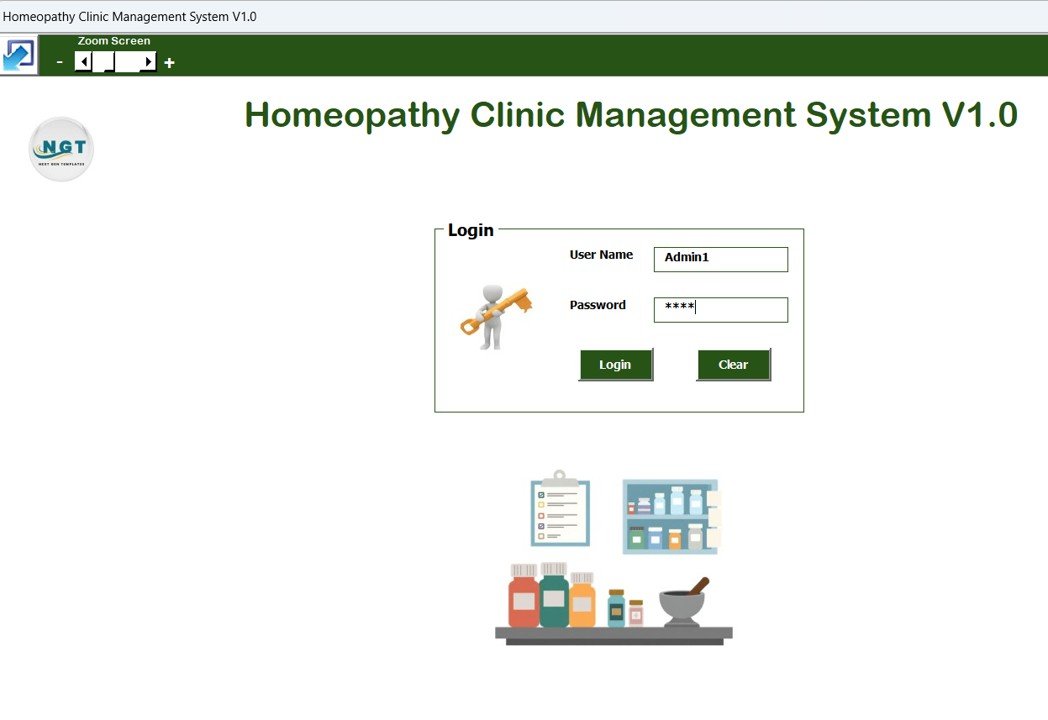
The system starts with a secure login screen.
Default Credentials
-
User ID: Admin1
-
Password: abcd
After entering credentials, click Login or press Enter to access the Main Form.
Click to Buy Homeopathy Clinic Management System V1.0 in Excel VBA
2. Main Form – Central Control Panel
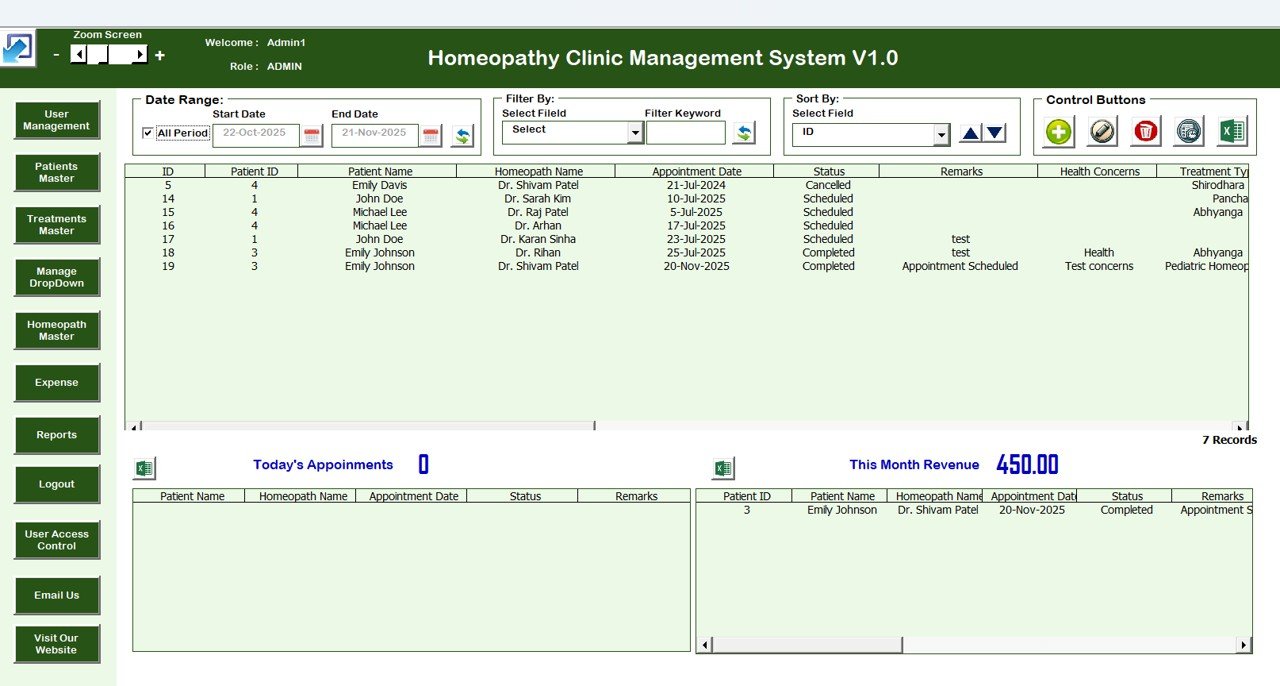
After login, the Main Form appears. This is the control center from where you can manage the entire clinic.
Main Features on the Dashboard:
Homeopathy Clinic Management System List Box
Displays all clinic records in a list box format.
Filters
Filter records by:
-
Date
-
Selected columns
-
Any field to quickly locate records
Sort by Option
Sort the list box data based on:
-
Record number
-
Patient
-
Appointment
-
Treatment
-
Any selected field
Main Buttons (Core Management Actions)
- Update Existing Record – Edit or update an existing entry
- Add New Record – Add a brand new clinic record
- Delete Record – Remove unwanted entries
- Show Record History – View complete modification log
- Export to Excel – Generate a new Excel file for backup or reporting
These buttons make it easy to manage records without touching backend data manually.
Click to Buy Homeopathy Clinic Management System V1.0 in Excel VBA
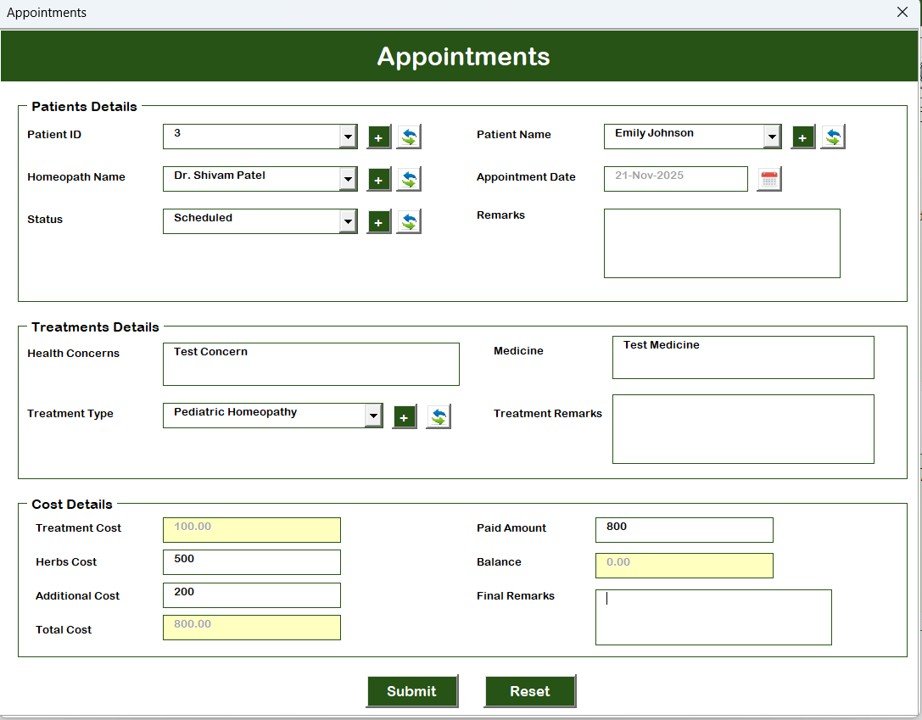
3. Appointments Form
In this section, you can enter all Appointment Details such as:
-
Patient name
-
Appointment date
-
Doctor/homeopath
-
Time slot
-
Purpose
-
Status (Scheduled / Completed / Cancelled)
This form helps the clinic manage daily schedules smoothly.
Click to Buy Homeopathy Clinic Management System V1.0 in Excel VBA
4. Patients Master
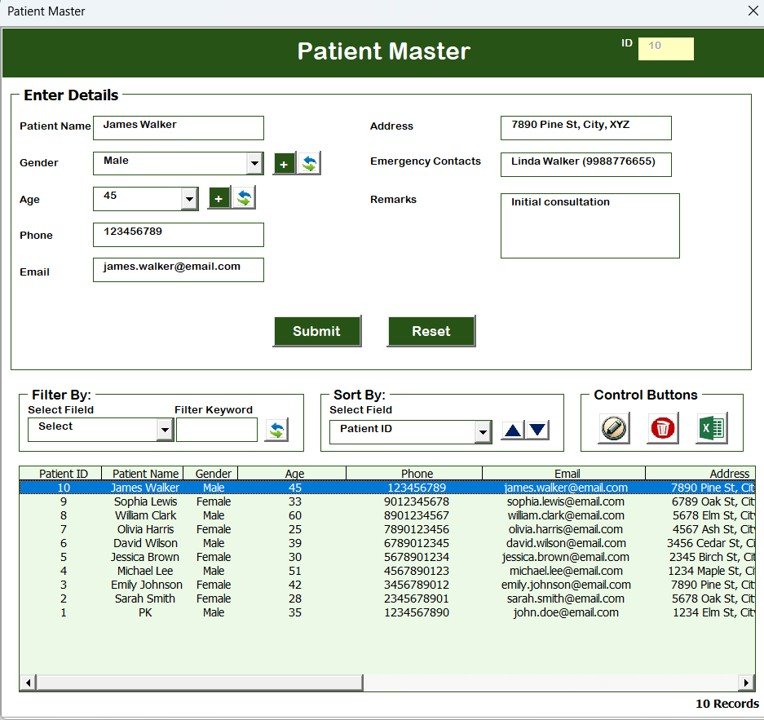
Maintain complete patient information including:
-
Patient Name
-
Age
-
Gender
-
Address
-
Medical history
-
Contact details
This master ensures easy search and quick patient reference during treatment.
5. Treatment Master
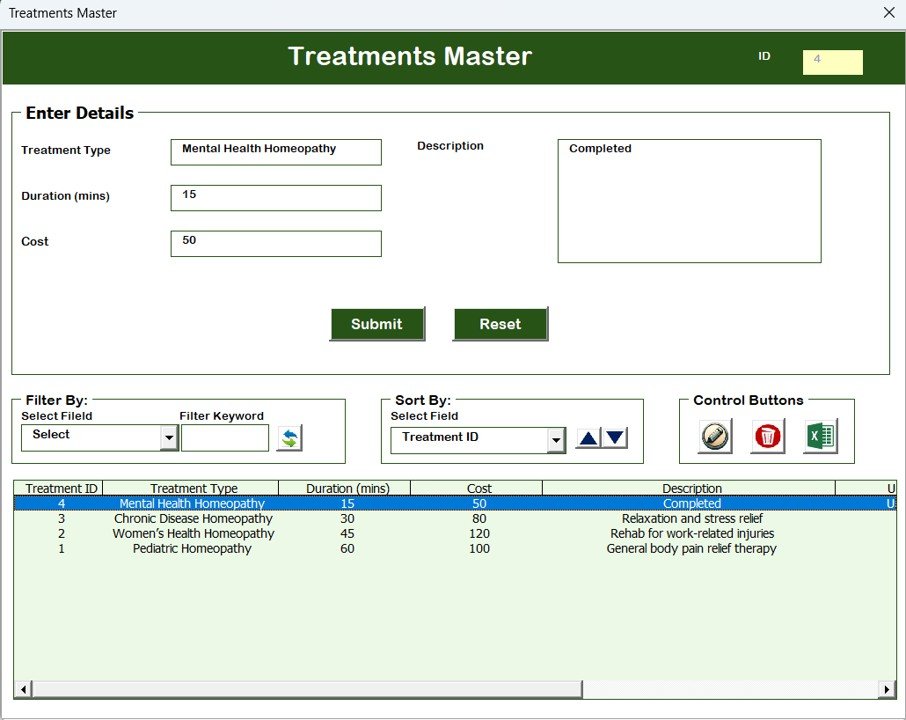
Store all treatment details here:
-
Treatment name
-
Category
-
Medicine
-
Dosage
-
Follow-up rules
-
Notes
This keeps treatment plans consistent across all clinic operations.
Click to Buy Homeopathy Clinic Management System V1.0 in Excel VBA
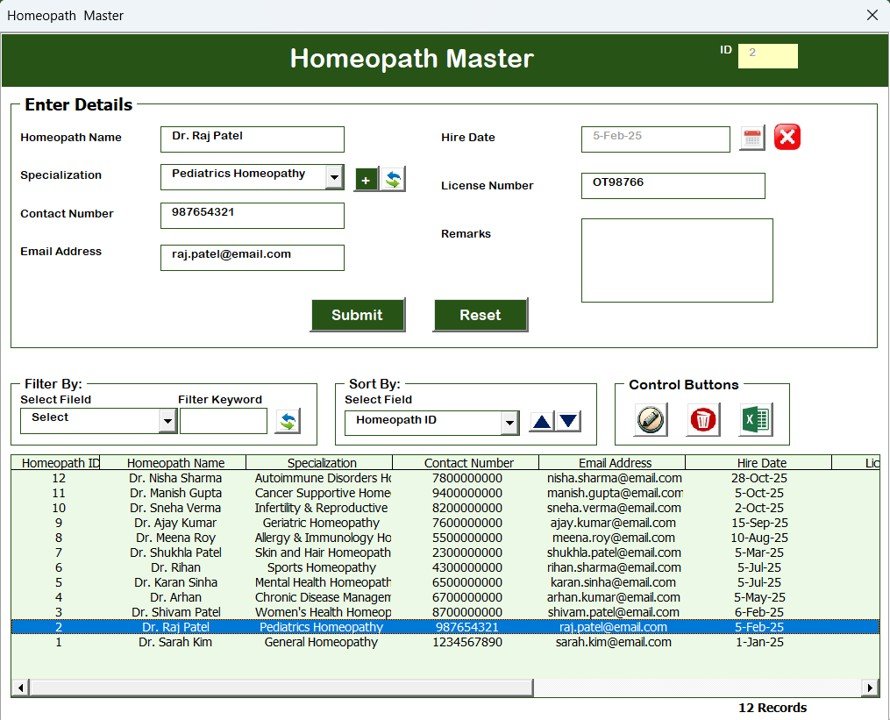
6. Homeopath Master
Maintain details of homeopathy doctors:
-
Doctor/homeopath name
-
Qualification
-
Experience
-
Specialization
-
Contact information
Helps in assigning doctors during appointments.
7. Expenses Form
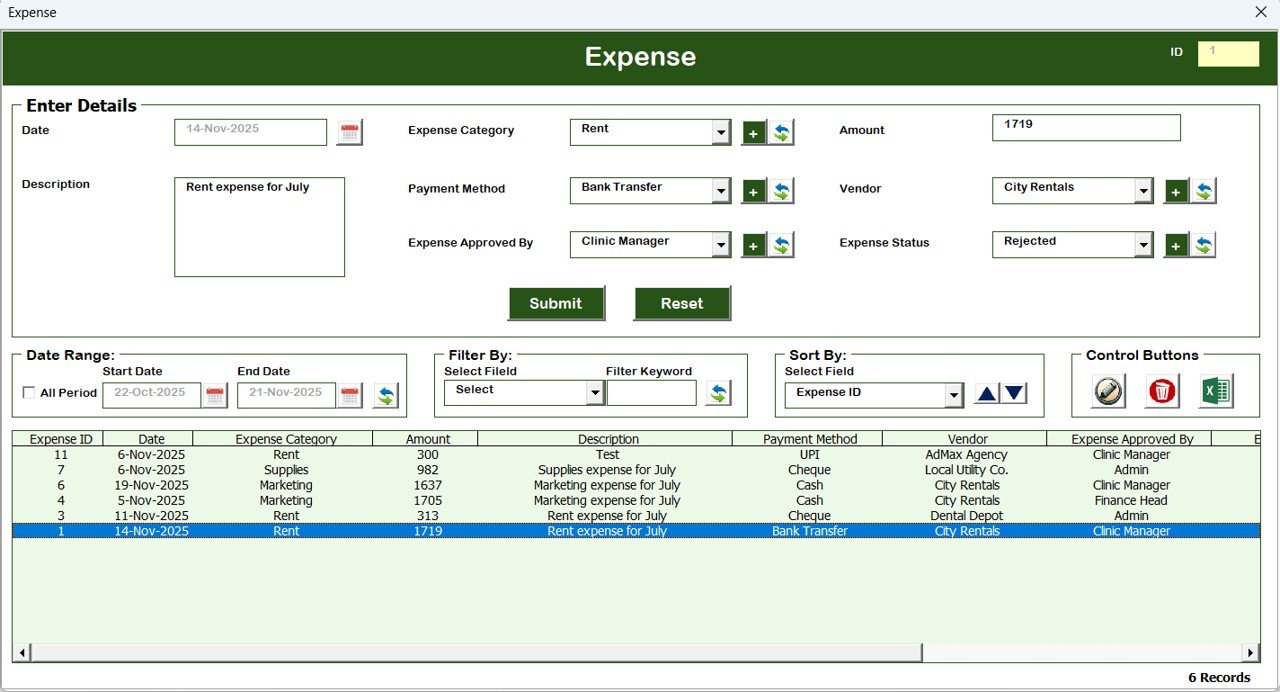
Track all clinic expenses such as:
-
Medicines
-
Rent
-
Utilities
-
Equipment
-
Staff salaries
-
Administrative expenses
This helps in financial analysis and monthly cost tracking.
Click to Buy Homeopathy Clinic Management System V1.0 in Excel VBA
8. User Management
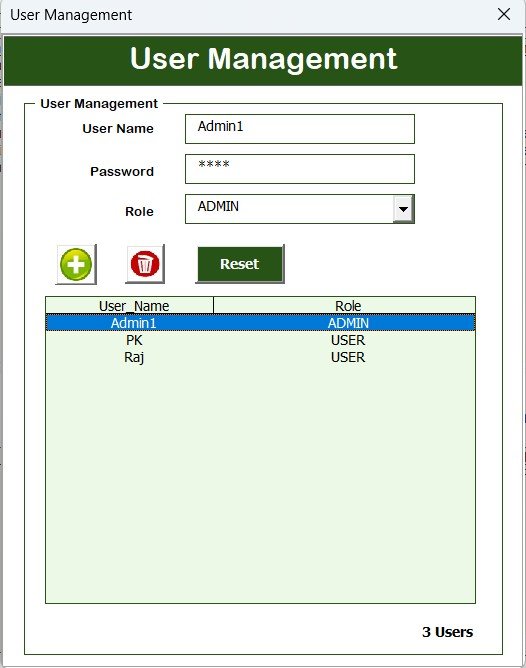
To access User Management, click the User Management button.
Capabilities:
-
Add users
-
Update user data
-
Delete users
-
Reset users
-
Change user passwords
This ensures secure access and multi-user control.
9. Manage List
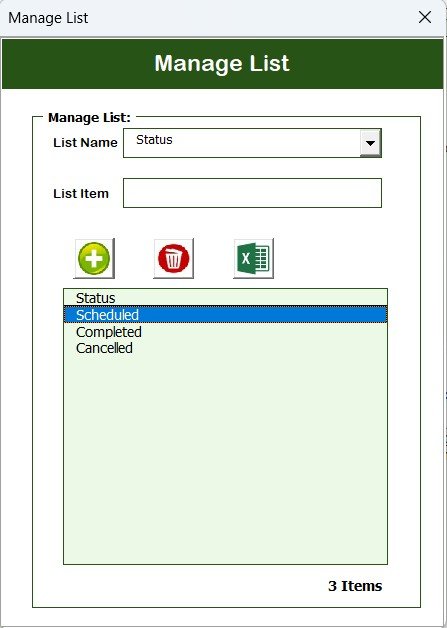
This form lets you manage drop-down lists used inside the tool.
You can:
-
Add new items
-
Delete unwanted items
Example lists: treatment types, expense categories, doctor names, etc.
Click to Buy Homeopathy Clinic Management System V1.0 in Excel VBA
10. Log Form History
This section shows the complete history of modifications, updates, deletions, and user actions.
It is useful for:
-
Audit
-
Tracking changes
-
User accountability
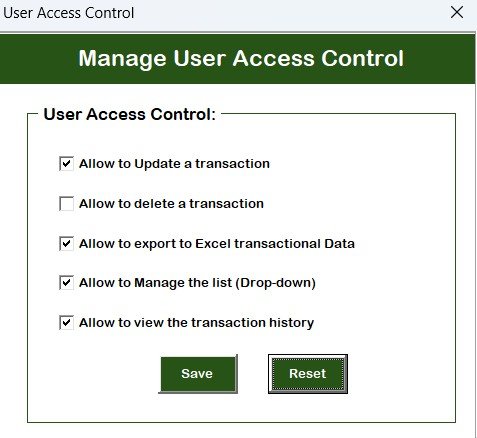
11. Manage User Access Control
Allows the admin to give or restrict access to:
-
Appointments
-
Patient master
-
Treatment master
-
Expenses
-
Reports
-
User management
Ensures each staff member only sees what they are allowed to.
Click to Buy Homeopathy Clinic Management System V1.0 in Excel VBA
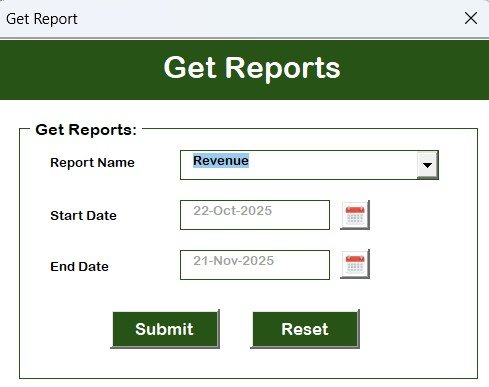
12. Reports Module
The Reports section helps you generate:
-
Expense analysis
Reports are auto-generated based on data stored inside the tool.
13. Logout & Email Us
-
Logout: Close the system securely
-
Email Us: Direct contact feature for support
Advantages of Homeopathy Clinic Management System V1.0
-
No subscription required → one-time tool
-
Easy and familiar Excel environment
-
Full automation using VBA
-
Complete clinic operations in one system
-
Multi-user access
-
Auto-generated reports
-
Secure login
-
Fast search, filter, and sort features
-
Best for small & medium-sized homeopathy clinics
Opportunities for Improvement (Optional Features)
Click to Buy Homeopathy Clinic Management System V1.0 in Excel VBA
-
SMS alerts for appointments
-
Email reminders
-
Online appointment booking
-
Doctor availability calendar
-
Cloud database integration
-
Analytics dashboard
Best Practices for Using This System
-
Update records daily
-
Keep Appointments and Patient Master clean
-
Regularly export backup Excel files
-
Use User Access Control for security
-
Monitor Log History for checks
-
Keep treatment master organized
Conclusion
Click to Buy Homeopathy Clinic Management System V1.0 in Excel VBA
The Homeopathy Clinic Management System V1.0 in Excel VBA gives homeopathy clinics a powerful, fully automated, and easy-to-use management solution. From appointments to patient data, treatments, expenses, reports, and user control — everything is handled within one smart Excel tool.
Whether you run a new clinic or a growing one, this system helps reduce workload, improve accuracy, and streamline daily operations.
Frequently Asked Questions (FAQ)
1. Do I need advanced Excel knowledge to use this tool?
No, the tool is button-based and completely automated.
2. Can multiple staff members use the tool?
Yes, with User Access Control you can create and manage multiple users.
3. Does this work on all versions of Excel?
It works on Excel with macros enabled (Windows recommended).
4. Can I customize forms or fields?
Yes, the template is customizable if you know basic VBA.
5. Is patient data secure?
Yes, login system + restricted access ensure privacy.
Visit our YouTube channel to learn step-by-step video tutorials
Watch the step-by-step video Demo:
Click to Buy Homeopathy Clinic Management System V1.0 in Excel VBA