In today’s competitive manufacturing environment, industrial tools and fasteners companies must monitor performance continuously to maintain quality, control costs, and improve operational efficiency. However, many organizations still depend on scattered spreadsheets and manual reporting systems. As a result, decision-makers struggle to identify performance gaps quickly.
Therefore, businesses increasingly adopt Power BI KPI dashboards to transform raw operational data into meaningful insights. One powerful solution is the Industrial Tools and Fasteners KPI Dashboard in Power BI, a ready-to-use analytics system designed to track manufacturing and operational performance using structured Key Performance Indicators (KPIs).
In this comprehensive guide, you will learn everything about this dashboard, including its structure, features, benefits, implementation process, best practices, and frequently asked questions.
Click to buy Industrial Tools and Fasteners KPI Dashboard in Power BI
What Is an Industrial Tools and Fasteners KPI Dashboard in Power BI?
An Industrial Tools and Fasteners KPI Dashboard in Power BI is an interactive business intelligence solution that helps manufacturers monitor operational performance using measurable KPIs.
Instead of reviewing multiple reports separately, managers can analyze performance through a centralized dashboard. Moreover, Power BI converts complex data into visual insights, which allows faster and smarter decision-making.
The dashboard captures data from an Excel file and automatically generates:
- KPI comparisons
- Performance indicators
- Trend analysis
- Target vs Actual tracking
- Year-over-year comparisons
Consequently, teams gain clear visibility into production efficiency and operational health.
Why Do Industrial Tools and Fasteners Companies Need KPI Dashboards?
Manufacturers face several operational challenges daily. For example, production delays, quality issues, inventory inefficiencies, and cost fluctuations directly impact profitability.
Without structured monitoring:
- Managers react late to problems.
- Performance tracking becomes inconsistent.
- Data analysis consumes excessive time.
However, a KPI dashboard solves these issues because it provides real-time visibility and structured performance monitoring.
Key Reasons Organizations Adopt KPI Dashboards
- Improve operational transparency
- Monitor production targets easily
- Reduce manual reporting effort
- Identify performance gaps faster
- Support data-driven decisions
Therefore, organizations move from reactive management to proactive performance improvement.
How Does the Industrial Tools and Fasteners KPI Dashboard Work?
The dashboard uses Power BI visualization combined with structured Excel data inputs. Once users update the Excel file, the dashboard refreshes automatically.
The system compares:
- Current performance vs targets
- Current year vs previous year
- Month-to-date vs year-to-date metrics
As a result, leaders immediately understand performance trends.
Dashboard Structure: Pages Inside the Power BI File
The dashboard contains three powerful analytical pages designed for different levels of analysis.
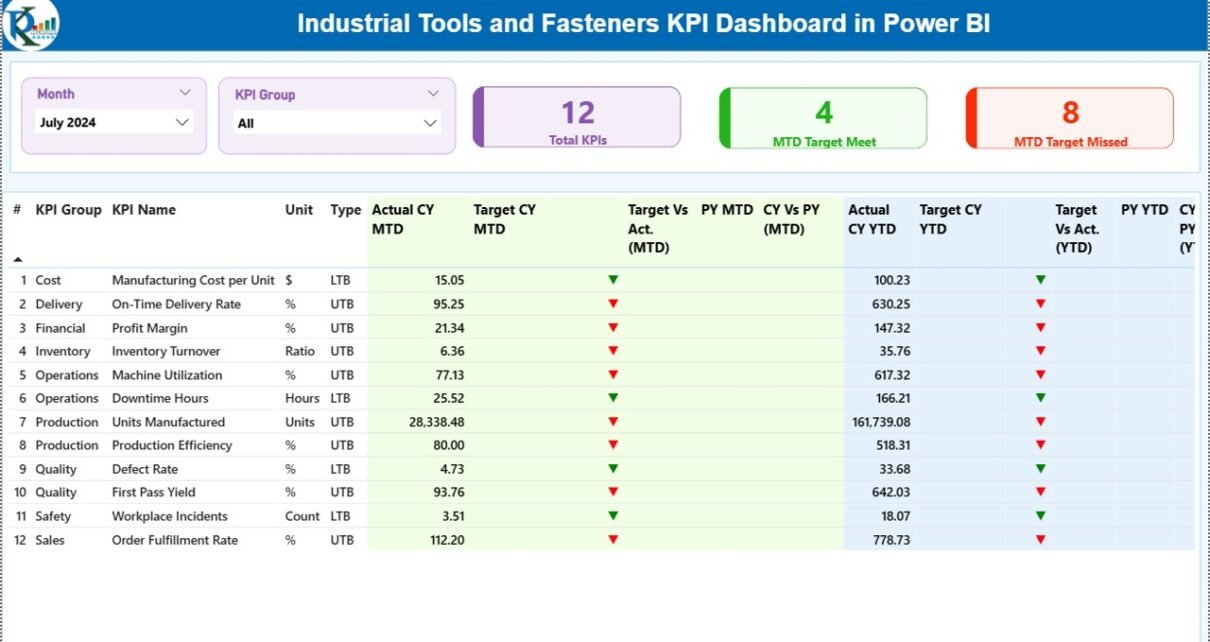
Summary Page – The Main Performance Control Center
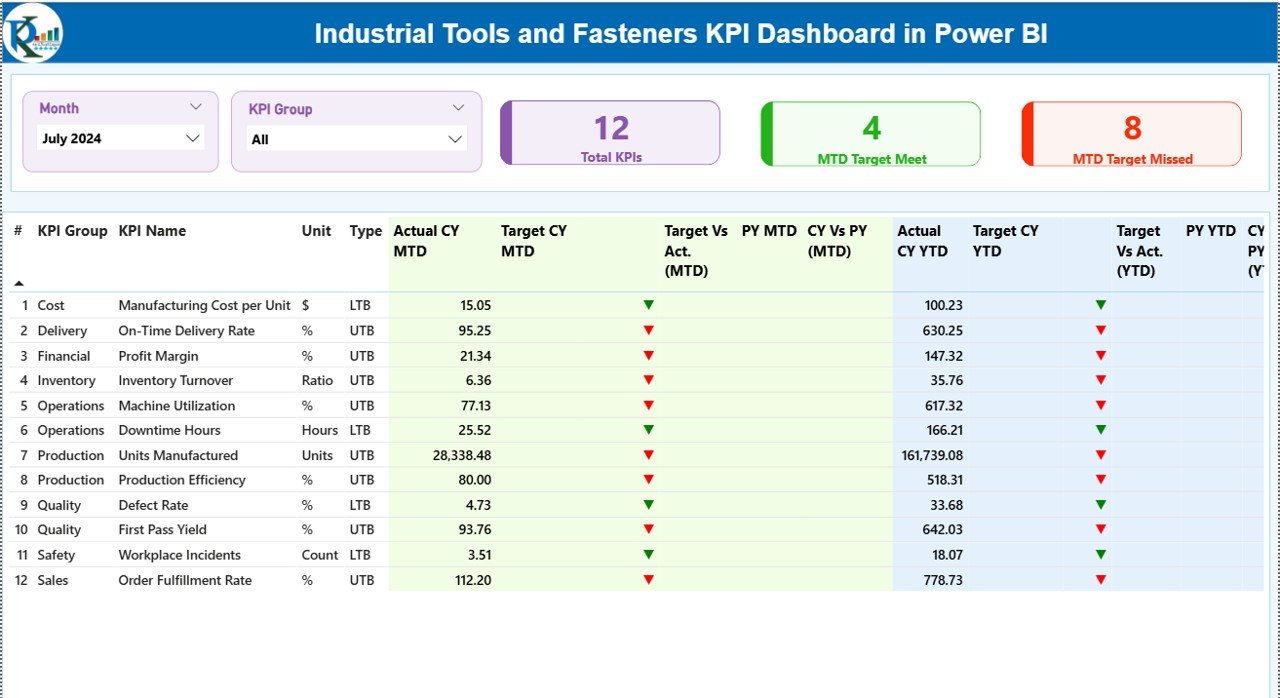
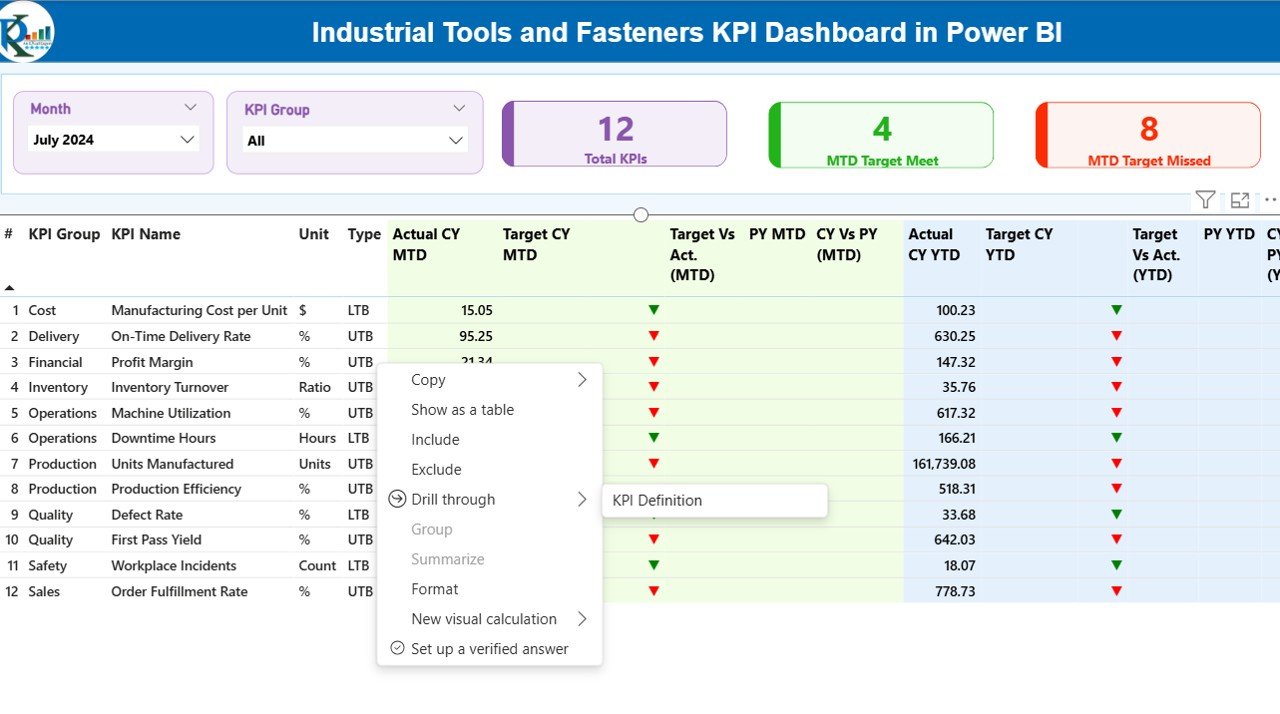
The Summary Page acts as the central decision-making screen. It provides a quick overview of KPI performance across departments or KPI groups.
Interactive Controls
At the top, users can select:
- Month slicer
- KPI Group slicer
These filters instantly update the entire dashboard.
KPI Performance Cards
The dashboard displays three key cards:
- Total KPIs Count
- MTD Target Met Count
- MTD Target Missed Count
Therefore, managers immediately understand overall performance status.
Detailed KPI Table Explained
The table provides complete KPI visibility.
KPI Number
Sequence number assigned to each KPI.
KPI Group
Category or department classification.
KPI Name
Specific performance indicator.
Unit
Measurement unit such as %, hours, quantity, or cost.
Type (LTB / UTB)
- LTB: Lower value performs better
- UTB: Higher value performs better
Month-to-Date (MTD) Metrics
- Actual CY MTD – Current year actual value.
- Target CY MTD – Target value.
- MTD Icon – ▲ green or ▼ red indicator.
- Target vs Actual (MTD) – Performance percentage.
- PY MTD – Previous year comparison.
- CY vs PY (MTD) – Growth comparison.
These metrics help teams evaluate short-term performance quickly.
Year-to-Date (YTD) Metrics
- Actual CY YTD
- Target CY YTD
- YTD Status Icon
- Target vs Actual (YTD)
- PY YTD
- CY vs PY (YTD)
Because of these comparisons, organizations monitor long-term performance trends effectively.
Click to buy Industrial Tools and Fasteners KPI Dashboard in Power BI
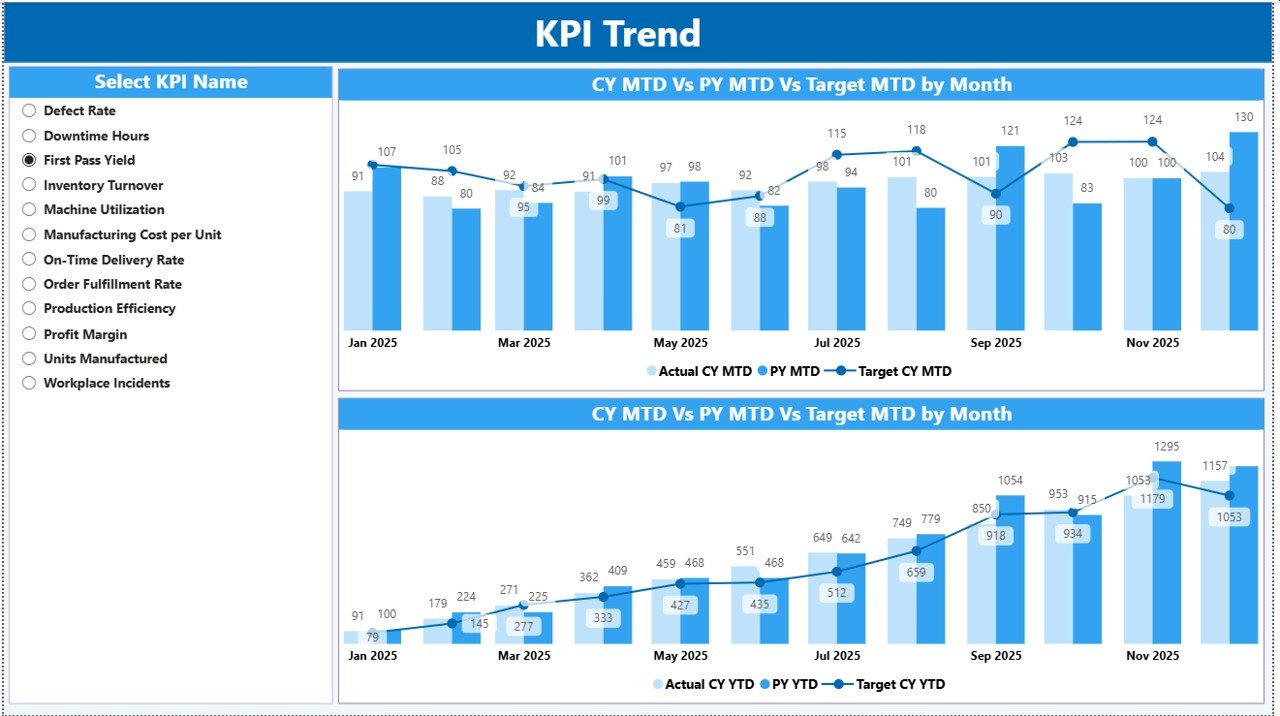
KPI Trend Page – Performance Over Time
While the Summary Page shows status, the Trend Page explains performance behavior.
Key Features
- Two combo charts
- Current Year Actual vs Target
- Previous Year comparisons
- KPI Name slicer
Users simply select a KPI to analyze trends instantly.
Therefore, managers identify whether performance improves, declines, or stays stable.
Click to buy Industrial Tools and Fasteners KPI Dashboard in Power BI
KPI Definition Page – Drill-Through Intelligence
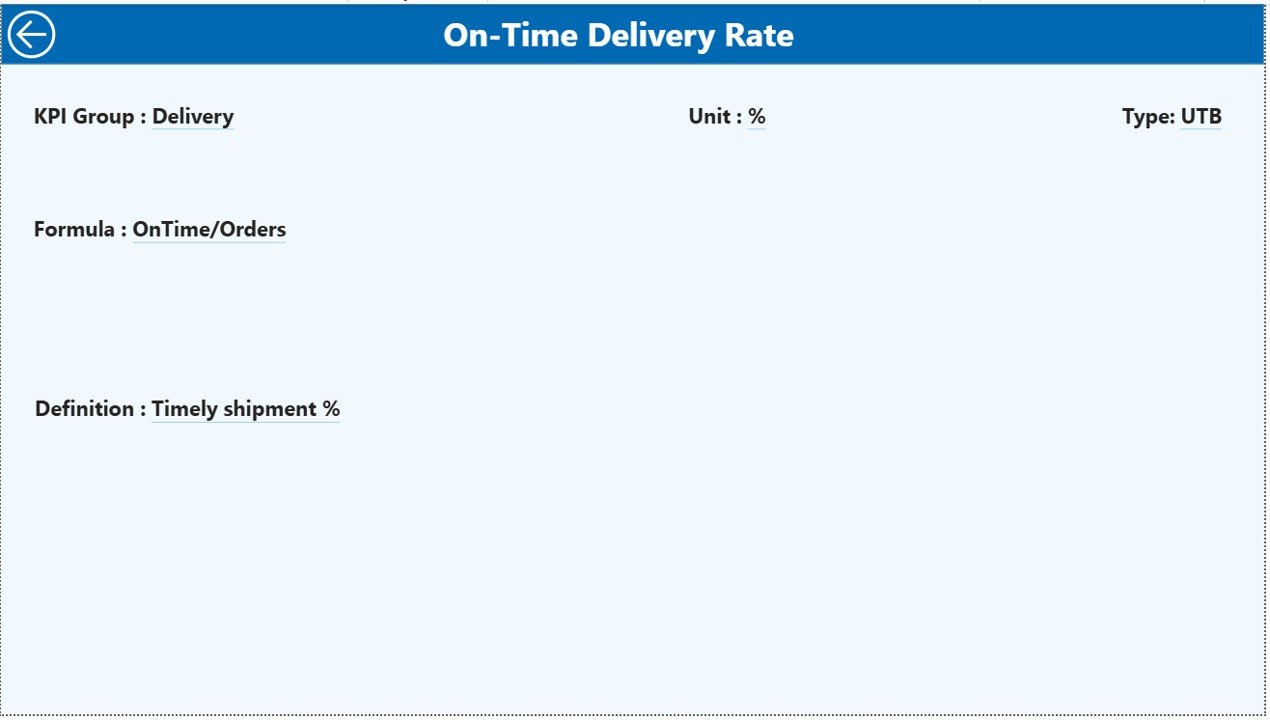
The KPI Definition Page works as a hidden drill-through page.
From the Summary Page, users can open detailed KPI information such as:
- KPI Formula
- KPI Definition
- Measurement logic
- KPI type classification
A back button allows quick navigation to the main dashboard.
Consequently, users understand not only results but also KPI calculation logic.
Click to buy Industrial Tools and Fasteners KPI Dashboard in Power BI
Excel Data Source Structure
The dashboard uses Excel as its data source. Users only need to update three worksheets.
Input_Actual Sheet
Users enter:
- KPI Name
- Month (first date of month)
- MTD values
- YTD values
Once updated, Power BI reflects actual performance automatically.
Click to buy Industrial Tools and Fasteners KPI Dashboard in Power BI
Input_Target Sheet
This sheet stores target values:
- KPI Name
- Month
- MTD Target
- YTD Target
Therefore, performance comparisons remain accurate.
KPI Definition Sheet
Users define KPI structure:
- KPI Number
- KPI Group
- KPI Name
- Unit
- Formula
- Definition
- Type (LTB or UTB)
This structure ensures standardized KPI tracking.
What KPIs Can Industrial Tools and Fasteners Companies Track?
Organizations can monitor multiple operational KPIs such as:
- Production Output Rate
- Machine Utilization
- Defect Rate
- Order Fulfillment Time
- Inventory Turnover
- On-Time Delivery
- Scrap Percentage
- Manufacturing Cost per Unit
- Downtime Hours
- Safety Incident Rate
Because the dashboard remains flexible, companies can customize KPIs easily.
Advantages of Industrial Tools and Fasteners KPI Dashboard in Power BI
- Real-Time Performance Visibility
Managers instantly see operational performance without manual reports.
- Faster Decision-Making
Visual indicators highlight issues immediately.
- Improved Target Tracking
Teams compare targets against actual results continuously.
- Reduced Manual Work
Automation eliminates repetitive reporting tasks.
- Better Strategic Planning
Historical comparisons help forecast performance.
- Enhanced Accountability
Each department tracks measurable KPIs.
- Scalable Solution
Organizations can add new KPIs anytime.
How Does Power BI Improve Manufacturing KPI Analysis?
Power BI enhances analysis through:
- Interactive visuals
- Drill-through analysis
- Dynamic filtering
- Automated calculations
- Real-time refresh capability
Therefore, users spend less time analyzing data and more time improving operations.
How to Implement the KPI Dashboard Successfully?
Step 1: Define Business Objectives
Identify what performance outcomes matter most.
Step 2: Select Relevant KPIs
Choose measurable and actionable KPIs.
Step 3: Prepare Excel Data
Structure actual and target data properly.
Step 4: Import Data into Power BI
Connect Excel sheets to the dashboard.
Step 5: Validate Calculations
Ensure KPI formulas produce accurate results.
Step 6: Train Users
Teach teams how to interpret visuals.
Best Practices for the Industrial Tools and Fasteners KPI Dashboard
Keep KPIs Simple
Avoid tracking too many metrics.
Update Data Regularly
Consistent updates ensure reliable insights.
Use Clear KPI Definitions
Everyone must understand KPI meaning.
Monitor Trends, Not Just Numbers
Focus on improvement direction.
Align KPIs With Business Goals
Each KPI should support strategic objectives.
Use Visual Indicators Wisely
Color coding improves quick understanding.
Review KPIs Periodically
Remove irrelevant metrics and add new ones.
Common Challenges and How to Overcome Them
Data Inconsistency
Standardize data entry formats.
Too Many KPIs
Prioritize high-impact indicators.
Lack of User Adoption
Provide training and simple guides.
Poor Data Quality
Implement validation rules in Excel.
Who Can Benefit from This Dashboard?
The dashboard supports multiple roles:
- Production Managers
- Plant Supervisors
- Operations Heads
- Quality Managers
- Supply Chain Teams
- Senior Executives
Because it simplifies analysis, both technical and non-technical users benefit equally.
Future of KPI Dashboards in Manufacturing
Manufacturing analytics continues to evolve. Companies increasingly combine Power BI with automation and predictive analytics.
Future dashboards will include:
- AI-driven forecasting
- Automated alerts
- Predictive maintenance analytics
- Real-time IoT integration
Therefore, KPI dashboards will become central to smart manufacturing strategies.
Conclusion
The Industrial Tools and Fasteners KPI Dashboard in Power BI provides a powerful and structured way to monitor manufacturing performance. Instead of relying on manual reports, organizations gain real-time visibility into operational metrics.
Because the dashboard integrates Excel data with interactive Power BI visuals, teams analyze performance faster and make informed decisions confidently. Moreover, features such as MTD and YTD comparisons, trend analysis, and KPI drill-through capabilities ensure deep performance understanding.
Ultimately, companies that adopt KPI dashboards improve efficiency, enhance accountability, and achieve sustainable operational growth.
Frequently Asked Questions (FAQs)
What is a KPI dashboard in Power BI?
A KPI dashboard in Power BI visualizes business performance metrics using interactive charts and real-time data analysis.
Can I customize KPIs in this dashboard?
Yes, you can easily modify or add KPIs through the Excel data source.
Do I need advanced Power BI skills to use it?
No. Users only need to update Excel data and refresh the dashboard.
What does LTB and UTB mean?
LTB means Lower the Better, while UTB means Upper the Better.
How often should data be updated?
Organizations should update data monthly or weekly depending on operations.
Can this dashboard support multiple departments?
Yes, KPI groups allow department-wise performance tracking.
Is Excel required for this dashboard?
Yes, Excel works as the data source for actual and target values.
Why is trend analysis important?
Trend analysis helps identify performance patterns and supports future planning.
Watch the step-by-step video tutorial:
Visit our YouTube channel to learn step-by-step video tutorials
Click to buy Industrial Tools and Fasteners KPI Dashboard in Power BI