The Study Abroad Deadline Calendar in Excel is a macro-enabled workbook with 7 sheets, 5 connected calendar views and 100 sample events covering every month of 2026. Each event stores a date, day, event name, time, location and description, and one list feeds the yearly grid, the month calendar, a date-range list and a monthly summary.
Applying to study overseas means juggling portal deadlines, English-test sittings, scholarship essays, deposits and visa appointments, often in three or four countries at once. A missed date can cost a whole intake. This study abroad deadline calendar in Excel gives students, parents and counsellors one place to see what is due, when and where, without paying for another subscription app.
Key Features of the Study Abroad Deadline Calendar
- Five views from one list. Annual View, Monthly View, Daily View, This Month and Events all read the same event records, so you type a deadline once and it appears everywhere.
- 100 realistic sample events. The demo data spans 05-Jan-2026 to 29-Dec-2026 with 8 or 9 events in every month, covering application deadlines, IELTS, TOEFL iBT, GRE and SAT sittings, scholarships, visa steps and pre-departure tasks.
- 12 sample locations. Common App Portal, UCAS Portal, German Uni-Assist Portal, Scholarship Portal, IELTS, TOEFL, GRE and SAT test centres, US Consulate, UK Visa Centre, University Admissions Office and Education Fair Venue.
- Form-based editing. Add New Record, Update Record and Delete Record buttons open an entry form with a date picker, a time picker and a Day field that fills itself.
- Adjustable calendar settings. Pick the year, the starting month, the first day of the week, two weekdays to highlight and one of five colour themes.
Template Structure: Every Sheet Explained
Home
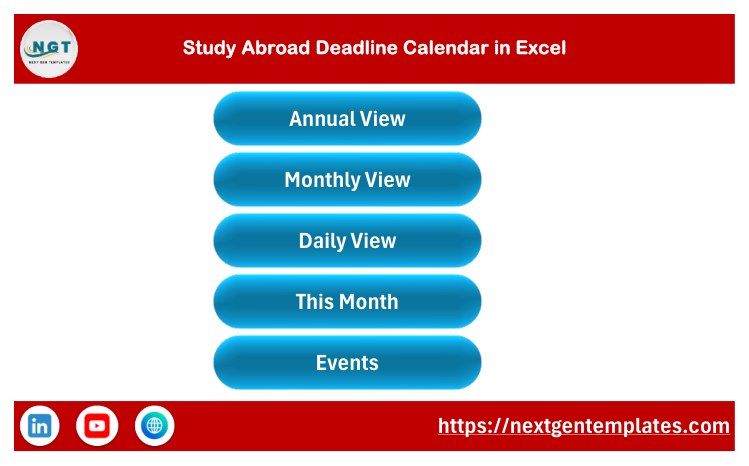
The landing page has five large buttons for Annual View, Monthly View, Daily View, This Month and Events, plus links to the NextGenTemplates website and channels. A home icon on every other page brings you back.
Annual View
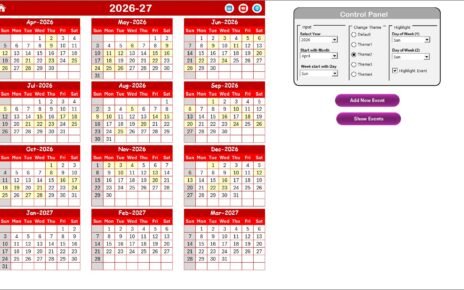
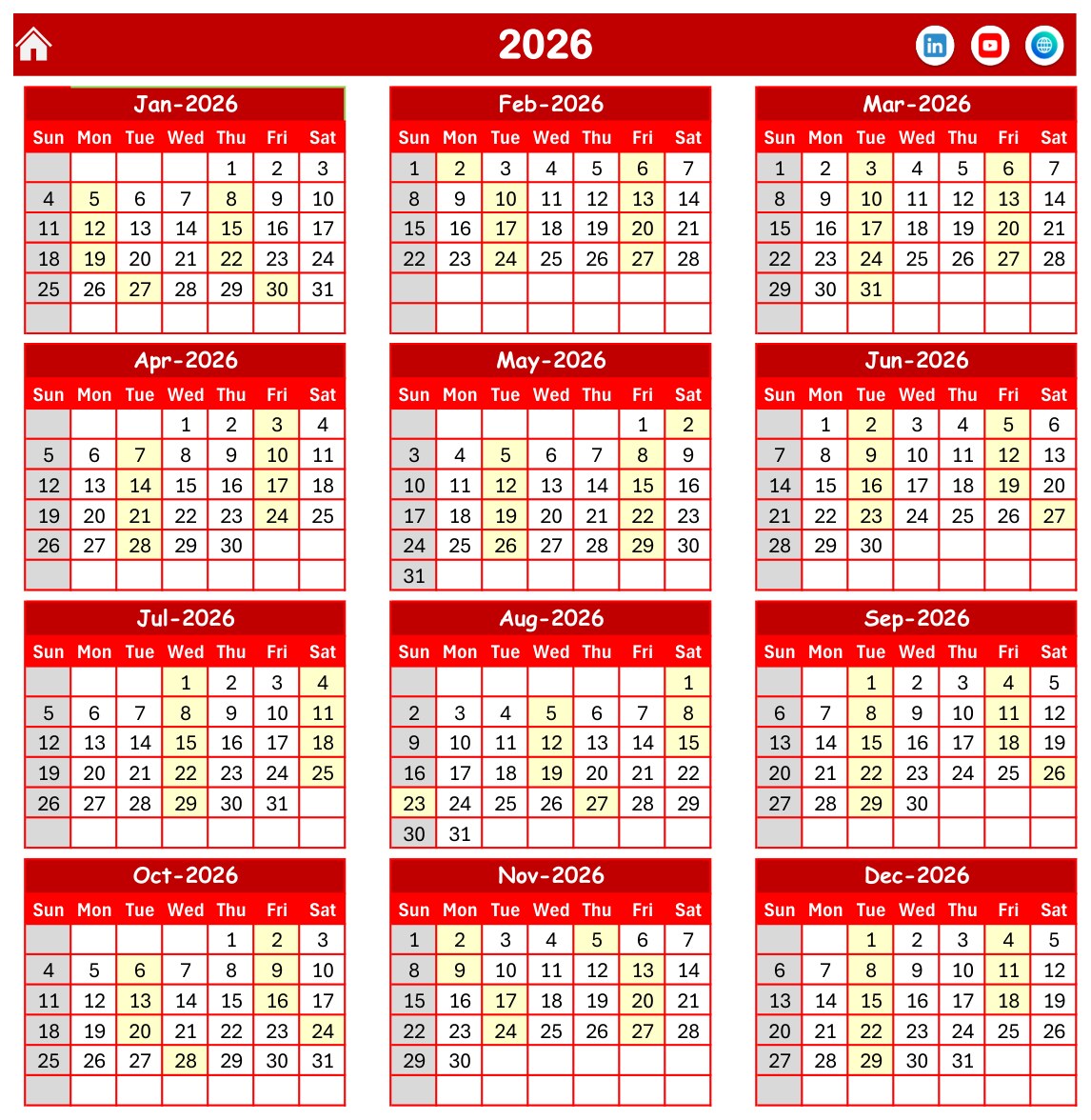
All twelve months of the chosen year sit in a 3 x 4 grid, and every date that carries an event is shaded. In the sample, the busy spring stretch from February to May stands out at a glance.
Monthly View
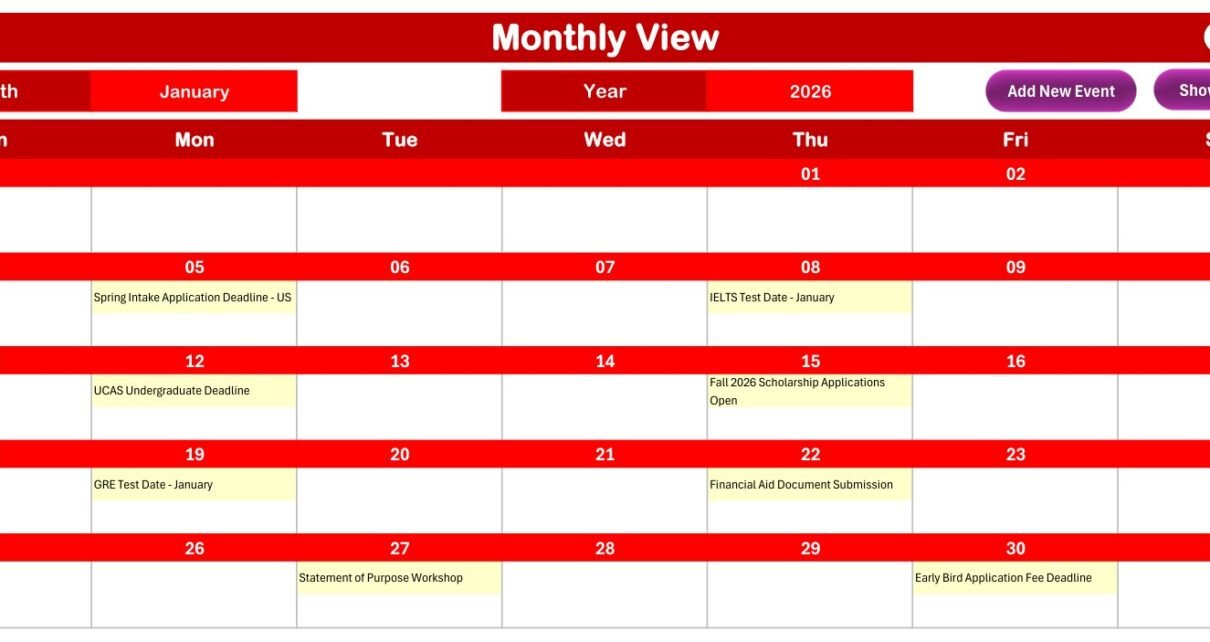
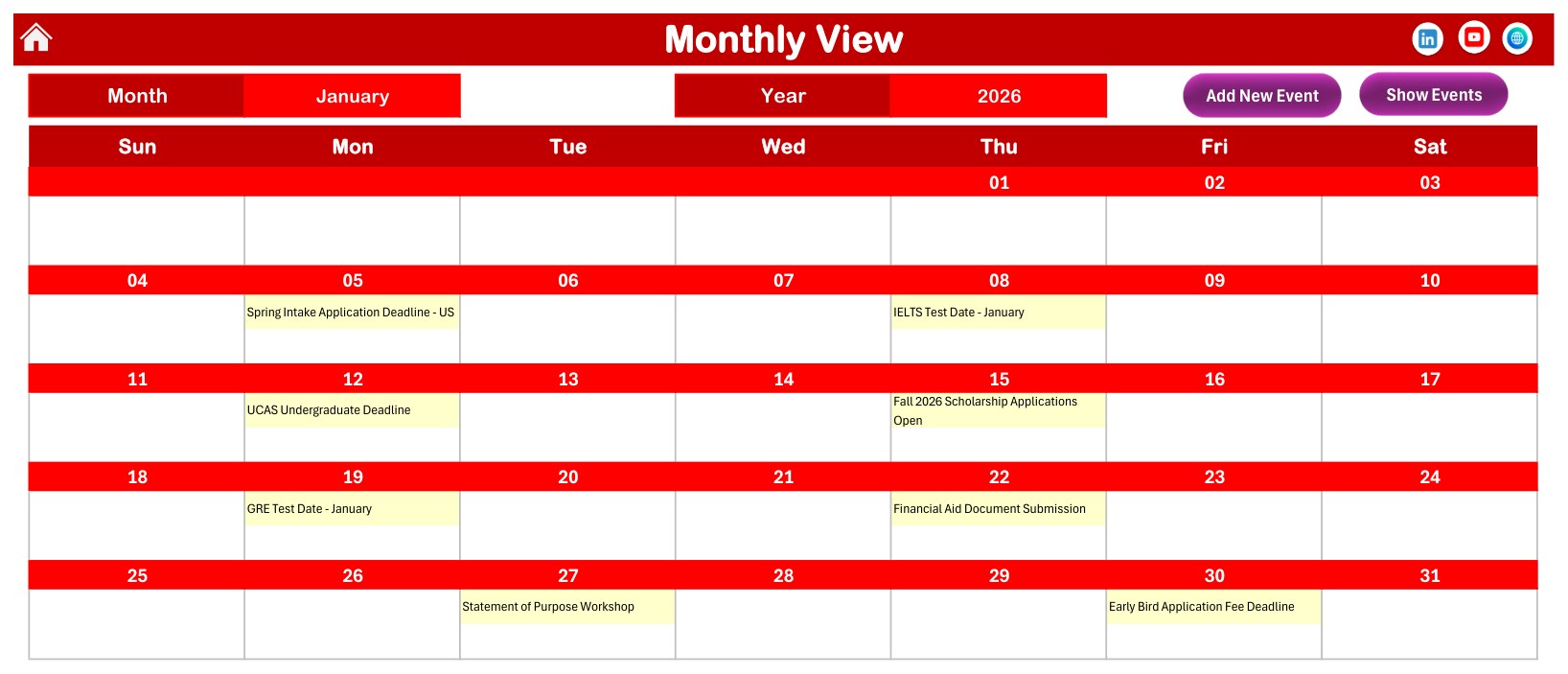
Choose a month and a year and the calendar redraws with the event name printed inside each day. January 2026 shows eight entries, including the UCAS Undergraduate Deadline on Monday 12 January and a GRE test date on Monday 19 January. Add New Event and Show Events buttons sit at the top.
Daily View
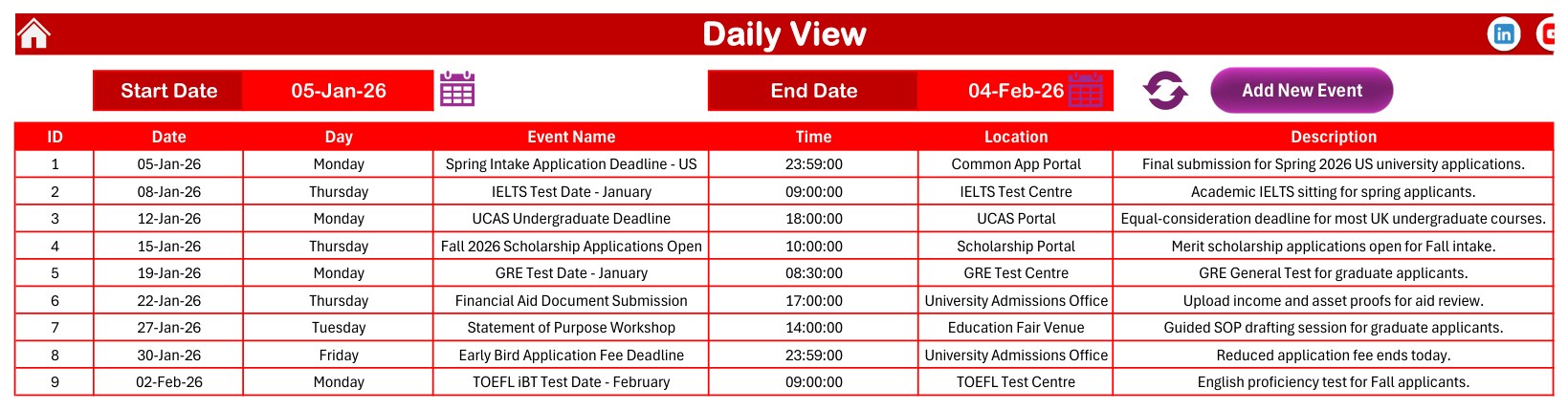
Set a start date and an end date, press refresh and the sheet lists every event in that window. The sample range of 05-Jan-26 to 04-Feb-26 returns nine rows with ID, date, day, event name, time, location and description.
This Month Summary
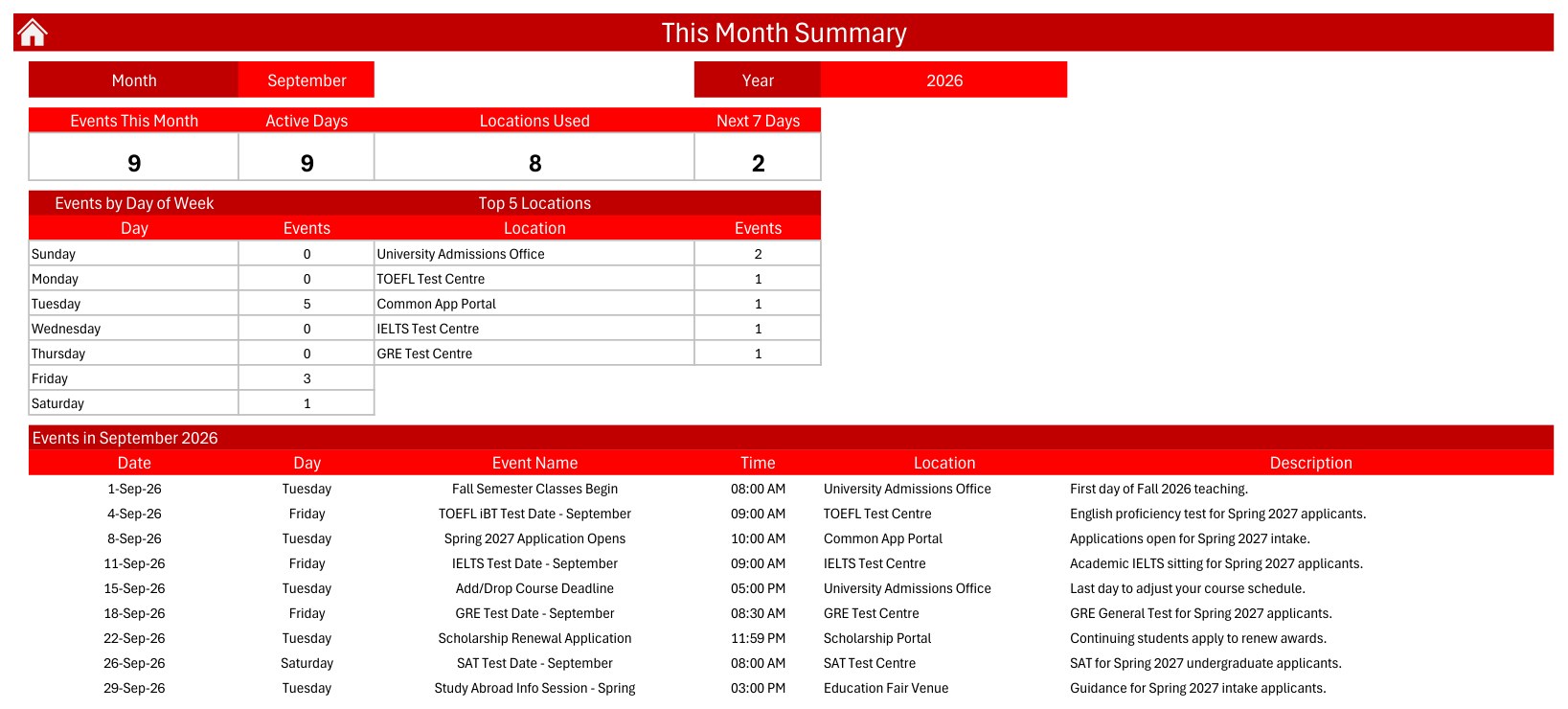
Four cards report Events This Month, Active Days, Locations Used and Next 7 Days. Below them sit Events by Day of Week, a Top 5 Locations table and the month’s full event list. September 2026 in the sample reads 9 events, 9 active days, 8 locations and 2 events in the next 7 days.
Events
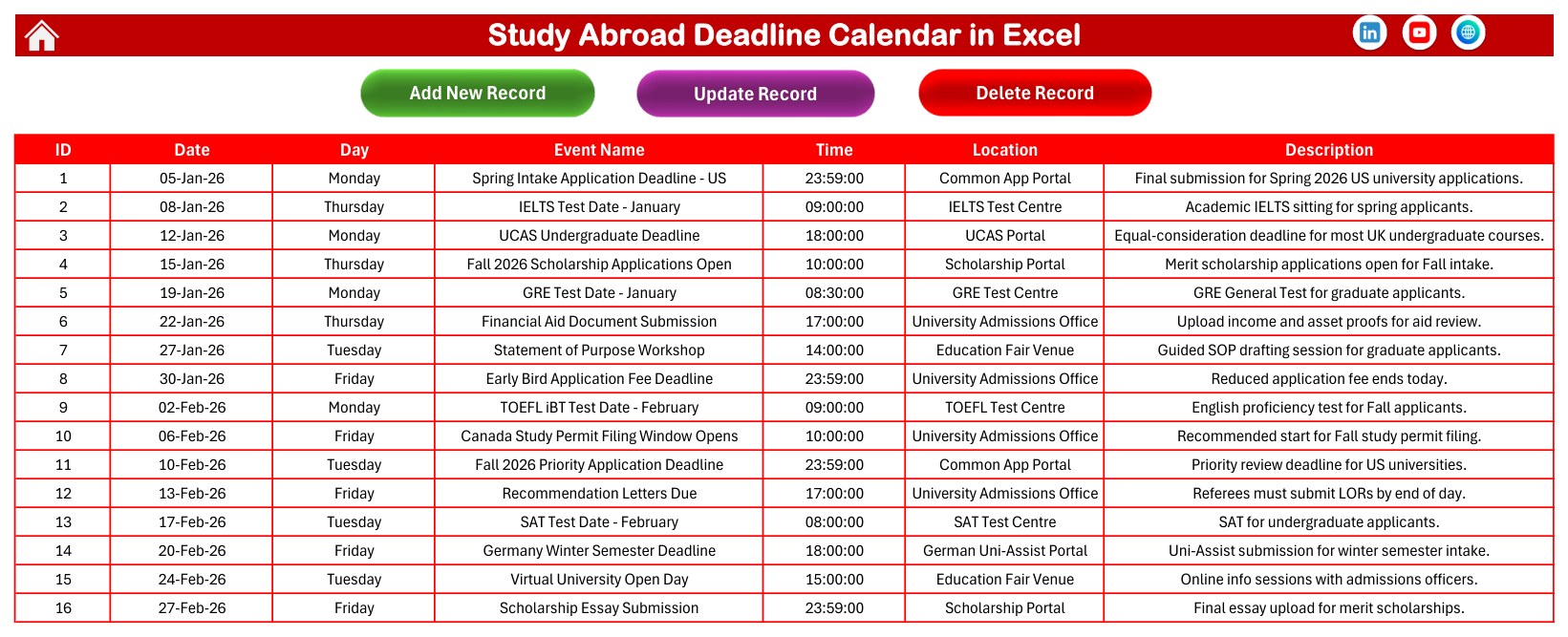
The master table behind every view. Each row holds ID, Date, Day, Event Name, Time, Location and Description, and the three buttons at the top add, update or delete records through the form.
Entry Form
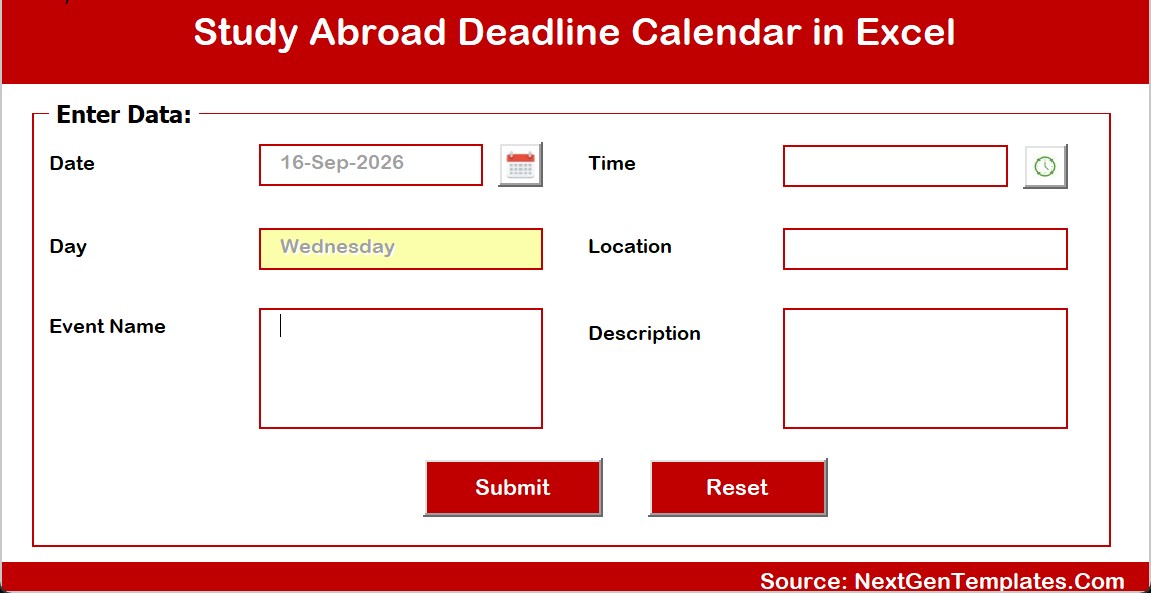
The form asks for Date, Event Name, Time, Location and Description. Day is filled from the date automatically, and Submit writes the row while Reset clears the fields.
Setting
The Setting sheet controls the year, starting month, week start, highlighted weekdays, event highlighting and the colour theme (Default, Blue, Red, Black or Orange).
Study Abroad Deadline Calendar in Excel vs. Google Sheets vs. Paid Planning Apps
| Feature | This Excel calendar | Google Sheets edition | Paid application-planning apps |
|---|---|---|---|
| Cost | One-time payment | One-time payment | Usually a monthly or yearly subscription |
| Platform | Desktop Excel for Windows (macros) | Any browser with a Google account | Web or mobile app |
| Works offline | Yes | Limited | Usually no |
| Annual, monthly, daily and summary views | All included | Varies by edition | Varies by app |
| Form-based entry, update and delete | Yes (VBA form) | See its listing | Yes |
| Live sharing with family or a counsellor | Share a copy of the file | Yes | Yes |
| Email or push reminders | No | No | Often |
| Data kept in your own file | Yes | In your Google Drive | Stored by the vendor |
If you want one private, offline deadline calendar without another subscription, the Excel edition fits best; if you plan in a browser, look at the Study Abroad Deadline Calendar in Google Sheets.
Who Should Use This Study Abroad Calendar Template
Perfect for:
- Students applying to universities in several countries who want one study abroad planner.
- Parents tracking test dates, fees, housing and visa steps for a son or daughter.
- Education counsellors and small consultancies running an intake-season calendar on a Windows PC.
- School careers offices that publish a yearly calendar of university fairs and test sittings.
Not a fit if:
- You need automatic email, SMS or phone reminders. The workbook sends none.
- You work on a Mac, iPad, Excel Online or Google Sheets and need the VBA buttons.
- You run an agency that needs a multi-user CRM with logins, document uploads and student files.
Real-World Use Cases
A student applying to three countries. Aisha is applying to universities in the US, the UK and Germany. She enters her Common App, UCAS and Uni-Assist deadlines next to her IELTS and GRE sittings, then uses the Annual View to make sure no test lands in the same week as a portal deadline. The workbook becomes her university application deadline tracker for the whole season.
A parent managing money and paperwork. Rahul adds the tuition deposit, housing application, health insurance enrolment and flight booking dates for his daughter. At the start of each month he opens This Month to see the Next 7 Days count and prints the Monthly View for the fridge.
A small education consultancy. A two-person team keeps an excel deadline calendar per intake. Before each weekly call, the counsellor filters the Daily View for the next 30 days and walks through every row. Students are recorded by reference code, never by name or passport number.
Advantages of This Excel Deadline Calendar
- One entry, five views. Typing a date once updates the annual grid, the month calendar, the date-range list and the monthly summary.
- Clear sight of crowded weeks. The Annual View shows at a glance when deadlines stack up, which is when mistakes happen.
- Private and offline. Your plan lives in your own workbook, not on a vendor’s server.
- No recurring fee. One purchase covers every intake season, and the year can be changed on the Setting sheet.
- Quick to learn. The sample events show exactly how each view behaves before you add your own, and a PDF user manual ships in the ZIP.
Opportunities for Improvement
No template fits every workflow, so here is what this one does not do:
- No reminders. It sends no email, SMS or pop-up alerts. Check the This Month page and the Daily View on a fixed day each week.
- No clash detection. It will not warn when two deadlines share a date or a time.
- First event per day on the Monthly View. Each day cell prints the first event on that date and adds an “N more” note when a date holds more than one entry. The sample has no shared dates, so the note only appears after you add one. Use the Daily View to see every event.
- Windows desktop Excel only for the buttons. The entry form and buttons are VBA macros.
- Sample dates are illustrative. The 100 demo events are examples, not the official deadlines of any university, test provider or embassy, and real dates change every year.
The calendar is not affiliated with UCAS, Common App, IELTS, ETS, College Board, Uni-Assist, Campus France or any visa office, and it gives no admissions, immigration or visa advice.
Best Practices
- Delete or overwrite all 100 sample events before you add real ones, so demo dates never mix with your plan.
- Copy every deadline from the official university, test-provider or embassy website, and note that source in the Description.
- Record portal deadlines with their exact time, such as 23:59, and remember time zones differ by country.
- Keep location names consistent, for example always “IELTS Test Centre”, so the Top 5 Locations table stays accurate.
- Set a weekly review slot and open the Daily View for the next 30 days.
- Save a backup copy before each application season. Microsoft explains how to enable macros safely.
Explore Relevant Templates
- Admission Season Calendar in Excel: the institution-side view of an admissions cycle.
- Exam Timetable Calendar in Excel: schedule exams, practicals and result dates.
- Scholarship Application Data Entry System in Excel: log scholarship applications through a form.
- Student Exchange Programs Dashboard in Excel: analyse exchange-programme data.
- Pre-Travel Documentation Checklist Template in Excel: get travel papers ready before departure.
Also available as: Study Abroad Deadline Calendar in Google Sheets. Browse every Excel calendar template on NextGenTemplates.
Frequently Asked Questions
What is the Study Abroad Deadline Calendar in Excel?
It is a macro-enabled Excel workbook for planning an overseas study application. It has Annual, Monthly, Daily, This Month and Events views fed by one event list, an entry form, five colour themes and 100 sample events across 2026.
Does it send reminders before a deadline?
No. It sends no email, SMS or pop-up alerts. The This Month page shows how many events fall in the next 7 days, and the Daily View lists everything in any date range, so a weekly check keeps you on track.
Are the sample deadlines official?
No. The 100 sample events are illustrative. Replace them with dates from each university, test provider and embassy, and recheck them regularly, because official deadlines change each year.
How long does setup take?
Most users are ready in about 15 minutes: choose the year and theme on the Setting sheet, clear the sample events, then add real deadlines with the Add New Record form.
Which version of Excel do I need?
Desktop Microsoft Excel for Windows with macros enabled. The views open elsewhere, but the form and buttons use VBA, which Excel for Mac, Excel Online, mobile apps and Google Sheets do not run reliably.
How does it compare with a paid application-planning app?
This Excel calendar is a one-time purchase that keeps your data in your own file and works offline. Paid apps usually add reminders and online sharing but charge a recurring subscription.
About the Author
Built by PK, Microsoft Certified Professional with 15+ years of Excel, Google Sheets and Power BI experience and founder of NextGenTemplates. Every template is hand-built and tested before release.
Conclusion
Studying abroad is a long chain of dates, and one missed link can delay a whole year. This workbook lays every application, test, scholarship and visa step out on one annual grid, one month calendar and one weekly list, so you always know what comes next.
Click here to Purchase the Study Abroad Deadline Calendar in Excel
Instant download · One-time payment · No subscription
Watch more tutorials at Youtube.com/@PK-AnExcelExpert.
Last updated: September 2026