Vendor performance directly impacts business success. However, many companies still review vendors through emails, meetings, or scattered notes. As a result, teams miss deadlines, overlook compliance gaps, and fail to track accountability.
So, how can you conduct structured and consistent vendor reviews without investing in expensive software?
The answer is simple.
You need a Vendor Evaluation Review Checklist in Excel.
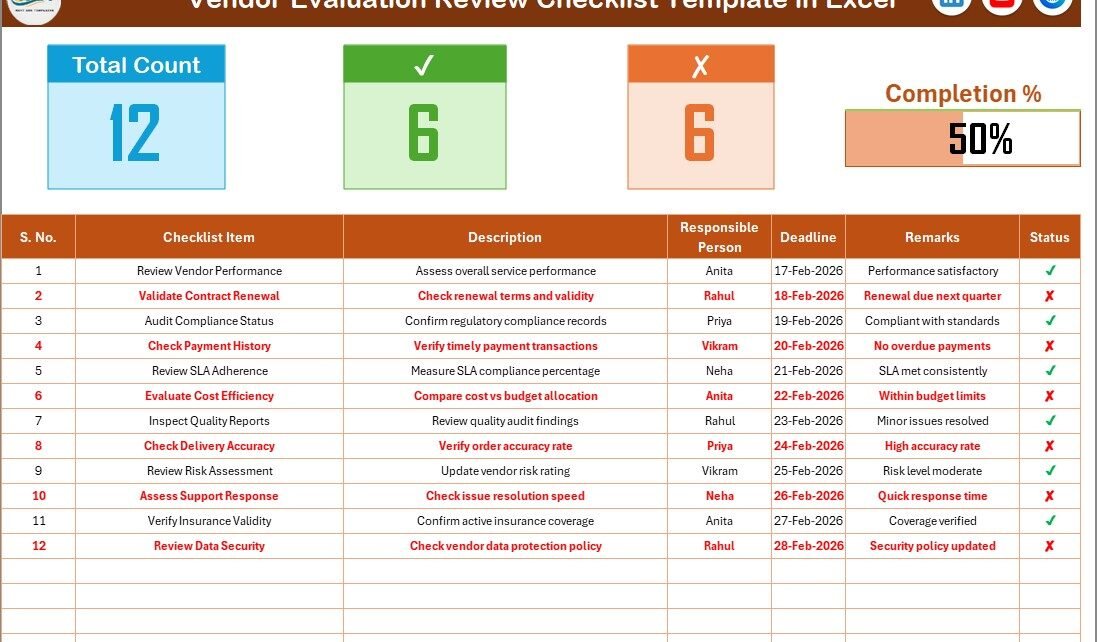
This ready-to-use Excel template helps you review vendor performance, assign responsibilities, track deadlines, and monitor completion status in one organized sheet. Moreover, it gives you a real-time progress indicator so you always know where things stand.
In this complete guide, you will learn:
-
What a Vendor Evaluation Review Checklist in Excel is
-
Why businesses need it
-
A detailed explanation of both worksheets
-
Key benefits and practical uses
-
Advantages of Vendor Evaluation Review Checklist in Excel
-
Best practices for implementation
-
Frequently Asked Questions
Let us explore everything step by step.
Click to Purchases Vendor Evaluation Review Checklist in Excel
What Is a Vendor Evaluation Review Checklist in Excel?
A Vendor Evaluation Review Checklist in Excel is a structured template designed to help businesses conduct periodic vendor reviews in a systematic way.
Instead of relying on manual tracking, you can:
-
Define review criteria
-
Assign responsible persons
-
Set review deadlines
-
Mark completion status
-
Monitor overall progress
Moreover, Excel allows you to use formulas, data validation, and visual indicators. Therefore, you gain clarity and control over vendor review activities.
Why Do Businesses Need a Vendor Evaluation Review Checklist?
Vendor reviews ensure that suppliers meet expectations. However, without a structured checklist, businesses often face:
-
Missed review cycles
-
Unclear accountability
-
Inconsistent evaluation standards
-
Poor documentation
Therefore, a checklist creates consistency. In addition, it improves transparency and supports better decision-making.
When you conduct vendor reviews regularly, you:
-
Maintain quality standards
-
Reduce supply chain risk
-
Improve service reliability
-
Strengthen vendor relationships
What Are the Key Features of Vendor Evaluation Review Checklist in Excel?
This ready-to-use template includes two well-structured worksheets that simplify vendor review management.
1️⃣ Vendor Evaluation Review Checklist Sheet (Main Worksheet)
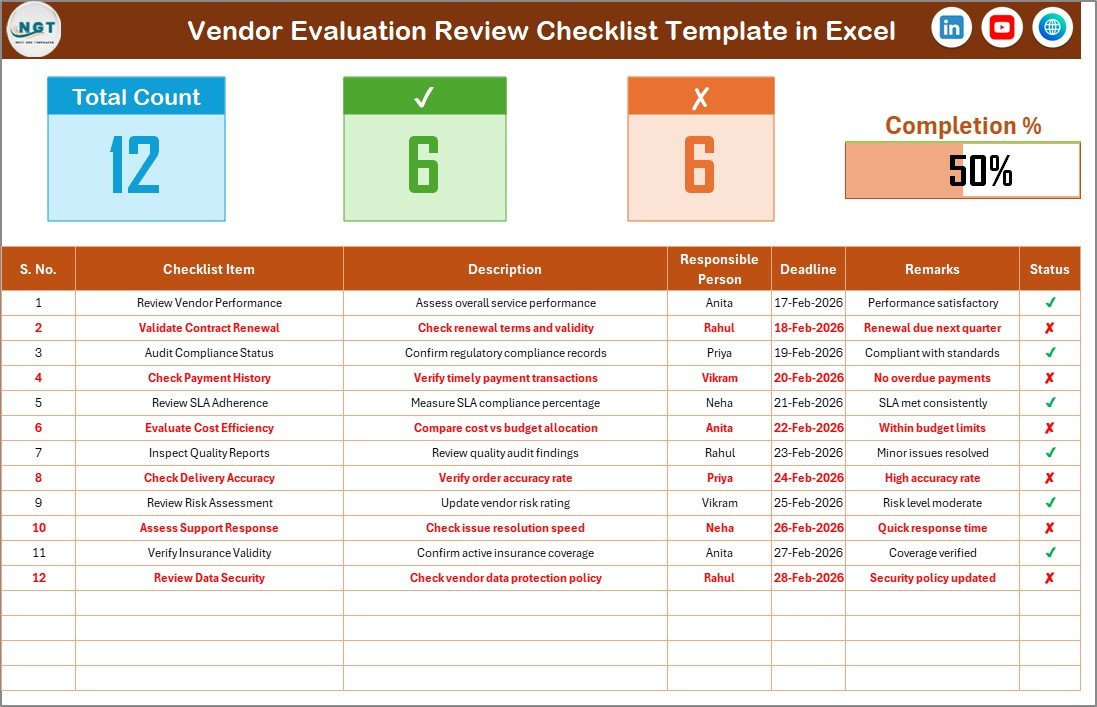
This is the primary sheet where you capture and manage all review-related information.
🔹 Top Section – Review Summary Dashboard
At the top of the worksheet, you will find:
-
Total Count – Total number of review checklist items
-
Checked Count – Number of completed review tasks (✔)
-
Crossed Count – Number of incomplete tasks (✘)
-
Progress Bar – Visual indicator showing completion percentage
Because of this summary section, managers instantly understand review status.
Moreover, the progress bar updates automatically when you change the status.
🔹 Checklist Table – Core Review Area
This is the main working table where you update checklist items.
You simply change the status to ✔ or ✘.
The checklist table includes the following columns:
| Column Name | Purpose |
|---|---|
| Serial No. | Unique number for each review item |
| Checklist Item | Vendor review criteria |
| Description | Detailed explanation of the review item |
| Responsible Person | Assigned reviewer |
| Deadline | Target review completion date |
| Remarks | Notes, comments, or observations |
| Status | ✔ for completed / ✘ for not completed |
Because the structure remains simple, teams can use it without technical training.
Click to Purchases Vendor Evaluation Review Checklist in Excel
2️⃣ List Sheet Tab – Drop-Down Source Sheet
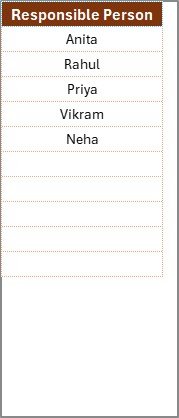
This worksheet stores the unique list of Responsible Persons.
Why is this important?
Because the template uses this list to create a drop-down menu in the main sheet. Therefore:
-
You avoid typing errors
-
You maintain data consistency
-
You standardize accountability
As a result, reporting and tracking become easier.
How Does the Progress Tracking Work?
The template calculates completion percentage using a simple formula:
Checked % = (Checked Count ÷ Total Count) × 100
For example:
-
If 12 tasks out of 15 show ✔
-
Then completion = 80%
-
The progress bar displays 80% visually
Because Excel updates formulas instantly, you always see real-time review progress.
What Can You Review Using This Checklist?
You can customize the checklist to review multiple vendor performance areas, such as:
-
Quality performance
-
Delivery timelines
-
Contract compliance
-
Cost performance
-
Documentation accuracy
-
Service response time
-
Risk management standards
-
SLA adherence
Moreover, you can tailor the checklist based on your industry requirements.
Click to Purchases Vendor Evaluation Review Checklist in Excel
Who Should Use Vendor Evaluation Review Checklist in Excel?
This template suits multiple business roles:
-
Procurement Managers
-
Vendor Relationship Managers
-
Supply Chain Teams
-
Operations Managers
-
Compliance Officers
-
Quality Assurance Teams
Whether you manage five vendors or fifty, this checklist helps you maintain structure and control.
How to Use Vendor Evaluation Review Checklist in Excel?
Follow these simple steps:
Step 1: Update Responsible Person List
Go to the List Sheet Tab.
Add or edit reviewer names.
Step 2: Define Review Criteria
Go to the Main Sheet.
Enter:
-
Serial Number
-
Checklist Item
-
Description
-
Responsible Person
-
Deadline
Step 3: Update Status
After completing the review:
-
Mark ✔ for completed items
-
Mark ✘ for pending items
Step 4: Monitor Review Progress
Check the summary section at the top.
You instantly see:
-
Total tasks
-
Completed reviews
-
Pending reviews
-
Overall completion percentage
Because everything updates automatically, you save time and effort.
Click to Purchases Vendor Evaluation Review Checklist in Excel
Advantages of Vendor Evaluation Review Checklist in Excel
Let us explore why this tool adds real value.
1️⃣ Improves Review Consistency
You use standardized review criteria. Therefore, every vendor receives fair evaluation.
2️⃣ Enhances Accountability
Assigned responsibilities ensure that reviewers complete tasks on time.
3️⃣ Provides Real-Time Visibility
Managers instantly see review progress through summary counts and progress bar.
4️⃣ Reduces Operational Risk
Regular reviews help identify vendor issues early.
5️⃣ Saves Cost
Excel eliminates the need for expensive vendor management software.
6️⃣ Simplifies Documentation
You maintain structured review records for audits and compliance.
7️⃣ Supports Better Vendor Decisions
Clear performance data helps you retain high-performing vendors and improve weak areas.
Click to Purchases Vendor Evaluation Review Checklist in Excel
How Can You Customize This Vendor Review Checklist?
You can enhance the template further by adding:
-
Vendor Name column
-
Review Period column
-
Score or rating column
-
Risk category
-
Priority level
-
Review frequency
Moreover, you can apply conditional formatting to highlight overdue reviews.
What KPIs Can You Derive from This Checklist?
Although the template functions as a checklist, you can extract valuable insights such as:
-
Review Completion Rate %
-
On-Time Review %
-
Overdue Review Count
-
Reviewer Performance Summary
-
Monthly Review Trend
Because Excel supports Pivot tables, you can easily create performance dashboards.
Best Practices for the Vendor Evaluation Review Checklist
To get maximum benefit, follow these best practices:
✔ Define Clear Review Criteria
Avoid vague checklist items. Instead, use measurable standards.
Example:
Instead of “Check delivery”
Write “Verify on-time delivery rate above 95%”
✔ Set Realistic Deadlines
When you define achievable deadlines, you ensure timely completion.
✔ Conduct Periodic Reviews
Schedule monthly or quarterly review cycles to maintain vendor quality.
✔ Use Drop-Down Lists
Always use data validation to maintain data consistency.
✔ Track Trends Over Time
Do not review once and forget. Instead, compare performance trends.
✔ Discuss Results With Vendors
Share review outcomes and improvement plans with vendors.
✔ Archive Review History
Maintain historical records for audit and compliance purposes.
Click to Purchases Vendor Evaluation Review Checklist in Excel
How Does This Checklist Improve Vendor Relationships?
Structured review builds trust.
Because:
-
Vendors understand expectations clearly
-
Feedback becomes structured
-
Performance gaps become measurable
-
Improvement actions become actionable
As a result, both parties focus on growth and collaboration.
Why Choose Excel for Vendor Evaluation Review?
You might wonder why Excel works well.
Here is why:
-
Most businesses already use Excel
-
You can customize it easily
-
It requires no extra software cost
-
It supports formulas and automation
-
It allows Pivot-based reporting
Moreover, Excel provides flexibility without complexity.
Common Mistakes to Avoid in Vendor Review Management
Avoid these errors:
-
Skipping regular review cycles
-
Using unclear evaluation criteria
-
Ignoring documentation
-
Failing to assign responsibility
-
Overcomplicating checklist structure
When you avoid these mistakes, you improve vendor governance significantly.
Click to Purchases Vendor Evaluation Review Checklist in Excel
How Does This Template Support Audit and Compliance?
During audits, companies must present vendor review records.
This checklist:
-
Documents evaluation history
-
Shows accountability
-
Tracks completion status
-
Demonstrates compliance monitoring
Therefore, it strengthens audit readiness.
Conclusion: Why Should You Use Vendor Evaluation Review Checklist in Excel?
Vendor review should never remain informal or inconsistent. When you review vendors properly, you improve quality, reduce risk, and strengthen supplier relationships.
The Vendor Evaluation Review Checklist in Excel provides:
-
Structured review tracking
-
Clear accountability
-
Real-time progress monitoring
-
Easy customization
-
Improved decision-making
Moreover, because it remains simple and user-friendly, any team can adopt it quickly.
If you want organized vendor reviews without complex systems, this Excel template delivers clarity, control, and consistency.
Click to Purchases Vendor Evaluation Review Checklist in Excel
Frequently Asked Questions with Answers
1️⃣ What is the main purpose of Vendor Evaluation Review Checklist in Excel?
It helps businesses conduct structured vendor reviews and track completion status effectively.
2️⃣ Can I customize the checklist items?
Yes. You can edit review criteria and add columns as needed.
3️⃣ How does the progress bar update?
The progress bar calculates completion percentage based on ✔ status entries.
4️⃣ Can I generate reports from this template?
Yes. You can use Pivot tables to create vendor performance reports.
5️⃣ Is this suitable for small businesses?
Yes. Small and medium businesses can use it easily.
6️⃣ How often should I review vendors?
You should review vendors monthly or quarterly depending on contract terms.
7️⃣ Can I track multiple vendors in one file?
Yes. You can create separate sheets or sections for different vendors.
Click to Purchases Vendor Evaluation Review Checklist in Excel
Visit our YouTube channel to learn step-by-step video tutorials