Managing IT support requests efficiently remains one of the biggest challenges for organizations of all sizes. Every day, IT teams handle password resets, software issues, hardware failures, network problems, and access requests. However, when teams manage these requests using emails, WhatsApp messages, or unstructured Excel sheets, things quickly become chaotic. As a result, tickets get lost, response times increase, and user satisfaction drops.
That is exactly where IT Helpdesk Ticket Management System V1.0 becomes a powerful and practical solution.
In this detailed article, you will learn what IT Helpdesk Ticket Management System V1.0 is, how it works, its features, advantages, best practices, system requirements, and frequently asked questions. Moreover, the article explains everything in clear and simple language so you can easily decide whether this tool fits your organization.
Click to Purchases IT Helpdesk Ticket Management System V1.0
What Is IT Helpdesk Ticket Management System V1.0Dry Clean Service Management System V1.0?
IT Helpdesk Ticket Management System V1.0 is a ready-to-use Excel and VBA-based tool designed to help organizations manage IT support tickets in a structured and controlled way. Instead of relying on emails or manual tracking, this system centralizes all tickets in one Excel-based application with user roles, forms, filters, and reports.
Because the tool runs on Microsoft Excel Desktop, it does not require expensive software, cloud subscriptions, or complex installations. Therefore, small businesses, startups, IT service providers, and internal IT teams can start using it immediately.
Most importantly, this system helps IT teams log tickets, assign agents, track updates, maintain history, and generate reports, all from one place.
Why Do Organizations Need an IT Helpdesk Ticket Management System?
Many organizations still manage IT issues manually. However, this approach creates several problems. For example, emails get buried, duplicate requests appear, and no one tracks resolution time properly.
An IT Helpdesk Ticket Management System solves these issues because it:
-
Centralizes all IT requests
-
Improves response and resolution time
-
Creates accountability for agents
-
Maintains a complete history of changes
-
Improves user satisfaction
As a result, IT teams work more efficiently, and management gains clear visibility into support operations.
How Does IT Helpdesk Ticket Management System V1.0 Work?
IT Helpdesk Ticket Management System V1.0 works entirely inside Microsoft Excel Desktop using VBA forms and logic. Once you open the file, you log in using predefined credentials. After login, the main form appears, from where you manage tickets, users, agents, and reports.
Because everything stays inside Excel, data remains easy to back up, export, and customize. Moreover, users do not need technical expertise to operate the system.
Key Features of IT Helpdesk Ticket Management System V1.0
Let us now explore the features of this tool in detail.
How Does the Login Form Work?
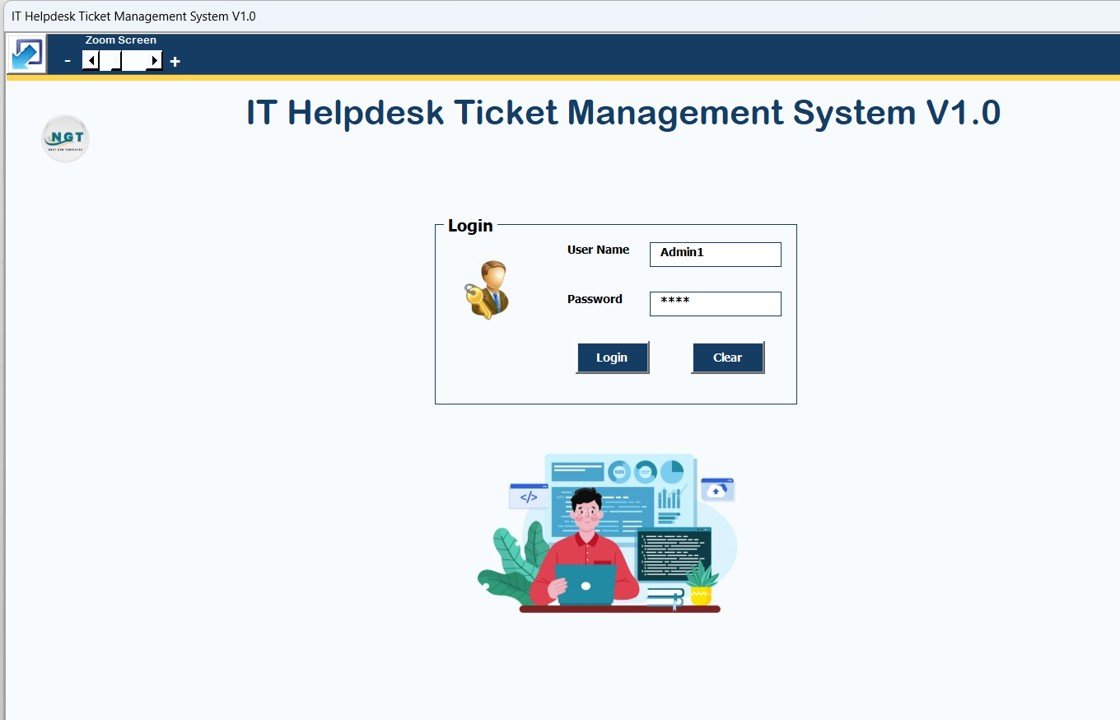
The Login Form acts as the security gateway for the system. It ensures that only authorized users can access the tool.
Default Login Credentials
Admin Role
-
Username:
Admin1 -
Password:
abcd
User Role
-
Username:
User1 -
Password:
abcd
Once you enter the correct credentials and click the Login button—or simply press Enter—the system opens the Main Form.
This role-based login ensures that admins and users see only what they are allowed to access.
Click to Purchases IT Helpdesk Ticket Management System V1.0
What Is the Main Form and Why Is It Important?
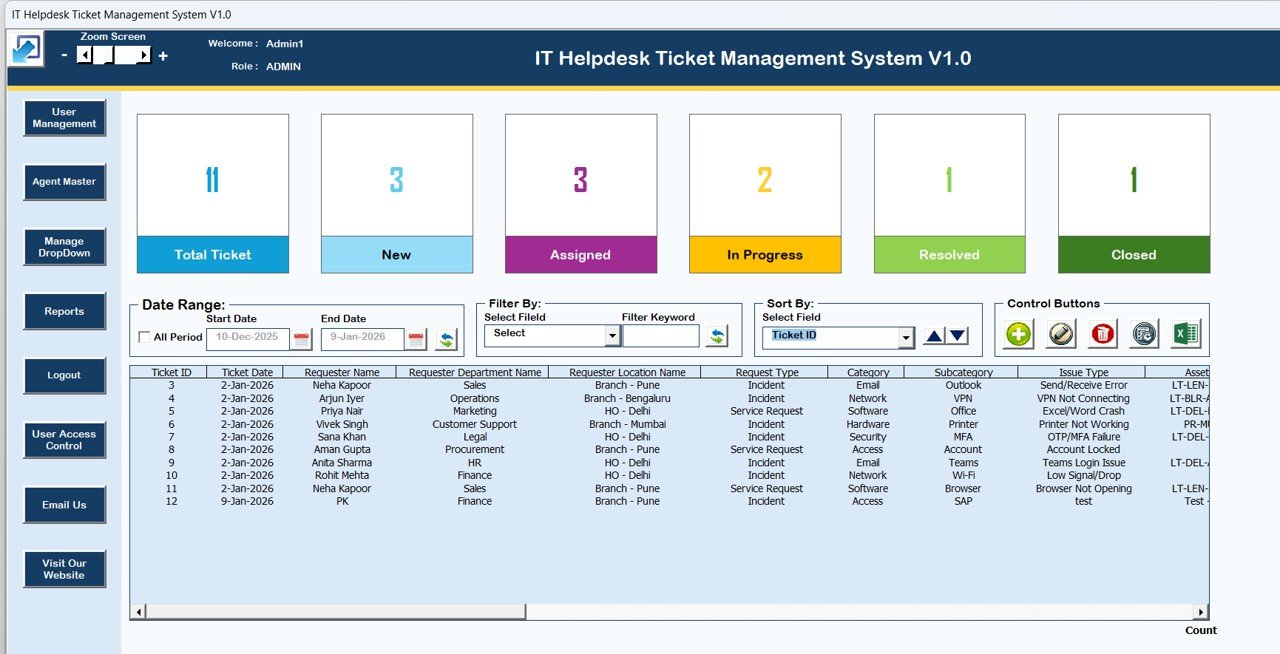
The Main Form acts as the control center of the entire IT Helpdesk Ticket Management System. From this screen, you manage tickets, filter data, perform actions, and navigate to other modules.
How Does the List Box Help Manage Tickets?
At the center of the Main Form, you will find a List Box. This list box displays all relevant ticket data in a tabular format.
Because the list box updates dynamically, you always see the latest information. Therefore, you can quickly review open tickets, closed tickets, or tickets assigned to specific agents.
How Do Filters Improve Ticket Management?
Above the list box, the system provides Filters that allow you to narrow down data.
You can:
-
Filter tickets by date range
-
Filter tickets by selected columns
As a result, you quickly find specific tickets without scrolling through hundreds of records.
How Does the Sort Feature Work?
The Sort By feature allows you to sort list box data based on selected criteria.
For example, you can sort tickets by:
-
Ticket date
-
Priority
-
Status
-
Agent
Because sorting happens instantly, analysis becomes faster and more effective.
What Control Buttons Are Available on the Main Form?
The Main Form includes multiple control buttons that simplify ticket management.
1. Add New Record
This button opens the Ticket Entry Form, where you can add a new IT support ticket.
2. Update Existing Record
To update a ticket, you select a record from the list box and click this button. Alternatively, you can double-click the record. The system opens the form with existing details so you can edit and submit changes.
3. Delete Record
This button deletes the selected ticket from the system. Because only authorized users can delete records, data remains secure.
4. Show Record History
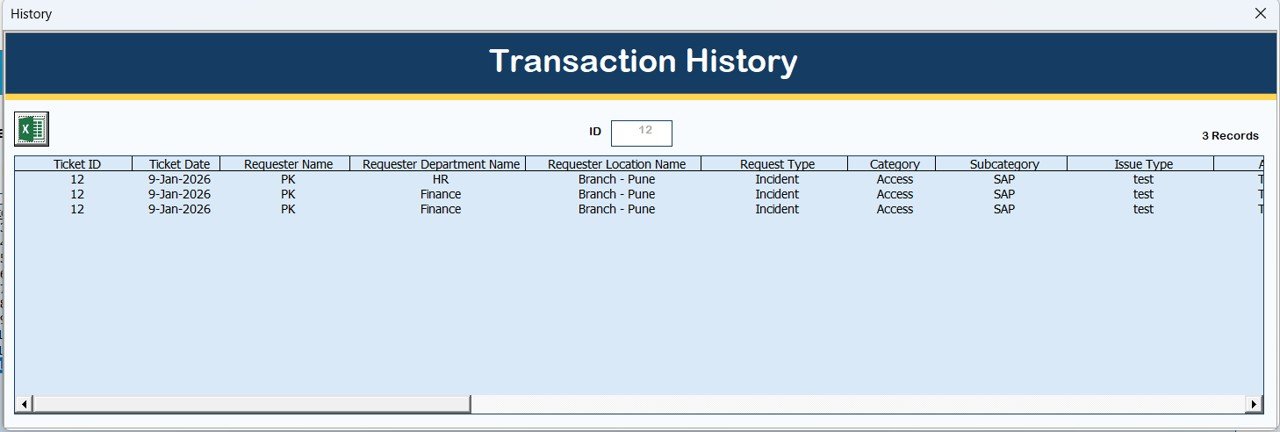
This feature displays the complete modification history of a ticket. Therefore, you always know who changed what and when.
5. Export to Excel
This button exports list box data into a new Excel file. As a result, reporting and sharing become extremely easy.
How Does the Ticket Entry Form Work?
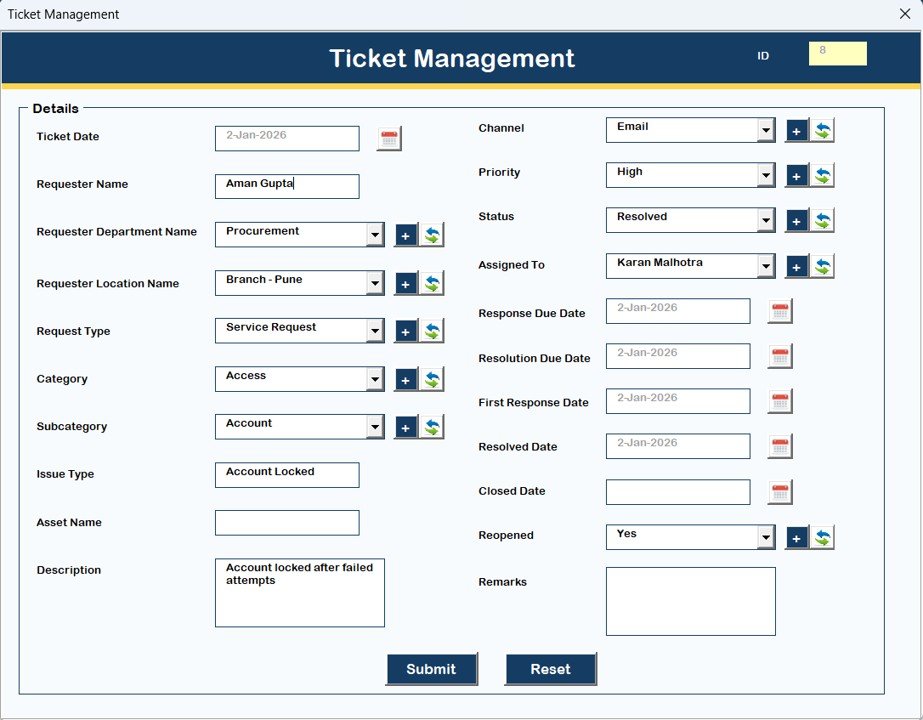
The Ticket (Main Data Entry Form) allows users to add or update ticket information.
This form opens when you click:
-
Add New Record
-
Update Existing Record
Users fill in ticket details, submit the form, and the system automatically updates the list box. Because the form uses validations, data quality remains high.
What Is the Navigation Menu and How Does It Help?
The Navigation Menu on the left-hand side provides quick access to all system modules.
What Can You Do in Firm Information?
The Firm Information module allows you to store and update organization details. This information appears in reports and exports, giving them a professional look.
How Does User Management Improve Security?
The User Management module lets admins:
-
Add new users
-
Update user details
-
Delete users
-
Reset passwords
-
Change passwords
Because admins control access centrally, system security remains strong.
What Is Manage List Used For?
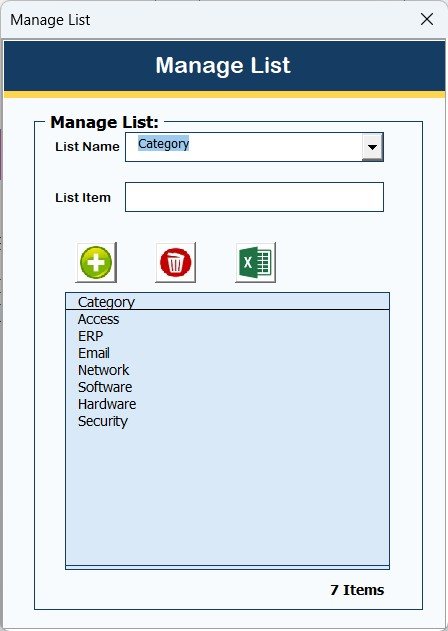
The Manage List module allows you to add or delete dropdown values used across the system. As a result, you can customize categories, statuses, priorities, and more without editing VBA code.
Why Is Agent Master Important?
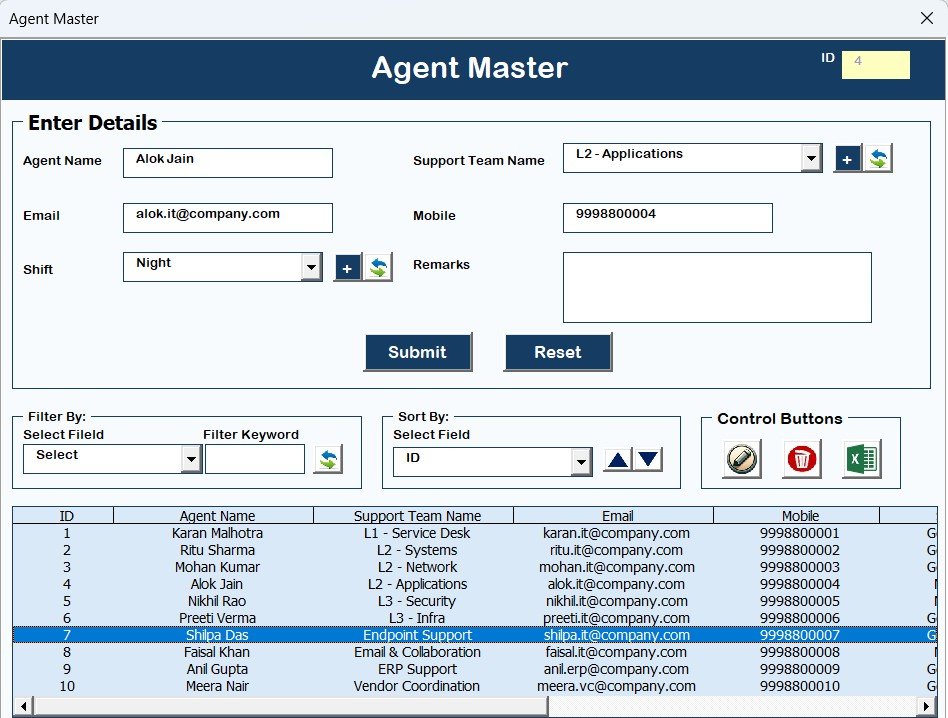
The Agent Master module stores agent information. You assign tickets to agents using this master data. Therefore, agent tracking becomes consistent and reliable.
How Do Reports Help Decision-Making?
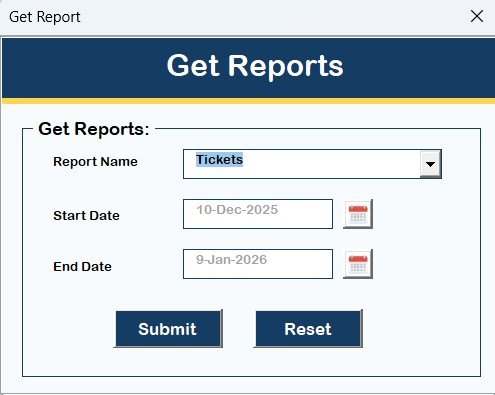
The Reports module generates Excel-based reports for selected date ranges.
With these reports, you can:
-
Analyze ticket volume
-
Track resolution trends
-
Measure agent performance
Because reports export to Excel, further analysis becomes easy.
How Does User Access Control Work?
Click to Purchases IT Helpdesk Ticket Management System V1.0
The Manage User Access Control module allows admins to define what each user role can access.
Admins tick permissions for:
-
Forms
-
Buttons
-
Modules
This ensures that users see only what they need. Only admins can access this feature.
How Does Logout Work?
The Logout button saves all data, closes forms, and exits the file safely. This prevents data corruption and ensures proper closure.
What Do Email Us and Visit Website Buttons Do?
-
Email Us displays the support email address for help or customization.
-
Visit Our Website opens a form that redirects users to purchase more tools and templates.
System Compatibility and Important Limitations
You must understand the system requirements before using this tool.
✔ Compatibility Highlights
-
Works on Windows 10 and above
-
Requires Microsoft Excel 2010 or later
-
Runs only on Microsoft Excel Desktop application
-
Designed for Laptop and Desktop devices
❌ Limitations
-
Does not work on Mobile or Tablet
-
Does not support Mac operating system
-
Does not run on Excel Online
Understanding these points ensures smooth usage and avoids confusion.
Advantages of IT Helpdesk Ticket Management System V1.0
This tool offers several practical advantages.
✔ Cost-Effective Solution
You avoid expensive helpdesk software and monthly subscriptions.
✔ Easy to Use
The interface remains simple, and users learn it quickly.
✔ Centralized Ticket Management
All IT issues stay in one controlled system.
✔ Role-Based Security
Admins control access and permissions easily.
✔ Complete Audit Trail
Record history ensures transparency and accountability.
✔ Flexible Reporting
Excel-based reports support deep analysis.
Best Practices for IT Helpdesk Ticket Management System V1.0
To get maximum value from the system, follow these best practices.
✔ Define Clear Ticket Categories
Well-defined categories improve reporting accuracy.
✔ Train Users Properly
Short training sessions reduce errors and confusion.
✔ Update Tickets Regularly
Frequent updates keep data reliable.
✔ Review Reports Weekly
Regular reviews help identify bottlenecks.
✔ Backup Excel Files
Always keep backups to prevent data loss.
Who Should Use IT Helpdesk Ticket Management System V1.0?
Click to Purchases IT Helpdesk Ticket Management System V1.0
This tool suits:
-
Small and medium businesses
-
Internal IT departments
-
IT service providers
-
Startups
-
Educational institutions
If you want a simple yet powerful ticket system without complexity, this tool fits perfectly.
Conclusion: Is IT Helpdesk Ticket Management System V1.0 Worth It?
If you want a simple, structured, and cost-effective IT helpdesk solution, IT Helpdesk Ticket Management System V1.0 delivers excellent value. It combines the power of Excel with automation, security, and reporting. Moreover, it removes dependency on emails and manual tracking.
For organizations that want control, visibility, and efficiency without expensive software, this system serves as an ideal starting point.
Frequently Asked Questions (FAQs)
1. Is IT Helpdesk Ticket Management System V1.0 cloud-based?
No, the system runs entirely on Microsoft Excel Desktop.
2. Can I customize fields and lists?
Yes, you can manage lists using the Manage List module.
3. Does it support multiple users?
Yes, the system supports multiple users with role-based access.
4. Can I export reports to Excel?
Yes, all reports export to Excel format.
5. Does it work on Mac?
No, the system does not support Mac operating systems.
6. Is technical knowledge required?
No, basic Excel knowledge is enough.
7. Can I track ticket history?
Yes, the system maintains complete record history.
Visit our YouTube channel to learn step-by-step video tutorials