In this article we have created a Monthly Budgeting Calendar in Excel. This is a ready-to-use calendar template in Excel that helps you track monthly bills, income dates, tax deadlines, and recurring expenses on a visual calendar interface. With 5 interactive worksheets, VBA-powered event forms, and 5 color themes, this Excel calendar template replaces scattered spreadsheets and sticky notes with a single organized budgeting system.
According to a 2024 NerdWallet survey, 74% of Americans maintain a monthly budget, yet most still use paper or basic spreadsheets without any calendar visualization. The Monthly Budgeting Calendar in Excel bridges that gap — giving you a date-based view of every financial event without the $14.99/month price tag of apps like YNAB.
Key Features of Monthly Budgeting Calendar in Excel
🛒 Click here to Purchase the Monthly Budgeting Calendar in Excel
Below are the key features of this calendar:
In this template, we have 5 worksheets:
1. Home Sheet Tab
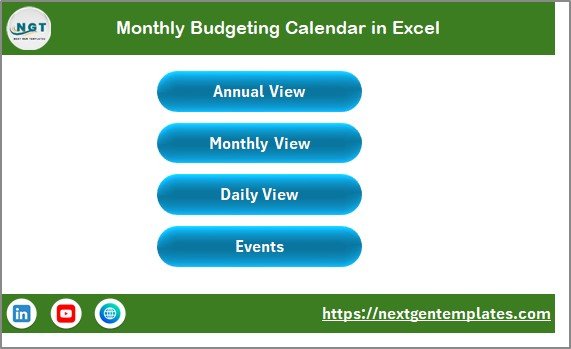
This is an index sheet where we have given 4 buttons to jump to the respective sheet: Annual View, Monthly View, Daily View, and Events.
 Monthly Budgeting Calendar in Excel
2. Annual View Sheet Tab
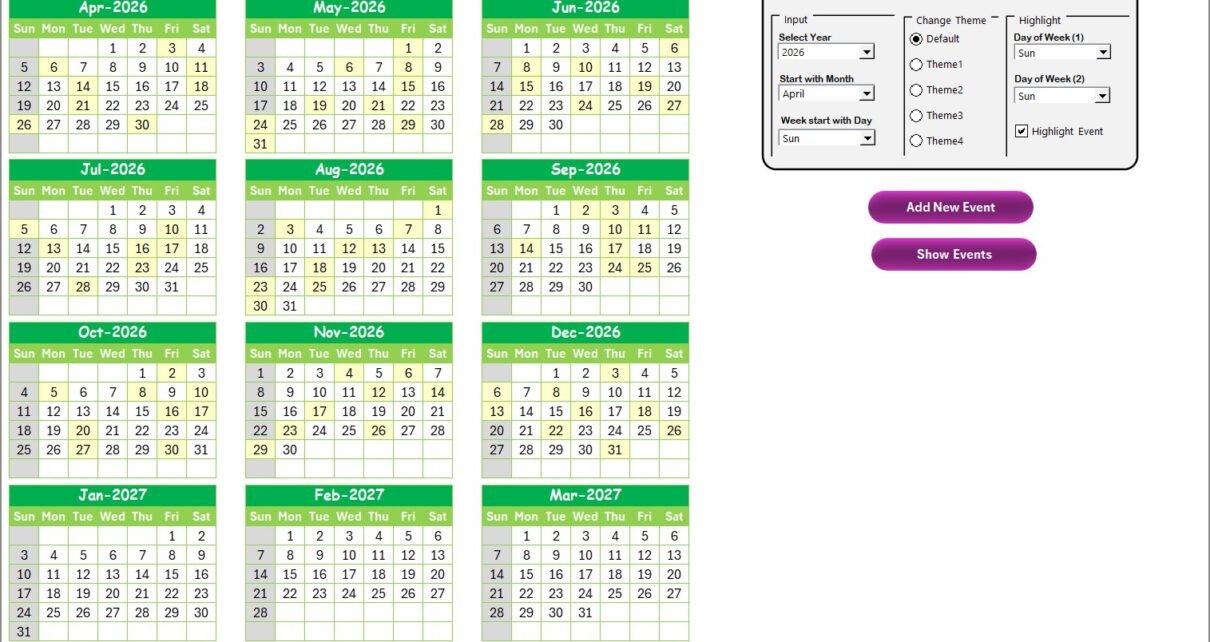
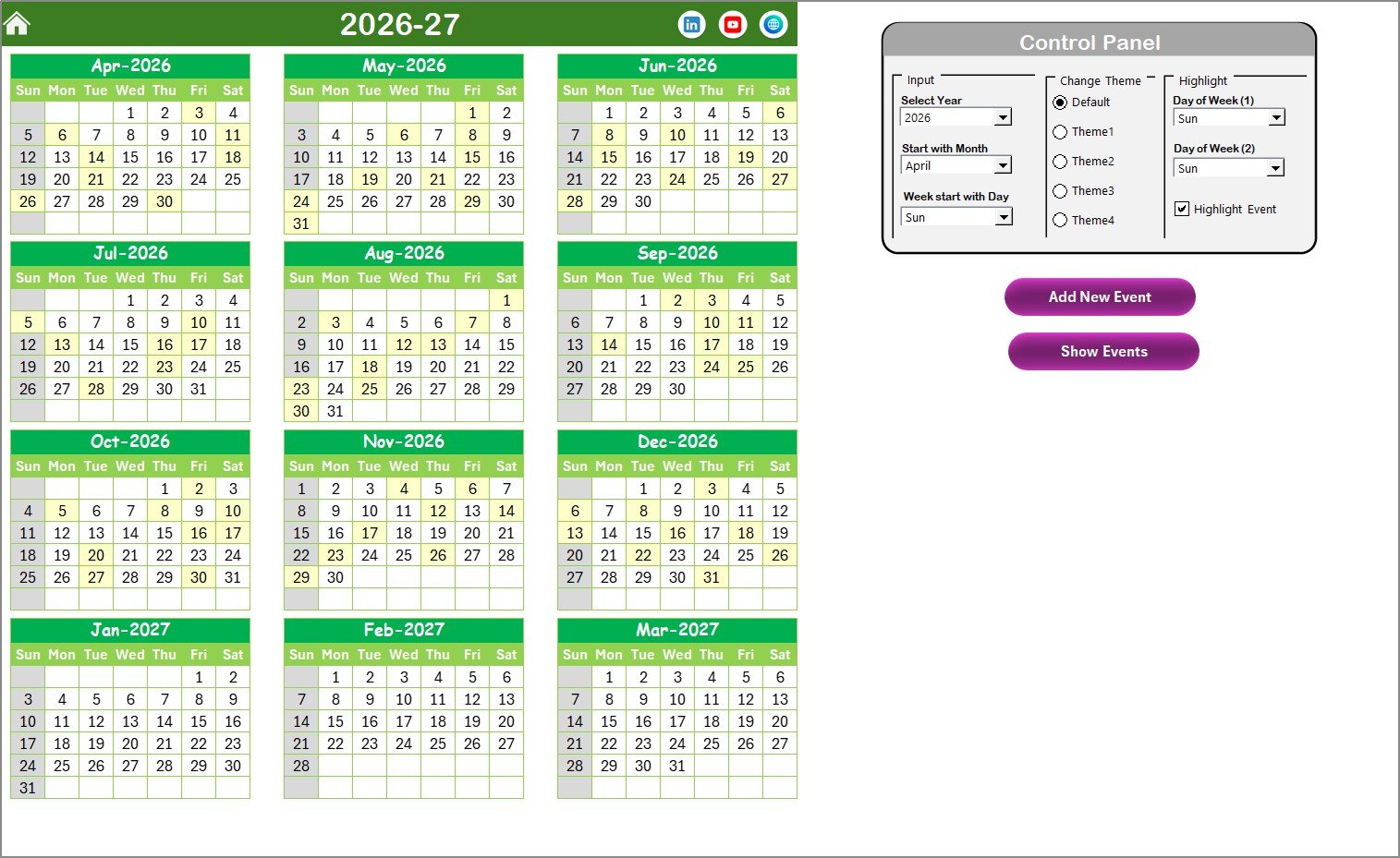
This is the Annual View Sheet showing 12 months calendars on one screen.
 Annual View Sheet Tab
On this sheet we have 1 control panel and 2 buttons:
Control Panel: The control panel has 3 groups:
🔹 Input group: Select the Year to change the annual calendar automatically. Change the starting month and starting day of the week.
🔹 Change Theme Group: 5 color themes that apply across the entire workbook with one click.
🔹 Highlight Group: Select Day of Week (1) and Day of Week (2) to highlight on the calendar in grey. Check the Highlight Event checkbox to show events in yellow on the annual view.
Add New Event button: Select a date on the calendar and click this button. It opens the Add New Event form — fill in the details and click submit.
Show Event button: Select a date and click to see the list of events on that date.
3. Monthly View Sheet Tab
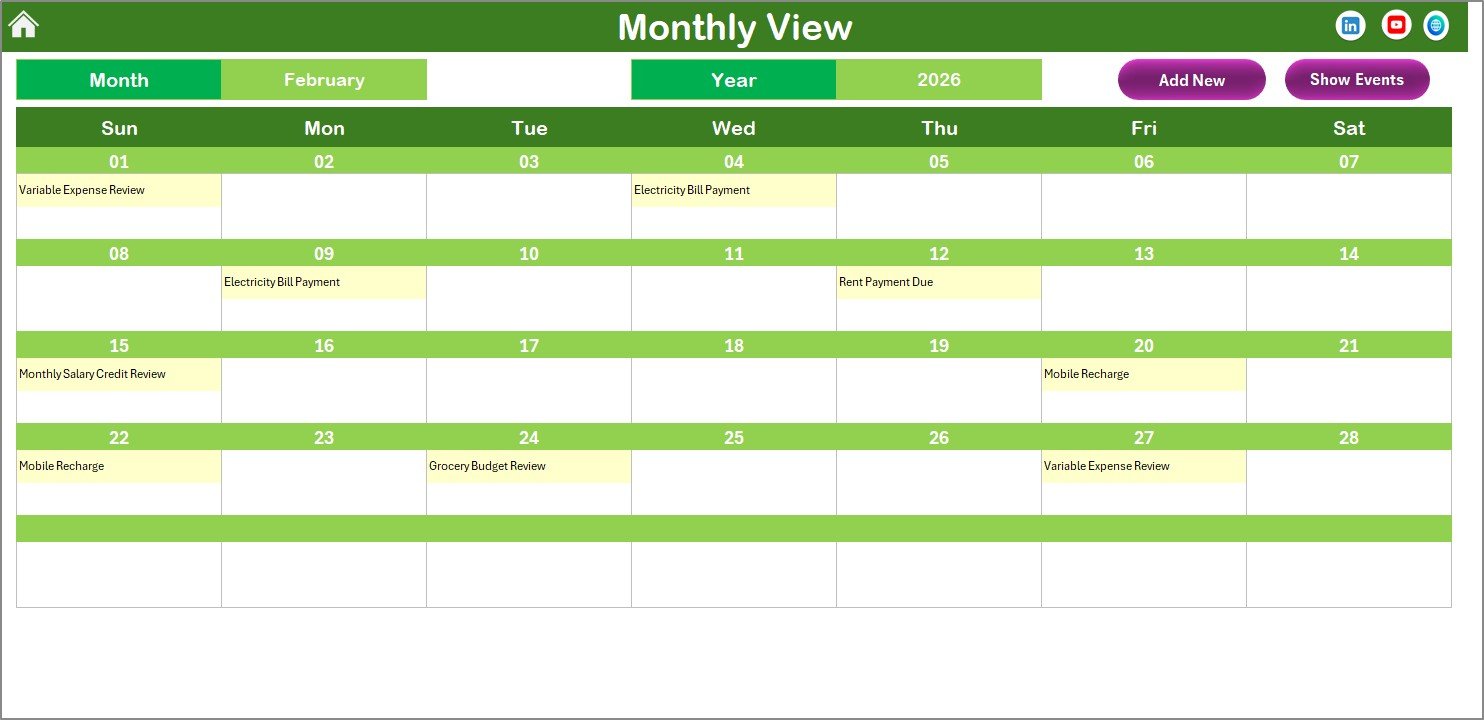
A single calendar for the selected month. Select Month and Year from the top dropdowns and the calendar updates automatically. One event is shown per date cell — if there are more than one event, it displays “more than 1…”
 Monthly View Sheet Tab
Two buttons on the top: Add New Event (opens the event form for the selected date) and Show Event (displays all events on the selected date).
4. Daily View Sheet Tab
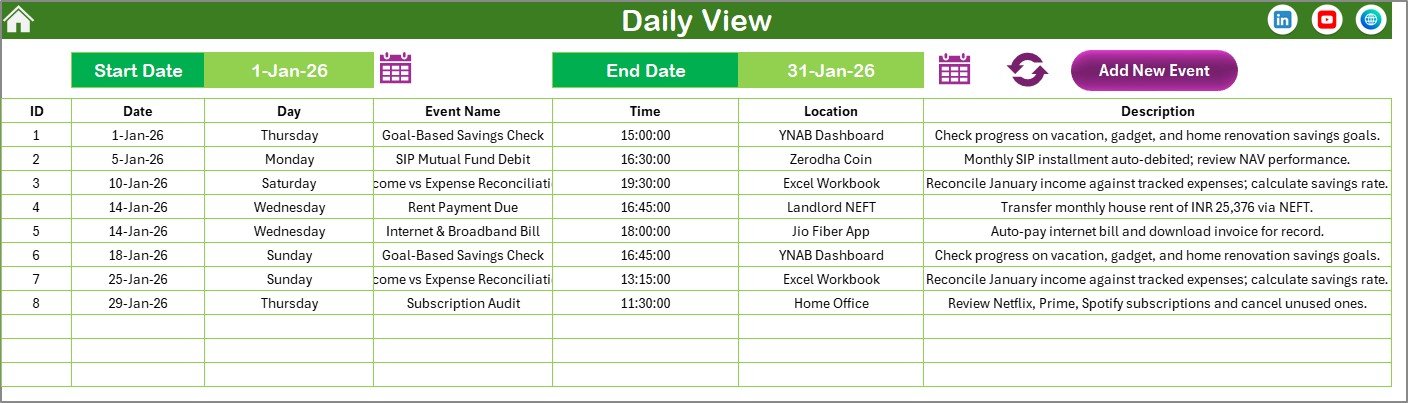
Shows the list of events with details for a selected date range. Set Start Date and End Date using the calendar icon, then click the Refresh button.
 Daily View Sheet Tab
An Add New Event button on the top lets you add events from this view too.
5. Events Sheet Tab
This is the database sheet capturing all event details: ID (auto-generated), Date, Day, Event Name, Time, Location, and Description.
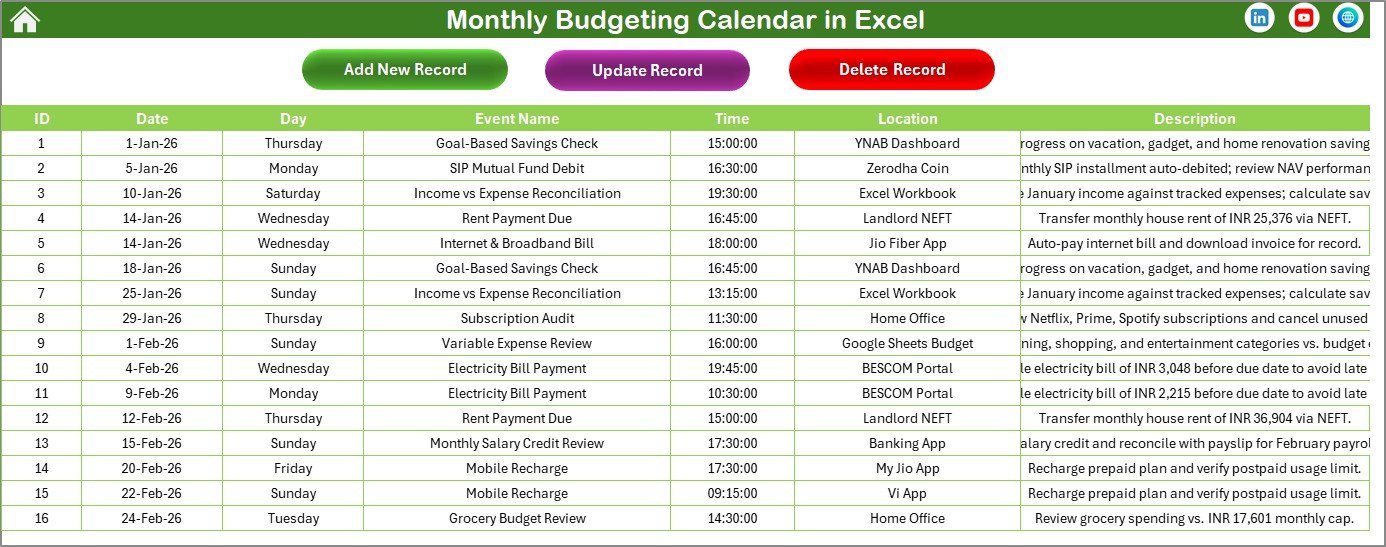 Events Sheet Tab
Three buttons on top: Add New Record (opens the event form), Update Existing Record (select the ID, click to edit and resubmit), and Delete Record (select the ID and delete).
Monthly Budgeting Calendar in Excel vs. Google Sheets Calendar vs. YNAB — Feature Comparison
| Feature | Monthly Budgeting Calendar in Excel | Google Sheets Calendar | YNAB |
|---|---|---|---|
| Cost | $4.99 one-time ✅ | Free (DIY build) | $14.99/month |
| Platform | Microsoft Excel ✅ | Browser-based | Web + Mobile |
| Setup time | Under 5 minutes ✅ | 2-4 hours | 15-30 min |
| VBA event forms | Yes ✅ | No | No calendar view |
| Color themes | 5 themes ✅ | No | Limited |
| Offline access | Full offline ✅ | Limited | Requires internet |
| Custom fiscal year start | Yes ✅ | Manual | No |
| Data privacy | 100% local ✅ | Google servers | Third-party |
| Year-1 cost | $4.99 total ✅ | $0 (hours of work) | $179.88 |
For anyone who wants a visual budget calendar without monthly fees or bank account linking, this Excel template sits in the sweet spot.
Who Should Use This Template
Perfect for:
- Individuals and families tracking monthly bills, income dates, and recurring expenses
- Freelancers scheduling payment due dates, invoice reminders, and tax deadlines
- Small business owners mapping monthly cash flow events
- Excel users who prefer offline, private budget planning
Not a fit if:
- You need automatic bank transaction imports
- You need real-time multi-user collaboration
- You only use Mac — VBA UserForms have limited Mac support
Real-World Use Cases
🛒 Click here to Purchase the Monthly Budgeting Calendar in Excel
Priya manages a household budget for her family of four. She marks rent on the 1st, utilities on the 15th, school fees on the 20th, and grocery shopping every Saturday. The Annual View helps spot months where expenses cluster, so she can plan savings around them.
David is a freelance graphic designer juggling 8 clients. He logs invoice due dates, expected payment arrivals, and quarterly tax deadlines. The Daily View filtered by week keeps his cash flow visible at a glance.
Maria runs a small bakery. She records supplier payment dates, equipment lease payments, and employee paydays. The event forms mean she never has to type directly into spreadsheet cells.
Advantages of Monthly Budgeting Calendar in Excel
🔹 No recurring fees — $4.99 once vs. $179/year for YNAB.
🔹 Complete data privacy — your financial data stays on your computer, never on third-party servers.
🔹 Works offline — no internet required after download.
🔹 VBA forms eliminate manual cell editing — add, update, and delete events through dedicated forms.
🔹 Customizable fiscal year — start your calendar from any month, useful for businesses with non-January fiscal years.
Opportunities for Improvement
🛒 Click here to Purchase the Monthly Budgeting Calendar in Excel
🔹 No automatic bank transaction imports — all events are entered manually.
🔹 VBA UserForms have limited functionality on Excel for Mac.
🔹 Single-user desktop file — not designed for team collaboration.
🔹 No mobile access — requires a desktop or laptop with Excel installed.
Best Practices
🔹 Set up recurring events at the start of each year — rent, utilities, insurance, subscriptions.
🔹 Use the Daily View weekly to review upcoming payments for the next 7 days.
🔹 Use different color themes for different fiscal years to visually separate them.
🔹 Back up your file monthly to avoid data loss.
🔹 Learn more about Excel VBA automation from Microsoft’s official VBA documentation.
Explore Relevant Templates
💎 Save 37% — Finance & Accounting Command Center Bundle
🔹 Budget Calculator in Excel — Income vs. expense breakdowns
🔹 Weekly Expense Tracker in Excel — Daily and weekly spending summaries
🔹 Accounts Payable and Receivable Calendar in Excel
🔹 Financial Year-End Close Calendar in Excel
🔹 Also available: Personal Monthly Budget Tracker in Google Sheets
Related reading: Budget Calculator in Excel | Weekly Expense Tracker in Excel | Personal Finance Dashboard in Excel | Financial Year-End Close Calendar in Excel
Frequently Asked Questions
🛒 Click here to Purchase the Monthly Budgeting Calendar in Excel
What can I track with the Monthly Budgeting Calendar in Excel?
The Monthly Budgeting Calendar in Excel tracks any date-based financial event including bill payments, income dates, tax deadlines, subscription renewals, and savings milestones. Each event stores a name, time, location, and description for quick reference.
Does this template work on Mac?
The calendar layout and data entry work on Mac, but VBA UserForms (Add Event, Update, Delete buttons) have limited functionality on Excel for Mac. For full feature access, use Excel on Windows.
Can I change the calendar year after setup?
Yes. Select any year from the control panel dropdown on the Annual View sheet, and all 12 months update automatically. Your existing events remain stored in the Events database regardless of the displayed year.
How does this compare to YNAB or Mint?
YNAB costs $14.99 per month ($179/year). The Monthly Budgeting Calendar in Excel costs $4.99 once with no recurring fees. It does not auto-import bank transactions — it is a manual calendar for scheduling and tracking budget events visually.
Can I add more than one event per date?
Yes. The Events database stores unlimited events per date. The Monthly View shows the first event and indicates “more than 1…” when multiple events exist. Use the Show Event button or Daily View to see all events on a given date.
Is my financial data stored online?
No. The Monthly Budgeting Calendar in Excel is a local desktop file. Your data stays on your computer and is never uploaded to any server, cloud, or third-party service.
Can I customize the color theme?
The template includes 5 pre-built color themes selectable from the Annual View control panel. Each theme applies across all 5 worksheets instantly. For additional customization, you can modify cell colors manually in Excel.
About the Author
Built by PK — Microsoft Certified Professional with 15+ years of Excel, Google Sheets, and Power BI experience. Founder of NextGenTemplates, reaching 300K+ subscribers across YouTube channels. Every template is hand-built and tested before release.
Conclusion
The Monthly Budgeting Calendar in Excel gives you a visual, date-based approach to tracking your finances — 5 worksheets, VBA event forms, 5 color themes, and a complete event database for $4.99 one-time. Whether you are managing a household budget, freelance income, or small business cash flow, this template keeps every bill payment, income date, and deadline visible on a calendar you control.
🛒 Click here to Purchase the Monthly Budgeting Calendar in Excel
✅ Instant download · One-time payment · No subscription
🎥 Visit our YouTube channel: Youtube.com/@PK-AnExcelExpert
📅 Last updated: April 2026