Office Key Access Request Tracker in Excel — Overview
Managing office keys sounds simple — until 12 different people share a single cabinet key, the server room key disappears for two days, and your auditor asks for a complete record of who accessed what. The Office Key Access Request Tracker in Excel turns that chaos into a clean, login-protected workflow with 8 worksheets, an interactive dashboard with 4 slicers and 5 charts, and a VBA UserForm for adding, updating, and deleting records in seconds.
This Excel template is built for Admin, Facilities, HR, and Security teams that need a single audit-ready ledger of every key request without buying smart-lock hardware or paying $3–8 per user per month for SaaS access-control platforms. Setup takes under 10 minutes, and the workbook scales from a 10-person clinic to a 500-person fintech.
Key Features of Office Key Access Request Tracker in Excel
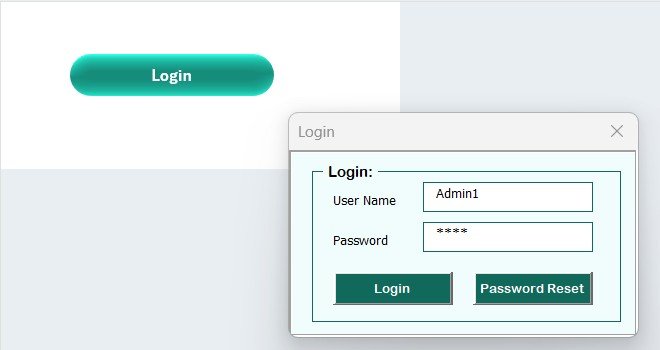
🔐 VBA Login Form: Every user signs in with their own credentials, so every approval, issuance, and key-return event is tied to a real identity. No more shared spreadsheets where “someone changed the data” is the only audit trail.
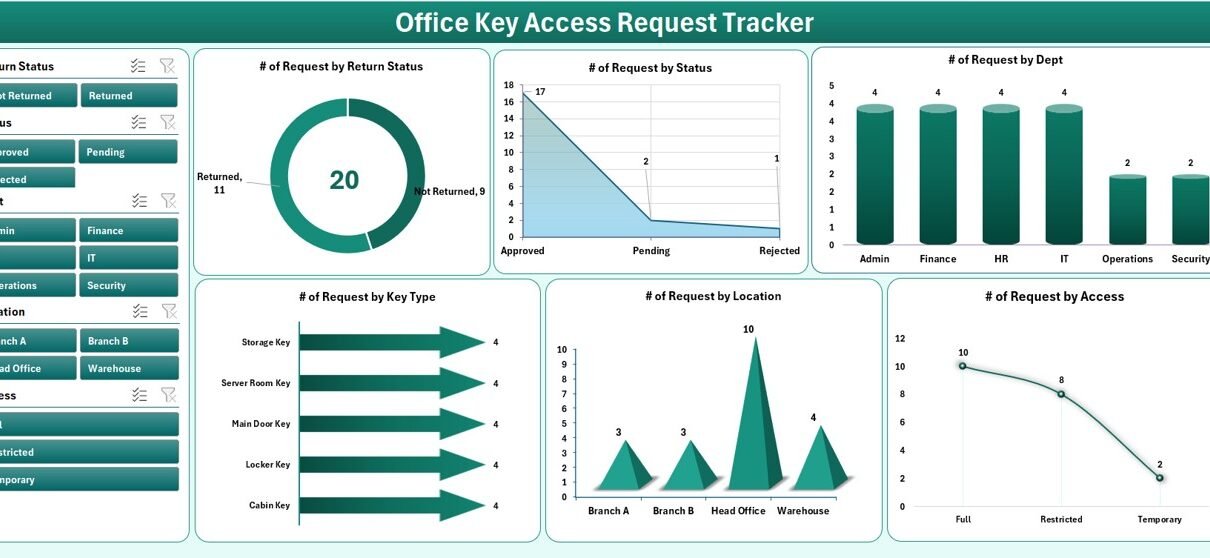
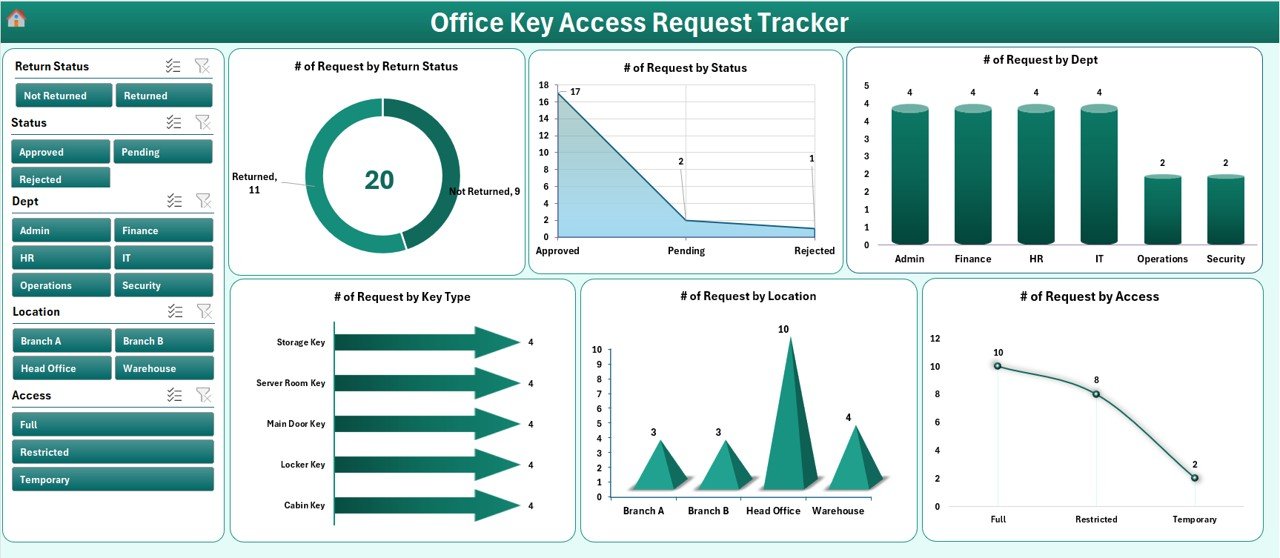
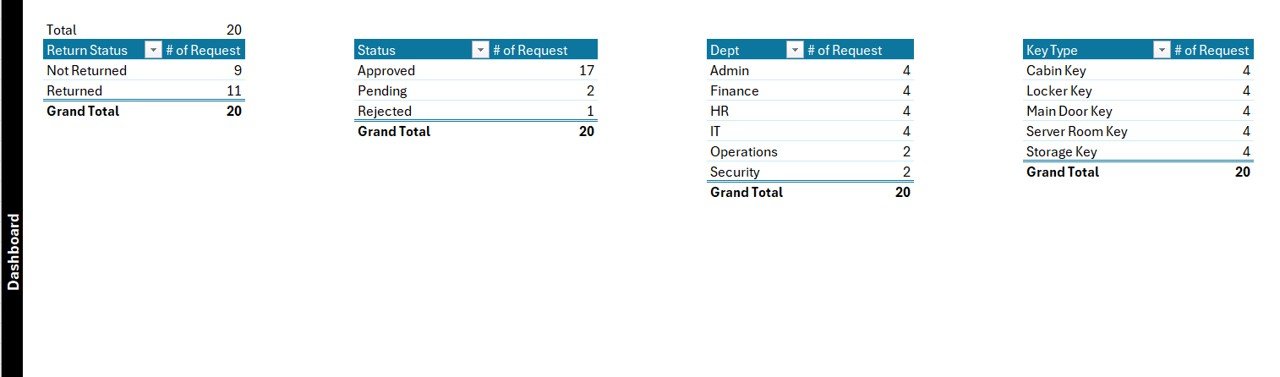
📊 Interactive Dashboard with 4 Slicers and 5 Charts: Filter by Department, Key Type, Status, and Date Range. The 5 charts show Key Request Status, Department-wise Requests, Key Type Distribution, Approval Authority Breakdown, and Monthly Request Trends. Pivot tables on the Support Sheet drive every visual.
📝 Add / Update / Delete UserForm: Three buttons on the Data Sheet open a VBA-powered form with combo boxes, date pickers, and field validation. Submit refreshes the dashboard automatically — no manual pivot refresh, no broken charts.
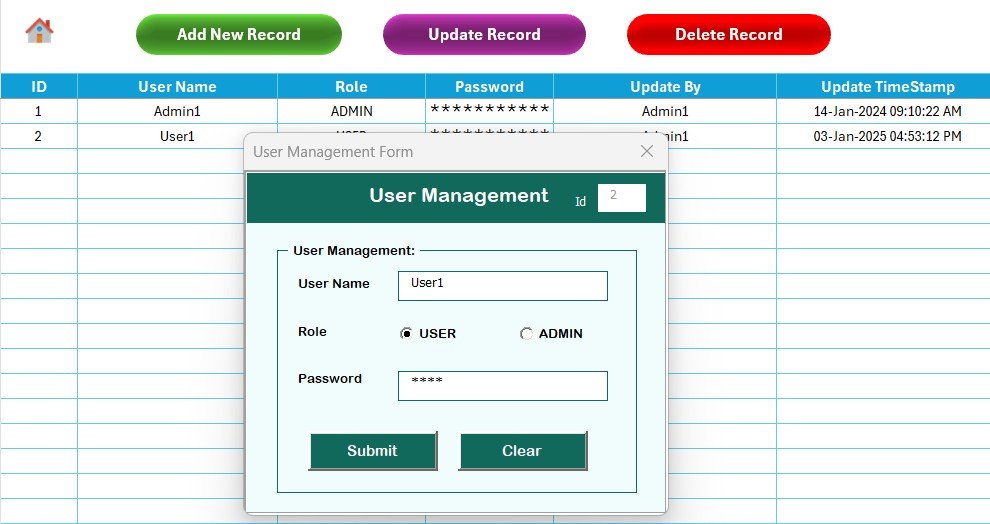
👥 User Management with Role-Based Access: Admins create users and assign Admin or Standard roles. Admins see and edit every record; Standard users see only their own activity. This is the “segregation of duties” auditors look for during ISO 27001 and SOX reviews.
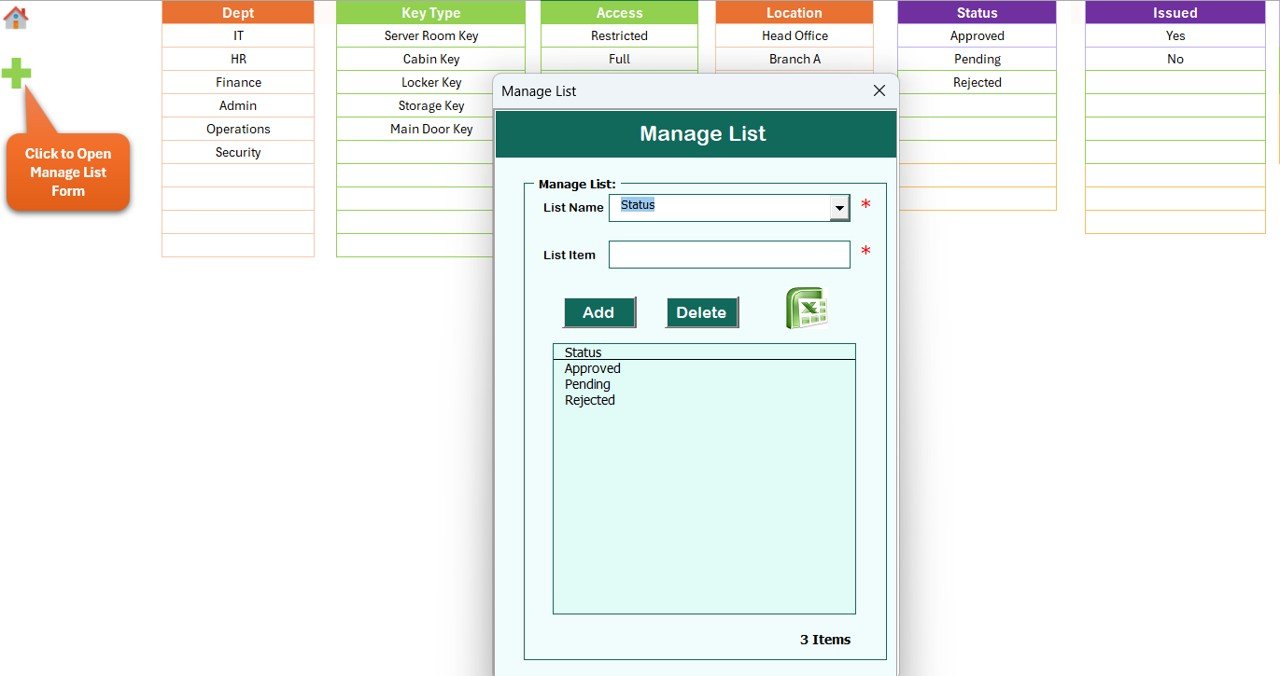
📋 Editable List Sheet: Update the master list of departments, key types, locations, and approvers in one place. Every dropdown in the data-entry form refreshes from this sheet — no need to edit forms or formulas.
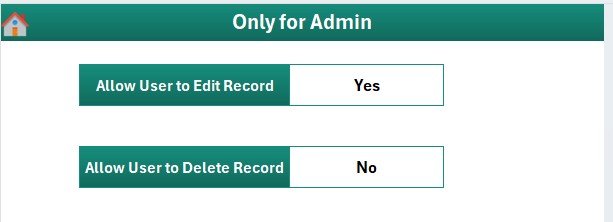
⚙️ Settings Sheet: Configure organization name, audit fields, date formats, and visual themes from a single sheet. The Home Page gives one-click navigation across all 8 sheets.
Sheets Explanation
1. Login Form Sheet
The first sheet you see when you open the workbook. Built entirely in VBA, the login form authenticates users against the User Management sheet before unlocking access to the rest of the workbook. Failed logins are blocked, and the form supports both Admin and Standard role flows.
2. Home Page
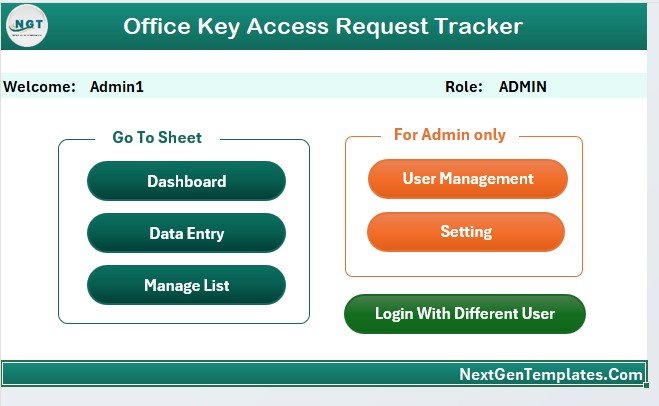
A central navigation hub with shape-based buttons that link to the Dashboard, Data Sheet, List Sheet, Settings, and User Management. New team members can find every section in one click instead of hunting through worksheet tabs.
3. Dashboard Sheet
The dashboard is the analytical core of the tracker. Four slicers (Department, Key Type, Status, Date Range) let you filter the entire view in one click. Five charts visualize the most important access-control questions: which requests are pending approval, which departments request keys most often, which key types are most in demand, who is approving most requests, and how request volumes trend month by month.
4. Data Sheet
The single source of truth. Every key request lives here, with columns for Request ID, Requester Name, Department, Key Type, Location, Purpose, Approver, Status, Issue Date, Return Date, and Remarks. Three buttons at the top — Add New Record, Update Record, and Delete Record — open the VBA UserForm.
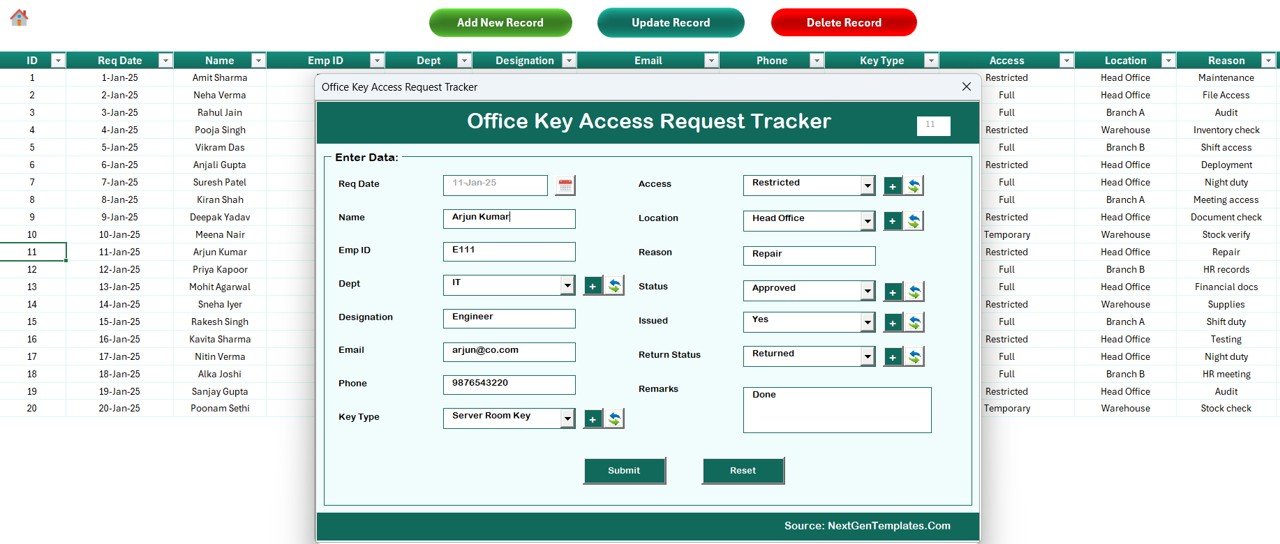
To add, click Add New Record, fill the form, and click Submit. To update, click the Request ID first, then click Update Record — the form opens pre-filled, and you only change what’s needed. To delete, click the Request ID and then Delete Record; a confirmation dialog prevents accidental removals.
5. List Sheet
This sheet stores the lookup values that drive every combo box in the data-entry form: departments (HR, Finance, IT, Operations, Facilities, etc.), key types (Main Door, Server Room, Cabinet, Storage, Meeting Room, Locker), locations (floors, buildings, branches), approvers, and status values. Edit the list once, and the form picks up the changes immediately.
6. Support Sheet
The hidden engine room. Pivot tables on this sheet aggregate the Data Sheet rows and feed the 5 dashboard charts. You don’t need to touch this sheet during normal use — once the tracker is in production, hide it and the dashboard keeps working.
7. Settings Sheet
Configure the workbook for your organization without writing formulas: organization name, default date format, audit retention days, and visual theme colors. Changes take effect on next open.
8. User Management Sheet
Admins manage the user list here. Each row holds a username, password, role (Admin / Standard), and active flag. Admins can add new staff, deactivate former employees, and reset passwords. The User Management sheet is itself protected so only Admin users can open it.
Office Key Access Request Tracker in Excel vs. Google Sheets vs. Paid Access SaaS — Feature Comparison
| Feature | Office Key Access Tracker (Excel) | Google Sheets Equivalent | Paid Access SaaS (Kisi / Brivo / Envoy) |
|---|---|---|---|
| Cost | $6.99 one-time | $10–15 one-time | $3–8 per user / month |
| Platform | Microsoft Excel (offline) | Google Sheets (cloud) | SaaS web + mobile app |
| Setup time | Under 10 minutes | 15 minutes | 2–4 weeks (hardware + training) |
| VBA login + role-based access | ✅ Yes | Sharing only | ✅ Yes |
| Dashboard with slicers | ✅ 4 slicers + 5 charts | Charts only | Vendor reports |
| Customizable list values | ✅ Edit list sheet | ✅ Edit list sheet | Limited / via vendor |
| Hardware required | ✅ None | ✅ None | Smart locks ($300–2,000) |
| Year-1 cost at 5 users | $6.99 total | ~$10 total | $180–480 + hardware |
For teams that want a structured, audit-ready key-request workflow without buying smart-lock hardware, the Office Key Access Request Tracker in Excel is the lowest-cost option that still gives proper user roles and a real dashboard.
Who Should Use This Template
Perfect for:
- Admin and Facilities managers at 10–500 person offices managing physical keys
- HR teams handling key issuance for new hires and key returns at exit
- Security officers maintaining a written audit trail for ISO 27001 or SOX
- Office managers in co-working spaces, schools, clinics, retail stores, warehouses
- Internal audit teams that need evidence of access-control procedures
Not a fit if:
- You already operate Kisi, Brivo, or Envoy with smart-lock hardware
- Your building uses badge-only access and no physical keys
- You need automated lock control or mobile credential issuance
- You only have macOS and don’t run Excel desktop (VBA forms need Windows / Mac Excel desktop)
Real-World Use Cases
Priya runs Admin operations at a 120-person fintech in Bangalore. Her team manages 35 different keys — server room, finance cabinet, document storage, three meeting rooms, and main-door spares. She uses the Office Key Access Request Tracker in Excel to log every issuance, route approvals through the Facilities Manager, and produce a quarterly access report for the ISO 27001 internal audit. Before the tracker, she was spending two days a quarter reconstructing logs from Slack messages and Outlook emails. Now the report exports in 15 minutes.
Marcus is the Facilities Lead at a co-working space in Berlin with 14 private offices. Each office has its own key, plus phone-booth and storage keys. He runs the tracker on a shared OneDrive workbook so his three weekend reception staff can log key handovers using the VBA UserForm. Only he and the operations director have Admin rights via User Management — everyone else is a Standard user who can only see and edit their own shift entries.
Sara is the School Operations Manager at a K-12 academy with 60 staff. She replaced a paper sign-out clipboard with this Excel tracker to log lab keys, AV cabinet keys, and after-hours access. The Dashboard slicers help her spot the two teachers with consistently overdue returns and address it before audit week. The workbook also gives her a clean record for the school’s annual safeguarding review.
Advantages of Office Key Access Request Tracker in Excel
One-time cost, lifetime use. $6.99 covers unlimited users, unlimited records, and lifetime access. A 5-person team using even the cheapest paid access-management SaaS pays $180+ per year, every year. Over a 5-year horizon, the savings exceed $1,000.
Works with the keys you already have. No need to swap door hardware, install card readers, or rewire locks. The tracker is the digital ledger; the physical keys stay exactly as they are.
Audit-ready out of the box. The Login Form ties every record to a user, the Data Sheet captures full request history with timestamps, and the User Management sheet gives auditors evidence of segregation of duties. ISO, SOX, and internal audit teams accept this kind of documentation.
Instantly customizable. Add a new department or key type? Update one cell in the List Sheet. Change the dashboard theme? Edit the Settings Sheet. Add a new field? Standard Excel — no consultant required. For a deeper Excel skill foundation, the official Microsoft Excel help center and VBA reference on Microsoft Learn are the best starting points.
Opportunities for Improvement
The Excel tracker is excellent at logging and reporting, but it does not control physical locks. If you want a key request to automatically unlock a door for a 30-minute window, you’ll need smart-lock hardware and SaaS — and that’s a different product category entirely.
The audit log is not cryptographically tamper-evident. A determined Admin with macro editing rights could alter historical records. For environments that require tamper-evident logs (regulated banks, defense contractors), pair the tracker with a secured file-sharing platform that captures every workbook version.
VBA UserForms are fully supported on Excel for Windows. Excel for Mac runs them but with occasional UI quirks. Excel Online doesn’t run macros at all — so the Add/Update/Delete buttons need the desktop application.
Best Practices
🔹 Change the default Admin password the first time you log in. Document the new password in your organization’s password manager — not in the workbook.
🔹 Hide the Support Sheet once the tracker is live. Users only need the Dashboard, Data Sheet, and Home Page.
🔹 Set a calendar reminder to export a CSV backup of the Data Sheet every month. Excel files do corrupt occasionally, especially when stored on shared drives.
🔹 Standardize the Status values (Submitted, Approved, Issued, Returned, Rejected). Free-text status entries break the dashboard charts.
🔹 For multi-site organizations, run one workbook per site. Cross-site reporting can be done in Power BI by combining the exported Data Sheets.
Explore Relevant Templates
🔹 Office Parking Permit Request Tracker in Excel — same VBA pattern for parking permit issuance and renewals.
🔹 Equipment Borrowing Request Tracker in Excel — log laptops, projectors, and shared assets with the same login-protected workflow.
🔹 Resource Booking Tracker in Excel — book meeting rooms, vehicles, and equipment with VBA forms.
🔹 Office Renovation Feedback Tracker in Excel — capture facilities feedback with the same dashboard layout.
🔹 Training Material Request Tracker in Excel — handle L&D material requests with the same form-driven approach.
🔄 Also available as: Office Key Access Request Tracker in Google Sheets — same workflow, cloud-native, no macros required. Browse the full Excel Tracker library for more workplace operations tools.
Frequently Asked Questions
What does the Office Key Access Request Tracker in Excel include?
The Office Key Access Request Tracker in Excel includes 8 worksheets: Login Form, Home Page, Dashboard with 4 slicers and 5 charts, Data Sheet with VBA Add / Update / Delete buttons, List Sheet, Support Sheet for pivot tables, Settings Sheet, and a User Management sheet for role-based access.
Does the tracker support multiple users with different permissions?
Yes. The User Management sheet lets Admins create users and assign Admin or Standard roles. Admins see every record and can edit anything; Standard users see only their own requests. That role separation is the segregation-of-duties evidence auditors look for during ISO 27001 and SOX reviews.
How does this compare to paid access-management SaaS like Kisi or Envoy?
Kisi, Brivo, and Envoy charge $3–8 per user per month and require smart-lock hardware costing $300–2,000 per door. The Office Key Access Request Tracker in Excel is a $6.99 one-time purchase that covers unlimited users and works with the physical keys you already have — at the cost of not automating lock control.
How long does setup take?
Under 10 minutes. Open the workbook, enable macros, log in with the default Admin credentials, replace the sample list values (departments, key types, locations, approvers) on the List Sheet with your own, and you can log your first request immediately.
Can I customize the dashboard charts?
Yes. The 5 dashboard charts read from pivot tables on the Support Sheet. You can edit the pivots, add new fields, or change chart types using standard Excel features — no VBA editing required for visual changes.
Does it work in Excel for Mac and Excel Online?
The Office Key Access Request Tracker in Excel works fully in Excel for Windows. Excel for Mac runs the workbook but VBA UserForm behaviour can be limited. Excel Online does not run macros, so the Add/Update/Delete buttons require the desktop app.
Is the audit trail tamper-evident?
The tracker keeps a full request history with timestamps and user IDs from the Login Form, suitable for ISO, SOX, and internal audit reviews. It is not cryptographically tamper-evident — for that level of assurance, smart-lock SaaS or a document-management platform with version control is required.
About the Author
Built by PK — Microsoft Certified Professional with 15+ years of Excel, Google Sheets, and Power BI experience. Founder of NextGenTemplates, reaching 300K+ subscribers across YouTube channels. Every template is hand-built and tested before release.
Conclusion
The Office Key Access Request Tracker in Excel turns a messy, paper-and-Slack key-request process into an audit-ready Excel workflow with a real login, role-based access, an interactive dashboard, and form-driven data entry. For $6.99 one-time, your Admin, Facilities, and Security teams get a tool that pays for itself the first time an auditor asks for a key access log.
👉 Click here to Purchase the Office Key Access Request Tracker in Excel
✅ Instant download · One-time payment · No subscription · No per-user fees · Lifetime access
🎥 Visit YouTube.com/@PK-AnExcelExpert for step-by-step Excel tutorials and template walk-throughs.
📅 Last updated: May 2026