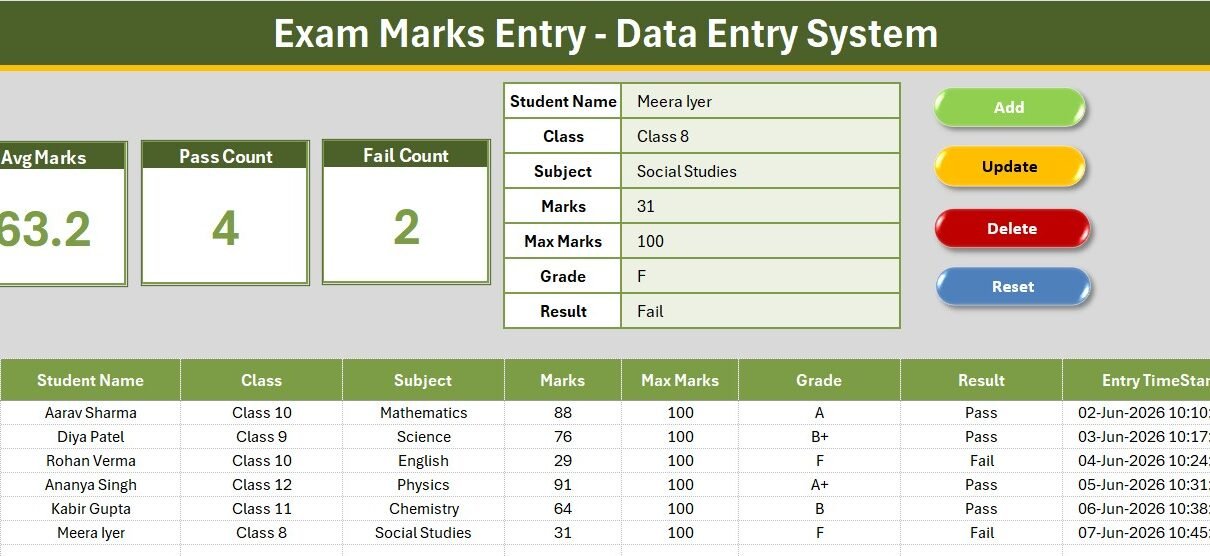
Recording exam marks by hand eats hours every term, and a single mistyped total can throw off an entire result sheet. The Exam Marks Entry Data Entry System in Excel fixes that: it captures 7 fields per student, drives 4 dropdowns from an editable Setting sheet, and refreshes 3 live KPI cards — Avg Marks, Pass Count and Fail Count — the instant you click Add. Sample rows ship inside, so the cards show real numbers the moment you open the file Exam Marks Entry Data Entry System in Excel.
Built on Excel VBA, this exam marks entry system runs fully offline, needs no login, and costs a one-time $5.99 instead of a per-teacher monthly SaaS fee. This guide walks through every feature, the four sheets inside, how it compares to Google Sheets and paid gradebook tools, and the best way to use it in a real classroom or coaching centre.
Key Features of the Exam Marks Entry System
Every number on the dashboard is a live formula, so the KPIs stay current as you add, edit or delete records. The system records unlimited student results on one sheet without slowing down Exam Marks Entry Data Entry System in Excel.
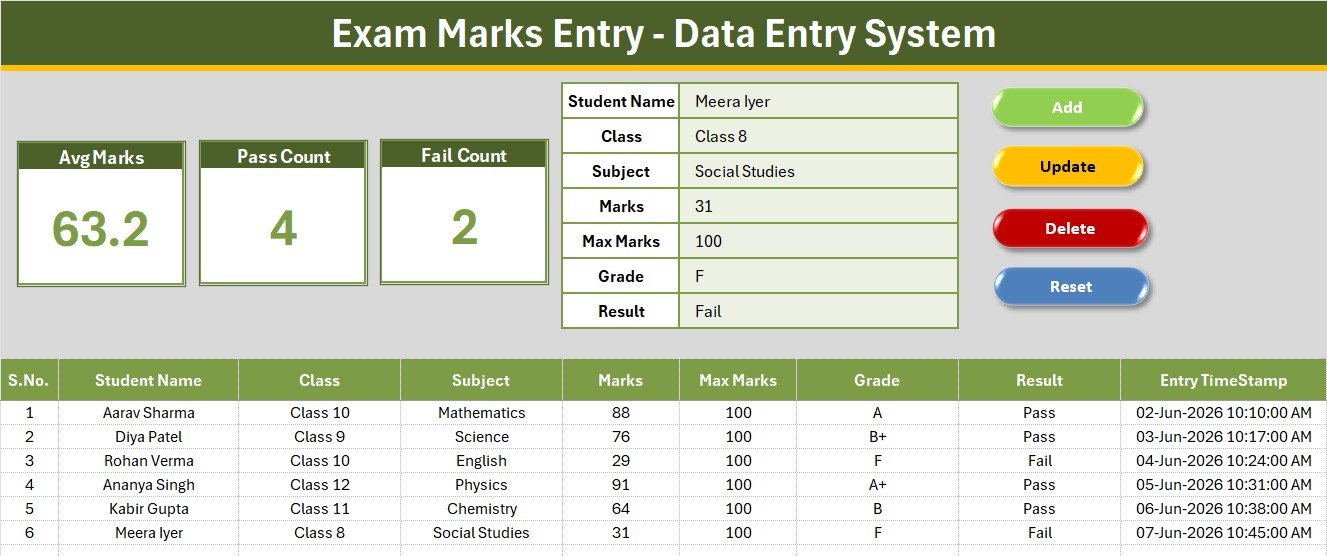
- 7-field entry form — Student Name, Class, Subject, Marks, Max Marks, Grade and Result, with bold labels and tinted input cells.
- 3 automatic KPI cards — Avg Marks uses AVERAGE on the Marks column, while Pass Count and Fail Count use COUNTIF on the Result field.
- Four one-click VBA buttons — Add, Update, Delete (with a confirmation prompt) and Reset.
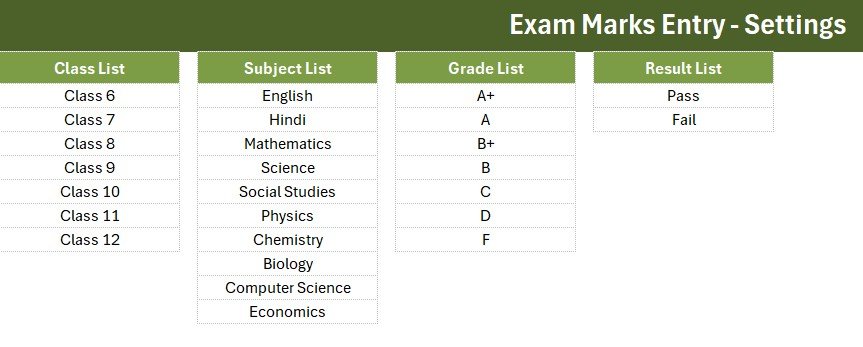
- Four editable dropdowns — Class (6 to 12), Subject (10 subjects), Grade (A+ to F) and Result (Pass/Fail).
- Auto S.No and Entry TimeStamp — every record is numbered and time-stamped automatically.
- Double-click to edit — load any record back into the form, change it, and click Update to write it to the same row.
Sheets Explanation
The workbook contains four sheets: Data Entry, Setting, Instructions and Get More Templates. Here is what the main views do.
Data Entry Dashboard
The main sheet holds the three KPI cards, the entry form, the four action buttons and the records table with auto S.No and timestamp columns. It is the only screen a teacher needs during marks entry.
Setting Sheet and Records Table
The Setting sheet holds the Class, Subject, Grade and Result lists that feed every dropdown — edit a list here and the form updates on its own. The records table below the form keeps a clean, filterable history of every mark entered Exam Marks Entry Data Entry System in Excel.
Exam Marks Entry System vs. Google Sheets vs. Paid Gradebook SaaS — Feature Comparison
| Feature | Exam Marks Entry System (Excel) | Google Sheets marks sheet | Paid Gradebook SaaS (Gradelink / TeacherKit Pro) |
|---|---|---|---|
| Cost | $5.99 one-time | Free but manual | $5–15 / teacher / month |
| Platform | Microsoft Excel (offline) | Browser + Google account | Cloud only |
| Setup time | Under 5 minutes | Build from scratch | Onboarding + import |
| Works fully offline | Yes | No | No |
| Auto Pass/Fail & average | Built-in | Manual formulas | Yes |
| Editable grade bands | Yes, no coding | Yes | Limited to plan |
| Per-teacher fees | None | None | Per seat |
| Year-1 cost at 5 teachers | $5.99 total | $0 | $300–900 |
For schools and tutors that want automatic pass/fail tracking without paying per-teacher SaaS fees, the Exam Marks Entry System sits in the sweet spot.
Who Should Use This Template
Perfect for:
- School teachers and class coordinators recording term or unit-test marks for 20 to 200 students.
- Private tutors and coaching centres tracking marks across subjects and batches.
- Exam-cell staff who need a fast pass/fail count without writing formulas.
Not a fit if:
- You need an online student portal with parent logins and SMS result delivery.
- You need many teachers editing the same file in real time across campuses.
Real-World Use Cases
Anjali teaches Class 10 at a CBSE school. After each unit test she opens the Exam Marks Entry System, records marks for all 48 students, and reads the Pass Count and Fail Count straight off the KPI cards before her staff meeting — no manual tallying, no calculator Exam Marks Entry Data Entry System in Excel.
Rahul runs a coaching centre with three batches. He keeps one workbook per batch, filters the records table by Subject, and uses the Avg Marks card to spot which subject needs an extra revision class the following week Exam Marks Entry Data Entry System in Excel
Priya coordinates the exam cell at a small college. She collects each teacher’s workbook, and because every file uses the same Grade and Result lists, consolidating the pass percentages takes minutes instead of an afternoon.
Advantages of the Exam Marks Entry System
- Saves time every term — the pass/fail count that used to take a manual tally is now a live number on the card.
- Fewer errors — dropdowns for Class, Subject, Grade and Result stop typos before they enter the table.
- Zero running cost — one $5.99 purchase versus recurring per-teacher SaaS bills that add up to hundreds a year.
- Full data ownership — the file lives on your PC, so student data never leaves your control.
Opportunities for Improvement
Honesty helps you decide well. The Exam Marks Entry System is a single-user Excel file, so it does not support several teachers editing the same workbook at once — for that you would want a shared web app. It also does not calculate percentage or rank automatically out of the box, though you can add a simple column since Marks and Max Marks are both captured. Finally, it needs macros enabled, which some locked-down school PCs restrict; in those cases IT may need to allow the file.
Best Practices
- Keep one workbook per class or batch so records and KPI cards stay focused.
- Set your grade bands once on the Setting sheet at the start of the year and leave them fixed for consistency.
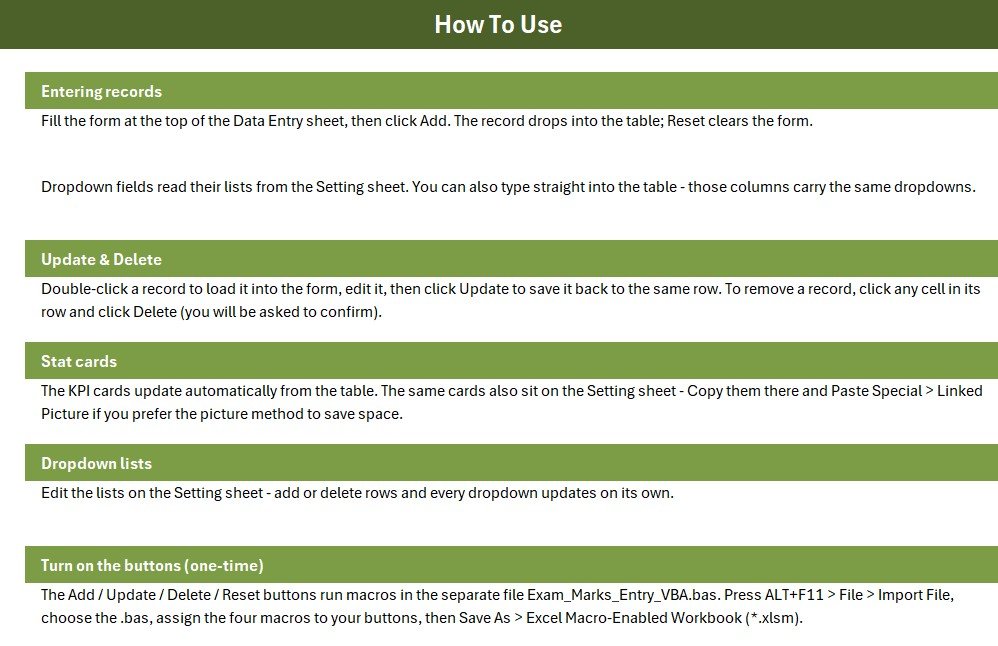
- Save the file as a macro-enabled workbook (.xlsm) after importing the VBA so the buttons keep working.
- Use the double-click-to-edit feature instead of retyping when you need to correct a single mark.
Explore Relevant Templates
Round out your school office in Excel with the Student Attendance Data Entry System and the Student Fee Collection System. For a similar build in another domain, see our Library Book Issue Data Entry System walkthrough. When you are ready to analyse results, step up to the Student Enrollment KPI Scorecard, the Exam Boards KPI Dashboard, or the full School Admin Dashboard in Excel. If you are new to enabling macros, the official Microsoft Excel documentation explains the security prompt.
Frequently Asked Questions
What fields does the Exam Marks Entry System capture?
The Exam Marks Entry System records seven fields per student: Student Name, Class, Subject, Marks, Max Marks, Grade and Result. Class, Subject, Grade and Result are dropdowns driven by an editable Setting sheet.
How are the Avg Marks, Pass and Fail counts calculated?
The three KPI cards use live formulas — AVERAGE on the Marks column and COUNTIF on the Result column — so Avg Marks, Pass Count and Fail Count update automatically every time you add or edit a record.
Do I need to enable macros?
Yes. The Add, Update, Delete and Reset buttons in the Exam Marks Entry System run a small VBA module, so enable macros when Excel prompts you and save the file as a macro-enabled workbook (.xlsm).
Can I change the grades or add more subjects?
Yes. Edit the Grade, Subject, Class and Result lists on the Setting sheet and every dropdown updates on its own — no formulas or code changes required.
How does this compare to paid gradebook software?
Paid gradebook SaaS typically costs $5–15 per teacher each month. The Exam Marks Entry System is a $5.99 one-time purchase that works offline in Excel, with no per-seat fees and your data staying on your own PC.
How long does setup take?
Setup takes under five minutes — enable macros, assign the four buttons to their macros once, and start entering marks. Sample rows are included so the KPI cards show live numbers immediately.
About the Author
Built by PK — Microsoft Certified Professional with 15+ years of Excel, Google Sheets and Power BI experience. Founder of NextGenTemplates, reaching 300K+ subscribers across YouTube channels. Every template is hand-built and tested before release. Subscribe at YouTube.com/@PK-AnExcelExpert for step-by-step tutorials.
Conclusion
The Exam Marks Entry Data Entry System in Excel turns a tedious, error-prone term-end chore into a five-minute task with automatic pass/fail counts and a live average. It is a one-time purchase you own forever, with no logins and no monthly fees. Click here to purchase the Exam Marks Entry Data Entry System in Excel and start recording marks today.
Instant download · One-time payment · No subscription. Last updated: July 2026.