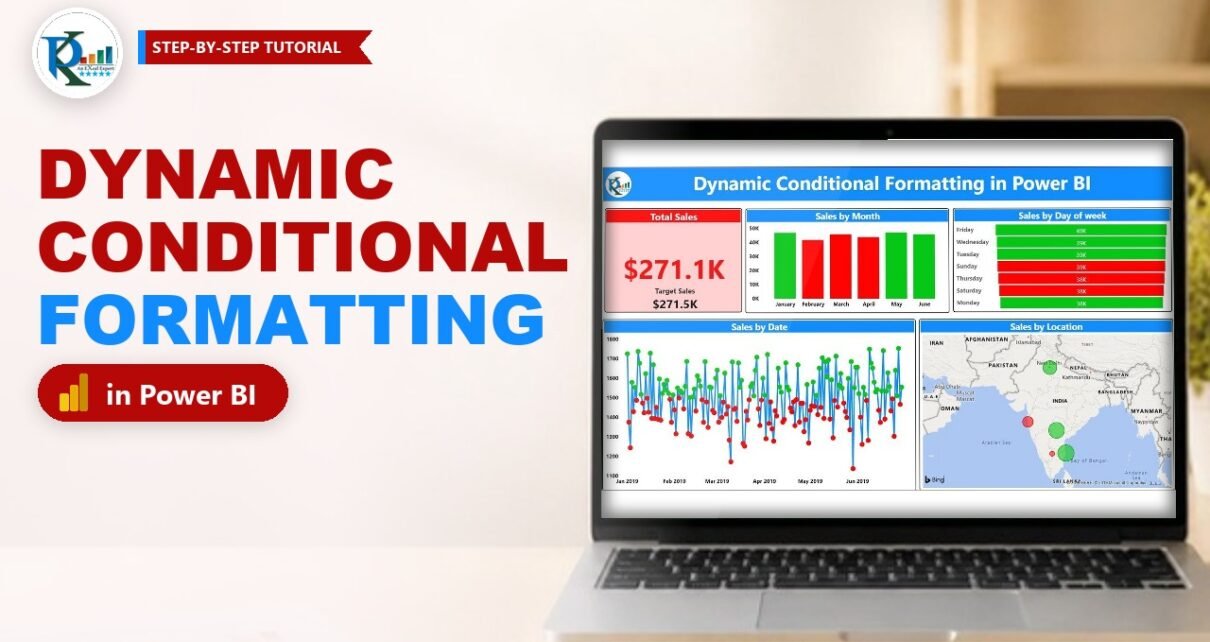
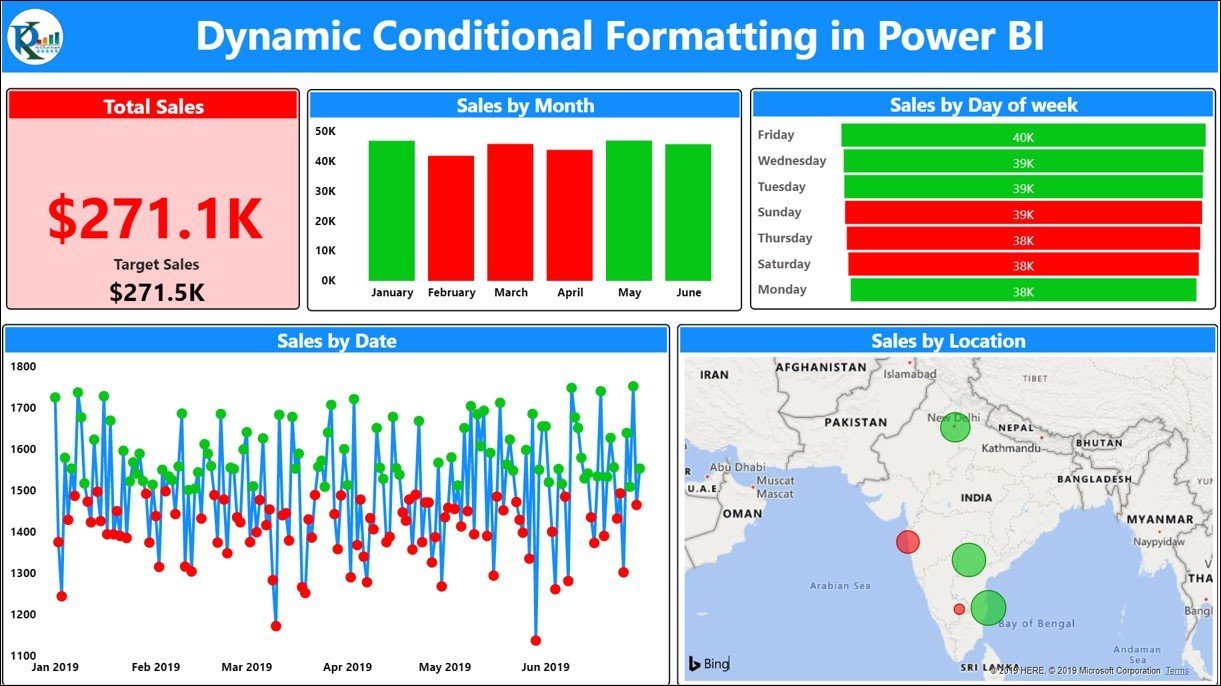
Dynamic conditional formatting in Power BI lets one DAX measure decide the colour of your cards, titles, columns, markers and map bubbles, so the whole report turns green when sales beat the target and red when they miss it. In this tutorial you build exactly that from a six-month sales file: three short measures, one rule type (Field value) and the same setting applied to every visual. Click a month or a weekday and every colour updates to match the selection.
⬇️ Download the Practice File
ZIP · Power BI file (.pbix) + source data (.xlsx) · Power BI Desktop
Watch the Video Tutorial
In the video PK loads the Excel data, writes the Total Sales, Target Sales and Dynamic Color measures, and then applies the same Field value rule to a card, a column chart, a line chart and a map.
Try the Live Report
This is the published version of the practice file. Click a month column or a weekday bar and watch the card, title and other visuals change colour.
What You Will Build
- Three DAX measures: Total Sales, Target Sales and a Dynamic Color measure that returns a colour.
- A Total Sales card whose title bar, background and number all follow the measure.
- A Sales by Month column chart with green columns for months that met target and red for months that missed it.
- A Sales by Date line chart with green and red markers for each day, plus a Sales by Day of week funnel.
- A Sales by Location map with bubbles coloured by the same rule.
- Cross-filtering: click any month or weekday and every colour recalculates for that selection.
The Data Behind the Report
The practice workbook Dynamic Conditional Formatting.xlsx has one sheet, Sales, with 905 rows from 1 January to 30 June 2019 and five columns:
- Date: one row per day per city.
- Location: Bangalore, Hyderabad, Chennai, Mumbai and New Delhi.
- Sales: the actual sales for that day, between 200 and 400.
- Target: a fixed daily target of 300. You can use your own targets; the measures work the same way.
- Day: the weekday name of the date.
Because the target sits on every row, summing it gives the right target for any month, city or weekday.
Part 1 – Load the Data and Create the Measures
Step 1: Load the Excel file
In Power BI Desktop choose Home → Get data → Excel workbook, pick the practice file and click Open. In the Navigator tick the Sales sheet and click Load.
Step 2: Create the Total Sales and Target Sales measures
Right-click the Sales table in the Data pane and choose New measure (or use Home → New measure). Create these two measures one by one:
Total Sales = SUM(Sales[Sales])


Target Sales = SUM(Sales[Target])
Select each measure and, in Measure tools → Format, choose Currency so the card shows values such as $271.1K.
Step 3: Create the Dynamic Color measure
This measure is the heart of dynamic conditional formatting in Power BI. It compares the two measures and returns the name of a colour:
Dynamic Color = IF([Total Sales] >= [Target Sales], "Green", "Red")Power BI accepts colour names such as Green and Red, or hex codes with a hash sign. In the video PK found the default green too dark, so he picked a lighter shade with a colour picker and replaced the word with its hex code:
Dynamic Color = IF([Total Sales] >= [Target Sales], "#04CF37", "Red")How the formula works
[Total Sales]and[Target Sales]are measures, so they are evaluated in the current filter context: the whole report for the card, one month for each column, one city for each bubble.IFreturns a text value. When a visual uses this measure for its colour, Power BI reads that text as a colour.
Part 2 – Apply Dynamic Conditional Formatting to a Card
Step 4: Add the card
Insert a Card visual and drag Total Sales into it. In the original report the category label under the number is switched off and the visual title is switched on with the text Total Sales, centred, in a bold font with white text.
Step 5: Colour the title background
Open the Format visual pane, go to General → Title and find Background color. Click the fx button next to it. In the dialog set:
- Format style: Field value
- What field should we base this on?: Dynamic Color
Click OK and the title bar turns red, because total sales of $271,064 are below the target of $271,500. (In the 2019 interface in the video, this dialog opened from the three dots next to the colour.)
Step 6: Colour the card background and the number
Repeat the same Field value rule in two more places:
- General → Effects → Background → Color → fx: Field value, Dynamic Color. Then set the background Transparency to 80% so the card gets a soft pink or soft green fill instead of a solid block.
- Visual → Callout value → Color → fx: Field value, Dynamic Color, so the number itself is red or green. (On older versions this section was called Data label.)
A small second card under the number shows Target Sales for comparison.
Part 3 – Colour the Charts and the Map
Step 7: Sales by Month column chart
Insert a Clustered column chart, put Date on the X-axis and Sales on the Y-axis. The date hierarchy starts at Year, so use the drill-down arrows to go to Month. Then open Visual → Columns → Color, click fx and choose Field value with Dynamic Color.
Each column is now coloured by its own month. With the practice data, January ($46,894 against a $46,500 target), May and June are green, while February, March and April are red.
Step 8: Sales by Date line chart
Copy the column chart, paste it and switch the copy to a Line chart. Use the Date field without the hierarchy so every day is a point. The Dynamic Color rule follows the copy. In the video, days that met the 1,500 daily target (five cities × 300) get green markers and the others get red markers.
Note (addition): the per-day marker colours above are what the 2019 version in the video shows. Line chart colour options have changed several times since then, and current versions apply conditional formatting to line colours per series, with markers inheriting that colour, so you may not get one colour per day. If you need a red or green result for every day, use a column chart for the daily view instead.
Step 9: Sales by Day of week and Sales by Location
The finished report adds two more visuals with the same rule:
- A Funnel with Day as the category and Sales as the value, coloured by Dynamic Color. Friday, Wednesday, Tuesday and Monday are green, Sunday, Thursday and Saturday red.
- A Map with Location in Location and Sales in Bubble size. In the video PK sets the bubble size a little bigger and then applies Field value, Dynamic Color to the bubble colour. Hyderabad, Chennai and New Delhi are green; Bangalore and Mumbai are red.
Note (addition): Microsoft has announced that the Bing-based Map and Filled map visuals are being retired in favour of Azure Maps. If you rebuild this report today, consider the Azure Maps visual. Its formatting options differ from the old Map, so check whether your version offers an fx button for the bubble colour.
Step 10: Test the cross-filter
Click the January column. The card recalculates for January only and turns green, along with its title and number. Click February and everything turns red.
Bonus: Cell Elements in a Table or Matrix
This section is an addition and is not shown in the video. The same measure also works in a Table or Matrix. Add Location, Total Sales and Target Sales to a table, then open Format visual → Visual → Cell elements. Choose the Total Sales series, switch on Background color (or Font color), click fx and select Field value with Dynamic Color. Each row is then coloured by its own city result.
For three states instead of two, a SWITCH(TRUE(), ...) measure can return green, amber and red bands.
Common Errors and Fixes
Dynamic Color does not appear in the field list
The Field value dialog only lists fields that return text. Make sure the measure returns a colour in quotes and not a number, and that you created it as a measure, not a calculated column.
Everything stays one colour
Check that you used measures and not the raw Sales and Target columns inside the IF. A calculated column is fixed per row and will not react to the month or city on the chart.
Colours look wrong after changing the code
A hex code needs the hash sign and six characters, such as #04CF37. Without the hash the colour is ignored.
Tips
- Use softer brand shades instead of pure red and green, and keep the number readable with a transparent background, as the card does at 80%.
- Look at Monday in the practice data: it has the lowest sales but is still green, because there is one Monday fewer and its target is lower. Always compare against the target for the same period.
- Show the target next to the actual so colour-blind readers get the same message.
- Microsoft’s guide to conditional formatting in Power BI visuals lists the supported visuals and every format style, including Field value.
Want It Ready-Made?
If you want a finished report that already uses target-based colours, take a look at the Sales KPI Dashboard in Power BI or the Sales Dashboard in Power BI from NextGenTemplates.com. You can also browse the full range of Power BI dashboard templates.
Related Tutorials
- Switch Excel conditional formatting with option buttons (Excel version)
- Table in Power BI
- Design, Publish and Share a Sales Dashboard in Power BI
- Power BI Tooltips: Format and Create Report Page Tooltips
- Power BI Dashboard Design: Make Your Report Look Like an App
Frequently Asked Questions
Can a DAX measure set the colour of a Power BI visual?
Yes. Create a measure that returns a colour name or hex code, then click the fx button next to a colour setting and choose Field value with that measure. Power BI evaluates it for every data point.
Which visuals support Field value conditional formatting?
Most core visuals do, including cards, column and bar charts, tables and matrices, and visual titles and backgrounds. If a colour setting shows an fx button, it accepts a Field value rule.
Why does the card turn green when I click January?
Clicking a column filters the page to January. Total Sales and Target Sales are then calculated for January only, and January sales are above the January target, so the measure returns green.
Can I use more than two colours?
Yes. Replace IF with SWITCH and return a different colour for each band, for example green, amber and red. The visuals do not need any change because they still read the same measure.
Is there an Excel version of this technique?
Yes. The Excel tutorial linked in the related tutorials section switches a heat map, data bars and icon sets with option buttons and formula-based rules.
About the Author
PK is a Microsoft Excel expert and trainer and the founder of PK: An Excel Expert and NextGenTemplates.com. He has been teaching Excel, Power Query and Power BI since 2016 on his YouTube channel.
Conclusion
Dynamic conditional formatting in Power BI comes down to one idea: let a DAX measure return a colour, then point every colour setting at it with Field value. Total Sales and Target Sales do the maths, Dynamic Color turns the result into green or red, and the card, columns, markers and map bubbles all follow it, even when the user filters the page. Build it once and you can reuse the same measure in every target-versus-actual report.