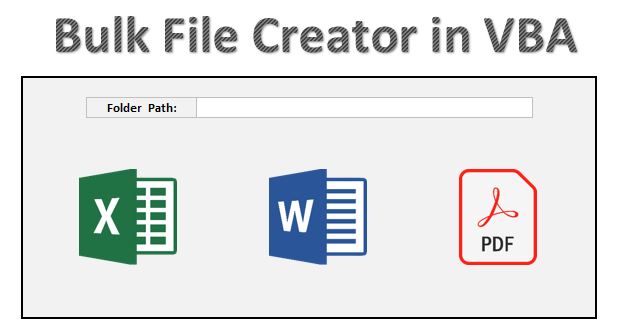
In this article, we have created an automation to create the bulk files for Excel, Word and PDF. Here we have used a school mark sheet template. This is a ready to use automation for Bulk File Creator in Excel VBA.
Bulk File Creator in Excel VBA:
Put the folder path wherein you want to create the files-
Click to buy Bulk File Creator in Excel VBA
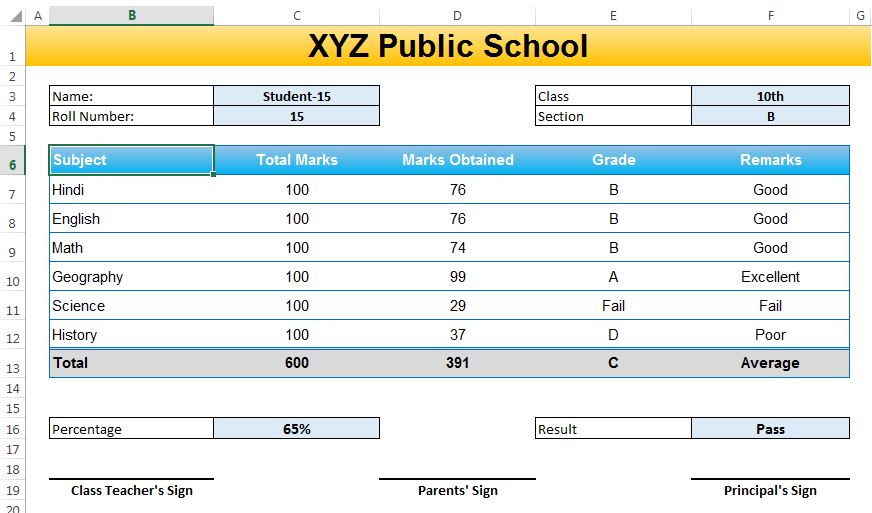
Mark sheet template –
Click to buy Bulk File Creator in Excel VBA
Macro for Excel File creation-
Option Explicit

Sub Create_Excel_Files()

Application.DisplayAlerts = False
Application.ScreenUpdating = False

Dim dsh As Worksheet
Dim tsh As Worksheet
Dim setting_Sh As Worksheet

Set dsh = ThisWorkbook.Sheets("Data")
Set tsh = ThisWorkbook.Sheets("Marksheet Template")
Set setting_Sh = ThisWorkbook.Sheets("Settings")

Application.DisplayStatusBar = True
Application.StatusBar = ""

Dim i As Integer
Dim File_Name As String

Dim nwb As Workbook

For i = 2 To dsh.Range("A" & Application.Rows.Count).End(xlUp).Row

Application.StatusBar = i - 1 & "/" & dsh.Range("A" & Application.Rows.Count).End(xlUp).Row - 1

tsh.Range("C3").Value = dsh.Range("A" & i).Value
tsh.Range("C4").Value = dsh.Range("B" & i).Value

tsh.Range("F3").Value = dsh.Range("C" & i).Value
tsh.Range("F4").Value = dsh.Range("D" & i).Value

tsh.Range("D7").Value = dsh.Range("E" & i).Value
tsh.Range("D8").Value = dsh.Range("F" & i).Value
tsh.Range("D9").Value = dsh.Range("G" & i).Value
tsh.Range("D10").Value = dsh.Range("H" & i).Value
tsh.Range("D11").Value = dsh.Range("I" & i).Value
tsh.Range("D12").Value = dsh.Range("J" & i).Value

File_Name = dsh.Range("A" & i).Value & "(" & dsh.Range("C" & i).Value & "-" & dsh.Range("D" & i).Value & ").xlsx"
tsh.Copy
Set nwb = ActiveWorkbook
nwb.Sheets(1).UsedRange.Copy
nwb.Sheets(1).UsedRange.PasteSpecial xlPasteValues
nwb.Sheets(1).Range("A1").Select
nwb.SaveAs setting_Sh.Range("F4").Value & "\" & File_Name
nwb.Close False

Next i

Application.StatusBar = ""

MsgBox "Done"
End Sub
Macro for PDF File creation-
Option Explicit

Sub Create_PDF_Files()

Application.DisplayAlerts = False
Application.ScreenUpdating = False

Dim dsh As Worksheet
Dim tsh As Worksheet
Dim setting_Sh As Worksheet

Set dsh = ThisWorkbook.Sheets("Data")
Set tsh = ThisWorkbook.Sheets("Marksheet Template")
Set setting_Sh = ThisWorkbook.Sheets("Settings")


Application.DisplayStatusBar = True
Application.StatusBar = ""

Dim i As Integer
Dim File_Name As String

For i = 2 To dsh.Range("A" & Application.Rows.Count).End(xlUp).Row

Application.StatusBar = i - 1 & "/" & dsh.Range("A" & Application.Rows.Count).End(xlUp).Row - 1

tsh.Range("C3").Value = dsh.Range("A" & i).Value
tsh.Range("C4").Value = dsh.Range("B" & i).Value

tsh.Range("F3").Value = dsh.Range("C" & i).Value
tsh.Range("F4").Value = dsh.Range("D" & i).Value

tsh.Range("D8").Value = dsh.Range("E" & i).Value
tsh.Range("D9").Value = dsh.Range("F" & i).Value
tsh.Range("D10").Value = dsh.Range("G" & i).Value
tsh.Range("D11").Value = dsh.Range("H" & i).Value
tsh.Range("D12").Value = dsh.Range("I" & i).Value
tsh.Range("D13").Value = dsh.Range("J" & i).Value

File_Name = dsh.Range("A" & i).Value & "(" & dsh.Range("C" & i).Value & "-" & dsh.Range("D" & i).Value & ").pdf"
tsh.ExportAsFixedFormat xlTypePDF, setting_Sh.Range("F4").Value & "\" & File_Name

Next i

Application.StatusBar = ""

MsgBox "Done"
End Sub
Macro for Word File creation-
Option Explicit

Sub Create_Word_Files()

Application.DisplayAlerts = False
Application.ScreenUpdating = False

Dim dsh As Worksheet
Dim tsh As Worksheet
Dim setting_Sh As Worksheet

Set dsh = ThisWorkbook.Sheets("Data")
Set tsh = ThisWorkbook.Sheets("Marksheet Template")
Set setting_Sh = ThisWorkbook.Sheets("Settings")

Application.DisplayStatusBar = True
Application.StatusBar = ""

Dim i As Integer
Dim File_Name As String

Dim wordApp As Object
Dim doc As Object

Set wordApp = CreateObject("Word.Application")
wordApp.Visible = True


For i = 2 To dsh.Range("A" & Application.Rows.Count).End(xlUp).Row

Application.StatusBar = i - 1 & "/" & dsh.Range("A" & Application.Rows.Count).End(xlUp).Row - 1

File_Name = dsh.Range("A" & i).Value & "(" & dsh.Range("C" & i).Value & "-" & dsh.Range("D" & i).Value & ").docx"

tsh.Range("C3").Value = dsh.Range("A" & i).Value
tsh.Range("C4").Value = dsh.Range("B" & i).Value

tsh.Range("F3").Value = dsh.Range("C" & i).Value
tsh.Range("F4").Value = dsh.Range("D" & i).Value

tsh.Range("D8").Value = dsh.Range("E" & i).Value
tsh.Range("D9").Value = dsh.Range("F" & i).Value
tsh.Range("D10").Value = dsh.Range("G" & i).Value
tsh.Range("D11").Value = dsh.Range("H" & i).Value
tsh.Range("D12").Value = dsh.Range("I" & i).Value
tsh.Range("D13").Value = dsh.Range("J" & i).Value

Set doc = wordApp.documents.Add
doc.PageSetup.Orientation = 1
tsh.UsedRange.Copy
doc.Range.Paste

doc.SaveAs setting_Sh.Range("F4").Value & "\" & File_Name
doc.Close False

Next i

wordApp.Quit
Application.StatusBar = ""

MsgBox "Done"
End Sub
Click to buy Bulk File Creator in Excel VBA
Visit our YouTube channel to learn step-by-step video tutorials
Watch the step by step video tutorial:
Click to buy Bulk File Creator in Excel VBA