• Excel and VBA
    • VBA Course
    • Shortcut Keys
    • Useful Formulas
    • Basic Charts
    • Advanced Chart
    • Sort and Filter
    • Pivot Table
    • Data Validation
    • Conditional Formatting
    • Auto Fill and Flash Fill
    • Find and Replace
  • DownloadsPopular
    • Excel VBA Tools
    • Dashboard
      • Excel Dashboard
      • KPI Dashboard
      • Power BI Dashboard
    • Charts
      • Progress Charts
      • Info-graphics
      • Animated Charts
      • Comparisons
      • Gantt Charts
      • Heatmaps
      • Speedometers
      • Timelines
    • Inventory Management
    • HR and Payrolls
    • VBA Automation
    • Utilities and Converters
    • Checklist
    • Calendars
    • Data Analysis
    • Excel Templates
    • Financial Tools
    • Project Management
    • Sales and Marketing
    • Productivity
  • Excel Dashboard
  • Templates
  • Tutorials
    • Charts and Visualization
    • VBA
    • Excel Tips and Tricks
  • Power BI
  • Template StoreNew
  • CoursesNew
  • About Us
  • Contact Us

PK: An Excel Expert

Transforming Data into Decisions

Home>Blogs>Dashboard>Civic Engagement Platforms Dashboard in Excel
Dashboard

Civic Engagement Platforms Dashboard in Excel

26 Mar 2026
0Comments Off on Civic Engagement Platforms Dashboard in Excel

Table of Contents

Toggle
  • Introduction
  • Key Features of Civic Engagement Platforms Dashboard in Excel
  • Dashboard Pages Explanation
    • 1. Overview Page
    • 2. Platform Performance
    • 3. Campaign Type Analysis
    • 4. Geographic Analysis
    • 5. Outcome & Status
    • 6. Data Sheet Tab
    • 7. Support Sheet
  • Advantages of Civic Engagement Platforms Dashboard in Excel
  • Opportunities for Improvement
  • Best Practices
  • FAQs
    • Can I customize the dashboard to add more metrics?
    • Is it compatible with Excel versions other than Microsoft 365?
    • How often should I update the data sheet?
    • Can I share this dashboard with others?
  • Conclusion
    • Watch the step-by-step video tutorial:

Introduction

The Civic Engagement Platforms Dashboard in Excel is a powerful, ready-to-use tool designed to help organizations track and analyze civic engagement activities efficiently. By simply updating your data in the Data sheet and refreshing the dashboard, you can gain valuable insights into visits, users, campaigns, funds raised, and much more.

Click to Purchases Civic Engagement Platforms Dashboard in Excel

Key Features of Civic Engagement Platforms Dashboard in Excel

  • Dynamic and interactive Excel dashboard made for civic engagement analysis.
  • Multiple pages covering different dimensions of civic platform performance.
  • Easy data refresh capability to update the entire dashboard with a single click.
  • Comprehensive use of cards, charts, and slicers for quick filtering and in-depth analysis.
  • Automated pivot tables driving dynamic charts for real-time insights.

Dashboard Pages Explanation

1. Overview Page

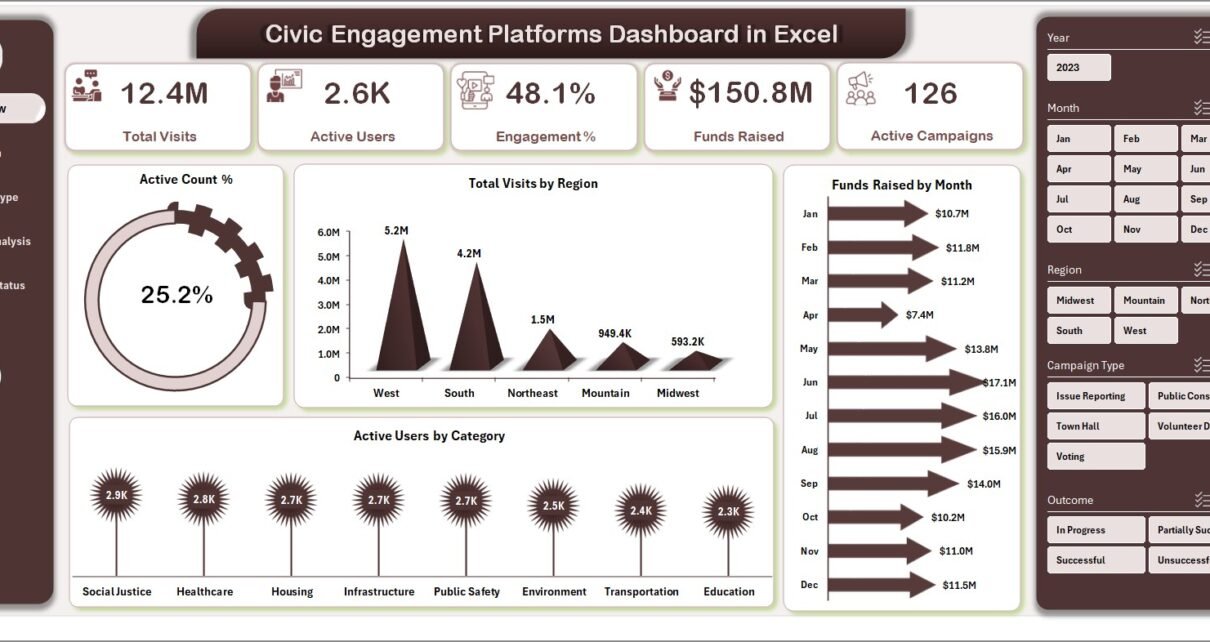
The Overview page offers a snapshot of your civic engagement performance through high-level cards and interactive charts.

  • Cards: Display key metrics such as Total Visits, Active Users, Engagement %, Funds Raised, and Active Campaigns.
  • Charts:
    • Active Count %: Shows the proportion of active users relative to total users, allowing for quick engagement assessment.
    • Total Visits by Region: Visualizes user visit distribution across various geographic areas for strategic planning.
    • Funds Raised by Month: Tracks fundraising progress month-by-month to identify trends and spikes.
    • Active Users by Category: Highlights participation across different user segments or categories.
  • Slicers: Enable quick filtering based on region, campaign type, or date to tailor the analysis.
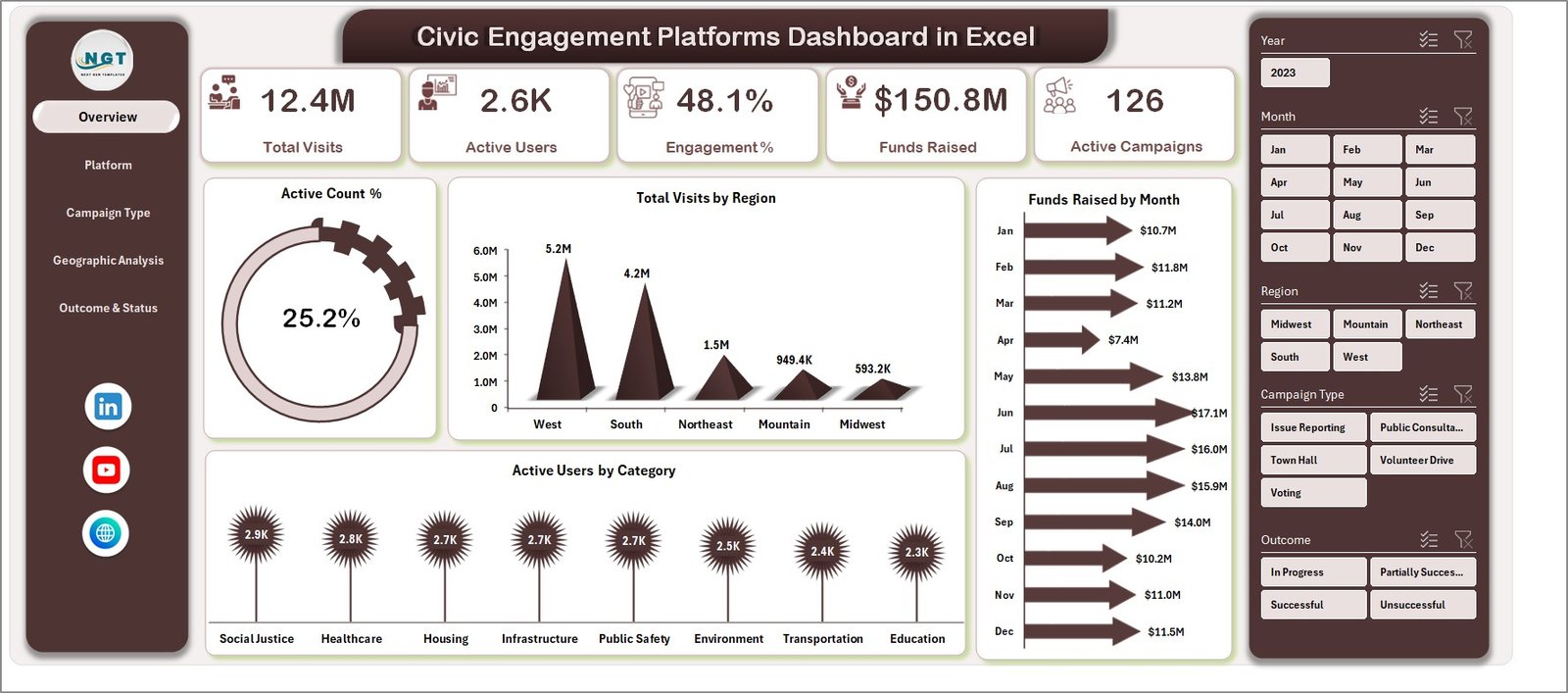
Civic Engagement Platforms Dashboard in Excel

Civic Engagement Platforms Dashboard in Excel

2. Platform Performance

This sheet tab offers detailed performance insights per platform.

  • Total Visits by Platform Name: Analyze the number of visits each platform has received.
  • Volunteers by Platform Name: Track volunteer counts associated with platforms for resource allocation.
  • Active Users by Platform Name: Measure user activity levels per platform.
  • Funds Raised by Platform Name: Monitor fundraising success across platforms.
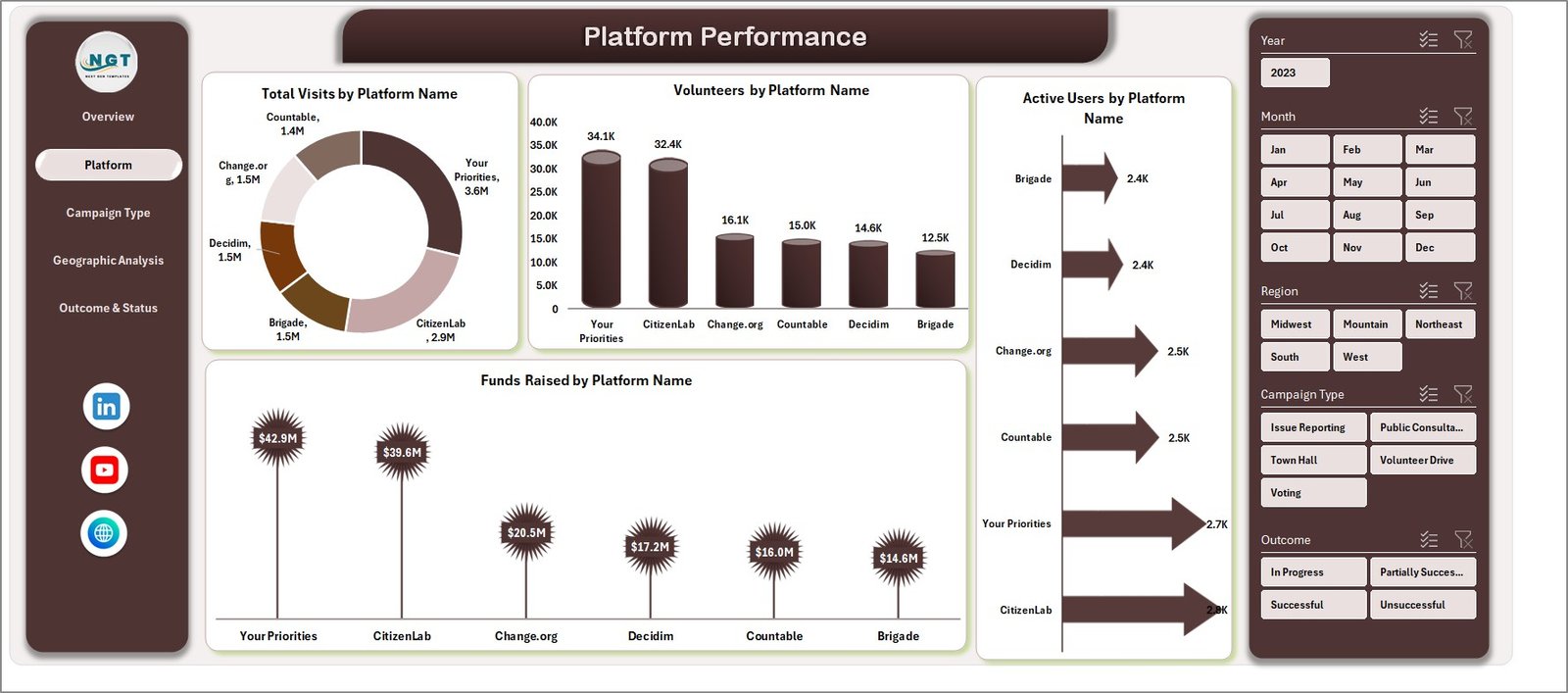
Platform Performance

Platform Performance

3. Campaign Type Analysis

This analysis tab gives deeper insights on campaigns to help evaluate effectiveness and satisfaction.

  • Funds Raised by Campaign: Shows fundraising totals categorized by campaign types.
  • Active Count % by Campaign: Percentage of active users involved in each campaign.
  • Successful Count by Campaign: Number of campaigns marked as successful for assessing outcomes.
  • Avg Satisfaction by Campaign: Measures user satisfaction averages helping improve future campaigns.
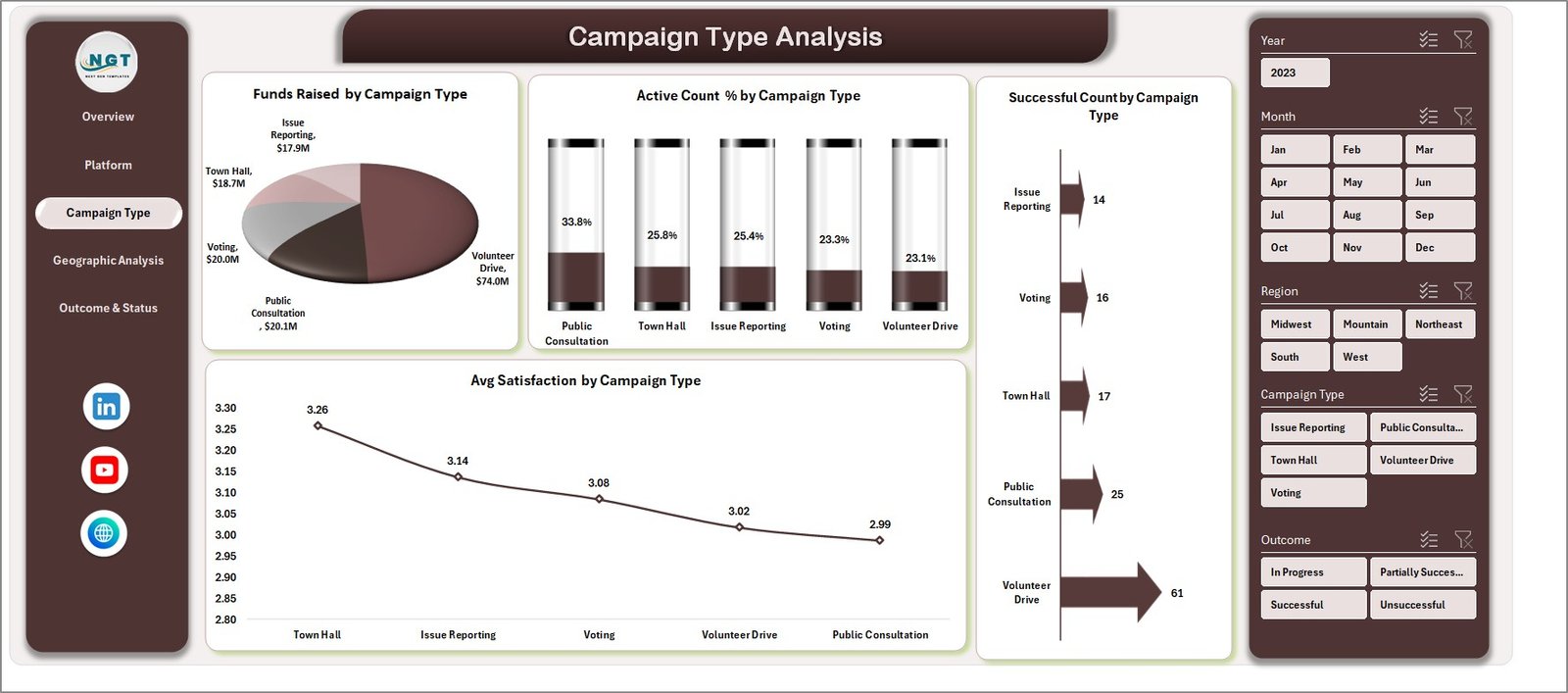
Campaign Type Analysis

Campaign Type Analysis

4. Geographic Analysis

Examine engagement and resource distribution across different regions.

  • Active Campaigns by Region: Number of ongoing campaigns in each geographic area.
  • Engagement % by Region: Engagement levels demonstrating regional participation.
  • Volunteers by Region: Counts of volunteers available by location.
  • Funds Raised by Region: Regional fundraising achievements visualized.
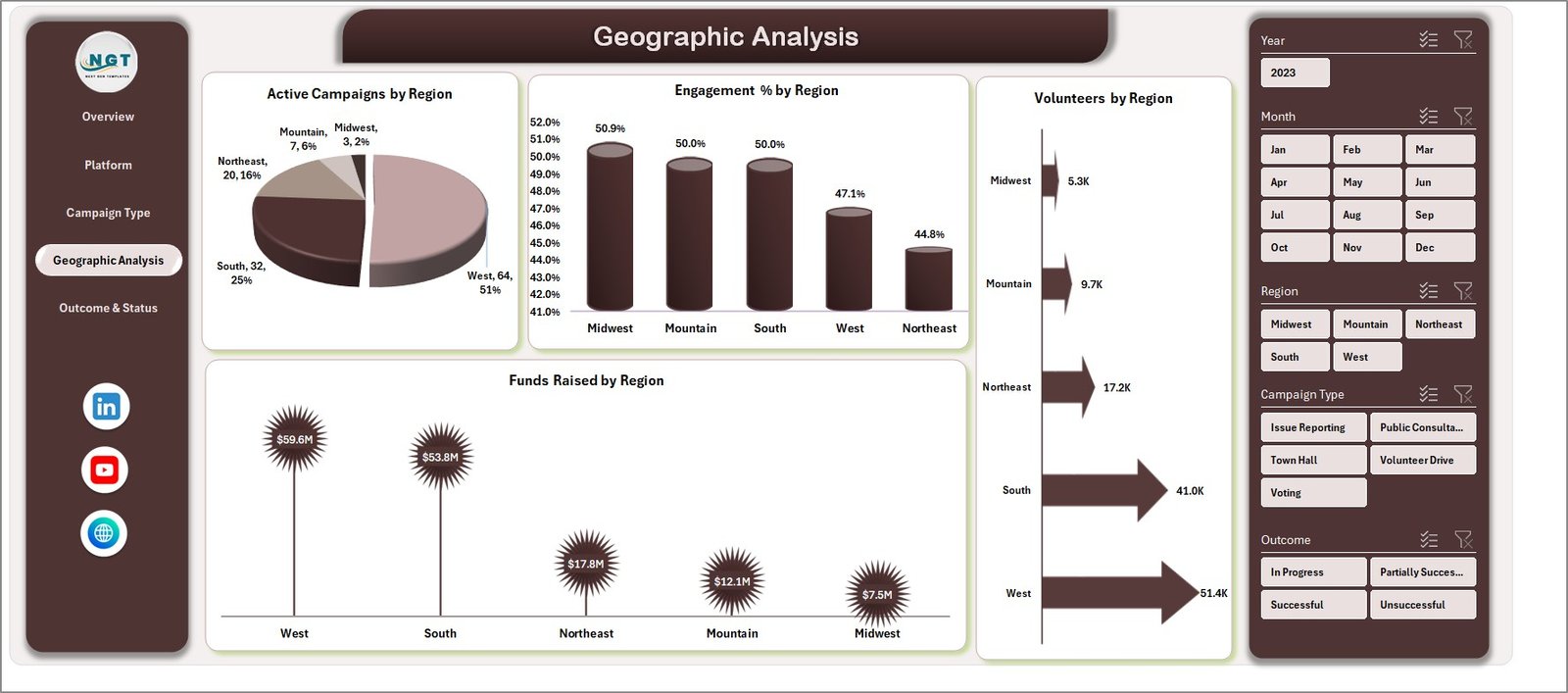
Geographic Analysis

Geographic Analysis

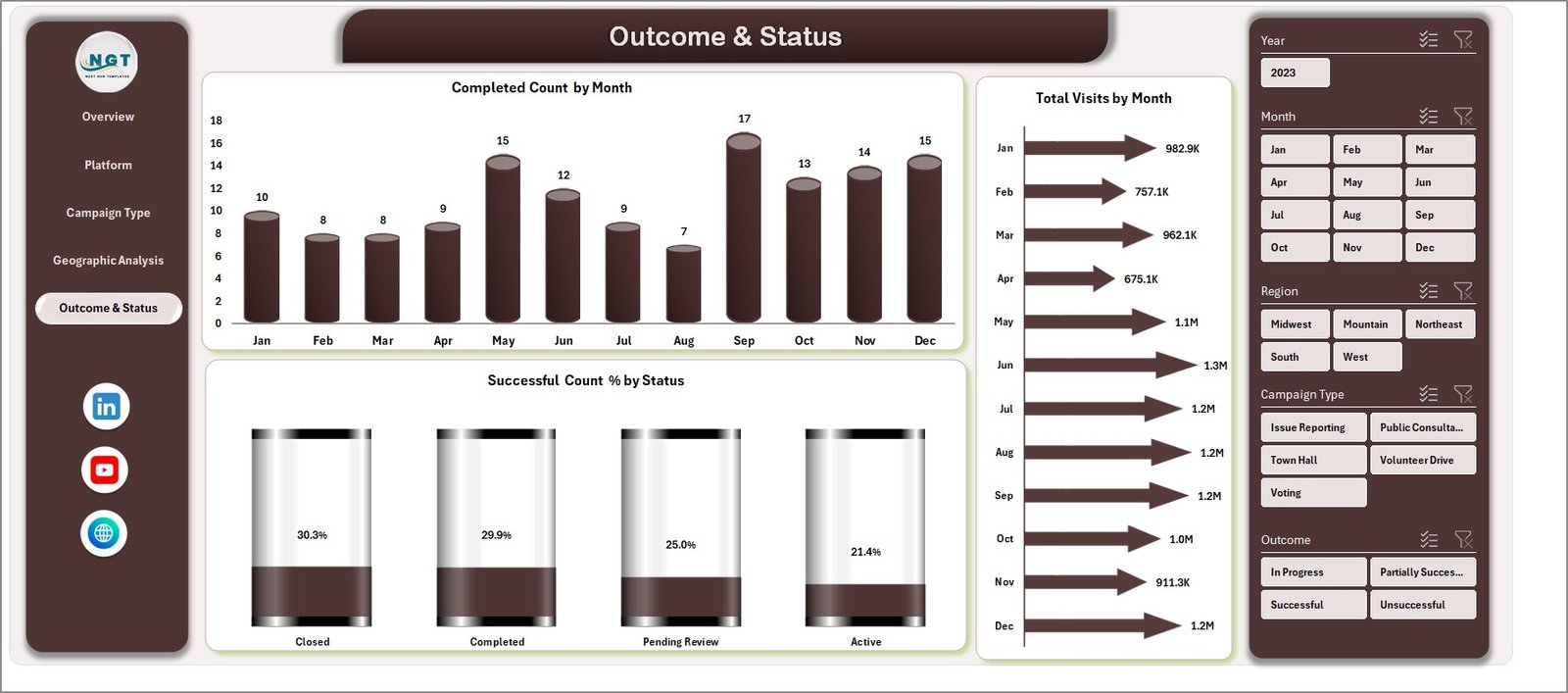
5. Outcome & Status

This page helps track completion statuses and success rates over time.

  • Completed Count by Month: Number of completed campaigns or activities each month.
  • Total Visits by Month: Monthly visits trend to monitor user engagement.
  • Successful Count %: Percentage of successful campaigns relative to total launched campaigns.
Outcome & Status

Outcome & Status

6. Data Sheet Tab

This is the master data sheet where all raw data is entered in a consistent format. Ensure data accuracy here to maintain dashboard integrity.

Data Sheet tab

Data Sheet tab

7. Support Sheet

This hidden sheet contains pivot tables that power the dashboard’s dynamic charts and metrics. After updating the Data sheet, clicking ‘Refresh All’ under the Data tab instantly updates all dashboard elements.

Support sheet tab

Support sheet tab

Advantages of Civic Engagement Platforms Dashboard in Excel

  • Easy to use: No coding needed-simply update data and refresh.
  • Comprehensive insight: Multi-dimensional analysis across platforms, campaigns, geography, and outcomes.
  • Time-saving: Automated reports eliminate manual chart making and repetitive tasks.
  • Customizable: Add or modify filters, slicers, and charts as per your organizational needs.
  • Wide accessibility: Excel format ensures compatibility across workplaces without specialized software.

Opportunities for Improvement

  • Integrate Power BI for more advanced visualization and interactivity.
  • Add automation scripts (VBA) for auto-refresh on file open.
  • Include predictive analytics to forecast future engagement trends.
  • Expand geographic mapping for detailed district or city-level insights.
  • Enable collaboration via cloud versions like Excel Online.

Best Practices

  1. Maintain data cleanliness and consistency on the Data sheet to avoid errors.
  2. Refresh pivot tables frequently to ensure dashboard reflects latest data.
  3. Use slicers wisely to drill down without overwhelming the visuals.
  4. Back up your Excel file regularly to prevent data loss.
  5. Train team members on how to update the data and refresh the dashboard.

FAQs

Can I customize the dashboard to add more metrics?

Yes, you can add new pivot tables and charts to the Support sheet and link them to your dashboard for more KPIs.

Is it compatible with Excel versions other than Microsoft 365?

The dashboard is compatible with Excel 2016 and above, but some newer features might require Microsoft 365.

How often should I update the data sheet?

Update based on your data collection frequency – weekly or monthly is typical for most civic programs.

Can I share this dashboard with others?

Yes, but ensure they have compatible Excel versions to view and interact with slicers and refresh pivots.

Click to Purchases Civic Engagement Platforms Dashboard in Excel

Conclusion

The Civic Engagement Platforms Dashboard in Excel is an essential tool for organizations aiming to track, analyze, and enhance their civic engagement initiatives effectively. Its user-friendly interface combined with robust analytical capabilities makes it a perfect fit for both beginners and advanced Excel users. By leveraging this dashboard, you can easily monitor key metrics, streamline reporting, and make informed decisions to boost the impact of your campaigns.

Explore further resources and maximize your Excel skills with Microsoft Excel official support.

Visit our YouTube channel to watch the demo: Youtube.com/@NextGenTemplates

Watch the step-by-step video tutorial:

Tagged campaign analysis, Civic Engagement, data analysis, Excel Dashboard, Geographic Analysis, Platform Performance
PK
Meet PK, the founder of PK-AnExcelExpert.com! With over 15 years of experience in Data Visualization, Excel Automation, and dashboard creation. PK is a Microsoft Certified Professional who has a passion for all things in Excel. PK loves to explore new and innovative ways to use Excel and is always eager to share his knowledge with others. With an eye for detail and a commitment to excellence, PK has become a go-to expert in the world of Excel. Whether you're looking to create stunning visualizations or streamline your workflow with automation, PK has the skills and expertise to help you succeed. Join the many satisfied clients who have benefited from PK's services and see how he can take your Excel skills to the next level!
https://www.pk-anexcelexpert.com

Related Articles

Dashboard

Event Management Dashboard in Excel

September 27, 2025September 29, 2025 PK
Managing events is a complex process that involves multiple moving parts—venues, budgets, organizers, attendees, and client satisfaction. Without a structured
Dashboard

Research & Development Institutes KPI Dashboard in Excel

November 29, 2025November 29, 2025 PK
Research and Development (R&D) plays a key role in innovation, scientific growth, and industry advancement. However, research institutes often struggle
Dashboard Power BI

Libraries & Archives KPI Dashboard in Power BI

January 6, 2026January 6, 2026 PK
Libraries and archives play a vital role in preserving knowledge, supporting education, and enabling research. However, as collections grow and

Post navigation

Cardiology Institutes Dashboard in Excel
Carbon Capture Firms Dashboard in Power BI

Number of items in cart: 0

  • Your cart is empty.
  • Total: $0.00
  • Checkout

Join Our Course

  • Excel Pivot Tables for Data Analysis

Top Categories

  • Blogs (21)
  • Charts and Visualization (155)
  • Dashboard (2,469)
  • Excel Tips and Tricks (185)
  • Power BI (1,136)
  • Power Pivot (102)
  • Power Point Visualization (4)
  • Power Query (1)
  • Predictive Analytics (5)
  • Productivity (2)
  • Templates (1,420)
  • VBA (210)

Download Categories

  • Calendars (54)
  • Charts (131)
    • Animated Charts (5)
    • Comparisons (53)
    • Gantt Charts (7)
    • Heatmaps (1)
    • Info-graphics (44)
    • Progress Charts (32)
    • Speedometers (4)
    • Timelines (2)
  • Checklist (229)
  • Dashboard (513)
    • Excel Dashboard (25)
    • KPI Dashboard (366)
    • Power BI Dashboard (122)
  • Data Analysis (12)
  • Excel Templates (73)
  • Excel VBA Tools (44)
  • Financial Tools (9)
  • HR and Payrolls (19)
  • Inventory Management (6)
  • Product (9)
  • Productivity (1)
  • Project Management (15)
  • Sales and Marketing (13)
  • Utilities and Converters (6)
  • VBA Automation (27)
instant= new adsenseLoader( '#quads-ad1-place', { onLoad: function( ad ){ if (ad.classList.contains("quads-ll")) { ad.classList.remove("quads-ll"); } } });

Latest Articles

Carbon Capture Firms Dashboard in Power BI

March 26, 2026March 26, 2026 PK

Civic Engagement Platforms Dashboard in Excel

March 26, 2026March 26, 2026 PK

Cardiology Institutes Dashboard in Excel

March 26, 2026March 26, 2026 PK

Biodegradable Packaging Dashboard in Power BI

March 26, 2026March 26, 2026 PK

Tax Planning Worksheet Template in Excel

March 26, 2026March 26, 2026 PK

Popular Articles

New Vendor Setup Tracker in Excel

July 7, 2025July 7, 2025 PK

Education and Learning Project Timeline KPI Dashboard in Excel

June 8, 2025June 8, 2025 PK

Infrastructure KPI Scorecard in Excel

October 26, 2025October 26, 2025 PK

Luxury Retail KPI Dashboard in Power BI

March 18, 2025March 18, 2025 PK

Climate Action KPI Dashboard in Power BI

February 13, 2025March 19, 2025 PK

Read More about..

  • Advanced Excel
  • VBA Course
  • Dashboard
  • Chart and Visualization
  • VBA Tips
  • Excel Tips and Trics
  • Our Excel Products
  • About US
  • Contact Us


Subscribe to our Newsletter


Download Dashboards

  • Project Management Dashboard
  • Zonal Dashboard
  • Sales Dashboard
  • Outbound Dashboard
  • A Quick Dashboard
  • C-SAT Dashboard
  • Performance Dashboard
  • Process Dashboard
  • Incentive Dashboard
instant= new adsenseLoader( '#quads-ad2-place', { onLoad: function( ad ){ if (ad.classList.contains("quads-ll")) { ad.classList.remove("quads-ll"); } } });

Popular Tags

Business Analytics business intelligence checklist template data analysis Data Analytics Data visualization Event Management Excel excel-kpi-template Excel calendar Excel Calendar Template excel checklist excel checklist template Excel Dashboard Excel dashboard template Excel KPI Dashboard Excel reporting Excel Template Excel Templates Excel Tips Excel Tutorial healthcare analytics HR Analytics kpi-tracking-excel KPI Dashboard KPI dashboard Excel KPI monitoring KPI tracking MTD YTD analysis MTD YTD dashboard MTD YTD KPIs performance dashboard Performance Metrics performance tracking Power BI Power BI dashboard Power BI KPI Dashboard Power BI Reporting Power BI reports Power BI Template Power BI Templates Project Management Task Management Task Tracker VBA
  • Excel and VBA
    • VBA Course
    • Shortcut Keys
    • Useful Formulas
    • Basic Charts
    • Advanced Chart
    • Sort and Filter
    • Pivot Table
    • Data Validation
    • Conditional Formatting
    • Auto Fill and Flash Fill
    • Find and Replace
  • DownloadsPopular
    • Excel VBA Tools
    • Dashboard
      • Excel Dashboard
      • KPI Dashboard
      • Power BI Dashboard
    • Charts
      • Progress Charts
      • Info-graphics
      • Animated Charts
      • Comparisons
      • Gantt Charts
      • Heatmaps
      • Speedometers
      • Timelines
    • Inventory Management
    • HR and Payrolls
    • VBA Automation
    • Utilities and Converters
    • Checklist
    • Calendars
    • Data Analysis
    • Excel Templates
    • Financial Tools
    • Project Management
    • Sales and Marketing
    • Productivity
  • Excel Dashboard
  • Templates
  • Tutorials
    • Charts and Visualization
    • VBA
    • Excel Tips and Tricks
  • Power BI
  • Template StoreNew
  • CoursesNew
  • About Us
  • Contact Us
Copyright © 2023 PK-AnExcelExpert.com - Privacy Policy
This website uses cookies to improve your user experience, analyze site traffic and serve targeted ads in accordance with our Privacy Policy ACCEPT
Privacy & Cookies Policy

Privacy Overview

This website uses cookies to improve your experience while you navigate through the website. Out of these cookies, the cookies that are categorized as necessary are stored on your browser as they are essential for the working of basic functionalities of the website. We also use third-party cookies that help us analyze and understand how you use this website. These cookies will be stored in your browser only with your consent. You also have the option to opt-out of these cookies. But opting out of some of these cookies may have an effect on your browsing experience.
Necessary
Always Enabled
Necessary cookies are absolutely essential for the website to function properly. This category only includes cookies that ensures basic functionalities and security features of the website. These cookies do not store any personal information.
Non-necessary
Any cookies that may not be particularly necessary for the website to function and is used specifically to collect user personal data via analytics, ads, other embedded contents are termed as non-necessary cookies. It is mandatory to procure user consent prior to running these cookies on your website.
SAVE & ACCEPT