The Digital Identity Platforms Dashboard in Power BI gives identity verification, KYC, compliance, fintech, SaaS, and trust teams a ready-made report for tracking verification requests, platform fees, cost, successful verifications, gross profit, risk tiers, integration channels, industries, providers, and regional performance. Identity teams often collect data from provider exports, onboarding systems, fraud tools, support tickets, finance files, and internal operations logs. When that data stays scattered, it becomes hard to answer simple business questions: which provider is profitable, which region has stronger verification success, which industry carries higher identity risk, and which channels generate more verification activity?
This Power BI dashboard brings those questions into one editable .pbix file with 5 focused report pages. It is designed for teams that need interactive reporting without building every visual from a blank canvas.

Key Features of Digital Identity Platforms Dashboard in Power BI
- 5 report pages: Overview Page, Volume Trends, Risk Analysis, Channel Health, and Provider Score.
- 5 executive KPI cards: Total Verification Requests, Total Platform Fees, Total Cost, Successful Verifications, and Gross Profit.
- Verification performance views: Track volume, cost, margin, status, provider, region, industry, channel, month, quarter, and year.
- Risk analysis: Compare total cost by risk tier and average identity risk score by industry.
- Provider scoring: Review gross profit and successful verifications by provider.
- Editable Power BI file: Customize visuals, measures, fields, data sources, colors, and page layouts in Power BI Desktop.
If you are new to Power BI, Microsoft explains what Power BI Desktop is and how it supports report building and data analysis.
Dashboard Pages Explanation
1. Overview Page
The Overview Page is the executive summary of the report. The top cards show Total Verification Requests, Total Platform Fees, Total Cost, Successful Verifications, and Gross Profit so users can quickly understand scale, commercial value, cost pressure, successful checks, and profit.
Gross Margin by Overall Performance shows whether verification economics are healthy across the selected filters. This helps finance and operations teams look beyond request volume and understand margin quality.
Total Verification Requests by Status explains how requests are distributed across workflow outcomes. Total Verification Requests by Industry shows which industries create the most identity verification demand. Total Platform Fees by Month Name helps teams review month-by-month fee movement.
2. Volume Trends
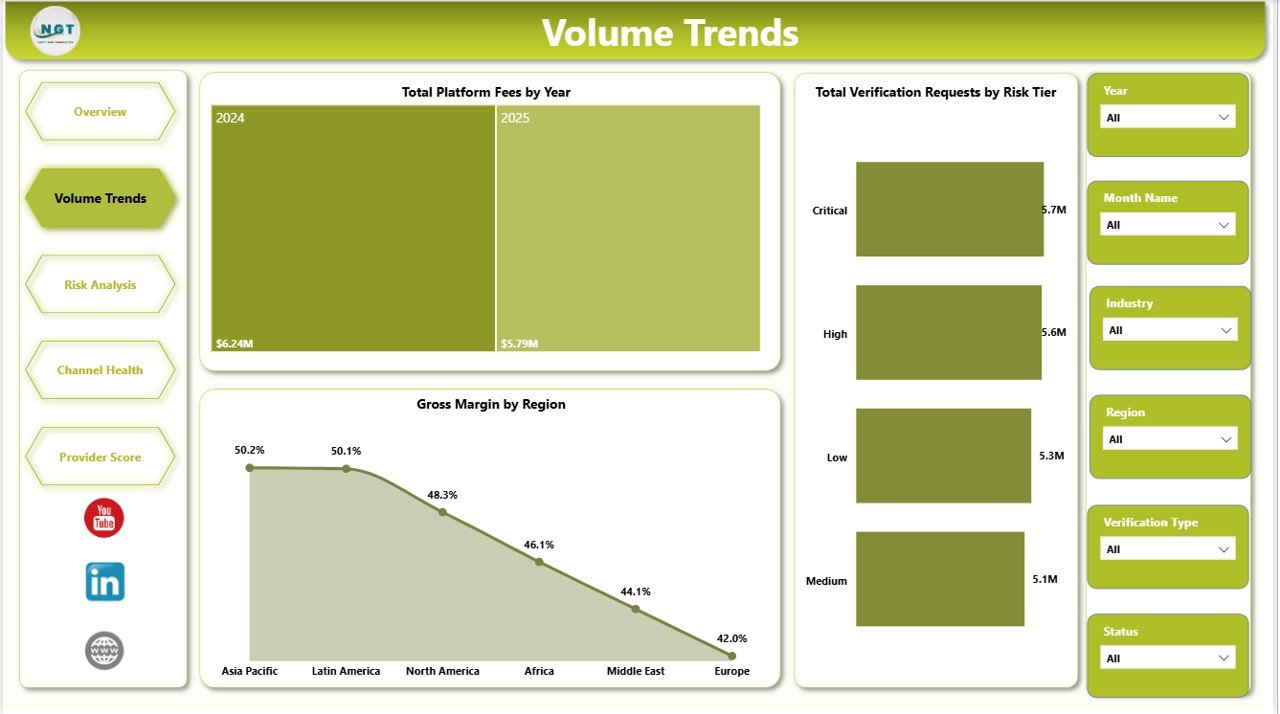
The Volume Trends page focuses on verification scale and growth. Total Platform Fees by Year helps users compare long-term fee movement and see whether identity verification revenue is increasing or declining.
Gross Margin by Region compares profitability across markets. A region may generate high request volume but lower margin, so this view helps leadership review pricing, provider cost, and market efficiency.
Total Verification Requests by Risk Tier shows how verification activity is distributed across low, medium, and high-risk groups. This is useful for compliance teams that need to understand whether riskier traffic is growing.
3. Risk Analysis
The Risk Analysis page is built for compliance, fraud prevention, and trust teams. Total Cost by Risk Tier shows where verification spend is concentrated across risk groups, helping teams understand whether high-risk checks are also driving higher cost.
Gross Margin by Status connects workflow outcomes with profitability. This can help teams see whether failed, pending, completed, or review-related statuses affect margin differently.
Average Identity Risk Score by Industry compares identity risk exposure by industry. This helps compliance analysts identify segments that may need stronger review, better onboarding rules, or provider-level investigation.

4. Channel Health
The Channel Health page explains how verification performance changes across integration paths, providers, and regions. Total Verification Requests by Integration Channel shows which channels bring the most traffic into the identity workflow.
Successful Verifications by Region helps teams compare regional success patterns. If one region has lower successful verification volume, teams can review document quality, local provider performance, user experience, or verification rules.
Total Platform Fees by Provider gives a vendor-level fee view. This is useful before provider reviews, renewal conversations, or internal cost analysis.

5. Provider Score
The Provider Score page is built for vendor performance conversations. Gross Profit by Provider shows which providers contribute the strongest financial return after cost.
Total Verification Requests by Quarter shows seasonal request movement, which is useful for quarterly business reviews and capacity planning.
Successful Verifications by Provider helps compare provider quality. Teams can use this view to understand which providers contribute more successful checks and which may require deeper review.

Digital Identity Platforms Dashboard in Power BI vs. Tableau vs. Paid Identity SaaS – Feature Comparison
| Feature | This Power BI Dashboard | Tableau Alternative | Paid Identity SaaS |
|---|---|---|---|
| Cost | $17.99 one-time | License plus report build cost | Monthly or annual subscription |
| Platform | Power BI Desktop | Tableau Desktop or Cloud | Vendor-hosted application |
| Setup time | Open .pbix and replace or connect data | Build data model and visuals | Implementation and configuration |
| Real-time team collaboration | Available after publishing to Power BI Service | Available through Tableau Cloud or Server | Usually included |
| Mobile access | Possible after publishing to Power BI Service | Possible through Tableau mobile | Vendor controlled |
| Customizable fields | Editable report and model | Editable with Tableau skills | Limited by vendor reporting options |
| Share with link | Possible through Power BI Service permissions | Possible through Tableau permissions | Login controlled |
| Year-1 cost at 5 users | $17.99 plus any Microsoft licensing | Often much higher after licenses | Often hundreds or thousands |
| Identity provider scoring | Built in | Must be designed | Depends on plan and data access |
Who Should Use This Template
This template is suitable for digital identity platforms, fintech onboarding teams, KYC operations teams, compliance analysts, fraud analysts, trust and safety managers, SaaS operations teams, marketplace onboarding teams, and business analysts who need to review identity verification performance in Power BI.
It is not intended to replace an identity provider, fraud decision engine, AML platform, CRM, ticketing system, or real-time customer onboarding workflow. It works best as a reporting layer after approved verification data has been prepared for analysis.
Real-World Use Cases
Aisha, fintech operations lead: Aisha reviews the Overview and Risk Analysis pages before weekly onboarding meetings to explain request volume, successful verifications, cost, margin, and higher-risk segments.
Daniel, identity product manager: Daniel uses Provider Score to compare gross profit and successful verifications by provider before vendor performance reviews.
Meera, compliance analyst: Meera uses Volume Trends and Channel Health to prepare region, risk tier, and channel summaries for compliance meetings.
Advantages of Digital Identity Platforms Dashboard in Power BI
- Faster reporting: KPI cards, visuals, slicers, and report pages are already structured.
- Interactive analysis: Users can filter performance by provider, region, risk tier, status, industry, channel, month, quarter, or year.
- Provider visibility: The report makes it easier to compare providers by fees, gross profit, and successful verifications.
- Power BI flexibility: Users can edit visuals, measures, relationships, and data sources.
- Lower template cost: It is a one-time purchase instead of a recurring template subscription.
Opportunities for Improvement
Larger teams can extend the dashboard by connecting it to governed databases, automating refresh in Power BI Service, adding row-level security, adding service-level agreement measures, or joining support ticket data with verification records. Teams with strict compliance requirements should confirm data handling rules before publishing or sharing identity-related reports.
Best Practices
- Keep source data column names and data types consistent before refreshing the report.
- Validate KPI totals after replacing the sample data.
- Use approved provider, region, industry, and status naming conventions.
- Review high-risk segments separately before executive reporting.
- Publish only through approved Power BI workspaces and permission settings.
Explore Relevant Templates
You can download the product here: Digital Identity Platforms Dashboard in Power BI.
Related templates include Digital Identity Platforms Dashboard in Excel, IT and Cybersecurity Operations Bundle, and Cybersecurity Report in Excel. Browse more Power BI Dashboard Templates.
Frequently Asked Questions
What does this Power BI dashboard track?
It tracks verification requests, platform fees, cost, successful verifications, gross profit, gross margin, status, industry, month, year, region, risk tier, integration channel, provider, quarter, and average identity risk score.
Do I need Power BI Desktop?
Yes. The .pbix file is designed to open and edit in Power BI Desktop.
Can I use my own data?
Yes. Replace the sample data or connect your own approved data source inside Power BI.
Can I customize the visuals?
Yes. You can edit visuals, colors, measures, fields, page names, layouts, and source connections.
Does this connect live to an identity API?
No live API connector is included. Use exported data or connect your own approved data source.
Can this replace my identity verification provider?
No. It is a reporting dashboard, not an identity verification service or KYC decision system.
About the Author
Built by PK – Microsoft Certified Professional with 15+ years of Excel, Google Sheets, and Power BI experience. Founder of NextGenTemplates, reaching 300K+ subscribers across YouTube channels. Every template is hand-built and tested before release.
Conclusion
The Digital Identity Platforms Dashboard in Power BI gives teams a practical way to review verification volume, cost, platform fees, successful checks, gross profit, risk tiers, channels, regions, industries, and provider performance. It is a good fit for teams that already have identity verification data and want a clear Power BI reporting layer without building every page from scratch.
For more tutorials, visit YouTube.com/@PKAnExcelExpert.