Financial compliance plays a critical role in every organization. Businesses must follow financial regulations, tax requirements, audit standards, and internal control policies to avoid penalties and maintain operational transparency. However, managing financial compliance tasks manually often leads to missed deadlines, incomplete documentation, and compliance risks.
Therefore, organizations increasingly use structured checklist templates to monitor compliance activities effectively. A well-designed checklist ensures that every compliance requirement receives proper attention and completion.
That is exactly where the Financial Compliance Checklist in Excel becomes an essential management tool.
This ready-to-use Excel template helps finance teams track compliance activities, assign responsibilities, monitor deadlines, and measure completion progress. Instead of managing compliance through scattered notes or emails, teams can track everything within a single organized Excel sheet.
In this comprehensive guide, you will learn:
-
What a Financial Compliance Checklist in Excel is
-
Why organizations need compliance checklists
-
Key features of the checklist template
-
Advantages of using this template
-
Best practices for managing financial compliance
-
Frequently asked questions
Let’s explore everything step by step.
Click to Purchases Financial Compliance Checklist in Excel
What Is a Financial Compliance Checklist in Excel?
A Financial Compliance Checklist in Excel is a structured task management tool designed to track financial regulatory activities within an organization.
It allows finance teams to monitor compliance tasks such as:
-
Tax filings
-
Financial reporting deadlines
-
Internal audits
-
Regulatory documentation
-
Compliance reviews
-
Financial policy implementation
Instead of relying on scattered communication or manual reminders, organizations can record all compliance tasks inside a centralized checklist.
As a result, finance teams gain better control over compliance processes while reducing the risk of missing important deadlines.
Because Excel supports progress tracking, status indicators, and dropdown selections, this template makes financial compliance management simple and efficient.
Click to Purchases Financial Compliance Checklist in Excel
Why Do Organizations Need a Financial Compliance Checklist?
Financial compliance involves multiple regulatory requirements and strict reporting deadlines. Therefore, organizations must track compliance tasks carefully.
Without a structured compliance tracking system, businesses often face several challenges such as:
-
Missed regulatory deadlines
-
Incomplete documentation
-
Poor accountability
-
Audit risks
-
Financial penalties
However, when organizations use a Financial Compliance Checklist, they gain better control over compliance activities.
For example, a checklist allows teams to:
-
Track compliance tasks clearly
-
Assign responsibilities to team members
-
Monitor deadlines effectively
-
Improve accountability
-
Reduce compliance risks
Consequently, organizations can maintain regulatory compliance while improving operational efficiency.
Click to Purchases Financial Compliance Checklist in Excel
Key Features of the Financial Compliance Checklist in Excel
This ready-to-use Excel template includes several useful features that simplify compliance management.
The template contains two worksheets, each designed for a specific purpose.
1. Financial Compliance Checklist Sheet – Main Tracking Page
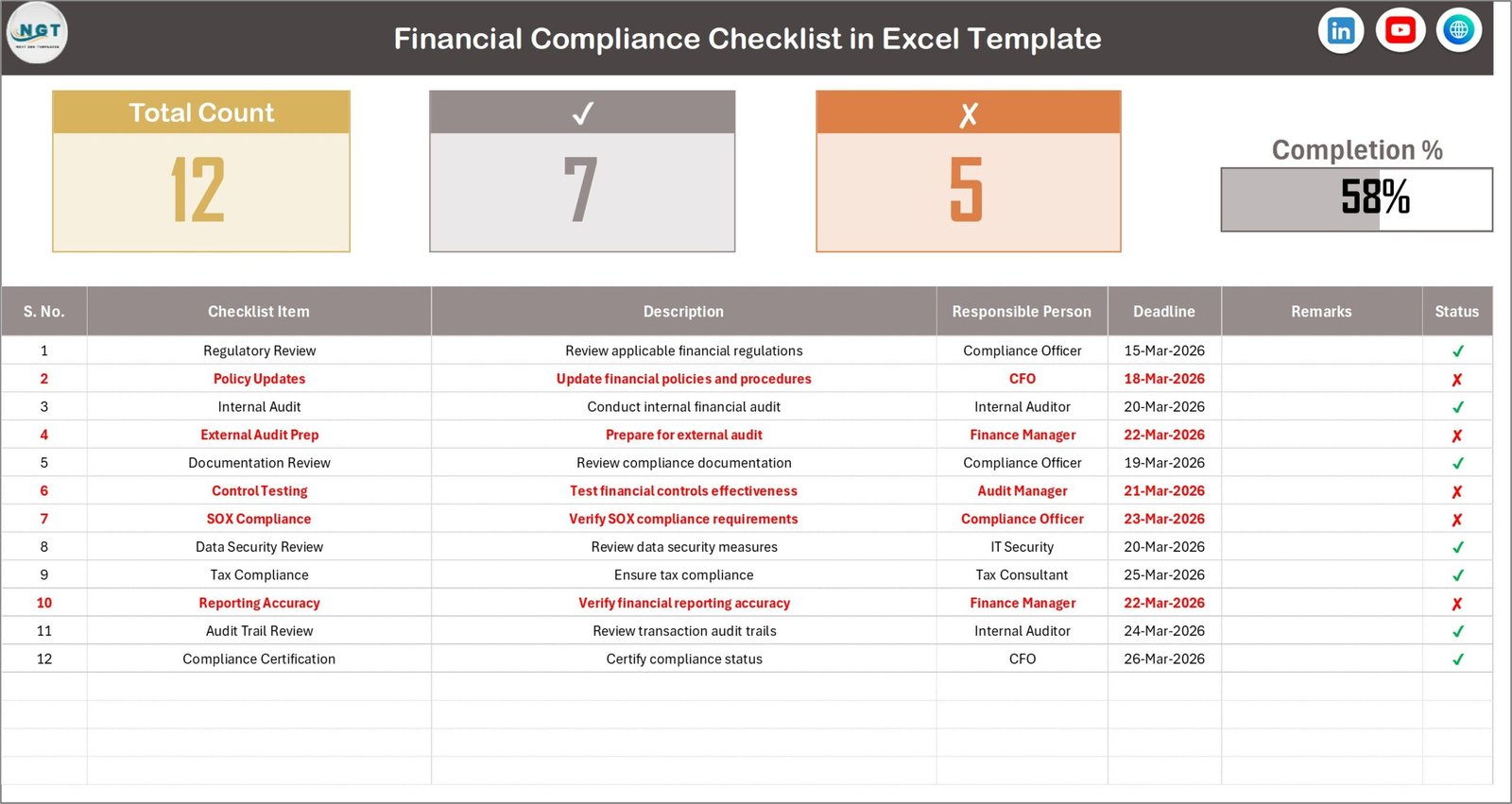
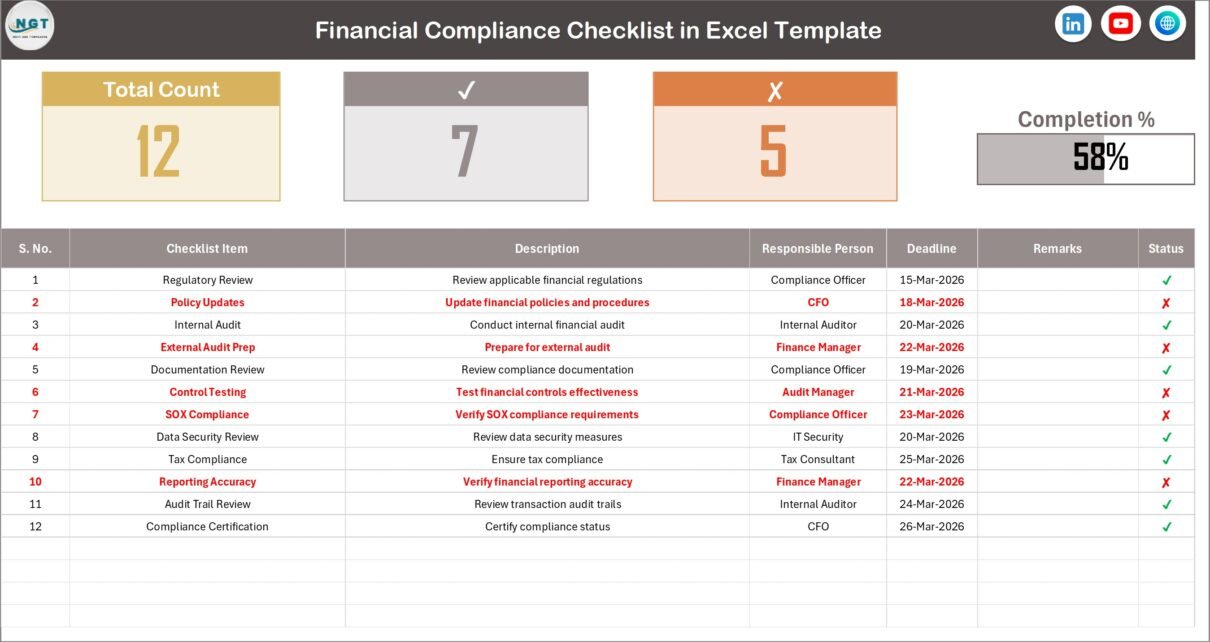
The Financial Compliance Checklist Sheet is the primary worksheet where users manage all compliance tasks.
This sheet allows organizations to record compliance requirements and monitor progress easily.
Top Section – Compliance Summary
The top section of the sheet displays important summary information about compliance progress.
The dashboard-like section shows the following metrics:
-
Total Count – Total number of compliance tasks
-
Checked Count – Number of completed tasks
-
Crossed Count – Number of pending or incomplete tasks
-
Progress Bar – Visual representation of completion percentage
Because the template automatically calculates the completion percentage, users can quickly understand overall compliance progress.
As a result, finance managers can easily identify whether compliance tasks are on schedule.
Click to Purchases Financial Compliance Checklist in Excel
Checklist Table – Task Management Section
Below the summary section, the template includes a structured checklist table where users track all compliance activities.
This table acts as the core working area of the template.
Users simply update the Status column with either:
-
✔ Completed
-
✘ Pending
Once the status changes, the template automatically updates the progress indicators.
Columns Available in the Checklist Table
The checklist table contains several important columns.
Serial No.
This column shows the sequence number of each compliance task.
Checklist Item
This field displays the name of the compliance activity.
Examples include:
-
Financial statement preparation
-
Tax filing submission
-
Internal audit review
-
Compliance documentation update
Description
This column explains the compliance task in detail.
Therefore, team members clearly understand the requirement.
Responsible Person
This column identifies the person responsible for completing the compliance task.
Assigning responsibility ensures accountability and improves task management.
Deadline
The deadline column records the due date for each compliance activity.
As a result, teams can track compliance timelines and avoid missing regulatory deadlines.
Remarks
Users can record additional notes, updates, or comments in the remarks column.
For example:
-
Compliance verification completed
-
Documentation submitted
-
Pending approval
Status
The Status column tracks task completion.
Users mark:
-
✔ when the task is completed
-
✘ when the task remains pending
Once the status changes, the dashboard automatically updates the completion progress.
Click to Purchases Financial Compliance Checklist in Excel
2. List Sheet – Dropdown Management
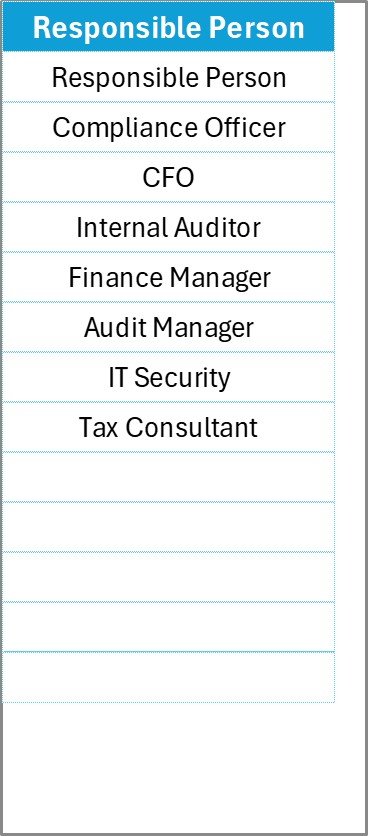
The second worksheet is the List Sheet.
This sheet stores the unique list of responsible persons used in the main checklist table.
Because Excel uses this list to create dropdown selections, users can assign responsible persons easily.
The dropdown list ensures:
-
Data consistency
-
Faster task assignment
-
Reduced data entry errors
Therefore, this sheet supports efficient data validation in the main checklist.
Click to Purchases Financial Compliance Checklist in Excel
Advantages of Financial Compliance Checklist in Excel
Organizations gain many benefits when they implement a structured financial compliance checklist.
Below are some key advantages.
1. Better Compliance Monitoring
The checklist allows finance teams to track compliance tasks in a structured way.
As a result, organizations maintain better control over regulatory obligations.
2. Improved Accountability
When tasks include assigned responsible persons, team members clearly understand their responsibilities.
Consequently, accountability improves across the organization.
3. Reduced Compliance Risks
Tracking deadlines and compliance tasks reduces the risk of missing regulatory requirements.
Therefore, organizations avoid penalties and legal complications.
4. Clear Progress Visibility
The template provides visual indicators such as progress bars and completion counts.
These indicators help managers evaluate compliance progress quickly.
5. Simple and Easy to Use
Because the template works inside Microsoft Excel, organizations do not require complex software.
Users can update tasks easily without technical knowledge.
Click to Purchases Financial Compliance Checklist in Excel
Best Practices for the Financial Compliance Checklist
Organizations should follow several best practices to maximize the benefits of this checklist.
1. Define All Compliance Requirements Clearly
First, organizations should identify all financial compliance activities.
Examples include:
-
Tax filing deadlines
-
Financial statement submissions
-
Audit documentation reviews
-
Regulatory compliance reporting
Clearly defining tasks improves tracking accuracy.
2. Assign Responsibilities Properly
Each compliance activity should include a responsible person.
This ensures accountability and prevents confusion.
3. Monitor Compliance Deadlines Regularly
Managers should review compliance deadlines frequently.
Regular monitoring prevents last-minute compliance issues.
4. Update Task Status Immediately
Team members should update the checklist status as soon as tasks are completed.
Real-time updates improve progress tracking.
5. Review the Checklist During Compliance Meetings
Organizations should review the checklist during financial review meetings.
This ensures that compliance tasks remain aligned with regulatory requirements.
How Does This Checklist Improve Financial Compliance Management?
A structured compliance checklist transforms the way organizations manage regulatory obligations.
For example, finance managers can quickly answer questions such as:
-
Which compliance tasks remain pending?
-
Who is responsible for each task?
-
Are compliance deadlines approaching?
-
What percentage of compliance tasks are complete?
Because the checklist provides clear visibility, organizations can manage compliance more efficiently.
Therefore, the template helps reduce compliance risks while improving operational control.
Conclusion
Financial compliance requires careful monitoring, accurate documentation, and strict deadline management. However, manual tracking methods often lead to confusion and missed compliance requirements.
The Financial Compliance Checklist in Excel provides a simple yet powerful solution to manage compliance activities effectively.
This ready-to-use template helps organizations:
-
Track compliance tasks
-
Assign responsibilities
-
Monitor deadlines
-
Measure progress
-
Improve accountability
Because the template centralizes all compliance information, finance teams can maintain better control over regulatory obligations.
As a result, organizations reduce compliance risks while improving financial governance.
Click to Purchases Financial Compliance Checklist in Excel
Frequently Asked Questions (FAQs)
What is a Financial Compliance Checklist?
A Financial Compliance Checklist is a structured list of tasks that helps organizations monitor regulatory compliance requirements such as tax filings, financial reporting, and audit documentation.
Why should organizations use Excel for compliance tracking?
Excel provides an easy and flexible way to manage compliance tasks, track deadlines, and monitor completion progress.
Who should use a Financial Compliance Checklist?
This checklist is useful for:
-
Finance managers
-
Compliance officers
-
Internal auditors
-
Accounting teams
-
Business owners
Can this checklist be customized?
Yes, organizations can customize the template by adding additional compliance tasks, responsible persons, or documentation requirements.
How often should organizations review the checklist?
Organizations should review the checklist regularly, especially during monthly or quarterly compliance meetings.
Click to Purchases Financial Compliance Checklist in Excel
Visit our YouTube channel to learn step-by-step video tutorials