Fitness Apps Dashboard in Excel helps fitness app founders, product managers, analysts, and growth teams turn exported app data into a clear Excel dashboard for revenue, engagement, retention, channels, and support cost. Fitness apps often track data across app stores, subscription platforms, campaign tools, trainer programs, and support systems. When those records stay in separate exports, teams can lose hours every week preparing revenue and usage reports manually.
This dashboard gives users a ready reporting workbook with 7 worksheet tabs, 5 executive KPI cards, 20 analysis charts, multiple slicers, a structured Data sheet, and a pivot-powered Support sheet. It is designed for recurring app reviews where managers need to discuss total revenue, net revenue, sessions, active minutes, users, subscription revenue, churn, regions, platforms, trainers, plans, and acquisition channels in one place.
You can review the product draft here: Fitness Apps Dashboard in Excel.
Key Features of Fitness Apps Dashboard in Excel
- 7 worksheet tabs for Overview, Revenue, Engagement, Retention, Channels, Data Sheet, and Support Sheet.
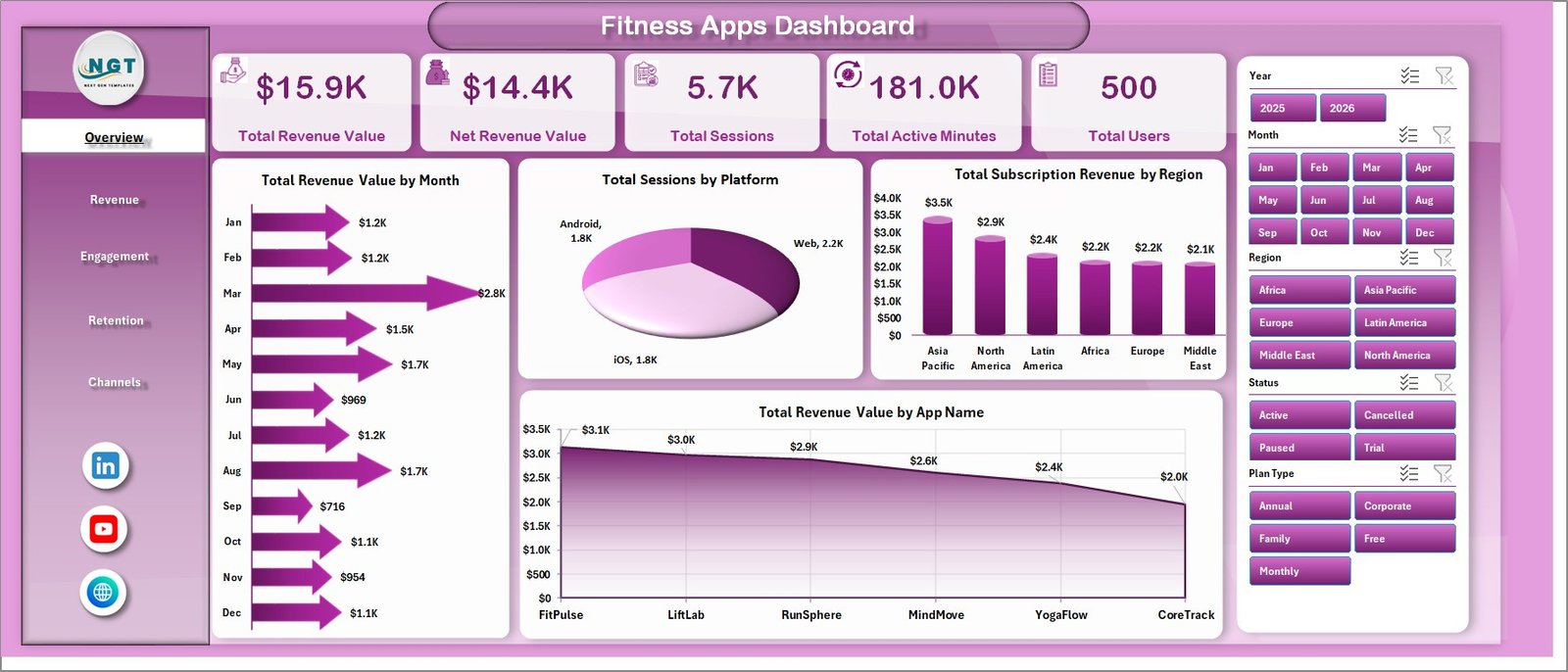
- 5 KPI cards on the Overview page: Total Revenue Value, Net Revenue Value, Total Sessions, Total Active Minutes, and Total Users.
- Multiple slicers to filter the workbook by app name, platform, region, plan type, acquisition channel, trainer, workout category, user status, segment, and period.
- Revenue analytics by month, region, app name, plan type, acquisition channel, subscription revenue, and support cost.
- Engagement analytics by active minutes, trainer, user segment, user status, total sessions, and month.
- Retention analytics by Active User %, churned users, plan type, region, and acquisition-channel revenue.
- Channel analytics for net revenue by platform, net revenue by user segment, and support cost by app name.
- Excel Refresh All workflow so pivot tables, slicers, charts, and KPI cards update after the Data sheet is replaced.
Dashboard Pages Explanation
1. Overview Page
The Overview page is the executive summary of the workbook. The top cards show Total Revenue Value, Net Revenue Value, Total Sessions, Total Active Minutes, and Total Users, giving managers a fast read on the current state of the fitness app business.
Total Revenue Value by Month: This chart tracks month-by-month revenue movement. It helps teams identify seasonal changes, subscription growth, campaign impact, and revenue dips that need investigation.
Total Sessions by Platform: This chart compares app activity across platforms such as iOS, Android, and web. It helps product teams understand which platforms are driving the highest usage volume.
Total Subscription Revenue by Region: This visual breaks subscription revenue by region. It helps growth teams identify high-performing markets and regions where pricing, campaigns, or localization may need attention.
Total Revenue Value by App Name: This chart compares revenue across app names or app brands. It is useful for companies managing multiple fitness, coaching, or wellness apps under one portfolio.
2. Revenue
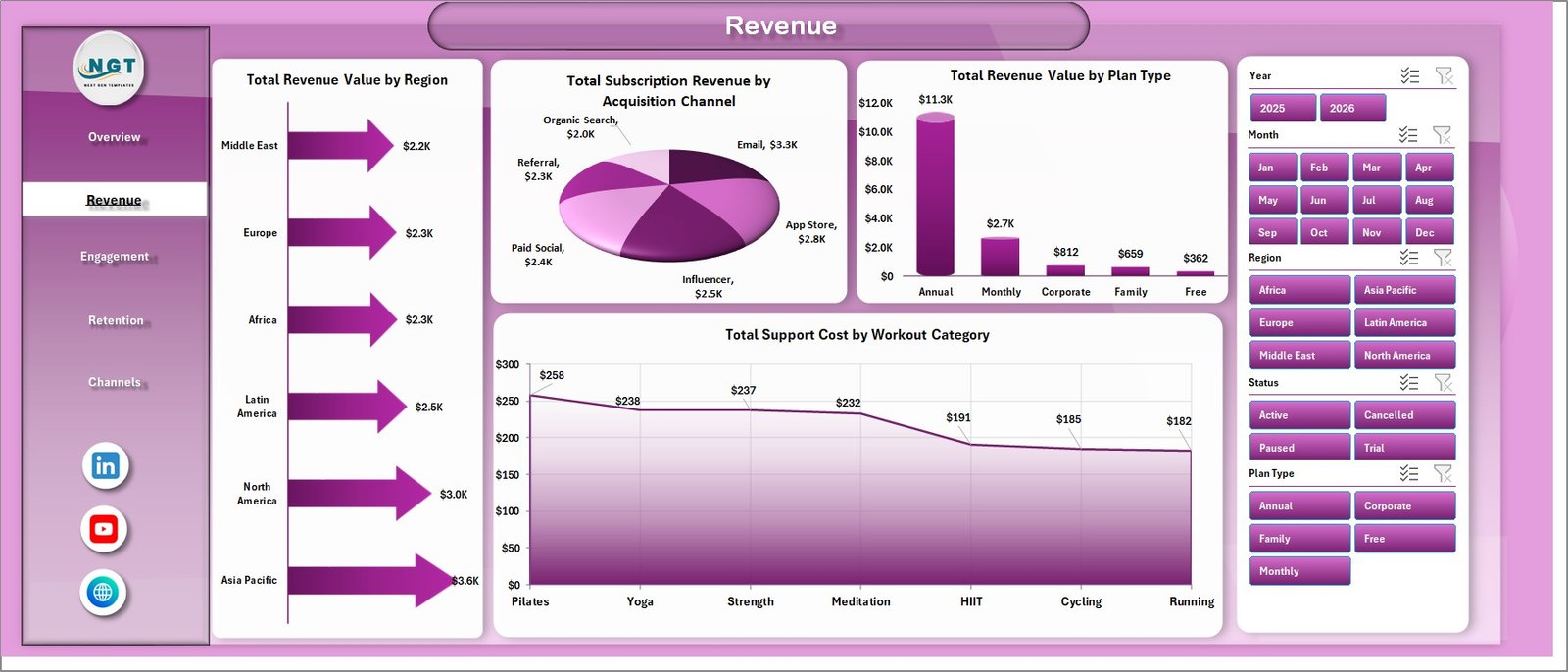
The Revenue sheet focuses on income quality and cost pressure. It includes Total Revenue Value by Region, Total Subscription Revenue by Acquisition Channel, Total Revenue Value by Plan Type, and Total Support Cost by Workout Category.
This page helps teams understand where revenue is coming from and how different channels or plans affect monetization. The support-cost view also helps identify workout categories that may need clearer onboarding, better trainer content, or reduced support load.
3. Engagement
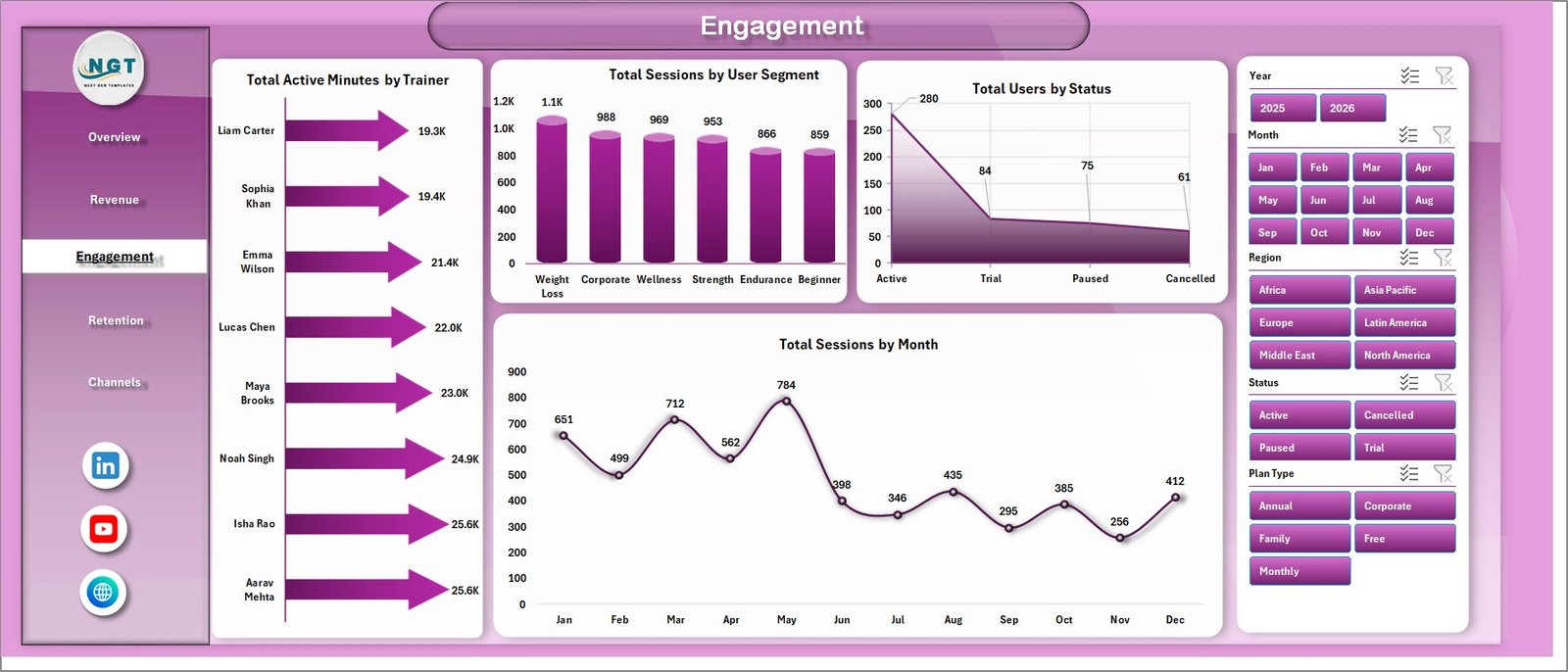
The Engagement sheet explains how users interact with the app. It includes Total Active Minutes by Trainer, Total Sessions by User Segment, Total Users by Status, and Total Sessions by Month.
This page is helpful when product managers want to see which trainers, segments, and user statuses drive app activity. It also supports monthly usage reviews because sessions and active minutes can be reviewed together.
4. Retention
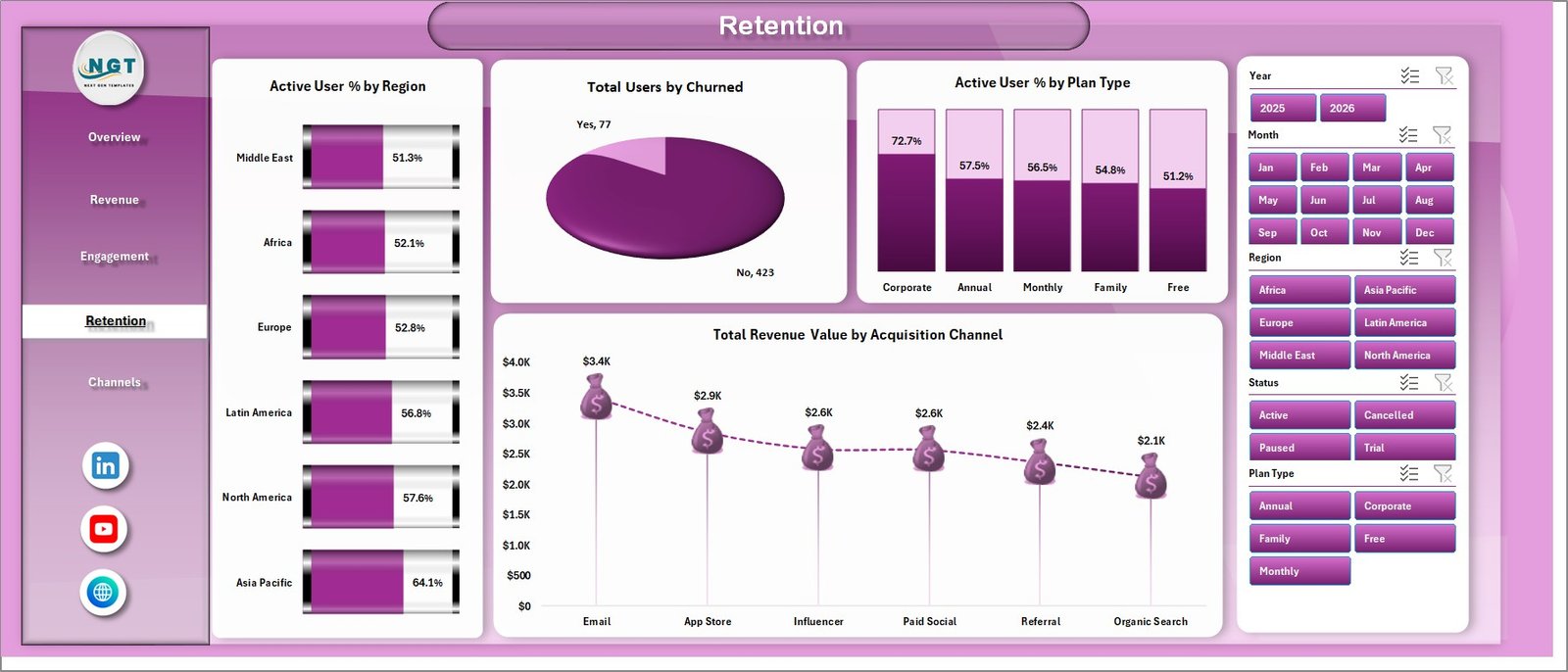
The Retention sheet focuses on user stickiness and churn. It includes Active User % by Region, Total Users by Churned, Active User % by Plan Type, and Total Revenue Value by Acquisition Channel.
This page helps teams connect retention with region, plan type, and acquisition source. If a channel brings revenue but weak active-user percentage, managers can investigate onboarding, user expectations, or campaign targeting.
5. Channels
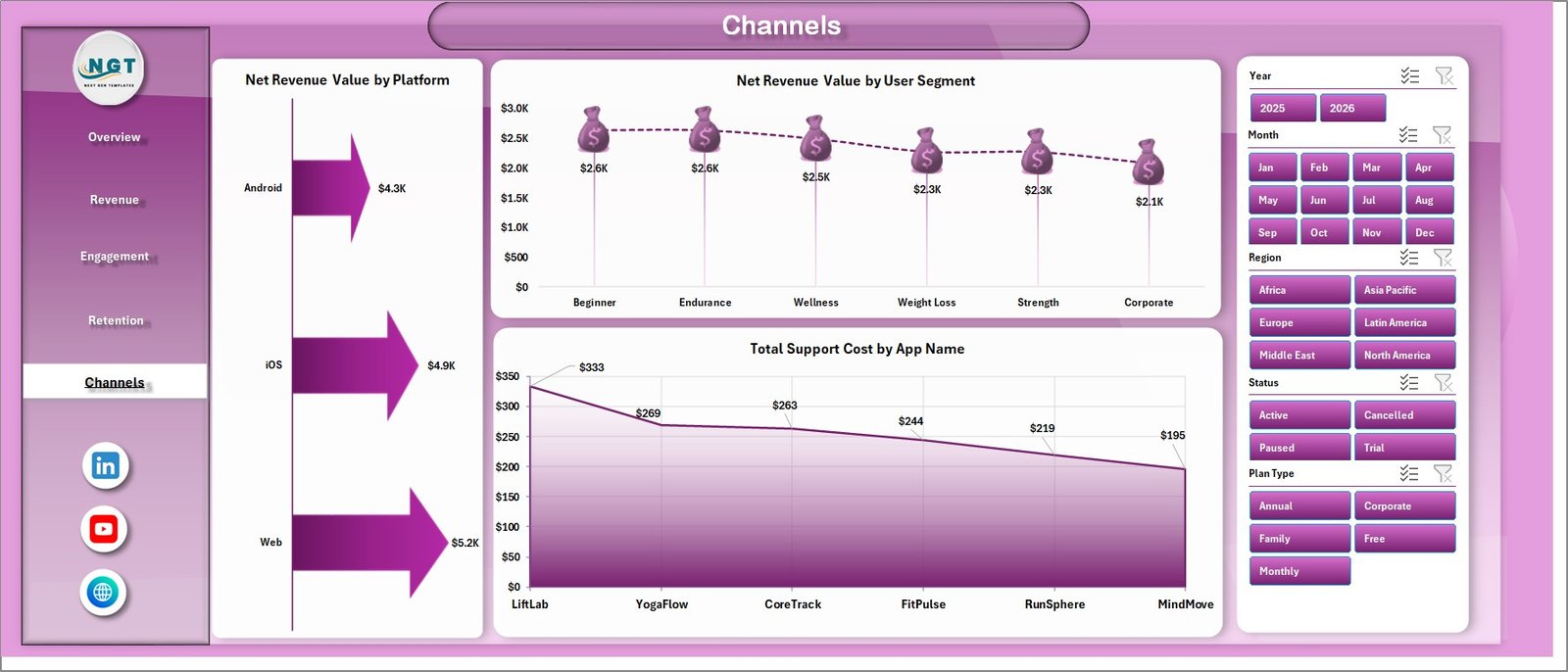
The Channels sheet connects platform, segment, app name, and cost. It includes Net Revenue Value by Platform, Net Revenue Value by User Segment, and Total Support Cost by App Name.
This page is useful for deciding where to invest product, marketing, and support resources. It helps users compare net revenue across platforms and segments instead of only looking at top-line revenue.
6. Data Sheet Tab
The Data Sheet is the input sheet for the workbook. Users should add or paste their data in the same format as the sample records so the dashboard pages continue to refresh correctly.

7. Support Sheet Tab
The Support Sheet contains the pivot tables that power the dashboard. After updating the Data sheet, go to the Data tab in the Excel Ribbon and click Refresh All. The Support Sheet can be hidden during normal use.

Fitness Apps Dashboard in Excel vs. Google Sheets vs. Paid App Analytics SaaS – Feature Comparison
| Feature | This Excel Dashboard | Google Sheets Alternative | Paid App Analytics SaaS |
|---|---|---|---|
| Cost | $17.99 one-time | Low cost, but may need rebuild | Monthly or annual subscription |
| Platform | Microsoft Excel | Browser spreadsheet | Vendor cloud platform |
| Setup time | Replace data and refresh | Copy sheet and adjust formulas | Requires setup, tracking, and integrations |
| Real-time team collaboration | Available through OneDrive or SharePoint if configured | Built in | Usually included by plan |
| Mobile access | Limited compared with web SaaS | Good browser access | Usually included |
| Customizable fields | Fully editable workbook | Editable sheet | Limited by vendor configuration |
| Share with link | Use OneDrive or SharePoint | Built in | Login controlled |
| Year-1 cost at 5 users | $17.99 plus Excel licensing already used | Usually low | Often hundreds or thousands |
| Fitness app reporting pages | 5 dashboard pages plus data and support pivots | Requires equivalent build | Depends on plan and connected data |
Who Should Use This Template
This template is useful for fitness app founders, wellness app operators, product managers, subscription analysts, growth marketers, finance teams, trainer-led program managers, and consultants who need recurring Excel-based reporting. It is especially helpful when the team already exports app data and wants a reusable dashboard without building every pivot and chart from scratch.
It is not the right fit if you need a live SDK, automated event tracking, user-level behavioral journeys, push notification automation, attribution modeling, or a real-time product analytics platform. For advanced app instrumentation, tools like Firebase, Amplitude, and Mixpanel may still be needed. For Excel setup and refresh concepts, Microsoft also provides helpful documentation for Microsoft Excel.
Real-World Use Cases
Monthly app performance review: A founder refreshes the workbook before a leadership meeting and reviews revenue, net revenue, sessions, active minutes, and users from the Overview page.
Trainer and content review: A product manager filters Engagement by trainer and user segment to understand which coaching programs are driving the most active minutes.
Growth channel review: A marketing analyst compares subscription revenue by acquisition channel and region to decide which campaigns deserve more budget.
Advantages of Fitness Apps Dashboard in Excel
- Fast setup: Start with ready dashboard pages rather than designing every pivot, card, and chart manually.
- Clear executive view: The Overview page summarizes revenue, usage, and user base health quickly.
- Channel-level insight: Revenue and net revenue can be reviewed by platform, segment, app, and acquisition source.
- Retention visibility: Active User % and churn views help teams find weak plans, regions, or acquisition channels.
- Editable Excel structure: Users can adjust charts, slicers, fields, colors, and labels to match internal reporting needs.
Opportunities for Improvement
The dashboard depends on clean source data. If app names, platform values, plan types, user segments, trainer names, or acquisition channels are inconsistent, the charts may need data cleanup before they become reliable.
The workbook also does not replace real-time analytics, event tracking, cohort analysis, or automatic subscription billing feeds. Teams that need those features can still use this workbook as an executive reporting layer after exporting clean data from their app systems.
Best Practices
- Keep the Data Sheet column structure unchanged.
- Use consistent names for app, platform, region, plan type, trainer, status, segment, and acquisition channel.
- Add new records below existing rows instead of overwriting headers.
- Click Refresh All after every data update.
- Review retention and engagement before increasing ad spend.
- Hide the Support Sheet for end users after setup.
- Save a monthly copy if you want a historical archive outside the live workbook.
Explore Relevant Templates
You can review the Fitness Apps Dashboard in Excel on NextGenTemplates. You may also find the Gym and Fitness Center Membership Management System Web App, Gym Retention Dashboard in Power BI, and Excel Dashboard Templates category useful.
Frequently Asked Questions
What does the Fitness Apps Dashboard in Excel track?
It tracks total revenue, net revenue, total sessions, active minutes, users, subscription revenue, support cost, churn, active user percentage, platforms, regions, plans, trainers, segments, and acquisition channels.
How many worksheet tabs are included?
The workbook includes 7 tabs: Overview, Revenue, Engagement, Retention, Channels, Data Sheet, and Support Sheet.
Can I track more than one fitness app?
Yes. The dashboard includes analysis by app name, so multiple app brands or product lines can be reviewed in the same workbook if the Data Sheet format is followed.
Do I need advanced Excel skills?
No. The main workflow is to replace the sample data, keep the column format, and click Refresh All. Advanced users can customize pivots, charts, slicers, and formulas if needed.
Does this dashboard need macros?
No. The workbook uses standard Excel tables, pivot tables, charts, slicers, and refresh behavior.
Can I use it with Excel for Mac?
Yes, the workbook is designed around standard Excel features. For the best slicer and pivot experience, use a current desktop version of Microsoft Excel.
About the Author
Built by PK – Microsoft Certified Professional with 15+ years of Excel, Google Sheets, and Power BI experience. Founder of NextGenTemplates, reaching 300K+ subscribers across YouTube channels. Every template is hand-built and tested before release.
Conclusion
The Fitness Apps Dashboard in Excel gives app teams a practical way to review revenue, engagement, retention, channels, and support cost from one workbook. Instead of rebuilding the same charts every month, users can update the Data Sheet, refresh the pivots, and review app performance through ready dashboard pages.
Visit our YouTube channel for step-by-step video tutorials: Youtube.com/@PKAnExcelExpert.