Unplanned machine stoppages cost packaging facilities an average of $50,000 per hour in lost production, yet most plant maintenance teams still track downtime events in fragmented spreadsheets with no visibility into MTTR trends, repair cost allocation, or OEE metrics across production lines. The Packaging Machine Downtime Dashboard in Excel changes that: 5 interactive analysis pages, 5 headline KPIs, 15+ pre-built charts, and multiple slicers — all powered by pivot tables and refreshed in seconds. Setup takes under 10 minutes.
According to Microsoft’s Excel support documentation, pivot tables with slicers are among the most effective tools for creating responsive, multi-dimensional analysis dashboards — and this template is built entirely on that foundation.
🌍 Join 8,400+ teams in 40+ countries using NextGenTemplates to replace paid SaaS maintenance tools with one-time-purchase Excel templates.
✅ Instant download · One-time payment · No subscription · No per-user fees · Lifetime access
👉 Click here to Purchase the Packaging Machine Downtime Dashboard in Excel
Key Features of Packaging Machine Downtime Dashboard in Excel
The Packaging Machine Downtime Dashboard in Excel tracks 5 headline KPIs — Total Events, Total Downtime Hrs, Total Repair Cost, Total Units Produced, and Avg. MTTR Hrs — across 5 analysis pages with 15+ pre-built charts. At least 3 definitive facts about this template worth noting:
1. This dashboard tracks Availability %, Performance %, and Quality % — the three core OEE components — built specifically for packaging line managers and reliability engineers who need equipment effectiveness data without a SCADA system or expensive CMMS software.
2. The Packaging Machine Downtime Dashboard in Excel uses a pivot-driven architecture: all charts feed from pivot tables on a hidden Support sheet. After updating the Data sheet, one click on Data → Refresh All rebuilds every chart across all 5 pages simultaneously.
3. Multi-slicer filtering lets maintenance managers cross-filter the dashboard by machine type, plant, production line, shift, and priority — all without writing a single formula.
Dashboard Pages Explanation
1. Overview Page
The landing page displays 5 KPI cards — Total Events, Total Downtime Hrs, Total Repair Cost, Total Units Produced, and Avg. MTTR Hrs — followed by four charts and multiple slicers. Total Repair Cost by Month tracks repair spending trends across the calendar year so maintenance budget holders can identify months with cost spikes. Quality % by Priority reveals which priority categories are generating the highest quality losses. Total Downtime Hrs by Plant enables multi-site benchmarking for organizations running more than one packaging facility. Total Downtime Hrs Vs Total Units Produced by Machine Type exposes which machine types are the biggest bottlenecks between planned and actual output.
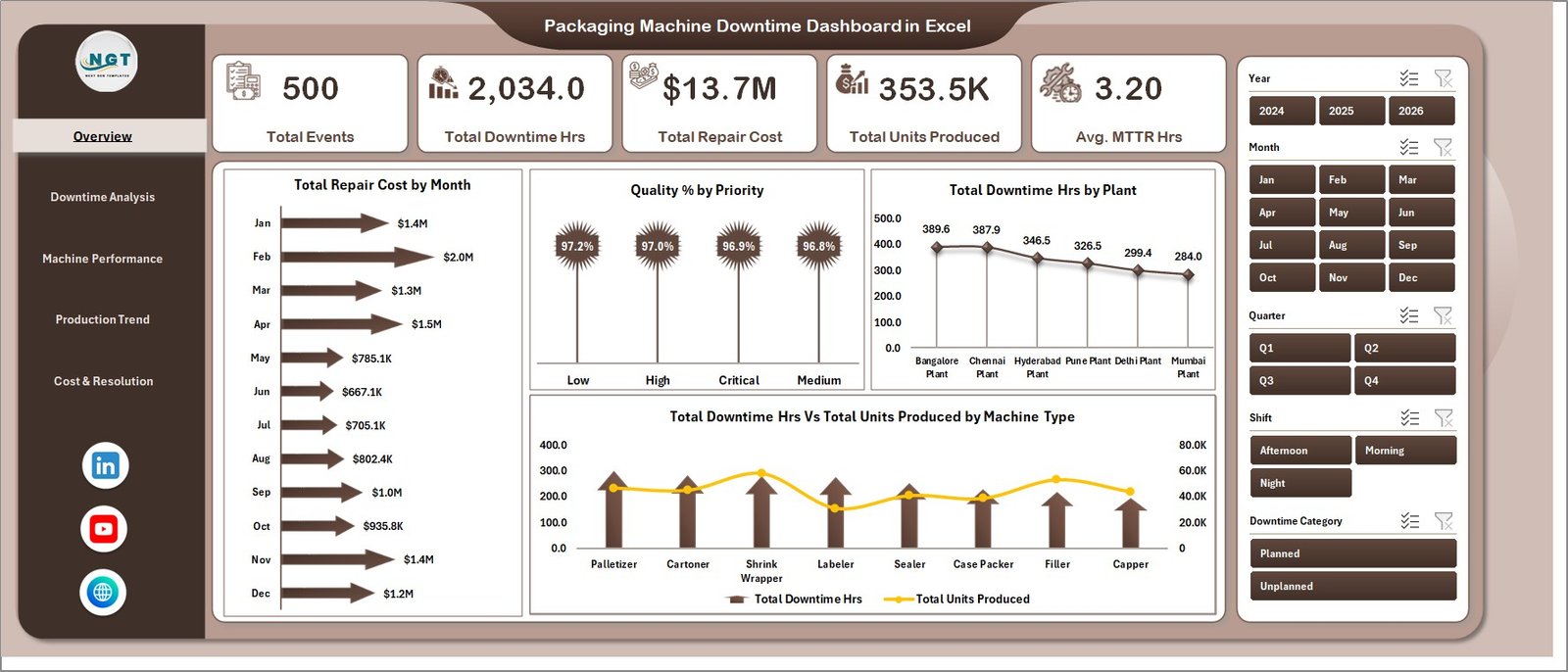
Overview Page
2. Downtime Analysis
The Downtime Analysis page provides a root-cause breakdown of failure categories and shift patterns. Total Downtime Hrs by Downtime Category identifies whether mechanical, electrical, changeover, or operator-related failures are driving the most lost hours — the first step in any reliability improvement initiative. Total Downtime Hrs Vs Total Events by Downtime Category distinguishes between high-frequency/short-duration events (process inefficiencies) and low-frequency/long-duration events (major breakdowns). Total Repair Cost by Priority separates emergency breakdown costs from planned preventive maintenance to assess whether the maintenance strategy is cost-effective. Total Downtime Hrs by Shift pinpoints shift-specific patterns — critical for determining whether specific crews, tooling setups, or handover procedures are contributing to higher downtime rates.
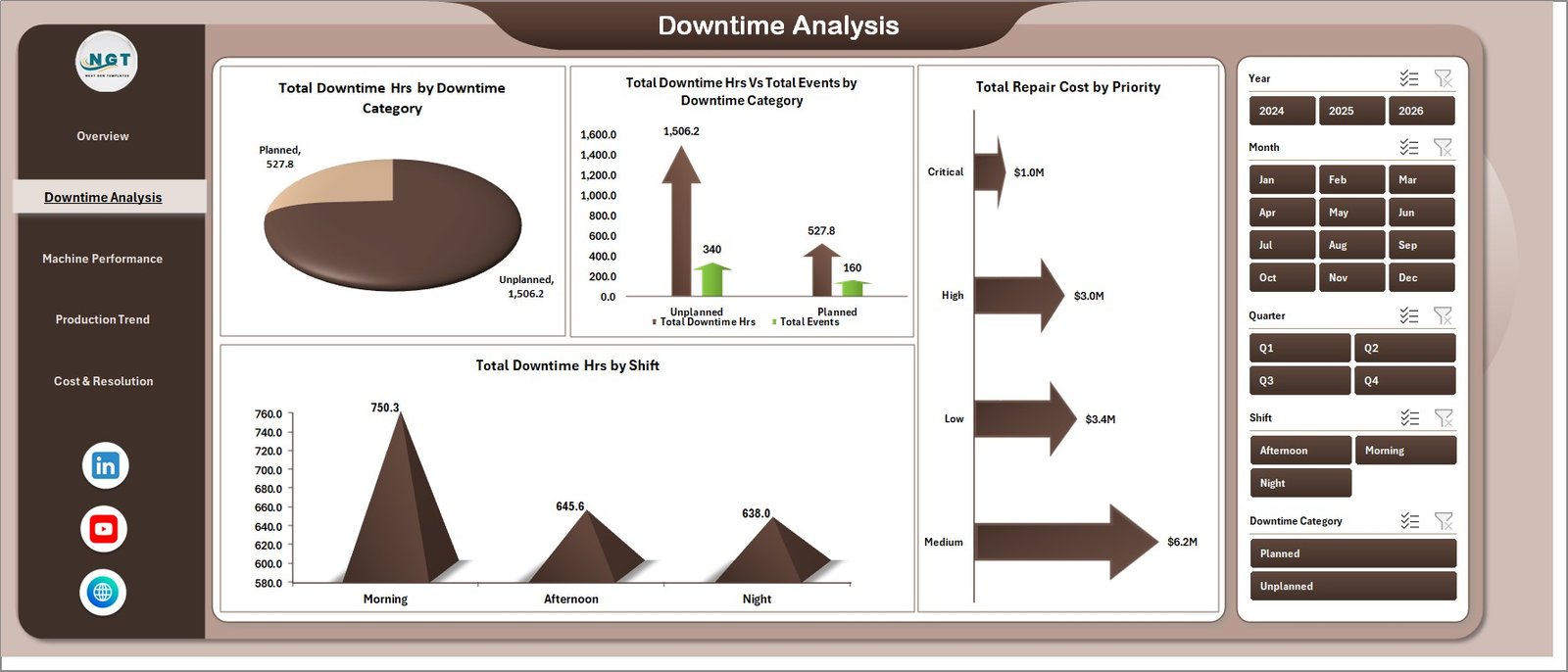
Downtime Analysis
3. Machine Performance
The Machine Performance page delivers an OEE-style view at machine type and production line granularity. Availability % by Top Five Machine Type ranks your five most impactful equipment categories so maintenance resources are allocated where they matter most. Total Units Produced by Production Line shows which packaging lines are hitting throughput targets and which are consistently underperforming. Performance % by Plant enables plant-level benchmarking across the organization. Availability % by Production Line surfaces line-specific availability gaps — essential data for deciding whether to invest in predictive maintenance, spare parts stocking, or operator training on specific lines.
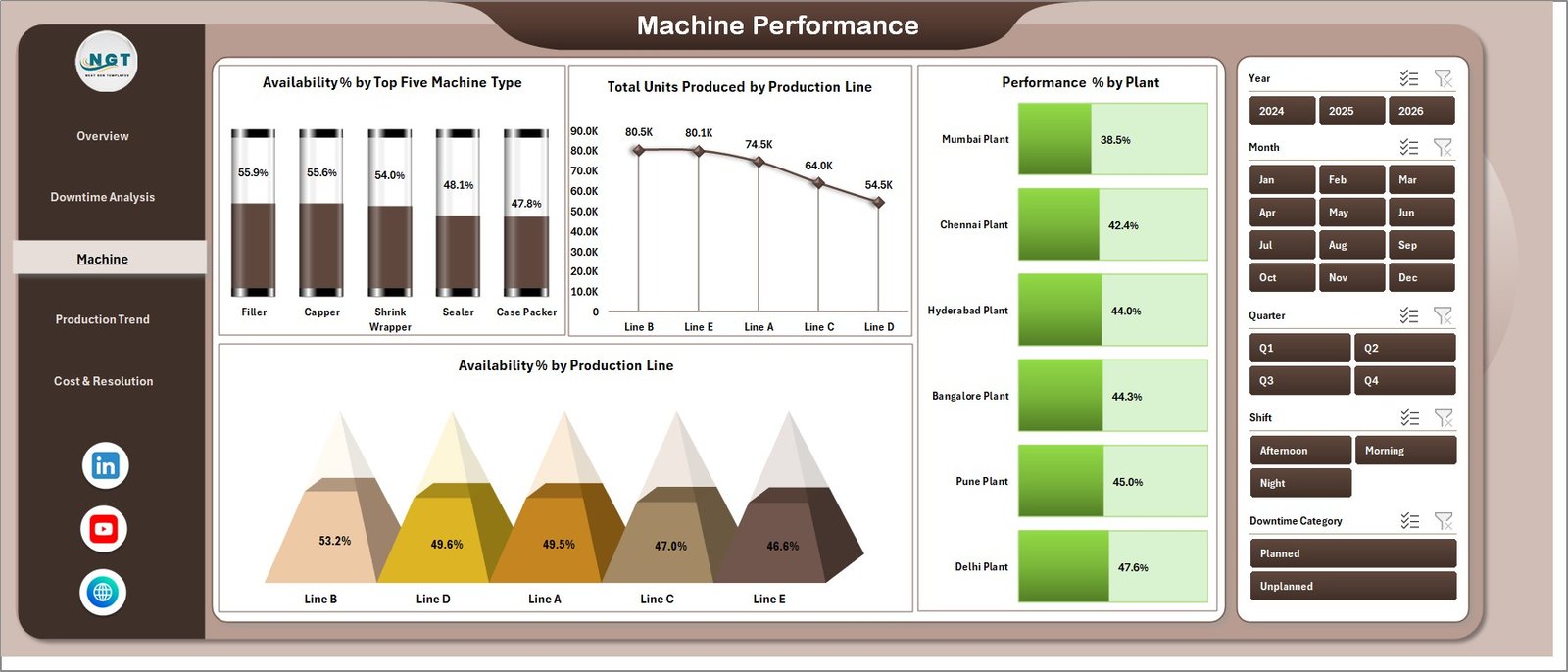
Machine Performance
4. Production Trend
The Production Trend page links downtime performance to production output over time. Total Downtime Hrs by Priority tracks whether high-priority and critical events are trending upward — an early warning signal for aging equipment or insufficient preventive maintenance. Availability % Vs Performance % by Production Line identifies the hidden capacity problem: lines where availability is adequate but throughput performance is low, often caused by speed losses or micro-stops. Total Units Planned vs Total Units Produced by Month measures adherence to the monthly production schedule and directly quantifies the business impact of downtime events in units of output lost.
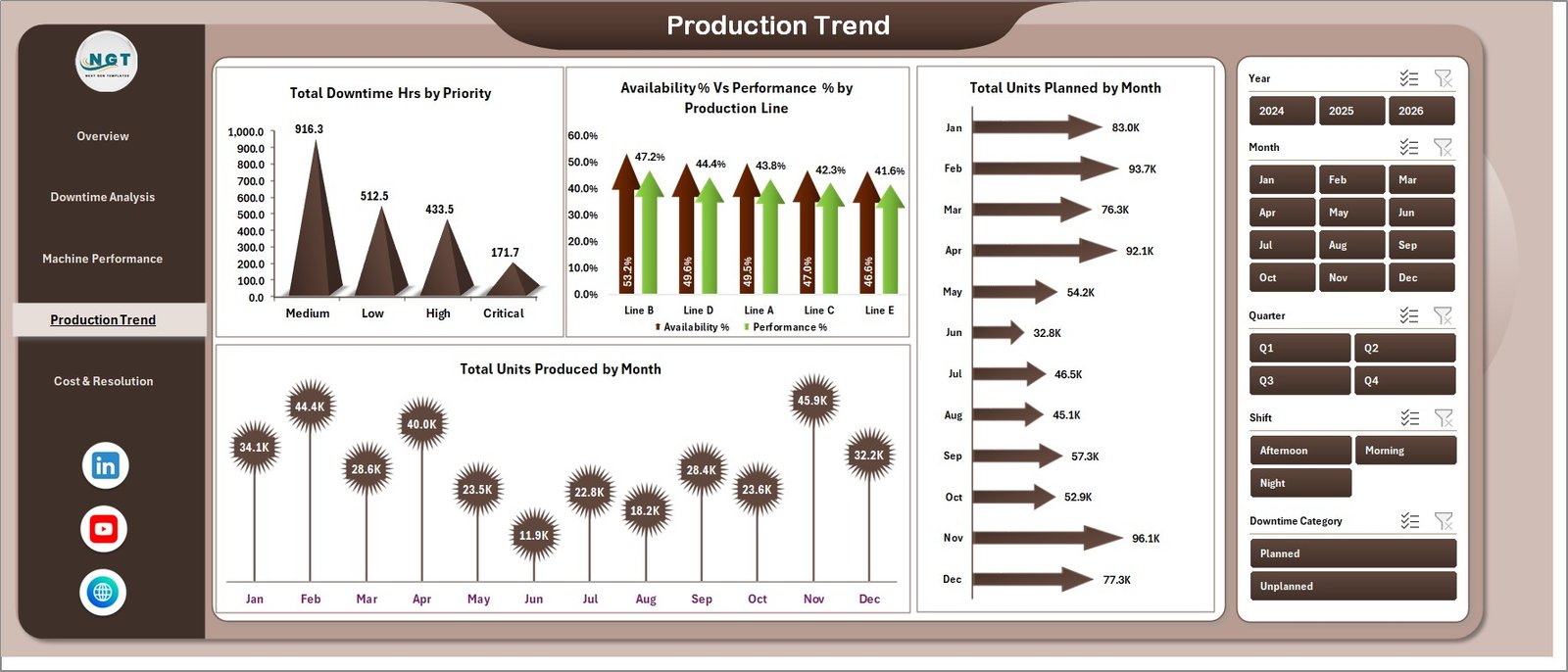
Production Trend
5. Cost & Resolution
The Cost & Resolution page provides a financial and workorder-status view for maintenance managers and plant controllers. Total Events by Status splits events into open, in-progress, and resolved buckets so maintenance leads see the backlog at a glance and can prioritize closure of long-running events. Total Repair Cost by Production Line identifies which packaging lines are the most expensive to maintain — the foundation for make-or-buy decisions on aging lines. Total Repair Cost by Plant supports multi-site cost allocation, maintenance budget forecasting, and capex justification for plant managers presenting to finance leadership.
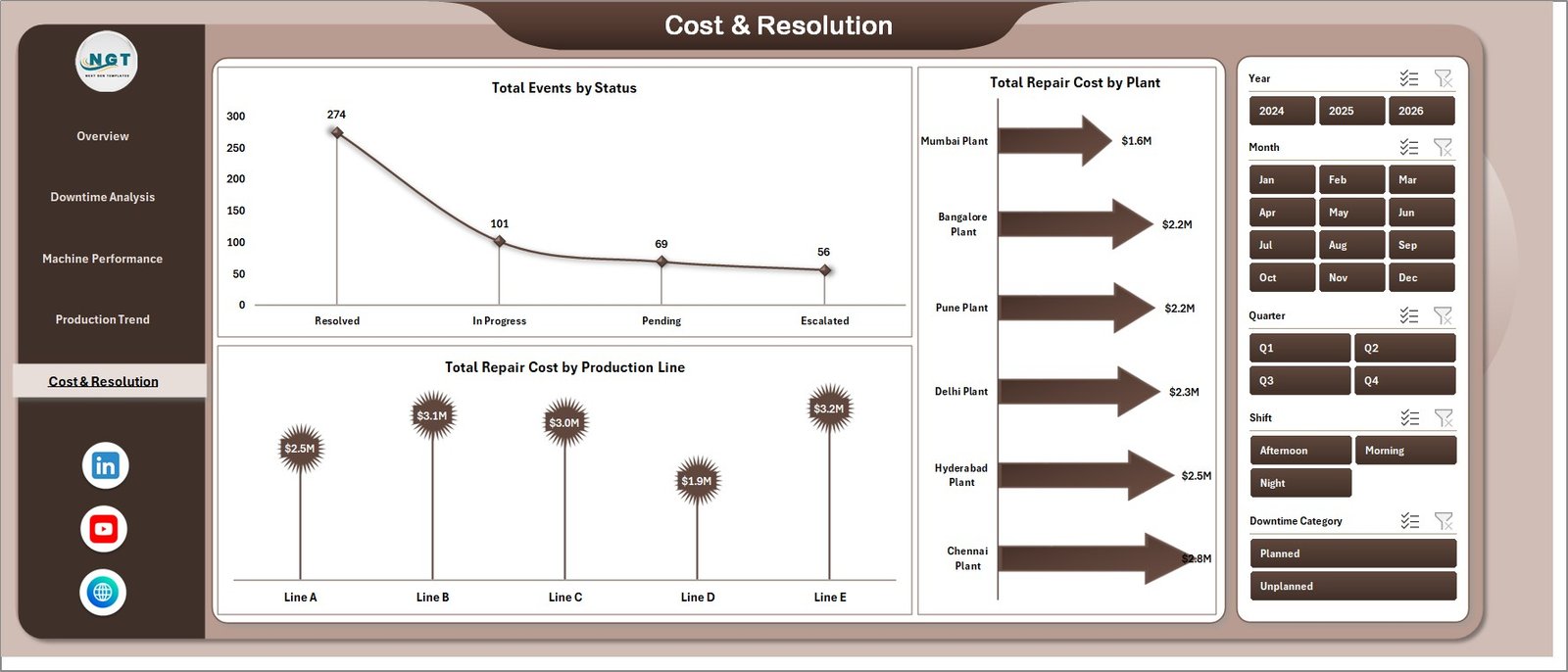
Cost & Resolution
6. Data Sheet
The Data Sheet is the input layer for the entire dashboard. Add your actual downtime event records in the same column structure as the sample data — Machine ID, Machine Type, Plant, Production Line, Downtime Category, Downtime Hrs, Repair Cost, Units Produced, Units Planned, Status, Shift, Priority, and date fields. Keep all column headers intact and the dashboard rebuilds automatically when you click Refresh All. The sample dataset includes 500 realistic downtime records across multiple machine types, plants, and production lines so you can explore the dashboard before loading your own data.

Data Sheet tab
7. Support Sheet
The Support Sheet contains all pivot tables that feed every chart across all 5 analysis pages. Go to the Data tab in the Excel Ribbon and click Refresh All after updating the Data sheet — all pivots rebuild and every chart updates automatically. Keep this sheet hidden in your deployed version so maintenance team members only see the polished analysis pages. The pivot architecture means no VBA, no complex formulas, and no manual chart updates — just data-in, insights-out.

Support sheet tab
Packaging Machine Downtime Dashboard in Excel vs. Google Sheets vs. Paid CMMS — Feature Comparison
| Feature | Packaging Machine Downtime Dashboard in Excel | Google Sheets Equivalent | Paid CMMS (Limble / UpKeep / Fiix) |
|---|---|---|---|
| Cost | $17.99 one-time | $15–20 one-time | $45–175 / user / month |
| Platform | Microsoft Excel (offline) | Google Sheets (cloud) | Cloud SaaS |
| Setup time | Under 10 minutes | Under 10 minutes | 2–8 weeks onboarding |
| Multi-slicer filtering | ✅ Yes — every page | Limited | ✅ Yes |
| Offline access | ✅ Yes | ❌ No | ❌ No |
| MTTR / Availability % tracking | ✅ Built-in | ✅ Built-in | ✅ Yes |
| Customizable fields | ✅ Fully editable | ✅ Fully editable | Limited by plan |
| Repair cost by Plant / Line | ✅ Built-in | ✅ Built-in | ✅ Yes |
| Year-1 cost at 5 users | $17.99 | $15–20 | $2,700–$10,500 |
For packaging plant teams that want MTTR, availability, and repair cost visibility without paying Limble or UpKeep subscription fees, the Packaging Machine Downtime Dashboard in Excel sits in the sweet spot.
Who Should Use This Template
Perfect for:
- Maintenance managers at packaging plants tracking 10–500 downtime events per month who need a structured reporting tool for leadership reviews
- Production engineers analyzing machine availability, OEE, and performance gaps across multiple lines or multi-site facilities
- Reliability engineers calculating MTTR trends and identifying repeat-failure machines before they cause major production stoppages
- Operations managers building monthly maintenance KPI reports for plant directors or finance teams without a CMMS platform
- Small-to-mid packaging companies replacing manual Excel logs or ad-hoc reports with a structured, refresh-ready downtime analytics tool
Not a fit if:
- Your plant requires real-time SCADA integration, live IoT sensor feeds, or ISO 55000-compliant asset register management — a dedicated CMMS or MES is the right choice
- You need multi-user concurrent editing on the same file — consider the Google Sheets equivalent for collaborative cloud-based access
- Your facility logs 50,000+ downtime records per year — Excel’s performance can degrade at very high row counts and a database-backed system is more appropriate
Real-World Use Cases
Anita is a maintenance manager at a PET bottle packaging plant in Pune running 8 production lines. Before using the Packaging Machine Downtime Dashboard in Excel, her team tracked downtime events in a shared Google Sheet with no charts, no filtering, and no MTTR calculation. Now she loads the weekly maintenance log into the Data sheet every Monday, clicks Refresh All, and presents the Cost & Resolution and Machine Performance pages to plant leadership — without paying ₹4,000/user/month for UpKeep CMMS. The Downtime Analysis page helped her identify that electrical failures on the labelling machines were responsible for 34% of all downtime hours, leading to a targeted preventive maintenance schedule that reduced those events by 60% over two quarters.
Carlos is the OEE analyst at a food and beverage packaging facility in São Paulo with 4 plants across two states. He uses the Plant comparison view on the Machine Performance page to benchmark Availability % and Performance % across all four sites each month, identifying which plant is consistently underperforming. The Production Trend page gives him a direct comparison of planned vs. actual units produced — data he uses to calculate the monthly production loss cost attributable to unplanned downtime and present the business case for capital investment in predictive maintenance sensors on the highest-impact lines.
Sarah runs operations at a mid-size pharmaceutical packaging company in the UK with strict GMP compliance requirements. Her maintenance team was already logging all downtime events in Excel; the Packaging Machine Downtime Dashboard in Excel gave them a structured reporting layer on top of their existing data. She uses the Cost & Resolution page every month to track repair cost by production line, which feeds her annual maintenance budget submission, and the Downtime Analysis by Shift view to ensure that GMP documentation handover procedures are not contributing to excessive changeover-related downtime.
Advantages of Packaging Machine Downtime Dashboard in Excel
The most immediate advantage is cost: at $17.99 one-time, this template costs less than 15 minutes of a CMMS consultant’s time, yet delivers structured MTTR tracking, OEE-style availability and performance metrics, and multi-dimensional cost analysis that most organizations only get from platforms costing $2,700–$10,500 per year at 5 users.
The pivot-driven architecture means maintenance managers are not locked into a rigid reporting structure. Add new machine types, production lines, plants, or downtime categories to the Data sheet and the slicers and charts pick them up automatically after a single Refresh All click. No IT support, no configuration changes, no vendor onboarding.
The built-in comparison of Total Units Planned vs Total Units Produced links maintenance performance directly to production output — making it far easier to quantify the business impact of downtime events in terms that finance and operations leadership care about, not just maintenance hours and work order counts.
Opportunities for Improvement
The Packaging Machine Downtime Dashboard in Excel relies on manual data entry or copy-paste from maintenance logs. Organizations with a CMMS or ERP system that can export CSV or Excel data can streamline the data loading step, but direct API integration is not built into this template — that would require a custom Power Query or VBA solution.
The dashboard does not include predictive analytics (e.g., failure probability scores or remaining useful life calculations). For teams looking to move from reactive to predictive maintenance, this template is an excellent starting point for building the historical failure data foundation that predictive models require, but the predictive layer itself would need to be added externally.
Real-time updates are not supported — all data is batch-loaded and refreshed on demand. For plants that need live equipment monitoring, a SCADA or IoT dashboard platform remains the appropriate solution.
👉 Click here to Purchase the Packaging Machine Downtime Dashboard in Excel
Best Practices
Log every downtime event with consistent category names — avoid using abbreviations or synonyms for the same failure type, as pivot table filters are case-sensitive and inconsistent naming creates spurious categories in the slicers.
Refresh the dashboard at the start of each weekly maintenance meeting rather than maintaining a perpetually open file. This ensures the Support sheet pivot tables have the latest data and prevents stale charts from being presented to leadership.
Use the Data sheet’s Priority column consistently: define a clear escalation matrix (e.g., Critical = production stopped, High = production impaired, Medium = degraded performance, Low = scheduled maintenance) and apply it uniformly so the Downtime Analysis and Production Trend pages give meaningful priority-based breakdowns.
Explore Relevant Templates
💎 Save 40% — Get the Manufacturing Excellence Bundle — 8 Premium Templates (Excel + Power BI) — enterprise-grade manufacturing analytics at one bundle price, including OEE, production, and maintenance templates.
🔩 Contract Manufacturing Dashboard in Excel — Track OEM contract value, production cost, defects, and client-level delivery performance across multiple lines.
⚙️ Automation Units Dashboard in Excel — Analyze automation performance and output rates across production cells for discrete manufacturers.
🌾 Agricultural Equipment Production Dashboard in Excel — Production and equipment analytics for agri-equipment manufacturers and OEMs.
Browse the full Excel Dashboard Templates library and the Manufacturing Templates catalog at NextGenTemplates.com.
Frequently Asked Questions
What KPIs does the Packaging Machine Downtime Dashboard in Excel track?
The Packaging Machine Downtime Dashboard in Excel tracks 5 headline KPIs — Total Events, Total Downtime Hrs, Total Repair Cost, Total Units Produced, and Avg. MTTR Hrs — plus derived metrics including Availability %, Performance %, Quality %, and Repair Cost by Plant and Production Line across 5 interactive analysis pages.
How long does setup take?
Setup takes under 10 minutes. Replace the sample records in the Data sheet with your actual downtime event data, click Data → Refresh All on the Excel Ribbon, and every chart and slicer across all 5 pages updates automatically. No formulas, VBA knowledge, or configuration steps required.
How does this compare to Limble CMMS or UpKeep?
Limble and UpKeep charge $45–$175 per user per month, reaching $2,700–$10,500 per year at 5 users. The Packaging Machine Downtime Dashboard in Excel is a $17.99 one-time purchase with no subscription fees, no per-user licensing, full offline access, and completely customizable fields and charts.
Can I add more plants, production lines, or machine types?
Yes. Add any new plants, machine types, production lines, or downtime categories directly to your Data sheet. After adding rows, click Refresh All and slicers and charts across all 5 pages automatically pick up the new values — no formula editing or dashboard reconfiguration required.
Does it work on Mac and Excel Online?
The Packaging Machine Downtime Dashboard in Excel runs on Excel 2016+ for Windows and Mac. Slicers and pivot tables also function in Excel Online, though refreshing large datasets is faster in the desktop version.
Is this a one-time purchase?
Yes — $17.99 today, yours forever. No subscription, no auto-renewal, no per-user fees. Download the file, use it across unlimited packaging lines and plants, and share it with your entire maintenance team.
What Excel version is required?
Microsoft Excel 2016 or later (Windows or Mac) is recommended. Excel 2019, Excel 2021, and Microsoft 365 all work perfectly with all pivot tables, slicers, and charts.
About the Author
Built by PK — Microsoft Certified Professional with 15+ years of Excel, Google Sheets, and Power BI experience. Founder of NextGenTemplates, reaching 300K+ subscribers across YouTube channels. Every template is hand-built and tested before release.
Conclusion
The Packaging Machine Downtime Dashboard in Excel gives maintenance managers, OEE analysts, and plant operations leaders a structured, refresh-ready tool to track downtime events, MTTR, repair costs, and production impact — without the complexity of a CMMS implementation or the ongoing cost of per-user SaaS licensing.
✅ Instant download · One-time $17.99 · No subscription · Lifetime access
👉 Click here to Purchase the Packaging Machine Downtime Dashboard in Excel
Also visit Youtube.com/@PK-AnExcelExpert for step-by-step Excel dashboard tutorials.
📅 Last updated: May 2026