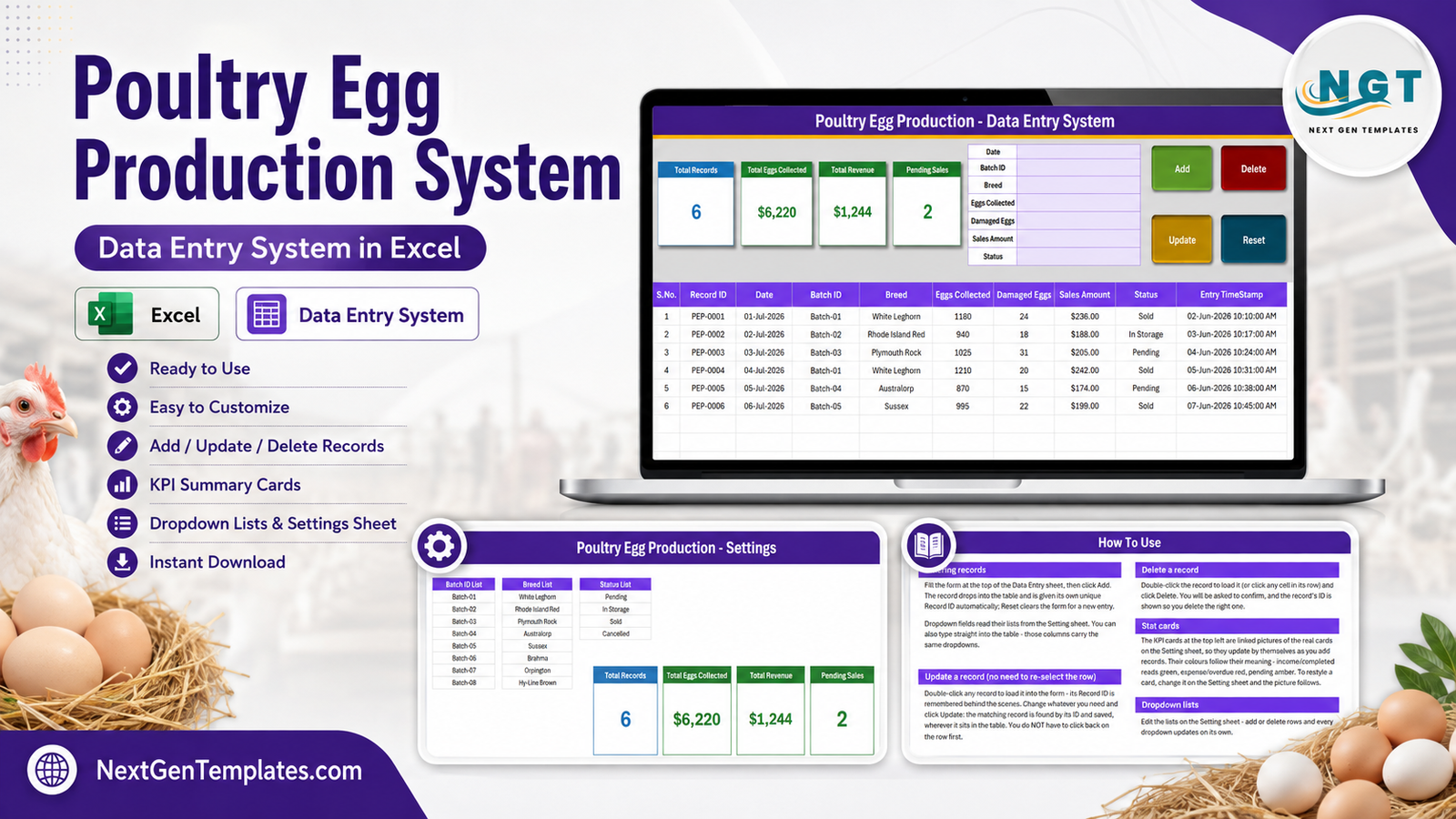
The Poultry Egg Production Data Entry System in Excel records 7 fields per entry into a 10-column register, keeps 4 KPI cards updated as you type, and ships with 3 editable dropdown lists holding 8 batch IDs, 8 breed names and 4 status labels. It is a single macro-enabled workbook with four sheets, no add-ins and no internet connection – the file sits on your PC and nothing leaves it. Poultry Egg Production Data Entry System in Excel
Most small egg producers keep their collection figures in a notebook, a phone note, or a spreadsheet that grows a new column every month until nobody can read it. The problem is not the counting; it is that a hand-kept record cannot be corrected safely, cannot be totalled without arithmetic, and cannot answer “how did Batch-03 do last month?” without a lot of squinting. This Poultry Egg Production Data Entry System in Excel replaces that notebook with a proper form, a proper table and an ID for every record. Poultry Egg Production Data Entry System in Excel
A note on scope before anything else: this workbook is a private record of the numbers and labels you type into it. It does not certify, grade, inspect or verify anything. It holds no health, disease, biosecurity or veterinary information, offers no husbandry guidance, and is not evidence for any food-safety, egg-grading or traceability scheme. The Breed and Status values are simply text labels you choose.
Key Features of the Poultry Egg Production Data Entry System in Excel
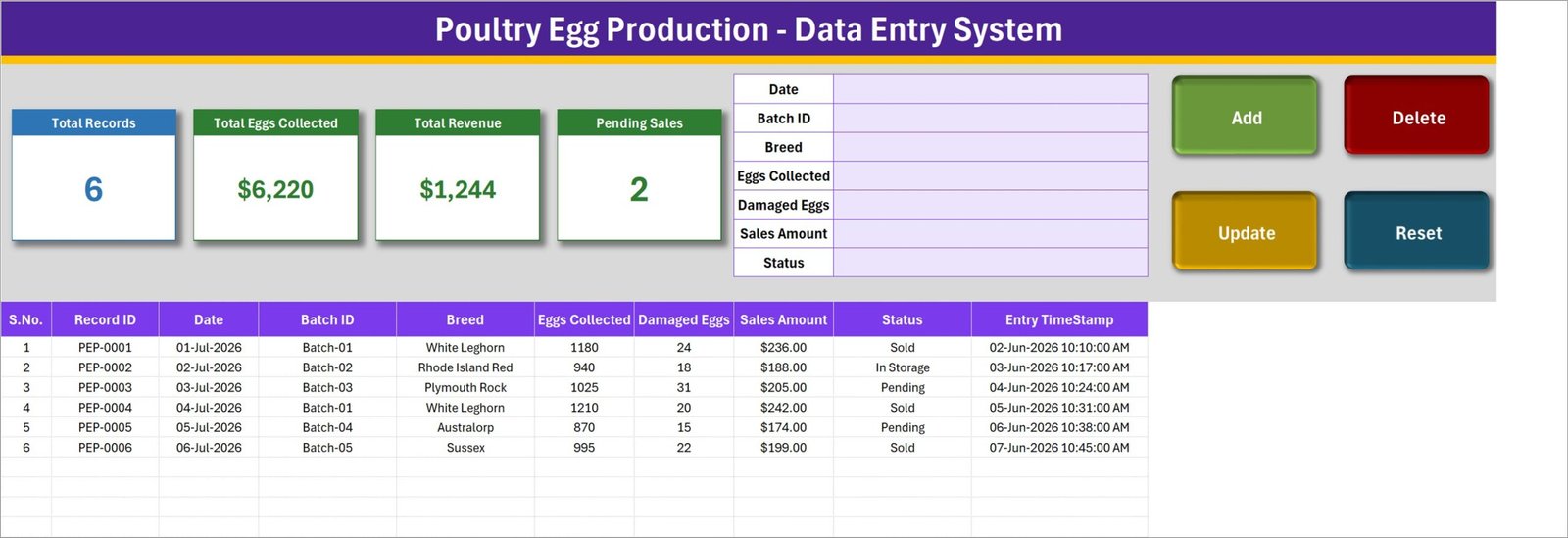
- A 7-field entry form on one screen. Date, Batch ID, Breed, Eggs Collected, Damaged Eggs, Sales Amount and Status. No second window, no wizard – fill it and click Add.
- Four live VBA buttons. Add, Update, Delete and Reset are real macros. Add writes the row, gives it a unique Record ID in the PEP-0001 / PEP-0002 pattern, and stamps it with an Entry TimeStamp.
- Editing by Record ID, not by row. Double-click a record to pull it into the form. The workbook remembers its ID, so Update saves that record wherever it currently sits – even after you have sorted or filtered the table. You never have to click back on the row first.
- Deletion you can double-check. The confirmation prompt names the Record ID being removed, so PEP-0004 does not quietly become PEP-0005.
- Four self-maintaining KPI cards. Total Records, Total Eggs Collected, Total Revenue and Pending Sales are linked pictures of live cards on the Setting sheet, so they recalculate on their own whenever a record is added, changed or deleted.
- Three dropdown lists under your control. Batch ID, Breed and Status all read from the Setting sheet. Add rows, delete rows, rename entries – the dropdowns follow automatically, both in the form and in the table columns.
- A 10-column register that behaves like a normal Excel table. S.No., Record ID, Date, Batch ID, Breed, Eggs Collected, Damaged Eggs, Sales Amount, Status and Entry TimeStamp – sortable, filterable, pivotable and printable. Poultry Egg Production Data Entry System in Excel
Sheets Explanation
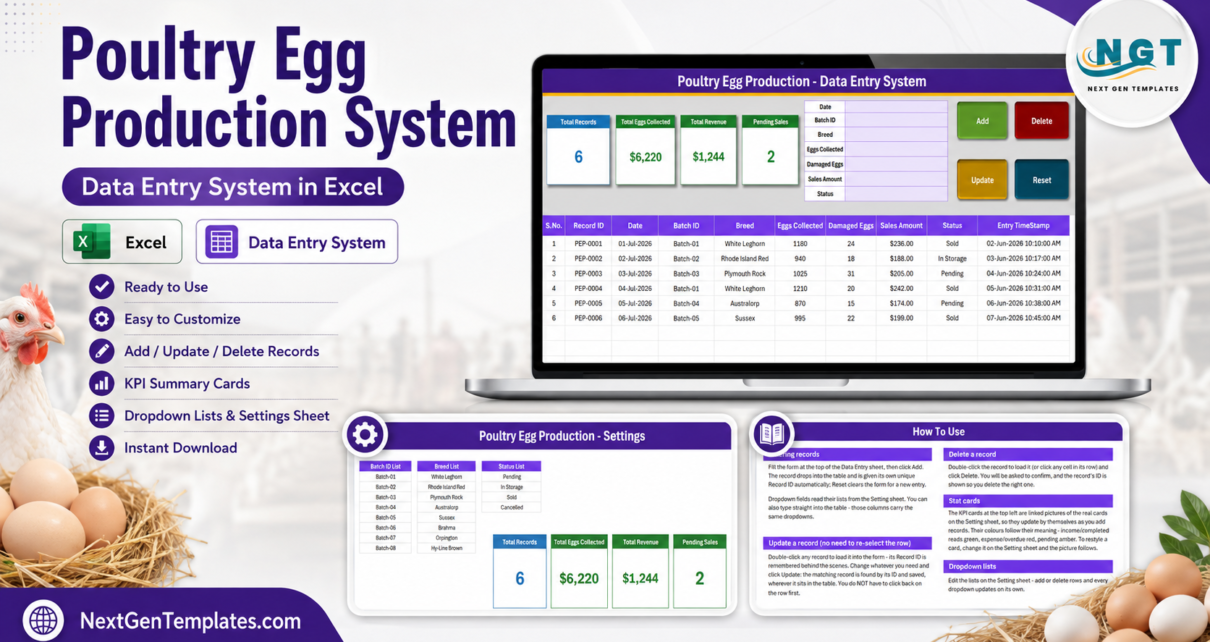
The workbook has four sheets. Three are pictured below; the fourth is described in text because it carries links rather than data.
Data Entry
The screen you will actually live on. The four KPI cards – Total Records, Total Eggs Collected, Total Revenue and Pending Sales – sit on the left, the 7-field form in the middle, and the Add, Update, Delete and Reset buttons on the right. Underneath is the 10-column register, shown here holding the 6 demo rows (PEP-0001 to PEP-0006) that ship with the file so you can see the layout working before you clear it. Poultry Egg Production Data Entry System in Excel
Setting
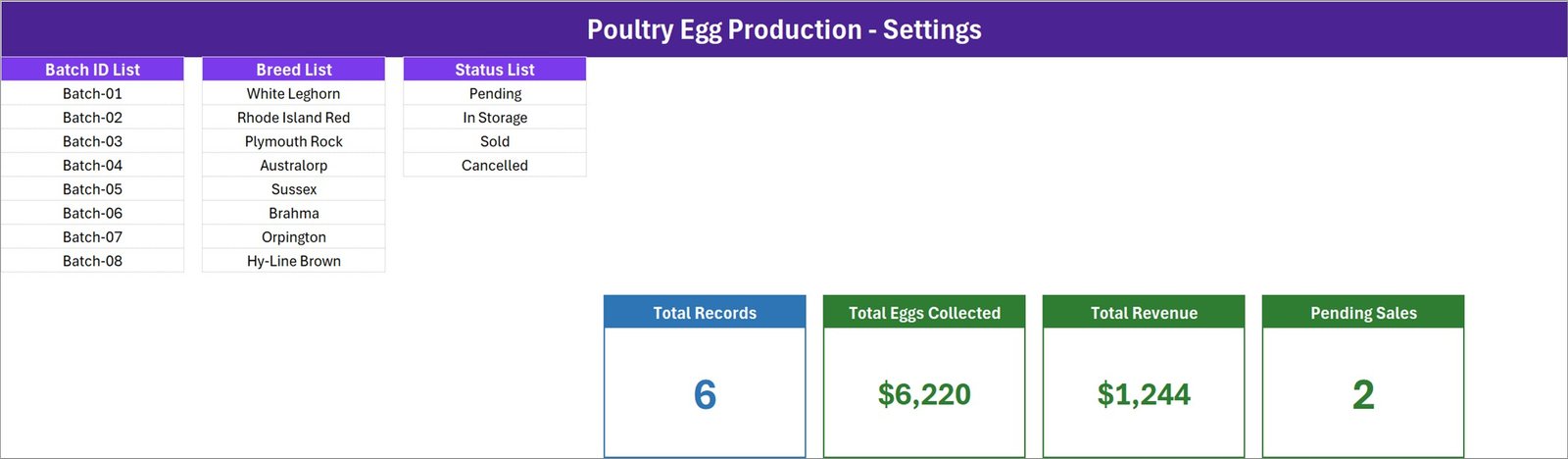
The control room for the dropdowns. The Batch ID List runs Batch-01 to Batch-08; the Breed List holds White Leghorn, Rhode Island Red, Plymouth Rock, Australorp, Sussex, Brahma, Orpington and Hy-Line Brown; the Status List holds Pending, In Storage, Sold and Cancelled. Every one of those is editable text – rename them to your own batch codes and your own breed names and the form follows immediately. The four live KPI cards that the Data Entry sheet mirrors also live here, so restyling a card is a Setting-sheet job.
How To Use (Instructions)
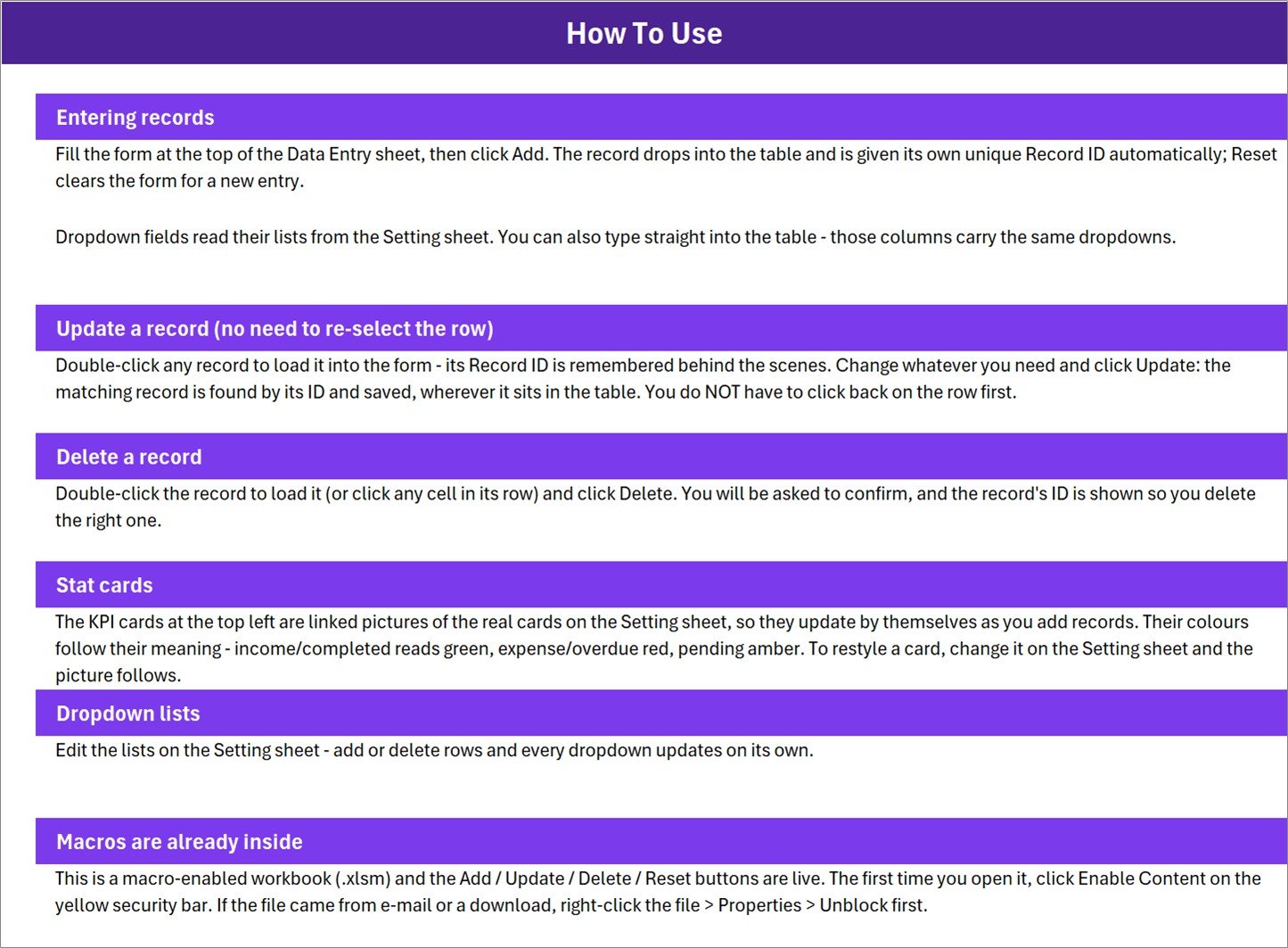
A six-part guide built into the file: Entering records, Update a record, Delete a record, Stat cards, Dropdown lists, and Macros are already inside. The last section covers clicking Enable Content on the yellow security bar and, if the file arrived by e-mail, right-clicking it and choosing Properties > Unblock. Because the guide travels inside the workbook, whoever inherits the file still has the manual. Poultry Egg Production Data Entry System in Excel
Get More Templates
A short in-file index pointing back to the wider NextGenTemplates library. There is no screenshot of it because it holds links, not data. If you want to browse the same shelf online, the MS Excel templates and tracker templates categories are the place to start.
Poultry Egg Production Data Entry System vs. a Google Sheets Form vs. Paid Farm-Management SaaS – Feature Comparison
| Feature | Poultry Egg Production Data Entry System in Excel | Google Sheets + Form | Paid farm-management SaaS |
|---|---|---|---|
| Cost | $6.99 one-time ✅ | Free, but you build it | $20-90 / user / month |
| Platform | Desktop Microsoft Excel (.xlsm) | Browser | Browser + vendor app |
| Setup time | Under 10 minutes ✅ | 2-6 hours to build form and formulas | Days, plus onboarding |
| Works fully offline | Yes ✅ | No | No |
| Edit a saved record in place | Yes – double-click, edit, Update ✅ | Awkward; responses are append-only | Yes |
| Real-time team collaboration | No – single-file workbook | Yes ✅ | Yes ✅ |
| Your data leaves your machine | Never ✅ | Stored in Google Drive | Stored on vendor servers |
| Customisable dropdown lists | Yes – edit the Setting sheet ✅ | Yes, manually | Often locked to presets |
| Year-1 cost at 5 users | $6.99 total ✅ | $0 + your build time | $1,200-5,400 |
For a small flock owner who wants a tidy, private egg-collection register without a monthly per-user fee, the Poultry Egg Production Data Entry System sits in the sweet spot.
Who Should Use This Template
Perfect for:
- Backyard and small-flock keepers who want their daily numbers somewhere more durable than a notebook
- Small layer units running a handful of batches who want a per-batch record with a sales figure attached
- Farm bookkeepers and family members sharing one PC and one workbook
- Anyone already comfortable in Excel who does not want to learn another web app Poultry Egg Production Data Entry System in Excel Poultry Egg Production Data Entry System in Excel
Not a fit if:
- You need certification, grading, inspection or audit evidence – a private spreadsheet is none of those things
- You are looking for flock health, disease, biosecurity or veterinary management – this workbook records no health data and gives no guidance
- Several people must enter records at the same time from different machines
- You work only in Google Sheets, Excel for the web, or an environment where macros are blocked by policy
- You need a full accounting ledger – this records a sales amount per entry, not invoices, tax or payables
Real-World Use Cases
Marta keeps 200 layers across four batches on a smallholding. Each evening she enters the date, the batch, the breed, the eggs collected and how many were cracked, then clicks Add. At month end she filters the register to Batch-03 and compares it against the others before deciding what to do with that group. The whole workflow costs her a one-off $6.99 rather than a recurring software bill.
Dev runs a family layer unit selling to two local shops. He logs each collection with a Sales Amount and marks the row Pending, In Storage, Sold or Cancelled as things move. The Pending Sales card tells him how many entries are still unsettled; the Total Revenue card gives him a running figure to hand to his bookkeeper without opening a calculator.
Priya inherited her father’s poultry records halfway through the year. The How To Use sheet inside the workbook meant she never had to ask anyone how the file worked, and the Setting sheet let her rename the batch labels to her own scheme without touching a single formula.
Advantages of the Poultry Egg Production Data Entry System
It removes the two things that break hand-kept records: corrections and totals. Because every entry carries a Record ID, a correction is a double-click and an Update rather than a hunt through rows. Because the KPI cards recalculate from the table, the totals are never out of date and never mis-added.
It costs once. A farm-management subscription at $20-90 per user per month is $1,200-5,400 across five users in a year. This is a single file at a one-time price, and it keeps working whether or not you ever buy anything again.
It stays private. There is no account, no cloud sync and no external connection. Your production and sales figures live in one .xlsm file on your own machine, which matters more to some producers than any feature list.
It is ordinary Excel underneath. The register is a normal table, so anything you already know how to do in Excel – PivotTables, charts, conditional formatting, filters, printing – works on it without permission from a vendor. Microsoft’s own PivotTable guide is all you need to turn the register into a monthly summary.
Opportunities for Improvement
An honest list, because no template is right for everyone:
- Single-user by design. One macro-enabled file means one editor at a time. Multi-site operations will outgrow it.
- Windows desktop Excel is the supported environment. The VBA buttons will not run in Google Sheets or Excel for the web, and Mac Excel is untested for this workbook.
- The “Total Eggs Collected” KPI card is currency-formatted in the shipped file, so a count of 6,220 eggs displays as $6,220. It is a cell-format quirk on the Setting sheet, not a calculation error – change the number format on that card and the picture on the Data Entry sheet follows.
- No charts included. This is a capture tool, not a reporting tool. If you want trends by batch or month, pair it with a dashboard (see below) or build a PivotChart on the register.
- No feed, cost or mortality fields. The form covers collection and sale only. Extra columns can be added, but the macros write the 7 fields they were built for.
Best Practices
- Set up the Setting sheet before your first real entry. Renaming a batch label after 300 records exist means the old records keep the old text.
- Delete the 6 demo rows early. They are sample data, and leaving them in quietly distorts every KPI card.
- Enter daily, not weekly. The Entry TimeStamp is only as useful as your habit of using it.
- Keep the Status list short. Four labels people actually use beats twelve nobody remembers.
- Save a dated copy at month end – Poultry_Egg_2026-08.xlsm – so you have an archive that no future edit can touch.
- Back it up somewhere other than the PC it lives on. A local file is private, which also means it is yours to lose.
Explore Relevant Templates
- Livestock Register Data Entry System in Excel – the same form-and-register build, aimed at animals rather than eggs.
- Harvest Record Data Entry System in Excel – the crop-side companion for producers who grow as well as keep birds.
- Poultry Farming KPI Dashboard in Excel – the reporting layer, for when your register has enough history to chart.
- Agriculture and Farm Dashboard in Excel – multi-page farm reporting across the whole operation.
- Farm Management KPI Dashboard in Excel – a broader KPI view for mixed farms.
Also available as: the poultry topic also ships as a Poultry Farming KPI Dashboard in Power BI and an Agriculture and Farm Dashboard in Power BI if you prefer to report in Power BI rather than Excel.
Frequently Asked Questions
What exactly does the Poultry Egg Production Data Entry System in Excel record?
It records 7 fields per entry – Date, Batch ID, Breed, Eggs Collected, Damaged Eggs, Sales Amount and Status – into a 10-column table that also stores an automatic Record ID and Entry TimeStamp. Every value in the Poultry Egg Production Data Entry System is one you type or select yourself.
Does this workbook certify or grade my eggs?
No. The Poultry Egg Production Data Entry System in Excel is a private spreadsheet with no certifying, grading, inspection or food-safety authority. Breed and Status are free-text labels you maintain on the Setting sheet, not verified classifications, and nothing in the file constitutes evidence for any scheme.
How long does setup take?
Under 10 minutes. Open the file, click Enable Content, edit the three lists on the Setting sheet, delete the 6 demo rows, and the Poultry Egg Production Data Entry System is ready for your first real record.
Do I have to enable macros?
Yes. The Add, Update, Delete and Reset buttons are VBA macros, so click Enable Content on the yellow bar the first time. If Excel still blocks the file, right-click it, choose Properties and tick Unblock. Microsoft explains this in its macro security documentation.
Can I use it in Google Sheets or Excel for the web?
The table and cards will display, but the four buttons will not run – neither platform executes VBA. The Poultry Egg Production Data Entry System in Excel is built for desktop Microsoft Excel on Windows, and that is the supported environment. Poultry Egg Production Data Entry System in Excel
How does it compare to paid farm-management software?
Paid platforms cost roughly $20-90 per user per month and bundle flock, feed and compliance modules. The Poultry Egg Production Data Entry System is a $6.99 one-time file doing one job well – a clean, correctable egg-collection and sales register that never leaves your computer.
Can I add my own columns?
You can add columns to the register for your own reference, but the macros write the 7 fields they were built for, so a new column will not be filled by the Add button. Keep extra columns to the right of the existing ten. Poultry Egg Production Data Entry System in Excel
About the Author
Built by PK – Microsoft Certified Professional with 15+ years of Excel, Google Sheets and Power BI experience. Founder of NextGenTemplates, reaching 300K+ subscribers across YouTube channels. Every template is hand-built and tested before release.
Conclusion
If you keep laying birds and you are still writing egg counts on paper, the gap between what you record and what you can actually use is the whole problem. The Poultry Egg Production Data Entry System in Excel closes it with a 7-field form, a 10-column register, four self-updating KPI cards and dropdown lists you control – all in one file that opens in the Excel you already have. Poultry Egg Production Data Entry System in Excel
👉 Click here to Purchase the Poultry Egg Production Data Entry System in Excel
Instant download · One-time payment · No subscription · Lifetime access
For step-by-step Excel and VBA tutorials, visit Youtube.com/@PK-AnExcelExpert.
Last updated: August 2026