Running a mental health practice means juggling sessions, specialities, branches, insurance reimbursements, and monthly billing — all while trying to stay clinically present for clients. The Mental Health Services Report in Excel gives therapy clinic owners, practice managers, and solo counsellors a ready-to-use monthly report that tracks 5 KPIs and 5 charts across 4 sheets, without a $588-per-clinician SaaS bill.
🌍 Used by 8,400+ teams in 40+ countries replacing paid SaaS tools with one-time-purchase Excel templates.
✅ Instant download · One-time $7.99 payment · No subscription · Works offline on Windows & Mac.
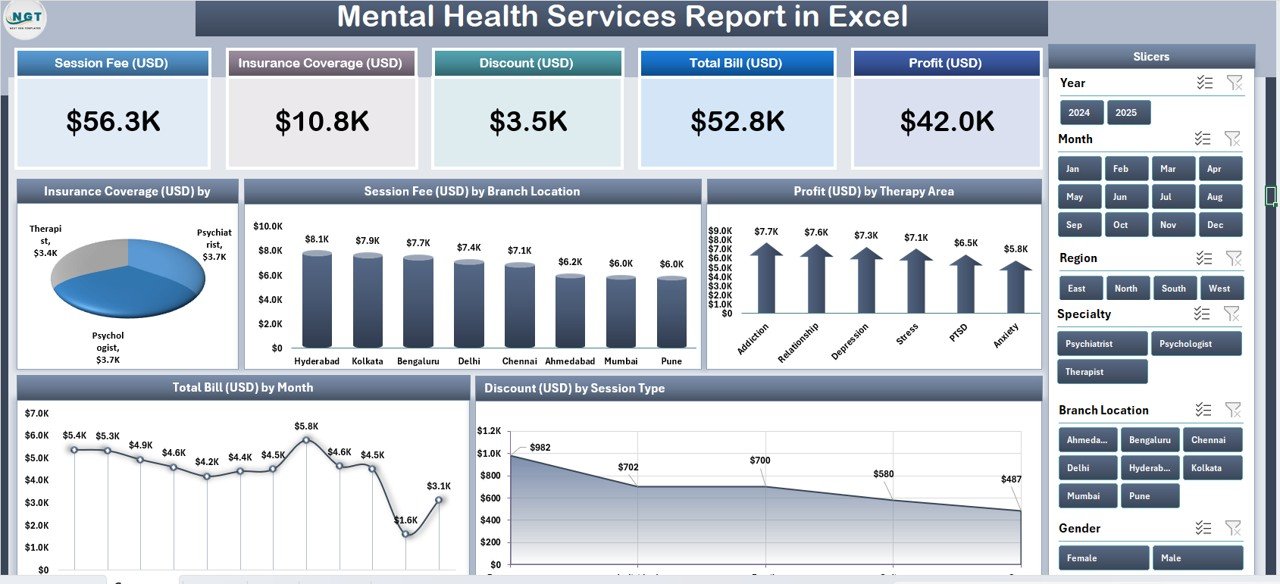
Mental Health Services Report in Excel – Summary Page
Introduction to the Mental Health Services Report in Excel
Most mental health and counselling practices live inside their booking software — SimplePractice, TherapyNotes, or a homegrown Google Calendar. These systems are great for scheduling and notes, but the monthly financial story of the practice usually gets exported to a spreadsheet anyway. That’s where the Mental Health Services Report in Excel earns its place.
The template takes your session-level data — dates, branches, therapy areas, session types, specialities, fees, discounts, total billed amount, and insurance coverage — and transforms it into a single Summary Page with 5 KPI cards and 5 charts, plus a dedicated Report Page for line-item analysis. Everything is driven by pivot tables, so updating the raw data and clicking Refresh All rebuilds every chart automatically. No VBA, no macros, no internet connection required. According to Microsoft’s official PivotTable documentation, the Refresh All workflow is the recommended approach for dashboards built on structured ranges — which is exactly how this report is wired.
Key Features of the Mental Health Services Report
The template is intentionally small — 4 sheets — but each sheet earns its place in a month-end reporting workflow.
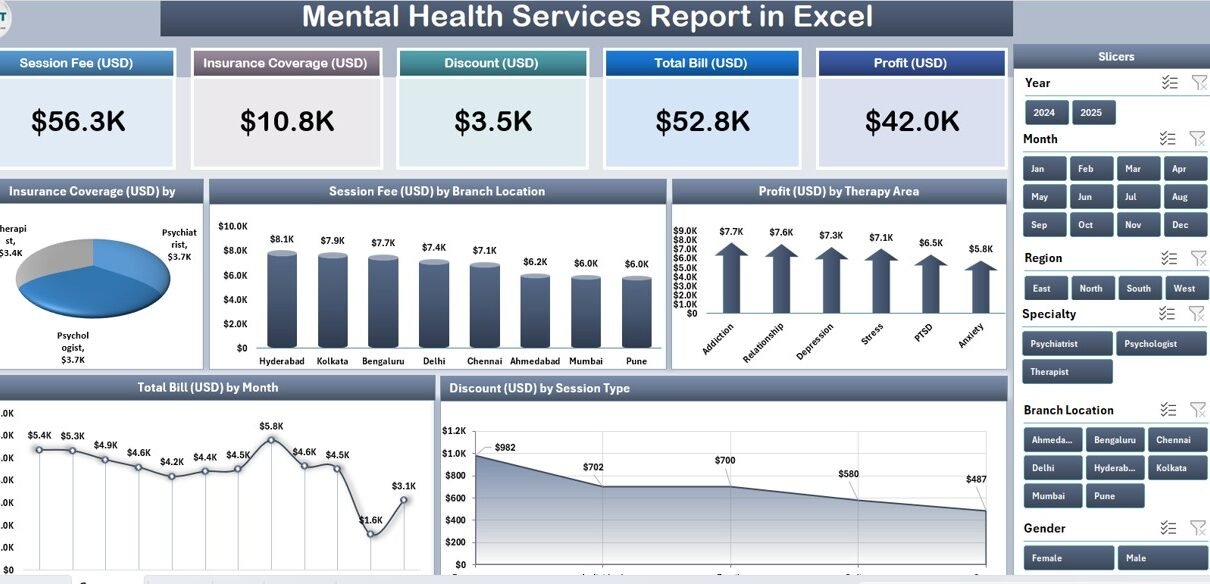
Five KPI Cards on the Summary Page: The top strip shows the 5 headline metrics every clinic director asks about first — the kind of numbers you’d want ready for a board meeting or bank loan conversation.
Right-Side Slicer Panel: Filter the entire Summary Page by therapy area, branch, session type, or period. Slicers on Excel dashboards are the single biggest usability upgrade over static pivot reports.
Five Analytical Charts: Each chart answers a specific business question — Insurance Coverage by Speciality (which codes reimburse best?), Session Fee by Branch Location (where are we underpriced?), Profit by Therapy Area (which service lines fund the practice?), Total Bill by Month (is the trend healthy?), and Discount by Session Type (where are write-offs concentrating?).
Report Page with Information Table: A separate worksheet with a left-side slicer and a line-item table — ideal for pulling session lists for insurance claim packets or for auditing individual patient billing.
100% Pivot-Table Architecture: Every chart on the Summary Page draws from a pivot table stored on the Support sheet. Replace data → click Refresh All → the entire report rebuilds. No formula edits.
Sheets Explanation
Here’s a walkthrough of each sheet in the template.
1. Summary Page
The main dashboard view. Five KPI cards sit at the top, giving clinic leadership an at-a-glance snapshot of practice performance. Below them, 5 interactive charts cover the analytical questions most often asked in a month-end review. On the right edge, a vertical slicer panel lets you filter by therapy area, branch, session type, and period — the same filter applies to all cards and charts simultaneously.
A separate worksheet with a left-side slicer and a detailed information table. Think of this as the audit-trail view — useful when your insurance payer asks for all sessions billed for a specific therapy area in a specific month, or when your accountant needs a line-item breakdown for GST/VAT filings.
3. Data Sheet
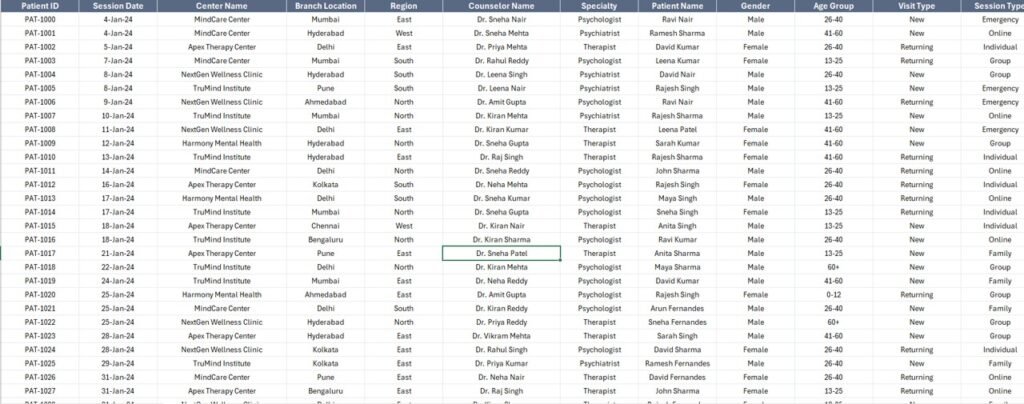
The raw input sheet. It holds 10 columns: Date, Branch, Therapy Area, Session Type, Speciality, Therapist, Session Fee, Discount, Total Bill, and Insurance Coverage. To use the template with your own clinic’s data, simply replace the sample rows — keeping the column headers identical. Pivot tables in the Support sheet reference these headers directly.
4. Support Sheet
Holds every pivot table that feeds the Summary Page. After updating the Data sheet, go to Data → Refresh All in the Excel ribbon and every pivot recalculates. In production, hide this sheet so clinicians and billing staff only see the Summary Page and Report Page.
Mental Health Services Report in Excel vs. Google Sheets Equivalent vs. SimplePractice / TherapyNotes — Feature Comparison
| Feature | Mental Health Services Report in Excel | Google Sheets equivalent | SimplePractice / TherapyNotes |
|---|---|---|---|
| Cost | $7.99 one-time | ~$10 one-time template | $49–$99 / user / month |
| Platform | Microsoft Excel (desktop) | Google Sheets (browser) | Web + mobile SaaS |
| Works offline | ✅ Yes | ❌ Requires internet | ❌ Requires internet |
| Setup time | Under 10 minutes | ~15 minutes | 2–5 days onboarding |
| Customizable KPIs & charts | ✅ Fully editable | ✅ Editable | ❌ Fixed reports |
| Per-user licence fees | None | None | $49+ per clinician / month |
| Data stays on your device | ✅ Yes | ❌ Cloud | ❌ Vendor cloud |
| Year-1 cost at 5 clinicians | $7.99 | ~$10 | $2,940 – $5,940 |
| Insurance & branch breakdown | ✅ Pre-built | Needs rebuild | ✅ Pre-built |
For clinics that want insurance, branch, and therapy-area profitability visibility without paying $3,000+ per year in SaaS fees, the Mental Health Services Report in Excel sits in the sweet spot.
Who Should Use This Template
Perfect for:
- Solo therapists and counsellors billing a mix of insurance and private-pay clients
- Group practices with 2–20 clinicians running multiple branches or specialities
- Practice managers preparing monthly financial reports for clinic owners
- Billing teams reconciling insurance coverage against session fees
- New clinic founders who haven’t yet committed to a SaaS platform
Not a fit if:
- You run a hospital-scale behavioural health network that needs HIPAA-certified cloud infrastructure with SSO
- You need e-prescribing, telehealth video, and patient portal all in one integrated system
- You only use Google Sheets — in that case, browse our Google Sheets dashboard collection
Real-World Use Cases
Dr. Meera — 4-therapist counselling practice, Mumbai. Meera uses the Mental Health Services Report each month to see which specialities are driving profit. The Insurance Coverage by Speciality chart helped her spot that her addiction-therapy codes were being under-reimbursed compared to peers — she renegotiated with two insurance panels and recovered an estimated ₹65,000 per quarter. She also uses the Profit by Therapy Area view to decide where to invest in new hires.
James — practice manager at a 3-branch group therapy clinic, Toronto. James compares average session fees across his downtown, suburban, and virtual branches using the Session Fee by Branch Location chart. Spotting a $22 gap at the suburban branch, he standardised pricing and lifted monthly revenue by roughly $4,800. Over a year that’s far more than he saved by not subscribing to SimplePractice’s $588-per-clinician plan.
Priya — freelance therapist launching her own private practice. Priya needs month-end financial summaries for her accountant but can’t justify $49/month for SaaS in year one. The Mental Health Services Report gives her Total Bill by Month and Discount by Session Type charts, works entirely offline on her Mac, and cost her a single $7.99 payment.
Advantages of the Mental Health Services Report
The template’s primary advantage is cost efficiency. A 5-clinician practice paying $49/month per seat for SimplePractice spends $2,940 a year just on reporting software; the Mental Health Services Report is $7.99 one-time. Over three years that’s roughly $8,800 saved — enough to fund a part-time admin hire or a quarterly team offsite.
The second advantage is data sovereignty. Patient-adjacent data never leaves your machine. For practices operating under HIPAA (US), PIPEDA (Canada), GDPR (EU), or India’s DPDP Act, keeping data on-device dramatically simplifies compliance reviews compared to vendor-cloud SaaS.
The third advantage is no learning curve. Anyone on your team who’s used Excel before can open the file, filter, and export a chart within five minutes — no admin training, no role permissions to configure, no onboarding calls.
Opportunities for Improvement
Being honest: the Mental Health Services Report in Excel is a report, not a full practice-management system. It doesn’t handle appointment booking, session notes, e-prescribing, or automated insurance claim submission. If you need those features in one integrated platform, you’ll want a dedicated SaaS tool like SimplePractice or TherapyNotes.
The template also assumes you already have session-level data in a clean, column-structured format. If your current system exports messy or multi-line records, you’ll spend extra minutes cleaning the data before pasting it in. For larger practices we recommend automating the export from your EHR using a monthly scheduled query.
Finally, the template is Excel-desktop-first. It opens in Excel Online but slicers and some chart interactions don’t render as smoothly — for a browser-native alternative, see the Hospital Patient Flow Dashboard in Google Sheets.
Best Practices
Standardise your category names. Use the same spelling for therapy areas, branches, and specialities every month. “CBT” vs “Cognitive Behavioural Therapy” will create two pivot rows and distort your charts.
Refresh before every review meeting. It’s a 2-second action (Data → Refresh All) that prevents stale numbers from sneaking into a board deck.
Keep a backup of the original template. Save the blank version before you paste your data — if something breaks, you can always start over without re-downloading.
Hide the Support sheet before sharing. Right-click the Support tab → Hide. Clinicians and billing staff should only interact with the Summary Page and Report Page.
Combine with a KPI dashboard. For clinics tracking operational KPIs beyond finance (appointment no-show rates, therapist utilisation), pair this report with a Medical Practice Dashboard in Power BI or a Telehealth Dashboard in Excel.
Explore Relevant Templates
🔹 Medical Practice Dashboard in Excel — The general-medical sibling covering appointments, revenue, and patient mix.
🔹 Telehealth Dashboard in Excel — For remote therapy practices tracking virtual visit volumes and no-show rates.
🔹 Pharmacy Dashboard in Excel — A good companion for psychiatry practices that also coordinate medications.
🔹 Hospital Patient Flow Dashboard in Google Sheets — A Google Sheets alternative for teams that prefer browser-based tools.
🔹 Compliance and Audit Dashboard in Power BI — For clinics scaling into multi-state or multi-country operations that need audit trails.
Frequently Asked Questions
What KPIs does the Mental Health Services Report in Excel track?
The Mental Health Services Report tracks 5 headline KPIs on the Summary Page displayed as card visuals, plus 5 interactive charts: Insurance Coverage by Speciality, Session Fee by Branch Location, Profit by Therapy Area, Total Bill by Month, and Discount by Session Type. All metrics auto-update when you refresh the pivot tables after pasting new data.
How does this template compare to SimplePractice or TherapyNotes?
SimplePractice and TherapyNotes charge $49–$99 per clinician per month — roughly $588–$1,188 per clinician per year. The Mental Health Services Report in Excel is a $7.99 one-time purchase with no per-user fees, works offline, and keeps patient-level data on your device rather than in a vendor cloud. It doesn’t replace a full EHR — it replaces the monthly financial-reporting workflow.
How long does setup take?
Setup takes under 10 minutes. Open the .xlsx file, paste your session-level data into the Data sheet (keep the column headers identical), then click Data → Refresh All in the Excel ribbon. Every card, chart, and slicer on the Summary Page updates automatically. No formulas to edit.
Does this template work on Mac Excel?
Yes. The Mental Health Services Report in Excel uses only pivot tables and slicers — no VBA, no macros — so it runs identically on Windows Excel and Mac Excel 2016 or later. No internet connection is required, which is also why it works well for practices in regions with unreliable bandwidth.
Can I add new therapy areas, branches, or specialities?
Yes. Add new categories directly to the Data sheet. After adding rows, click Data → Refresh All in the Excel ribbon and every pivot table on the Support sheet will pick up the new categories. The Summary Page charts populate automatically.
Is patient-level data safe with this template?
Data stays entirely on your device. The Mental Health Services Report doesn’t connect to any cloud service, API, or external database. For full HIPAA, PIPEDA, GDPR, or DPDP compliance you’ll still need to encrypt the file and control access, but no third party can see your data by default — unlike with cloud-based SaaS.
Can multiple clinicians use the same file?
Yes. Email the .xlsx file or share it via OneDrive, Dropbox, or SharePoint. There’s no per-user licence — clinicians and billing staff can open and filter the report with any Microsoft Excel installation. For simultaneous multi-user editing, use OneDrive’s co-authoring or a shared SharePoint location.
About the Author
Built by PK — Microsoft Certified Professional with 15+ years of Excel, Google Sheets, and Power BI experience. Founder of NextGenTemplates, reaching 300K+ subscribers across YouTube channels. Every template is hand-built and tested before release.
Conclusion
The Mental Health Services Report in Excel is a focused, month-end reporting tool for therapy and counselling practices that want insurance, branch, and therapy-area visibility without paying thousands a year for SaaS. Five KPIs, 5 charts, 4 sheets, one-time $7.99 — that’s the whole promise.
👉 Click here to Purchase the Mental Health Services Report in Excel
✅ Instant download · One-time payment · No subscription
🎥 For step-by-step video tutorials, visit our YouTube channel: Youtube.com/@PK-AnExcelExpert
📅 Last updated: April 2026