Garden centers and plant nurseries in the US generate roughly $50 billion in annual retail sales, yet most independent operators still manage weekly numbers on paper or in a blur of tabs. The Garden Center Dashboard in Excel tracks 5 KPIs and 13 analytical views across 5 interactive pages, with a pivot-driven refresh model that rebuilds every chart the moment you paste new data.
If you run a garden center, plant nursery, or small horticulture retail business and want full sales analytics without paying $89 per register per month for a cloud POS, this is the template you’ve been looking for. Setup takes under 10 minutes and it works entirely offline in Microsoft Excel 2016 or newer.
Garden Center Dashboard in Excel
Key Features of Garden Center Dashboard in Excel
The Garden Center Dashboard in Excel is engineered specifically for retail horticulture operations — garden centers, plant nurseries, lawn-and-garden chains, and small landscaping retailers. Here’s what ships in the file:
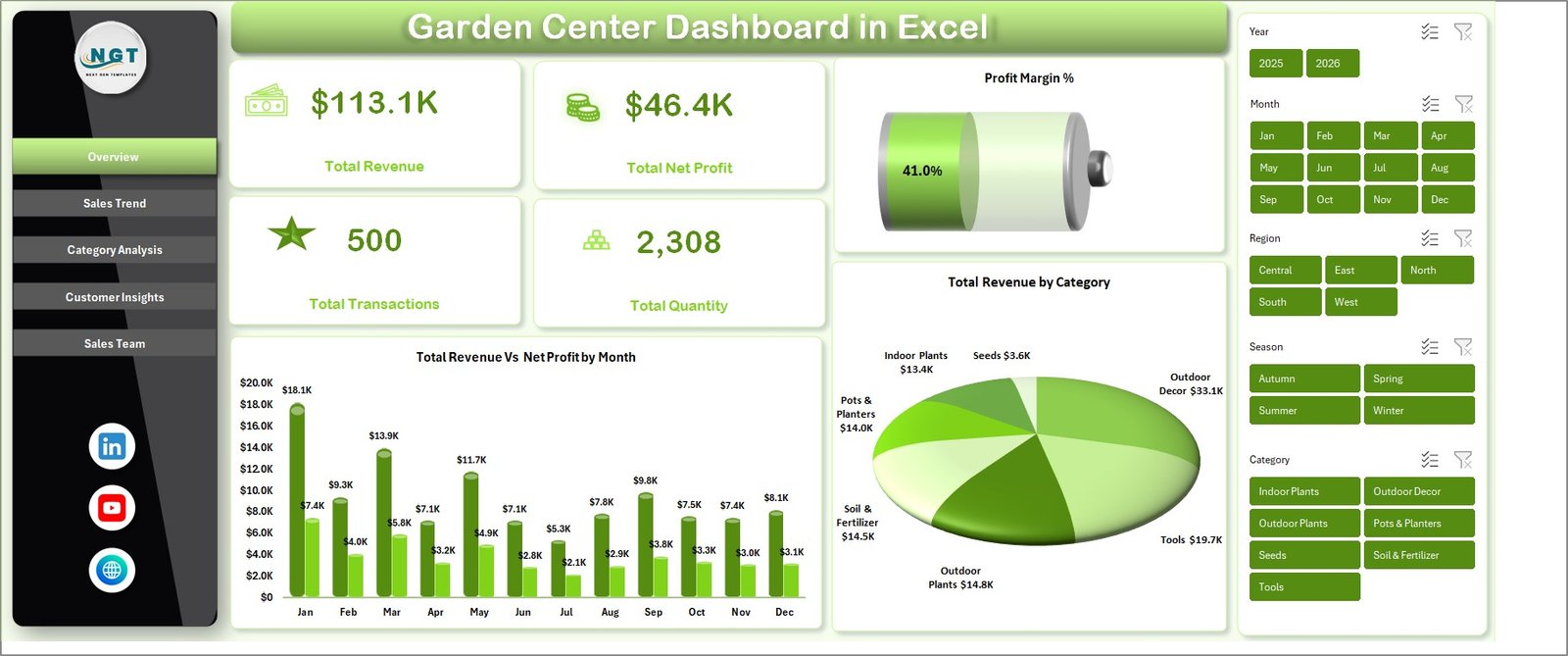
- 5 live KPI cards on the Overview page: Total Revenue, Total Net Profit, Profit Margin %, Total Transactions, Total Quantity
- 13 analytical charts across Sales Trend, Category Analysis, Customer Insights, and Sales Team pages
- 8+ slicers — Category, Region, Season, Salesperson, Status, Channel, Customer Type, Payment Method — filtering every view simultaneously
- Pivot-driven architecture — a hidden Support sheet does the heavy lifting, one click rebuilds everything
- Retail-ready data schema — columns for Category, Season, Region, Channel, Payment Method, Customer Type, Salesperson, Status, Quantity, Revenue, Cost, Net Profit, Satisfaction Score
- 100% offline — works in Excel 2016, 2019, 2021, or Microsoft 365; no cloud sync, no account, no telemetry
Dashboard Pages Explanation
1. Overview Page
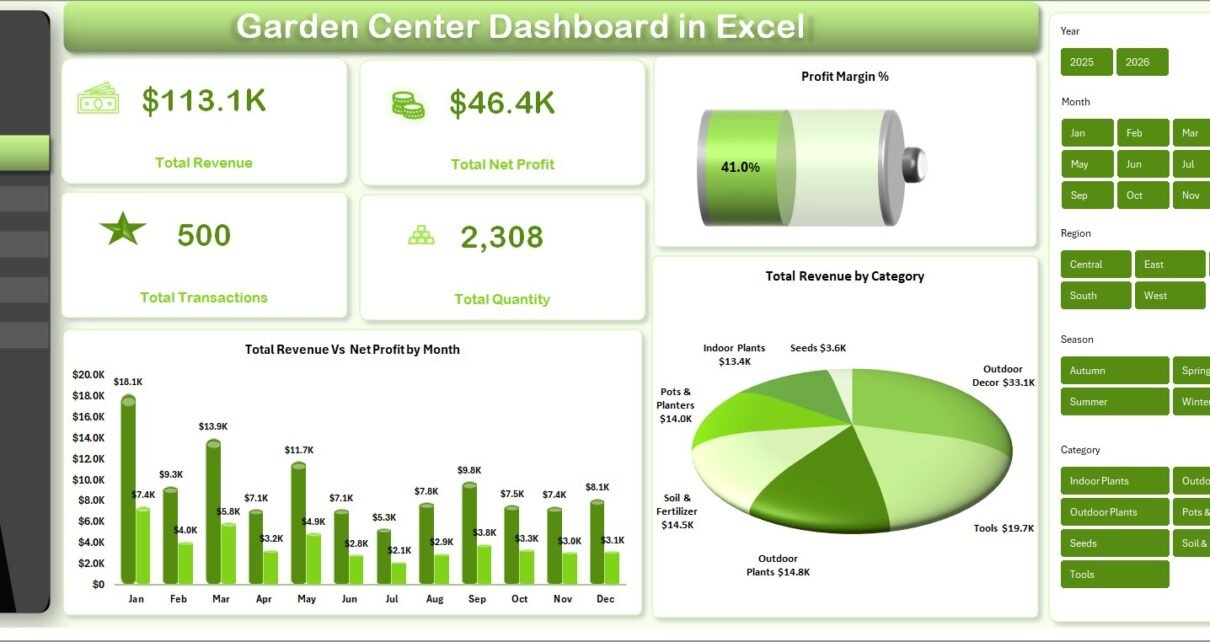
The Overview page is your executive summary. Five KPI cards sit across the top — Total Revenue, Total Net Profit, Profit Margin %, Total Transactions, Total Quantity — so you see the financial heartbeat of your garden center in one glance. Two headline charts follow: Total Revenue vs Net Profit by Month (tracks revenue against profit to expose seasonal peaks and margin health) and Total Revenue by Category (ranks plants, soil, pots, tools, garden chemicals by revenue contribution). Slicers for Category, Region, and Season let you drill instantly.
2. Sales Trend Page
The Sales Trend tab focuses on time and geography: Total Revenue vs Total Cost by Month (gross margin pulse), Total Revenue by Season (Spring, Summer, Fall, Winter side-by-side — critical for garden retail, where 60%+ of annual revenue often lands in 4 months), and Total Transactions by Region (which store locations or delivery zones are actually moving volume).
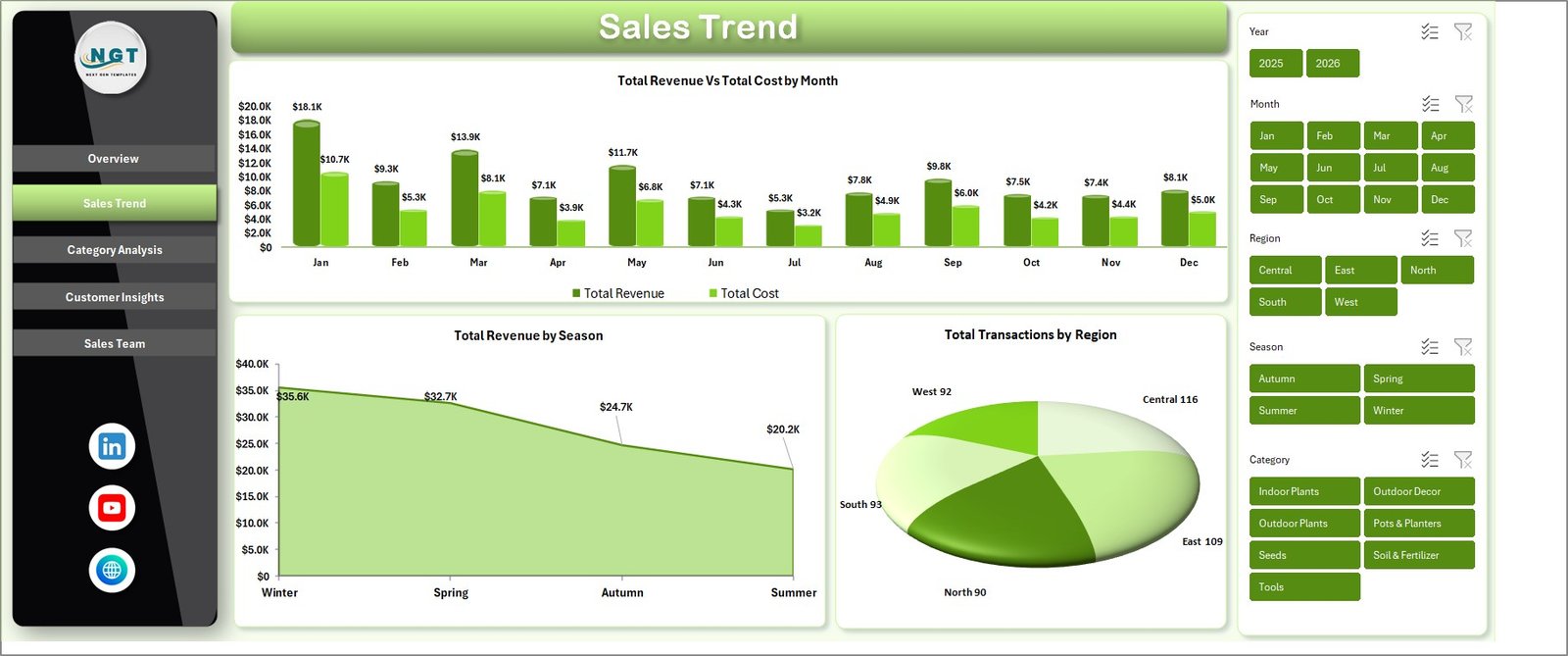 Sales Trend Page
3. Category Analysis Page
Margin decisions happen here. Three charts: Total Revenue vs Net Profit by Category (top-line vs bottom-line), Profit Margin % by Category (which categories are actually working), and Total Transactions by Category (volume vs value signal).
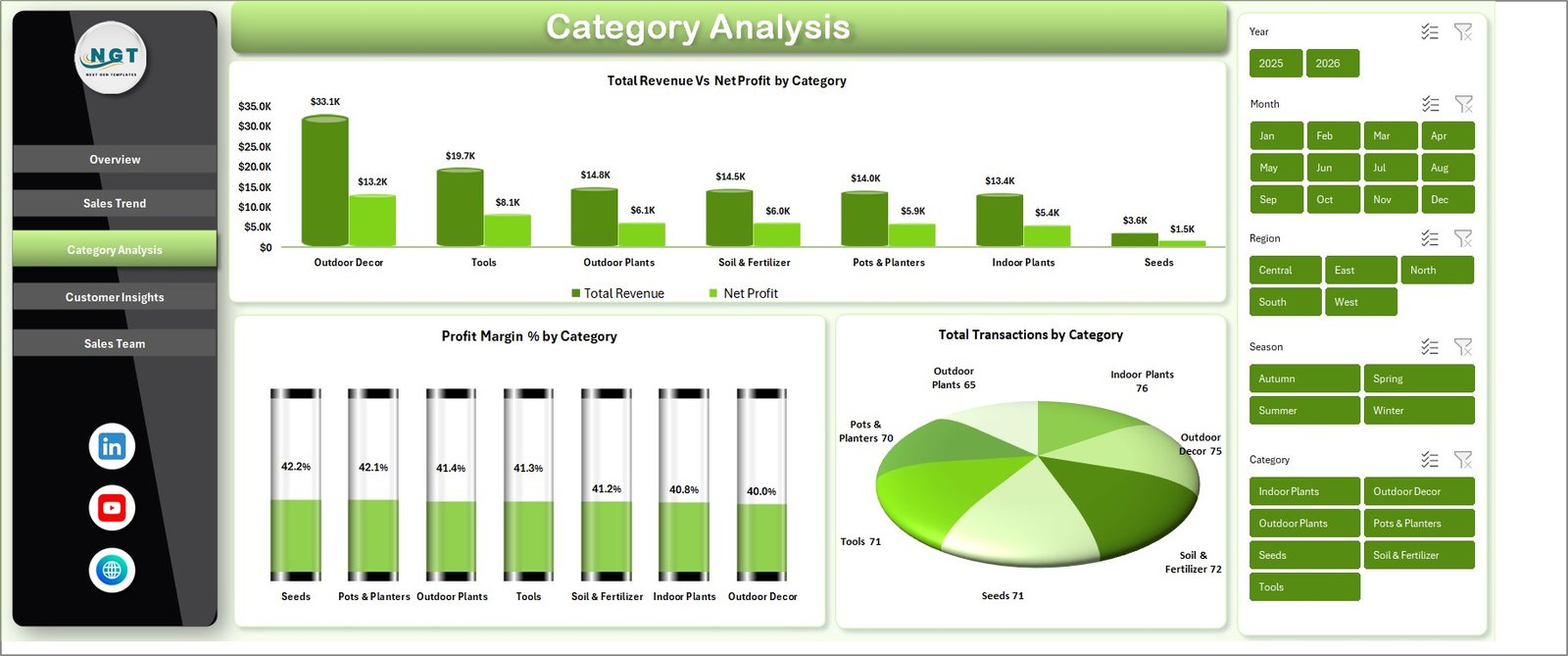 Category Analysis Page
4. Customer Insights Page
Four charts understand who’s buying and how they feel about it: Total Revenue by Customer Type (retail shopper vs landscaper vs B2B), Total Revenue by Channel (walk-in vs online vs phone), Total Revenue by Payment Method (cash, card, UPI, net banking), and Avg Satisfaction by Customer Type.
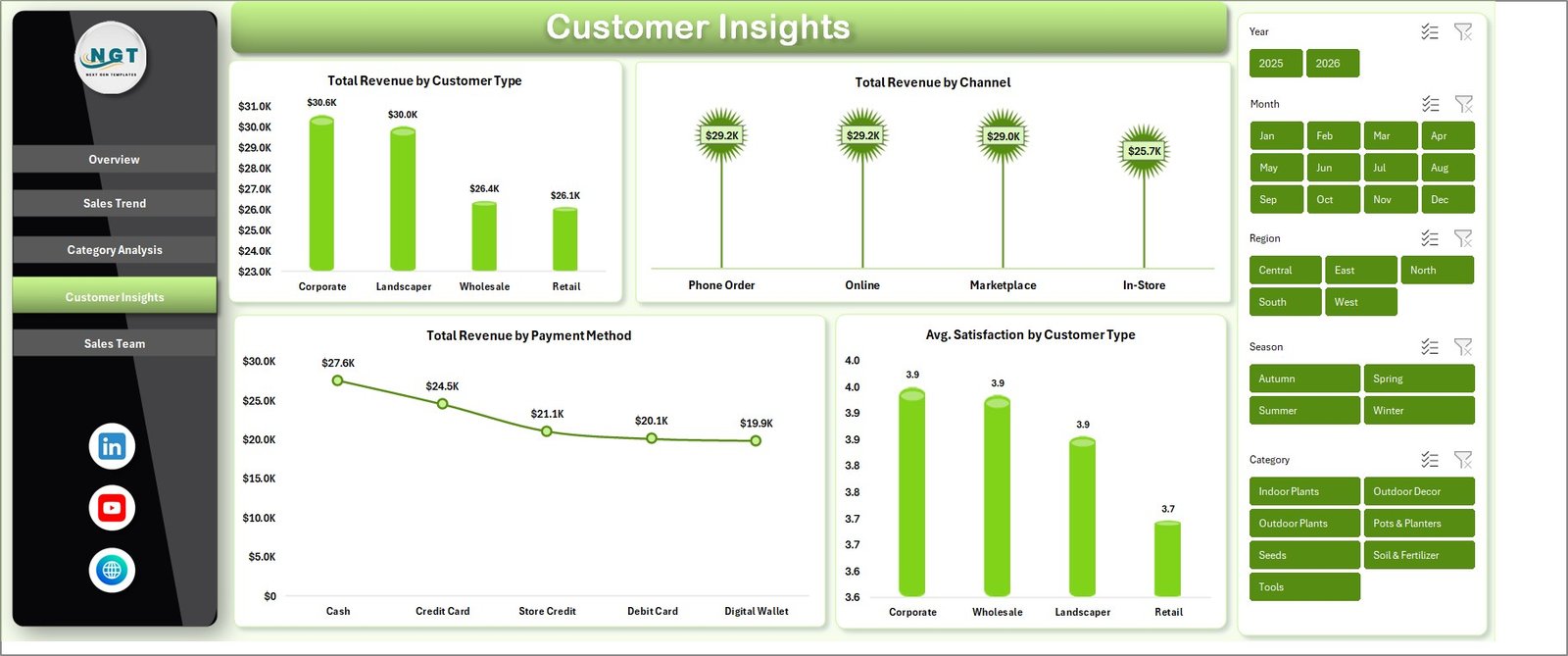 Customer Insights Page
5. Sales Team Page
For garden centers with 2+ salespeople, this is the highest-ROI page. Three views: Total Transactions by Salesperson, Total Transactions vs Total Revenue by Status (Completed, Pending, Returned, Cancelled), and Profit Margin % by Salesperson (who’s protecting margin versus who’s discounting to hit volume).
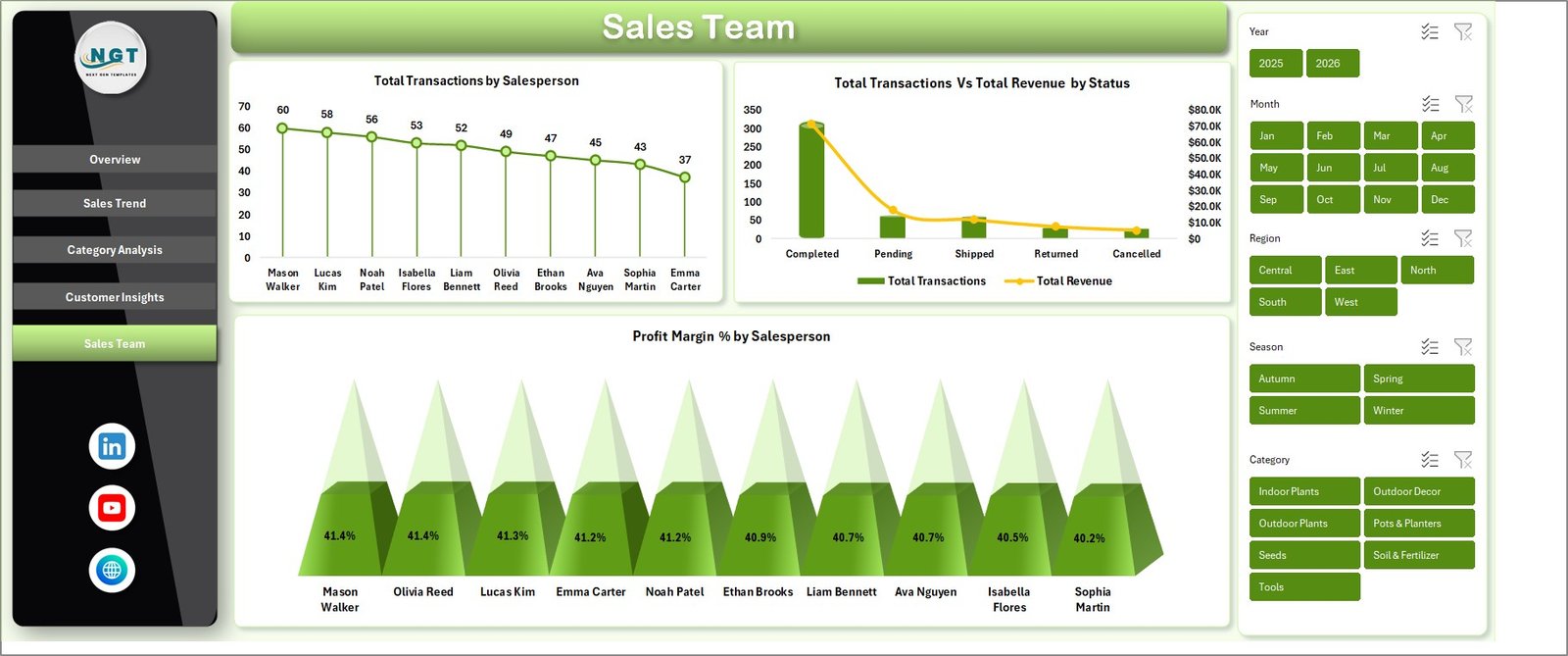 Sales Team Page
6. Data Sheet
The raw input tab. Paste or type your transactions in the existing column format: Date, Category, Product, Season, Region, Channel, Customer Type, Salesperson, Status, Quantity, Revenue, Cost, Net Profit, Satisfaction. Every other sheet reads from here.
 Data Sheet tab
7. Support Sheet
Hidden by default. Contains every pivot table that feeds the charts. After you paste fresh data, go to the Data tab in the Excel Ribbon and click Refresh All (Ctrl+Alt+F5). Every pivot recomputes, every chart redraws, every KPI card updates. Keep this sheet hidden in production — right-click the tab and select Hide.
 Support sheet tab
Garden Center Dashboard in Excel vs. Google Sheets Equivalent vs. Paid Retail POS — Feature Comparison
| Feature | Garden Center Dashboard in Excel | Google Sheets Equivalent | Lightspeed Retail / Shopify POS |
|---|---|---|---|
| Cost | $17.99 one-time | $7–$15 one-time | $89–$289 / register / month |
| Platform | Microsoft Excel 2016+ | Google Sheets (browser) | Proprietary cloud POS |
| Setup time | Under 10 minutes | 15–20 minutes | 2–5 days (hardware + config) |
| Works offline | ✅ Fully offline | ❌ Needs internet | Partially (limited offline mode) |
| Data ownership | ✅ 100% local | Google cloud | Vendor cloud |
| Customizable charts | ✅ | ✅ | ❌ Fixed reports only |
| Multi-user collaboration | Via shared drive | ✅ Real-time | ✅ Real-time |
| Year-1 cost at 3 registers | $17.99 | ~$15 | $3,200–$10,400 |
| Analytics depth | ✅ 13 charts + 8 slicers | ✅ | Paid add-on |
For garden centers and plant nurseries that want serious analytics without paying $3,000+ per year for a cloud POS they didn’t need, the Garden Center Dashboard in Excel sits in the sweet spot.
Who Should Use This Template
Perfect for:
- Independent garden center owners running 1–3 retail locations
- Plant nursery managers tracking seasonal sales and supplier-side margins
- Small landscaping businesses that also sell plants, soil, tools retail
- Retail consultants advising horticulture or outdoor clients
- Excel-comfortable owners who want analytics without cloud vendor lock-in
Not a fit if:
- You run an enterprise garden-retail chain that needs SOC 2 or SSO
- You need real-time multi-user editing (consider the Google Sheets version of the Agriculture Dashboard)
- You’ve never opened an Excel pivot table before
- You need integrated payment processing and inventory in a single system
Real-World Use Cases
Maya owns an independent garden center in suburban Ohio. Spring is her biggest season — bedding plants, mulch, seed packets — but she had no way to see which category was actually profitable week-by-week. She uses the Garden Center Dashboard in Excel to paste her POS export every Monday, filter the Overview by Season = Spring, and instantly see that hanging baskets deliver 3× the margin of fertilizer. She reallocated spring display space based on that single chart.
Arjun runs a plant nursery in Pune with 4 salespeople. He was guessing who was closing high-value landscaping consults and who was stuck selling $2 seedlings. The Sales Team page showed him Profit Margin % by Salesperson — and he reorganized commissions within a week. Two months later his team’s blended margin rose 9 percentage points.
Linda consults for 6 small garden retailers across Texas. She replaced her patchwork of spreadsheets with this one template — paste each client’s data, generate the slicer-filtered report, email the PDF. One template, six clients, zero per-user subscription fees.
Advantages of Garden Center Dashboard in Excel
The clearest advantages are cost, speed, and data ownership. Paying $17.99 one time versus $1,000+ per year for a cloud POS is a 98% cost reduction for the analytics layer specifically. Setup under 10 minutes versus 2–5 days for a full POS rollout keeps you focused on running the business. And because your garden center sales data stays on your laptop, you’re not subject to vendor price hikes, feature deprecations, or account lockouts.
You can also learn a lot by opening the Support sheet — the pivot tables are visible and editable, doubling as a living tutorial on how to build pivot-driven dashboards in Excel. For deeper pivot-table technique, Microsoft’s official PivotTable guide on Microsoft Learn walks through every option used in the file.
Opportunities for Improvement
Honesty matters: this is an Excel file, not a POS. It doesn’t process payments, sync inventory in real time, or run on a cash register. If you need those, pair this dashboard with your existing POS (Square, Clover, Lightspeed) — the POS handles transactions, this template handles analytics.
Real-time multi-user collaboration is limited compared to Google Sheets. Excel can be shared via OneDrive with co-authoring, but heavy concurrent editing still performs better in Sheets. If real-time collaboration is critical, the Google Sheets family of templates is worth considering.
Finally, the dashboard uses the data columns it ships with. If your POS export has radically different columns — say, you track 40 custom fields — you’ll need to either map to the existing schema or add new columns and repoint the pivots (a 15-minute job for anyone comfortable with pivot sources).
Best Practices
- Refresh on a schedule. Monday morning is a good default. Paste last week’s transactions, click Refresh All, review the Overview.
- Hide the Support sheet before sharing. Right-click the tab → Hide. Staff see only the 5 dashboard pages plus Data.
- Use Season as the primary slicer during business reviews. Garden retail lives and dies by seasonal patterns.
- Track Profit Margin %, not just Revenue. High-revenue categories can drag margin down if they’re the discount leaders.
- Export the Overview to PDF monthly. It becomes your board / lender / spouse reporting pack in 30 seconds.
Explore Relevant Templates
- Agriculture and Farm Dashboard in Excel — for farm producers who also sell retail
- Agriculture Farm Dashboard in Google Sheets — cloud-based version for collaborative teams
- Landscaping Services Dashboard in Power BI — for landscaping firms
- Garden Care Checklist in Excel — operational companion for seasonal maintenance
- Pharmacy Dashboard in Excel — same architecture for retail pharmacy operators
- Read the Landscaping Dashboard in Excel guide for adjacent methodology
- Browse all Excel Dashboard Templates
Frequently Asked Questions
How much does the Garden Center Dashboard in Excel cost compared to Lightspeed Retail?
The Garden Center Dashboard in Excel is a one-time $17.99 purchase. Lightspeed Retail starts around $89 per register per month — over $1,000 per year for a single register. For garden centers that need sales analytics rather than full POS hardware, this template delivers the reporting layer at roughly 1.5% of the annual cost.
How long does setup take?
Setup for the Garden Center Dashboard in Excel takes under 10 minutes. Download, open in Excel 2016 or later, paste your transactions into the Data sheet keeping the column order identical, then click Data → Refresh All. Every KPI card, slicer, and chart across all 5 pages recalculates automatically.
Can this dashboard handle multi-location garden centers?
Yes. The Garden Center Dashboard in Excel includes a Region column in the Data sheet and a Total Transactions by Region chart on the Sales Trend page. Add a location or delivery-zone code per row, and the Region slicer on every page filters the whole dashboard by store location in real time.
What Excel version do I need?
Microsoft Excel 2016, 2019, 2021, or Microsoft 365 on Windows or macOS. The template uses standard pivot tables, pivot charts, and slicers — no VBA, no macros, no add-ins — so every feature works out of the box without triggering security prompts.
Can I add new categories without breaking the dashboard?
Yes. Add new rows or values to the Data sheet, then click Data → Refresh All. The pivots automatically pick up new dimension values, and every chart, card, and slicer in the Garden Center Dashboard in Excel updates without any manual formula changes.
Is my garden center sales data stored in the cloud?
No. The Garden Center Dashboard in Excel is a standalone .xlsx file living on your computer. There is no telemetry, no account requirement, no cloud sync. Your sales data stays 100% under your control.
Can I hide the Support sheet before sharing with staff?
Yes, and we recommend it. Right-click the Support sheet tab and choose Hide. The hidden pivots still power every chart and KPI card, but staff viewing the file see only the 5 dashboard pages plus the Data sheet.
About the Author
Built by PK — Microsoft Certified Professional with 15+ years of Excel, Google Sheets, and Power BI experience. Founder of NextGenTemplates, reaching 300K+ subscribers across YouTube channels. Every template is hand-built and tested before release.
Conclusion
The Garden Center Dashboard in Excel is the fastest way to turn your garden center POS data into clear, seasonal, margin-aware insights — without subscribing to a $3,000-a-year cloud tool you only half use. Five pages, 13 charts, 5 KPI cards, one click to refresh.
👉 Click here to Purchase the Garden Center Dashboard in Excel
✅ Instant download · One-time payment · No subscription · Lifetime access
🎥 For video walkthroughs, visit YouTube.com/@PK-AnExcelExpert.