The Architecture & Design Report in Excel is a slicer-driven 4-sheet Excel template built for architecture firms, design studios, and construction project managers who need a clean, executive-ready view of project status, budgets, and delivery performance — without paying $660–$1,440 a year for SaaS subscriptions like Asana, Monday.com, or Smartsheet. Setup takes under 10 minutes: replace the sample data with your own, click Data → Refresh All, and every KPI card, chart, and slicer updates automatically.
🌍 Join 8,400+ teams in 40+ countries using NextGenTemplates to replace paid SaaS tools with one-time-purchase Excel, Google Sheets, Power BI, and HTML templates. ✅ Instant download · One-time payment · No subscription · Lifetime access.
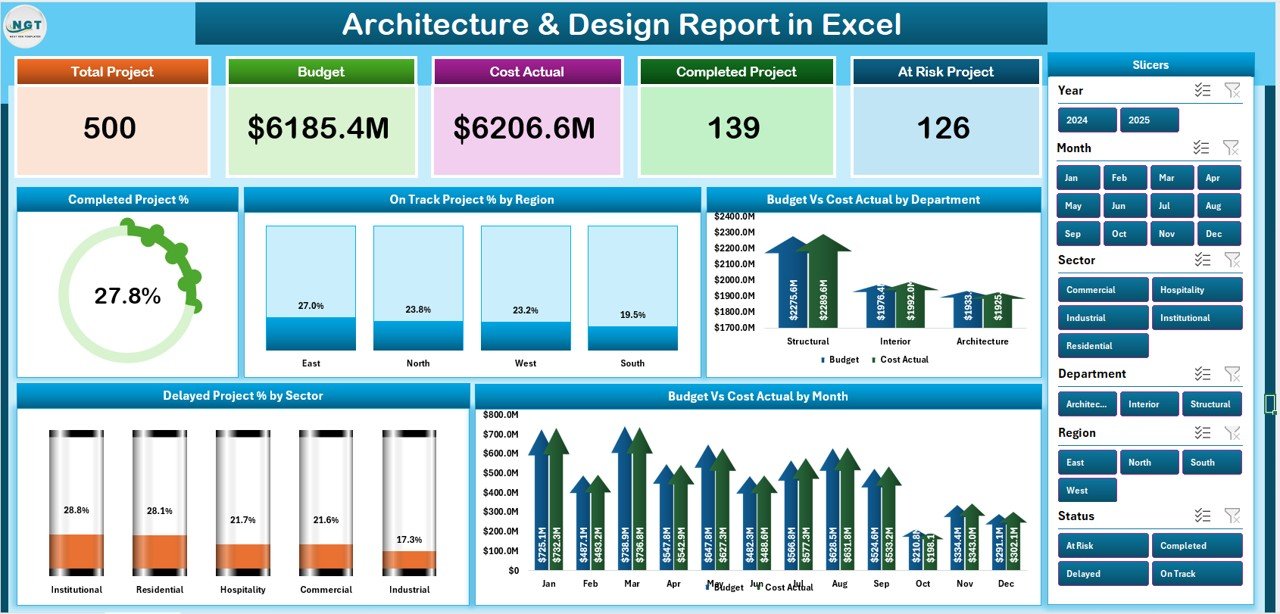
Architecture & Design Report in Excel — Summary Page
Introduction
Architecture and design firms juggle a unique reporting challenge — partners need a portfolio-level view of project health while project leads need line-by-line drill-downs into specific projects. Most firms either pay for an enterprise project management platform (which is overkill for a 10–50 person studio) or stitch together half a dozen disconnected spreadsheets. The Architecture & Design Report in Excel solves both views in a single workbook with native Microsoft Excel slicers, pivot tables, and charts that anyone on your team can edit. The data structure follows standard project-tracking fields — Project ID, Project Name, Region, Sector, Department, Start Date, End Date, Status, Budget, and Actual Cost — fully aligned with the project tracking conventions documented by Microsoft 365 for Business.
Key Features of Architecture & Design Report in Excel
📊 5 KPI Cards on the Summary Page: Completed Project %, On Track Project %, Delayed Project %, Total Budget, and Total Actual Cost. These cards anchor the executive view — partners and senior leadership get the headline numbers in one glance.
🎯 Slicer-Driven Filtering on Both Pages: The Summary page has a right-side slicer; the Report page has a left-side slicer. Click any slicer button — region, sector, department, status — and every chart, KPI card, and table on the page filters instantly. No manual formula edits, no pivot table refresh button.
📈 5 Pre-Built Analysis Charts: Completed Project %, On Track Project % by Region, Budget vs Cost Actual by Department, Delayed Project % by Sector, and Budget vs Cost Actual by Month. Each chart is wired into the slicer so filters cascade automatically.
📋 Information Table on the Report Page: A line-by-line breakdown of every project record — useful for project review meetings, audit trails, and client status reports. Combined with the left-side slicer, you can drill from the portfolio view into a specific region or sector in two clicks.
💯 100% Formula and Pivot Table Driven: No macros, no VBA, no scripts. The report works identically on Excel for Windows, Excel for Mac, and Excel on the web. Native Excel slicer behavior is supported across all three platforms.
Dashboard Pages Explanation
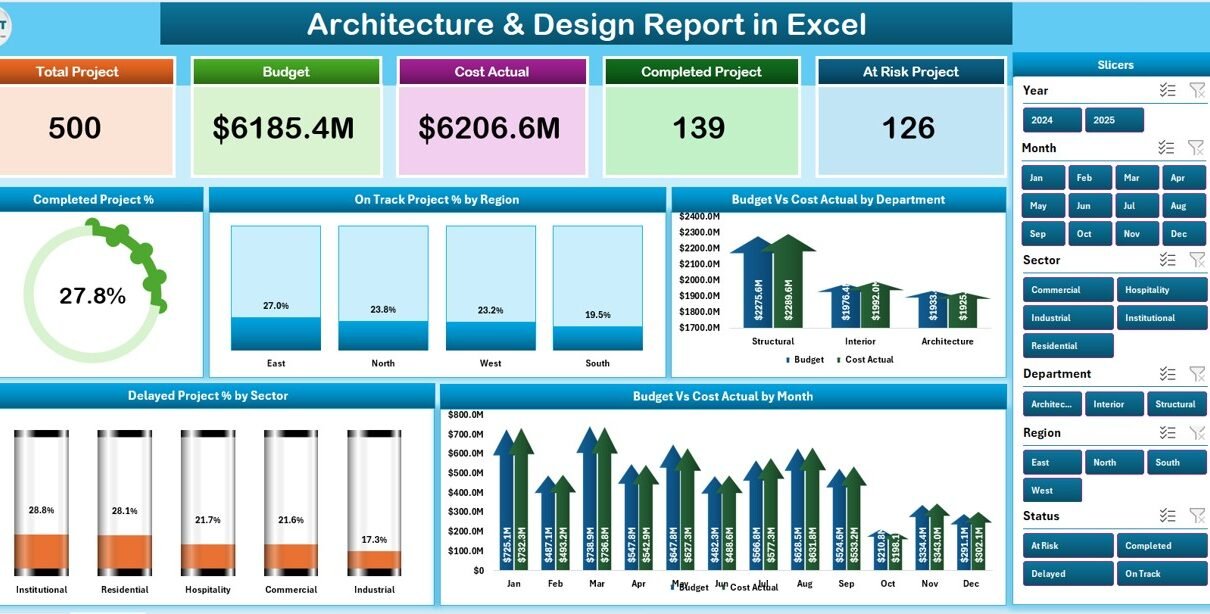
Sheet 1 — Summary Page: The headline view that opens first. Five KPI cards run across the top showing Completed Project %, On Track Project %, Delayed Project %, Total Budget, and Total Actual Cost. The right-side slicer filters every visual on the page. Below the cards sit five charts — project completion %, on-track % by region, budget vs cost actual by department, delayed % by sector, and budget vs cost actual by month — each wired to the slicer.
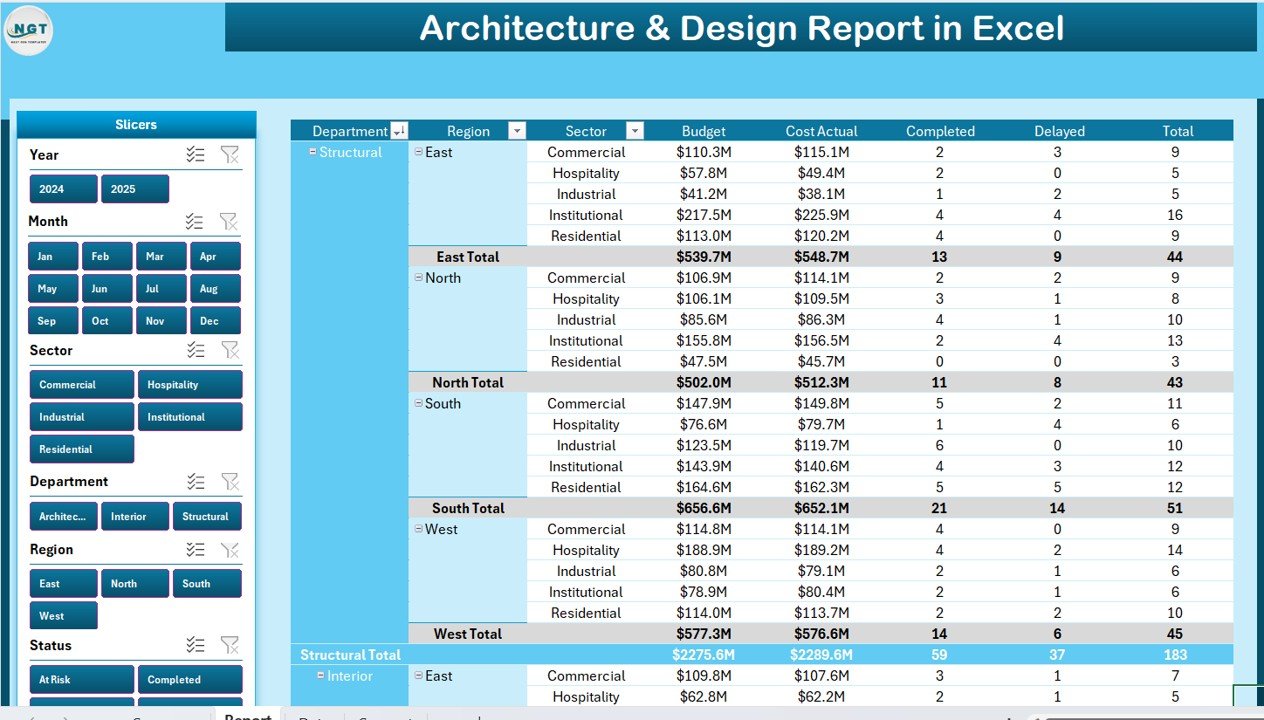
Report Page — Left-side Slicer with detailed Information Table
Sheet 2 — Report Page: A line-by-line view of every project. The left-side slicer filters by region, sector, department, status, or month. The Information Table shows each project’s key fields in a sortable layout — perfect for project review meetings, client status updates, and detailed audit trails. Project leads can filter to a single region or sector and present the filtered view directly to clients.
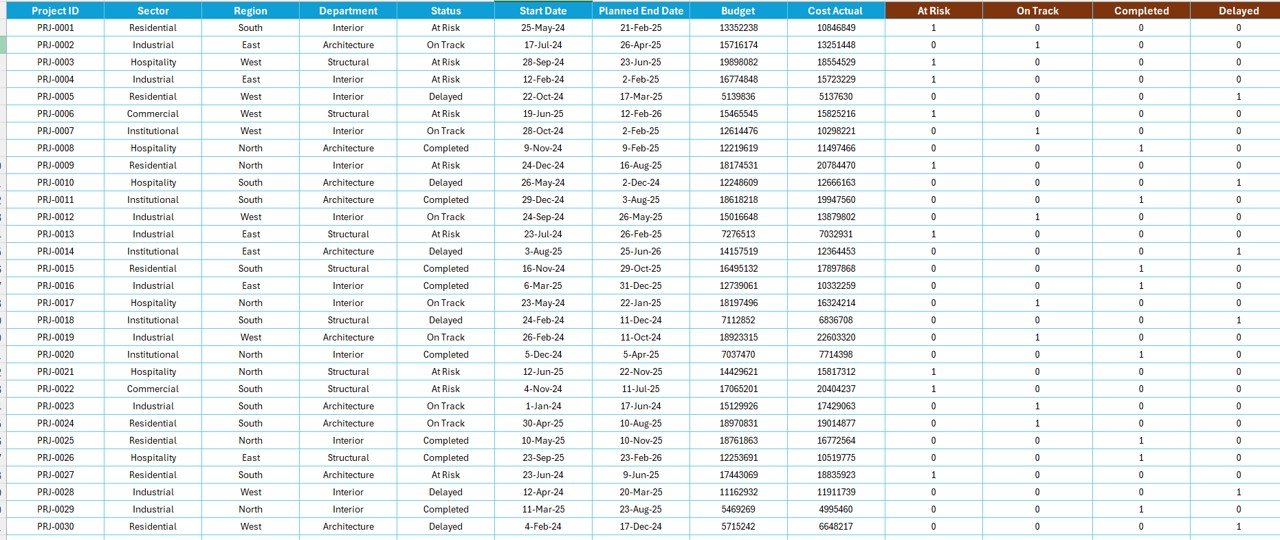
Data Sheet — Single source of truth for all project records
Sheet 3 — Data Sheet: The single source of truth for the entire report. Add new architecture and design projects in the same column structure used by the sample data. Required fields include Project ID, Project Name, Region, Sector, Department, Start Date, End Date, Status, Budget, and Actual Cost. Every other sheet rebuilds from this data.
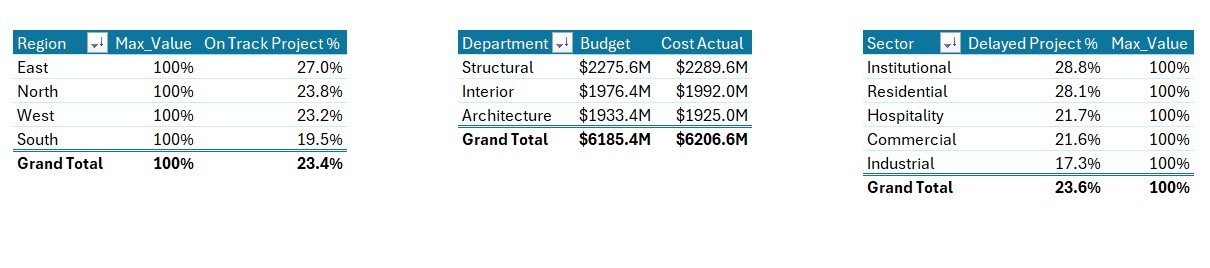
Support Sheet — Pivot tables that power the report
Sheet 4 — Support Sheet: Houses the pivot tables that aggregate Data sheet records into the metrics shown on the Summary and Report pages. After updating the data, click Data → Refresh All in the Excel ribbon and every chart, KPI card, and slicer updates in seconds. Keep this sheet hidden in client-facing copies of the file.
Architecture & Design Report vs. Google Sheets vs. Paid PM SaaS — Feature Comparison
| Feature | Architecture & Design Report (Excel) | Google Sheets Equivalent | Asana / Monday.com / Smartsheet |
|---|---|---|---|
| Cost | $7.99 one-time | $5–$10 one-time | $10.99–$24 / user / month |
| Platform | ✅ Excel (offline + online) | Google Sheets (cloud only) | Cloud SaaS subscription |
| Setup time | ✅ Under 10 minutes | Under 10 minutes | 2–4 weeks of admin setup |
| Slicer-based filtering | ✅ Native Excel slicers | Filter views | Filter UI varies by plan |
| Offline access | ✅ Yes — full functionality | Read-only offline | No — requires internet |
| Customizable fields | ✅ Fully editable in Excel | Fully editable | Limited on lower tiers |
| Year-1 cost at 5 users | $7.99 total | ~$10 total | $660–$1,440 |
| License model | ✅ One-time, lifetime use | One-time | Per-user subscription |
For architecture firms that want a clean, executive-ready project report without paying $1,440 a year for SaaS, the Architecture & Design Report in Excel sits in the sweet spot.
Who Should Use This Template
Perfect for:
- Architecture firm partners and project leads tracking 10–200 active design and construction projects
- Design studio operations managers reporting weekly project status to clients and senior leadership
- Construction project managers monitoring budget vs actual cost across regions, sectors, and departments
- Independent architects and small studios wanting a professional report without paying for project management SaaS
- Real estate developers tracking architectural design milestones across multi-site portfolios
Not a fit if:
- You need real-time collaboration across 50+ users with role-based permissions
- You require BIM integration, CAD file linking, or 3D model tracking inside the report
- You need automatic time-tracking, automated client billing, or invoicing inside the same tool
Real-World Use Cases
Maria runs a 25-architect studio in Madrid. She uses the Architecture & Design Report in Excel to prepare a monthly project review for her partners — slicing the Summary page by region (Spain, Portugal, France) and by sector (residential, commercial, hospitality) to spot which markets are over- or under-running on budget. The Budget vs Cost Actual by Department chart shows her where senior architects need to renegotiate scope with clients. She replaced a $1,200/year Smartsheet subscription with a single one-time $7.99 purchase.
James is a project manager at a mid-sized construction firm in Toronto. Every Monday morning he opens the Report page, filters the left-side slicer to “Delayed” projects only, and exports the filtered Information Table to PDF for the operations stand-up. His firm doesn’t need real-time multi-user collaboration — they need a fast, clean, slicer-driven view that James controls and presents. The On Track Project % by Region chart instantly tells the leadership team which regional offices need backup.
Aditi is a design lead at a real estate developer in Mumbai tracking 30+ architectural projects across India and the UAE. The Budget vs Cost Actual by Department chart is her go-to view for the quarterly leadership review. She doesn’t need a $24/user/month tool to do this — she needs a clean, reliable Excel report that opens on any laptop and prints cleanly to PDF for the board pack.
Advantages of Architecture & Design Report in Excel
💰 Cost savings of $650–$1,432 per year compared to paid project management SaaS at a 5-user team size. The one-time $7.99 price covers the entire firm forever.
⏱️ Under 10 minutes from download to first report. Replace the sample data, click Data → Refresh All, done. No admin setup, no user provisioning, no permission roles to configure.
🖥️ Works fully offline. Architecture site visits and remote inspections often happen in places without reliable internet — this report opens and updates without a connection.
🎨 Fully customizable colors, columns, and chart types using standard Excel features. No locked plan tier, no premium features behind a paywall.
👥 Co-authoring through OneDrive or SharePoint. When stored in Microsoft 365, multiple architects can edit the report simultaneously. For deeper guidance on Excel co-authoring, see the official Microsoft co-authoring documentation.
Opportunities for Improvement
The Architecture & Design Report in Excel is honest about its boundaries. There is no built-in BIM file linking — for firms that need to attach Revit or AutoCAD files to project records, you’ll need to add a column with file paths and rely on Excel hyperlinks. Real-time collaboration depends on Microsoft 365 co-authoring; pure desktop Excel files are single-editor at a time. There is no built-in time-tracking layer — if you need timesheet-to-project rollups, this report focuses on budget and status, not hours. For users who need a more visual Power BI-style experience with deeper drill-throughs, consider pairing this report with a Power BI dashboard later.
Best Practices
1. Standardize the Status field across your team — use a fixed list (Completed, On Track, Delayed, On Hold) so the KPI percentages stay accurate.
2. Add a “Last Updated” column to the Data sheet and populate it whenever a project record changes. This gives you a freshness audit trail.
3. Hide the Support sheet before sharing the file with external clients — it contains the pivot tables that drive the report and isn’t meant for client viewing.
4. Save a master copy with sample data intact, and create a working copy for each reporting cycle. This protects the original structure.
5. Set up co-authoring on OneDrive or SharePoint if multiple project leads need to update the Data sheet simultaneously.
6. Use the slicer combinations strategically — slicing by Region + Sector reveals patterns that single-dimension slicing misses (e.g., “commercial projects in Europe are over budget but residential projects in the same region are not”).
Explore Relevant Templates
📋 Emergency Management Report in Excel — same slicer-driven Excel Report format for crisis and incident reporting workflows.
🔬 Research Institutions Report in Excel — Report-style template for academic and research institution reporting.
🚨 Public Safety Report in Excel — slicer-based template for public safety and government departments.
🏗️ Construction Project Timeline in Google Sheets — Gantt-style timeline view for tracking construction project schedules.
📐 Office Renovation Feedback Tracker in Excel — companion tracker for capturing stakeholder feedback during renovations.
Browse the full Excel Dashboard Templates library or explore Google Sheets Dashboards for cloud-based alternatives.
Frequently Asked Questions
What KPIs does the Architecture & Design Report in Excel track?
The Architecture & Design Report in Excel tracks 5 headline KPIs — Completed Project %, On Track Project %, Delayed Project %, Total Budget, and Total Actual Cost — plus 5 analysis charts covering region, department, sector, and monthly performance. All metrics update automatically when you replace the sample data.
How does this compare to Asana or Monday.com for architecture firms?
Asana and Monday.com cost $10.99–$24 per user per month, totalling $660–$1,440 a year for a 5-person team. The Architecture & Design Report in Excel is a one-time $7.99 purchase, works fully offline, and gives you complete control over your data — ideal for firms that want a clean executive report without ongoing SaaS bills.
Does the Architecture & Design Report in Excel work on Mac?
Yes. The Architecture & Design Report in Excel is 100% formula and pivot-table driven with no macros or VBA, so it works identically on Microsoft Excel for Windows, Excel for Mac, and Excel on the web. Native slicers are supported across all three platforms.
How long does setup take?
Under 10 minutes. Replace the sample data on the Data sheet with your project records, click Data → Refresh All, and the entire Architecture & Design Report rebuilds automatically. No formulas to edit, no charts to reconfigure.
Can I customize the Architecture & Design Report in Excel?
Yes. Every element is fully editable — change colours, add columns, rename slicers, add new KPIs, or swap chart types. The Architecture & Design Report uses standard Excel pivot tables, so any Excel user can adapt it to a different design or construction reporting workflow.
Will I get future updates to this template?
Yes. Every NextGenTemplates purchase includes lifetime access to the latest version of the Architecture & Design Report in Excel. You can re-download from your account anytime. There is no subscription, no expiry, and no usage cap.
Can multiple architects edit the file simultaneously?
Excel supports co-authoring through OneDrive or SharePoint, so multiple architects can edit the Architecture & Design Report simultaneously when the file is stored in Microsoft 365. For pure desktop Excel without Microsoft 365, the file is single-editor at a time.
About the Author
Built by PK — Microsoft Certified Professional with 15+ years of Excel, Google Sheets, and Power BI experience. Founder of NextGenTemplates, reaching 300K+ subscribers across YouTube channels (@PK-AnExcelExpert, @NextGenTemplates, @NeoTechNavigators). Every template is hand-built and tested before release.
Conclusion
The Architecture & Design Report in Excel gives architecture firms, design studios, and construction project managers a clean, slicer-driven 4-sheet workbook to track project status, budgets, and delivery performance — for a one-time $7.99 instead of $660–$1,440 a year for SaaS. Setup takes under 10 minutes, the file works on Excel for Windows, Mac, and the web, and every chart and KPI updates automatically when you refresh the data.
👉 Click here to Purchase the Architecture & Design Report in Excel
✅ Instant download · One-time payment · No subscription · No per-user fees · Lifetime access
🎥 Visit YouTube.com/@PK-AnExcelExpert for step-by-step Excel tutorials.
📅 Last updated: May 2026