Introduction
The Cannabis Dispensary Dashboard in Excel is built for dispensary owners, multi-state operators, and cannabis-industry consultants who need a fast, reusable monthly performance review without paying $99–$499 per user per month for tier-three POS analytics. It tracks 5 headline KPIs — Total Revenue, Net Profit, Total Transactions, Total Quantity, and Avg. Basket Size — across 5 interactive analysis pages and 17+ pivot-driven charts. Setup takes under 10 minutes: paste your dispensary transactions into the Data sheet, click Data → Refresh All, and every KPI, chart, and slicer updates automatically.
This post walks through every page of the dashboard, compares it against Google Sheets and paid dispensary SaaS like Dutchie or Flowhub, and lays out exactly who gets the most value from this template (and who should buy something else).
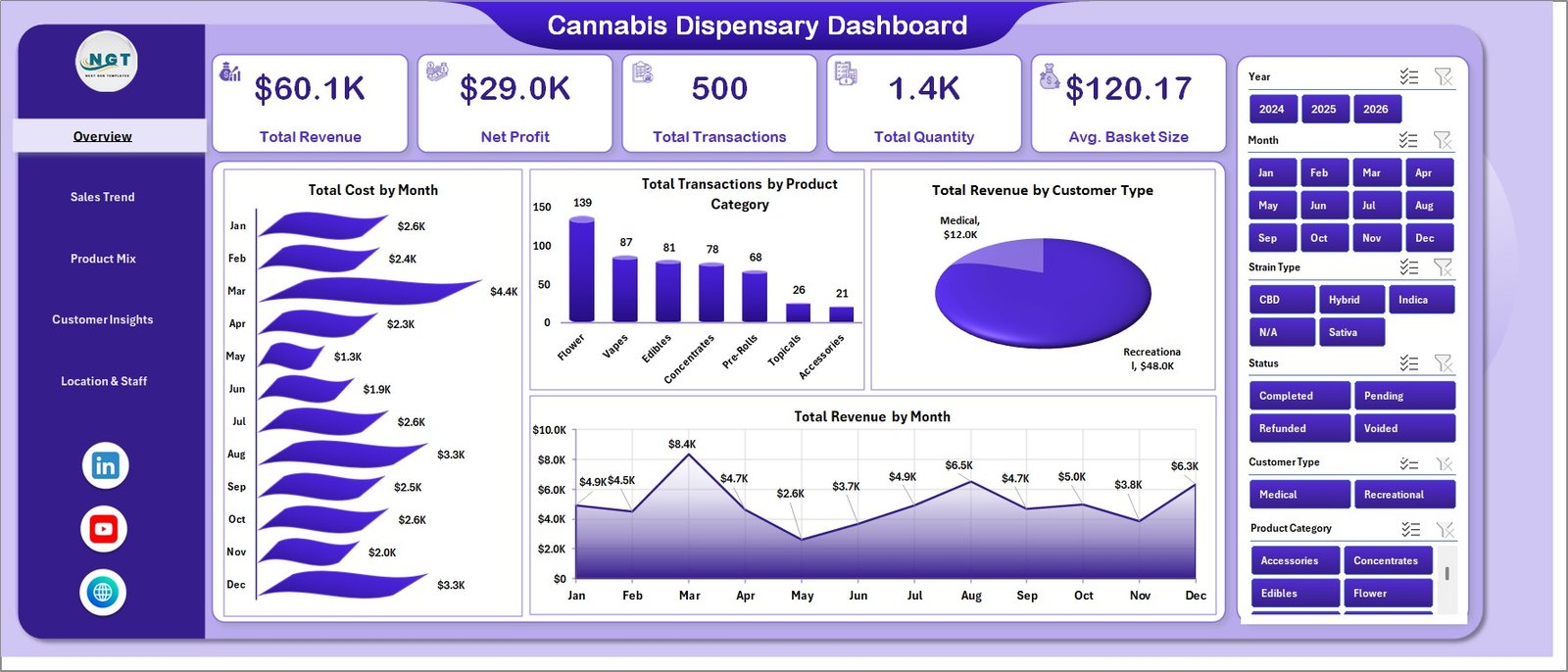
Cannabis Dispensary Dashboard
Key Features of Cannabis Dispensary Dashboard in Excel
- 5 interactive analysis pages plus Data and Support sheets — Overview, Sales Trend, Product Mix, Customer Insights, and Location & Staff, backed by a raw Data sheet and a hidden Support sheet that holds every pivot table.
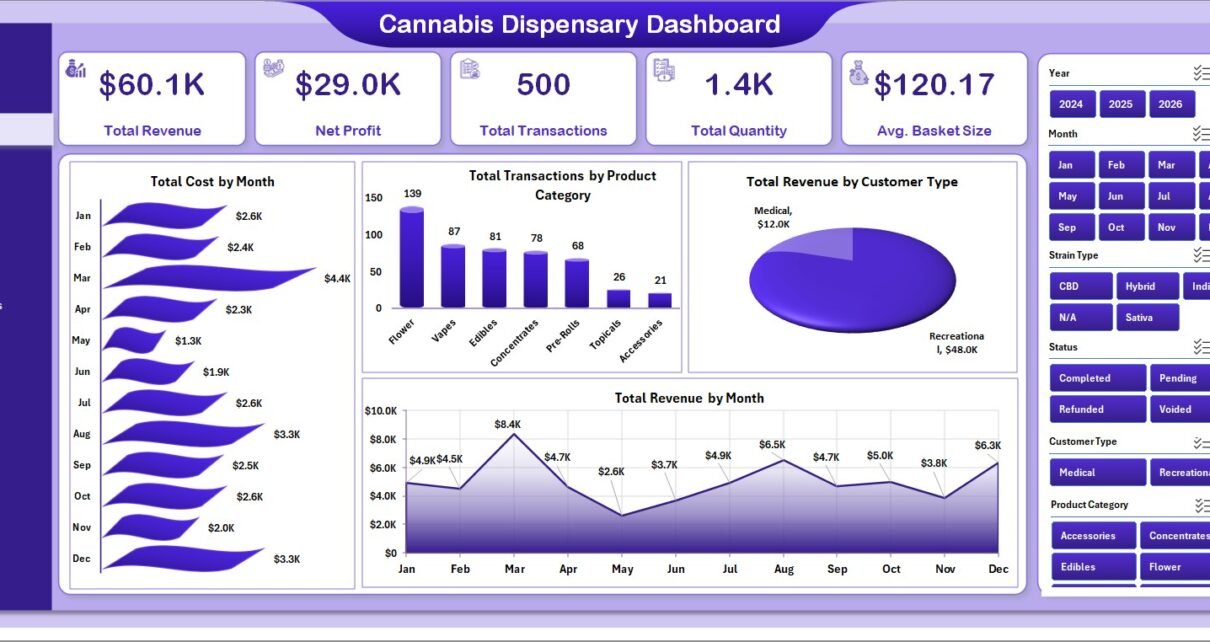
- 5 Overview KPI cards — Total Revenue, Net Profit, Total Transactions, Total Quantity, and Avg. Basket Size — all refresh with every slicer click.
- 17+ pivot-driven charts covering monthly trends, quarterly revenue, product mix, strain margin, customer-type basket size, payment methods, location performance, and budtender ranking.
- Multi-dimensional slicers on every page for Product Category, Customer Type, Payment Method, Location, Strain Type, Budtender, and Month.
- Strain-level Profit Margin % built into the Product Mix page — Indica, Sativa, Hybrid, and CBD compared side by side.
- Budtender performance ranking by Total Revenue and Avg. Basket Size — a coaching and commission-planning tool out of the box.
- 100% Excel-native — works in Microsoft Excel 2016, 2019, 2021, and Microsoft 365, on Windows and Mac. No add-ins required.
- One-time purchase, lifetime updates — no subscription, no per-user fees.
Dashboard Pages Explanation
1. Overview Page
The Overview page is the landing screen — the page leadership will look at first. The 5 KPI cards summarize the headline numbers, and the four charts answer “what does the month look like at a glance?”
- Total Cost by Month: Tracks total cost of goods month over month, exposing how COGS reacts to seasonality and supplier shifts.
- Total Transactions by Product Category: Compares transaction volume across Flower, Edibles, Concentrates, Pre-Rolls, Vapes, and Accessories.
- Total Revenue by Customer Type: Splits revenue between Recreational, Medical, and First-Time Customers — one of the most useful views for promotion planning.
- Total Revenue by Month: Plots monthly revenue, exposing patterns like 4/20 spikes or end-of-month medical-card refills.
Overview Page
2. Sales Trend Page
The Sales Trend page drills deeper into revenue evolution by quarter, month, and category — the page you take into a quarterly business review.
- Total Revenue by Quarter: Aggregates revenue into Q1–Q4 buckets for year-on-year comparison.
- Total Transactions by Month: Tracks monthly transaction count separately from average basket size.
- Total Revenue by Product Category: Ranks every product category by revenue.
- Net Profit by Month: Separates revenue trends from margin trends so you catch cost creep before it erodes profitability.
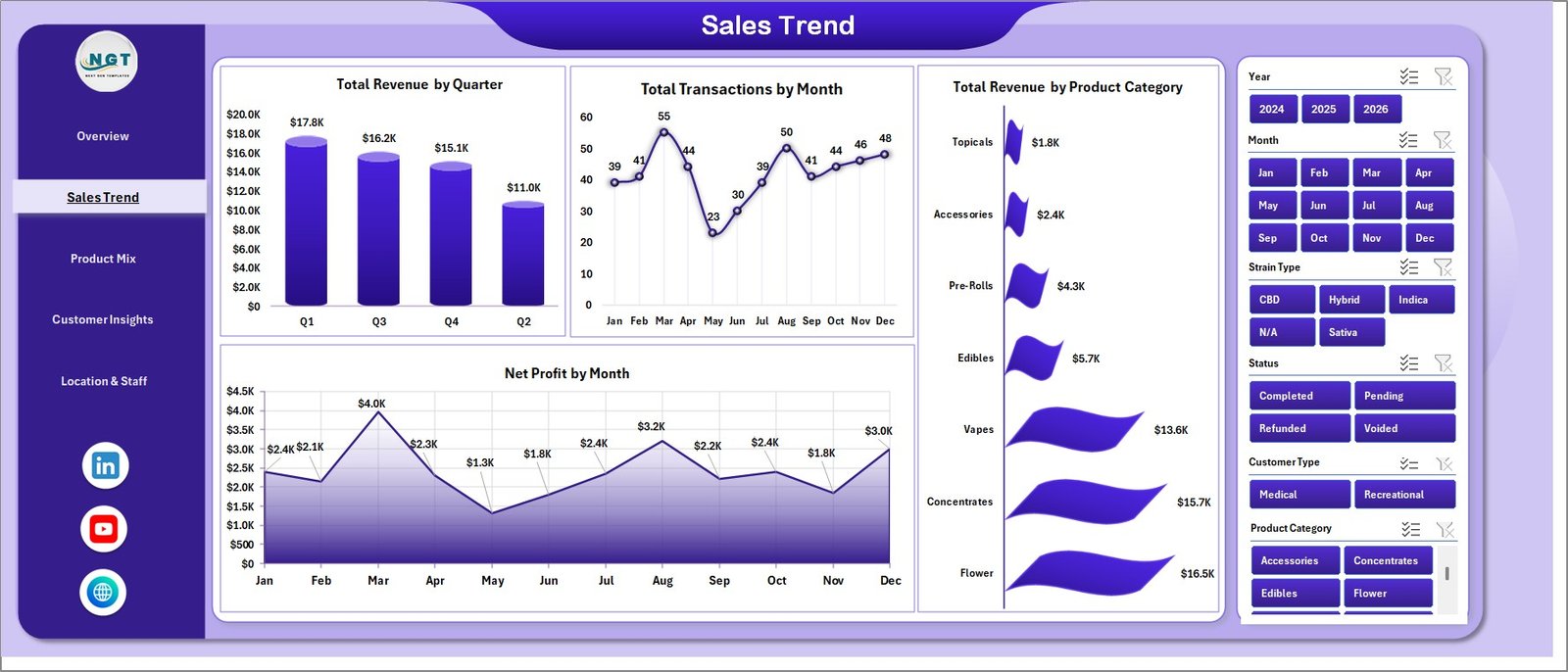
Sales Trend Page
3. Product Mix Page
The Product Mix page is where margin truth lives. It separates “what sells a lot” from “what actually makes money” — across both product category and strain type.
- Net Profit by Product Category: Net profit per category — exposes formats that look high-volume but contribute little to the bottom line.
- Total Transactions by Customer Type: Compares transaction count between Recreational, Medical, and First-Time Customer segments.
- Total Revenue by Strain Type: Indica, Sativa, Hybrid, and CBD revenue side by side.
- Profit Margin % by Strain Type: Gross profit margin by strain type — essential input for vendor negotiations and promo planning.
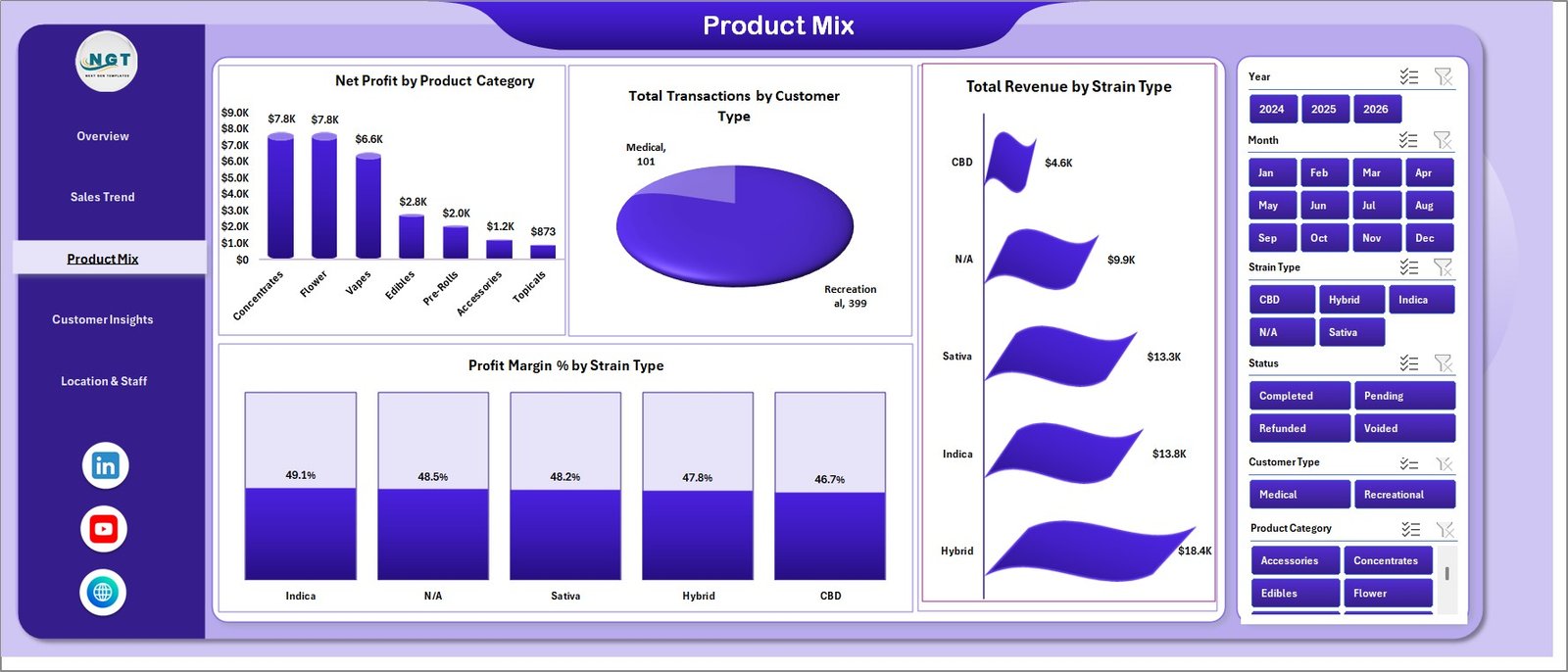
Product Mix Page
4. Customer Insights Page
The Customer Insights page turns transactional data into customer-behavior intelligence and payment-mix analysis — a must in a cash-heavy industry.
- Avg. Basket Size by Customer Type: Reveals whether Medical, Recreational, or First-Time Customers spend more per visit.
- Total Revenue by Payment Method: Splits revenue across Cash, Debit, ACH, and Crypto.
- Total Revenue by Location: Ranks every store by total revenue.
- Profit Margin % by Payment Method: Highlights which payment methods cost you the most in fees.
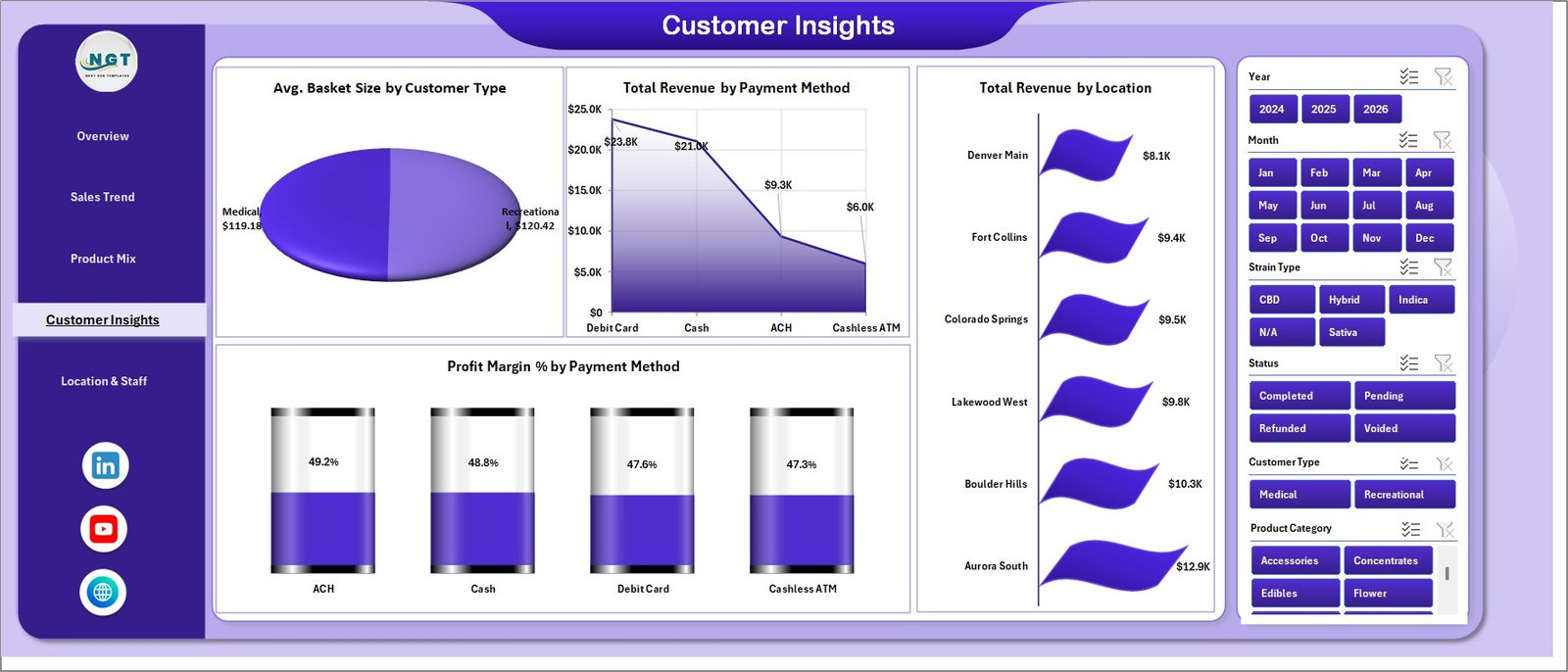
Customer Insights Page
5. Location & Staff Page
The Location & Staff page benchmarks both store and budtender performance — the operational page for district managers and store leads.
- Profit Margin % by Location: Ranks every store by profit margin.
- Avg. Basket Size by Budtender: Identifies your top upsellers.
- Total Revenue by Budtender: Tracks total revenue per budtender for performance reviews and commissions.
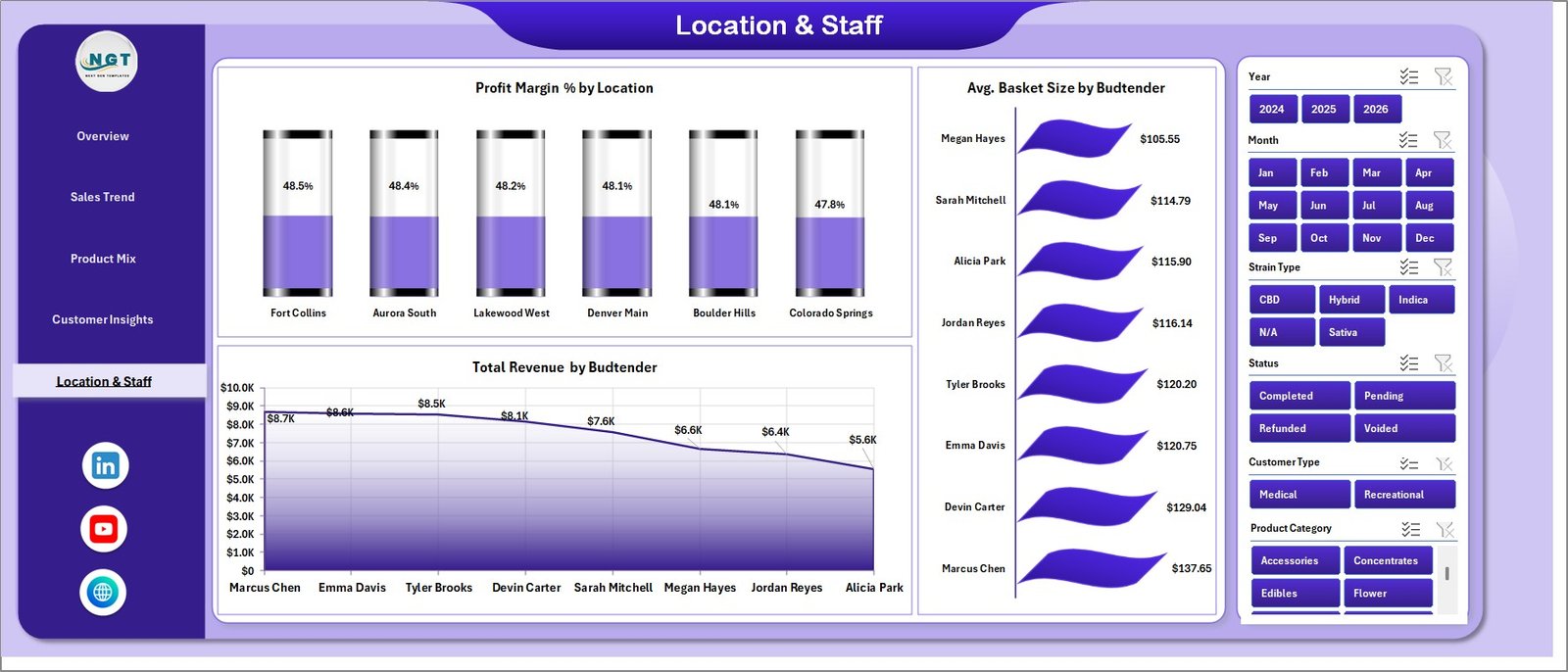
Location & Staff Page
6. Data Sheet Tab
The Data Sheet is where you paste your dispensary transactions in the exact format shown in the sample. Every pivot table reads from this single sheet — there is no dual-maintenance.

Data Sheet tab
7. Support Sheet Tab
The Support Sheet houses all pivot tables that drive the dashboard. After updating the Data sheet, click Data → Refresh All on the Excel ribbon — every pivot rebuilds, and every chart follows. This sheet can be kept hidden from end users.

Support sheet tab
Cannabis Dispensary Dashboard in Excel vs. Google Sheets Equivalent vs. Paid Dispensary SaaS — Feature Comparison
| Feature | Cannabis Dispensary Dashboard in Excel | Google Sheets Equivalent | Paid Dispensary SaaS (Dutchie / Flowhub / Treez) |
|---|---|---|---|
| Cost | $17.99 one-time ✅ | $9.99–$19.99 one-time | $99–$499 / user / month |
| Platform | Microsoft Excel (offline-ready) ✅ | Google Sheets (cloud-only) | Proprietary web app |
| Setup time | Under 10 minutes ✅ | Under 10 minutes | 2–6 weeks onboarding |
| Analysis pages | 5 + Data + Support ✅ | 5 pages | 15+ pre-built reports |
| Strain-level margin tracking | Profit Margin % by strain ✅ | Available | Higher tiers only |
| Budtender performance ranking | Built-in ✅ | Available | Available |
| Mobile access | Excel mobile app ✅ | Google Sheets mobile ✅ | Dedicated app |
| Year-1 cost (5 users) | $17.99 total ✅ | $19.99 total | $5,940–$29,940 |
| Data ownership | Local .xlsx ✅ | Google Drive | Vendor cloud |
For dispensaries that want a sales-and-margin analytics layer without paying tens of thousands per year in SaaS fees, the Cannabis Dispensary Dashboard in Excel sits in the sweet spot.
Who Should Use This Template
Perfect for:
- Independent dispensary owners running 1–10 stores who want monthly revenue and margin visibility.
- Multi-state operators (MSOs) needing a single-file performance review across stores, strain types, and customer segments.
- Cannabis retail managers tracking budtender performance and basket size month over month.
- Cannabis accountants and bookkeepers preparing month-end management reports for dispensary clients.
- Cannabis-industry consultants and analysts who want a reusable Excel reporting layer on top of POS exports.
Not a fit if:
- You need real-time POS, METRC seed-to-sale traceability, or dispensing hardware — use a full cannabis-management platform.
- You require automated state regulatory reporting and ID scanning baked in — those need a vertical SaaS like Dutchie or Flowhub.
- You refuse to work in Excel — consider the Google Sheets dashboard catalogue instead.
Real-World Use Cases
Marcus owns a 3-store independent dispensary chain in Denver. He replaced a $299 per month POS analytics add-on with the Cannabis Dispensary Dashboard in Excel to track Total Revenue, Net Profit, and Profit Margin % by strain across his 3 locations. He now spends 25 minutes a month pasting POS exports instead of 5 hours building reports — and identified that Hybrid strains were quietly carrying his Indica-heavy stores.
Priya is the operations manager at an 8-store recreational chain in Michigan. She uses the Location & Staff page to rank stores by Profit Margin % and budtenders by Avg. Basket Size. After coaching the bottom-quartile budtenders against the top-quartile playbook, average basket size rose 14% in one quarter.
Daniel is a cannabis-industry accountant serving 18 dispensary clients across California. Instead of building a fresh dashboard for each client, he sends every client a copy of this template and turns around month-end management reports in under 40 minutes per client.
Advantages of Cannabis Dispensary Dashboard in Excel
- Massive cost savings vs SaaS — at $17.99 one-time it pays back in the first month versus $99–$499 per user per month for tier-three dispensary analytics.
- Strain-level margin truth — most POS dashboards stop at category; this one goes one layer deeper.
- Budtender coaching tool — Total Revenue and Avg. Basket Size by budtender are both ready to plug into 1:1s and commissions.
- Pivot-driven, not formula-driven — adding rows to the Data sheet does not break charts. One Refresh All rebuilds the whole dashboard.
- Fully editable — extend the Data sheet, add new pivots on the Support sheet, drop new charts on any page.
Opportunities for Improvement
This is a sales and margin analytics dashboard, not a full dispensary management system. Worth flagging:
- It does not connect live to a POS — you import a transaction export (CSV or paste) once a month.
- It does not include METRC compliance reporting or state-mandated traceability views.
- It does not include real-time inventory or expiry alerts. For inventory-led tracking, the dashboard is a complement to POS, not a replacement.
- For very large MSOs running 25+ stores, Excel pivot performance starts to noticeably slow versus a Power BI version.
Best Practices
- Run a monthly close routine: on the 1st of every month, paste the prior month’s POS export, refresh, save a dated snapshot.
- Standardize your column order in the POS export so paste-into-Data is fast and error-free.
- Use the Location slicer to drive store-level conversations, not aggregate-only views.
- Keep the Support sheet hidden for non-analyst users — it prevents accidental pivot deletion.
- Annotate your Excel file with a brief readme cell on the Data sheet describing the column definitions for whoever owns next month’s report.
Explore Relevant Templates
- Cannabis Industry KPI Dashboard in Excel — KPI-scorecard companion focused on industry-wide cannabis metrics.
- Garden Center Dashboard in Excel — Same pivot-driven Excel format for retail garden and nursery operations.
- Pharmacy Dashboard in Excel — Adjacent regulated-retail dashboard with similar inventory and customer analytics.
- Dropshipping Dashboard in Excel — Same architecture for e-commerce retail operators.
- Browse the full Excel Dashboard Templates library.
Frequently Asked Questions
What KPIs does the Cannabis Dispensary Dashboard in Excel track?
The Cannabis Dispensary Dashboard in Excel tracks 5 headline KPIs — Total Revenue, Net Profit, Total Transactions, Total Quantity, and Avg. Basket Size — plus 17+ pivot-driven charts across sales trend, product mix, customer insights, and location and staff performance. All metrics refresh after Data → Refresh All.
How long does setup take?
Setup of the Cannabis Dispensary Dashboard in Excel takes under 10 minutes. Open the .xlsx, paste your transactions into the Data sheet in the same column order as the sample, and press Data → Refresh All. Every chart and KPI updates immediately — no formula editing required.
Can I use this template for multiple dispensary store locations?
Yes. The Cannabis Dispensary Dashboard in Excel is designed for multi-store dispensaries. Every page has a Location slicer, and the Customer Insights and Location & Staff pages plot revenue, profit margin, and basket size by store, so you can benchmark locations side by side.
Which versions of Excel does this dashboard support?
The Cannabis Dispensary Dashboard in Excel works in Microsoft Excel 2016, 2019, 2021, and Microsoft 365 on Windows and Mac. Excel Online opens it in read-only mode. Pivot tables and slicers require the desktop app for full interactivity, per the official Microsoft Excel slicers documentation.
How does this compare to paid dispensary SaaS like Dutchie or Flowhub?
Paid dispensary SaaS like Dutchie or Flowhub typically costs $99–$499 per user per month and includes POS, METRC compliance, and ID scanning. The Cannabis Dispensary Dashboard in Excel is $17.99 one-time and focuses on revenue, profit, and performance analytics — most dispensaries run it alongside their POS rather than replacing it.
Can I add my own custom KPIs and charts?
Absolutely. The Cannabis Dispensary Dashboard in Excel is fully editable. Extend the Data sheet with new columns, add custom pivot fields on the Support sheet, and create additional charts on any page. Nothing is locked.
Do I get future updates to the Cannabis Dispensary Dashboard in Excel?
Yes. Every structural improvement or fix is shared at no additional charge. Re-download the .zip from your NextGenTemplates account at any time to get the latest version.
About the Author
Built by PK — Microsoft Certified Professional with 15+ years of Excel, Google Sheets, and Power BI experience. Founder of NextGenTemplates, reaching 300K+ subscribers across YouTube channels (@PK-AnExcelExpert, @NextGenTemplates, @NeoTechNavigators). Every template is hand-built and tested before release.
Conclusion
If you run a dispensary, the gap between “I can see how the month went” and “I can see exactly which strain, store, and budtender drove it” is usually the difference between buying $300+ per month POS analytics or paying nothing extra and living with shallow reports. The Cannabis Dispensary Dashboard in Excel closes that gap for $17.99 once.
👉 Click here to Purchase Cannabis Dispensary Dashboard in Excel
✅ Instant download · One-time payment · No subscription
For more Excel dashboard tutorials, visit Youtube.com/@PK-AnExcelExpert.
📅 Last updated: May 2026