Luxury Handbags Dashboard in Excel is a ready-to-use Excel dashboard template for luxury handbag retailers, boutique owners, fashion brands, e-commerce sellers, and analysts who need a clear view of revenue, cost, net profit, units sold, orders, quality ratings, brands, regions, channels, product categories, returns, and fulfillment. Luxury retail can change quickly because premium products carry higher expectations, higher margins, and higher risk when returns or delivery issues increase. A structured dashboard helps teams move from scattered spreadsheets to focused decisions.
This workbook includes 5 dashboard pages, 5 high-level KPI cards, multiple slicers, a Data Sheet, and a pivot-powered Support Sheet. Users can add their data, refresh the workbook, and review management-ready charts without building the reporting structure from scratch. For Excel PivotTable basics, you can also refer to Microsoft Support’s guide on creating PivotTables to analyze worksheet data.
Click here to purchase the Luxury Handbags Dashboard in Excel
Luxury Handbags Dashboard in Excel
Key Features of Luxury Handbags Dashboard in Excel
- 5 dashboard pages: Overview, Brand Analysis, Channel Sales, Product Mix, and Fulfillment.
- 5 KPI cards: Total Revenue, Net Profit, Units Sold, Total Orders, and Avg. Quality Rating.
- Interactive slicers: Apply filters and review selected luxury handbag performance quickly.
- Brand analysis: Compare average quality rating, revenue, cost, and margin by brand and segment.
- Channel sales analysis: Review delivery percentage, return percentage, revenue, and monthly cost.
- Product mix analysis: Understand profit by material, margin by brand, orders by status, and returns by category.
- Fulfillment reporting: Track delivery performance by region and returns by month or channel.
- Editable Excel workbook: Modify charts, pivot tables, slicers, labels, colors, and source data fields.
Dashboard Pages Explanation
1 – Overview Page
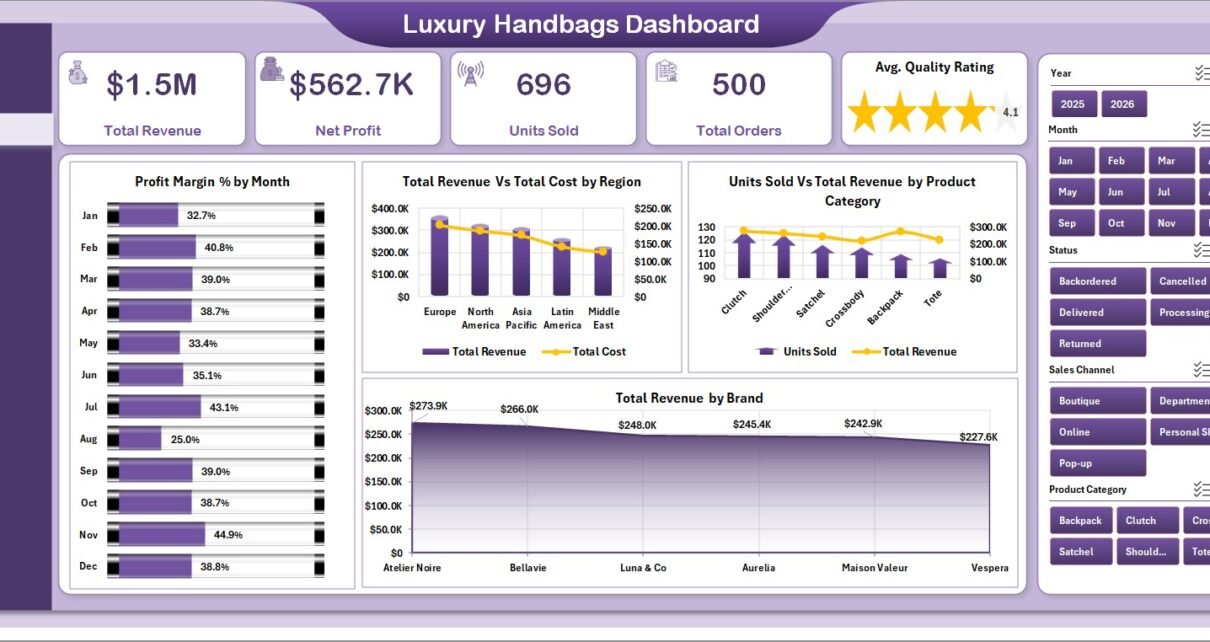
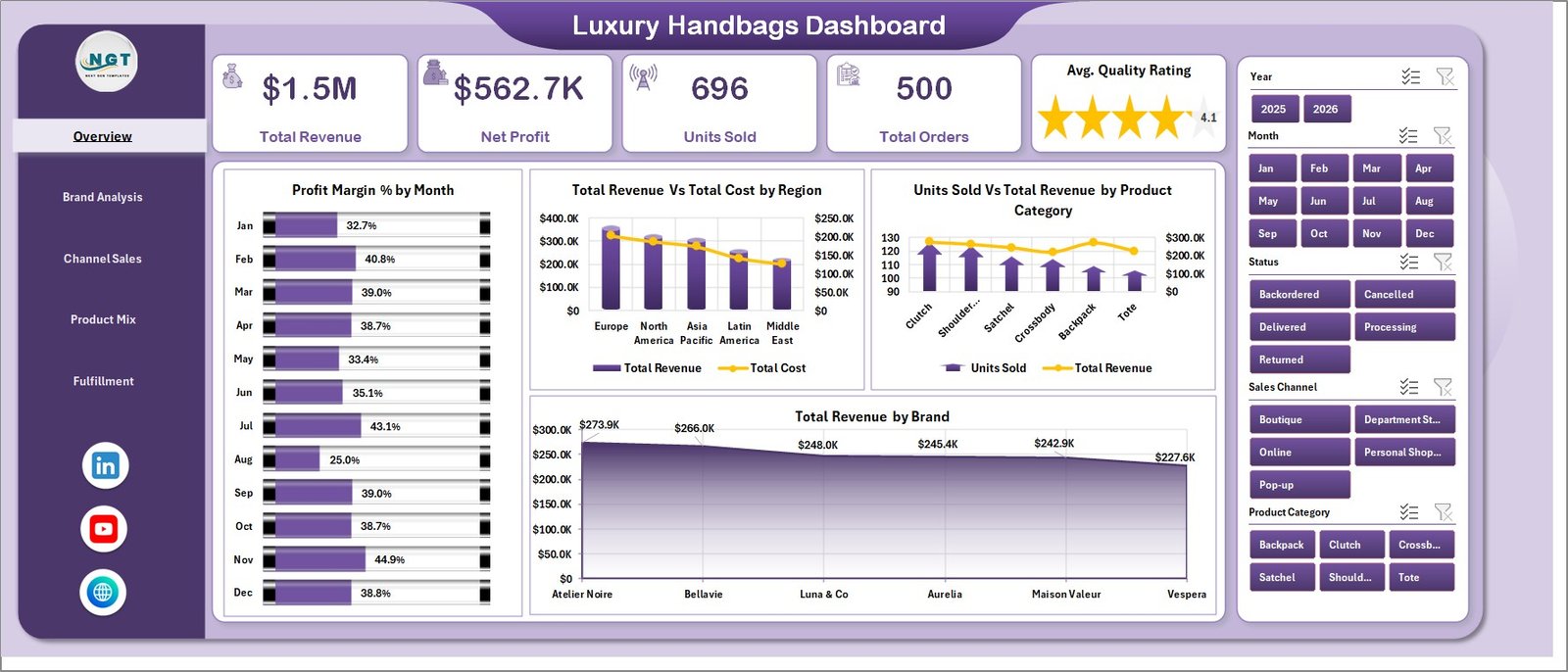
The Overview page is the first page for management review. At the top, KPI cards show Total Revenue, Net Profit, Units Sold, Total Orders, and Avg. Quality Rating. These cards help owners and managers understand business health before they go into brand, channel, product, or fulfillment details.
Profit Margin % by Month: This chart shows monthly profitability movement. It helps identify seasonal pressure, discount-heavy periods, and months where product mix or cost needs attention.
Total Revenue and Total Cost by Region: This chart compares sales value and cost by region. It helps teams find territories where revenue is strong but cost may be reducing profit.
Units Sold and Total Revenue by Product Category: This chart connects product movement with sales value. It helps distinguish high-volume categories from high-revenue categories.
Total Revenue by Brand: This chart ranks brands by revenue contribution. It helps teams focus buying, promotions, and premium positioning on the brands driving the most value.
2 – Brand Analysis
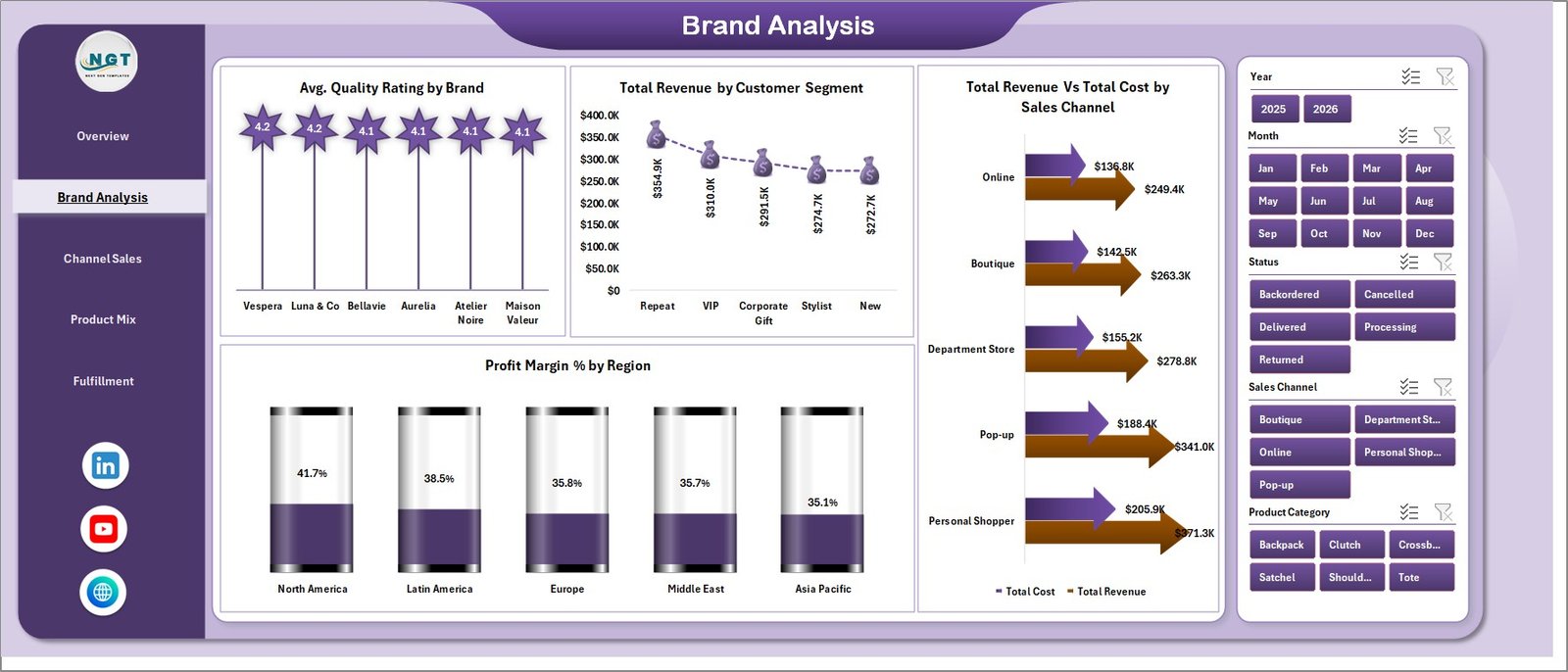
The Brand Analysis page focuses on brand quality, segment revenue, sales channel cost, and regional profit margin. It is useful for brand managers, merchandisers, and finance teams reviewing luxury handbag performance.
Avg. Quality Rating by Brand: This chart compares customer quality perception by brand. It helps identify strong brands and brands that may need supplier or quality review.
Total Revenue by Customer Segment: This chart shows which customer segments contribute the most revenue. It supports VIP campaigns, loyalty planning, and targeted merchandising.
Total Revenue and Total Cost by Sales Channel: This chart compares channel sales and cost side by side. It helps users decide whether each channel is profitable enough to scale.
Profit Margin % by Region: This chart shows regional margin differences. It helps identify markets where pricing, shipping, returns, or channel mix may be affecting profit.
Brand Analysis
3 – Channel Sales
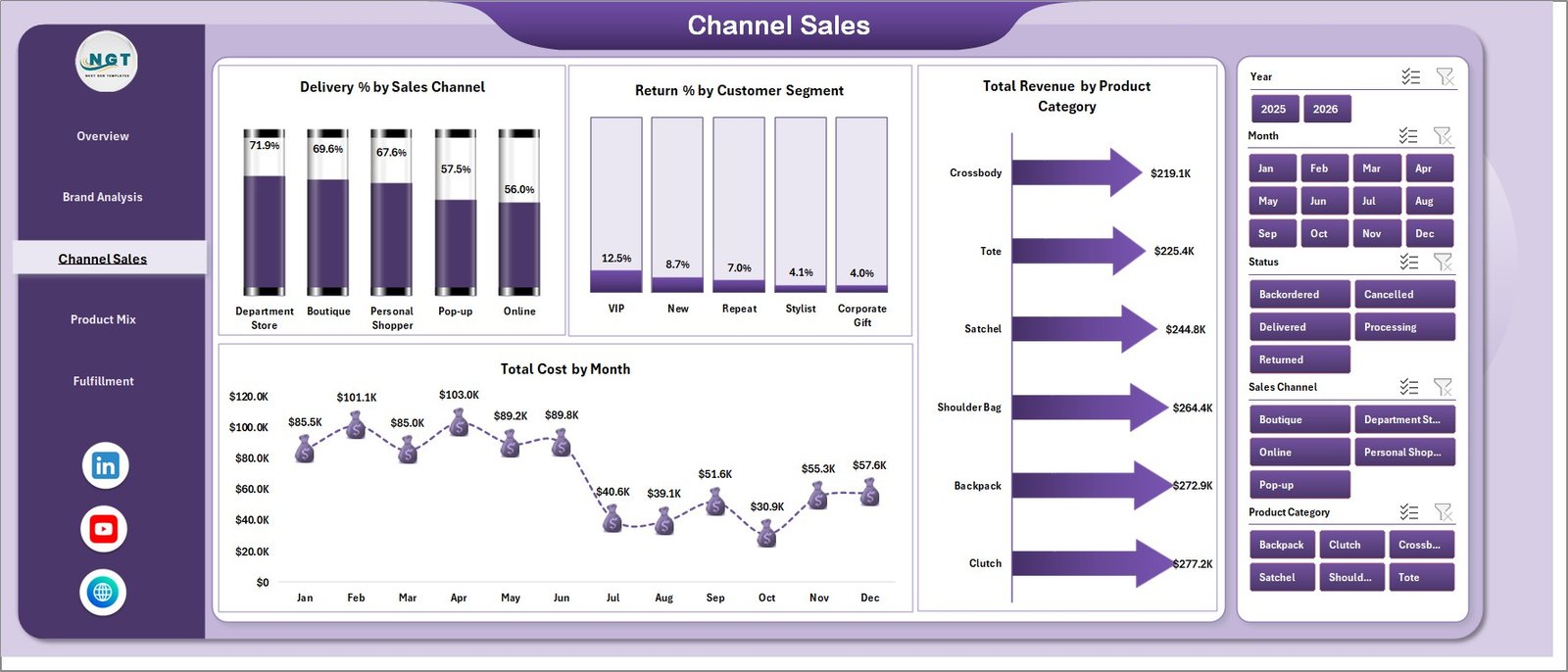
The Channel Sales page helps teams understand the relationship between delivery, returns, revenue, product category, and cost trends.
Delivery % by Sales Channel: This chart compares delivery success across sales channels. It helps identify where the customer experience may be stronger or weaker.
Return % by Customer Segment: This chart shows which customer segments return more often. It helps teams review sizing, expectations, product quality, or campaign targeting.
Total Revenue by Product Category: This chart highlights the categories producing the highest revenue. It supports assortment planning and category-level promotions.
Total Cost by Month: This chart tracks monthly cost movement. It helps users investigate seasonal cost spikes, supplier changes, campaign spending, or fulfillment pressure.
Channel Sales
4 – Product Mix
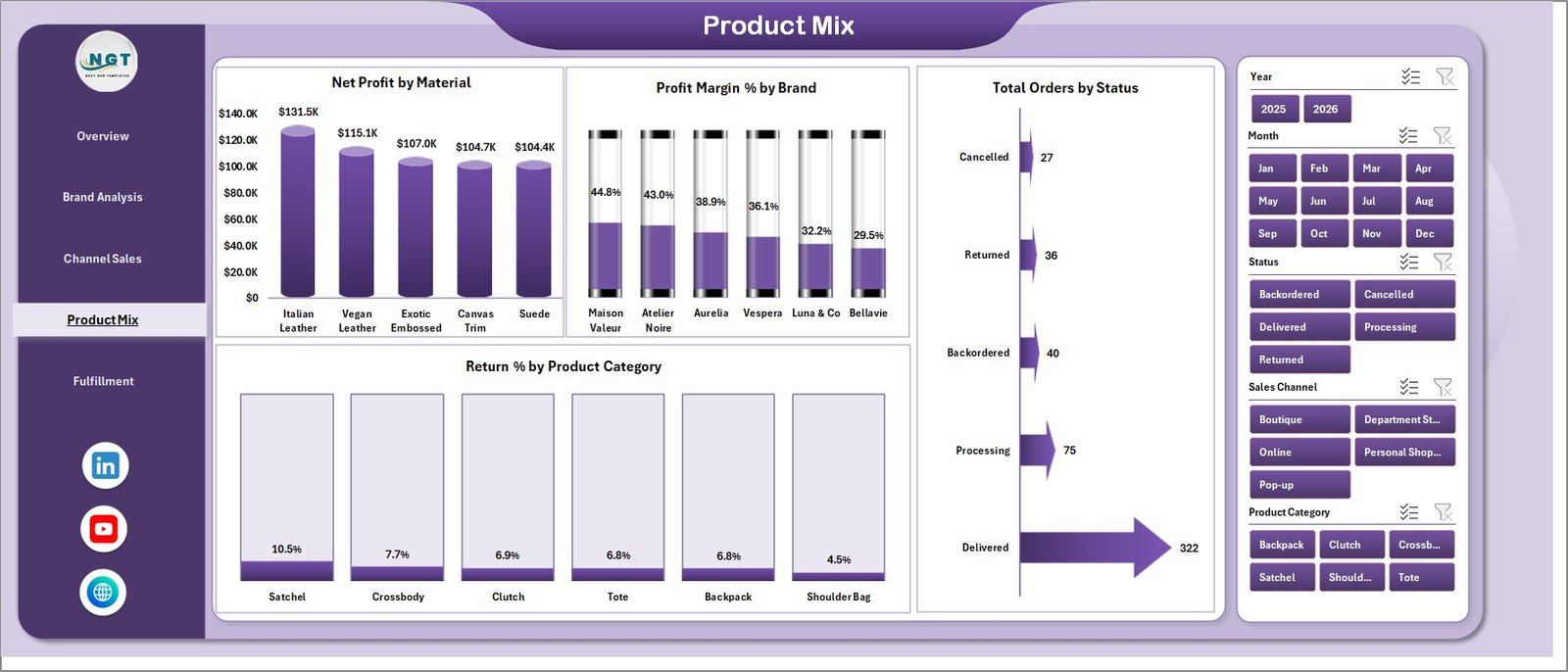
The Product Mix page supports merchandising and product planning decisions. It focuses on material profitability, brand margin, order status, and category-level return risk.
Net Profit by Material: This chart shows which handbag materials produce the most profit. It helps teams understand whether leather, canvas, suede, or other materials are supporting margin goals.
Profit Margin % by Brand: This chart compares profitability by brand. It helps separate high-revenue brands from brands that create stronger profit margin.
Total Orders by Status: This chart summarizes orders by status. It helps operations teams monitor completed, pending, returned, or cancelled orders.
Return % by Product Category: This chart compares return rate by category. It helps identify categories where quality, fit, photos, pricing, or expectations may need review.
Product Mix
5 – Fulfillment
The Fulfillment page focuses on delivery and return performance. Luxury customers expect reliable delivery, careful packaging, and fast issue resolution, so fulfillment analysis is important for protecting brand value.
Delivery % by Region: This chart compares delivery performance across regions. It helps find markets where courier performance, stock location, or delivery process may need attention.
Total Returns by Month: This chart shows return volume by month. It helps identify spikes after promotions, new launches, seasonal peaks, or fulfillment issues.
Return % by Sales Channel: This chart compares return rate by channel. It helps managers understand whether online, store, marketplace, or wholesale sales create different return patterns.
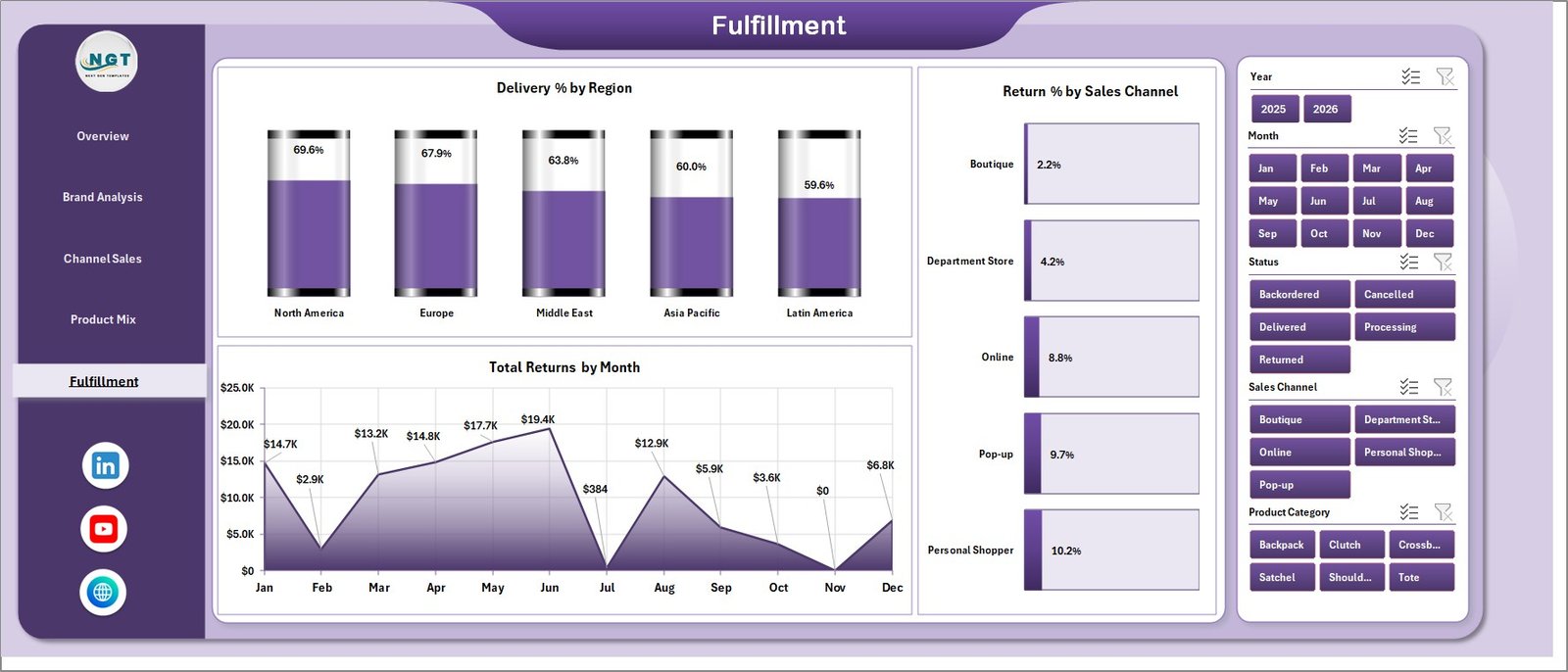
Fulfillment
6 – Data Sheet Tab
The Data Sheet tab is where users add their records in the same format as the sample data. Keeping the same columns and structure allows the cards, charts, slicers, and pivot tables to refresh correctly.

Data Sheet tab
7 – Support Sheet Tab
The Support Sheet contains multiple pivot tables used to create the entire dashboard dynamically. After updating the Data Sheet, go to the Data tab in the Excel Ribbon and click Refresh All. The pivot tables and charts will refresh, and the sheet can be hidden for everyday users.

Support Sheet tab
Luxury Handbags Dashboard in Excel vs. Google Sheets vs. Paid CRM/SaaS – Feature Comparison
| Feature | Luxury Handbags Dashboard in Excel | Google Sheets alternative | Paid retail SaaS |
|---|---|---|---|
| Cost | $17.99 one-time sale price | Template or custom build cost | Monthly or annual subscription |
| Platform | Microsoft Excel | Google Sheets | Vendor-hosted retail platform |
| Setup time | Replace data and refresh pivots | Import data and adapt formulas | Implementation and onboarding |
| Real-time team collaboration | Possible with OneDrive or SharePoint | Native collaboration | Usually included |
| Mobile access | Excel mobile with limitations | Google Sheets mobile | Usually included |
| Customizable fields | Fully editable workbook | Editable sheet | Plan dependent |
| Share with link | Possible through Microsoft 365 | Yes | Login controlled |
| Year-1 cost at 5 users | $17.99 plus Microsoft licensing | Template cost plus maintenance | Often hundreds or thousands |
| Luxury handbag analysis | Built around revenue, profit, ratings, brands, channels, product mix, and fulfillment | Must be built or adapted | Depends on vendor module |
Who Should Use This Template
This template is ideal for luxury handbag retailers, boutique owners, fashion e-commerce sellers, merchandisers, brand managers, finance analysts, operations managers, and consultants who need repeatable Excel reporting for premium handbag sales and fulfillment.
It is especially useful when teams already export data from POS, e-commerce, marketplace, ERP, CRM, or spreadsheet systems and need a clean Excel dashboard for weekly or monthly review.
Real-World Use Cases
Priya, boutique owner: opens the Overview and Product Mix pages every week to review revenue, profit, units sold, return percentage, and material-level profit.
Arjun, finance analyst: uses the Region, Channel Sales, and Brand Analysis pages to explain margin movement during monthly business review meetings.
Sofia, brand manager: reviews quality ratings, brand revenue, return rate, and fulfillment performance before supplier and assortment planning discussions.
Advantages of Luxury Handbags Dashboard in Excel
- It gives leadership a quick view of revenue, profit, units, orders, and quality rating.
- It separates analysis into focused pages instead of one crowded dashboard.
- It supports slicer-based exploration across available dimensions.
- It is editable, so Excel users can adjust visuals, formulas, pivots, and labels.
- It gives teams a one-time template purchase instead of adding another reporting subscription.
Opportunities for Improvement
This is a reporting dashboard, not a POS, CRM, ERP, warehouse, or live fulfillment platform. It does not process payments, scan inventory, update stock automatically, send customer messages, book couriers, or manage customer service tickets.
Advanced users can extend the workbook with extra slicers, Power Query, additional pivot tables, custom KPIs, margin thresholds, customer cohorts, or separate pages for inventory planning and campaign performance.
Best Practices
- Keep brand, region, product category, material, channel, customer segment, and status names consistent.
- Refresh all pivots after every Data Sheet update.
- Review return percentage with quality rating so return issues are not missed.
- Compare revenue and cost together before calling a region or channel successful.
- Keep a backup before changing formulas, pivot sources, or sheet structure.
Explore Relevant Templates
- Luxury Handbags Dashboard in Excel
- Luxury Handbags KPI Dashboard in Excel
- Fashion Boutiques Dashboard in Excel
- Fashion E-commerce Dashboard in Excel
- Baby Products Retail Dashboard in Excel
Frequently Asked Questions
What is the Luxury Handbags Dashboard in Excel?
It is an editable Excel dashboard template for reviewing luxury handbag revenue, cost, profit, orders, units sold, quality ratings, brands, channels, regions, product mix, returns, and fulfillment.
How do I update the dashboard?
Add or paste your records into the Data Sheet in the same format, then click Refresh All from the Excel Data tab.
How many dashboard pages are included?
The workbook includes 5 dashboard pages: Overview, Brand Analysis, Channel Sales, Product Mix, and Fulfillment, plus Data Sheet and Support Sheet tabs.
Can I customize the workbook?
Yes. You can edit formulas, charts, pivot tables, slicers, headings, colors, and sheet names directly in Excel.
Does this replace retail management software?
No. It is a reporting dashboard, not a POS, CRM, inventory system, or order management platform.
Can I hide the Support Sheet?
Yes. The Support Sheet contains pivot tables used to run the dashboard and can be hidden after setup.
About the Author
Built by PK – Microsoft Certified Professional with 15+ years of Excel, Google Sheets, and Power BI experience. Founder of NextGenTemplates, reaching 300K+ subscribers across YouTube channels. Every template is hand-built and tested before release.
Conclusion
The Luxury Handbags Dashboard in Excel gives fashion retail teams a practical way to review revenue, cost, net profit, units sold, orders, quality rating, brand performance, channel sales, product mix, returns, and fulfillment in one workbook. With 5 dashboard pages, slicers, a Data Sheet, and a pivot-powered Support Sheet, it is a strong fit for teams that want better reporting without building an Excel dashboard from a blank file.
Click here to purchase the Luxury Handbags Dashboard in Excel
For step-by-step Excel tutorials, visit YouTube.com/@PKAnExcelExpert.
Last updated: July 5, 2026