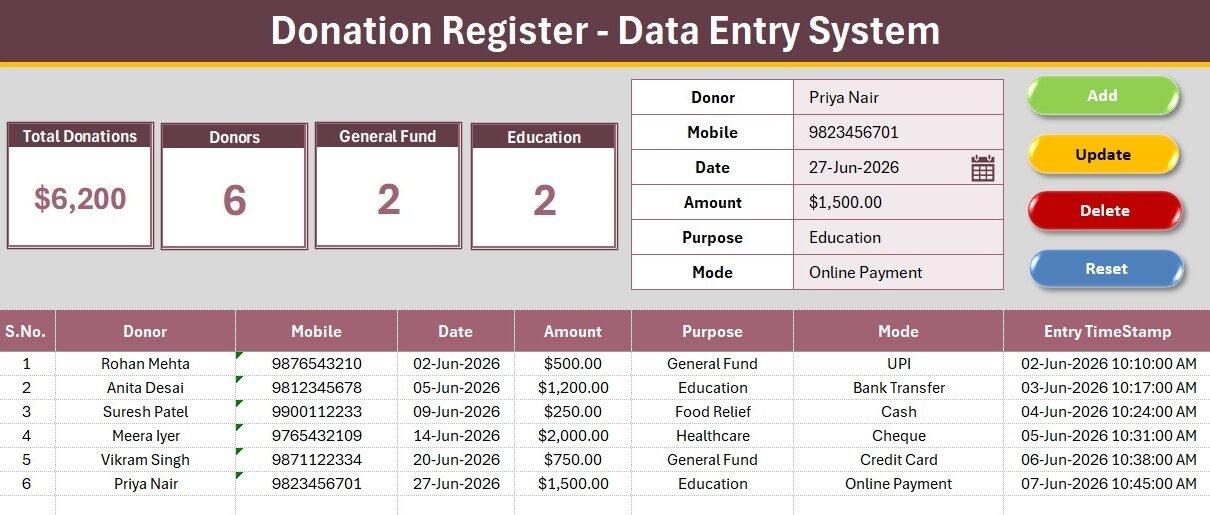
The Donation Register Data Entry System in Excel captures six donor fields on a single form, feeds four live KPI cards, and runs Add, Update, Delete and Reset from four one-click VBA buttons. Two dropdown lists ship ready to use: 12 donation purposes and 8 payment modes, both editable on the Setting sheet. Every record is stamped with an automatic serial number and an Entry TimeStamp, so your donation log stays audit-ready without a single manual formula.
Most small charities, temples, churches, school funds and community groups still track giving in a loose spreadsheet – names in one column, amounts in another, no totals, no consistency in how a purpose or payment mode is spelled. Then the annual report arrives and someone spends a weekend reconciling it. Donor-management SaaS solves that, but it starts around $99 per month and locks your donor list behind a login. This Excel donation tracker template gives you the structure without the subscription.
Key Features of the Donation Register Data Entry System in Excel
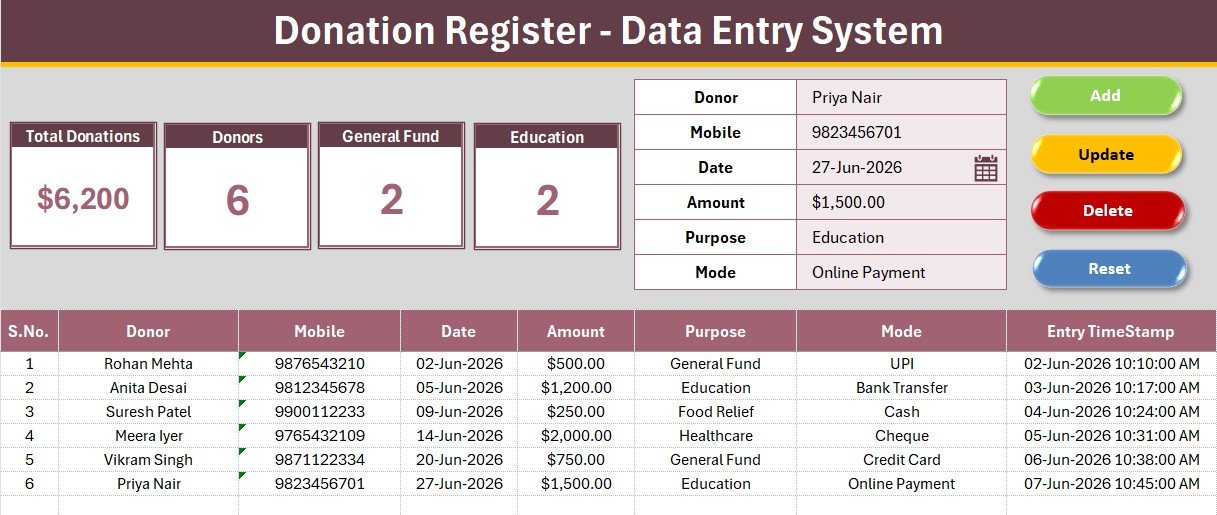
- Six-field donor form. The system records Donor, Mobile, Date, Amount, Purpose and Mode. Purpose and Mode are dropdown-controlled, so two volunteers entering the same donation always spell it the same way.
- Four live KPI cards. The dashboard panel tracks Total Donations (a running sum of every amount), Donors (total records logged), General Fund count and Education count. All four recalculate the moment a record is added.
- Four VBA macros. Add_Record, Update_Record, Delete_Record and Reset_Form drive the coloured Add, Update, Delete and Reset buttons. No typing directly into the table, no accidental overwrites.
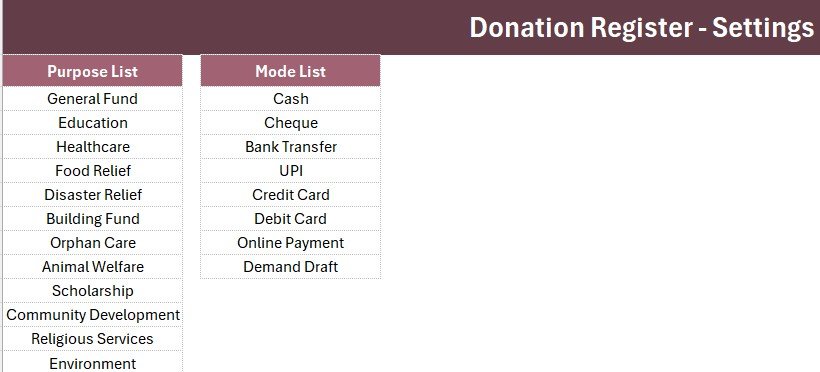
- Two editable dropdown lists. Purpose ships with 12 options (General Fund, Education, Healthcare, Food Relief, Disaster Relief, Building Fund, Orphan Care, Animal Welfare, Scholarship, Community Development, Religious Services, Environment). Mode ships with 8 (Cash, Cheque, Bank Transfer, UPI, Credit Card, Debit Card, Online Payment, Demand Draft).
- Auto serial number and timestamp. The S.No column fills itself as rows appear, and every entry gets an Entry TimeStamp – useful when two people log donations on the same day and you need to know which came first.
- Currency formatting built in. The Amount column is pre-formatted, so donation values stay clean and the Total Donations card is always report-ready.
- Works offline. Excel 2016, 2019, 2021 and Microsoft 365. No add-ins, no internet connection, no per-user seat charge.
Sheets Explanation
Sheet 1: Data Entry
This is the working sheet. The top panel holds the four KPI cards – Total Donations, Donors, General Fund and Education – alongside the six-field donor form and the Add, Delete, Update and Reset buttons. Below row 14 sits the records table: S.No, Donor, Mobile, Date, Amount, Purpose, Mode and Entry TimeStamp. Fill the form, press Add, and the row lands at the bottom of the log with the KPI cards updating instantly.
Sheet 2: Setting
The Setting sheet holds the two dropdown source lists – Purpose and Mode – plus a duplicated set of the KPI cards. Add a new fund or a new payment channel here and it appears in the form dropdown immediately, because the validation is wired through named ranges. The duplicated cards exist so you can copy them and paste as a linked picture into a report or an email.
Sheet 3: Instructions
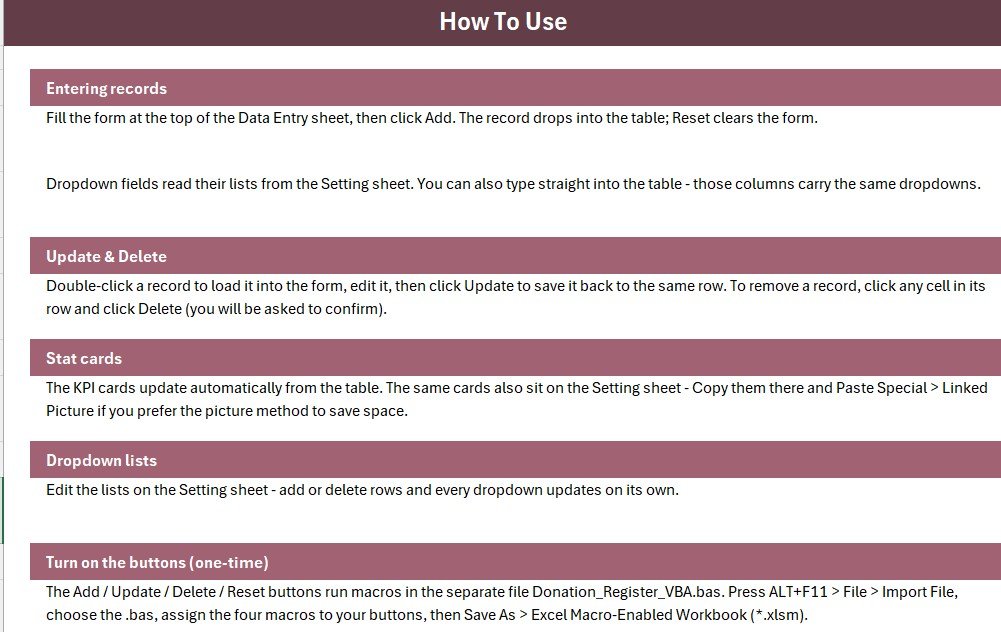
A step-by-step activation guide: import the VBA module, place the four form-control buttons over the coloured cells, assign the macros, and save as a macro-enabled workbook. The whole process takes under 10 minutes and only needs doing once. A Get More Templates sheet is bundled alongside it with links to related NextGenTemplates products.
Donation Register in Excel vs. Google Sheets vs. Paid Donor SaaS – Feature Comparison
| Feature | Donation Register Data Entry System in Excel | Google Sheets donation log | DonorPerfect / Bloomerang / Little Green Light |
|---|---|---|---|
| Cost | $5.99 one-time | Free, but built by you | $99-$300 / month |
| Platform | Excel 2016+ / Microsoft 365 | Browser only | Cloud only |
| Setup time | Under 10 minutes | 2-4 hours to build from scratch | 1-3 weeks of onboarding |
| One-click Add / Update / Delete | Yes – 4 VBA buttons ✅ | Needs Apps Script | Yes ✅ |
| Real-time team collaboration | Via OneDrive / SharePoint | Yes ✅ | Yes ✅ |
| Works offline | Yes ✅ | No | No |
| Donor data stays on your machine | Yes ✅ | Google servers | Vendor servers |
| Customisable purposes & payment modes | Yes – edit the Setting sheet ✅ | Manual setup | Admin-only, tiered |
| Year-1 cost at 5 users | $5.99 total | $0 + your build time | $1,188 – $3,600 |
For a charity that wants a structured, auditable donation log without paying four figures a year for donor-management software, the Donation Register Data Entry System in Excel sits in the sweet spot.
Who Should Use This Template
Perfect for:
- Small charities, NGOs and community trusts logging 10-500 donations a month
- Churches, temples, mosques and gurdwaras tracking offerings by fund and payment mode
- School and college fundraising committees running scholarship or building appeals
- Volunteer treasurers who need a clean donor list for the annual report
- Anyone currently using an unstructured spreadsheet with no totals and no validation
Not a fit if:
- You need automatic tax-receipt emails, recurring gift processing or payment-gateway integration – use a donor CRM
- Your organisation requires SOC 2, SSO or a full audit trail across users
- You need multiple people editing the register simultaneously all day (OneDrive co-authoring on a macro workbook has limits)
- You are on Excel for Mac and cannot enable macros in your environment
Real-World Use Cases
Meera is the volunteer treasurer of a 200-family community trust. Before the Donation Register, giving was logged on paper receipts and typed up at year-end. Now every donation is entered as it arrives – donor, mobile, amount, purpose, mode – and the Total Donations card gives her the running figure at any moment. When the committee asks how much the Building Fund has raised, she filters one column instead of rebuilding a summary.
Father Thomas runs a parish office with two part-time volunteers. The dropdown lists mean all three of them record “Bank Transfer” the same way, so the mode breakdown at the end of the quarter is actually usable. The Entry TimeStamp column has already settled one dispute about which of two donations was logged first.
Anjali coordinates a school scholarship drive. She added “Alumni Pledge” and “Corporate Match” to the Purpose list on the Setting sheet in under a minute, and both appeared in the form dropdown immediately – no formula editing required.
Advantages of the Donation Register Data Entry System in Excel
- Cost. A one-time $5.99 against $1,188 or more per year for entry-level donor software. For a group whose entire admin budget is a few hundred dollars, that difference is the point.
- Time. Setup takes under 10 minutes. There is no data migration, no onboarding call, no import mapping.
- Data ownership. Donor names and mobile numbers stay in a file on your machine. Nothing is uploaded anywhere.
- Consistency. Dropdown validation removes the single biggest source of mess in a donation spreadsheet – free-typed category names.
- Familiarity. Every volunteer treasurer already knows Excel. Nobody needs training on a new interface.
Opportunities for Improvement
An honest look at the limits. The system logs and summarises donations – it does not issue receipts, and it will not chase a lapsed monthly donor. There is no charting page: the four KPI cards are the reporting layer, so if you want a Purpose-by-month trend chart you will need to add a PivotChart yourself or move up to a full Educational NGOs Dashboard in Excel. Macro workbooks also need to be saved as .xlsm and trusted, which means a one-off security prompt the first time each user opens it. Finally, the KPI cards count two named purposes (General Fund and Education) rather than every purpose – editing the COUNTIF value in the card formula lets you point them at whichever funds matter most to you.
Best Practices
- Customise the Setting sheet before your first real entry – add your own funds and payment channels so the log is consistent from row one.
- Enter donations the day they arrive. The Entry TimeStamp only helps if it reflects reality.
- Keep a backup copy in OneDrive or Google Drive. It is one file – losing it loses the register.
- Retain the underlying receipts. Excel is your log, not your evidence – authorities such as the IRS guidance on substantiating charitable contributions expect written acknowledgement records to be kept alongside it.
- If you want to extend the macros, the Microsoft Excel VBA reference documents every object used in the module.
Explore Relevant Templates
- Donation Register Data Entry System in Excel – the template covered in this post.
- Nonprofit & NGO Operations Bundle – 7 Excel and Google Sheets templates for charity operations, at 46% off the individual prices.
- Church Transaction Analysis Dashboard in Google Sheets – the reporting layer if you want charts on top of your giving data.
- Gym Membership Data Entry System in Excel – the same engine applied to membership records.
- Vehicle Service Log Data Entry System in Excel and Hotel Room Booking Data Entry System in Excel – two more systems from the same family.
- 💎 Excel VBA Tools & Utilities Pack – 8 premium VBA templates, save 40%.
Frequently Asked Questions
What does the Donation Register Data Entry System in Excel track?
The Donation Register Data Entry System in Excel tracks six fields per donation – Donor, Mobile, Date, Amount, Purpose and Mode – and summarises them in four KPI cards: Total Donations, Donors, General Fund count and Education count. All figures refresh automatically as records are added.
Do I need to know VBA to use it?
No. The Donation Register Data Entry System in Excel ships with a ready-made VBA module. You import it once via ALT+F11, assign four macros to four buttons, and save the file as .xlsm. The Instructions sheet walks through every step – no code writing required.
Can I change the donation purposes and payment modes?
Yes. Both lists live on the Setting sheet of the Donation Register Data Entry System in Excel. Type a new fund or payment channel into the list and it appears in the form dropdown immediately, because the data validation is driven by named ranges that expand automatically.
How does this compare to DonorPerfect or Bloomerang?
Donor CRMs handle receipts, recurring gifts and payment gateways, and charge roughly $99-$300 per month. The Donation Register Data Entry System in Excel does none of that – it gives you a clean, validated, auditable donation log for a one-time $5.99, offline, with your donor data on your own machine.
How long does setup take?
Under 10 minutes. Open the workbook, import the .bas module, draw four buttons over the coloured Add, Delete, Update and Reset cells, assign the macros, and save as a macro-enabled workbook. Setup is a one-time task for the Donation Register Data Entry System in Excel.
How many donations can it hold?
There is no cap built into the Donation Register Data Entry System in Excel. The records table grows down the sheet and the KPI formulas cover the full column, so an organisation logging a few thousand donations a year will run comfortably within Excel’s row limit for many years.
About the Author
Built by PK – Microsoft Certified Professional with 15+ years of Excel, Google Sheets, and Power BI experience. Founder of NextGenTemplates, reaching 300K+ subscribers across YouTube channels. Every template is hand-built and tested before release.
Conclusion
A donation register does not need to be complicated – it needs to be consistent, quick to fill, and impossible to get wrong. The Donation Register Data Entry System in Excel gives a volunteer treasurer a six-field form, four one-click buttons, validated dropdowns and four live KPI cards, and it does so in a file that opens offline on any copy of Excel.
👉 Click here to purchase the Donation Register Data Entry System in Excel
✅ Instant download · One-time payment · No subscription · Lifetime access
🎥 For step-by-step video tutorials, visit Youtube.com/@PK-AnExcelExpert
Last updated: July 2026