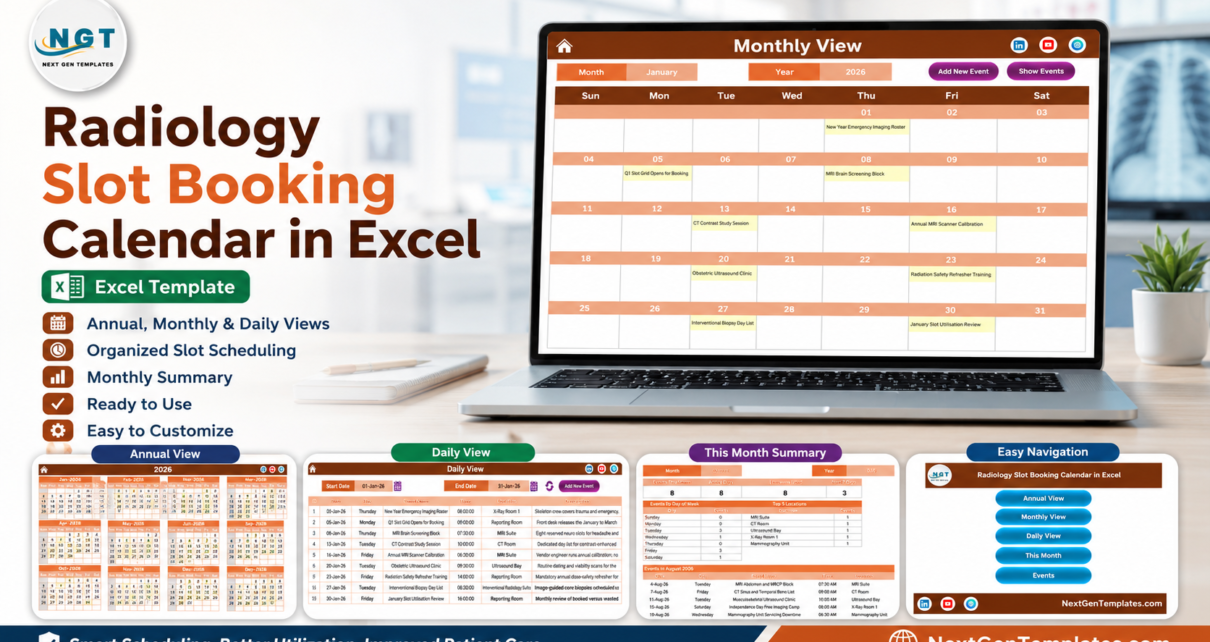
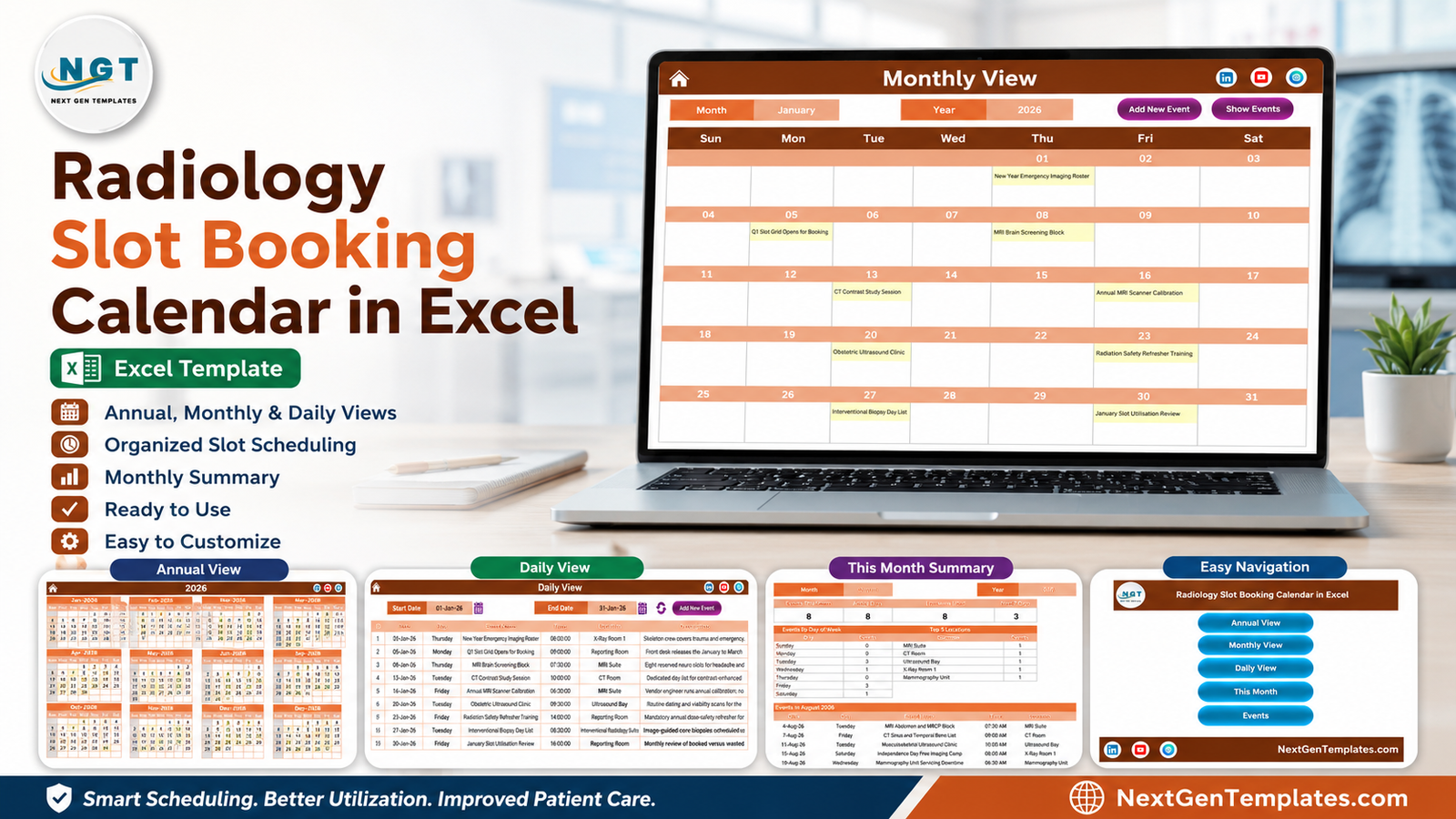
The Radiology Slot Booking Calendar in Excel is a macro-enabled workbook of 7 worksheets that turns a single event table into 5 linked scheduling views. It arrives with 100 sample imaging sessions covering 01-Jan-2026 to 31-Dec-2026 and 8 named locations – MRI Suite, CT Room, Ultrasound Bay, X-Ray Room 1, Mammography Unit, Nuclear Medicine Lab, Interventional Radiology Suite and the Reporting Room – so you can see exactly how the layout behaves before you type a row of your own. Setup takes under 10 minutes: unzip, enable macros, set the year, replace the sample rows.
Most imaging departments still plan the year on a whiteboard or a printed grid. The MRI screening block, the CT contrast day list, the annual scanner calibration, the mammography servicing downtime and the radiation-safety refresher all live in different heads and different emails, and the first time anyone notices a clash is the morning it happens. The Radiology Slot Booking Calendar in Excel puts all of it in one table and then draws that table as a year planner, a month grid, a printable day list and a monthly utilisation summary.
One thing to be clear about first. This is a departmental scheduling spreadsheet, not clinical software. It is not a RIS, PACS, EHR or EMR, it carries no HIPAA, GDPR or any other health-data certification, it has no access control, no encryption and no audit trail, it sends no reminders and it connects to nothing. It contains only what you type into your own copy of the file. Schedule by modality, session and room – never by patient – and keep patient records in your governed clinical system.
Key Features of the Radiology Slot Booking Calendar in Excel
- 7 worksheets: Home, Annual View, Monthly View, Daily View, This Month, Events and Setting.
- One master table drives everything. The Events sheet holds 7 columns – ID, Date, Day, Event Name, Time, Location and Description – and all four calendar views read from it, so a session entered once appears everywhere.
- 100 sample sessions across a full year, from the New Year Emergency Imaging Roster on 01-Jan-2026 to the Year-End Radiology Slot Audit on 31-Dec-2026.
- A 6-field pop-up entry form that captures Date, Event Name, Time, Location and Description and fills the Day field automatically from the date you pick.
- Add, Update and Delete controls on the Events sheet, plus Add New Event and Show Events buttons on the Monthly View and an Add New Event button with a refresh control on the Daily View.
- 5 one-click colour themes – Default, Blue, Red, Black and Orange – applied to the whole workbook from the Setting sheet.
- Configurable calendar rules: set the year, the month the calendar starts with, the day the week starts on, two highlighted weekday columns and an event highlight colour.
- Macro-enabled .xlsm built for Microsoft Excel for Windows on the desktop, with a user manual PDF in the download.
Sheets Explanation
Home – the navigation page
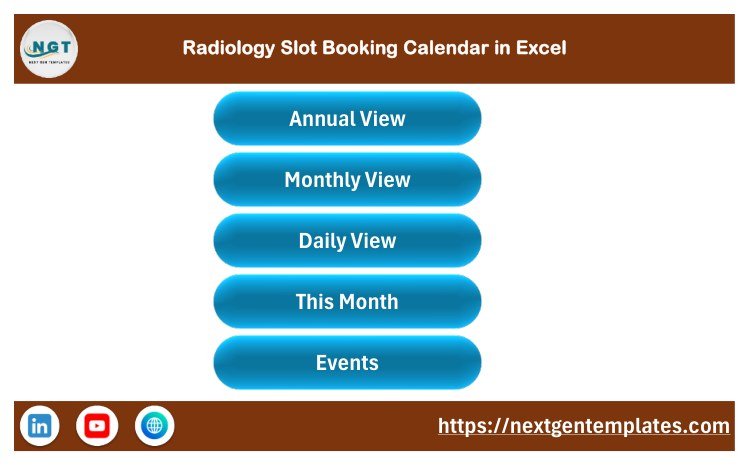
A clean landing sheet carrying the workbook title and five large buttons: Annual View, Monthly View, Daily View, This Month and Events. It is the sheet to leave open on the reception machine when staff only need to jump to today’s list.
Annual View – the whole year on one page
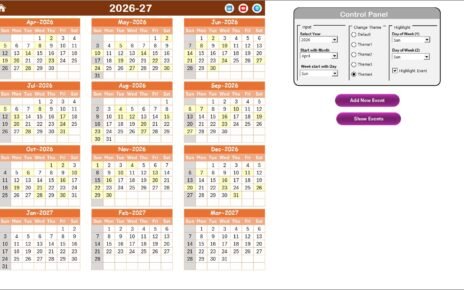
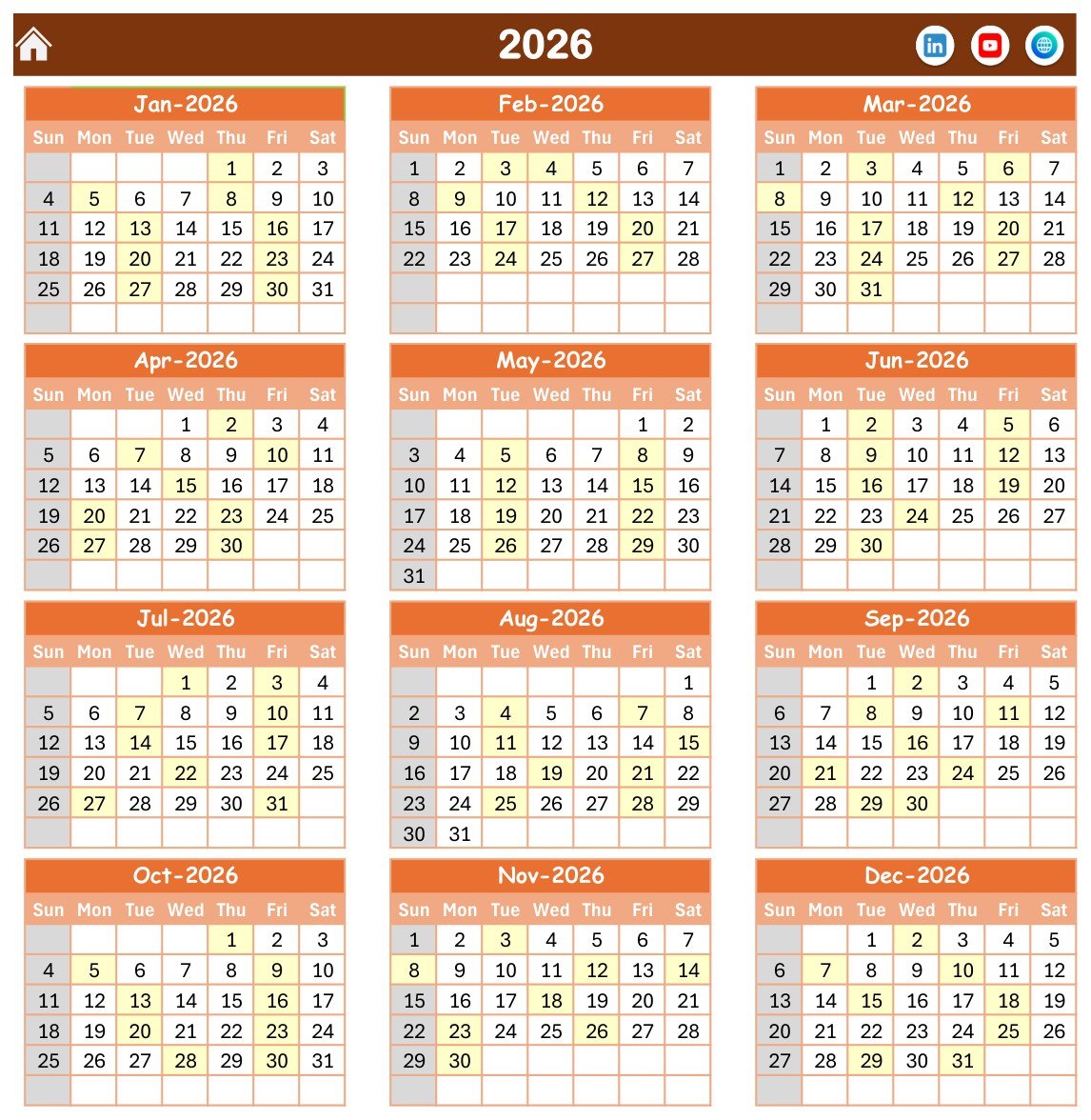
All twelve months of the chosen year, three months across and four rows down, on a single printable page. Weekend columns are shaded and the two highlight weekdays you choose on the Setting sheet are tinted, which makes a recurring Tuesday CT list or Friday interventional list obvious at a glance across the entire year.
Monthly View – the working grid
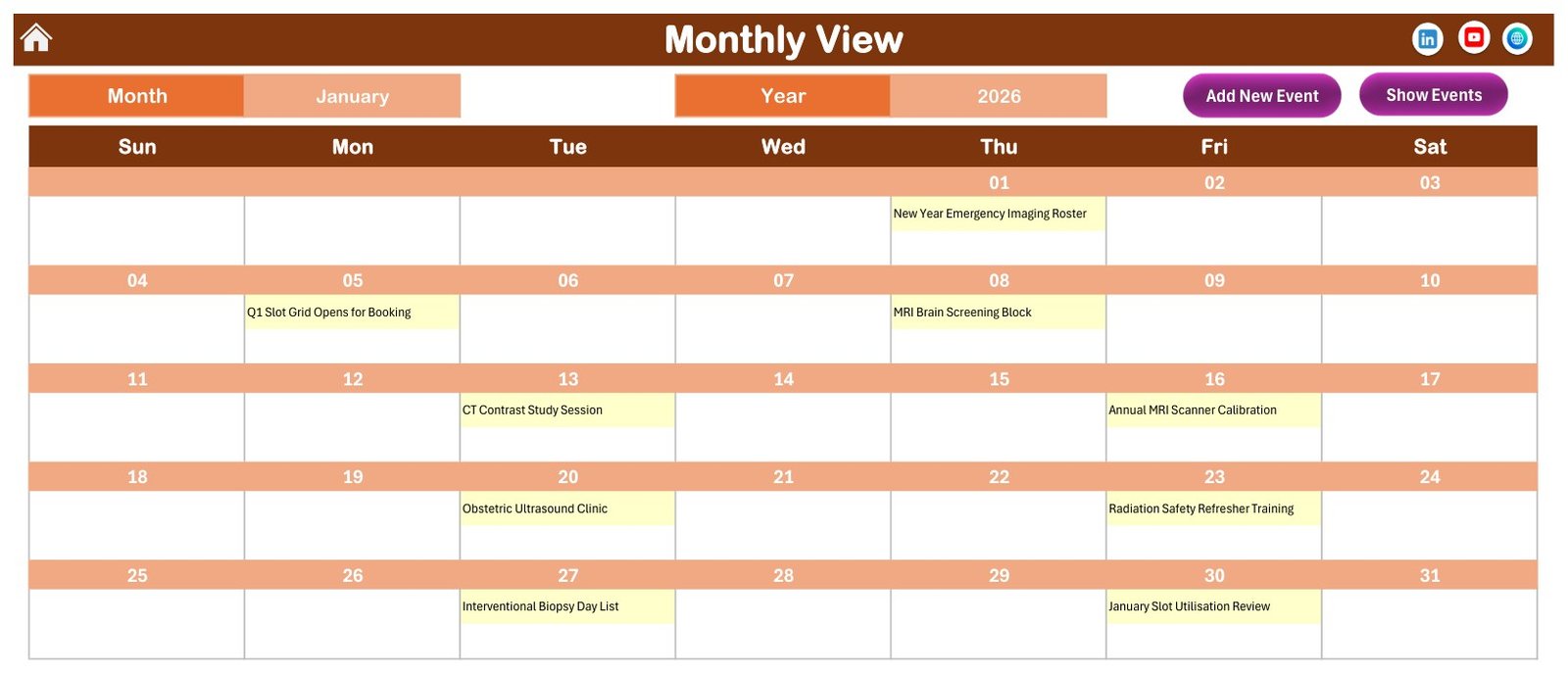
A full-width month grid with Month and Year pickers and Add New Event and Show Events buttons above it. Each date cell lists the sessions booked that day. In the sample file, January 2026 shows the New Year Emergency Imaging Roster on the 1st, the Q1 slot grid opening on the 5th, the MRI Brain Screening Block on the 8th, the CT Contrast Study Session on the 13th, the annual MRI scanner calibration on the 16th, the Obstetric Ultrasound Clinic on the 20th, radiation safety refresher training on the 23rd, the interventional biopsy day list on the 27th and the January slot utilisation review on the 30th.
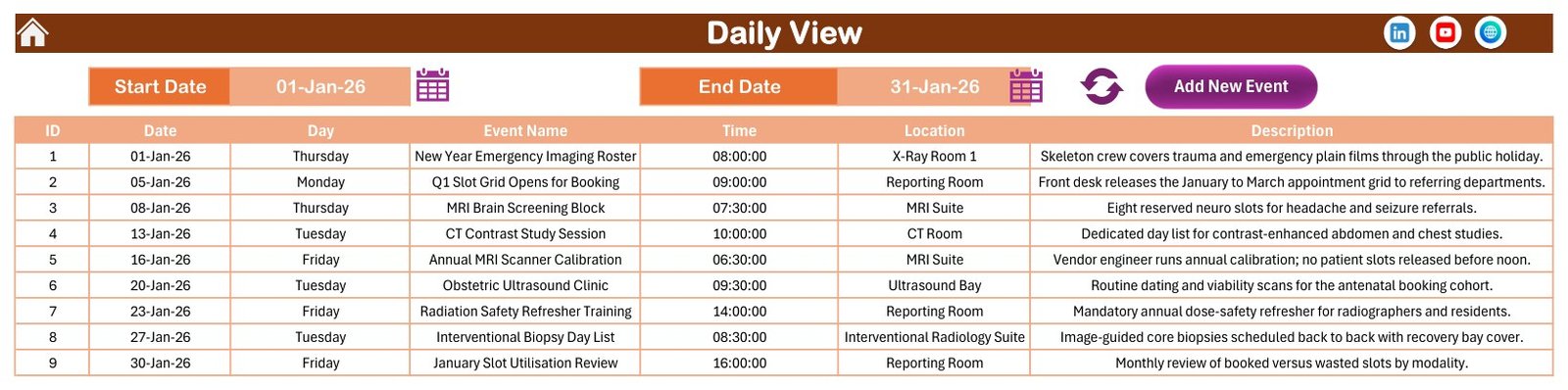
Daily View – the printable date range
Set a Start Date and an End Date, hit refresh, and the sheet returns every matching session as a flat table of ID, Date, Day, Event Name, Time, Location and Description. This is the view to print for tomorrow’s room-by-room list, or for a week of interventional bookings ahead of a theatre meeting.
This Month – the utilisation summary
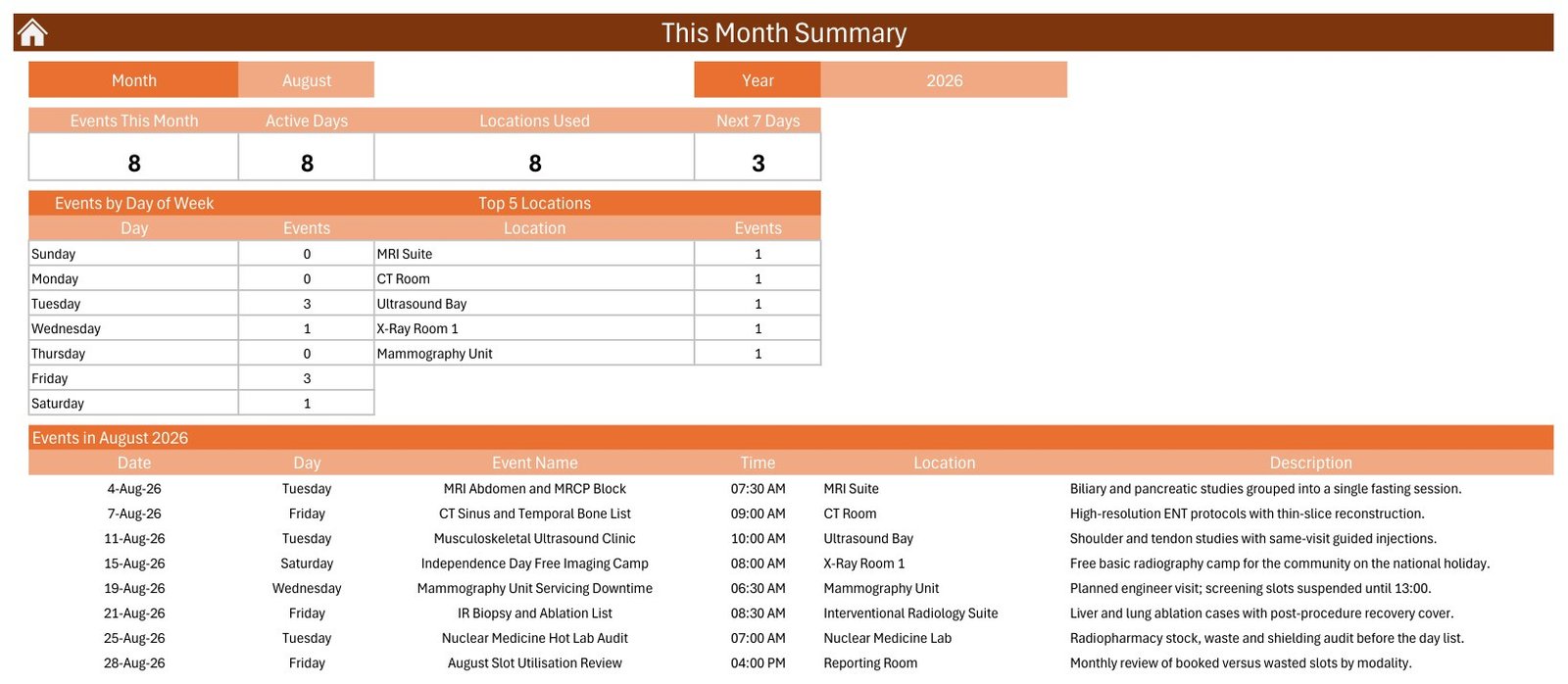
Choose a month and year and the page reports four tiles: Events This Month, Active Days, Locations Used and Next 7 Days. Below them sit an Events by Day of Week table and a Top 5 Locations table, then the full list of that month’s sessions with time, location and description. In the sample file, August 2026 shows 8 sessions across 8 active days and 8 locations, with 3 on Tuesdays, 3 on Fridays, 1 on a Wednesday and 1 on a Saturday.
Events – the master table
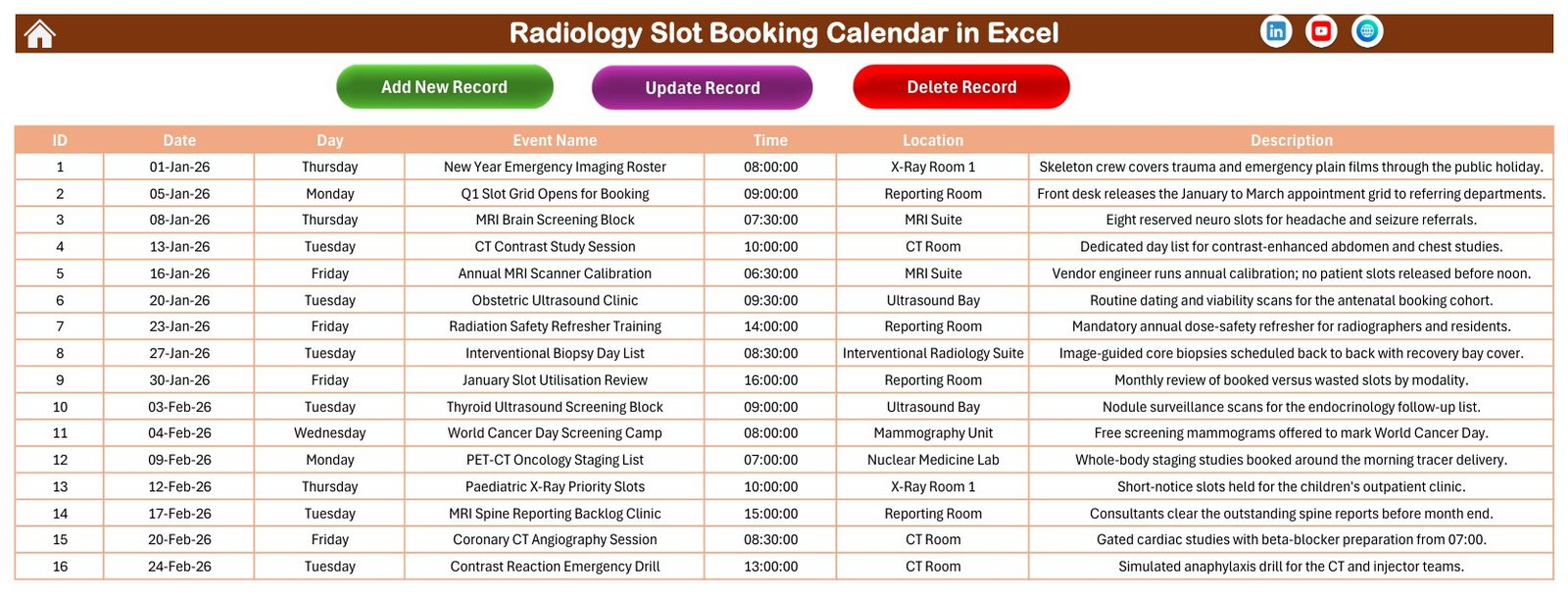
The single source of truth for the whole workbook: every session in one 7-column table with Add New Record, Update Record and Delete Record buttons above it. The 100 sample rows live here, and this is where you paste or type your own schedule.
The entry form
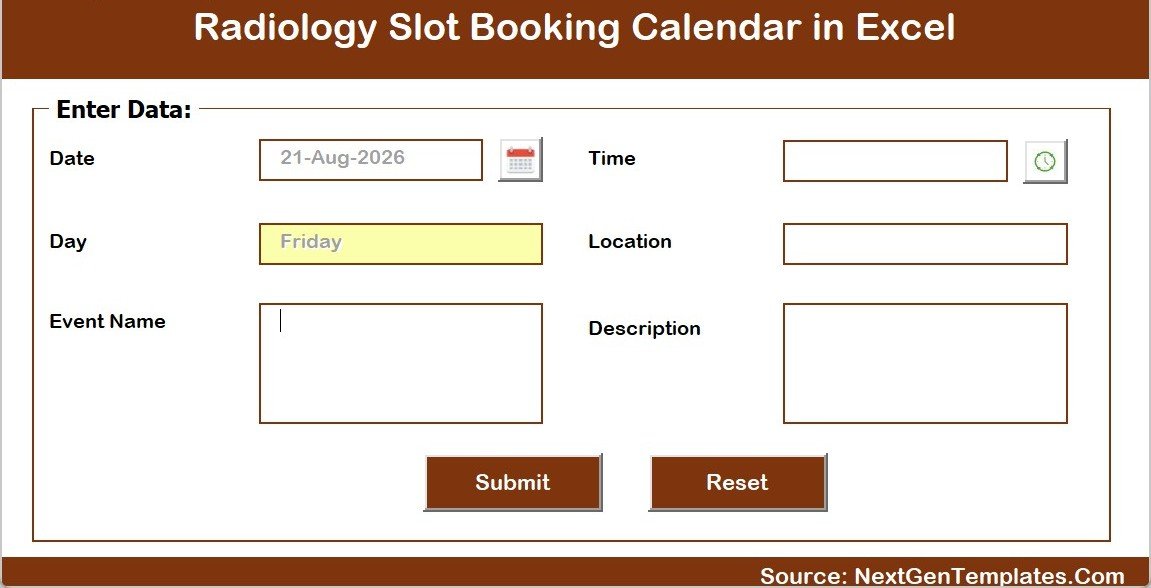
Every Add New Event button opens the same pop-up VBA form. It takes Date with a date picker, Event Name, Time with a time picker, Location and Description, auto-fills Day from the date, and writes the row straight into the Events table on Submit. Reset clears the fields.
Setting – the configuration sheet
The controls behind the views: the calendar Year, the month it starts with, the day the week starts on, two highlight weekday choices, an event highlight colour, and the Whole Theme picker with its five colour options.
Radiology Slot Booking Calendar in Excel vs. a Google Sheets calendar vs. paid clinic-scheduling SaaS – Feature Comparison
| Feature | Radiology Slot Booking Calendar in Excel | Google Sheets calendar equivalent | Paid scheduling SaaS (Athenahealth / Kareo / NexHealth) |
|---|---|---|---|
| Cost | $8.99 one-time | Free to $16.99 one-time | $99-$500+ per provider per month |
| Platform | Microsoft Excel for Windows, desktop, macros required | Any browser ✅ | Vendor cloud |
| Setup time | Under 10 minutes ✅ | Under 10 minutes ✅ | Weeks, with vendor onboarding |
| Views included | 5 – Annual, Monthly, Daily range, This Month summary, Events table ✅ | Usually 2-3 | Many, plus provider and resource calendars |
| Real-time team collaboration | No – one file at a time | Yes, multi-user ✅ | Yes ✅ |
| Mobile access | No – Windows desktop only | Yes ✅ | Yes ✅ |
| Patient reminders (SMS / email) | None | None | Yes ✅ |
| HIPAA / clinical-grade storage | No – schedule by modality and room, never by patient | No | Yes, contractually ✅ |
| Year-1 cost for a 5-radiographer team | $8.99 total ✅ | $0-$16.99 total | $6,000-$30,000 |
For an imaging department that wants its modality blocks, scanner downtime and audit days visible on one printable year grid without paying per provider per month, the Radiology Slot Booking Calendar in Excel sits in the sweet spot – as long as the patient record stays where it belongs.
Who Should Use This Template
Perfect for:
- Radiology and imaging department managers planning modality blocks, screening camps and scanner servicing across a year
- Single-site diagnostic centres and small imaging clinics running the plan on a whiteboard today
- Radiographer team leads who need a printable day list per room and a month-end look at booked versus wasted slots
- Anyone who has to hand a printed year planner to staff who do not have logins to the hospital system
Not a fit if:
- You need to store patient records – this is not an EHR/EMR, RIS or PACS and has no access control, encryption or audit trail
- You need HIPAA or GDPR compliance guarantees or a data-processing agreement – the workbook carries no certification of any kind
- You need automated reminders, online self-booking, or a live link to a hospital, insurance or billing system
- Your team is on Mac, iPad, Android or the browser – the VBA forms need Excel for Windows on the desktop
- Several people must edit the same schedule simultaneously – a browser-based sheet suits that better
Real-World Use Cases
Priya manages a 4-modality imaging department in a 180-bed hospital. At the start of the year she blocks out the MRI brain screening sessions, the CT contrast day lists and the annual scanner calibration on the Events sheet, prints the Annual View for the department board, and uses the This Month page each month-end to see how many days each room was actually active.
Daniel runs a standalone diagnostic centre with one CT scanner, one ultrasound bay and a mammography unit. He prints tomorrow’s list from the Daily View date range for the front desk each evening, and uses the Top 5 Locations table as evidence when the ultrasound bay tops the count three months running and he wants a second probe signed off.
Anita is the radiographer team lead who owns training and downtime. She schedules the radiation safety refresher, the contrast reaction emergency drill, the mammography QA phantom testing and the servicing downtime into the same calendar as clinical sessions, so nobody books a screening list into the week the unit is off.
Advantages of the Radiology Slot Booking Calendar in Excel
The obvious advantage is cost: $8.99 once against $99-$500 per provider per month for a cloud scheduling platform. For a five-radiographer department that is the difference between $8.99 and roughly $6,000 in the first year alone.
The less obvious advantage is that it needs no permission from anybody. There is no procurement cycle, no IT security review and no user provisioning – it is an Excel file on a network drive. Departments that have waited eighteen months for a module in the hospital system can have a working year planner running this afternoon.
It also prints properly. The Annual View is designed to go on a wall, and the Daily View range prints as a clean room-by-room list. That matters more in an imaging department than it does in most offices, because the people who need the schedule are standing next to a scanner, not sitting at a desk.
Opportunities for Improvement
It is worth being honest about the limits. There is no concurrency – one person edits the file at a time, and a shared network copy will hit the usual Excel locking problems if two people open it. There is no conflict detection either: nothing stops you booking two sessions into the MRI Suite at the same hour, so a human still has to read the grid.
It is Windows-only. The VBA forms will not run in Excel for the web, in Google Sheets, on macOS or on mobile, which rules it out for teams that are not on Windows desktops. And because it is a plain workbook, there is no permission model – anyone who can open the file can change any row, and nothing records who changed what.
Finally, and most importantly, it has no place in patient-data handling. The sample rows deliberately contain no patient names or identifiers, and yours should not either. If you need patient-level booking with an audit trail, that belongs in a governed clinical system, not in a spreadsheet.
Best Practices
- Name entries by modality, session and room – “MRI Brain Screening Block”, “CT Contrast Study Session” – never by patient name or ID.
- Put downtime in the calendar first. Scanner calibration, servicing and QA phantom testing block real capacity; entering them before clinical sessions prevents most clashes.
- Keep one master file on a controlled network location and distribute printed or PDF views rather than copies of the workbook.
- Set the Setting sheet up once – year, start month, week start day, highlight weekdays and theme – before you enter a single session.
- Review the This Month page every month-end. Active Days and Top 5 Locations are the closest thing the workbook has to a utilisation metric.
- Keep the file trusted. Store it in a Trusted Location so Excel stops asking about macros – Microsoft’s own guidance on enabling and disabling macros in Microsoft 365 files explains how.
Explore Relevant Templates
Once you have a few months of sessions recorded, the analysis layer is where the value moves. The Radiology and Imaging Dashboard in Excel and the Radiology & Imaging KPI Dashboard in Excel cover imaging volumes, turnaround and utilisation, and the Radiology and Imaging Dashboard in Power BI does the same for Power BI teams.
Other clinics on the same calendar engine include the Dental Clinic Appointment Calendar in Excel and the Physiotherapy Session Calendar in Excel. To roster the people rather than the rooms, pair this workbook with the Doctor Duty Roster Data Entry System in Excel.
Also available as: a browser-based, multi-user alternative in the Medical Appointment Calendar in Google Sheets.
Frequently Asked Questions
Is the Radiology Slot Booking Calendar in Excel HIPAA compliant, and can I store patient details in it?
No. The Radiology Slot Booking Calendar in Excel is an ordinary Excel workbook with no access control, encryption or audit trail, and it carries no HIPAA, GDPR or any other health-data certification. It is not an EHR/EMR, RIS or PACS. Schedule by modality, session and room, and keep patient-identifiable data in your governed clinical system.
Does it send appointment reminders or take online bookings?
No. The Radiology Slot Booking Calendar in Excel sends no SMS or email, takes no online bookings, and connects to no hospital, insurance or billing system. It is an offline planning grid – whatever you type into your own copy of the file is all it holds and all it does.
Do I have to enable macros, and does it work on a Mac?
Yes to macros, no to Mac. The Radiology Slot Booking Calendar in Excel is a macro-enabled .xlsm and its navigation buttons, Add/Update/Delete controls and pop-up entry form are all VBA. It needs Microsoft Excel for Windows on the desktop and will not run in Excel for the web, Google Sheets, or on iOS or Android.
How long does setup take?
Under 10 minutes. Unzip the download, open the .xlsm, click Enable Content, set the year and colour theme on the Setting sheet, then replace the 100 sample rows on the Events sheet with your own sessions. Every view redraws from that one table automatically.
How many sample events are included, and can I delete them?
The Radiology Slot Booking Calendar in Excel ships with 100 sample sessions spanning 01-Jan-2026 to 31-Dec-2026 across 8 imaging locations. They exist to demonstrate the layout and are safe to remove – select the rows on the Events sheet and clear them, or simply overwrite them with your own schedule.
How does this compare to Athenahealth or Kareo?
They solve different problems. Athenahealth and Kareo are cloud practice-management platforms with patient records, reminders and billing, priced per provider per month. The Radiology Slot Booking Calendar in Excel is an $8.99 one-time departmental planning grid holding no patient data – it sits alongside a clinical system rather than replacing one.
Can I change the colours to match our department branding?
Yes. The Setting sheet holds a Whole Theme picker with five options – Default, Blue, Red, Black and Orange – that repaints every sheet at once. You can also choose which two weekday columns are highlighted and which colour marks a booked event.
About the Author
Built by PK – Microsoft Certified Professional with 15+ years of Excel, Google Sheets and Power BI experience. Founder of NextGenTemplates, reaching 300K+ subscribers across YouTube channels. Every template is hand-built and tested before release.
Conclusion
The Radiology Slot Booking Calendar in Excel does one job well: it takes the modality blocks, screening camps, scanner downtime and audit days that currently live in five different places and shows them as a year planner, a month grid, a printable day list and a monthly utilisation summary – all from one table, for $8.99 once. It is not clinical software and does not pretend to be; keep the patient record in your clinical system and use this for the room and the rota.
👉 Click here to Purchase the Radiology Slot Booking Calendar in Excel
Instant download · One-time payment · No subscription
🎥 For step-by-step video tutorials, visit Youtube.com/@PK-AnExcelExpert
Last updated: August 2026