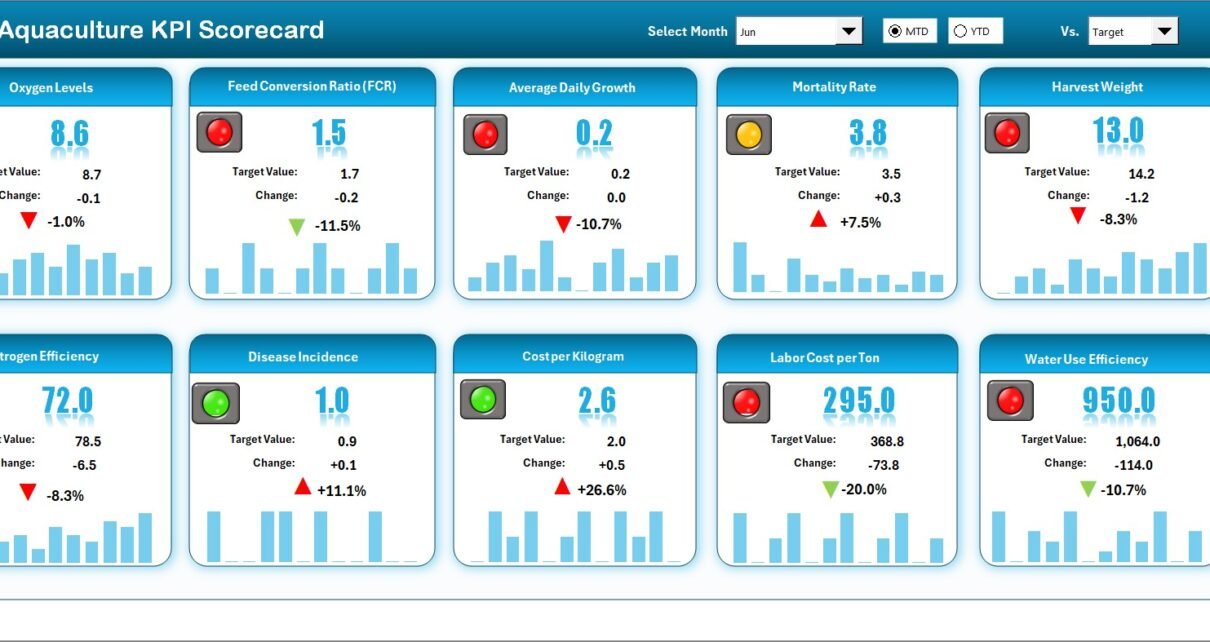
The global aquaculture industry produced over 130 million tonnes of fish and seafood in 2024, yet 68% of small-to-medium fish farms still track performance using paper logs or disconnected spreadsheets. Without a centralized scorecard, feed conversion ratios slip unnoticed, survival rates drop between harvest cycles, and cost-per-kilogram creeps upward. The Aquaculture KPI Scorecard in Excel solves this by tracking 10+ aquaculture KPIs across 4 structured worksheets with automated MTD and YTD calculations, traffic-light conditional formatting, and interactive 12-month trend charts.
Join 8,400+ teams in 40+ countries using NextGenTemplates to replace paid SaaS tools with one-time-purchase Excel, Google Sheets, Power BI, and HTML templates.
✅ Instant download · One-time payment · No subscription · No per-user fees · Lifetime access
Key Features of Aquaculture KPI Scorecard in Excel
👉 Click here to Purchase the Aquaculture KPI Scorecard in Excel
This scorecard is engineered for fish farms, shrimp hatcheries, and integrated aquaculture operations that need a single Excel file to monitor feed conversion ratios, survival rates, water quality indices, harvest volumes, and cost per kilogram. It ships with 4 worksheets — Scorecard, KPI Trend, Input Data, and KPI Definition — covering the full KPI management cycle from metric definition to visual trend analysis.
The Aquaculture KPI Scorecard in Excel includes an interactive month selector that refreshes the entire scorecard with one dropdown change. Toggle between MTD (Month-to-Date) and YTD (Year-to-Date) views to compare short-term batch performance against annual targets. Traffic-light conditional formatting uses green, amber, and red to flag which KPIs are on track, at risk, or underperforming — no manual checking required.
The KPI Trend sheet lets you select any metric from cell C3 and instantly view 12-month trend lines for Actual, Target, and Previous Year values. The KPI Definition sheet documents each metric’s name, group, unit, formula, type (Lower the Better or Upper the Better), and plain-language definition. The centralized Input Data sheet feeds every chart and formula automatically — enter your numbers once and the entire scorecard updates.
No VBA macros, no add-ins, no Power BI. The template runs entirely in Microsoft Excel on both Windows and Mac.
Dashboard Pages Explanation
The Aquaculture KPI Scorecard in Excel contains 4 worksheets, each serving a distinct role in aquaculture performance monitoring:
1. Scorecard Sheet
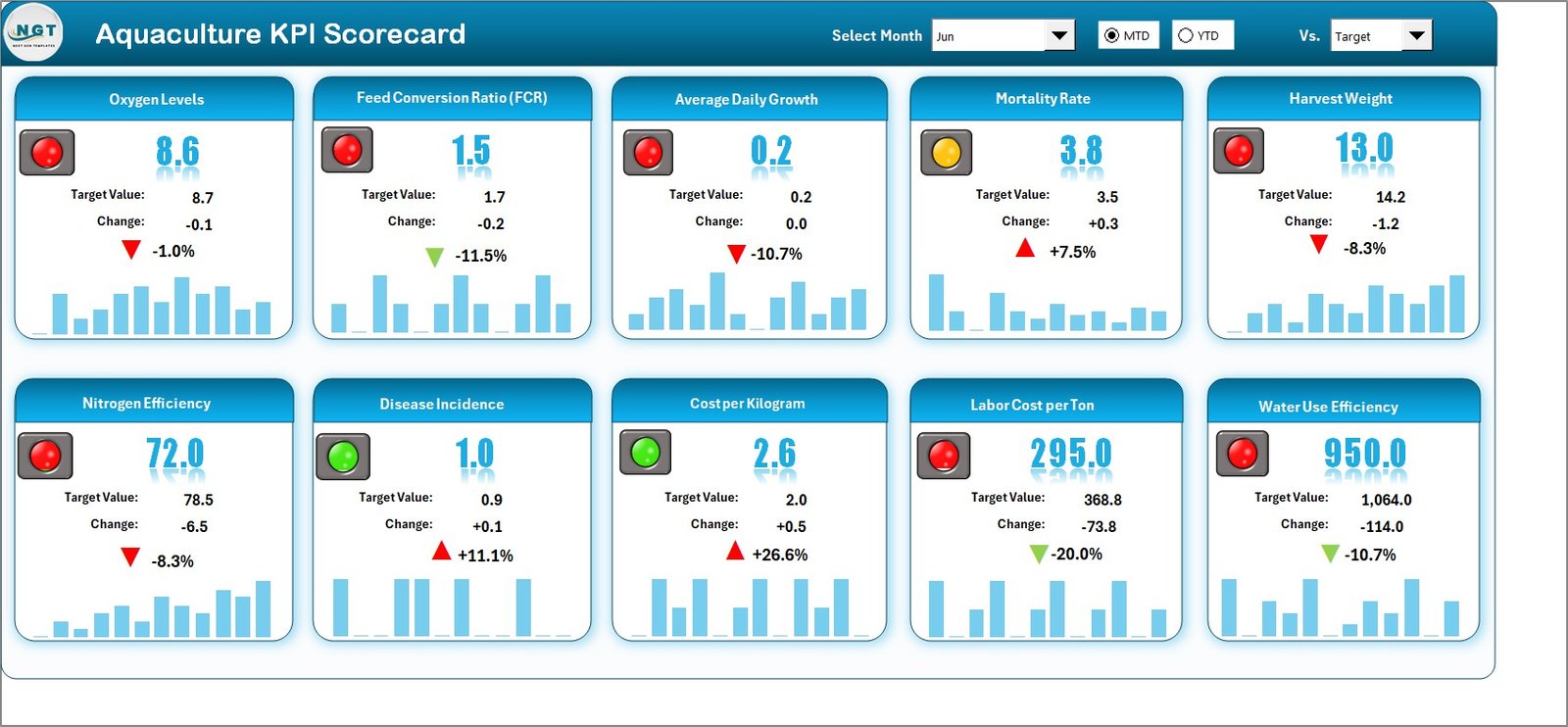 Aquaculture KPI Scorecard in Excel
The Scorecard sheet is the main interface for viewing KPI performance at a glance. It includes dropdown menus to select the month, MTD, or YTD view. Actual vs Target values are displayed side by side for every KPI, with color-coded traffic-light indicators highlighting performance status. The sheet also shows previous month and previous year comparisons, giving you a full picture of aquaculture performance in one view.
2. KPI Trend Sheet
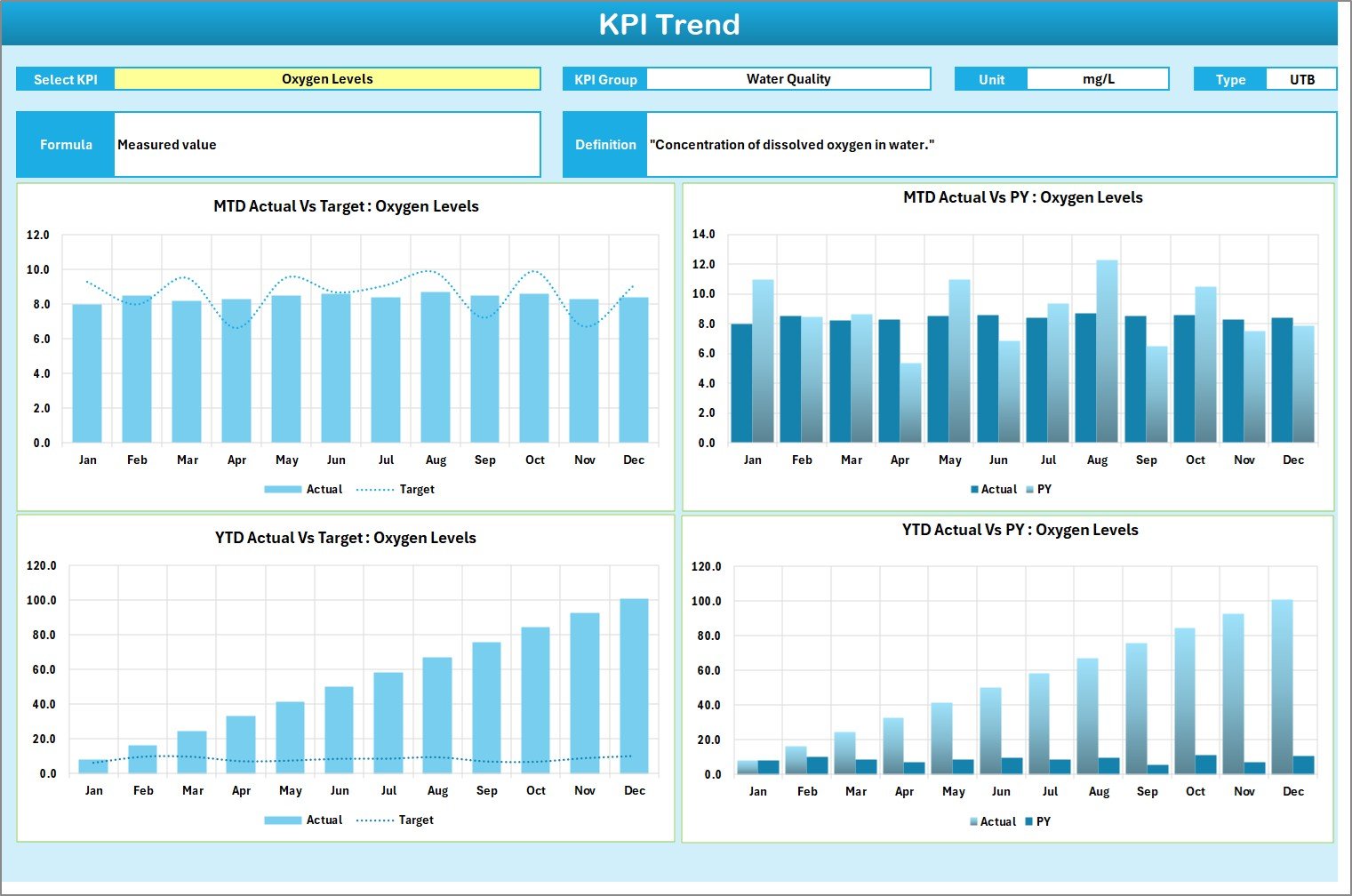 KPI Trend Sheet
Select any KPI from the dropdown on range C3 to view detailed trend data. The sheet displays the KPI Group, Unit, Type (Lower the Better or Upper the Better), Formula, and Definition. Below these details, MTD and YTD trend charts plot Actual, Target, and Previous Year numbers across 12 months — ideal for spotting seasonal dips in survival rates or feed efficiency.
3. Input Data Sheet
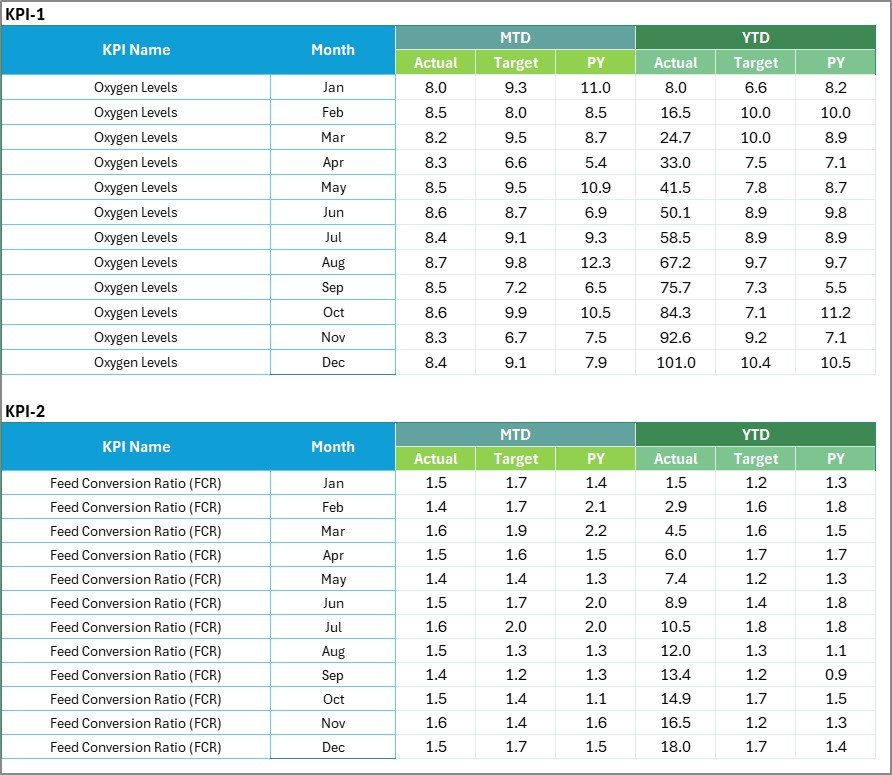 Input Data Sheet
The Input Data sheet is your centralized data entry point. Record monthly actual values, targets, and previous year numbers for each KPI. As new harvest cycle results come in, update the corresponding cells and the Scorecard and Trend sheets refresh automatically. No manual formula editing needed.
4. KPI Definition Sheet
 KPI Definition Sheet
Enter the KPI Name, KPI Group, Unit, Formula, and Definition for each metric. This sheet standardizes understanding across your aquaculture team — from pond technicians to farm managers — so everyone measures performance the same way.
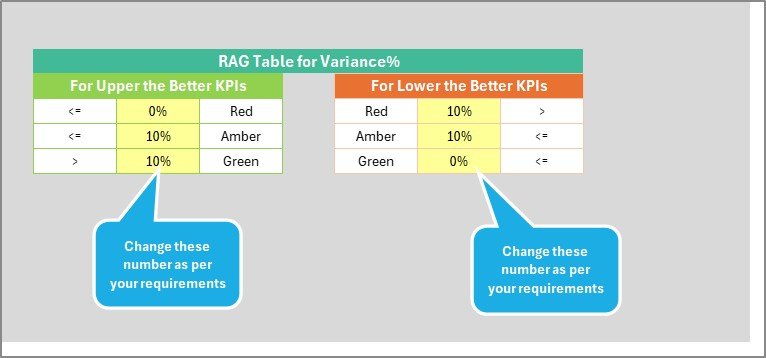 Aquaculture KPI Scorecard – Additional View
Aquaculture KPI Scorecard in Excel vs. Google Sheets Scorecard vs. Paid Aquaculture SaaS — Feature Comparison
| Feature | Aquaculture KPI Scorecard in Excel | Google Sheets Scorecard | AquaManager / Paid SaaS |
|---|---|---|---|
| Cost | $12.99 one-time | $9.99 one-time | $50–200/month |
| Platform | Microsoft Excel (desktop) | Google Sheets (cloud) | Web-based SaaS |
| Setup Time | Under 10 minutes ✅ | Under 10 minutes | Days to weeks |
| Real-Time Collaboration | Via OneDrive/SharePoint | Built-in ✅ | Built-in |
| Offline Access | Full offline ✅ | Limited offline | Requires internet |
| Customizable KPIs | Fully editable ✅ | Fully editable | Limited to plan tier |
| Trend Charts | Built-in ✅ | Built-in | Built-in |
| Year-1 Cost (5 Users) | $12.99 total ✅ | $9.99 total | $3,000–$12,000 |
| Data Ownership | 100% yours ✅ | Stored on Google servers | Vendor-controlled |
For aquaculture teams that want KPI tracking without monthly SaaS fees or vendor lock-in, the Aquaculture KPI Scorecard in Excel sits in the sweet spot between affordability and functionality.
Who Should Use This Template
✅ Perfect for:
- Fish farm managers tracking feed conversion ratio, survival rates, and harvest volumes in Excel
- Shrimp hatchery operators monitoring water quality, stocking density, and cost per kilogram
- Aquaculture consultants generating monthly client performance reports from a single template
- Small-to-medium aquaculture businesses wanting data-driven operations without SaaS subscriptions
- Agriculture departments and cooperatives standardizing KPI reporting across multiple farm sites
❌ Not a fit if:
- You need real-time IoT sensor integration with automated data feeds from pond monitors
- Your team requires simultaneous multi-user editing without OneDrive — consider the Agriculture KPI Scorecard in Google Sheets instead
- You operate 50+ ponds with enterprise-grade compliance needs (look into dedicated aquaculture ERP platforms)
Real-World Use Cases
👉 Click here to Purchase the Aquaculture KPI Scorecard in Excel
Rajesh manages a 50-pond tilapia farm in South India. Before the scorecard, he spent 3 hours every Monday compiling feed logs and survival counts into a PowerPoint for his farm director. Now he enters actuals into the Input Data sheet in 10 minutes, selects the month from the Scorecard dropdown, and presents a traffic-light overview that instantly flags underperforming ponds. His feed conversion ratio improved by 8% in the first quarter because he caught a feed brand issue two weeks earlier than his old process allowed.
Maria runs a shrimp hatchery in Ecuador. She tracks stocking density, water quality index, and harvest yield across 3 grow-out cycles per year using MTD and YTD views. The trend charts revealed a seasonal dip in survival rates during March–April that she traced to dissolved oxygen drops. Adjusting her aeration schedule early saved an estimated 12% in feed costs per cycle — roughly $4,200 per year.
Tom is an aquaculture consultant in Norway. He uses the KPI Definition sheet to standardize metrics across 8 client sites. Each month, he swaps the Input Data for each client and generates branded scorecards — no per-client SaaS license required. His consulting overhead dropped because the template eliminated custom spreadsheet builds for each engagement.
Advantages of Aquaculture KPI Scorecard in Excel
👉 Click here to Purchase the Aquaculture KPI Scorecard in Excel
The primary advantage is speed to insight. Most aquaculture operations lose weeks between data collection and actionable reporting. This scorecard collapses that gap to minutes because all formulas, charts, and indicators are pre-built.
Cost efficiency is another major benefit. At $12.99 one-time, the Aquaculture KPI Scorecard in Excel replaces tools that cost $50–200 per month. For a 5-person team over 12 months, that translates to savings of $2,987–$11,987 compared to typical aquaculture SaaS platforms.
The template also gives you full data ownership. Your aquaculture data stays on your machine or your company’s OneDrive — it never sits on a third-party vendor’s servers. This matters for operations in regions with data sovereignty requirements.
Finally, offline access means pond managers and field technicians can enter data even at remote farm sites without internet connectivity — a limitation that disqualifies most cloud-based SaaS tools.
Opportunities for Improvement
This scorecard does not include automated data ingestion from IoT sensors, pond monitoring systems, or ERP tools. Data entry is manual, which means someone on your team needs to input actual values each month.
There is no built-in multi-language support. All labels, KPI names, and instructions are in English. Teams operating in non-English regions will need to translate the KPI Definition sheet manually.
The template does not include mobile-optimized views. While Excel works on tablets and phones, the scorecard layout is designed for desktop screens. Teams needing a mobile dashboard should consider the HTML Dashboard Templates on NextGenTemplates.
Best Practices
👉 Click here to Purchase the Aquaculture KPI Scorecard in Excel
Start by defining your KPIs clearly in the KPI Definition sheet before entering any data. Ambiguous metric definitions lead to inconsistent data entry, which undermines the entire scorecard’s accuracy.
Update the Input Data sheet at the same time each month — ideally within the first 3 business days of the new month. Consistent timing ensures your MTD and YTD comparisons remain meaningful.
Use the KPI Trend sheet to review each metric’s 12-month history at least once per quarter. Trend analysis catches gradual performance shifts (like declining survival rates) that monthly snapshots miss.
If you manage multiple farm sites, create a separate copy of the Input Data sheet for each site and use a master Scorecard that pulls from all of them. Alternatively, add a “Site” column to a consolidated Input Data sheet and filter by location.
Back up your scorecard file regularly — especially before making structural changes like adding new KPIs or modifying formulas.
Explore Relevant Templates
🐄 Agriculture KPI Scorecard in Excel — Track crop yield, irrigation efficiency, and farm profitability KPIs in Excel.
🌿 Smart Agriculture KPI Scorecard in Excel — Advanced agriculture KPI tracking with smart farming metrics and trend analysis.
🐕 Wildlife Conservation KPI Scorecard in Excel — Monitor conservation KPIs, species populations, and habitat health indicators.
🐾 Animal Shelter KPI Scorecard in Excel — Track adoption rates, intake volumes, and shelter capacity metrics.
☁️ Agriculture KPI Scorecard in Google Sheets — Prefer cloud-based collaboration? This Google Sheets version follows the same scorecard structure.
📂 Browse all KPI Dashboard Templates on NextGenTemplates.
Frequently Asked Questions
👉 Click here to Purchase the Aquaculture KPI Scorecard in Excel
What KPIs does the Aquaculture KPI Scorecard in Excel track?
The Aquaculture KPI Scorecard in Excel tracks aquaculture metrics including feed conversion ratio, survival rate, harvest volume, cost per kilogram, water quality index, stocking density, and revenue per pond. All KPIs update automatically when you replace the sample data with your own farm numbers.
How long does it take to set up this aquaculture scorecard?
Setup takes under 10 minutes. Define your KPIs in the Definition sheet, enter actual and target values in the Input Data sheet, and the Scorecard and Trend sheets populate automatically. No formula editing or configuration required.
Can I add custom KPIs specific to my fish farm?
Yes. The Aquaculture KPI Scorecard in Excel is fully editable. Add new rows for custom KPIs like dissolved oxygen levels, pH readings, biomass growth rate, or any metric relevant to your operation. Charts and formulas extend to cover your additions.
How does this compare to paid aquaculture management software?
Paid SaaS tools like AquaManager cost $50–200 per month and require constant internet access. The Aquaculture KPI Scorecard in Excel costs $12.99 one-time, works offline in Excel, and gives you full data ownership with zero recurring fees.
Does this scorecard work on Mac?
Yes. The Aquaculture KPI Scorecard in Excel works on both Windows and Mac versions of Microsoft Excel. No VBA macros are used, ensuring full cross-platform compatibility.
Is there a Google Sheets version available?
Yes. NextGenTemplates offers the Agriculture KPI Scorecard in Google Sheets for teams that prefer real-time cloud-based collaboration. Both versions use the same 4-sheet scorecard structure.
Can I use this for multiple aquaculture sites?
Yes. Duplicate the Input Data sheet for each site, or consolidate all site data into one sheet with a site identifier column. The Scorecard will reflect whichever data set you point it to, making multi-site reporting straightforward.
About the Author
Built by PK — Microsoft Certified Professional with 15+ years of Excel, Google Sheets, and Power BI experience. Founder of NextGenTemplates, reaching 300K+ subscribers across YouTube channels (@PK-AnExcelExpert, @NextGenTemplates, @NeoTechNavigators). Every template is hand-built and tested before release.
Conclusion
The Aquaculture KPI Scorecard in Excel gives fish farms, shrimp hatcheries, and aquaculture consultants a ready-to-use performance tracking system that works offline, costs $12.99 one-time, and replaces SaaS tools costing thousands per year. With 4 structured worksheets, traffic-light indicators, and 12-month trend charts, it turns raw aquaculture data into actionable insights in under 10 minutes.
👉 Click here to Purchase the Aquaculture KPI Scorecard in Excel
✅ Instant download · One-time payment · No subscription
🎥 Visit our YouTube channel for step-by-step tutorials: Youtube.com/@PK-AnExcelExpert