The Financial Tech Startups KPI Dashboard in Excel tracks fintech-specific KPIs across 7 interactive worksheets, with built-in MTD and YTD comparisons, conditional formatting arrows, and individual KPI trend charts. According to Microsoft’s data analytics documentation, structured KPI tracking reduces reporting errors by up to 40% compared to ad-hoc spreadsheet approaches. Setup takes under 10 minutes — just replace the sample data and every metric updates automatically.Financial Tech Startups KPI Dashboard in Excel
Financial technology startups face unique challenges tracking operational metrics like transaction volume, payment success rates, churn rate, and customer acquisition cost. Instead of subscribing to Klipfolio ($99/month) or Databox ($47/month), this Excel template delivers the same structured KPI monitoring at a one-time cost of $14.99 with no recurring fees.Financial Tech Startups KPI Dashboard in Excel
Key Features of Financial Tech Startups KPI Dashboard in Excel
📦 Click here to Purchase Financial Tech Startups KPI Dashboard in Excel
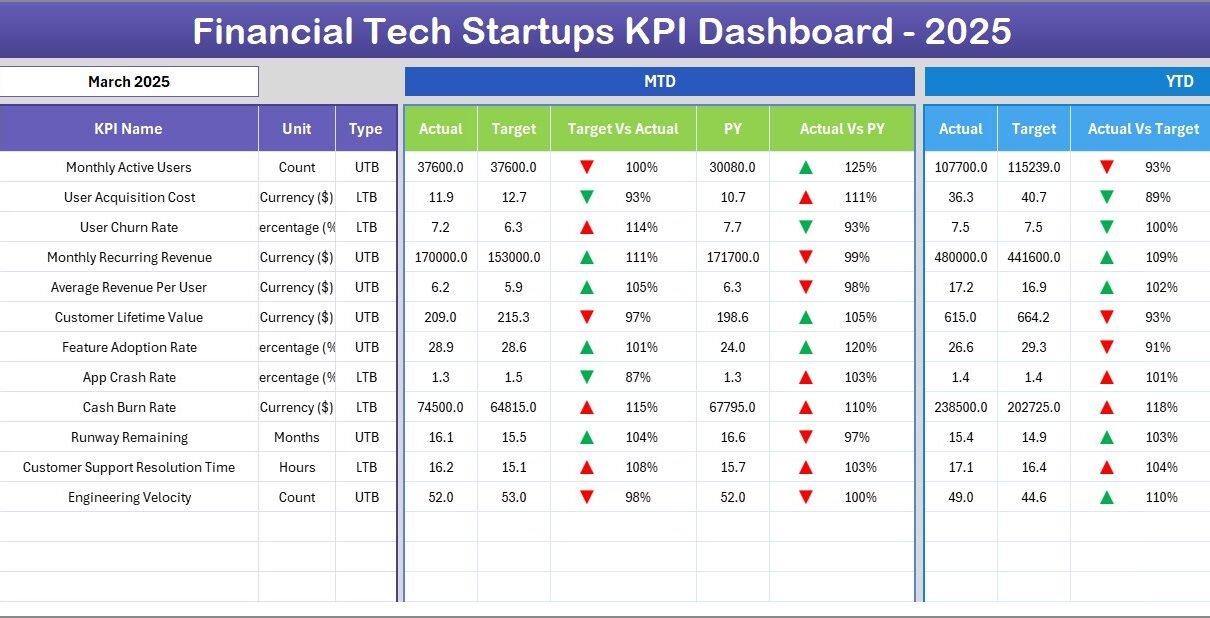
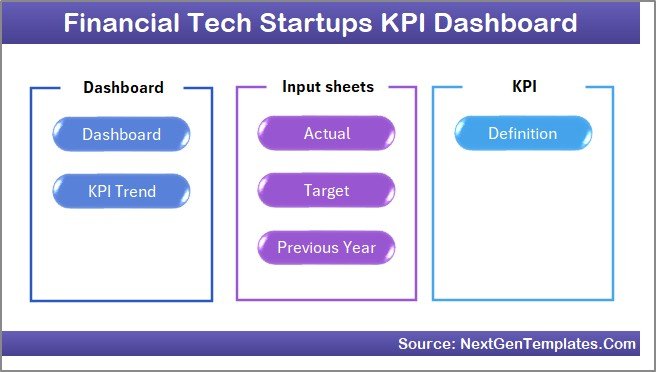
This Excel KPI dashboard includes 7 worksheets: a Home navigation page, a main Dashboard with month-selectable KPI views, a KPI Trend analysis page, three data input sheets (Actual, Target, Previous Year), and a KPI Definition sheet. The dashboard displays MTD Actual, Target, and Previous Year data alongside YTD numbers — all with Target vs Actual and PY vs Actual variance columns using conditional formatting up/down arrows.Financial Tech Startups KPI Dashboard in Excel
Each KPI can be classified as LTB (Lower the Better) or UTB (Upper the Better) to ensure the conditional formatting arrows point correctly based on performance context. The KPI Trend sheet lets you select any individual KPI from a dropdown and instantly view its MTD and YTD trend charts comparing Actual, Target, and Previous Year lines. No macros or VBA are required — the entire dashboard runs on native Excel formulas and conditional formatting, making it compatible with Excel 2016, 2019, 2021, and Microsoft 365.Financial Tech Startups KPI Dashboard in Excel
Dashboard Pages Explanation
1. Home Sheet
This is an index sheet with 6 navigation buttons to jump directly to any worksheet in the template.
Home Page
2. Dashboard Sheet
The main KPI view. Select a month from the dropdown on cell D3 and the entire dashboard refreshes. It shows MTD and YTD columns for Actual, Target, and Previous Year with variance indicators using conditional formatting up/down arrows. This is where you get the complete picture of all your fintech startup KPIs in one view.
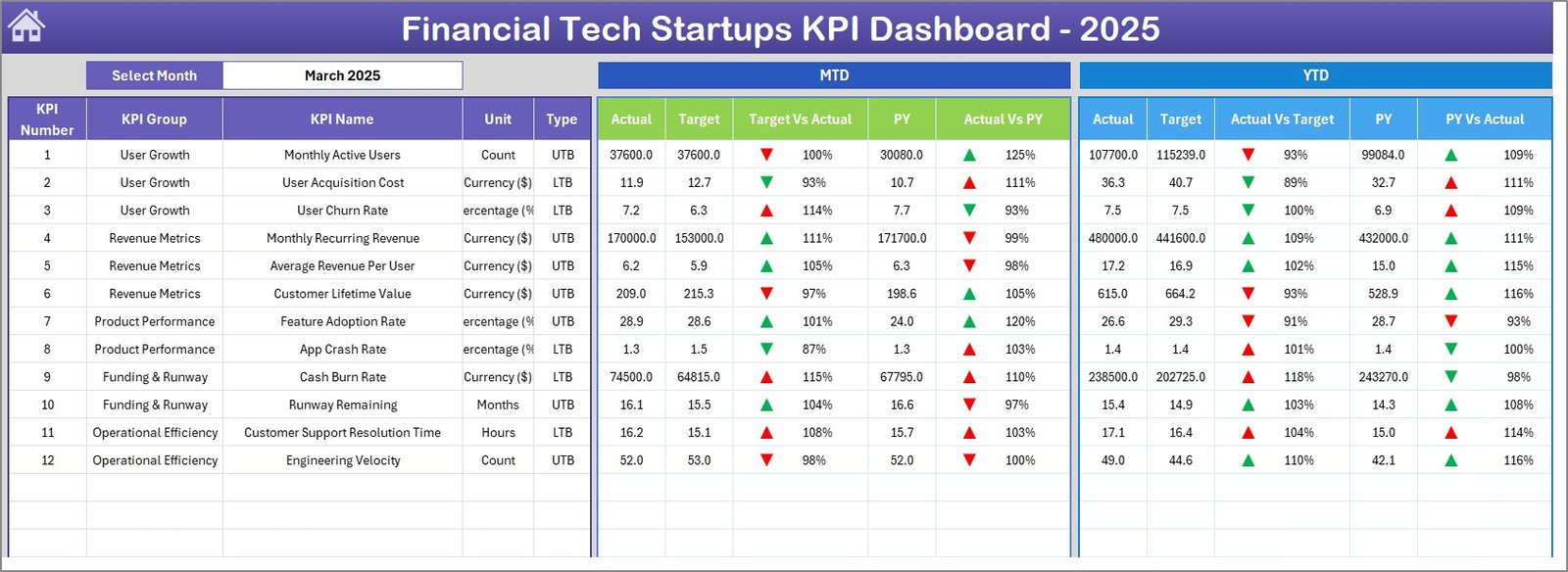
Financial Tech Startups KPI Dashboard
3. KPI Trend Sheet
Select any KPI from the dropdown on cell C3. The sheet displays the KPI Group, Unit, Type (LTB/UTB), Formula, and Definition. Below, MTD and YTD trend charts show Actual vs Target vs Previous Year performance over time. This is particularly useful for identifying which fintech metrics are trending off-target before they become problems.
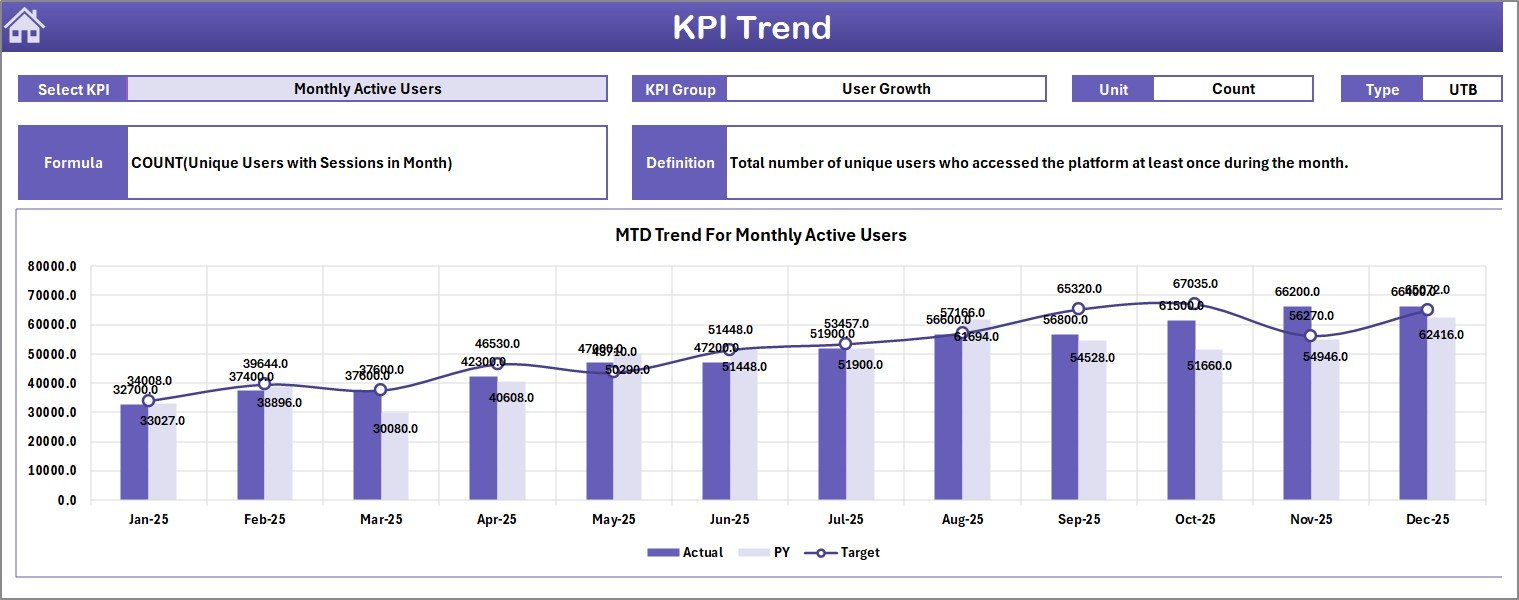
KPI Trend Sheet
4. Actual Numbers Input Sheet
Enter your actual MTD and YTD numbers here for each KPI. You can change the starting month from cell E1 to align with your fiscal year. This sheet feeds the Dashboard and KPI Trend sheets with real performance data.
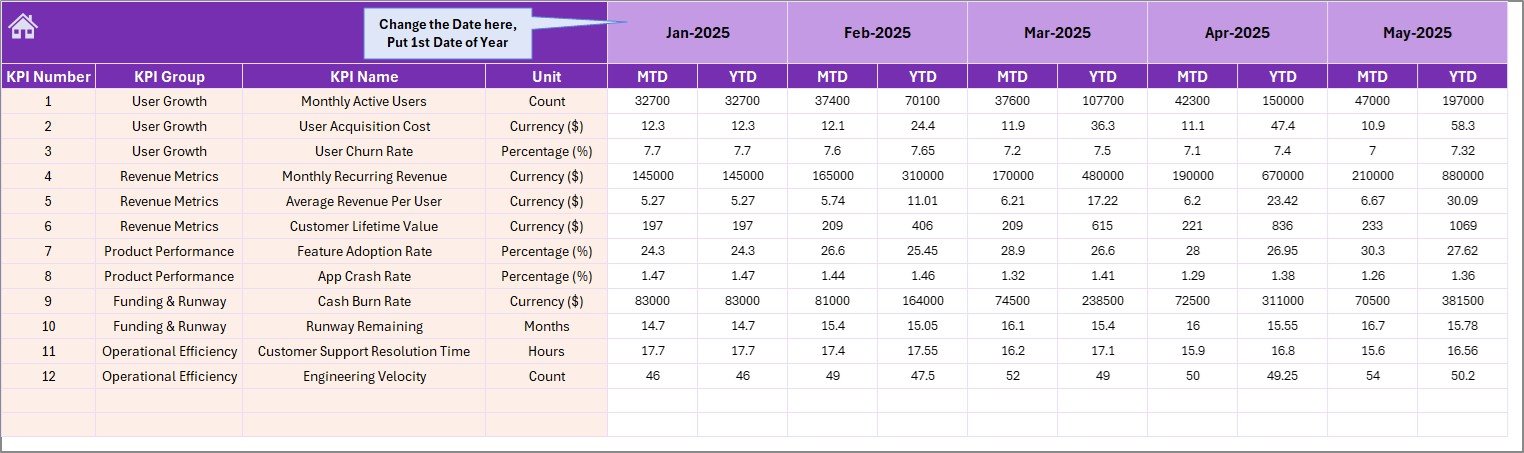
Actual Numbers Input Sheet
5. Target Number Input Sheet
Enter target numbers for each KPI by month — both MTD and YTD. These targets are what the Dashboard compares your actual numbers against to calculate variance and display the conditional formatting arrows.
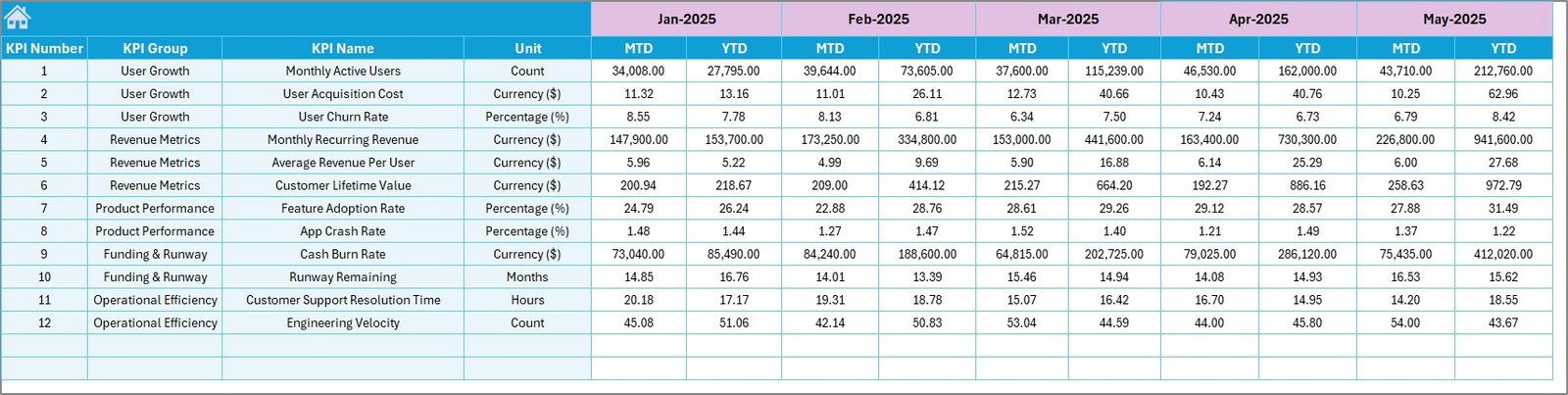
Target Number Input Sheet
6. Previous Year Number Sheet
Enter last year’s numbers in the same format as the current year. This enables year-over-year comparisons on the Dashboard sheet, so you can see both target performance and historical trends for each KPI.
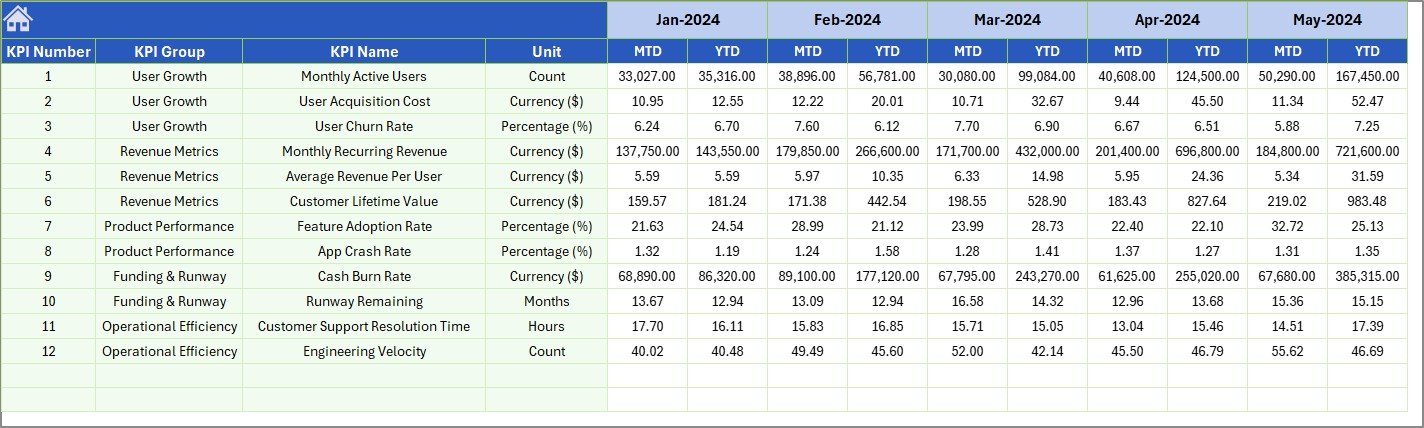
Previous Year Number Input Sheet
7. KPI Definition Sheet
Define each KPI’s name, group, unit, formula, and definition. In the last column, mark each KPI as LTB (Lower the Better) or UTB (Upper the Better). This data feeds the KPI Trend sheet’s reference panel and controls the conditional formatting logic across the dashboard.

KPI Definition Sheet
Financial Tech Startups KPI Dashboard vs. Google Sheets vs. Paid SaaS — Feature Comparison
| Feature | Financial Tech Startups KPI Dashboard (Excel) | Google Sheets Equivalent | Klipfolio / Databox |
|---|---|---|---|
| Cost | $14.99 one-time ✅ | Free (build from scratch) | $99–$399/month |
| Platform | Microsoft Excel ✅ | Google Sheets | Cloud SaaS |
| Setup Time | Under 10 minutes ✅ | 4–8 hours (DIY) | 1–3 hours |
| Real-time Collaboration | Via OneDrive/SharePoint | Yes (native) | Yes (native) |
| Mobile Access | Excel Mobile App | Google Sheets App | Yes (native app) |
| Customizable KPIs | Unlimited — define your own ✅ | Manual formula setup | Pre-built connectors |
| LTB/UTB KPI Logic | Built-in ✅ | Manual conditional logic | Limited |
| Year-1 Cost (5 Users) | $14.99 total ✅ | $0 (but 8+ hours labor) | $1,188–$4,788 |
| Offline Access | Full offline ✅ | Limited offline | No |
For fintech startups that want structured KPI tracking without paying $99+/month for SaaS dashboards, the Financial Tech Startups KPI Dashboard in Excel sits in the sweet spot.
Who Should Use This Template
📦 Click here to Purchase Financial Tech Startups KPI Dashboard in Excel
Perfect for:
- Fintech startup founders and COOs tracking 10–30 operational and financial KPIs monthly
- Finance managers at digital payment, lending, or insurtech companies needing MTD/YTD reporting
- Startup analysts preparing board-ready KPI reports without investing in expensive BI tools
- Consultants advising early-stage fintech companies on performance metrics
Not a fit if:
- You need real-time API-connected dashboards pulling from 100+ data sources — consider a dedicated BI platform
- Your team needs multi-user concurrent editing — Google Sheets-based dashboards from our Google Sheets Dashboard collection may be a better fit
- You require SOC 2 compliance, SSO, and enterprise-grade audit trails
Real-World Use Cases
Ravi leads operations at a digital lending startup with 45 employees. He uses the Financial Tech Startups KPI Dashboard to track loan disbursement rates, default percentages, and customer acquisition costs monthly. Every board meeting, he selects the relevant month, exports the dashboard view, and presents it directly — saving 6 hours of manual report building each quarter.
Meera is a CFO at a payment processing fintech in Series A. She tracks 18 KPIs including transaction volume, payment success rate, chargeback ratio, and gross margin using this dashboard. The LTB/UTB logic ensures that metrics like chargeback ratio correctly show green arrows when the number decreases — something her old spreadsheet got wrong consistently.
James consults for 3 early-stage fintech companies. He uses one copy of this template per client, customizing the KPI definitions for each business model. The KPI Trend sheet lets him quickly identify which metrics are trending off-target during monthly review calls — without switching between multiple tools.
Advantages of Financial Tech Startups KPI Dashboard
📦 Click here to Purchase Financial Tech Startups KPI Dashboard in Excel
The primary advantage of this template is structured KPI monitoring at a fraction of SaaS costs. At $14.99 one-time versus $99–$399 per month for comparable cloud tools, the cost savings over a single year range from $1,173 to $4,773 for a 5-person team. The template works offline, requires no internet connection for daily use, and stores all your data locally in the Excel file.
The LTB/UTB classification system is particularly useful for fintech teams where some KPIs should decrease (churn rate, default rate, cost per acquisition) while others should increase (transaction volume, revenue, active users). The dashboard handles both types correctly with conditional formatting arrows that always point in the performance-correct direction.
Opportunities for Improvement
This template tracks KPIs manually — you need to enter actual numbers each month rather than pulling them from APIs or databases automatically. For teams that update KPIs daily or in real-time, a SaaS tool with data connectors would be more efficient. The template also does not include a multi-user permission system, so if multiple team members edit the same file simultaneously without OneDrive/SharePoint, you may encounter version conflicts.
Best Practices
Start by defining your KPIs carefully in the KPI Definition sheet. Group related metrics together (e.g., all revenue KPIs in one group, all customer KPIs in another) for easier analysis. Update your actual numbers at the same time each month to maintain consistency. Use the Previous Year data to identify seasonal patterns — fintech metrics often show monthly cycles tied to payment processing volumes and lending activity.
For related financial dashboards, check out the Digital Wallets KPI Dashboard in Excel for payment-specific metrics or the Peer-to-Peer Lending KPI Dashboard in Excel for lending-focused KPIs. If you need a broader view, explore our full KPI Dashboard Templates category.
Explore Relevant Templates
📊 Digital Wallets KPI Dashboard in Excel — Track digital wallet transaction metrics, user growth, and payment processing KPIs.
📊 Peer-to-Peer Lending KPI Dashboard in Excel — Monitor loan origination, borrower default rates, and investor returns.
📊 Insurance Brokers KPI Dashboard in Excel — Track insurance sales, claims ratio, and policy renewal rates.
📊 Actuarial Services KPI Dashboard in Excel — Track risk assessment and actuarial performance metrics.
📊 VC Portfolio Dashboard in Excel — Manage venture capital portfolio performance and fund analytics.
Frequently Asked Questions
📦 Click here to Purchase Financial Tech Startups KPI Dashboard in Excel
What KPIs can I track with the Financial Tech Startups KPI Dashboard?
You can track any KPI relevant to your fintech business. The KPI Definition sheet lets you define unlimited KPIs including transaction volume, customer acquisition cost, churn rate, loan default rate, gross margin, and more. Each KPI gets its own trend chart and variance tracking.
Does this Excel dashboard work without macros?
Yes. The Financial Tech Startups KPI Dashboard runs entirely on native Excel formulas and conditional formatting. No macros, no VBA, and no special add-ins needed. It works in Excel 2016, 2019, 2021, and Microsoft 365.
How does this compare to using Klipfolio or Databox for fintech KPIs?
Klipfolio starts at $99/month and Databox at $47/month. This Excel dashboard costs $14.99 one-time with no recurring fees. If you need API integrations and real-time data, SaaS tools are better. For monthly manual KPI tracking and board reporting, this template delivers the same structured insights at a fraction of the cost.
Can I customize the KPI groups and definitions?
Absolutely. The KPI Definition sheet lets you set custom KPI names, group names, measurement units, calculation formulas, text definitions, and LTB/UTB type classifications. Every change automatically reflects in the Dashboard and KPI Trend sheets.
How long does setup take for the Financial Tech Startups KPI Dashboard?
Initial setup takes under 10 minutes. Enter your KPI definitions, plug in your actual and target numbers for the current month, and the dashboard is ready. Adding previous year data for year-over-year comparisons takes an additional 5–10 minutes depending on how many KPIs you track.
Can I use this fintech KPI dashboard for non-fintech businesses?
Yes. While the template is designed for fintech startups, the KPI structure is fully customizable. You can repurpose it for any industry by changing the KPI names and definitions in the KPI Definition sheet.
Is this template compatible with Mac?
Yes. The Financial Tech Startups KPI Dashboard works on both Windows and Mac versions of Microsoft Excel. Since it uses no macros or VBA, there are no compatibility issues on macOS.
About the Author
Built by PK — Microsoft Certified Professional with 15+ years of Excel, Google Sheets, and Power BI experience. Founder of NextGenTemplates, reaching 300K+ subscribers across YouTube channels (@PK-AnExcelExpert, @NextGenTemplates, @NeoTechNavigators). Every template is hand-built and tested before release.
Conclusion
The Financial Tech Startups KPI Dashboard in Excel gives fintech startup teams a structured, ready-to-use KPI monitoring system across 7 worksheets with MTD/YTD tracking, conditional formatting arrows, and individual KPI trend analysis. At $14.99 one-time, it replaces monthly SaaS subscriptions costing $99–$399/month while working entirely offline in Microsoft Excel.
📦 Click here to Purchase Financial Tech Startups KPI Dashboard in Excel
✅ Instant download · One-time payment · No subscription · Lifetime access
🎥 Visit our YouTube channel for step-by-step video tutorials:
👉 Youtube.com/@PK-AnExcelExpert