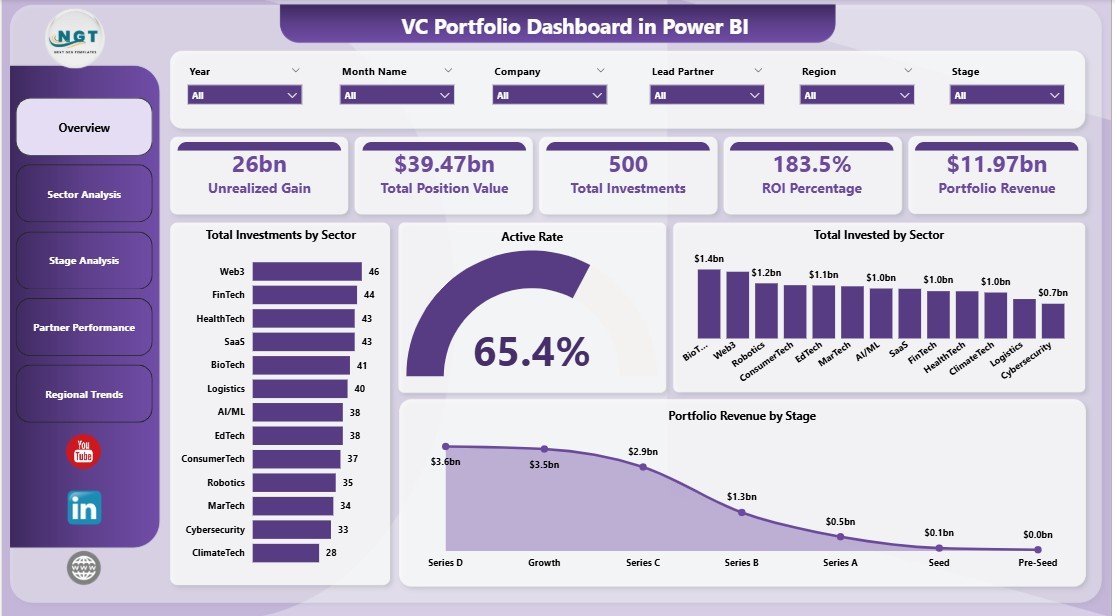
The VC Portfolio Dashboard in Power BI tracks 5 fund-level KPIs across 5 fully-interactive analytics pages, with 16+ DAX-driven visuals covering invested capital, unrealized gain, ROI by sector and stage, lead partner performance, and regional concentration. Built natively in Power BI Desktop, the dashboard updates in under 10 minutes — point Power Query at your portfolio data, hit Refresh, and every card, chart, and slicer recalculates automatically.
For emerging fund managers, family offices, and corporate VC teams, monthly LP reporting and quarterly IC pre-reads still happen in pivot-heavy Excel files. The VC Portfolio Dashboard in Power BI replaces that fragile workflow with a single .pbix file that any partner, analyst, or LP can read on Power BI Desktop, Power BI Pro, or Power BI Service — no $20K/year SaaS subscription required, no per-portfolio-company fees, no vendor lock-in.
VC Portfolio Dashboard in Power BI
Key Features of the VC Portfolio Dashboard in Power BI
🔹 5 fully-interactive Power BI pages — Overview, Sector Analysis, Stage Analysis, Partner Performance, and Regional Trends — each with cross-filter slicers, drill-through behavior, and visual tooltips that surface deal-level context on hover.
🔹 5 high-level KPI cards on the Overview page: Unrealized Gain, Total Position Value, Total Investments, ROI Percentage, and Portfolio Revenue — every card built using DAX measures (SUMX, DIVIDE, COUNTROWS) so figures respond instantly to slicer selections without manual recalculation.
🔹 16+ DAX-driven visuals covering Total Investments by Sector, Active Rate, Total Invested by Sector, Portfolio Revenue by Stage, ROI % by Sector, Avg Monthly Burn by Sector, Total Position Value by Stage, Active Investments by Lead Partner, and regional concentration views — every chart cleanly themed and aligned to the same color palette.
🔹 Sector, Stage, Lead Partner, and Region slicers on every page — perfect for LP reporting cuts, IC pre-reads, and quarterly partner reviews where you need to isolate a single sector or stage in seconds.
🔹 Native Power BI Desktop only — no R, no Python, no premium capacity required. Compatible with Power BI Desktop (free), Power BI Pro, Power BI Premium per User, and Power BI Service for sharing with LPs and partners.
🔹 Editable DAX measures and data model — open the .pbix file, swap the sample data for your own portfolio extract (CSV, Excel, or SQL), and the entire model rewires automatically. All measures are commented for easy customization.
Dashboard Pages Explanation
This dashboard ships with 5 analytics pages covering every dimension a venture investor reviews monthly. Each page uses the same color theme, the same slicer panel, and the same drill-through navigation so partners can move between views without re-learning the layout.
Page 1 — Overview
The Overview page anchors every monthly review with 5 KPI cards at the top — Unrealized Gain, Total Position Value, Total Investments, ROI Percentage, and Portfolio Revenue. Below the cards, four visuals tell the rest of the story: Total Investments by Sector, an Active Rate gauge, Total Invested by Sector, and Portfolio Revenue by Stage. Slicers for Sector, Stage, Lead Partner, and Region sit on the side panel, applying instantly to every visual on the page.
Overview Page
Page 2 — Sector Analysis
The Sector Analysis page surfaces three sector-level views — ROI Percentage by Sector, Avg Monthly Burn by Sector, and Portfolio Revenue by Sector. This is where a fund manager spots which sectors are returning capital and which are bleeding cash month-over-month. A quick glance shows whether SaaS, Fintech, or Climate is currently the strongest sector by ROI, and which is the highest cash burner.
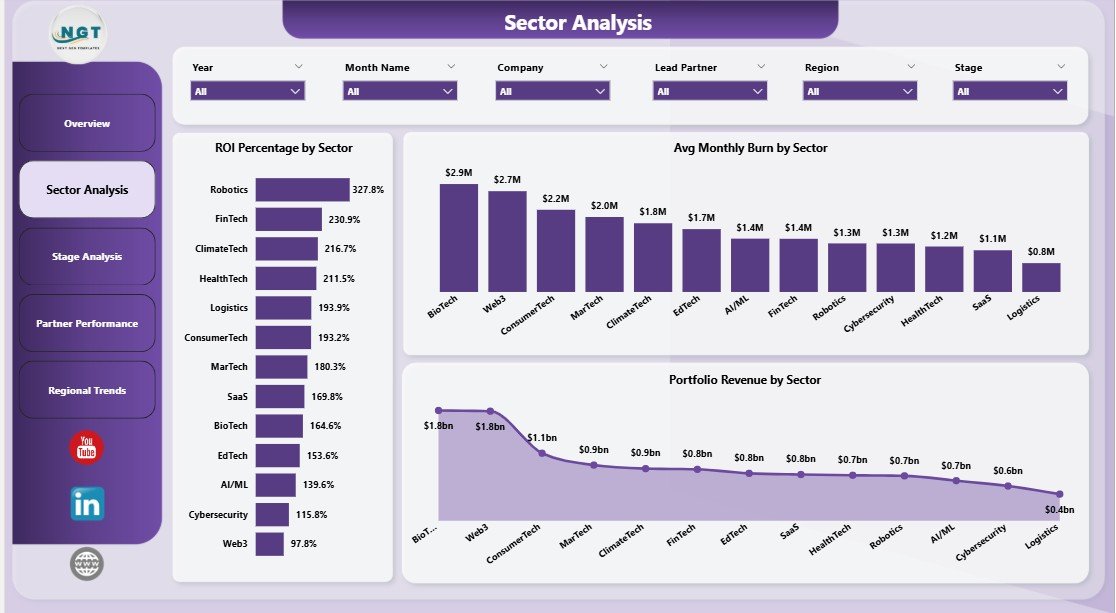
Sector Analysis
Page 3 — Stage Analysis
The Stage Analysis page breaks down capital and activity by investment stage — Total Position Value by Stage, Total Invested by Stage, and Active Investments by Stage. Built for fund managers tracking deployment pacing across Pre-Seed, Seed, Series A, Series B, and growth rounds, this page makes it obvious whether the portfolio is concentrated too heavily in a single stage or whether deployment is on plan with the LP-promised allocation.
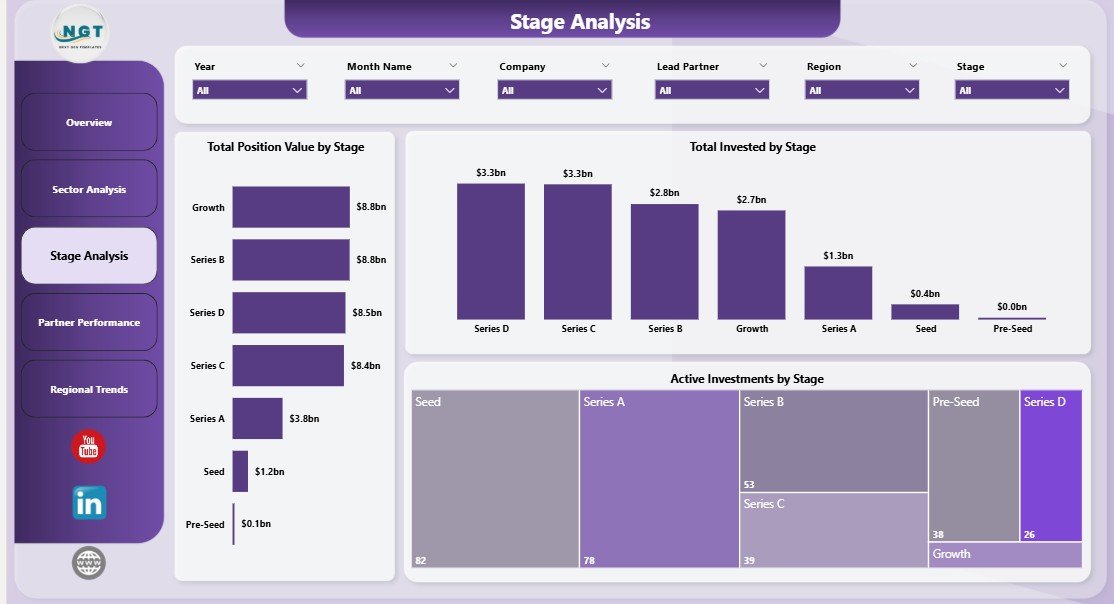
Stage Analysis
Page 4 — Partner Performance
The Partner Performance page covers three partner-level views — Total Position Value by Lead Partner, Total Invested by Lead Partner, and Active Investments by Lead Partner. This is the page that makes individual partner accountability transparent and IC-ready: who has deployed the most capital, who has the highest unrealized gain, and who has the largest active book.
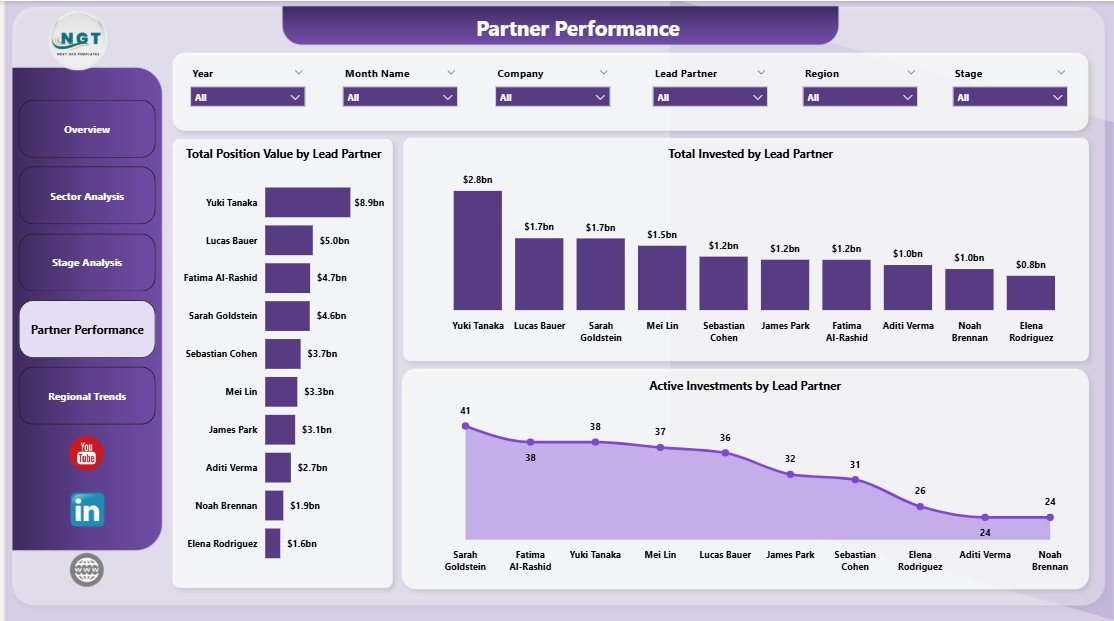
Partner Performance
Page 5 — Regional Trends
The Regional Trends page anchors three geography-led views — Total Position Value by Region, Total Invested by Region, and Active Investments by Region. This is perfect for global funds tracking exposure across North America, EMEA, APAC, and LATAM, or for emerging managers who need to demonstrate to LPs how capital is being deployed across geographies.
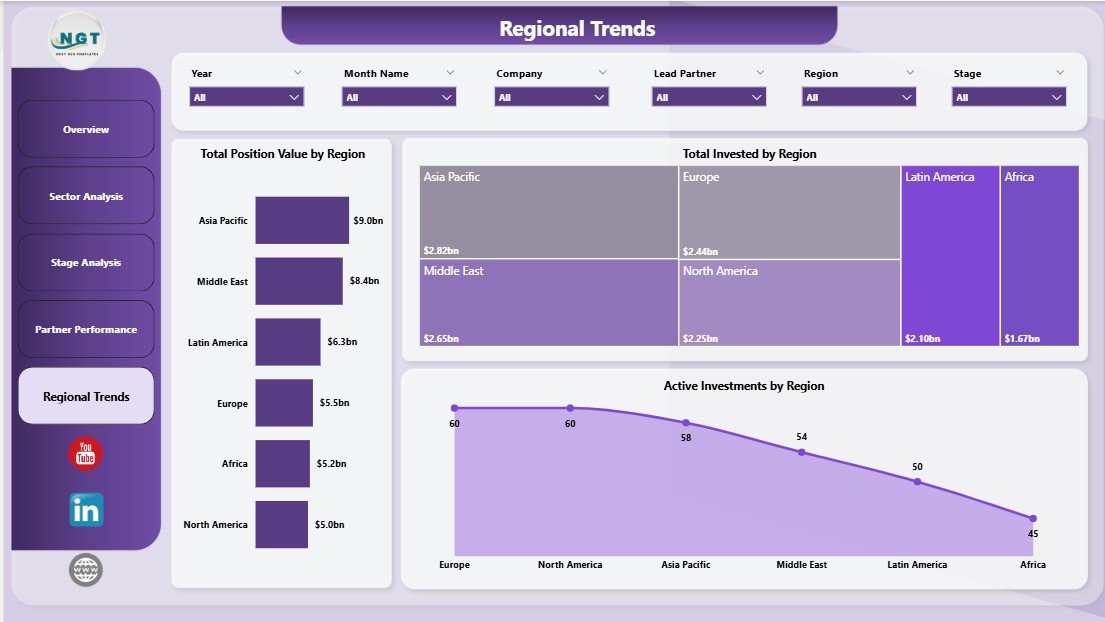
Regional Trends
VC Portfolio Dashboard in Power BI vs. Excel Pivot Build vs. Paid Portfolio SaaS — Feature Comparison
| Feature | VC Portfolio Dashboard (Power BI) | Excel Pivot Build | Carta / AngelList / Visible.vc |
|---|---|---|---|
| Cost | $17.99 one-time ✅ | ~$30/user/month for Excel 365 | $10K–$50K/year + per-portfolio-co fees |
| Platform | Power BI Desktop (free) | Microsoft Excel | Cloud SaaS (vendor-hosted) |
| Setup time | Under 10 minutes ✅ | 2–4 hours of pivot wiring | 2–6 weeks onboarding + data import |
| DAX measures included | 16+ pre-built ✅ | Build manually with formulas | Vendor-defined (limited custom) |
| Real-time slicer filtering | Yes ✅ | Yes (with extra setup) | Yes |
| Share with LPs (Power BI Service) | Yes ✅ | Email file or screenshot | Yes (vendor portal) |
| Customizable visuals & themes | Full edit access ✅ | Full edit access | Limited (vendor-defined) |
| Year-1 cost at 5 partners | $17.99 ✅ | ~$1,800 (Excel licenses) | $10,000–$50,000+ |
| Vendor lock-in | None ✅ | None | High (data export limits) |
For emerging managers and VC analysts who want institutional-quality reporting without paying $20K/year for Carta or Visible.vc, the VC Portfolio Dashboard in Power BI sits in the sweet spot.
Who Should Use This Template
✅ Perfect for:
- Emerging VC fund managers ($5M–$100M AUM) who want LP-ready monthly reporting without paying for a portfolio SaaS
- VC analysts and associates preparing IC pre-reads, quarterly partner reviews, or annual LP letters
- Family offices and angel syndicates managing 10–200 startup investments across multiple sectors and stages
- Corporate VC and strategic investment teams reporting to a parent company’s CFO or BU head
- Solo GPs and scout investors who already own Microsoft 365 or have free Power BI Desktop installed
❌ Not a fit if:
- You run a Tier-1 VC firm with 500+ portfolio companies — your fund admin and Carta integration will scale better
- You manage public equities or hedge fund books — this template is built for illiquid private investments, not daily-marked positions
- You need automated cap-table + 409A + waterfall calculations — use Carta, AngelList Stack, or Pulley for that
- You only have Power BI Service free tier without Power BI Desktop installed locally
Real-World Use Cases
Priya runs a $40M emerging-manager fund with 28 portfolio companies. She used to spend two days every month wrangling a 12-tab Excel file before LP updates went out. Now she opens the VC Portfolio Dashboard in Power BI, refreshes against her Airtable export, opens Sector Analysis to flag two sectors with elevated burn, and exports the Partner Performance page to PDF for her co-GP — all before her morning coffee. She estimates the dashboard saves her 16 hours per month, every month, without paying $1,800/month for Visible.vc.
James is a VC associate at a corporate venture arm. Before every Investment Committee meeting, he refreshes the .pbix against the firm’s internal deal pipeline SQL view, then walks the IC through Stage Analysis and Regional Trends. The dashboard replaced what used to be a hand-built 12-tab Excel file his predecessor maintained — a file that broke every time someone added a new sector or renamed a column.
Carla manages a single-family office’s 65-deal angel portfolio. She publishes the dashboard to Power BI Service quarterly so the principal can browse Total Position Value by Region from his iPad — no spreadsheet attachments, no version-control headaches, and no $25K/year angel-syndicate-tracking SaaS bill.
Advantages of the VC Portfolio Dashboard in Power BI
The biggest advantage is cost-to-capability ratio. A one-time $17.99 download replaces $10,000–$50,000/year SaaS spend on Carta, AngelList Stack, or Visible.vc — and gives you full edit access to every measure, every visual, and every slicer. There are no per-portfolio-company fees and no per-LP seat charges.
The second advantage is data ownership and portability. Your portfolio data lives in a CSV, Excel file, or SQL database that you control. There is no vendor data-export window, no “export to PDF only” limitation, and no contract negotiation when you need to move data between funds.
The third advantage is customizability. Every DAX measure is exposed and commented inline. You can add a new KPI, duplicate a page for a fund-of-funds breakdown, swap colors to match your brand, or layer in a benchmark dataset — all without engineering help.
Opportunities for Improvement
The dashboard is not a fund-administration system — it does not handle cap-table tracking, 409A valuations, SAFE/convertible-note conversion math, or LP waterfall calculations. Funds that need those workflows still need Carta, Pulley, or AngelList Stack alongside this dashboard.
The dashboard also expects a clean, structured input dataset. If your portfolio data lives in 14 different Google Sheets across 4 partners’ Drive accounts, you will need to consolidate it once before the first refresh. (After that, refreshes are one-click.)
Finally, mobile-first viewing on Power BI Service requires Power BI Pro for sharing — that is a $10/user/month charge directly from Microsoft, not a NextGenTemplates fee.
Best Practices
📌 Refresh weekly, not monthly. Even if your LP report cadence is quarterly, refreshing weekly catches data-entry errors early and gives partners a habit of checking the dashboard before IC.
📌 Use bookmarks for IC-ready views. Power BI bookmarks let you save a specific slicer combination (e.g., “Series A SaaS deals in EMEA”) and return to it in one click during a partner review.
📌 Pair the .pbix with a one-page methodology note. LPs love consistency — a short PDF that defines how you calculate Unrealized Gain, ROI %, and Active Rate prevents follow-up emails after every quarterly report.
📌 Publish to a dedicated Power BI workspace. Don’t mix portfolio reporting with operational dashboards in the same workspace — confidentiality is easier to manage with workspace-level access controls.
📌 For deeper Power BI customization, consult the official Microsoft Power BI documentation on DAX measures, data modeling, and Power BI Service publishing.
Explore Relevant Templates
👉 Cross-platform companion: The same dashboard is also available as the VC Portfolio Dashboard in Excel — built natively with pivot tables, pivot charts, and slicers for fund managers who prefer staying in the Microsoft Excel environment.
👉 Venture Capital Dashboard in Power BI — an alternative VC dashboard layout focused on deal-level analytics rather than fund-level portfolio metrics.
👉 Venture Capital KPI Dashboard in Power BI — KPI-scorecard-style version with traffic-light indicators against monthly target benchmarks.
👉 Browse all Power BI Dashboard templates on NextGenTemplates, or explore the Financial Tools collection for related VC, PE, and family-office templates.
Frequently Asked Questions
What KPIs does the VC Portfolio Dashboard in Power BI track?
The VC Portfolio Dashboard in Power BI tracks 5 fund-level KPIs on the Overview page — Unrealized Gain, Total Position Value, Total Investments, ROI Percentage, and Portfolio Revenue. Every metric is built with editable DAX measures and updates automatically when slicers are applied or new data is refreshed.
How does the VC Portfolio Dashboard in Power BI compare to Carta or Visible.vc?
The VC Portfolio Dashboard in Power BI is a one-time $17.99 purchase, while Carta or Visible.vc typically run $10,000–$50,000 per year plus per-portfolio-company fees. You give up automated cap-table tracking and 409A valuations, but you keep full data ownership, full visual customization, and zero vendor lock-in.
Do I need Power BI Pro to use this template?
No. The VC Portfolio Dashboard in Power BI works fully on the free Power BI Desktop application. You only need Power BI Pro if you want to publish the report to Power BI Service and share it with colleagues or LPs — and that license is $10 per user per month directly from Microsoft.
How long does setup take?
Setup for the VC Portfolio Dashboard in Power BI takes under 10 minutes for users familiar with Power Query. Open the .pbix, point Transform Data at your own portfolio data source, click Refresh, and every visual on all 5 pages updates automatically using the bundled DAX measures.
Can I add new sectors, stages, or KPIs?
Yes. The VC Portfolio Dashboard in Power BI is fully editable — every DAX measure is exposed and commented, every visual is unlocked, and you can duplicate any of the 5 pages to build new sector-specific or LP-specific views without breaking the model. Just add new dimension values to your source data and refresh.
Does the dashboard work with Excel data?
Yes. The VC Portfolio Dashboard in Power BI ships with an Excel data source by default. Open Transform Data, swap the file path to your own .xlsx portfolio extract, and refresh. CSV, SharePoint, OneDrive, and SQL Server sources are equally supported.
Is there a tutorial video for the VC Portfolio Dashboard in Power BI?
Yes. The PK-AnExcelExpert YouTube channel publishes step-by-step Power BI tutorials covering DAX measures, slicers, drill-through, and Power BI Service publishing — all directly applicable to customizing the VC Portfolio Dashboard in Power BI for your fund.
About the Author
Built by PK — Microsoft Certified Professional with 15+ years of Excel, Google Sheets, and Power BI experience. Founder of NextGenTemplates, reaching 300K+ subscribers across YouTube channels (@PK-AnExcelExpert, @NextGenTemplates, @NeoTechNavigators). Every template is hand-built and tested before release.
Conclusion
The VC Portfolio Dashboard in Power BI gives venture investors a one-time $17.99 path to LP-grade reporting — replacing fragile pivot-heavy Excel files and $20K/year SaaS subscriptions with a fully-editable .pbix file you actually own. With 5 KPI cards, 16+ DAX-driven visuals, 5 analytics pages, and one-click slicer filtering, it covers every dimension a fund manager reviews monthly: sector, stage, lead partner, and region.
👉 Click here to Purchase the VC Portfolio Dashboard in Power BI
✅ Instant download · One-time payment · No subscription · Lifetime access
🎥 Visit YouTube.com/@PK-AnExcelExpert for video tutorials on Power BI dashboards, DAX measures, and portfolio analytics.
📅 Last updated: May 2026