The Data Privacy Office Dashboard in Excel packs 5 privacy KPIs, 5 interactive report pages, and 20+ charts into one workbook that a Data Protection Officer can refresh in under 10 minutes. Instead of juggling separate case logs, breach trackers, and fine estimates, you get a single, slicer-driven view of your organisation’s privacy posture.
Since GDPR came into force, regulators have issued billions of euros in data protection fines, and privacy laws now apply across 130+ countries. This Data Privacy Office Dashboard in Excel helps small and mid-sized teams track cases, data subject requests, and breaches — and quantify potential fine exposure — without the cost and complexity of an enterprise GRC platform. You can download the Data Privacy Office Dashboard here.
Key Features of the Data Privacy Office Dashboard in Excel
This dashboard turns a raw privacy case log into a connected, board-ready report. Key features include:
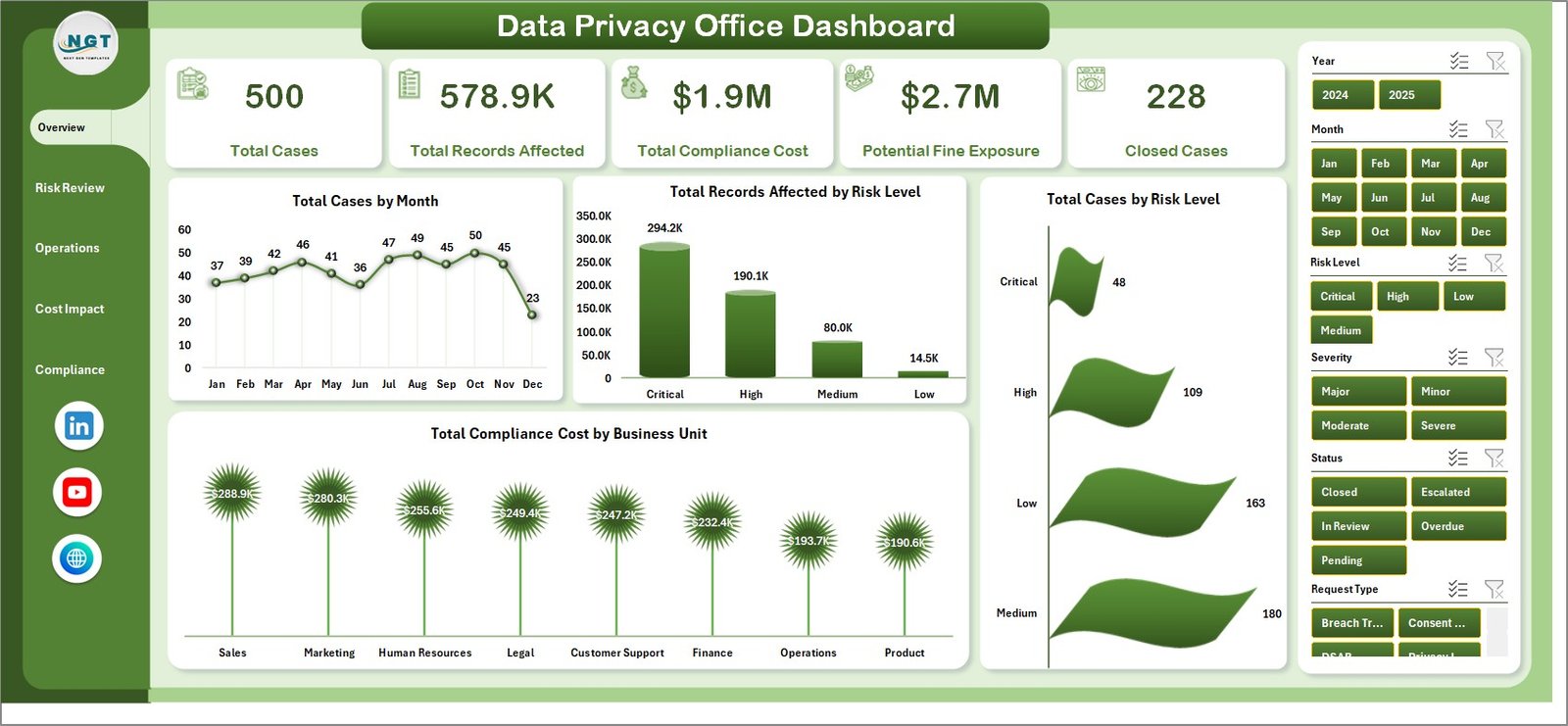
- 5 executive KPI cards — Total Cases, Total Records Affected, Total Compliance Cost, Potential Fine Exposure, and Closed Cases.
- 20+ pre-built charts across five pages, covering case volume by month, risk level, regulation, owner, region, channel, vendor, and data domain.
- Slicer-driven filtering so you can slice any page by risk level, regulation, business unit, or status in one click.
- Multi-regulation coverage for GDPR, CCPA, HIPAA, and other frameworks, with closure rate tracked per regulation.
- Fine-exposure modelling by business unit and by year, turning regulatory risk into a currency figure.
- Pivot-powered, auto-refresh engine — update the Data sheet and click Refresh All to rebuild everything.
Three things worth stating plainly: the Data Privacy Office Dashboard tracks 5 headline KPIs, ships with 20 charts across 5 pages, and runs entirely in Microsoft Excel with no macros or add-ins.
Dashboard Pages Explanation
The workbook contains five report pages, a Data sheet, and a hidden Support sheet.
1. Overview Page

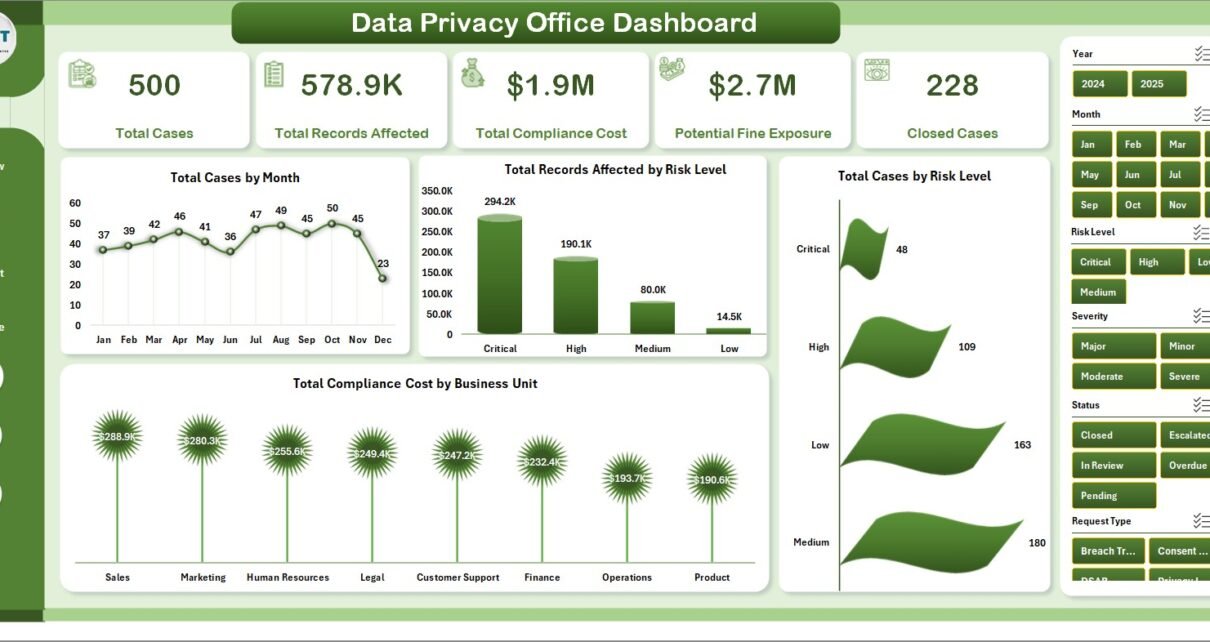
The Overview leads with five KPI cards and four charts. Total Cases by Month tracks case volume over time, Total Records Affected by Risk Level shows how much data sits behind each risk band, Total Cases by Risk Level reveals the share of high-risk work, and Total Compliance Cost by Business Unit highlights where privacy spend concentrates. Slicers let you refilter the whole page instantly.
2. Risk Review
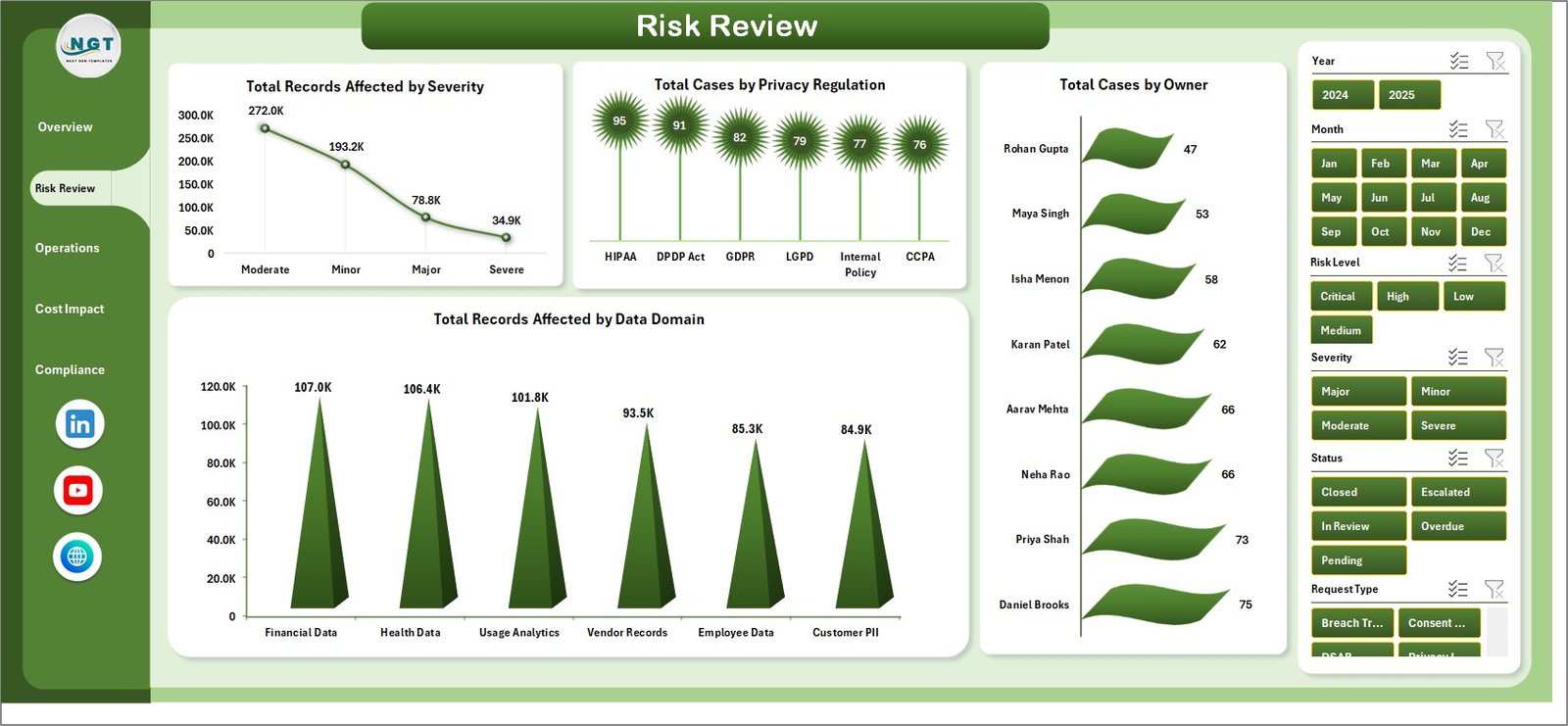
Risk Review profiles exposure with Total Records Affected by Severity, Total Cases by Privacy Regulation, Total Cases by Owner, and Total Records Affected by Data Domain, so you can see which regulations, owners, and data domains carry the most risk.
3. Operations
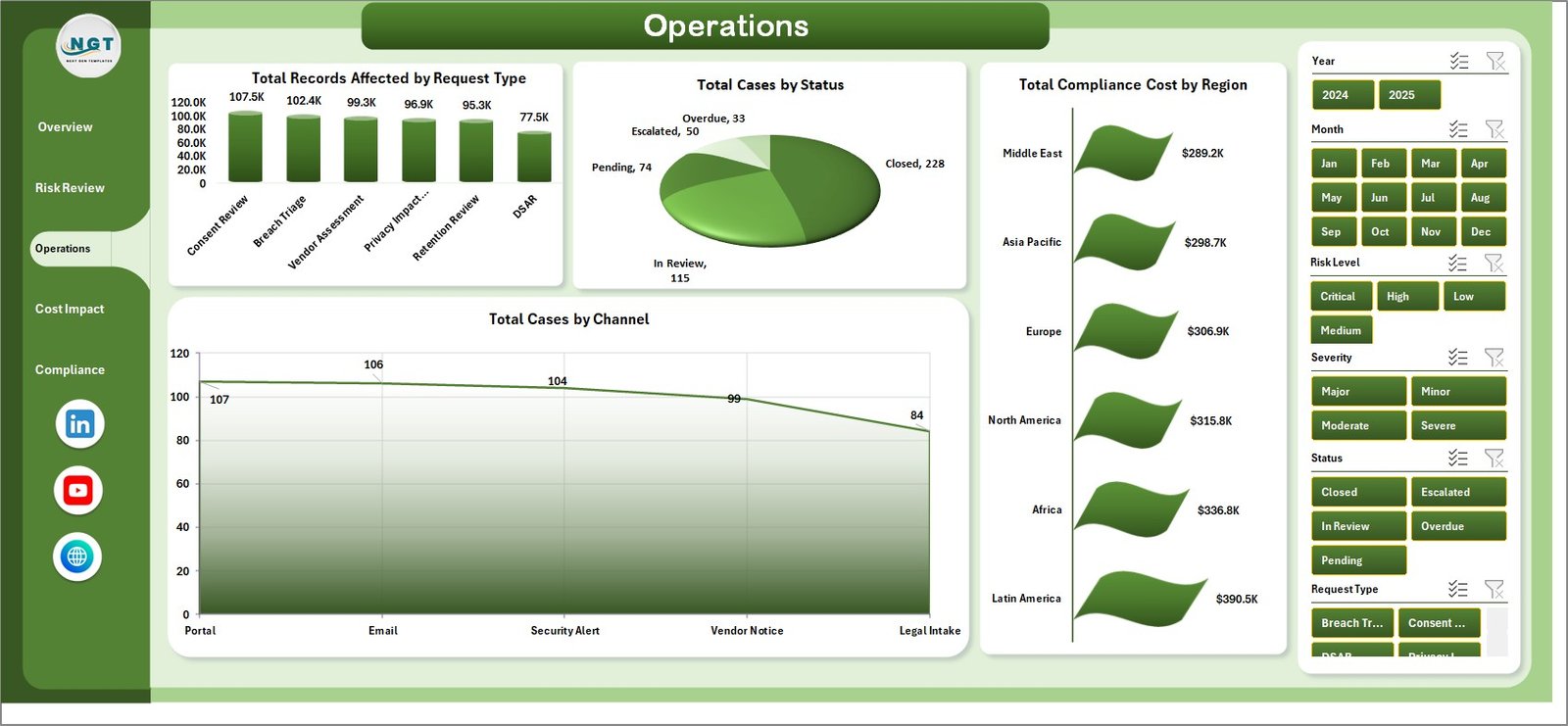
Operations tracks case handling with Total Records Affected by Request Type, Total Cases by Status, Total Compliance Cost by Region, and Total Cases by Channel — covering request mix, open versus closed status, regional spend, and intake channels.
4. Cost Impact
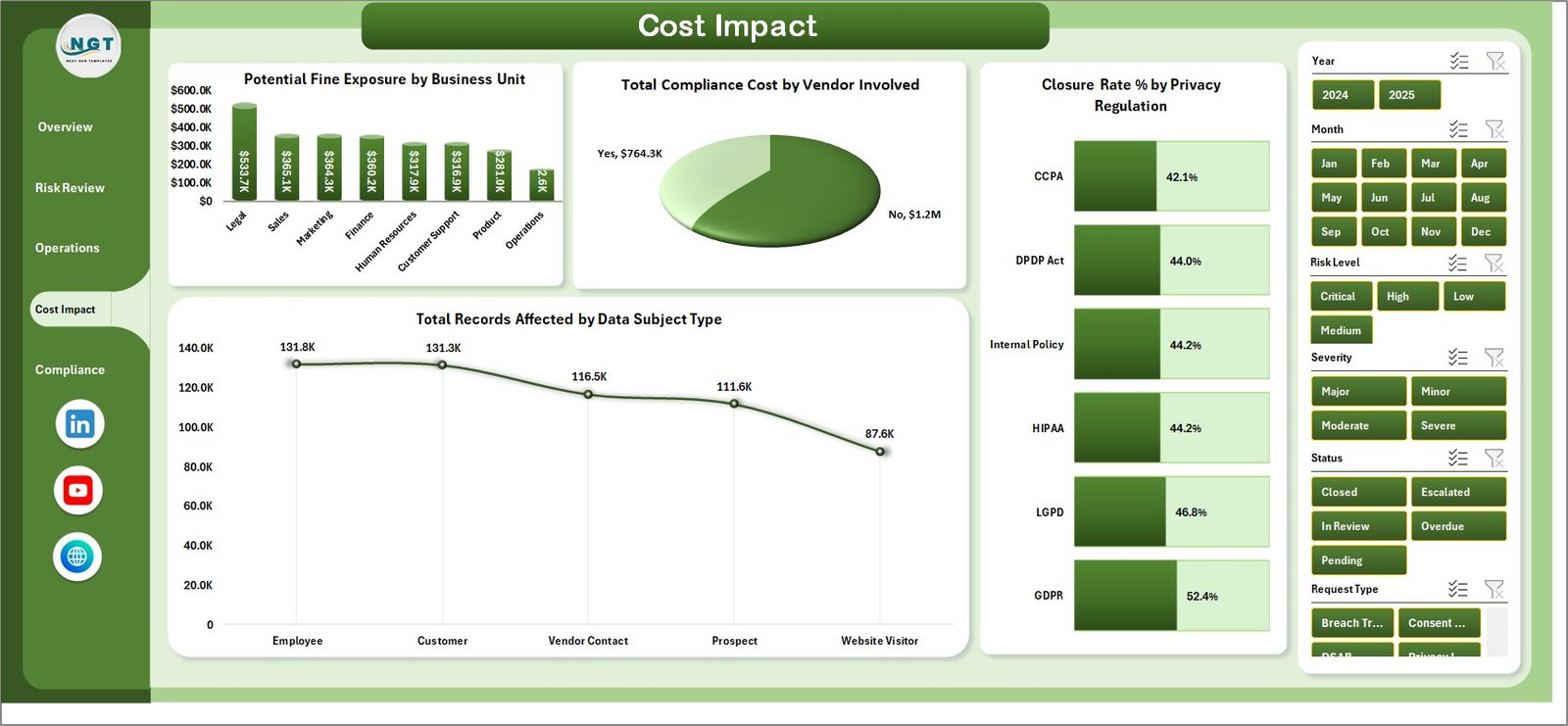
Cost Impact links privacy work to money with Potential Fine Exposure by Business Unit, Total Compliance Cost by Vendor Involved, Closure Rate % by Privacy Regulation, and Total Records Affected by Data Subject Type, so finance and legal can weigh fine risk against spend and resolution speed.
5. Compliance
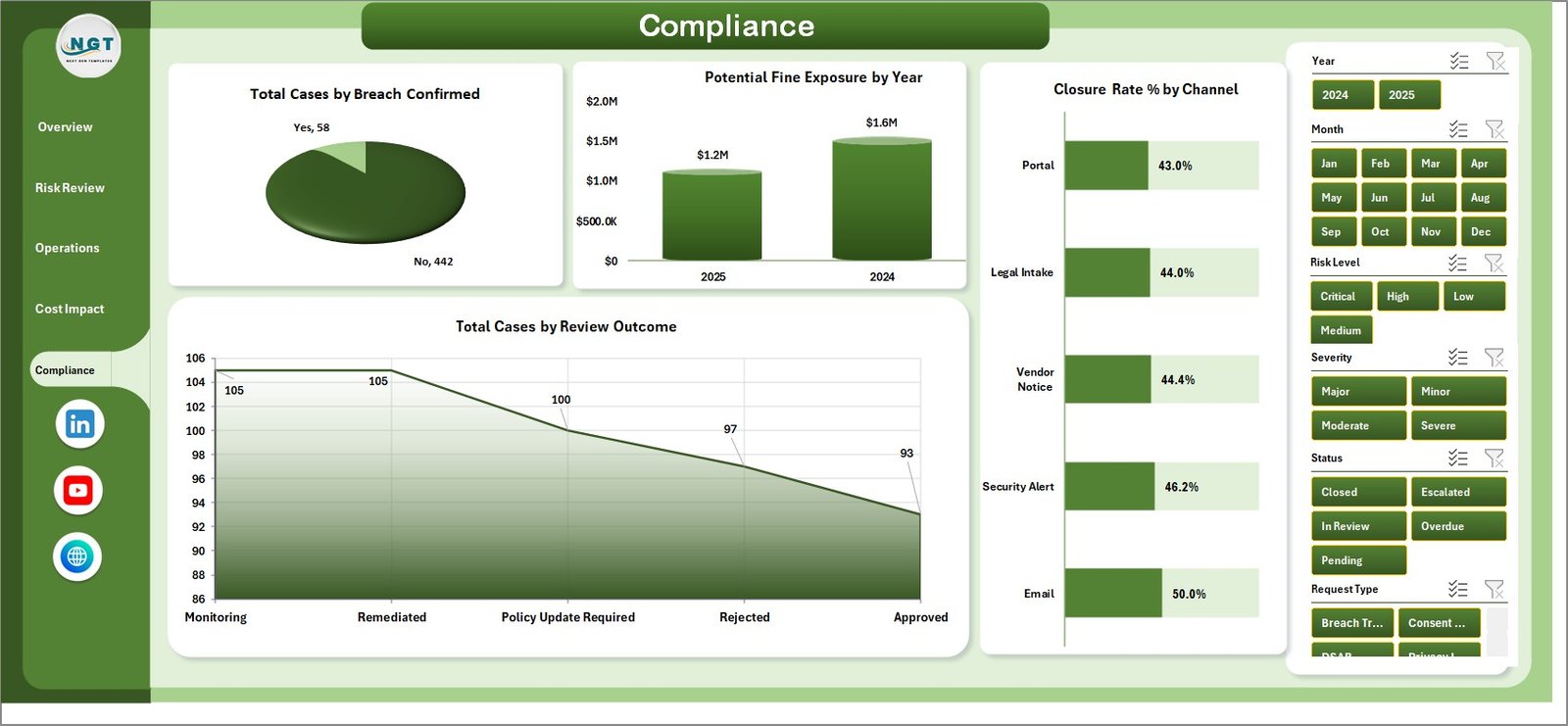
Compliance gives a regulatory summary with Total Cases by Breach Confirmed, Potential Fine Exposure by Year, Closure Rate % by Channel, and Total Cases by Review Outcome — ideal for board reporting on confirmed breaches and multi-year fine exposure.
6. Data Sheet
The Data sheet holds your records. Paste your privacy cases into the existing column structure and the dashboard reads them on the next refresh.

7. Support Sheet
The Support sheet contains the pivot tables behind every chart. After editing the Data sheet, open the Data tab in the Excel ribbon and click Refresh All to rebuild the pivots and visuals. Keep this sheet hidden during daily use.

Data Privacy Office Dashboard vs. Google Sheets vs. Paid Privacy SaaS — Feature Comparison
Here is how this Excel template compares to a Google Sheets build and to enterprise privacy platforms such as OneTrust or TrustArc:
| Feature | Data Privacy Office Dashboard (Excel) | Google Sheets Version | OneTrust / TrustArc |
|---|---|---|---|
| Cost | $17.99 one-time | $9.99 one-time | $15,000+ / year |
| Platform | Microsoft Excel (offline) | Google Sheets (cloud) | Web SaaS |
| Setup time | Under 10 minutes | Under 10 minutes | Weeks of onboarding |
| DSAR & breach tracking | Built in | Built in | Yes |
| Fine-exposure modelling | By unit & year | Yes | Yes |
| Real-time team collaboration | Via shared drive / OneDrive | Native | Native |
| Mobile access | Excel mobile app | Browser | App |
| Customizable fields | Fully editable | Fully editable | Limited / paid |
| Year-1 cost at 5 users | $17.99 total | $9.99 total | $15,000+ |
For privacy teams that want DSAR, breach, and fine-exposure tracking without a five-figure GRC contract, the Data Privacy Office Dashboard in Excel sits in the sweet spot.
Who Should Use This Template
Perfect for:
- Data Protection Officers and privacy managers at 10–1,000-person organisations who need a clear privacy overview without enterprise software.
- Compliance, legal, and InfoSec teams currently tracking GDPR, CCPA, or HIPAA cases in spreadsheets.
- Consultants and DPO-as-a-service providers reporting privacy posture to multiple clients.
Not a fit if:
- You need automated data discovery, consent management, or SOC 2 / SSO-grade tooling.
- You require a fully cloud-native, multi-user workflow with audit logging.
- You need real-time API integrations with ticketing or DSAR-intake systems.
Real-World Use Cases
Priya is a DPO at a 250-person fintech. She logs every data subject request and breach in the Data sheet, then uses the Compliance page to show her board confirmed breaches and Potential Fine Exposure by Year — without paying for OneTrust.
Marcus runs InfoSec at a healthcare provider. He filters the Risk Review page by HIPAA to see records affected by severity and data domain, helping him prioritise the highest-risk cases first. He also keeps the Cyber Risk Management KPI Dashboard open alongside it.
Lena is an independent privacy consultant. She keeps one workbook per client, updates the Data sheet monthly, and clicks Refresh All to produce a polished privacy report in minutes.
Advantages of the Data Privacy Office Dashboard in Excel
- Massive cost saving — a $17.99 one-time purchase versus $15,000+ per year for enterprise privacy platforms.
- Fast to deploy — under 10 minutes from download to a working report.
- Works offline — no cloud dependency, so your privacy data stays in your own file.
- Board-ready visuals — confirmed breaches, fine exposure, and closure rates in one place.
- Fully editable — adapt fields, charts, and regulations to match your program.
Opportunities for Improvement
To set expectations honestly: the Data Privacy Office Dashboard in Excel relies on manual data entry, so it is only as current as your last update. It is single-file by design, which means real-time multi-user editing is better handled in a cloud tool, and it does not perform automated data discovery or consent capture. For teams that need those capabilities, a dedicated GRC platform is the right step up — but for most small and mid-sized privacy offices, this dashboard covers the essentials at a fraction of the cost.
Best Practices
- Keep the Data sheet column structure intact so the pivot tables refresh cleanly.
- Click Refresh All after every data update to rebuild charts and KPIs.
- Use slicers to produce focused views (for example, GDPR-only or high-risk-only) before exporting.
- Archive a dated copy each month to build a historical fine-exposure trend.
- Align your fields with the official frameworks — for example, the full text of the GDPR.
Explore Relevant Templates
If you manage privacy and security data, these related templates pair well:
- Data Privacy KPI Scorecard in Excel
- Cybersecurity Operations Center Dashboard in Excel
- Compliance and Audit Dashboard in Excel
- IT Security Auditing KPI Dashboard in Excel
You may also like these related reads: Cyber Law Advisory Dashboard in Excel and the AI Governance Dashboard in Power BI.
Frequently Asked Questions
What KPIs does the Data Privacy Office Dashboard in Excel track?
The Data Privacy Office Dashboard tracks 5 headline KPIs — Total Cases, Total Records Affected, Total Compliance Cost, Potential Fine Exposure, and Closed Cases — plus 20+ supporting charts across risk, operations, cost, and compliance views.
Which privacy regulations does it support?
The dashboard breaks down cases and closure rate by privacy regulation, so you can monitor GDPR, CCPA, HIPAA, and other frameworks side by side. You can rename or add regulations on the Data sheet to match your own program.
How long does setup take?
Setup takes under 10 minutes. Paste your records into the Data sheet using the existing columns, click Refresh All on the Data tab, and the Data Privacy Office Dashboard rebuilds every chart and KPI automatically.
How does this compare to OneTrust or TrustArc?
OneTrust and TrustArc are enterprise GRC platforms that typically start around $15,000 per year. The Data Privacy Office Dashboard in Excel is a $17.99 one-time purchase that covers DSAR, breach, and fine-exposure tracking for small and mid-sized teams.
Do I need macros or an internet connection?
No. The Data Privacy Office Dashboard runs on standard Excel pivot tables and charts with no macros or add-ins, and it works fully offline in Excel 2016, 2019, 2021, and Microsoft 365.
Can I customise the fields and charts?
Yes. Every column, chart, and slicer is fully editable. Add your own data domains, business units, or regulations on the Data sheet and refresh to update the visuals.
About the Author
Built by PK — Microsoft Certified Professional with 15+ years of Excel, Google Sheets, and Power BI experience. Founder of NextGenTemplates, reaching 300K+ subscribers across YouTube channels. Every template is hand-built and tested before release.
Conclusion
The Data Privacy Office Dashboard in Excel gives privacy teams a fast, affordable way to track cases, breaches, and fine exposure in one refreshable workbook. Click here to purchase the Data Privacy Office Dashboard in Excel and start reporting today.
Instant download · One-time payment · No subscription.
Last updated: May 2026