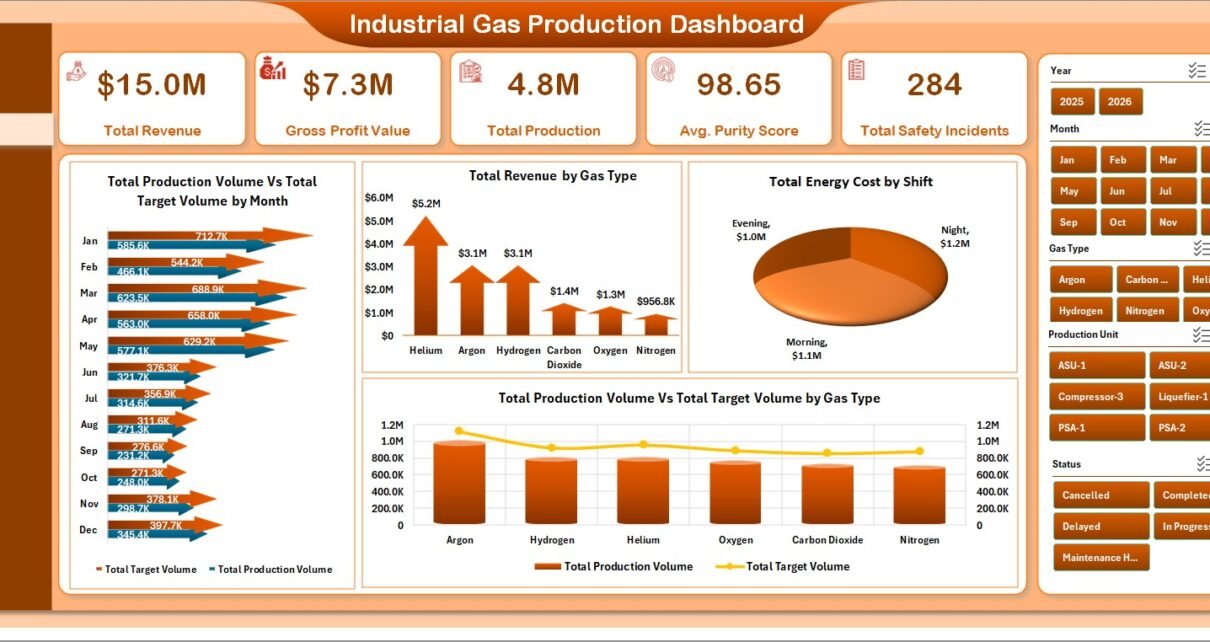
Industrial Gas Production Dashboard in Excel helps industrial gas producers, air separation plants, specialty gas manufacturers, plant managers, quality teams, finance analysts, and safety leaders monitor production, revenue, gross profit, purity, energy cost, downtime, and safety incidents from one refreshable Excel workbook. The template includes 7 worksheet tabs, 5 executive KPI cards, 19 analysis visuals, multiple slicers, a Data Sheet, and a pivot-backed Support Sheet.
Industrial gas production reporting becomes difficult when plant output, target volume, purity results, energy cost, shift activity, downtime, and incidents are reviewed in separate spreadsheets. This Excel dashboard brings those metrics together so management can move from high-level performance to production, cost, quality, and operations analysis without rebuilding charts each month.
Click here to view the Industrial Gas Production Dashboard in Excel.
Key Features of Industrial Gas Production Dashboard in Excel
- 7 worksheet tabs: Overview, Production, Cost Analysis, Quality, Operations, Data Sheet, and Support Sheet.
- 5 KPI cards: Total Revenue, Gross Profit Value, Total Production, Avg. Purity Score, and Total Safety Incidents.
- 19 analysis visuals: Review production volume, target volume, revenue, energy cost, gross profit, purity pass rate, safety incidents, attainment, downtime, shifts, plants, gas types, operators, and regions.
- Excel slicers: Filter pages quickly during daily, weekly, or monthly production reviews.
- Refreshable structure: Replace sample records in the Data Sheet, click Refresh All, and update the pivot tables and charts.
- Editable workbook: Adjust charts, colors, labels, fields, slicers, and layouts to match your reporting process.
Dashboard Pages Explanation
1. Overview Page
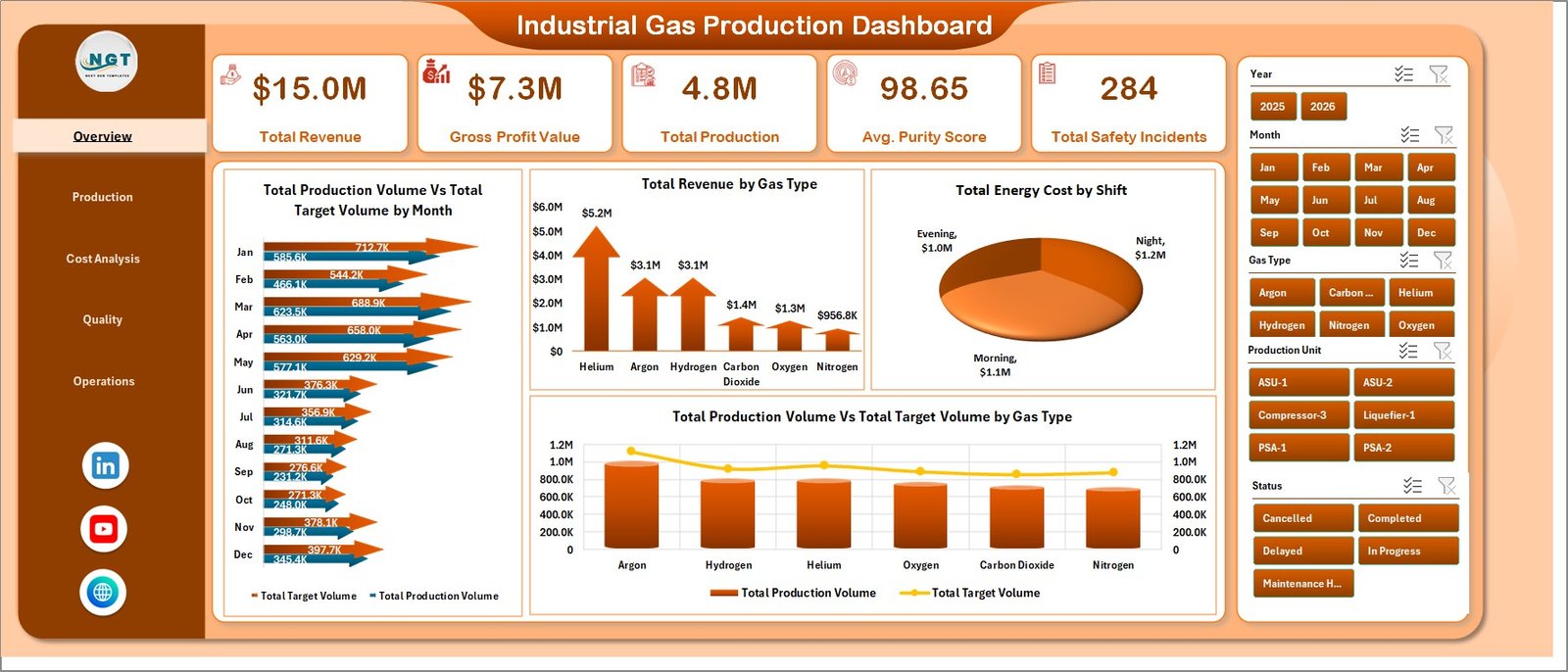
The Overview page gives the leadership view of industrial gas performance. The top cards show Total Revenue, Gross Profit Value, Total Production, Avg. Purity Score, and Total Safety Incidents, so users can read financial, production, quality, and safety status on one screen.
Total Production Volume Vs Total Target Volume by Month compares actual monthly output with the planned target. It helps managers identify whether the plant is ahead, behind, or on target across the year.
Total Revenue by Gas Type shows which gas categories contribute the most revenue. It is useful for product mix review, pricing discussion, and commercial planning.
Total Energy Cost by Shift compares energy cost across operating shifts. Teams can use it to investigate high-cost shifts and review staffing, equipment load, or operating patterns.
Total Production Volume Vs Total Target Volume by Gas Type compares actual and target output by gas type. It helps teams see which product lines need production follow-up.
2. Production
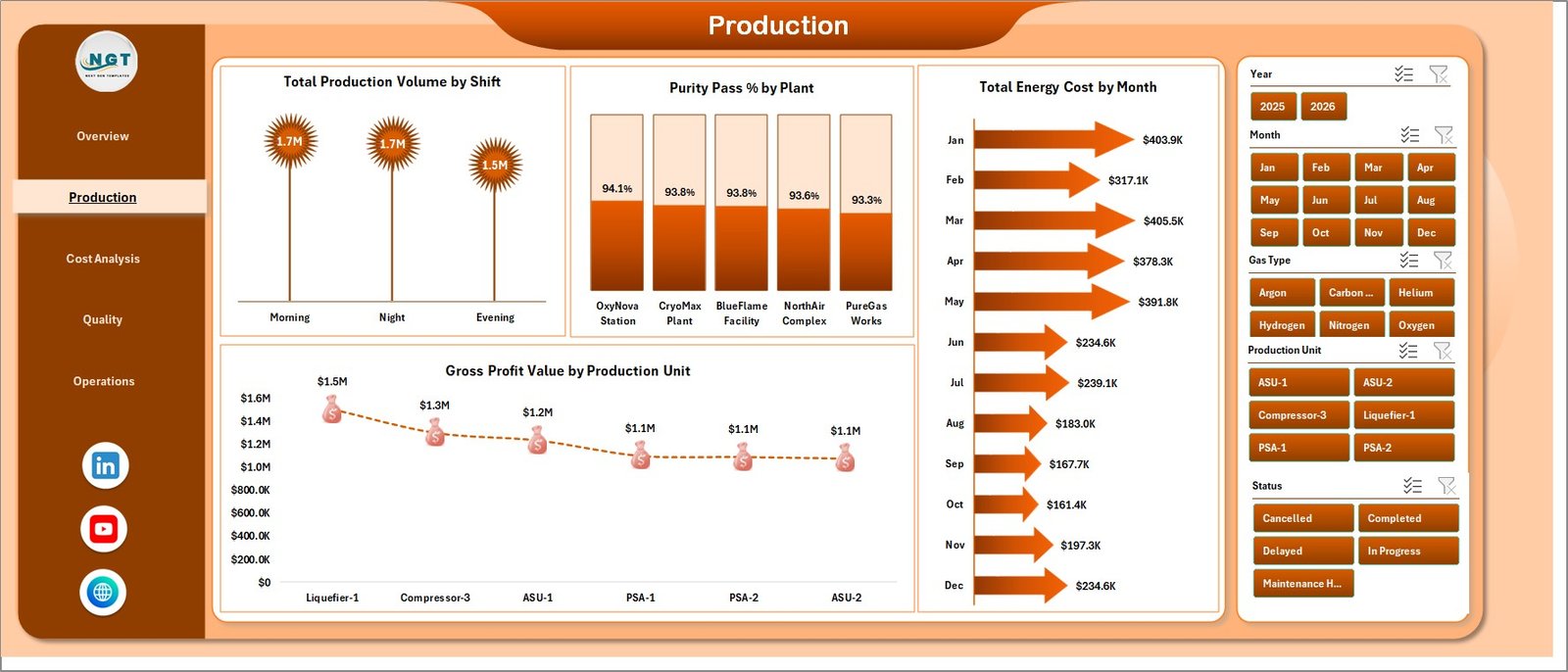
The Production sheet focuses on output, shift performance, plant quality, energy cost, and production-unit margin. Total Production Volume by Shift shows how production is distributed across shifts. Purity Pass % by Plant compares quality pass performance across plants. Total Energy Cost by Month shows cost movement over time, and Gross Profit Value by Production Unit identifies the units contributing the most gross profit.
3. Cost Analysis
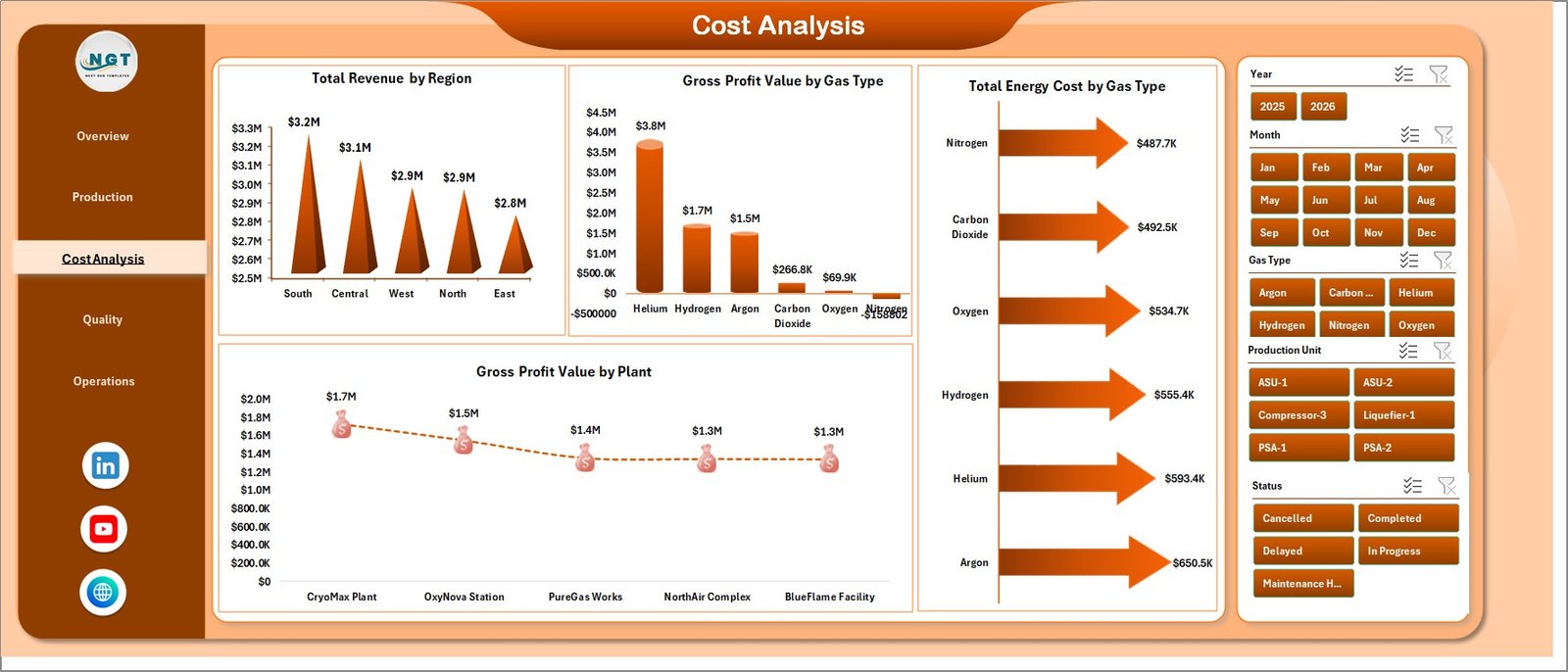
The Cost Analysis page helps finance and operations teams understand where value is created and where energy cost is concentrated. Total Revenue by Region shows regional contribution. Gross Profit Value by Gas Type highlights profitable gases. Total Energy Cost by Gas Type shows which gas categories consume the most energy cost, while Gross Profit Value by Plant compares plant-level margin.
4. Quality
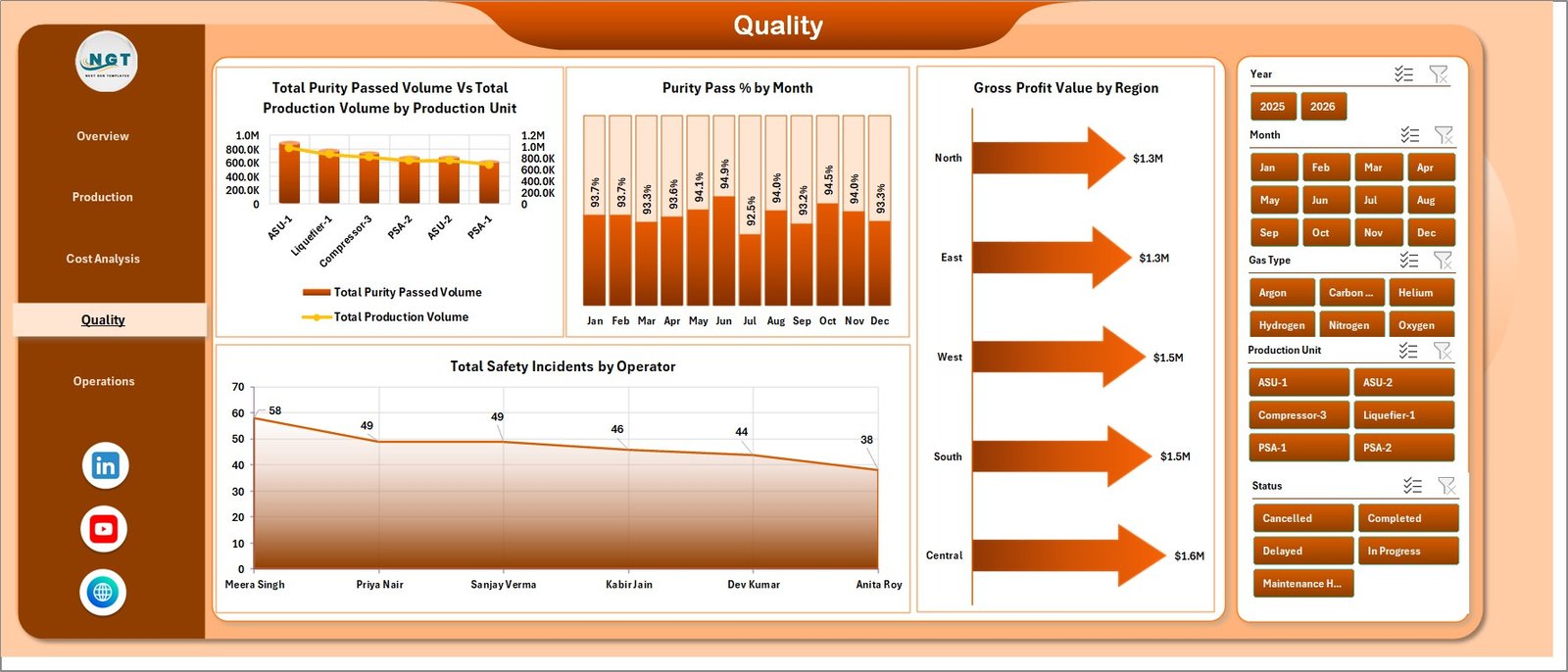
The Quality page connects production volume, purity, profit, region, and safety. Total Purity Passed Volume Vs Total Production Volume by Production Unit compares approved production with total production. Purity Pass % by Month shows quality movement over time. Gross Profit Value by Region links quality review with financial outcome, and Total Safety Incidents by Operator helps safety leaders identify operator-level incident concentration.
5. Operations
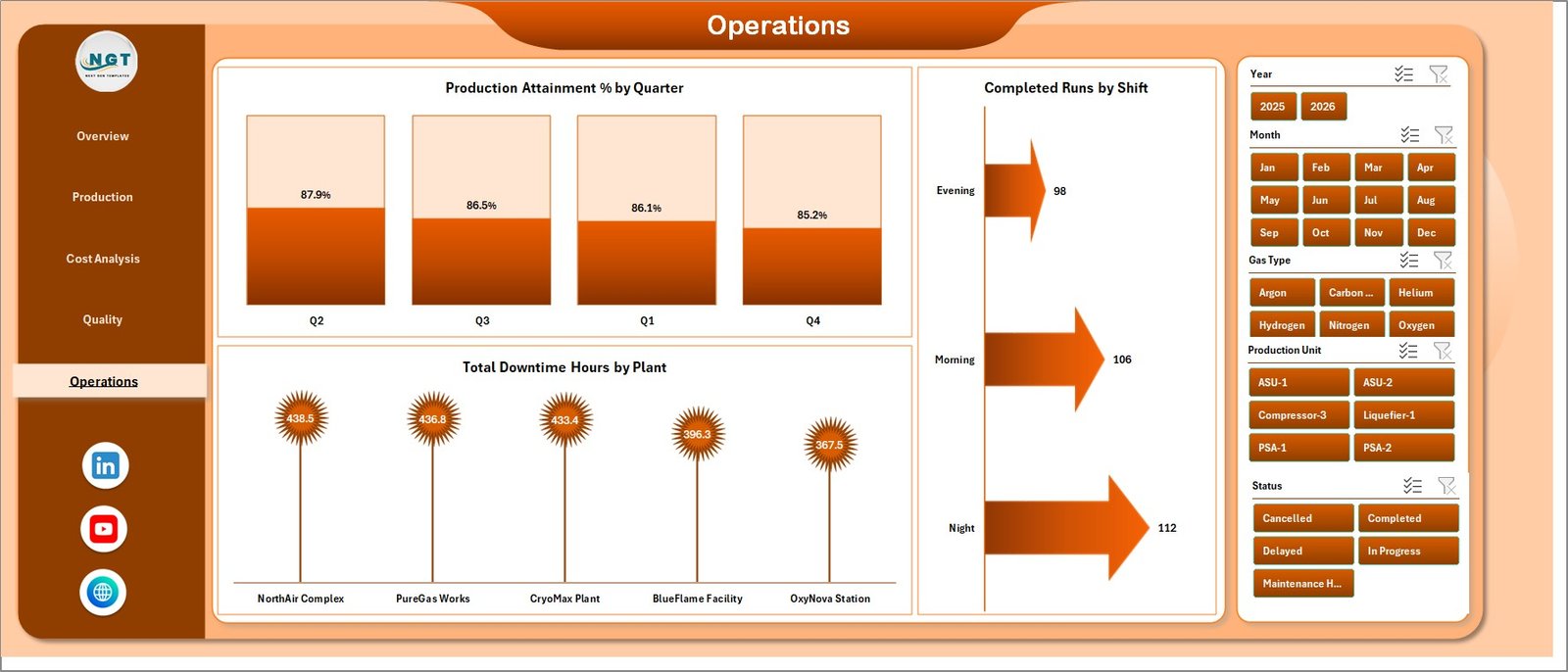
The Operations sheet supports execution review. Production Attainment % by Quarter tracks quarterly target achievement. Completed Runs by Shift compares production completion across shifts. Total Downtime Hours by Plant identifies plants where downtime is reducing available production capacity.
6. Data Sheet Tab
The Data Sheet stores the records that feed the dashboard. Users add data in the same column format, keeping plant, shift, gas type, production volume, target volume, revenue, cost, purity, incidents, downtime, and related fields consistent.

7. Support Sheet
The Support Sheet contains the pivot tables that power the dashboard dynamically. After updating the Data Sheet, go to the Data tab in the Excel Ribbon and click Refresh All. All pivots and dashboard charts refresh together. You can keep this sheet hidden from normal users.

Industrial Gas Production Dashboard in Excel vs. Google Sheets vs. Paid CRM/SaaS – Feature Comparison
| Feature | Industrial Gas Production Dashboard in Excel | Google Sheets Alternative | Paid Operations SaaS |
|---|---|---|---|
| Cost | $17.99 one-time template | Low cost, online-first | Monthly or annual subscription |
| Platform | Microsoft Excel | Google Sheets in browser | Vendor cloud platform |
| Setup time | Replace data and refresh | Copy file and adapt formulas | Implementation and configuration |
| Real-time team collaboration | Possible with OneDrive or SharePoint | Native sharing | Usually included |
| Mobile access | Excel mobile or browser view | Google Sheets app | Vendor mobile app |
| Customizable fields | Fully editable workbook | Editable sheet | Depends on plan and permissions |
| Share with link | Possible through Microsoft 365 | Native share links | Usually role-controlled |
| Year-1 cost at 5 users | $17.99 plus existing Excel licenses | Low to moderate | Often hundreds or thousands |
| Industrial gas metrics | Built for production, purity, revenue, energy, downtime, safety, and targets | Must be configured | Depends on vendor module |
Who Should Use This Template
This template is a good fit for industrial gas producers, oxygen and nitrogen plants, air separation units, specialty gas manufacturers, production supervisors, plant managers, quality leaders, safety teams, and finance analysts who need a practical Excel reporting layer.
It is not the right fit if you need live SCADA feeds, ERP transaction control, production scheduling, tank telemetry, compliance workflows, or automated dispatch routing. In those cases, use this dashboard as a reporting layer after exporting or preparing source data.
Real-World Use Cases
Amit, Plant Manager: opens the Overview and Operations pages every Monday to compare production volume vs. target, attainment, downtime, and safety incident trends.
Priya, Quality Lead: uses the Quality and Production pages to review purity pass percentage by plant, purity passed volume by production unit, and operator-level incidents before monthly quality meetings.
Daniel, Finance Analyst: uses the Cost Analysis page to compare gross profit by plant and gas type, energy cost by gas type, and revenue by region before preparing a management report.
Advantages of Industrial Gas Production Dashboard in Excel
- It gives industrial gas teams a ready reporting structure instead of a blank workbook.
- It combines production, target, revenue, gross profit, purity, safety, energy, and downtime views.
- It uses familiar Excel features like sheets, slicers, charts, and pivot tables.
- It can be edited by experienced Excel users without waiting for a software vendor.
- It works well for monthly reporting, weekly production reviews, and quality meetings.
Opportunities for Improvement
The workbook is refresh-based, so it does not replace live plant telemetry or real-time SCADA reporting. Larger teams may want to connect Excel to a governed data source, add Power Query transformations, or use SharePoint/OneDrive for version control. Microsoft explains how PivotTables and PivotCharts summarize Excel worksheet data in its support documentation: Overview of PivotTables and PivotCharts.
Best Practices
- Keep gas type, plant, shift, operator, production unit, and region names consistent.
- Validate production volume, target volume, energy cost, gross profit, and purity fields before refreshing.
- Refresh the workbook after each data update using Data, then Refresh All.
- Keep one clean backup of the original dashboard before changing chart fields or pivot structures.
- Hide the Support Sheet when sharing the file with users who only need dashboard views.
Explore Relevant Templates
You can download this product here: Industrial Gas Production Dashboard in Excel. You may also like Cryogenics Dashboard in Excel, Oil and Gas Analysis Dashboard in Excel, and Footwear Manufacturing Dashboard in Excel.
Frequently Asked Questions
What does the Industrial Gas Production Dashboard in Excel track?
It tracks revenue, gross profit, total production, purity score, safety incidents, production volume vs. target volume, energy cost, purity pass percentage, completed runs, downtime, shifts, plants, gas types, production units, operators, and regions.
How many worksheet tabs are included?
The workbook includes 7 tabs: Overview, Production, Cost Analysis, Quality, Operations, Data Sheet, and Support Sheet.
Do I need macros to use this dashboard?
No. The dashboard uses standard Excel sheets, pivot tables, charts, and slicers. You update data and click Refresh All.
Can I use my own industrial gas data?
Yes. Replace the sample rows in the Data Sheet with your own records while keeping the same column structure.
Can the Support Sheet be hidden?
Yes. The Support Sheet can remain hidden because it mainly stores the pivot tables that power the dashboard.
Is this a subscription product?
No. It is a one-time downloadable Excel template from NextGenTemplates.
About the Author
Built by PK – Microsoft Certified Professional with 15+ years of Excel, Google Sheets, and Power BI experience. Founder of NextGenTemplates, reaching 300K+ subscribers across YouTube channels. Every template is hand-built and tested before release.
Conclusion
The Industrial Gas Production Dashboard in Excel gives production, quality, safety, finance, and plant teams a simple way to review industrial gas performance from one workbook. Instead of rebuilding reports every month, users can update the Data Sheet, refresh the workbook, and use slicers to review production, cost, quality, and operational performance.
Visit our YouTube channel for step-by-step tutorials: Youtube.com/@PK-AnExcelExpert.