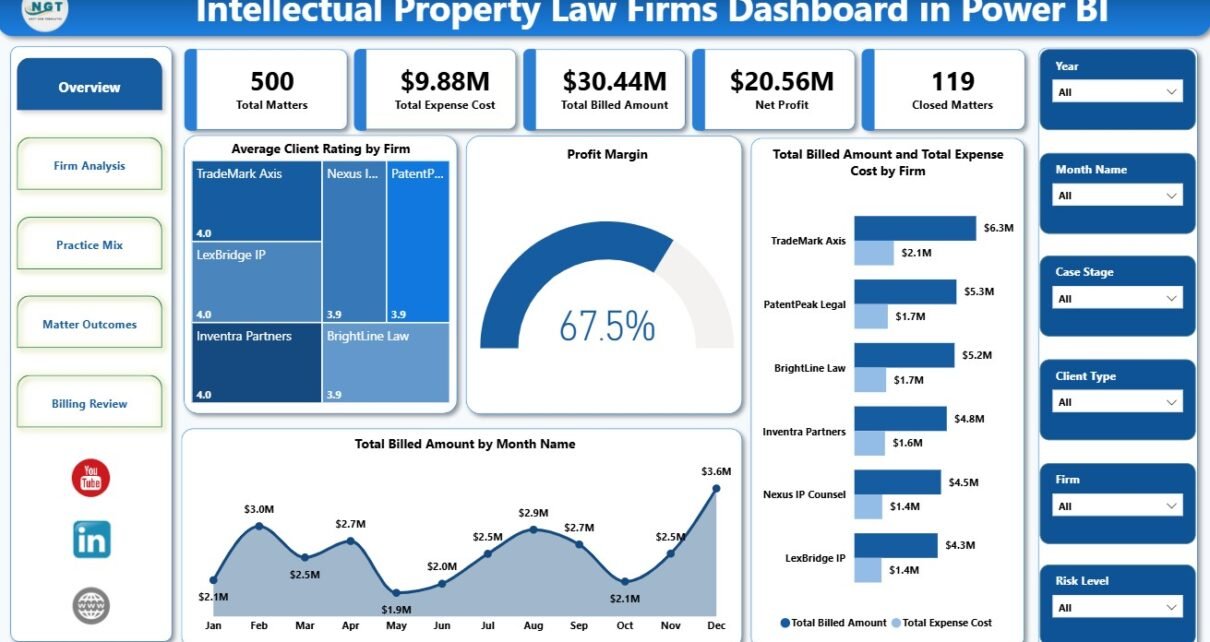
Intellectual Property Law Firms Dashboard in Power BI is a ready-to-use reporting template for IP partners, patent attorneys, trademark teams, legal operations managers, and finance analysts. It helps track Total Matters, Total Expense Cost, Total Billed Amount, Net Profit, Closed Matters, client ratings, profit margin, settlement value, utilization, case stage, practice area, region, risk level, and billing model from one interactive Power BI report.
Law firms are under growing pressure to understand profitability at matter level, not only revenue at invoice level. For intellectual property work, that means connecting patents, trademarks, copyrights, litigation, settlement value, client satisfaction, deadlines, expenses, and billable utilization. This dashboard gives firms a faster starting point for that analysis, using a Power BI report structure that can be edited and refreshed with your own data.
Power BI is useful for this work because it supports interactive reports, slicers, data models, measures, and sharing through Microsoft tools. Microsoft explains the platform as a way to connect to data, visualize insights, and share reports across an organization: Microsoft Learn Power BI overview.
Click here to purchase Intellectual Property Law Firms Dashboard in Power BI
Key Features of Intellectual Property Law Firms Dashboard in Power BI
- 5 report pages: Overview Page, Firm Analysis, Practice Mix, Matter Outcomes, and Billing Review.
- 5 KPI cards: Total Matters, Total Expense Cost, Total Billed Amount, Net Profit, and Closed Matters.
- Interactive slicers: Quickly filter by available firm, region, practice area, client type, outcome, risk level, billing model, month, quarter, and year fields.
- Profitability analytics: Compare billed amount, expense cost, net profit, profit margin, and matter count together.
- Practice mix analytics: Review settlement value, utilization, client type, and risk-level profitability across IP workstreams.
- Matter outcome analytics: Analyze regional margin, case stage distribution, and billing model economics.
- Editable PBIX report: Replace sample data, customize visuals, refresh the model, and publish when ready.
Dashboard Pages Explanation
1. Overview Page
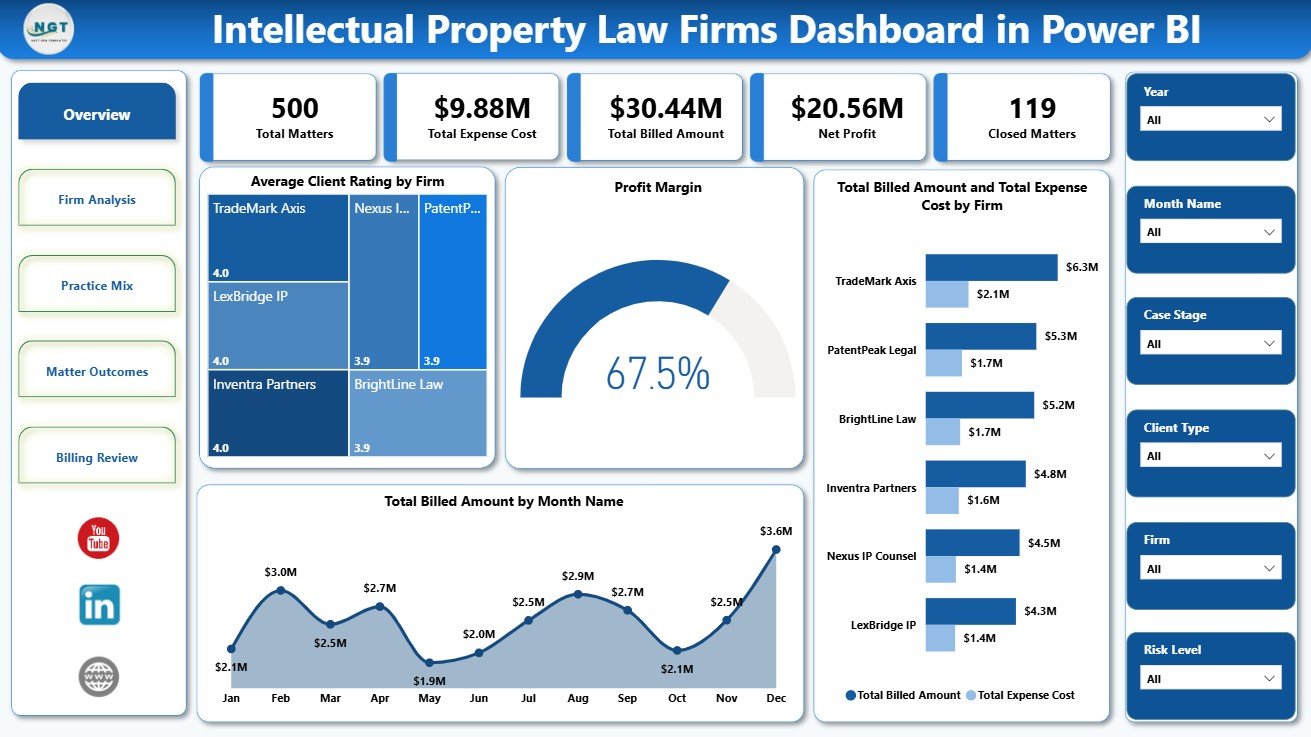
The Overview Page gives a leadership-level summary of IP law firm performance. At the top, KPI cards show Total Matters, Total Expense Cost, Total Billed Amount, Net Profit, and Closed Matters. These cards help users understand workload, billing scale, expense pressure, profit, and closure activity before moving into detailed analysis.
Average Client Rating by Firm: This chart compares client satisfaction across firms or firm units. It helps partners identify which teams are creating stronger client experiences and where follow-up may be needed.
Profit Margin by Total Matters: This visual connects profitability with matter volume. It helps users see whether higher workload is improving margin or creating cost pressure.
Total Billed Amount and Total Expense Cost by Firm: This chart compares billing and cost side by side by firm. It helps leadership identify firms with healthy billing coverage and firms where expenses are reducing profit.
Total Billed Amount by Month Name: This trend shows billing movement across months. It helps finance teams identify stronger billing periods, slower months, and possible seasonality in IP legal work.
2. Firm Analysis
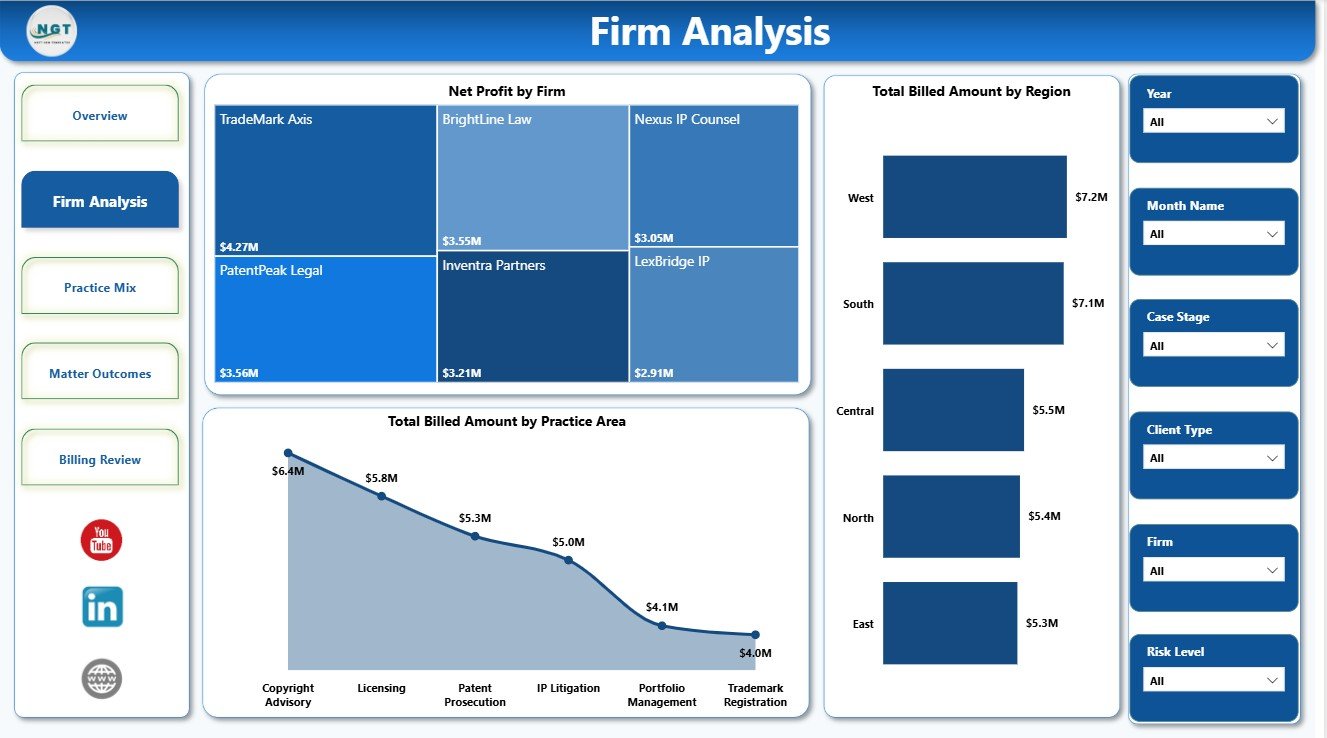
The Firm Analysis page focuses on firm-level performance. It is useful for partner reviews, leadership meetings, regional planning, and finance discussions where teams need to connect billing, profit, geography, and practice area.
Net Profit by Firm: This chart ranks firms by net profit. It helps managers identify which firm groups are contributing the strongest profit after expense cost.
Total Billed Amount by Region: This visual compares billed amount across regions. It helps teams understand which markets generate stronger IP legal revenue.
Total Billed Amount by Practice Area: This chart shows billing contribution by IP service line. It is useful for comparing patent, trademark, copyright, licensing, advisory, and litigation work.
3. Practice Mix
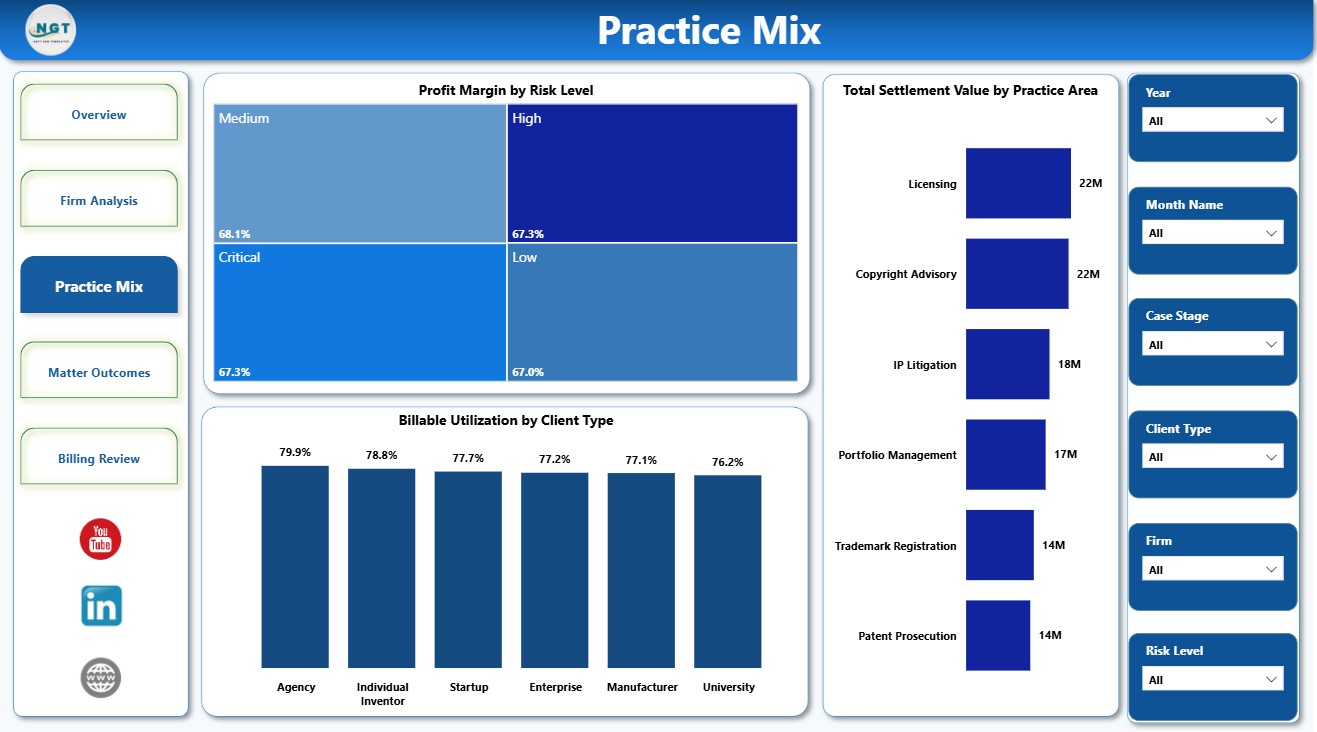
The Practice Mix page studies the relationship between practice area, risk, settlement value, and utilization. It helps firms understand which types of IP work are driving value and which segments need a closer review of effort and return.
Profit Margin by Risk Level: This visual compares margin across matter risk levels. It helps teams see whether high-risk matters are delivering enough return for the work involved.
Total Settlement Value by Practice Area: This chart compares settlement value across IP practice areas. It helps users identify areas where matters carry higher financial impact.
Billable Utilization by Client Type: This visual compares billable efficiency across client segments. It helps partners see which client types consume more non-billable effort.
Click here to purchase Intellectual Property Law Firms Dashboard in Power BI
4. Matter Outcomes
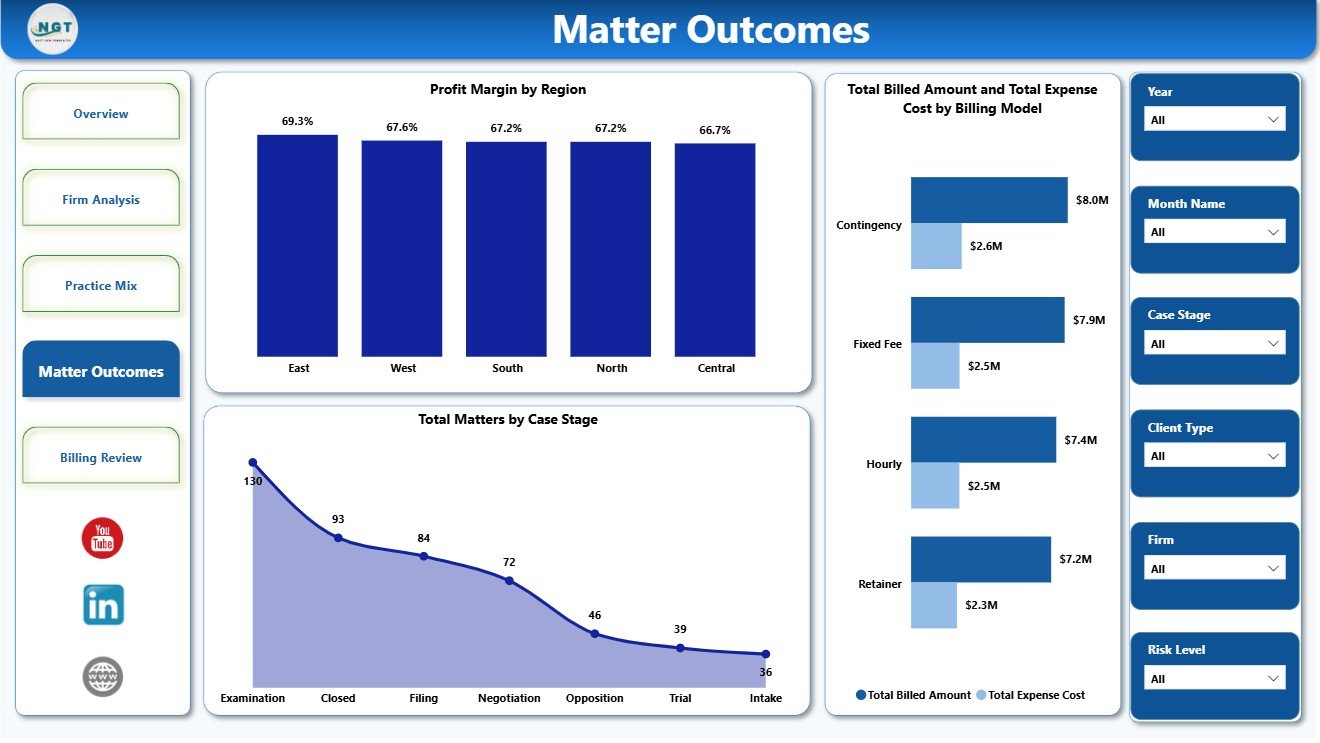
The Matter Outcomes page supports operational and financial review of case flow. It helps users understand where matters sit, how billing models compare, and whether regional profitability is consistent.
Profit Margin by Region: This visual compares margin across regions. It helps leaders see which markets are more profitable after expense cost.
Total Matters by Case Stage: This chart shows matter distribution across stages such as intake, filing, examination, negotiation, litigation, settlement, and closure. It helps identify pipeline concentration and potential bottlenecks.
Total Billed Amount and Total Expense Cost by Billing Model: This chart compares billing value and cost across hourly, fixed fee, contingency, retainer, or mixed billing models. It helps evaluate model-level economics.
5. Billing Review
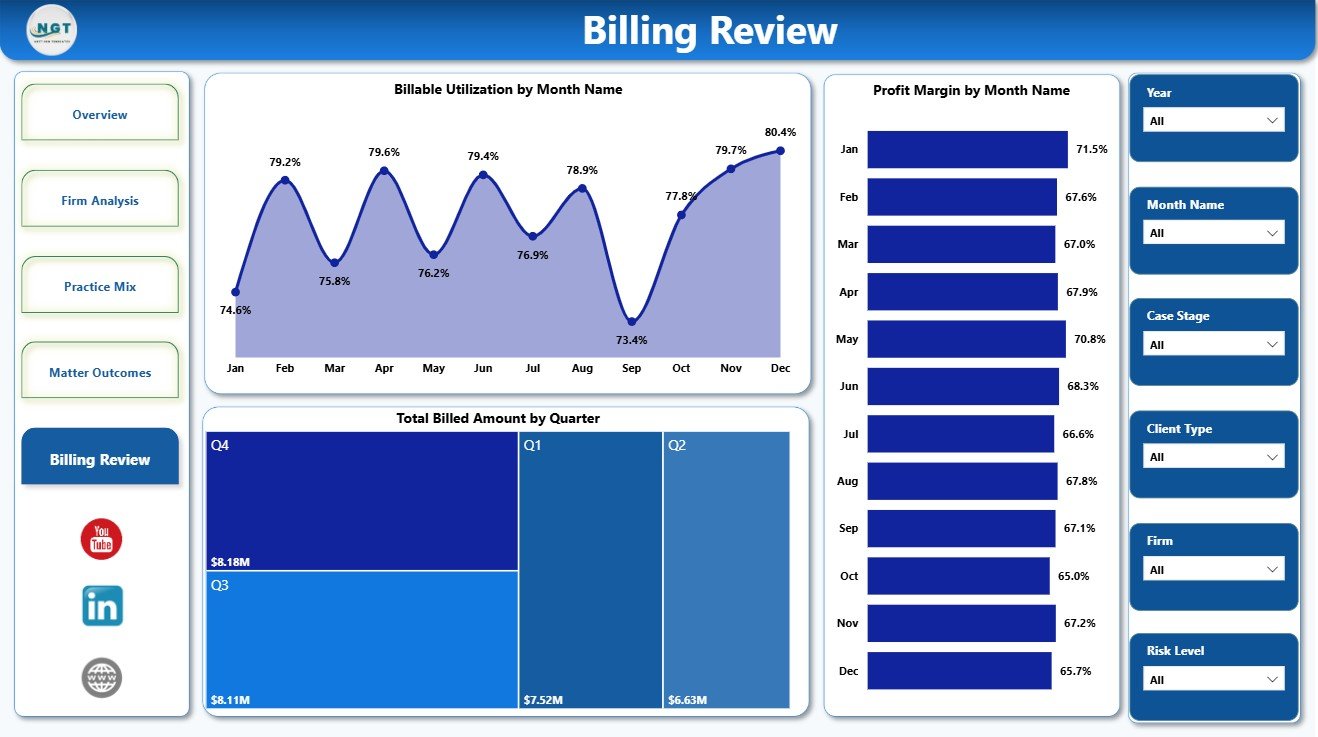
The Billing Review page gives finance and leadership teams a time-based view of billing and margin performance. It is useful for monthly and quarterly review meetings.
Billable Utilization by Month Name: This trend shows monthly billable efficiency. It helps managers monitor whether worked hours are converting into billable hours.
Total Billed Amount by Quarter: This chart summarizes billed amount by quarter. It helps compare billing momentum across the year.
Profit Margin by Month Name: This chart tracks monthly profitability. It helps teams detect months where expenses rose faster than billed amount.
Intellectual Property Law Firms Dashboard in Power BI vs. Tableau vs. Paid Legal CRM/SaaS – Feature Comparison
| Feature | Intellectual Property Law Firms Dashboard in Power BI | Tableau alternative | Paid legal CRM/SaaS |
|---|---|---|---|
| Cost | $17.99 one-time template price | License plus dashboard build time | Monthly or annual subscription |
| Platform | Power BI Desktop / Power BI Service | Tableau Desktop or Cloud | Vendor cloud platform |
| Setup time | Open PBIX, replace data, refresh | Build model and visuals manually | Implementation and onboarding |
| Real-time team collaboration | Available through Power BI Service | Available through Tableau publishing | Usually included by user plan |
| Mobile access | Available after publishing | Available after publishing | Usually included |
| Customizable fields | Editable pages, visuals, fields, and measures | Editable if you build the workbook | Limited by vendor settings |
| Share with link | Possible through Power BI sharing options | Possible through Tableau sharing | Usually login controlled |
| Year-1 cost at 5 users | $17.99 plus Microsoft licensing you already use | Software licensing plus development time | Often hundreds or thousands |
| IP law analytics | Matters, billing, expenses, profit, utilization, ratings, settlement value, risk, and outcomes included | Requires custom design | Depends on legal software module |
Who Should Use This Template
This template is useful for intellectual property law firms, patent law practices, trademark teams, copyright and licensing teams, IP litigation groups, legal operations managers, law firm finance teams, consultants, and Power BI analysts who need a reporting layer for IP legal performance.
It is not designed to replace docketing software, document management, e-filing, client portals, matter intake workflows, trust accounting, or conflict checks. It is best used as an analytics dashboard when the source data is already available.
Real-World Use Cases
Partner performance meeting: Anika, an IP practice partner, reviews total matters, billed amount, expense cost, net profit, client rating, and closed matters before monthly leadership meetings.
Legal operations review: Marcus, a legal operations manager, uses the Matter Outcomes and Billing Review pages to review case stage, billing model, risk level, and utilization trends.
Finance profitability analysis: Priya, a finance analyst, compares billed amount versus expense cost by firm, region, and billing model before preparing quarterly profitability notes.
Advantages of Intellectual Property Law Firms Dashboard in Power BI
- It saves time compared with designing an IP law firm Power BI report from a blank canvas.
- It keeps matter volume, billing, expense, profit, client rating, utilization, settlement value, and outcomes in one report.
- It gives leadership a high-level view while still allowing page-level analysis.
- It supports faster review through slicers, KPI cards, and ready-made visuals.
- It avoids recurring dashboard software fees for teams that already use Microsoft Power BI.
Opportunities for Improvement
Larger firms may extend the dashboard with Power Query connections, SQL databases, SharePoint lists, practice management exports, attorney-level profitability, client-level drilldowns, deadline monitoring, and matter aging metrics. Teams with automated data pipelines can also publish the report to Power BI Service and configure scheduled refresh where licensing supports it.
Best Practices
- Keep firm, region, practice area, client type, risk level, billing model, and month names consistent in the source data.
- Validate Total Billed Amount, Total Expense Cost, Net Profit, and Closed Matters after every refresh.
- Review margin and utilization together so high billing does not hide heavy non-billable effort.
- Use slicers during review meetings instead of creating duplicate report pages.
- Document any custom measures or fields added to the Power BI model.
Explore Relevant Templates
- Intellectual Property Law Firms Dashboard in Power BI
- Intellectual Property Law Firms Dashboard in Excel
- Power BI Dashboard Templates
- Power BI Templates
Frequently Asked Questions
What is included in the Intellectual Property Law Firms Dashboard in Power BI?
It includes five Power BI pages: Overview Page, Firm Analysis, Practice Mix, Matter Outcomes, and Billing Review.
What KPIs are shown on the overview page?
The overview page shows Total Matters, Total Expense Cost, Total Billed Amount, Net Profit, and Closed Matters.
Do I need Power BI Desktop?
Yes. Open the .pbix file in Power BI Desktop, replace or connect your source data, and refresh the report.
Can I customize this dashboard?
Yes. You can edit visuals, cards, slicers, fields, measures, page names, colors, and labels based on your reporting needs.
Is this a full legal practice management system?
No. It is an analytics dashboard, not docketing, e-filing, billing, document management, client portal, or case management software.
Can I publish this dashboard to Power BI Service?
Yes, if your Microsoft account and Power BI permissions support publishing and sharing.
About the Author
Built by PK – Microsoft Certified Professional with 15+ years of Excel, Google Sheets, and Power BI experience. Founder of NextGenTemplates, reaching 300K+ subscribers across YouTube channels. Every template is hand-built and tested before release.
Conclusion
The Intellectual Property Law Firms Dashboard in Power BI gives legal teams a practical way to review matters, billed amount, expense cost, net profit, closed matters, utilization, settlement value, client ratings, and outcomes from one report. With five dashboard pages, KPI cards, slicers, and ready-made visuals, it helps users move from scattered legal records to clearer IP law firm performance analysis.
Click to Purchase Intellectual Property Law Firms Dashboard in Power BI
Visit our YouTube channel to learn step-by-step Excel, Power BI, and dashboard tutorials.