Geothermal energy teams often manage long-running plant assets, high capital costs, regional operating differences, and sustainability targets at the same time. The Geothermal Energy Dashboard in Power BI gives those teams a structured PBIX report for reviewing revenue, capacity, cost, profit margin, generation, reliability, and carbon offset performance from one interactive reporting layer.
This dashboard is built for geothermal plant managers, renewable energy analysts, utility finance teams, ESG reporting leads, and consultants who need clean recurring reporting without building a Power BI model from scratch. It includes 5 report pages, executive KPI cards, multiple slicers, and focused visuals for production, financial, reliability, and sustainability analysis.
Click to purchase Geothermal Energy Dashboard in Power BI
Key Features of Geothermal Energy Dashboard in Power BI
- Five Power BI pages: Overview, Production, Financials, Reliability, and Sustainability.
- Executive KPI cards: Track Total Revenue, Total Capacity, Total Cost, and high-level geothermal performance.
- Multiple slicers: Filter the dashboard quickly by available dimensions such as region, country, plant, technology, resource type, month, and risk level.
- Production reporting: Review generation by resource type, generation by technology, operational rate, and capacity trends.
- Financial analysis: Compare revenue, net profit, profit margin, country-level results, region-level results, and technology performance.
- Reliability review: Analyze operational projects, risk-level capacity, plant-level net profit, and month-wise operational rate.
- Sustainability view: Track carbon offset by technology, region, country, and plant-level project contribution.
- Editable PBIX file: Open, customize, refresh, and extend the report in Power BI Desktop.
Dashboard Pages Explanation
1. Overview Page
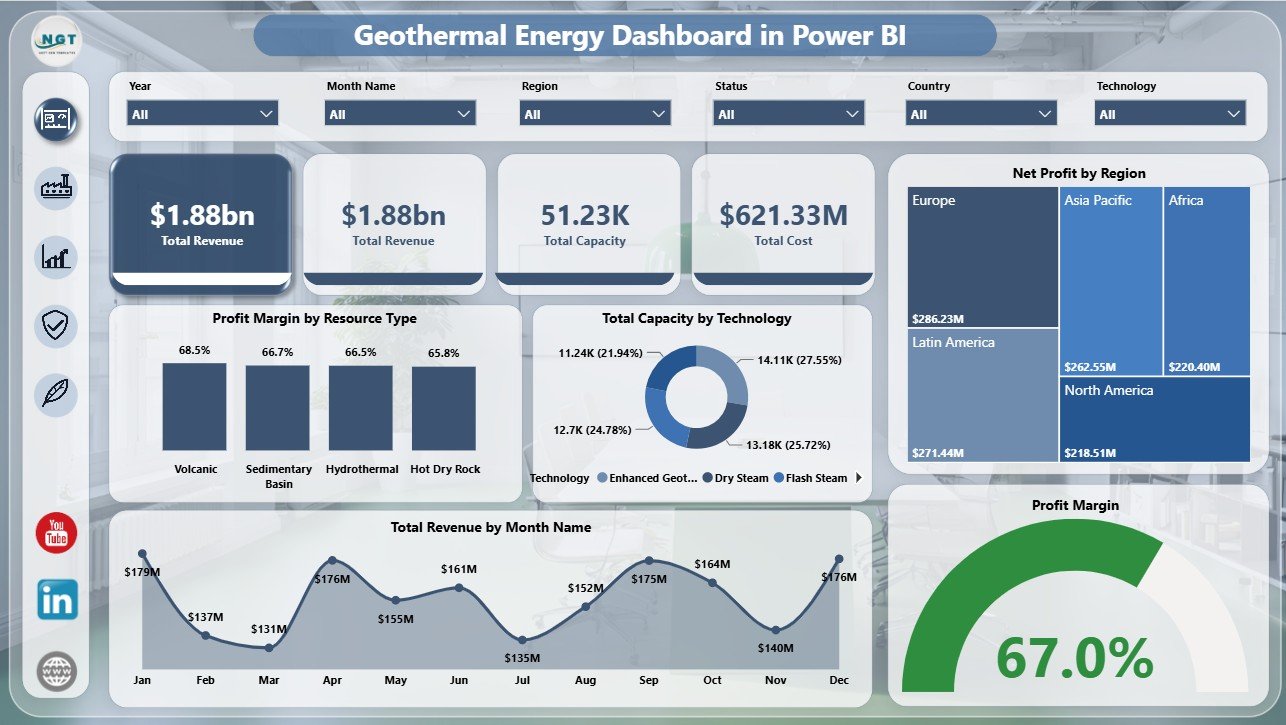
The Overview page gives leadership a fast summary of geothermal operations and financial performance. KPI cards show Total Revenue, Total Capacity, and Total Cost so users can quickly understand scale, spending, and commercial activity before drilling into detailed pages.
Profit Margin by Resource Type: This chart compares profitability across geothermal resource categories. It helps analysts see which resource groups are producing stronger returns after costs are included.
Total Capacity by Technology: This visual breaks capacity across geothermal technologies. It helps planning teams understand where capacity is concentrated across binary, flash, dry steam, or other technology types.
Net Profit by Region: This chart compares profitability by region. It helps managers identify strong markets and regions where operating cost, output, or pricing may need attention.
Total Revenue by Month Name: This chart shows how revenue changes across months. It supports monthly review meetings and helps spot seasonality or unusual revenue movement.
Profit Margin: This visual highlights profitability quality rather than revenue alone. It helps teams confirm whether higher revenue is also creating healthy margin.
2. Production
The Production page focuses on output and capacity. Total Generation by Resource Type shows contribution by geothermal resource group. Operational Rate helps monitor operating effectiveness. Total Generation by Technology compares production by technology, and Total Capacity by Month Name shows how capacity changes over time.

3. Financials
The Financials page is designed for revenue and profit review. Profit Margin by Technology compares technology-level financial efficiency. Total Revenue by Region shows geographic revenue contribution. Total Revenue by Country supports country-level reporting, and Net Profit by Country highlights where profit is strongest or weakest.

4. Reliability
The Reliability page connects plant operations with risk and financial impact. Operational Projects by Technology shows active project mix. Total Capacity by Risk Level highlights where capacity exposure sits. Net Profit by Plant Name compares plant-level contribution, while Operational Rate by Month Name tracks reliability movement over time.

5. Sustainability
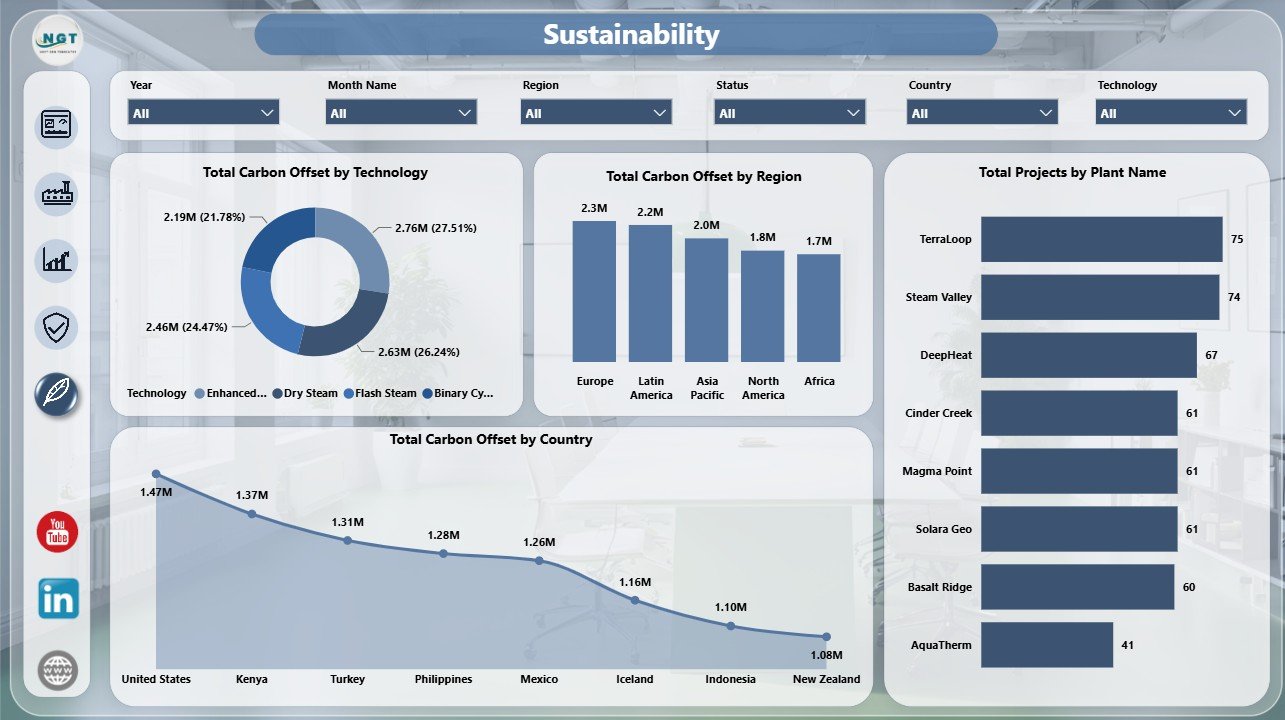
The Sustainability page helps users report environmental contribution. Total Carbon Offset by Technology compares impact by technology. Total Carbon Offset by Region and Total Carbon Offset by Country support ESG reporting, while Total Projects by Plant Name shows plant-level project contribution.
Geothermal Energy Dashboard in Power BI vs. Tableau vs. Paid Energy SaaS – Feature Comparison
| Feature | This Power BI Dashboard | Tableau Alternative | Paid Energy SaaS |
|---|---|---|---|
| Cost | $17.99 one-time template purchase | License plus custom build time | Monthly or annual subscription |
| Platform | Power BI Desktop / Power BI Service | Tableau Desktop / Cloud | Vendor cloud platform |
| Setup time | Open PBIX, replace or connect data, refresh | Build data model and dashboards manually | Vendor setup and onboarding |
| Real-time team collaboration | Available after publishing to Power BI Service | Available after publishing | Usually seat-based |
| Mobile access | Available through Power BI mobile after publishing | Available after publishing | Usually included |
| Customizable fields | Edit visuals, measures, slicers, pages, and data model | Editable if you own the workbook | Limited by vendor configuration |
| Share with link | Possible through Power BI Service permissions | Possible through Tableau Cloud permissions | Usually login controlled |
| Year-1 cost at 5 users | $17.99 plus any Microsoft licensing | Usually higher with licenses and build work | Often hundreds or thousands |
| Geothermal reporting structure | Included across five pages | Requires custom setup | Depends on module and plan |
Who Should Use This Template
This template is useful for geothermal plant managers, renewable energy analysts, utility finance teams, ESG specialists, regional managers, energy consultants, and Power BI users who need structured reporting for geothermal production, capacity, revenue, cost, profit, reliability, risk, and carbon offset metrics.
It is not designed to replace SCADA, plant control systems, automated meter infrastructure, IoT telemetry, maintenance management software, or audited finance systems. It works best when the source data is already available in a structured table or export.
Real-World Use Cases
Priya, geothermal operations manager: Priya reviews Overview and Reliability each month to explain capacity, operational rate, risk level, cost, and plant-level net profit to senior leaders.
Marcus, renewable finance analyst: Marcus uses Financials to compare revenue by region and country, margin by technology, and net profit by country before preparing a board reporting pack.
Asha, ESG reporting lead: Asha filters the Sustainability page to summarize carbon offset by technology, region, country, and plant for stakeholder updates.
Advantages of Geothermal Energy Dashboard in Power BI
- It saves build time compared with creating a geothermal Power BI report from a blank file.
- It keeps production, financial, reliability, and sustainability views in one PBIX report.
- It supports interactive filtering through slicers instead of static screenshots or manual report copies.
- It can be customized in Power BI Desktop for different plants, regions, or reporting formats.
- It can be published to Power BI Service for secure sharing, browser access, mobile viewing, and refresh workflows when configured by the user.
Opportunities for Improvement
Larger geothermal operators may extend the report with Power Query transformations, database connections, work order data, well-level data, steam flow, heat rate, reservoir pressure, planned versus unplanned outages, inspection logs, and budget variance analysis. Teams can also add extra DAX measures if they have advanced Power BI requirements.
Best Practices
- Keep region, country, plant, resource type, technology, and month names consistent in the source data.
- Validate Total Revenue, Total Capacity, Total Cost, and Net Profit after every refresh.
- Review reliability and financial pages together so strong generation does not hide operational risk.
- Use slicers during meetings to answer follow-up questions quickly.
- Keep a backup copy before changing measures, relationships, or page layouts.
- Use Microsoft guidance for report creation and publishing when extending the PBIX file. See the official Power BI documentation on Microsoft Learn.
Explore Relevant Templates
- Geothermal Energy Dashboard in Power BI
- Geothermal Energy Dashboard in Excel
- Renewable Infrastructure Projects Dashboard in Power BI
- Clean Tech Dashboard in Power BI
Frequently Asked Questions
Does this dashboard work in Power BI Desktop?
Yes. The template is delivered as a PBIX file for Power BI Desktop.
What pages are included?
The report includes Overview, Production, Financials, Reliability, and Sustainability pages.
Can I use my own geothermal data?
Yes. Replace or connect your structured data source, keep the required field mapping, and refresh the report.
Does the dashboard include slicers?
Yes. It includes multiple slicers so users can filter the report quickly by available dimensions.
Can I customize the dashboard?
Yes. You can edit visuals, measures, relationships, labels, slicers, colors, and pages in Power BI Desktop.
Is this a live plant monitoring tool?
No. It is a Power BI analytics template, not a real-time telemetry, SCADA, or plant control system.
About the Author
Built by PK – Microsoft Certified Professional with 15+ years of Excel, Google Sheets, and Power BI experience. Founder of NextGenTemplates, reaching 300K+ subscribers across YouTube channels. Every template is hand-built and tested before release.
Conclusion
The Geothermal Energy Dashboard in Power BI gives renewable energy teams a ready-made reporting structure for production, finance, reliability, and sustainability analysis. With five report pages, executive cards, slicers, and editable visuals, it helps users move from scattered data exports to clear Power BI insight faster.
Click to purchase Geothermal Energy Dashboard in Power BI
Visit our YouTube channel to learn step-by-step Excel and Power BI tutorials.