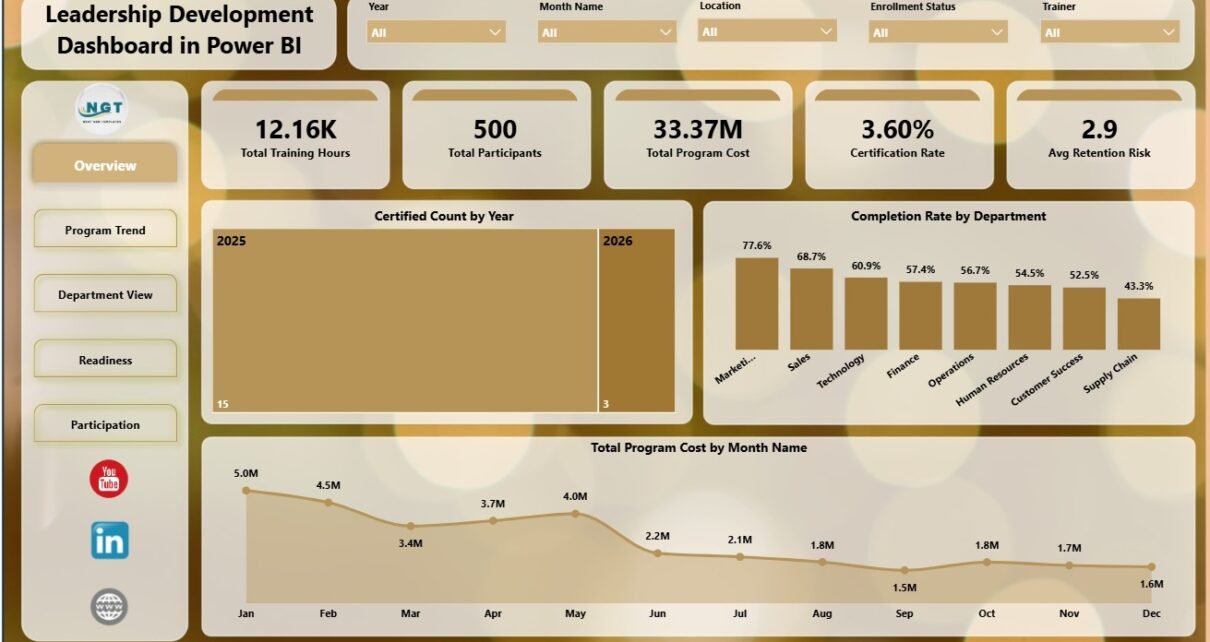
Leadership development programs can be costly, time-sensitive, and difficult to explain when training hours, certification, completion, cost, assessment scores, and retention risk sit in different files. The Leadership Development Dashboard in Power BI brings those measures into a 5-page PBIX report with 5 executive cards, 15 analysis visuals, and slicers for quick filtered review. It is designed for HR, L&D, talent management, leadership coaches, department heads, and consultants who need a clear way to review leadership program performance without building a Power BI report from a blank page.
Click here to purchase the Leadership Development Dashboard in Power BI
Leadership Development Dashboard in Power BI
Key Features of Leadership Development Dashboard in Power BI
- 5 Power BI pages: Overview Page, Program Trend, Department View, Readiness, and Participation.
- 5 KPI cards: Total Training Hours, Total Participants, Total Program Cost, Certification Rate, and Avg Retention Risk.
- Interactive slicers: Filter the report by available leadership program, department, trainer, level, location, time, and delivery fields.
- Certification and completion review: Track certified counts, completion rates, and completed program volume.
- Cost visibility: Compare program cost by month, department, trainer, and location.
- Assessment insights: Review pre assessment, post assessment, and assessment lift by trainer, program type, and leadership level.
- Retention risk view: Compare Avg Retention Risk by department so HR teams can connect development and retention conversations.
- Editable PBIX file: Use Power BI Desktop to inspect visuals, modify fields, and connect prepared data.
Dashboard Pages Explanation
1 – Overview Page
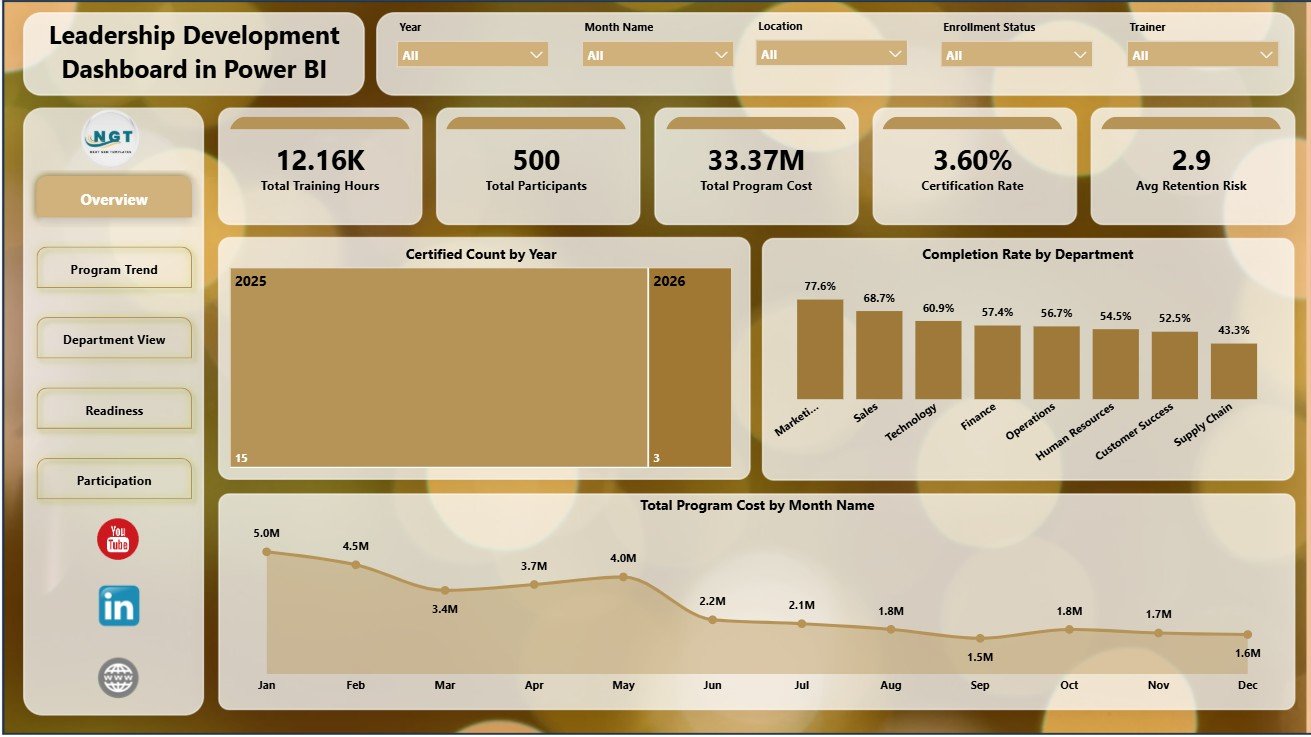
The Overview Page gives a high-level snapshot of leadership development activity. The top KPI cards show Total Training Hours, Total Participants, Total Program Cost, Certification Rate, and Avg Retention Risk, making it easier to start a leadership review with the most important numbers.
Certified Count by Year: This chart shows how certification volume changes across years. It helps teams see whether certification activity is growing, stable, or declining.
Completion Rate by Department: This chart compares completion performance by department. It helps HR leaders identify teams that may need scheduling support, manager follow-up, or program reminders.
Total Program Cost by Month Name: This chart shows monthly leadership development investment. It helps budget owners spot months with higher spend and compare cost movement across the year.
Overview Page
2 – Program Trend
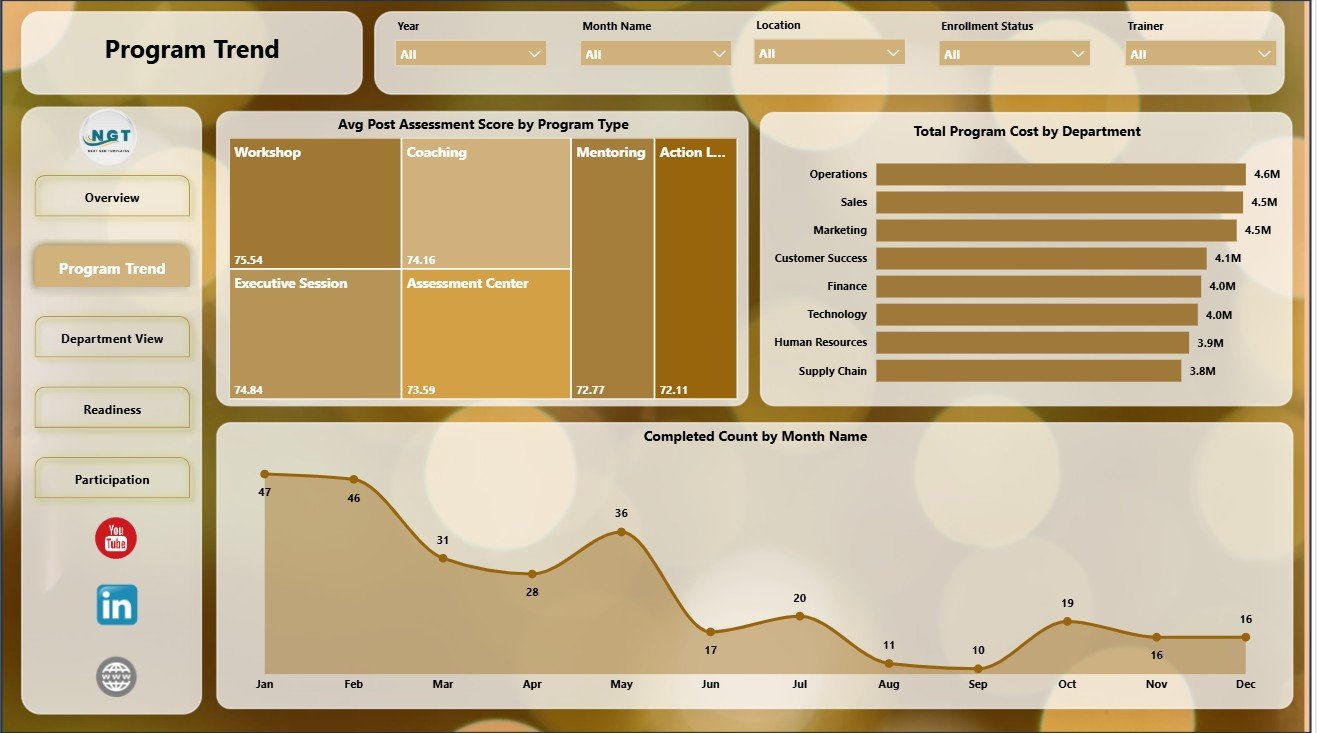
The Program Trend page focuses on how programs perform over time and across major HR dimensions. It helps L&D teams compare assessment outcomes, program cost, and completed program volume before monthly or quarterly reviews.
Avg Post Assessment Score by Program Type: This chart compares final assessment performance across program types. It helps identify which programs are producing stronger post-training knowledge or readiness.
Total Program Cost by Department: This visual shows which departments carry the largest leadership development investment. It supports budget conversations and cost allocation review.
Completed Count by Month Name: This chart shows completed program volume by month. It helps teams detect seasonal training patterns and months where completion may need follow-up.
Program Trend
3 – Department View
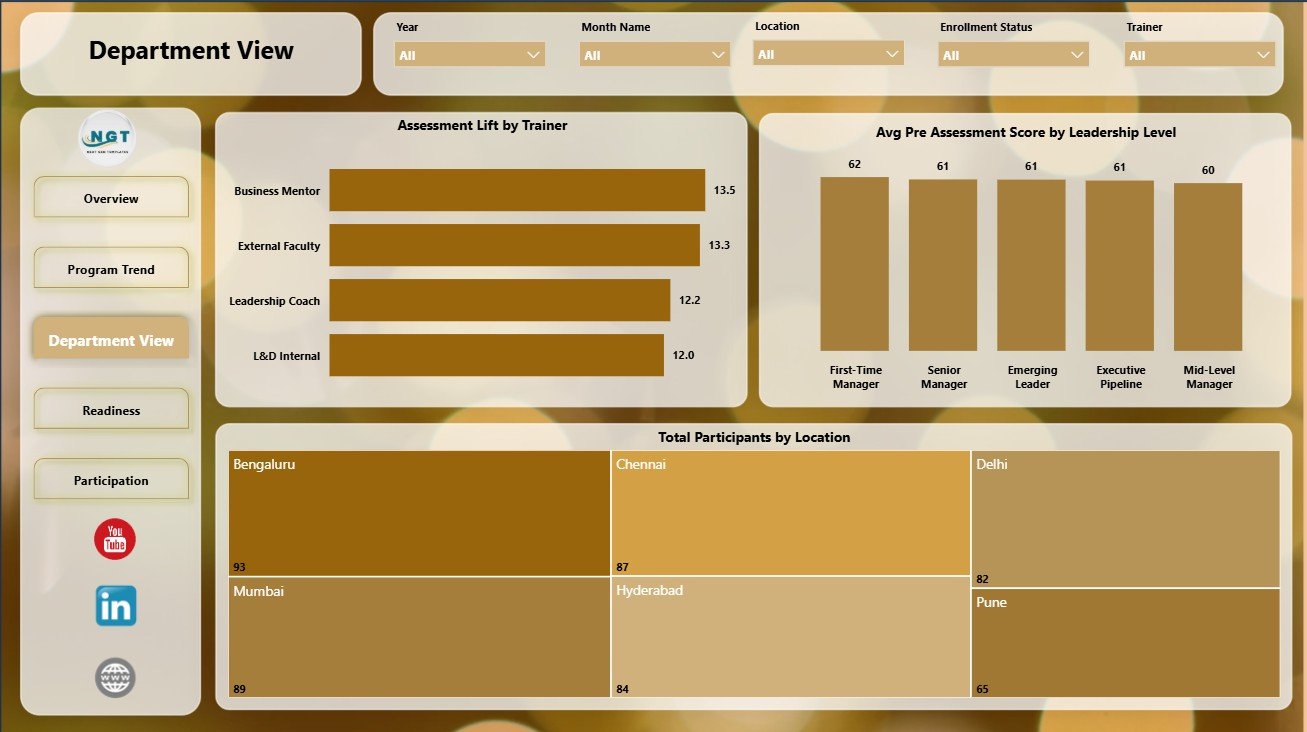
The Department View page is built for team-level analysis. HR business partners and department leaders can use it to compare trainer impact, leadership-level readiness, and participation by location.
Assessment Lift by Trainer: This chart compares learning improvement by trainer. It helps identify trainers whose sessions are linked with stronger pre-to-post assessment improvement.
Avg Pre Assessment Score by Leadership Level: This visual shows starting assessment performance by leadership level. It helps teams understand whether emerging leaders, managers, or senior leaders need different support.
Total Participants by Location: This chart shows where leadership program participation is concentrated. It helps compare program reach across offices, regions, or training locations.
Department View
4 – Readiness
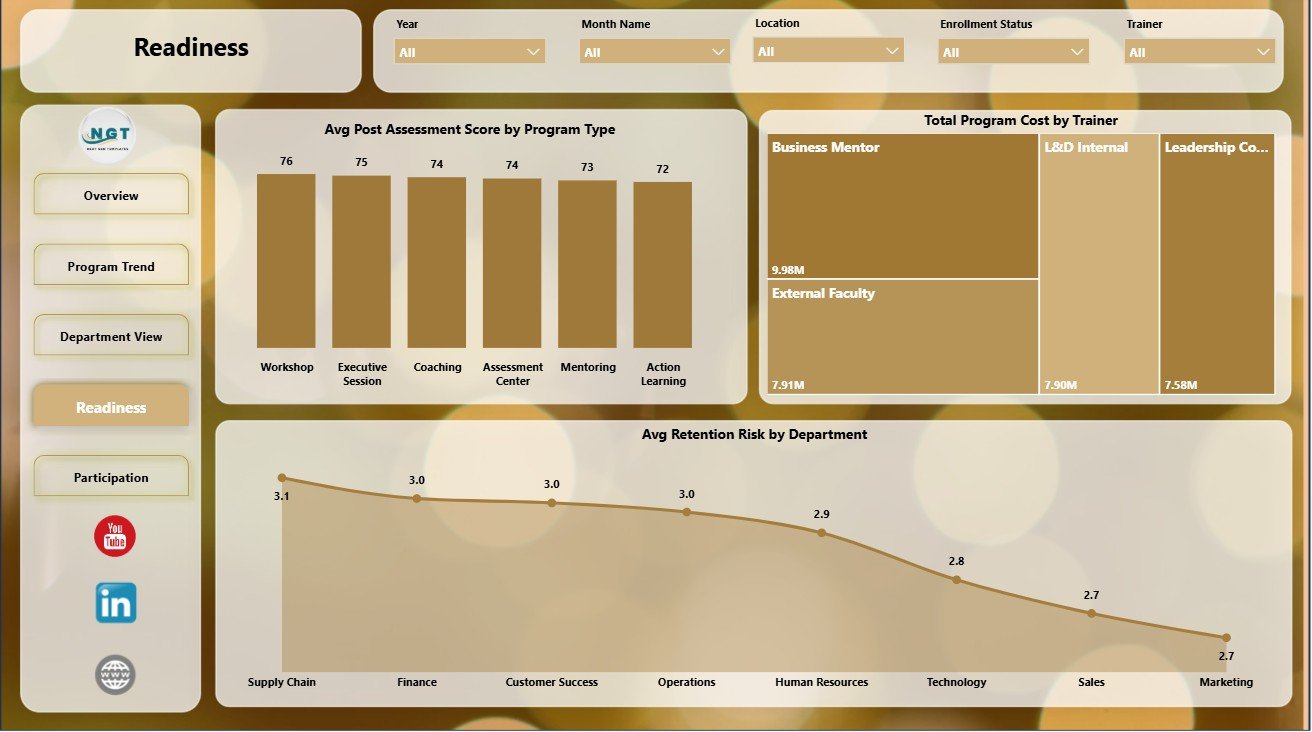
The Readiness page focuses on leadership preparedness and risk. It is useful before succession planning, talent review, and quarterly leadership development discussions.
Avg Post Assessment Score by Program Type: This chart compares final assessment strength across program categories. It helps leaders see which program types are creating stronger learning outcomes.
Total Program Cost by Trainer: This visual compares investment by trainer. It helps L&D owners review spend alongside trainer effectiveness and delivery mix.
Avg Retention Risk by Department: This chart compares department-level retention risk. It helps HR teams identify where leadership development may need to be combined with retention action planning.
Readiness
5 – Participation
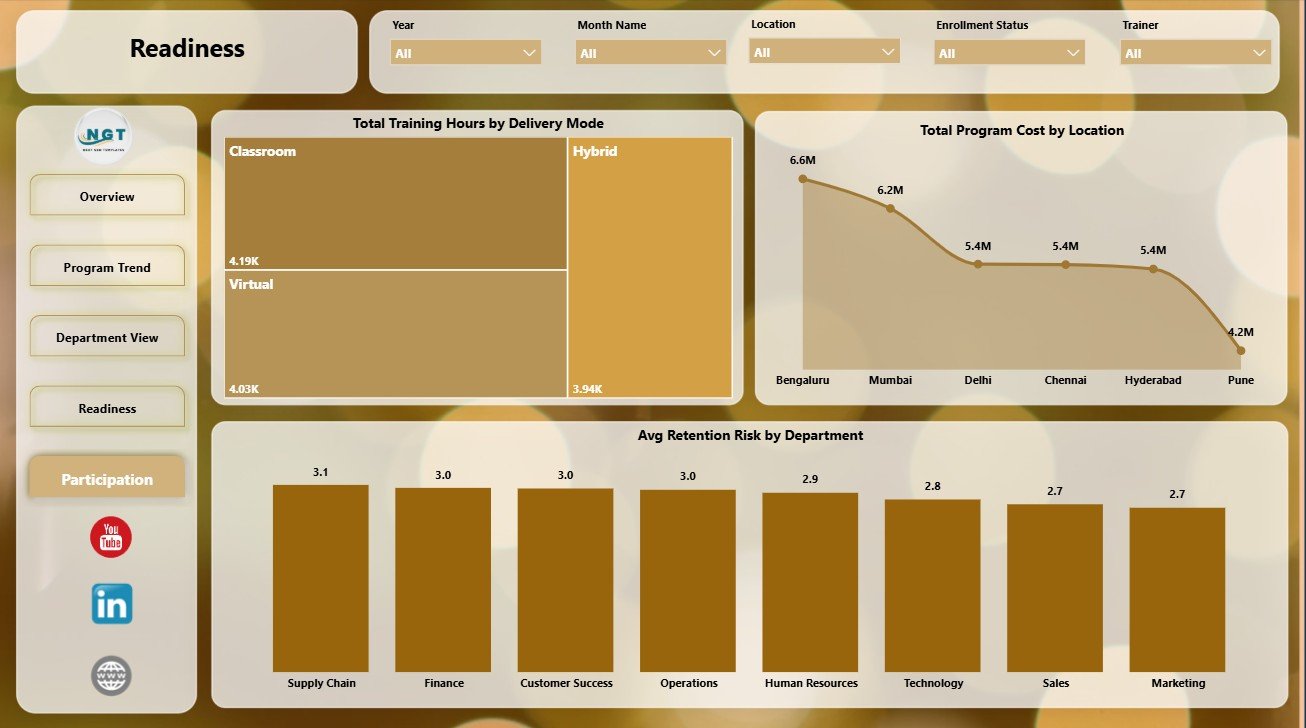
The Participation page reviews where training activity, program cost, and risk are concentrated. It helps teams understand how participants are engaging by delivery mode, location, and department.
Total Training Hours by Delivery Mode: This chart shows how training time is distributed across delivery formats. It helps teams evaluate whether classroom, online, blended, or other modes match the program strategy.
Total Program Cost by Location: This visual compares investment across locations. It helps identify regions or offices with higher leadership development spend.
Avg Retention Risk by Department: This chart gives a department-level retention risk view. It supports conversations where development activity and employee retention need to be reviewed together.
Participation
Leadership Development Dashboard in Power BI vs. Tableau vs. Paid CRM/SaaS – Feature Comparison
| Feature | Leadership Development Dashboard in Power BI | Tableau or Qlik Alternative | Paid HR SaaS |
|---|---|---|---|
| Cost | $17.99 one-time | License and build cost | Monthly or annual subscription |
| Platform | Power BI Desktop | Tableau/Qlik desktop or cloud | Vendor-hosted HR platform |
| Setup time | Open PBIX and replace or connect data | Build or adapt report pages | Implementation and onboarding |
| Real-time team collaboration | Possible through Power BI Service | Possible with cloud plans | Usually included |
| Mobile access | Power BI mobile after publishing | Plan dependent | Usually included |
| Customizable fields | Editable model, visuals, pages, and slicers | Editable with BI skills | Limited by vendor permissions |
| Share with link | Available through Power BI Service | Plan dependent | Login controlled |
| Year-1 cost at 5 users | $17.99 plus any Microsoft licensing | License-dependent | Often hundreds or thousands |
| Leadership analytics pages | 5 ready-made report pages | Must be built or purchased | Depends on selected module |
For more background on opening and building reports, Microsoft provides official Power BI Desktop documentation at Microsoft Learn.
Who Should Use This Template
- HR managers tracking leadership development performance.
- Learning and development teams reporting training hours, completion, and certification.
- Talent management leaders reviewing readiness and retention risk.
- Leadership coaches comparing trainer impact and assessment lift.
- Consultants preparing Power BI reports for client leadership programs.
Real-World Use Cases
Anita, HR development manager: Anita uses the Overview and Program Trend pages before quarterly talent meetings to compare training hours, participants, cost, certification rate, and completion trends.
Rahul, leadership coach: Rahul reviews assessment lift by trainer and post assessment score by program type to identify which training formats are creating stronger improvement.
Melissa, L&D consultant: Melissa adapts the PBIX file for clients and uses the Department View and Readiness pages to prepare executive-ready leadership pipeline summaries.
Advantages of Leadership Development Dashboard in Power BI
- It gives HR leaders a clean 5-page Power BI report instead of disconnected spreadsheets.
- It saves setup time for recurring leadership development reviews.
- It connects program cost, completion, certification, assessment, participation, and risk in one report.
- It can be customized in Power BI Desktop for different datasets or client needs.
- It supports executive summaries through KPI cards and focused visuals.
Opportunities for Improvement
This dashboard is a reporting template, not a complete HR software system. Teams that need enrollment workflows, automated reminders, employee self-service, certification rule engines, or live HRIS integration may need to pair it with an LMS, HRIS, or custom data pipeline. Advanced Power BI users may also extend it with additional measures, row-level security, Power Query transformations, or published Power BI Service dashboards.
Best Practices
- Keep department, trainer, location, program type, delivery mode, and leadership level names consistent.
- Clean your source data before connecting it to the PBIX file.
- Review certification rate and completion rate together, not in isolation.
- Use retention risk as a conversation starter, then validate with manager and employee context.
- Save a backup copy before changing measures, relationships, or report pages.
Explore Relevant Templates
- Leadership Development Dashboard in Power BI
- Leadership Development Dashboard in Excel
- HR Analytics Dashboard in Power BI
- Leadership Development KPI Dashboard in Excel
- Browse Power BI Dashboard Templates
Frequently Asked Questions
What is the Leadership Development Dashboard in Power BI?
It is an editable PBIX dashboard template for tracking leadership development training hours, participants, cost, certification, completion, assessment scores, retention risk, departments, trainers, locations, and delivery modes.
How many pages are included?
The report includes 5 pages: Overview Page, Program Trend, Department View, Readiness, and Participation.
Do I need Power BI Desktop?
Yes. You need Power BI Desktop to open, edit, refresh, and customize the PBIX file.
Can I connect my own data?
Yes. You can replace the sample data or modify the data source connection in Power BI Desktop.
Can I customize the dashboard?
Yes. You can edit pages, visuals, fields, measures, colors, slicers, and report layout.
Is this a full LMS or HRIS?
No. It is a reporting dashboard template. It does not manage enrollments, reminders, certification workflows, employee profiles, or HR transactions.
About the Author
Built by PK – Microsoft Certified Professional with 15+ years of Excel, Google Sheets, and Power BI experience. Founder of NextGenTemplates, reaching 300K+ subscribers across YouTube channels. Every template is hand-built and tested before release.
Conclusion
The Leadership Development Dashboard in Power BI gives HR and L&D teams a practical way to review leadership program performance across participation, cost, certification, completion, assessment, readiness, and risk. If your team already works with leadership development records and wants a cleaner reporting layer, this PBIX template can shorten the time from raw data to management-ready insight.
Click here to purchase the Leadership Development Dashboard in Power BI
For step-by-step Excel and Power BI tutorials, visit YouTube.com/@PKAnExcelExpert.
Last updated: July 2, 2026