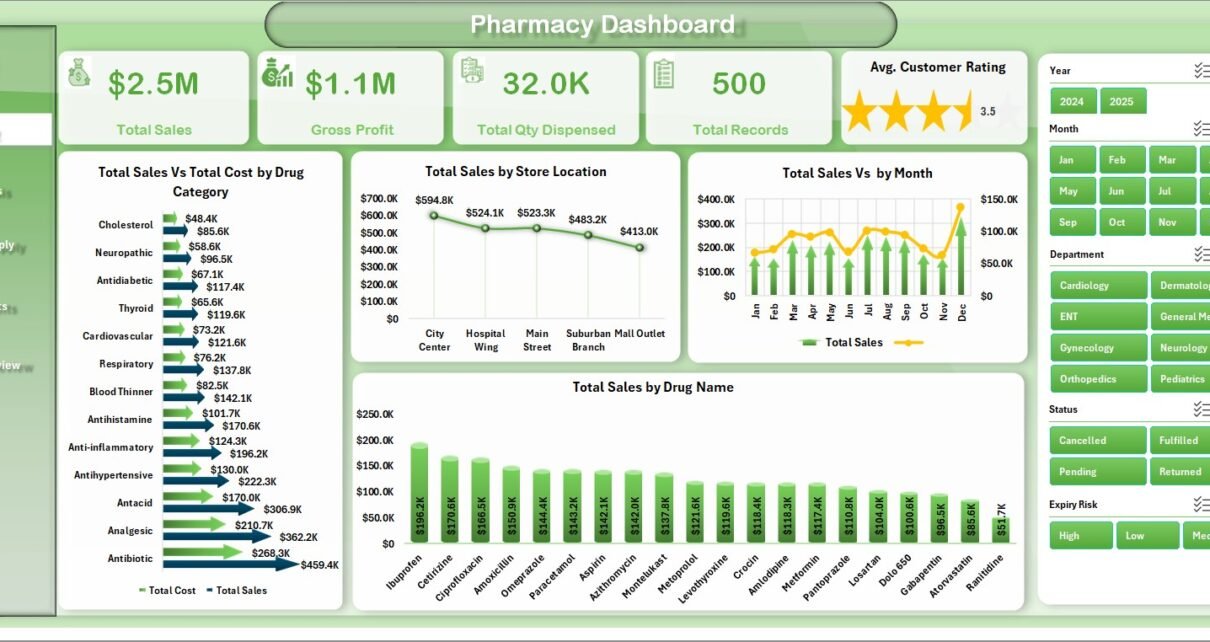
The Pharmacy Dashboard in Excel tracks 5 headline KPIs — Total Sales, Gross Profit, Total Quantity Dispensed, Total Records, and Average Customer Rating — across 5 interactive pages and 15+ pivot-driven charts. Setup takes under 10 minutes, and every chart refreshes automatically after you click Data → Refresh All.
Independent pharmacy owners, regional chain managers, and hospital in-patient pharmacy leads lose 4–8 hours a month building the same monthly report in Excel from scratch — or pay $99–$499 per user per month for SaaS pharmacy management tools that bundle features they will never use. This Pharmacy Dashboard in Excel gives you a clean, customizable analytics layer at a one-time $17.99 price so you can stop paying monthly and stop rebuilding the same pivot tables every month.
Pharmacy Dashboard in Excel
Key Features of Pharmacy Dashboard in Excel
- 5 interactive analysis pages — Overview, Sales Analysis, Inventory and Supply, Patient Insights, and Performance Review — plus a Data sheet and a hidden Support sheet with every pivot table that powers the dashboard.
- 15+ pre-built pivot charts covering sales, cost, margin, expiry risk, insurance coverage, fulfillment rate, and customer ratings — none of which you have to rebuild when your data changes.
- Multi-dimensional slicer filtering on every page: Drug Category, Store Location, Payment Method, Department, Prescription Type, and Month.
- Works for single-store pharmacies, regional chains, and hospital dispensaries. Every chart includes a Store Location dimension so you can benchmark locations side by side.
- 100% native Excel — no add-ins, no macros. Runs on Microsoft Excel 2016, 2019, 2021, and Microsoft 365 for Windows and Mac.
- Fully unlocked .xlsx file — extend the Data sheet, add new pivots on the Support sheet, change colors, and rebrand to your pharmacy.
- One-time purchase — no subscription, no per-user fees, free lifetime updates.
Dashboard Pages Explanation
1. Overview Page
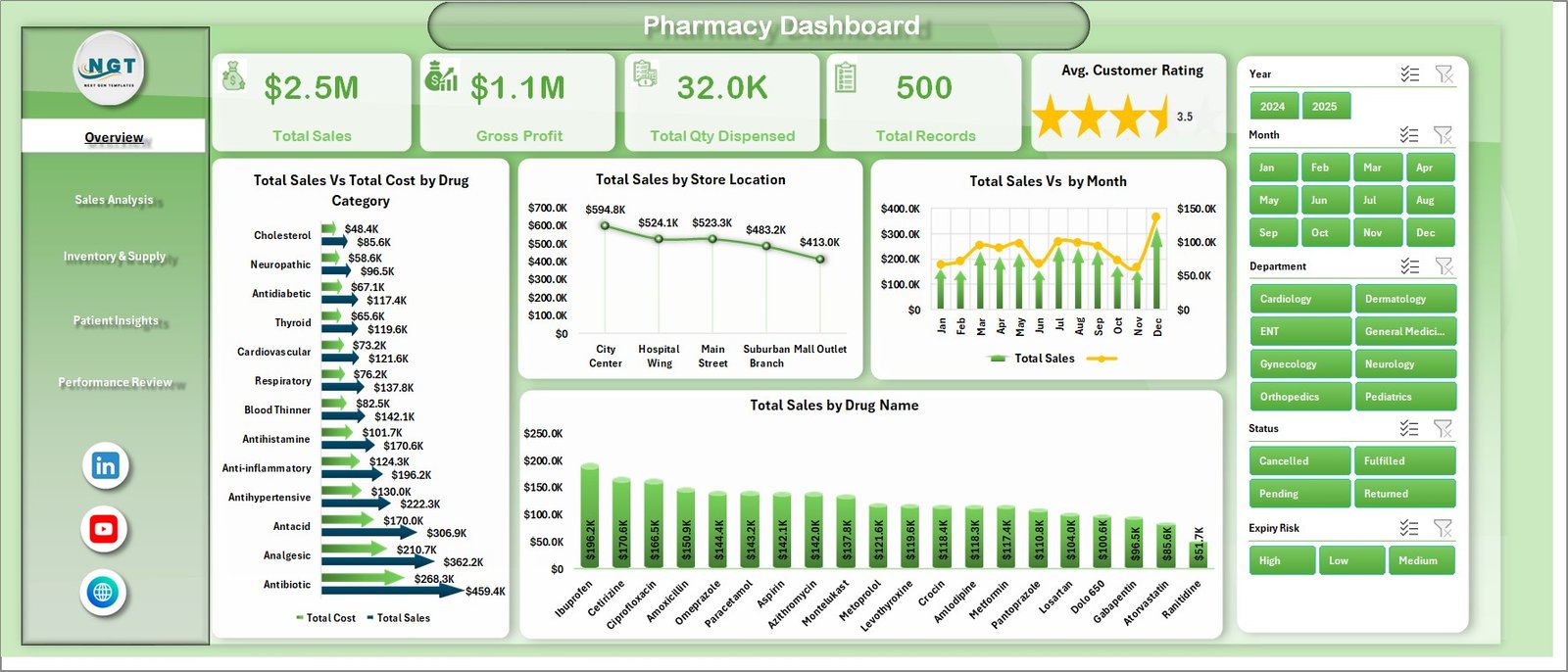
The Overview page opens with 5 KPI cards — Total Sales, Gross Profit, Total Quantity Dispensed, Total Records, and Average Customer Rating — followed by slicers that filter every chart instantly.
- Total Sales Vs Total Cost by Drug Category: A side-by-side comparison of revenue and cost for each drug category, highlighting thin-margin categories at a glance.
- Total Sales by Store Location: Ranks every pharmacy store by revenue so district managers can spot outperformers and underperformers immediately.
- Total Sales by Month: Shows monthly sales trend across the year, surfacing seasonal demand patterns like flu-season surges.
- Total Sales by Drug Name: Ranks the top-selling drugs by revenue so you know what is driving the top line.
Pharmacy Dashboard in Excel – Overview Page
2. Sales Analysis Page
The Sales Analysis page drills into how revenue breaks down by payment method, prescription type, and supplier — useful for both finance teams and buyers.
- Total Sales by Payment Method: Splits revenue between Cash, Card, Insurance, and Online so you can plan cash flow and reconcile deposits.
- Gross Profit by Prescription Type: Surfaces which prescription categories (Rx, OTC, Refill, Compound) are truly profitable.
- Total Qty Dispensed by Month: Plots dispensing volume month by month to spot workload spikes.
- Total Sales Vs Total Cost by Supplier: Compares what you pay each supplier against what you earn from their drugs — direct input to annual contract negotiations.
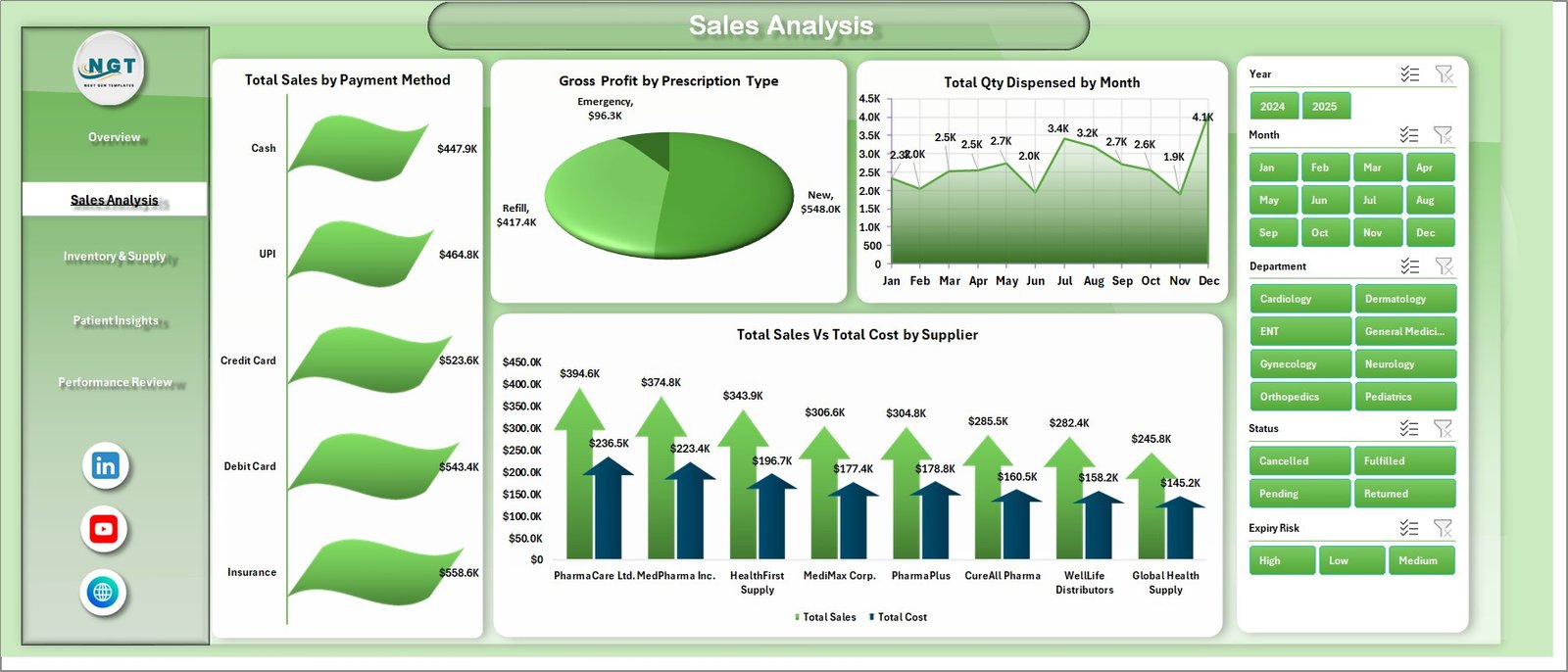
Pharmacy Dashboard in Excel – Sales Analysis Page
3. Inventory and Supply Page
The Inventory and Supply page focuses on operational health: what is moving, what is sitting too long, and where expiry risk is highest.
- Total Qty Dispensed by Drug Category: Identifies the highest-velocity categories so reorder points are right-sized.
- Total Records by Expiry Risk: Buckets inventory into Low, Medium, and High expiry risk — the single best view to prevent write-offs.
- Total Qty Dispensed Vs Total Records by Store Location: Compares activity against record counts per store, useful for spotting stockouts or slow-moving inventory.
- Total Records Vs Total Sales by Department: Shows throughput versus revenue by department.
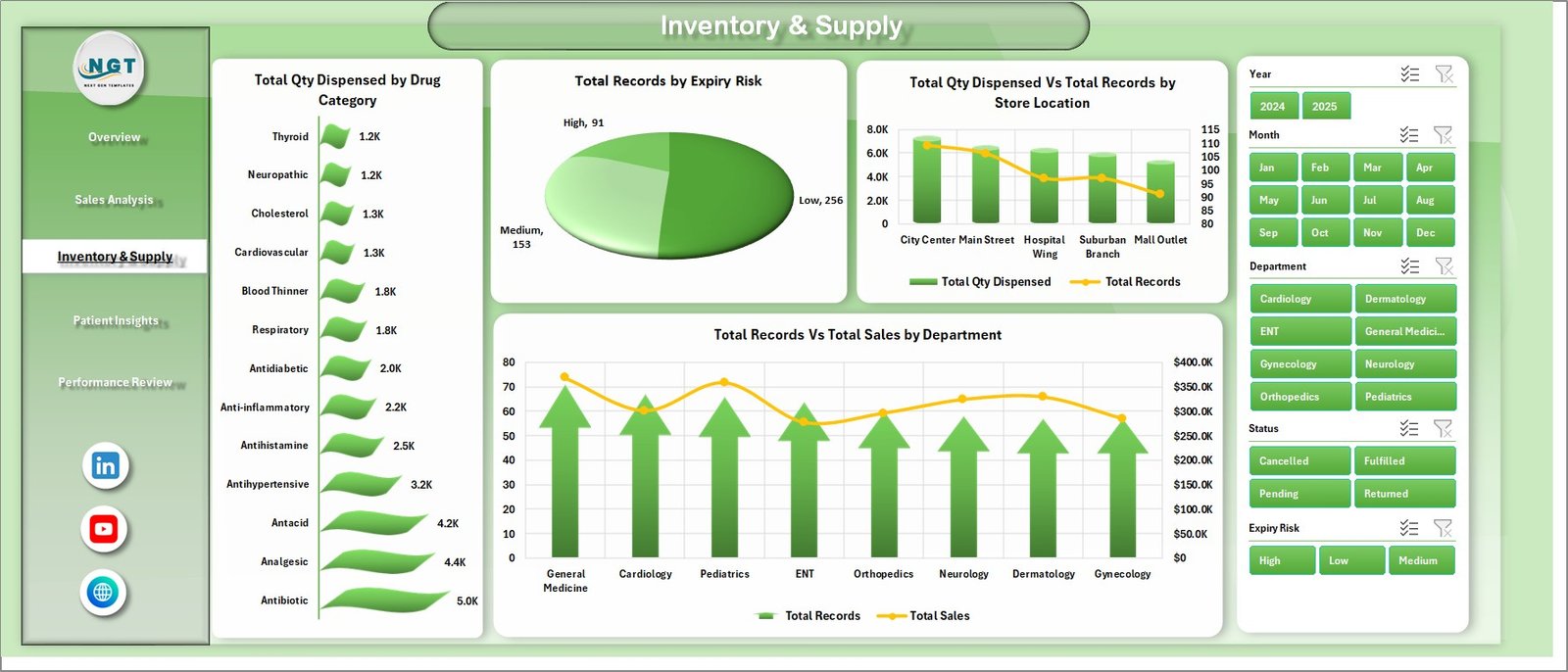
Pharmacy Dashboard in Excel – Inventory and Supply Page
4. Patient Insights Page
The Patient Insights page turns raw transactions into demographic and insurance intelligence.
- Insurance Coverage % by Drug Category: Shows what share of each category is paid by insurance versus out-of-pocket.
- Total Sales by Gender: Splits revenue by patient gender to inform targeted campaigns.
- Total Patient Payment Vs Total Insurance Amount by Year: Tracks how the payer mix is shifting year-over-year.
- Total Records by Status: Surfaces records by status (Completed, Pending, Cancelled, Refunded) so exceptions get chased.
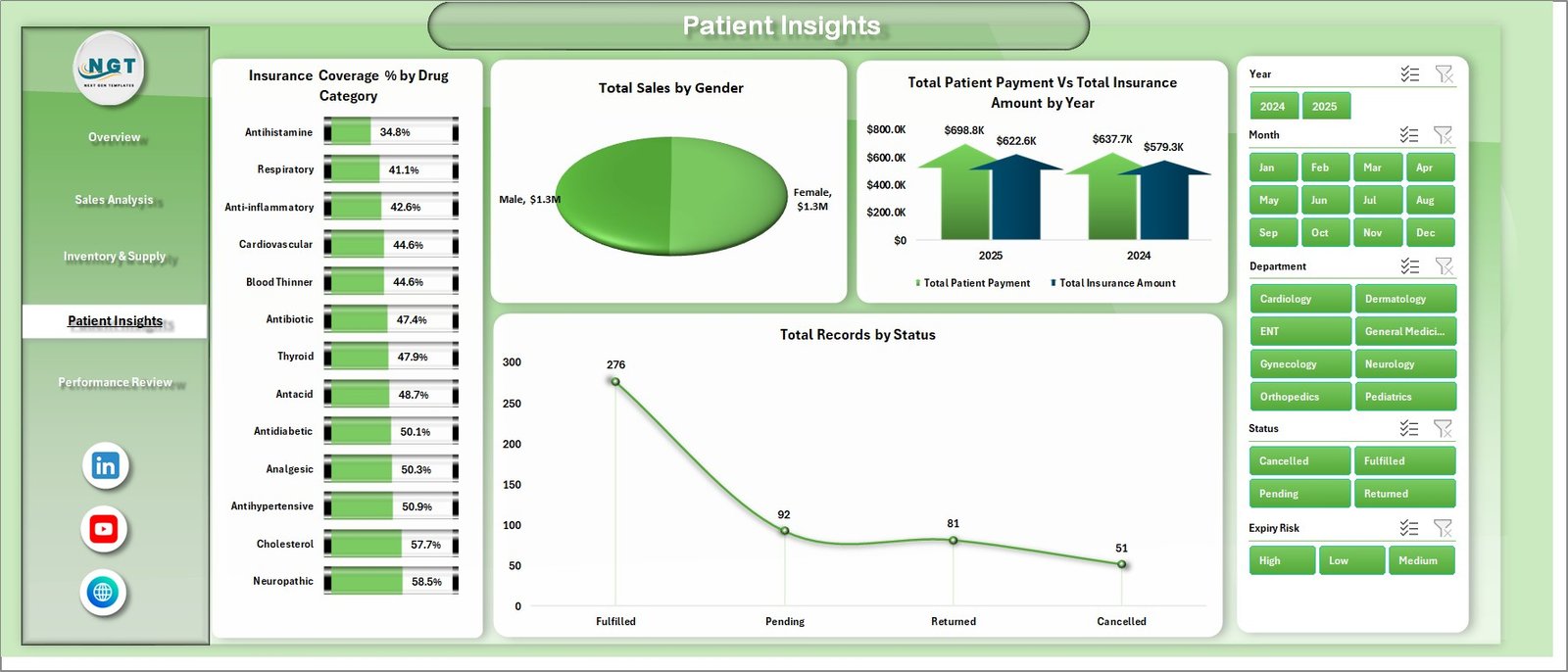
Pharmacy Dashboard in Excel – Patient Insights Page
5. Performance Review Page
The Performance Review page benchmarks store and department performance on customer experience, fulfillment, and margin.
- Avg. Customer Rating by Store Location: Ranks every store by average customer rating — directly tied to retention.
- Fulfillment % by Department: Tracks the percentage of prescriptions filled on time per department.
- Profit Margin % by Drug Category: Calculates gross-profit margin by drug category — essential for category management.
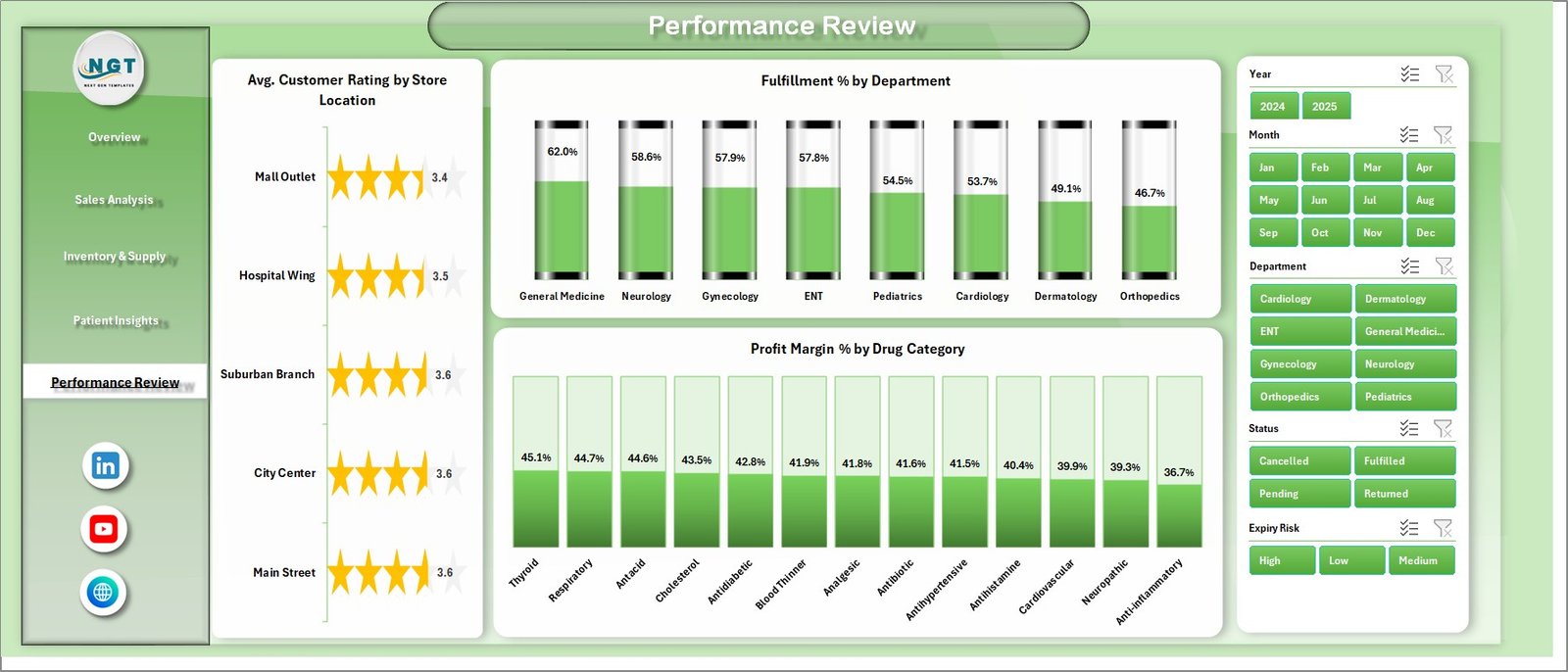
Pharmacy Dashboard in Excel – Performance Review Page
6. Data Sheet Tab
The Data Sheet is the single source of truth. Paste your pharmacy transaction records here in the exact column order shown in the sample, and every pivot table reads from this one sheet.

Pharmacy Dashboard in Excel – Data Sheet tab
7. Support Sheet Tab
The Support Sheet contains every pivot table that powers the dashboard. After updating the Data sheet, go to the Data tab on the Excel ribbon and click Refresh All. Every pivot and every chart rebuilds automatically. Keep this sheet hidden from end users for a clean presentation.

Pharmacy Dashboard in Excel – Support Sheet tab
Pharmacy Dashboard in Excel vs. Google Sheets Equivalent vs. Paid Pharmacy SaaS — Feature Comparison
| Feature | Pharmacy Dashboard in Excel | Google Sheets Equivalent | Paid Pharmacy SaaS (PioneerRx / RxSafe / BestRx) |
|---|---|---|---|
| Cost | $17.99 one-time ✅ | $9.99–$19.99 one-time | $99–$499 / user / month |
| Platform | Microsoft Excel (offline-ready) ✅ | Google Sheets (cloud-only) | Proprietary web app |
| Setup time | Under 10 minutes ✅ | Under 10 minutes | 2–8 weeks onboarding |
| Analysis pages | 5 pages + Data + Support ✅ | 5 pages | 15+ pre-built reports |
| Pivot-driven filtering | Native Excel slicers ✅ | Query formulas / filter views | Built-in |
| Custom KPIs | Fully editable formulas ✅ | Fully editable | Limited without paid tier |
| Year-1 cost (5 users) | $17.99 total ✅ | $19.99 total | $5,940–$29,940 |
| Data ownership | Local .xlsx file you control ✅ | Google Drive | Vendor cloud |
For pharmacies that want a sales-and-inventory analytics layer without paying thousands per year in SaaS fees, the Pharmacy Dashboard in Excel sits in the sweet spot.
Who Should Use This Template
Perfect for:
- Independent pharmacy owners running 1–20 stores who want monthly sales and inventory visibility without buying pharmacy-management SaaS.
- Regional pharmacy chain managers who need a single-file performance review template.
- Hospital in-patient pharmacy leads tracking dispensing volume, expiry risk, and insurance coverage.
- Healthcare consultants and accountants preparing monthly reports for pharmacy clients.
- Pharmacy-school students and instructors learning to analyze pharmacy KPIs in Excel.
Not a fit if:
- You need real-time point-of-sale integration or dispensing hardware — for that, use a full pharmacy-management system.
- You require HIPAA-audited SaaS with role-based access and SSO for an enterprise hospital group.
- You refuse to work in Excel and want a pure cloud-first tool.
Real-World Use Cases
Meera owns a 4-store independent pharmacy chain in Pune. She replaced a $150 per month pharmacy reporting SaaS with the Pharmacy Dashboard in Excel. She now spends 20 minutes a month pasting transaction data and catches slow-moving SKUs on the Expiry Risk view before they turn into write-offs. Annual saving: roughly $1,800.
Daniel is the pharmacy director at a 180-bed community hospital in Ohio. He uses the dashboard’s Patient Insights page to monitor Insurance Coverage percent by drug category across inpatient and outpatient dispensing. The Expiry Risk view cut his hospital’s controlled-substance write-offs by 31% in a single quarter.
Rashmi is a healthcare consultant serving 12 pharmacy clients across India. Instead of building a fresh dashboard for each client, she sends every client a branded copy of this template and turns around month-end management reports in under 45 minutes per client. She bills roughly 10x the template cost per client per month.
Advantages of Pharmacy Dashboard in Excel
- One-time cost. $17.99 replaces $1,188–$29,940 per year in SaaS subscription fees for small and mid-sized pharmacies.
- Works offline. The dashboard opens and refreshes without internet access — essential for pharmacies with spotty connectivity.
- Zero vendor lock-in. Your data stays in a local .xlsx file that you control and can back up to any drive.
- Instant learning curve. Anyone who has used an Excel pivot table can understand every page in under 30 minutes.
- Fully extensible. Add new columns to the Data sheet, extend pivots on the Support sheet, or drop in additional charts — nothing is locked.
Opportunities for Improvement
To be genuinely useful, it helps to name what this dashboard is not. Three honest limitations:
- Not a dispensing system. It will not print labels, check drug interactions, or submit e-prescriptions. Pair it with your existing pharmacy management system — this template is an analytics layer, not an operational system.
- Single-user by design. Multiple people editing the same .xlsx simultaneously is not recommended — use the Google Sheets version if you need concurrent editing.
- Manual data refresh. The dashboard pulls from the Data sheet on demand. If you want live database connectivity, consider Pharmacy KPI Dashboard in Power BI with a direct SQL connection instead.
Best Practices
- Keep the Data sheet clean. One row per prescription transaction, no blank rows in the middle, and no formulas in the data columns. Pivot tables break when the source data has gaps.
- Refresh after every data paste. Go to Data → Refresh All (Microsoft’s official docs). Every pivot and chart rebuilds in seconds.
- Save a dated copy each month. Name it PharmacyDashboard_YYYY-MM.xlsx. Over a year you will build a powerful longitudinal dataset.
- Add your branding. Replace the header logo on page 1 with your pharmacy brand — the file is fully unlocked.
- Hide the Support sheet. Right-click the tab and hide it so end users only see the 5 analysis pages plus the Data sheet.
Explore Relevant Templates
📌 Pharmacy KPI Dashboard in Power BI — The Power BI version of this template with DAX measures and cross-filtering. Same underlying data model, served through Power BI.
📌 Pharmacy KPI Dashboard in Google Sheets — The cloud-native Google Sheets equivalent with collaborative real-time editing.
📌 Pharmacy Workflow Bottleneck Analysis Dashboard in Power BI — Operational companion focused on prescription turnaround time and workflow bottlenecks.
📌 Clinics Dashboard in Excel — Same Excel format tailored for outpatient clinics.
📌 Medical Practice Dashboard in Excel — A sibling dashboard for medical practices, covering patient visits, revenue, department KPIs.
💎 Healthcare & Hospital Management Bundle — Save 44% — 8 healthcare templates (Excel + Power BI + VBA) including hospital management systems and healthcare dashboards for $99.99 instead of $179.92.
Also explore our full library of Excel Dashboard Templates.
Frequently Asked Questions
What KPIs does the Pharmacy Dashboard in Excel track?
The Pharmacy Dashboard in Excel tracks 5 headline KPIs — Total Sales, Gross Profit, Total Quantity Dispensed, Total Records, and Average Customer Rating — plus 15+ pivot-driven charts across sales, inventory, patient insights, and performance. All metrics refresh automatically after you click Data → Refresh All.
How long does setup take?
Setup of the Pharmacy Dashboard in Excel takes under 10 minutes. Download the .zip, open the .xlsx, paste your transactions into the Data sheet in the same column order as the sample, and press Data → Refresh All. Every chart and KPI updates immediately without any formula editing.
Can I use this template for multiple pharmacy store locations?
Yes. The Pharmacy Dashboard in Excel is designed for multi-store pharmacies. Every page has a Store Location slicer, and the Overview and Performance Review pages plot sales and customer rating by store so you can benchmark locations side by side.
Which versions of Excel does this dashboard support?
The Pharmacy Dashboard in Excel works in Microsoft Excel 2016, 2019, 2021, and Microsoft 365 on both Windows and Mac. It also opens in Excel Online in read-only mode, but pivot tables and slicers require the desktop app for full interactivity.
How does this compare to paid pharmacy SaaS like PioneerRx or BestRx?
Paid pharmacy SaaS typically costs $99–$499 per user per month and bundles POS, e-prescribing, and dispensing hardware. The Pharmacy Dashboard in Excel is $17.99 one-time and focuses on sales, inventory, and performance analytics. Most pharmacies run it alongside their operational system rather than replacing it.
Can I add my own custom KPIs and charts?
Absolutely. The Pharmacy Dashboard in Excel is fully editable. You can extend the Data sheet with new columns, add custom pivot fields on the Support sheet, and create additional charts on any page. Nothing is locked and no password is required.
Do I get future updates to the Pharmacy Dashboard in Excel?
Yes. Every structural improvement or fix is shared at no additional charge. Re-download the .zip from your NextGenTemplates account at any time to get the latest version of the Pharmacy Dashboard in Excel.
About the Author
Built by PK — Microsoft Certified Professional with 15+ years of Excel, Google Sheets, and Power BI experience. Founder of NextGenTemplates, reaching 300K+ subscribers across YouTube channels. Every template is hand-built and tested before release.
Conclusion
If you run a pharmacy — independent, chain, or hospital — the Pharmacy Dashboard in Excel gives you the analytics layer you keep meaning to build yourself but never get around to. One-time price. Full ownership. Zero learning curve if you know pivots. For the cost of one month of SaaS, you get a dashboard that serves you for years.
Click here to Purchase Pharmacy Dashboard in Excel — Instant download · One-time payment · No subscription.
Visit our YouTube channel for step-by-step video tutorials — Youtube.com/@PK-AnExcelExpert
📅 Last updated: April 2026