Legal Research Dashboard in Excel gives law firms, legal operations teams, research managers, compliance teams, and in-house counsel a structured way to review research performance without building a dashboard from scratch. Legal teams often track research work across spreadsheets, emails, matter notes, and billing exports. That makes it difficult to see which practice areas are profitable, which researchers carry more workload, where risk is concentrated, and whether completion performance is improving.
This Excel dashboard solves that reporting gap with 7 worksheet tabs, 5 dashboard pages, 4 executive KPI cards, 17 analysis charts, multiple slicers, a Data Sheet, and a Support Sheet with pivot tables. Users can replace the sample records, click Refresh All, and review billable amount, net profit, research hours, authorities, workload, practice mix, risk, and productivity in one workbook.
Download the Legal Research Dashboard in Excel from NextGenTemplates.
Key Features of Legal Research Dashboard in Excel
- 5 dashboard pages for Overview, Workload, Practice, Risk, and Productivity.
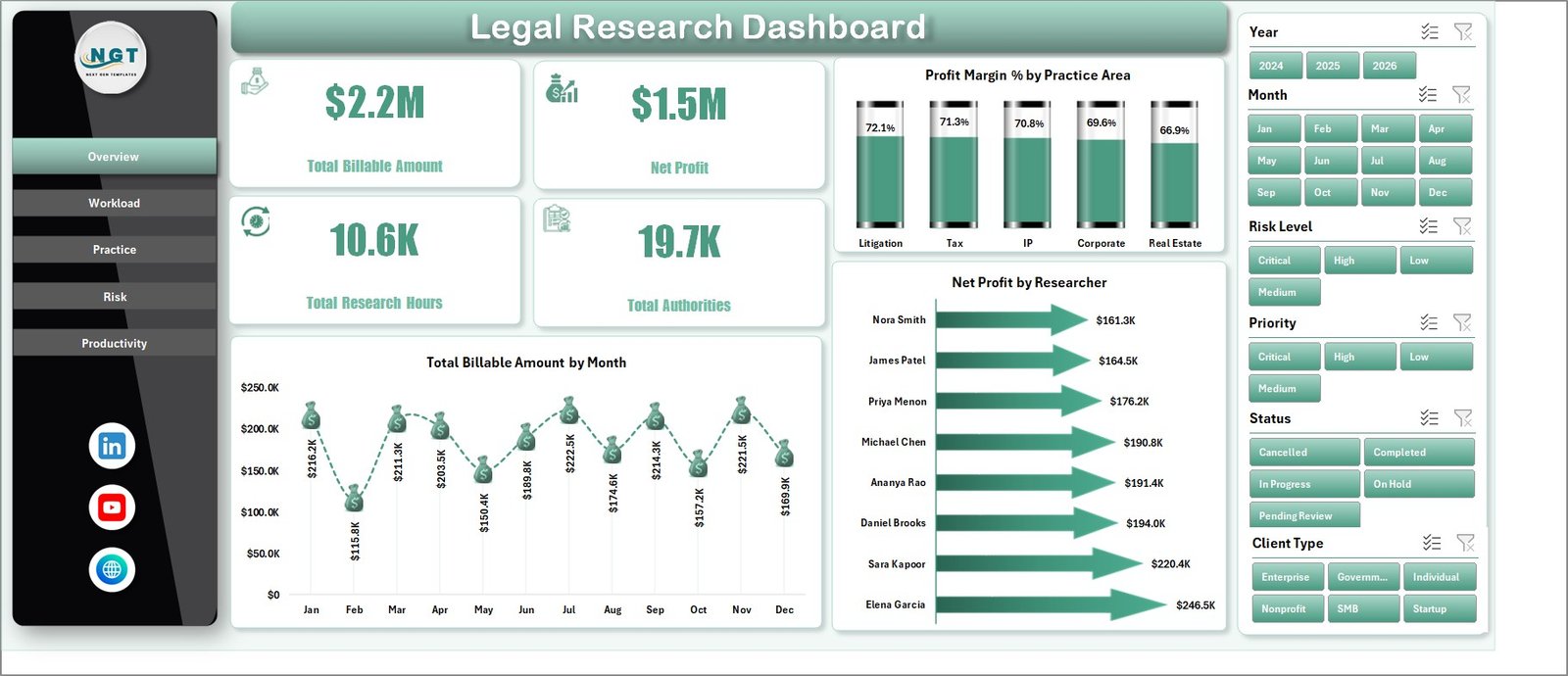
- 4 headline KPI cards for Total Billable Amount, Net Profit, Total Research Hours, and Total Authorities.
- 17 chart views covering monthly billing, profit margin, researcher performance, workload, cost, priority, source type, practice area, jurisdiction, client type, firm, risk level, status, and completion rate.
- Interactive slicers so users can filter legal research data quickly.
- Data Sheet tab where users add or replace legal research records in the same structure.
- Support Sheet tab containing pivot tables that power the dashboard dynamically.
- Excel-native workflow with no monthly SaaS subscription required.
Dashboard Pages Explanation
1. Overview Page
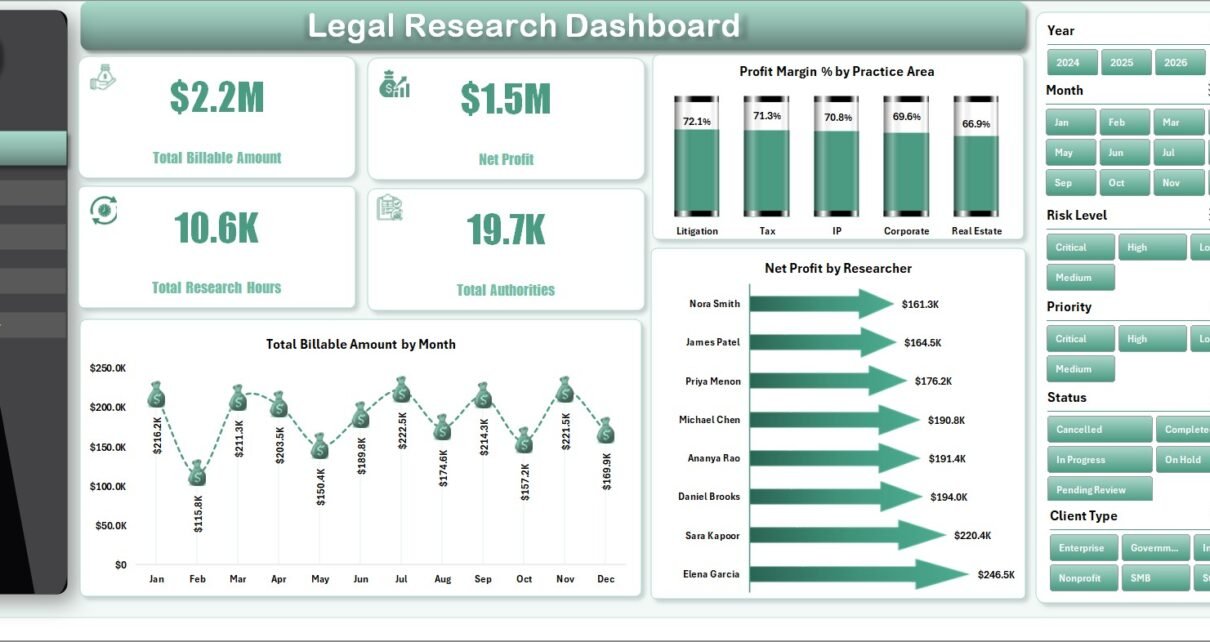
The Overview Page gives a high-level picture of legal research performance. At the top, KPI cards show Total Billable Amount, Net Profit, Total Research Hours, and Total Authorities. These cards help partners and legal operations leaders understand financial value, research effort, and authority coverage before opening deeper analysis tabs.
Total Billable Amount by Month: This chart shows monthly billable research value. It helps users identify stronger billing periods, slower months, and seasonal changes in research demand.
Profit Margin % by Practice Area: This chart compares margin across practice areas. It helps teams see which legal research categories produce better profitability after cost.
Net Profit by Researcher: This chart compares researcher-level profit contribution. It helps managers review productivity, staffing balance, and where coaching or process support may be useful.
2. Workload
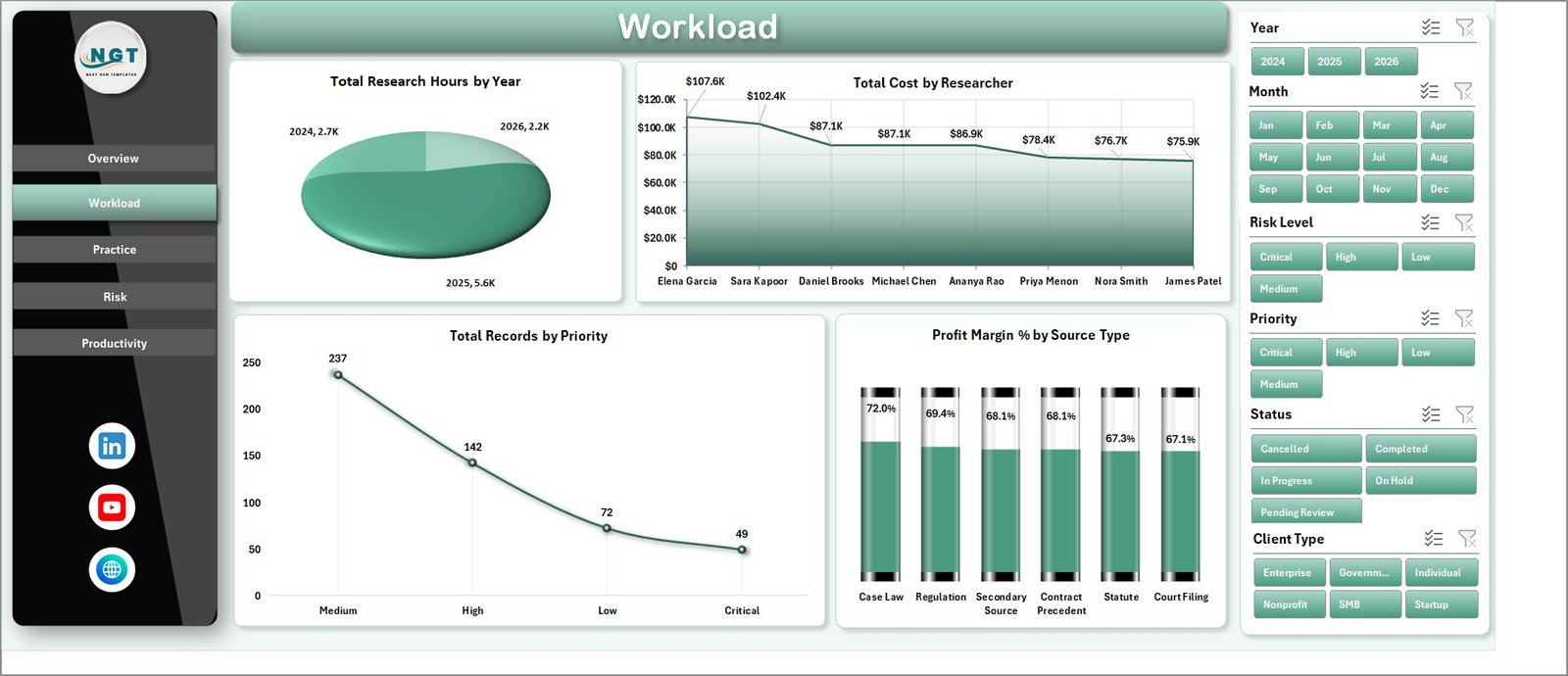
The Workload sheet focuses on effort, cost, priority, and source mix. Total Research Hours by Year shows whether research demand is increasing or decreasing over time. Total Cost by Researcher compares the cost attached to each team member. Total Records by Priority shows how much work is urgent, high, medium, or low priority. Profit Margin % by Source Type helps users compare margin across source categories.
3. Practice
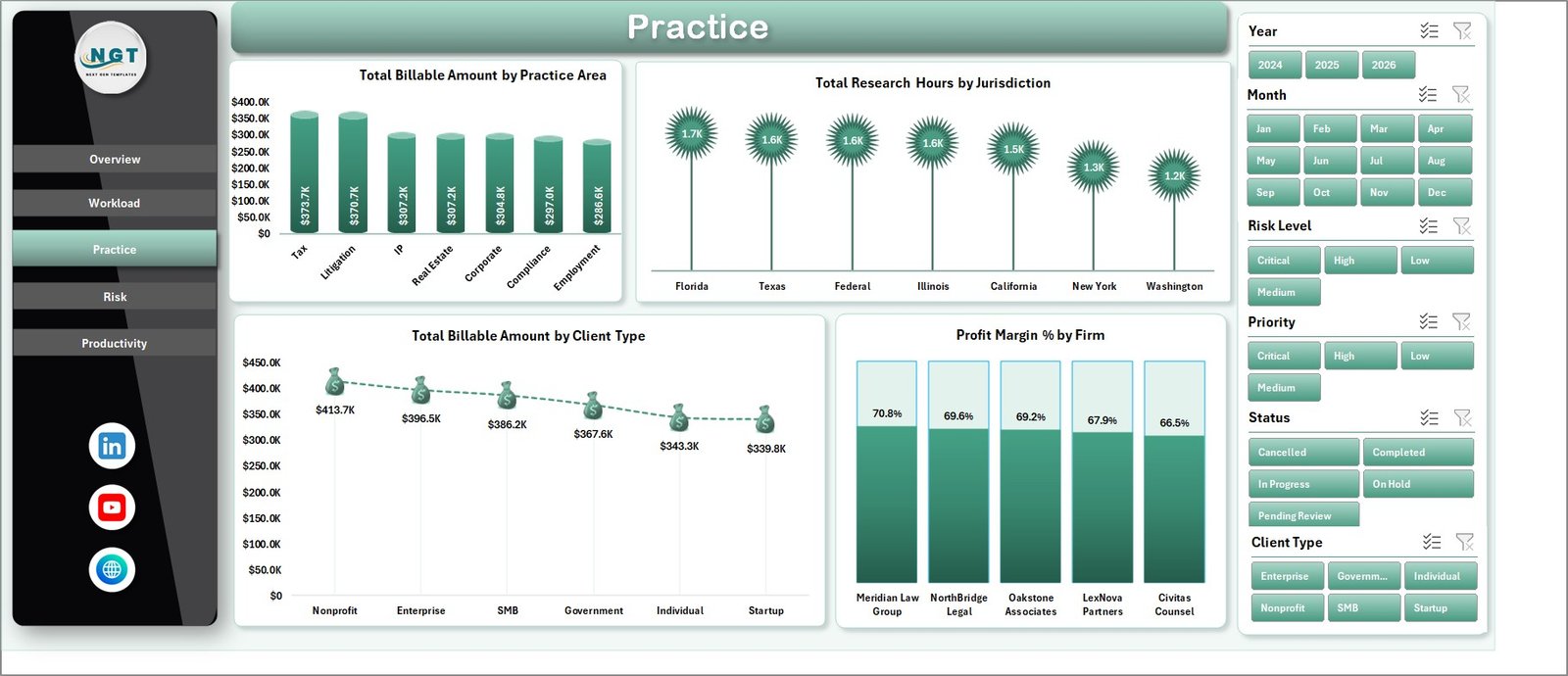
The Practice sheet reviews research value by legal practice area, jurisdiction, client type, and firm. Total Billable Amount by Practice Area highlights the highest-value research categories. Total Research Hours by Jurisdiction shows where effort is concentrated geographically or legally. Total Billable Amount by Client Type compares client segment value. Profit Margin % by Firm helps leadership review firm-level profitability.
4. Risk
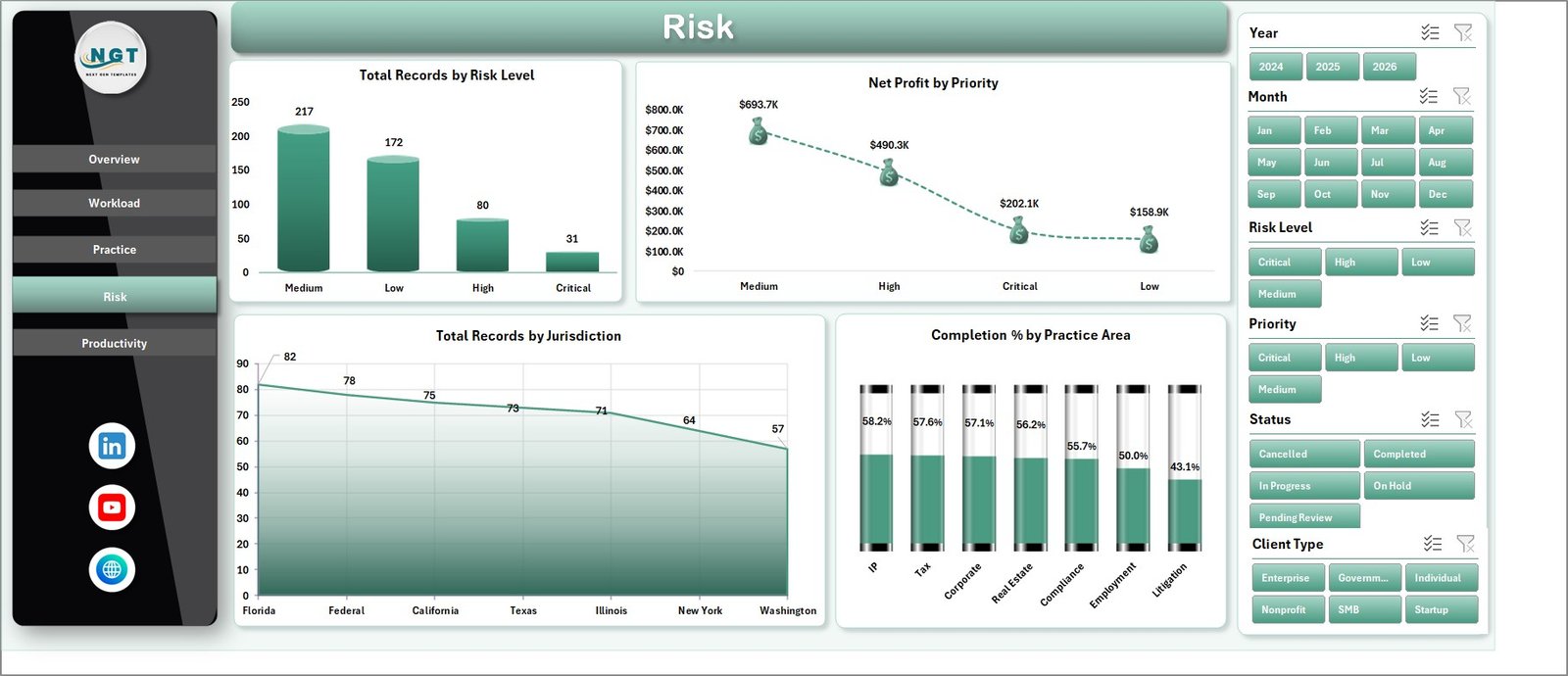
The Risk sheet connects research records with risk, priority, jurisdiction, and completion. Total Records by Risk Level shows the overall risk profile of research work. Net Profit by Priority explains whether urgent or high-priority work is also financially meaningful. Total Records by Jurisdiction highlights jurisdictional concentration. Completion % by Practice Area shows where research tasks close efficiently and where work may need follow-up.
5. Productivity
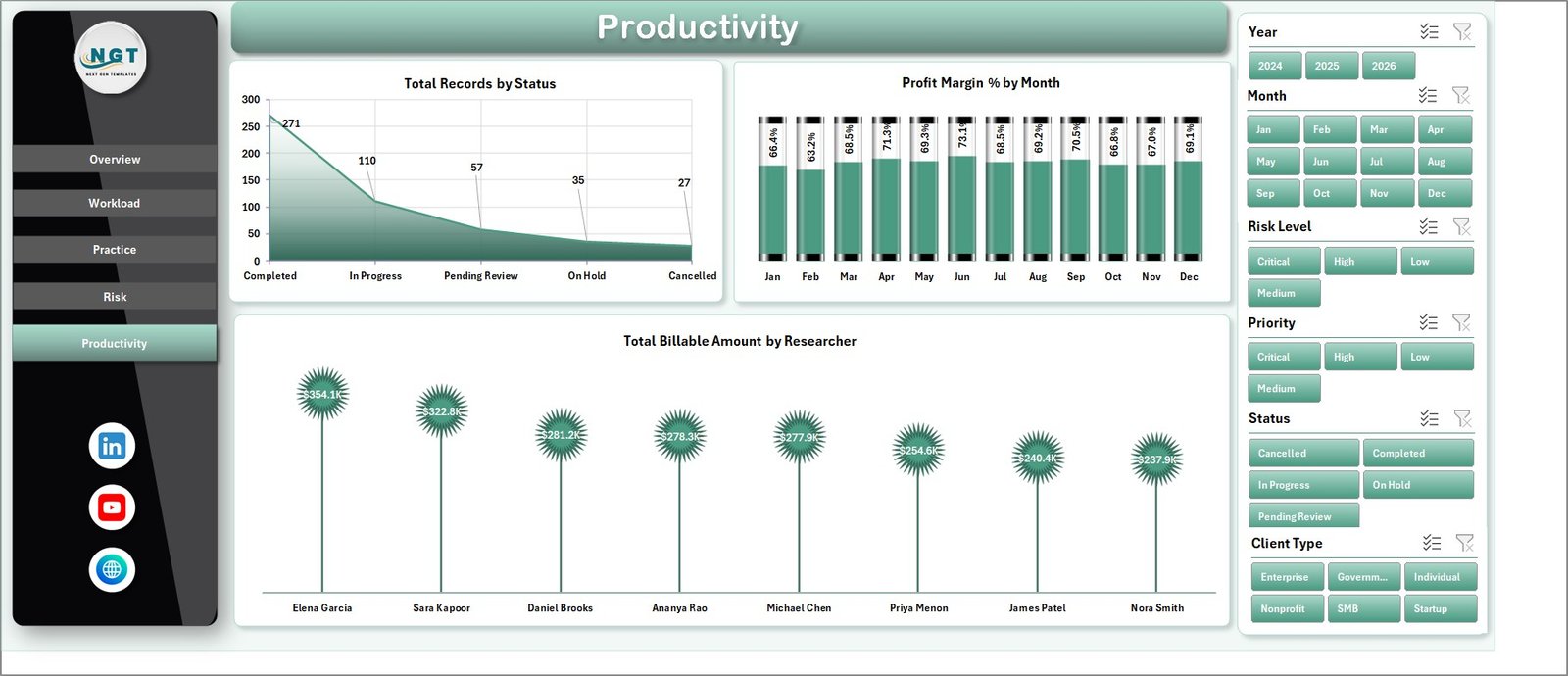
The Productivity sheet is built for status review, margin trend monitoring, and researcher-level billing analysis. Total Records by Status shows pipeline distribution. Profit Margin % by Month highlights monthly profitability movement. Total Billable Amount by Researcher helps compare billing contribution across the research team.
6. Data Sheet Tab
The Data Sheet is where users add their own legal research records. Keep the same column format, replace the sample rows, and refresh the workbook. This keeps the dashboard reliable while allowing teams to use their own researchers, firms, practice areas, jurisdictions, client types, source types, priorities, risk levels, and statuses.

7. Support Sheet
The Support Sheet contains the pivot tables used to create the entire dashboard dynamically. After updating the Data Sheet, go to the Data tab in the Excel Ribbon and click Refresh All. Microsoft also explains this workflow in its PivotTable refresh documentation: Microsoft Support – Refresh PivotTable data. The Support Sheet can be hidden during normal use.

Legal Research Dashboard in Excel vs. Google Sheets vs. Paid CRM/SaaS – Feature Comparison
| Feature | This Excel Dashboard | Google Sheets Alternative | Paid Legal SaaS |
|---|---|---|---|
| Cost | $17.99 one-time | Template cost or custom build time | Monthly or annual subscription |
| Platform | Microsoft Excel | Browser-based spreadsheet | Vendor cloud platform |
| Setup time | Replace data and refresh pivots | Import data and rebuild formulas or charts | Implementation, onboarding, and configuration |
| Real-time team collaboration | Available through OneDrive or SharePoint if configured | Native collaboration | Usually included by plan |
| Mobile access | Excel mobile or web for light review | Google Sheets mobile app | Vendor app or browser |
| Customizable fields | Editable sheets, pivots, charts, and labels | Editable but needs careful formula control | Depends on vendor permissions |
| Share with link | Possible through Microsoft 365 sharing | Native link sharing | Often login controlled |
| Year-1 cost at 5 users | $17.99 plus Microsoft licensing if needed | Low software cost plus setup time | Often hundreds or thousands |
| Legal research analytics | Billable amount, net profit, hours, authorities, workload, practice, risk, and productivity views included | Must be built or adapted | May require premium reporting |
Who Should Use This Template
This dashboard is useful for legal research managers, law firm partners, legal operations analysts, in-house legal departments, compliance research teams, and consultants who track research work in a structured spreadsheet format.
It is especially helpful when teams need a clear monthly or weekly reporting view but do not want to pay for a full legal analytics SaaS platform. It is also useful for Excel consultants who build reporting systems for legal clients and need a ready workbook structure.
Real-World Use Cases
Anika, legal research manager: Anika reviews research hours, authorities, priority records, and completion percentage before assigning work for the next week.
Marcus, law firm partner: Marcus filters by practice area and researcher to understand which legal research categories are creating the strongest billable amount and net profit.
Priya, legal operations analyst: Priya uses jurisdiction, risk level, source type, and status filters to explain research workload concentration during monthly operations reviews.
Advantages of Legal Research Dashboard in Excel
- It works in Microsoft Excel, so many business users can update and review it without learning a new platform.
- It separates raw records, dashboard pages, and support pivots in a clean workbook structure.
- It gives leadership multiple views of legal research performance: financial, workload, practice, risk, and productivity.
- It can be customized by Excel users who want to adjust fields, charts, colors, labels, or slicers.
Opportunities for Improvement
This dashboard is an analytics template, not a legal research database or case management system. It does not include AI research, document storage, role-based security, automated legal citations, client portals, or billing approval workflows. Teams handling confidential legal data should store the workbook in an approved secure location and follow internal data protection policies.
Best Practices
- Keep the Data Sheet format consistent when adding new records.
- Use standardized values for practice area, jurisdiction, client type, firm, researcher, source type, priority, risk level, and status.
- Refresh all pivots after every data update.
- Hide the Support Sheet for end users, but keep it available for maintenance.
- Review high-risk and high-priority records regularly, not only at month end.
Explore Relevant Templates
You may also like Legal Research KPI Dashboard in Excel, Intellectual Property Law Firms Dashboard in Excel, International Arbitration Panels Dashboard in Excel, and Employment Law Services Dashboard in Excel.
Frequently Asked Questions
What does the Legal Research Dashboard in Excel track?
It tracks billable amount, net profit, research hours, authorities, cost, records, priority, source type, practice area, jurisdiction, client type, firm, risk level, status, and completion percentage.
Can I use my own data?
Yes. Replace the sample rows in the Data Sheet with your own legal research data, keep the same structure, and click Refresh All.
Do I need advanced Excel skills?
No. The main workflow is to update the Data Sheet and refresh the workbook. Advanced Excel users can also customize pivots, slicers, charts, labels, and formatting.
Can I customize practice areas and jurisdictions?
Yes. You can use your own practice areas, jurisdictions, firms, researchers, client types, source types, priority values, and risk levels as long as the data remains structured consistently.
Is this a legal research database?
No. It is an Excel dashboard template for reporting and analysis, not a research database, AI research tool, docketing system, or legal document repository.
Can the Support Sheet be hidden?
Yes. The Support Sheet contains pivot tables and can be hidden after setup while still powering the dashboard.
About the Author
Built by PK – Microsoft Certified Professional with 15+ years of Excel, Google Sheets, and Power BI experience. Founder of NextGenTemplates, reaching 300K+ subscribers across YouTube channels. Every template is hand-built and tested before release.
Conclusion
The Legal Research Dashboard in Excel gives legal teams a practical reporting layer for research performance. Instead of relying on scattered spreadsheets or manual summaries, users can review billable amount, net profit, research hours, authorities, workload, practice mix, risk, completion, and productivity in one refreshable workbook.
Visit our YouTube channel to learn step-by-step Excel dashboard tutorials.