The U.S. moving-services industry generated an estimated $22 billion in revenue in 2024, served by roughly 7,300 active moving companies. Yet the majority of owner-operators still run their weekly review out of a spreadsheet built job-by-job — with no single view of revenue, labor cost, fuel cost, or customer rating across move types. The Moving Company Dashboard in Excel fixes that gap in under 10 minutes of setup.
This ready-to-use Excel template consolidates 5 headline KPIs and 20 pivot-driven charts across 5 dashboard pages — Overview, Move Analysis, Revenue Insights, Customer Experience, and Operations — so moving-company owners, dispatchers, franchise managers, and bookkeepers can see the whole business on one screen instead of flipping between QuickBooks, a CRM, and three field apps.
Moving Company Dashboard in Excel
Key Features of the Moving Company Dashboard in Excel
The Moving Company Dashboard in Excel is built around pivot tables feeding slicers, KPI cards, and charts — so every update to the Data sheet triggers a full recalculation after a single Refresh All click. No VBA. No macros. Runs identically on Windows Excel and Mac Excel 2016 or later. Here’s what it includes:
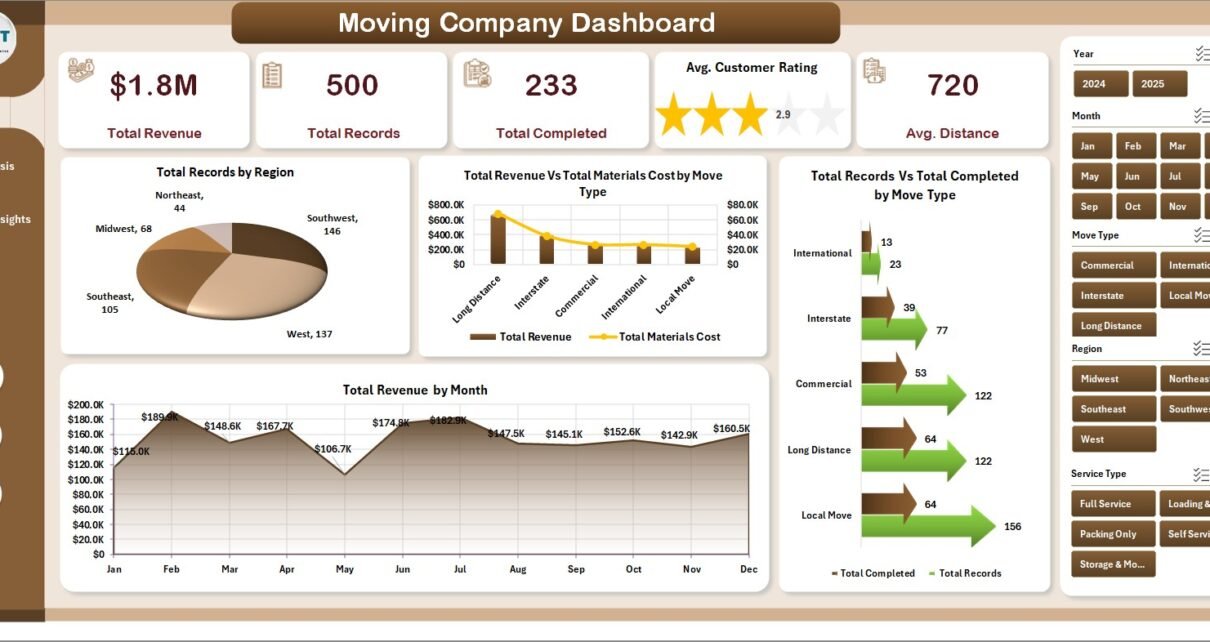
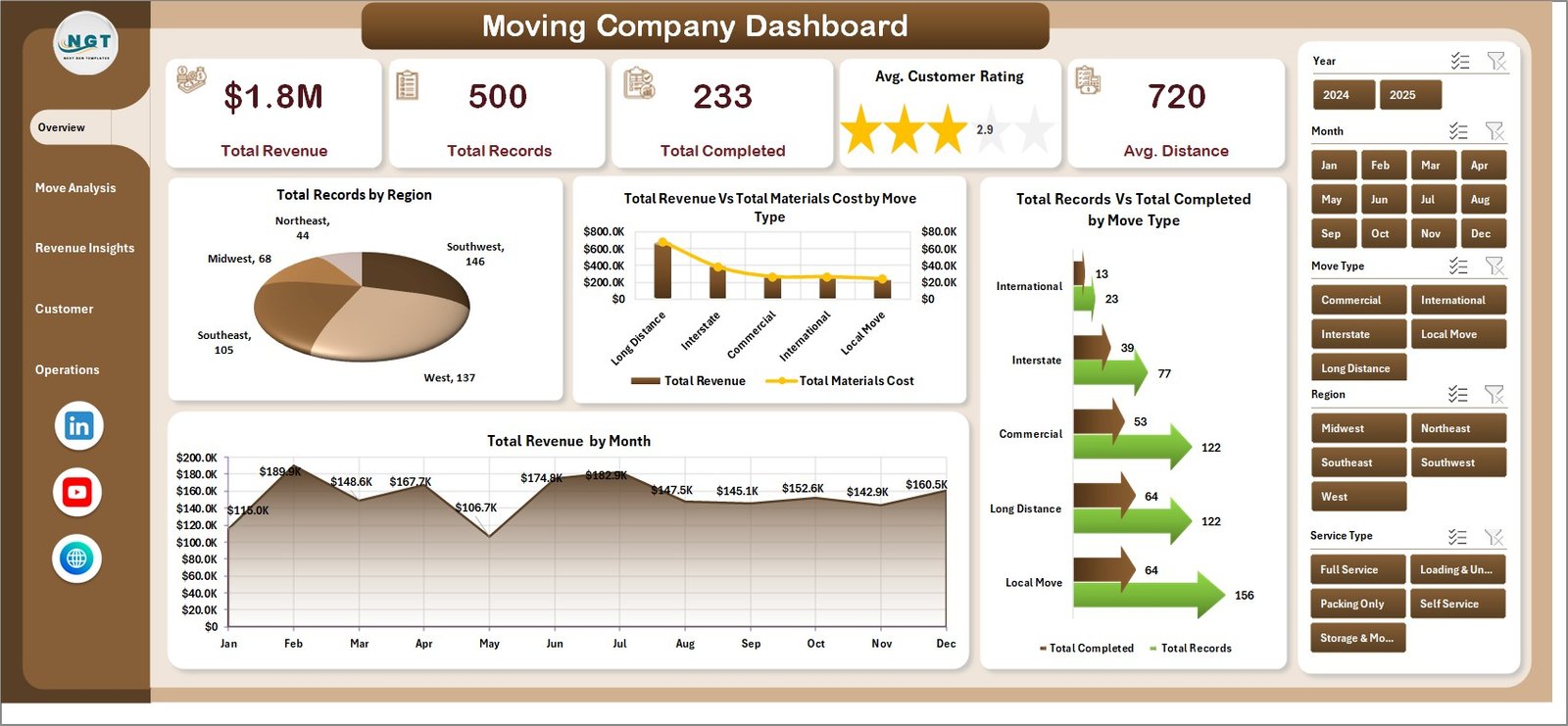
- 5 headline KPIs on the Overview page: Total Revenue, Total Records, Total Completed, Avg. Customer Rating, Avg. Distance
- 20 analytical charts distributed across 5 dashboard pages
- Slicers on every page so crews, owners, and finance can filter by move type, region, lead source, or payment method in one click
- Data sheet with 15 structured columns — Job ID, Date, Region, Move Type, Service Type, Truck Size, Lead Source, Payment Method, Status, Distance, Actual Hours, Revenue, Labor Cost, Fuel Cost, Customer Rating
- Hidden Support sheet holding every pivot table — keep it hidden in production and the team only sees the 5 dashboard pages
- Offline-first — customer contact data, crew pay rates, and revenue figures never leave the machine, unlike cloud-based moving SaaS
Dashboard Pages Explanation
1. Overview Page
The Overview page is the default landing view. Five KPI cards stretch across the top of the sheet — Total Revenue, Total Records, Total Completed, Avg. Customer Rating, and Avg. Distance — giving the owner a same-screen read on volume, service quality, and average haul length. Below the cards, four charts visualize Total Records by Region, Total Revenue vs. Total Materials Cost by Move Type, Total Records vs. Total Completed by Move Type, and Total Revenue by Month.
Slicers on the right let you filter the entire page by move type, region, service type, or month in one click. The revenue-vs-materials-cost view is particularly useful for spotting service lines where packing supplies are quietly eating margin.
Move Analysis
2. Move Analysis
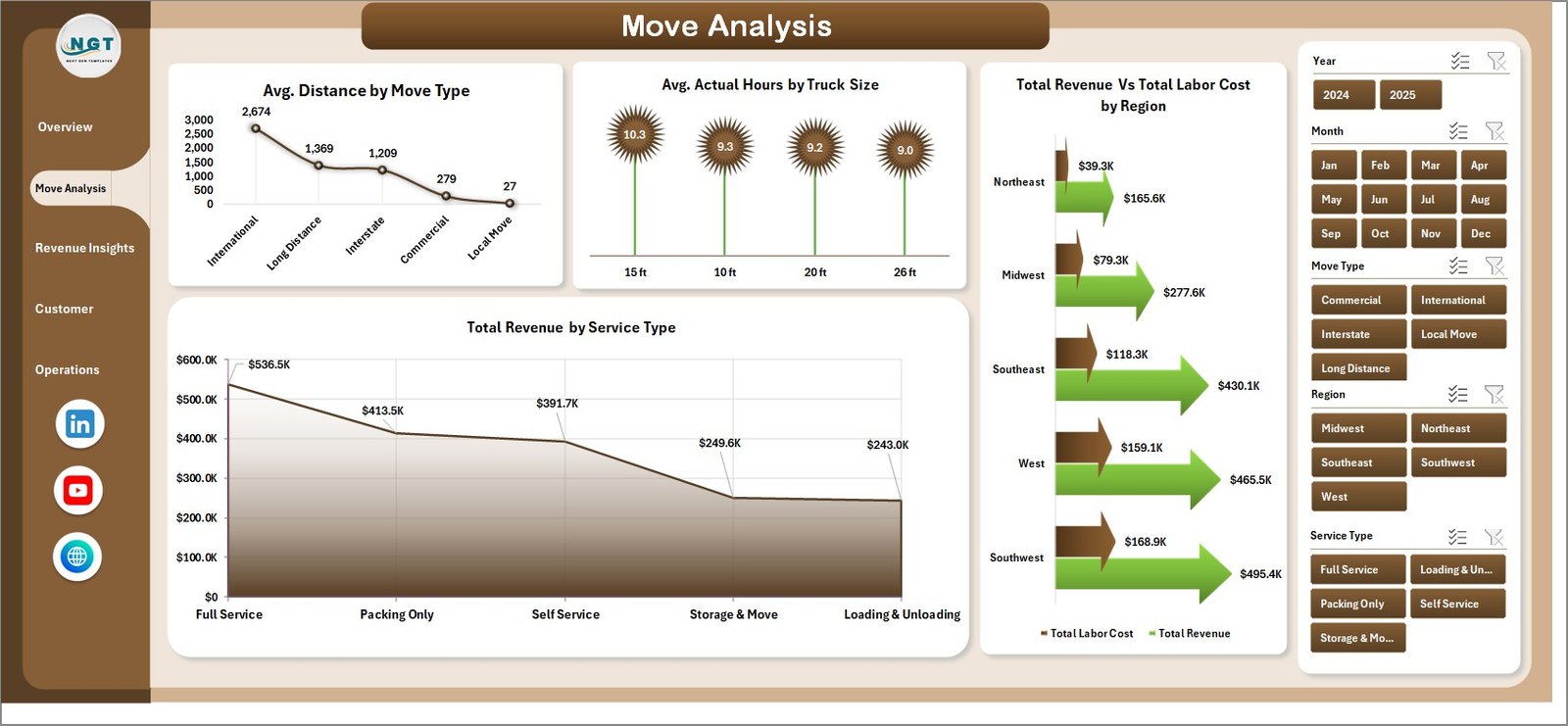
The Move Analysis page zooms into service-line economics with four charts: Avg. Distance by Move Type, Avg. Actual Hours by Truck Size, Total Revenue vs. Total Labor Cost by Region, and Total Revenue by Service Type. This is where operations managers diagnose overtime patterns on specific truck sizes and spot regions where labor cost is eating revenue.
Revenue Insights
3. Revenue Insights
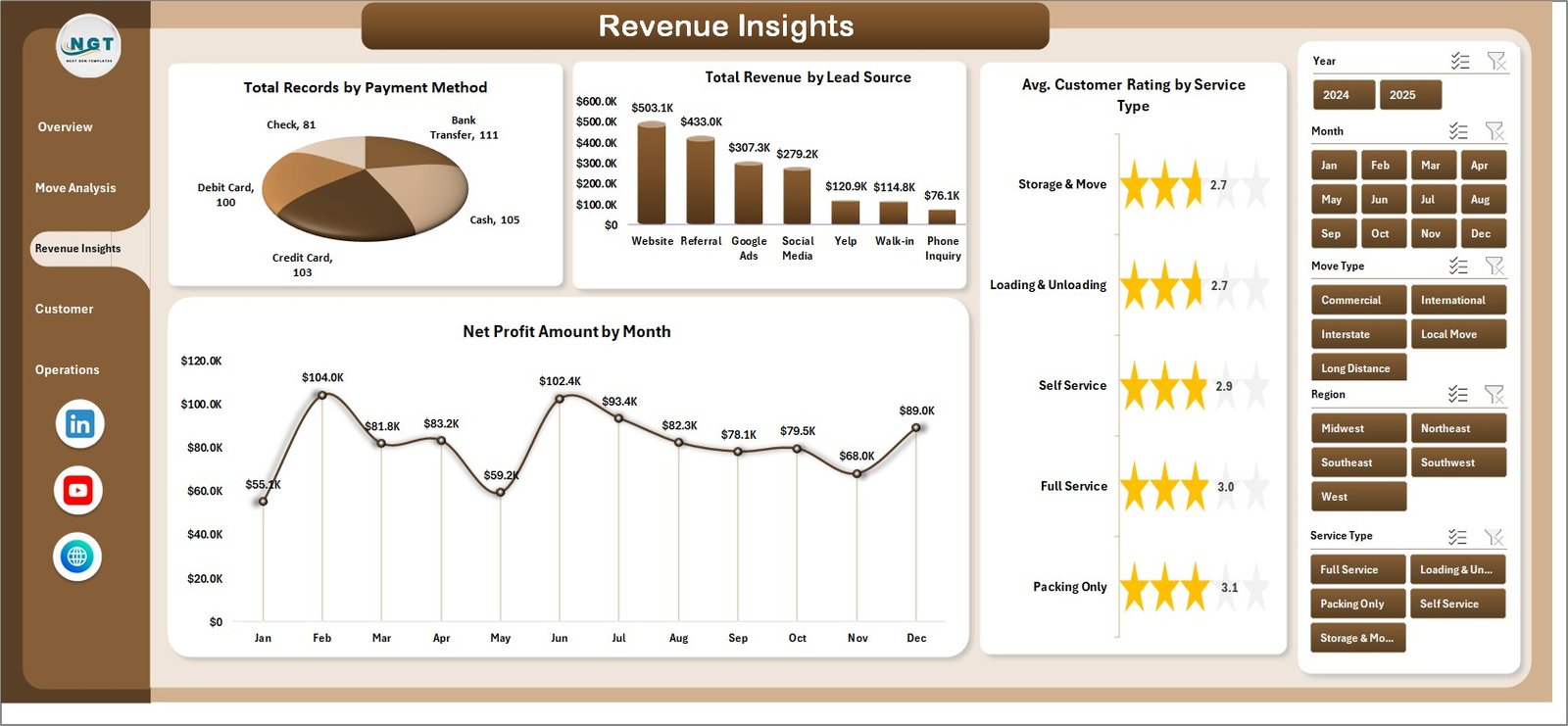
The Revenue Insights page covers Total Records by Payment Method, Total Revenue by Lead Source, Avg. Customer Rating by Service Type, and Net Profit Amount by Month. Marketing leads use this tab to compare lead-channel ROI — Google Ads vs. referrals vs. Thumbtack vs. repeat customers — in a single view.
The Net Profit by Month chart is the closest thing to a monthly P&L snapshot you can build without opening accounting software. It nets materials, labor, and fuel cost out of revenue so owners see real profit by month, not just top-line bookings.
Customer Experience
4. Customer Experience
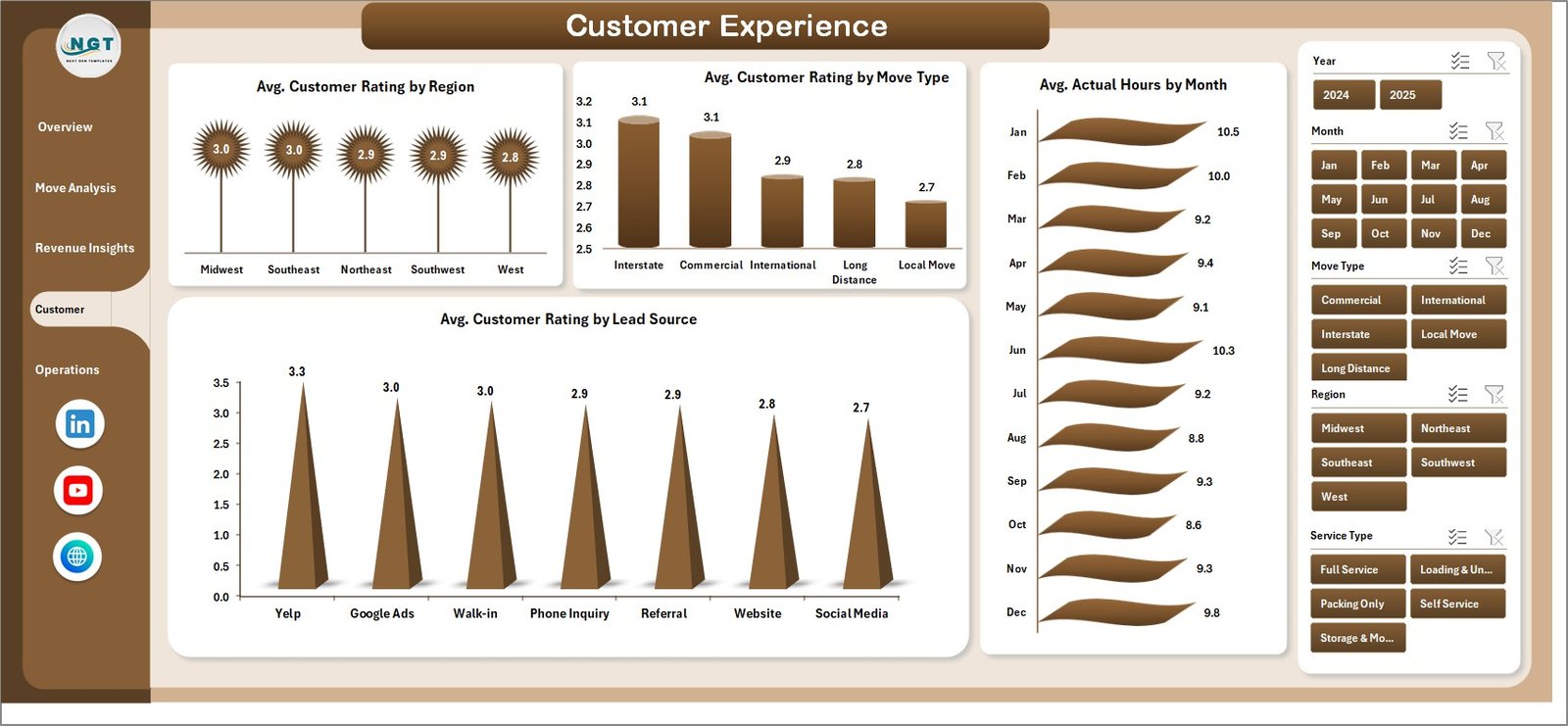
The Customer Experience page has four charts: Avg. Customer Rating by Region, Avg. Customer Rating by Move Type, Avg. Actual Hours by Month, and Avg. Customer Rating by Lead Source. The rating-by-lead-source view is the fastest way to identify lead channels that consistently produce low-rated jobs — so you can cut ad spend on channels where cost-per-booking looks good but cost-per-5-star-review is actually worse than referrals.
Operations
5. Operations
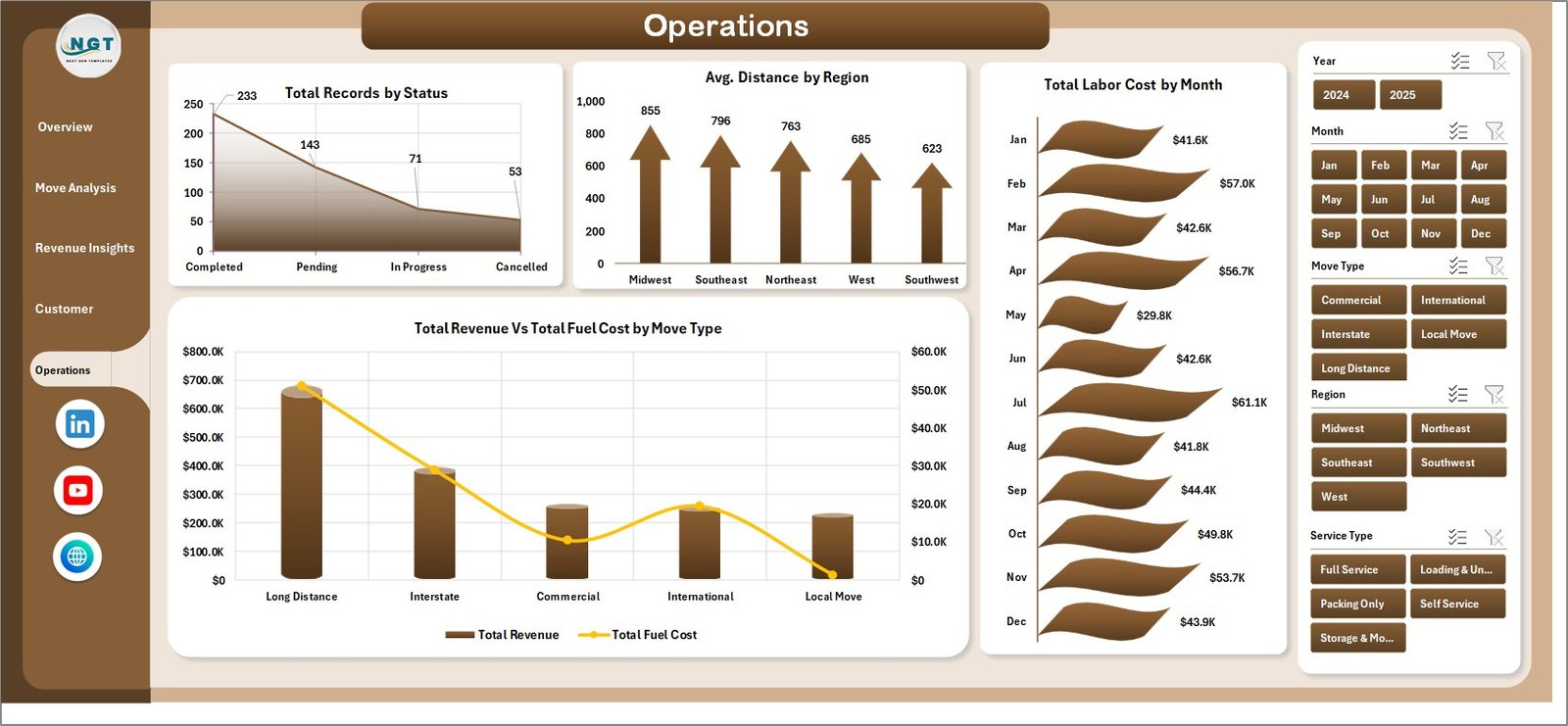
The Operations page covers Total Records by Status, Avg. Distance by Region, Total Labor Cost by Month, and Total Revenue vs. Total Fuel Cost by Move Type. Dispatchers and operations leads use this weekly for crew scheduling and to catch fuel-cost creep on long-haul commercial moves before it reaches the monthly P&L.

Data Sheet tab
6. Data Sheet
The Data sheet is the only tab where you actually enter records. Paste your job-level data into the 15 pre-built columns — Job ID, Date, Region, Move Type, Service Type, Truck Size, Lead Source, Payment Method, Status, Distance, Actual Hours, Revenue, Labor Cost, Fuel Cost, Customer Rating — and keep the headers identical so the Support-sheet pivots keep functioning.

Support sheet tab
7. Support Sheet
The Support sheet holds every pivot table that feeds the 5 dashboard pages. After updating the Data sheet, hit Data → Refresh All in the Excel ribbon (Microsoft’s documentation on refreshing pivot tables is here) and every chart recalculates. Hide this sheet in production so crews only see the 5 dashboard pages.
Moving Company Dashboard in Excel vs. Google Sheets Equivalent vs. SmartMoving / MoverBase SaaS — Feature Comparison
| Feature | Moving Company Dashboard in Excel | Google Sheets equivalent | SmartMoving / MoverBase SaaS |
|---|---|---|---|
| Cost | $17.99 one-time | ~$20 one-time template | $99–$399 / user / month |
| Platform | Microsoft Excel (desktop) | Google Sheets (browser) | Web + mobile SaaS |
| Works offline | ✅ Yes | ❌ Requires internet | ❌ Requires internet |
| Setup time | Under 10 minutes | ~15 minutes | 2–4 weeks onboarding |
| Customizable KPIs & charts | ✅ Fully editable | ✅ Editable | ❌ Fixed reports |
| Per-user licence fees | None — share freely | None | $99+ per user / month |
| Customer data stays on your device | ✅ Yes | ❌ Cloud (Google servers) | ❌ Vendor cloud |
| Year-1 cost at 5 users | $17.99 | ~$20 | $5,940 – $23,940 |
| Revenue, fuel, labor, rating in one view | ✅ Pre-built | Needs rebuild | ✅ Pre-built |
For moving-company owners who want revenue-vs-cost visibility without paying $6,000+ per year in SaaS fees, the Moving Company Dashboard in Excel sits in the sweet spot.
Who Should Use This Template
Perfect for:
- Owner-operators of 1–20 truck moving companies tracking jobs across 2–10 regions
- Long-distance and commercial movers running 50–500 jobs per month
- Franchise operators benchmarking regional performance against HQ targets
- Relocation managers reviewing lead-source ROI and service-type profitability
- Dispatchers and operations leads running weekly crew scheduling and cost reviews
Not a fit if:
- You run 500+ trucks and need integrated dispatch, DOT compliance, and fuel-card data (use McLeod or TMW)
- You need live GPS tracking, automated crew SMS, or customer-facing booking portals (use SmartMoving or MoverBase)
- Your team lives in Google Sheets — browse our Google Sheets Dashboards instead
Real-World Use Cases
Mike runs a 6-truck local moving company in Phoenix with 3 regional service areas. Every Monday he reviews the Revenue vs. Labor Cost by Region chart to spot which of his three territories is eating margin. Last quarter the Avg. Customer Rating by Lead Source chart showed one paid channel producing 3.2-star reviews while referrals averaged 4.8 — he cut that channel’s spend and redirected roughly $2,400/month into a referral bonus, without paying $299/month for SmartMoving.
Priya manages operations at a long-distance mover with 18 trucks across 5 US states. She uses the Revenue vs. Fuel Cost by Move Type chart to catch fuel-cost creep on long-haul commercial moves and the Records vs. Completed by Move Type chart to flag jobs stuck in booked status. After rebuilding her estimate-confirmation process based on what the dashboard surfaced, she cut refund requests by about 30% in one quarter.
Carlos owns a commercial-relocation business in Miami with 25 crew members. He needs monthly P&L reports for his CFO but can’t justify $99/user/month for MoverBase with 6 seats. The Net Profit by Month and Revenue by Lead Source views on the Revenue Insights page give him exactly what the CFO needs, running offline on his MacBook, for $17.99 once.
Advantages of the Moving Company Dashboard in Excel
- One-time cost vs. SaaS subscription — $17.99 once compared to $6,000+ per year on SmartMoving, MoverBase, or Vonigo at 5 seats
- Under 10 minutes to deploy vs. 2–4 weeks onboarding for moving-industry SaaS
- Fully customizable — edit KPIs, add new move types, change chart colors, swap regions, build custom slicer fields
- Offline-first — reliability at branch locations with patchy internet; customer data never leaves the machine
- Share freely — no per-user licence; dispatch, sales, and finance can all open the same file
- No vendor lock-in — it’s an Excel file you own, not a hosted platform you’re paying to access your own data
Opportunities for Improvement
This is a reporting and analytics dashboard — not an operational system. There’s no live GPS tracking, no automated customer SMS, no driver mobile app, no DOT-compliant electronic logging. If those features are critical, a dedicated moving-industry SaaS (SmartMoving, MoverBase, Vonigo) is the right fit. For owners and CFOs who need a weekly management-view layer sitting on top of their existing CRM and accounting data, the dashboard is the fastest $17.99 you’ll spend this quarter.
The dashboard also assumes you’ll maintain the Data sheet manually or via a simple CSV export from your CRM. If your booking volume is high enough to need an automated pipeline from CRM to Excel, you’ll want to pair this template with a Power Query connection (or a Zapier / Make automation that writes rows into the Data sheet).
Best Practices
- Refresh weekly, review monthly. Pivot tables don’t auto-refresh — click Data → Refresh All every Monday. Read the Overview page weekly, drill into the other 4 pages once a month.
- Keep the Data sheet headers identical. The pivots depend on exact column names. Renaming a column breaks the dashboard.
- Hide the Support sheet before handing the file to dispatchers or crew — they only need the 5 dashboard pages.
- Use slicers to show clients one filtered view. Filter by region or move type and screenshot the dashboard for proposal decks.
- Back up the file weekly to OneDrive or Dropbox — it’s an Excel file, not a cloud app.
- Save a fresh copy each quarter so you can compare quarter-over-quarter performance without overwriting historical data.
Explore Relevant Templates
🔹 Trucking Companies Dashboard in Excel — Sister template focused on long-haul fleet operations, driver productivity, and fuel-cost analysis.
🔹 Warehouse Efficiency Dashboard in Excel — Tracks fulfillment rate, pick time, and shipping cost for movers running a storage or warehouse leg.
🔹 Procurement Management Dashboard in Excel — Manage packing-material, fuel-card, and truck-rental vendor spend in one view.
🔹 Also available as: Trucking & Logistics Dashboard in Google Sheets and Trucking & Logistics Dashboard in HTML.
💎 Save on the full logistics ops stack — Get the Manufacturing Excellence Bundle → 8 premium Excel + Power BI operations templates for one bundle price.
Also browse all our Excel Dashboard Templates for more industry-specific reports.
Frequently Asked Questions
What KPIs does the Moving Company Dashboard in Excel track?
The Moving Company Dashboard in Excel tracks 5 headline KPIs on the Overview page — Total Revenue, Total Records, Total Completed, Avg. Customer Rating, and Avg. Distance — plus 20 analytical charts across Move Analysis, Revenue Insights, Customer Experience, and Operations pages. All metrics auto-update when you refresh the pivot tables from the Data sheet.
How does this compare to SmartMoving or MoverBase?
SmartMoving and MoverBase charge $99–$399 per user per month, reaching $6,000–$24,000 per year at 5 seats. The Moving Company Dashboard in Excel is a $17.99 one-time purchase with no per-user fees, works offline, and keeps customer address and pricing data on your device. It covers revenue, labor, fuel, and rating analytics, but not dispatch or GPS.
How long does setup take?
Setup takes under 10 minutes for the Moving Company Dashboard in Excel. Open the .xlsx file, paste your job-level data into the 15-column Data sheet (keep headers identical), then click Data → Refresh All. All 5 KPI cards, 20 charts, and slicers across the 5 dashboard pages update automatically. No formulas, no VBA.
Does the Moving Company Dashboard work on Mac Excel?
Yes. The Moving Company Dashboard in Excel is built entirely with pivot tables and slicers — no VBA, no macros — so it runs identically on Windows Excel and Mac Excel 2016 or later. No internet connection is required, which matters for branch offices with patchy connectivity.
Can I add my own regions, move types, or lead sources?
Yes. Add any new regions, move types, service types, lead sources, or truck sizes directly to the Data sheet. After adding rows, click Data → Refresh All and every pivot table on the Support sheet picks up the new values, populating the Overview, Move Analysis, Revenue Insights, Customer Experience, and Operations pages automatically.
Is my customer and pricing data safe with this template?
Customer and pricing data stays on your device. The Moving Company Dashboard in Excel doesn’t connect to any cloud service, API, or external database. Customer contact details, crew pay rates, and move-level pricing data never leave your machine — an important advantage over SaaS platforms where third parties host your commercially sensitive records.
Can multiple team members use the same file?
Yes. Email the .xlsx file or share via OneDrive, Dropbox, or SharePoint. There’s no per-user licence — dispatch, sales, and finance staff can all open and filter the Moving Company Dashboard with any Microsoft Excel installation, at zero extra cost per seat.
About the Author
Built by PK — Microsoft Certified Professional with 15+ years of Excel, Google Sheets, and Power BI experience. Founder of NextGenTemplates, reaching 300K+ subscribers across YouTube channels. Every template is hand-built and tested before release.
Conclusion
The Moving Company Dashboard in Excel gives moving-company owners, franchise operators, dispatchers, and bookkeepers a single-screen view of revenue, fuel cost, labor cost, customer rating, and net profit — in under 10 minutes of setup and for a $17.99 one-time purchase instead of $6,000+ per year on moving-industry SaaS.
👉 Click here to Purchase the Moving Company Dashboard in Excel
✅ Instant download · One-time payment · No subscription · Lifetime access
🎥 For step-by-step walkthroughs, visit Youtube.com/@PK-AnExcelExpert.
📅 Last updated: April 2026